Best Yale Smart Locks with Keypad in 2026: 15 Picks
As an Amazon Associate we earn from qualifying purchases. Links on this page are affiliate links.
Finding the best yale smart locks with keypad requires comparing key specs like connectivity and material. We analyzed 15 options based strictly on the specifications published on the listings. Our top pick is the Yale Wi-Fi Smart Deadbolt with Keypad because it offers direct Wi-Fi connectivity and unlimited user codes without a hub. This guide helps you decide which model fits your security needs. You will see how each lock’s access method and hardware dimensions match your door. We focus on practical details to simplify your choice.
Quick picks
The best fit for you
- You need direct Wi-Fi control without a hub Yale Wi-Fi Smart Deadbolt with Keypad It connects via Wi-Fi and supports unlimited user codes for easy access management.
- You want simple keyless entry without app setup Yale Keyless Deadbolt, Black Suede This model offers keypad entry without requiring smart home connectivity or complex configuration.
- You use Google Home and need remote access Yale Google Nest x Yale Keyless Deadbolt It integrates with Google Assistant for robust remote management and voice control capabilities.
- You want to retrofit existing deadbolts with Wi-Fi Yale Approach Retrofit Wi-Fi Smart Lock This lock adds Wi-Fi control to your current hardware without requiring full replacement.
Our 15 picks

Yale Wi-Fi Smart Deadbolt with Keypad
Best for: Direct Wi-Fi connectivity and unlimited user codes
- Access Method
- Keypad (what this guide is about)
- Access Methods
- Auto-unlock, keypad, app, key
- Connectivity
- 2.4 GHz or 5 GHz Wi-Fi
- User Code Capacity
- Unlimited
- Material
- Brass
- Dimensions
- 0.88 × 2.5 × 4.88 inches
This Yale deadbolt connects directly to 2.4 or 5 GHz Wi-Fi without a hub. You get unlimited user codes and control via the app, Apple Watch, or keypad. Auto-unlock detects when you arrive, while DoorSense and Auto-Lock manage security. It is Grade 2 certified for durability and operates in extreme temperatures. This model suits those who want robust, hub-free smart entry with extensive access management.
Pros
- Connects directly to 2.4 or 5 GHz Wi-Fi without a hub
- Unlimited user code capacity for shared access
- Grade 2 BHMA certification for commercial-grade durability
- Auto-unlock feature recognizes when you are home
- DoorSense and Auto-Lock automate security checks
Cons
- Requires 2.4 or 5 GHz Wi-Fi; no Bluetooth option listed
- Includes backup key access, not fingerprint or Z-Wave
- App access limited to US and Canada regions
Good fit if
- You want direct Wi-Fi connectivity without extra hardware
- You need unlimited codes for frequent visitors
- You require a Grade 2 certified lock for durability
Skip if
- You live outside the US or Canada
- You prefer fingerprint access over keypad or app
- You need Z-Wave or Zigbee integration
Verdict: Yale Wi-Fi Smart Lock Lifetime Brass is a durable, hub-free option for users who need unlimited codes and direct Wi-Fi control. It fits households prioritizing automated security and broad access management over biometric or multi-protocol connectivity.

Yale Keyless Deadbolt, Black Suede
Best for: simple keyless entry without app setup
- Access Method
- Keypad (what this guide is about)
- Access Methods
- PIN code, Physical key
- Installation Type
- Deadbolt replacement
- Auto-Lock Delay
- Auto-Lock
- User Code Capacity
- 20
- Included Door Hardware
- Deadbolt with backup key
This Yale deadbolt offers keyless entry via a backlit keypad without requiring Wi-Fi, Bluetooth, or an app. You can store up to 20 unique codes for family or guests. The auto-lock feature secures the bolt behind you automatically. It carries a Grade 3 BHMA certification for residential durability and operates in extreme temperatures from -22°F to 140°F. A backup key is included for peace of mind.
Pros
- No app or Wi-Fi setup required
- Stores up to 20 unique entry codes
- Auto-lock secures the deadbolt automatically
- Backlit keypad for night entry
- Grade 3 BHMA certified durability
Cons
- Lacks remote access or smartphone integration
- Grade 3 security is lower than Grade 1
- No low-battery indicator beyond alerts
Good fit if
- You want simple keyless entry without app setup
- You need to share codes with multiple users
- You prefer a straightforward mechanical installation
Skip if
- You require remote locking from your phone
- You need high-security Grade 1 certification
- You want integration with a smart home hub
Verdict: Yale Digital Keypad Deadbolt Black Suede is a reliable, no-frills option for users who want code-based entry without the complexity of smart home connectivity. It suits those who prioritize ease of use and local code management over remote features.

Yale Google Nest x Yale Keyless Deadbolt
Best for: Google Home users needing remote keypad access
- Access Method
- Keypad (what this guide is about)
- Access Methods
- Keypad, app, passcode
- Installation Type
- Deadbolt replacement
- Smart Home Compatibility
- Google Assistant
- Color
- Satin Nickel
- Application
- Front Door
The Google Nest x Yale Lock replaces your existing deadbolt with a keyless entry system. It features a satin nickel finish and an LED keypad that chimes to confirm actions. You control access via the Nest app or unique passcodes. The lock supports auto-locking and privacy mode. It integrates with Google Assistant for voice commands. This model weighs 4 pounds and fits standard front doors.
Pros
- LED keypad with audible chimes for lock and unlock confirmation
- Remote access and control via the Nest mobile app
- Generates unique passcodes for family and guests with scheduling
- Compatible with Google Assistant for voice control
- Auto-lock feature engages when you leave home
Cons
- Requires Google Assistant for full smart home integration
- No Bluetooth or Z-Wave support for local connectivity
- Heavier build at 4 pounds compared to lighter alternatives
Good fit if
- You already use the Google Nest ecosystem for home automation
- You want remote guest access through the Nest app
- You prefer audible feedback from the keypad for security
Skip if
- You rely on Apple HomeKit or Amazon Alexa as your primary hub
- You need local Bluetooth connectivity without internet
- You prefer a lighter lock for easier installation
Verdict: Google Nest x Yale Lock Satin Nickel is a secure choice for users deeply integrated into the Google smart home environment. It offers robust remote management and clear keypad feedback, making it ideal for those who value app-based control and voice integration.

Yale Assure Lock 2 Touch Key-Free Deadbolt
Best for: Local fingerprint and keypad entry
- Access Method
- Keypad, Fingerprint, Key (what this guide is about)
- Access Methods
- Fingerprint, keypad, app
- Connectivity
- Bluetooth
- Installation Type
- Full deadbolt replacement
- User Code Capacity
- Unlimited
- Color
- Satin Nickel
This Yale deadbolt combines Bluetooth connectivity with fingerprint and keypad access. It supports unlimited user codes and auto-unlocks as you approach. The unit measures 2.5 by 3.75 inches. It replaces standard deadbolts without a locksmith. You get trackable access via the app. This model suits those who want keyless entry without Wi-Fi hardware.
Pros
- Fingerprint recognition under 0.5 seconds
- Unlimited user code capacity
- Auto-unlock via Bluetooth proximity
- No locksmith required for installation
Cons
- Bluetooth only, no built-in Wi-Fi
- Requires separate bridge for remote access
- No Z-Wave or Zigbee support
Good fit if
- You want fingerprint speed
- You prefer Bluetooth range
- You need unlimited codes
Skip if
- You need remote Wi-Fi access
- You use Z-Wave hubs
- You want Zigbee integration
Verdict: Yale Assure Lock 2 Bluetooth offers fast fingerprint entry and unlimited codes for local control. It fits users who value proximity unlocking over remote Wi-Fi features.

Yale August Wi-Fi Smart Lock with Keypad Touch
Best for: Retrofitting existing deadbolts with keyless entry
- Access Method
- Keypad, Fingerprint (what this guide is about)
- Access Methods
- Fingerprint, keypad, app, key
- Connectivity
- Built-in Wi-Fi, Bluetooth
- Color
- Silver
- Dimensions
- 0.8 × 2.72 × 4.84 inches
- Weight
- 2.18 pounds
View on Amazon: Yale August Wi-Fi Smart Lock with Keypad Touch
The Yale August Wi-Fi Smart Lock with Keypad Touch in Silver installs over your existing deadbolt, keeping your current keys. It features built-in Wi-Fi and Bluetooth, eliminating the need for extra hubs. You can unlock the door using a fingerprint scanner, a custom keypad code, or the Yale Access app. The package includes the lock and the keypad, offering a complete keyless entry solution.
Pros
- Built-in Wi-Fi requires no additional hub
- Fingerprint scanner offers 99% accuracy
- Installs over existing deadbolt
- Includes Yale Keypad Touch
Cons
- Silver finish may not match all door hardware
- Requires existing deadbolt for installation
- Fingerprint option is a specific variation
Good fit if
- You want to keep your current keys
- You prefer fingerprint or keypad entry
- You need Wi-Fi without extra hardware
Skip if
- You need a Z-Wave or Zigbee connection
- You require a lever handle instead of a deadbolt
- You prefer a different color finish
Verdict: Yale August Wi-Fi Silver Lock fits homeowners who want to retain their physical keys while adding fingerprint and keypad access. It is ideal for those seeking a hub-free Wi-Fi installation.

Yale Bluetooth Keypad Smart Deadbolt
Best for: Local keyless entry with unlimited codes
- Access Method
- Keypad (what this guide is about)
- Access Methods
- Auto-unlock, keypad, app, Apple Watch
- Connectivity
- Bluetooth
- User Code Capacity
- Unlimited
- Material
- Brass
- Dimensions
- 0.88 × 2.6 × 3.75 inches
This Yale deadbolt uses Bluetooth for local control via the app or Apple Watch. It features a keypad and auto-unlock for hands-free entry. The lock supports unlimited user codes for family and guests. It is Grade 2 certified for durability and operates in extreme temperatures. You can upgrade to Wi-Fi or Z-Wave with separate modules. It suits renters who want reliable keyless entry without permanent wiring.
Pros
- Bluetooth connectivity for app and Apple Watch control
- Unlimited entry code capacity
- Grade 2 BHMA durability certification
- Auto-unlock and DoorSense features
- Supports optional Wi-Fi and Z-Wave modules
Cons
- Requires proximity for Bluetooth access
- Wi-Fi and Z-Wave modules sold separately
- No native remote access without add-on
Good fit if
- You want keyless entry with app control
- You need unlimited user codes for guests
- You plan to add smart home modules later
Skip if
- You need immediate remote access from anywhere
- You want all-in-one Wi-Fi or Z-Wave integration
- You prefer a lever handle over a deadbolt
Verdict: Yale Bluetooth Smart Lock Deadbolt fits users who prioritize local security and unlimited codes over remote connectivity. It is a solid choice for those willing to add modules for wider smart home integration.
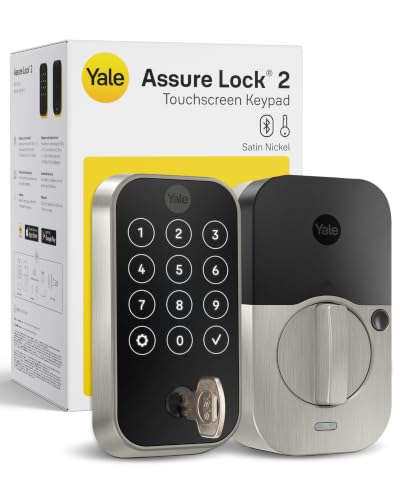
Yale Keypad Deadbolt with Bluetooth
Best for: Local control with unlimited codes
- Access Method
- Keypad (what this guide is about)
- Access Methods
- Auto-unlock, keypad, app, key
- Connectivity
- Bluetooth
- User Code Capacity
- Unlimited
- Color
- Satin Nickel
- Dimensions
- 0.88 × 2.5 × 3.75 inches
This Yale deadbolt uses Bluetooth for near-door control via the app. It features a touchscreen keypad and supports auto-unlock when you are home. You can generate unlimited user codes for guests or staff. The lock is Grade 2 certified for durability and includes DoorSense to confirm the door is closed. It weighs 4.23 pounds and fits standard doors.
Pros
- Unlimited user code capacity
- Grade 2 BHMA certification
- Auto-unlock and DoorSense features
- Supports Wi-Fi and Z-Wave modules
Cons
- Bluetooth range limits remote control
- Wi-Fi and Z-Wave modules sold separately
- Requires backup key for entry
Good fit if
- You want unlimited access codes
- You prefer local Bluetooth control
- You need auto-unlock convenience
Skip if
- You need built-in Wi-Fi
- You want remote access without extra hardware
- You require Z-Wave integration out of the box
Verdict: Yale Bluetooth Deadbolt Satin Nickel suits those who prioritize local control and unlimited codes. It fits users who do not need remote access without buying extra modules.
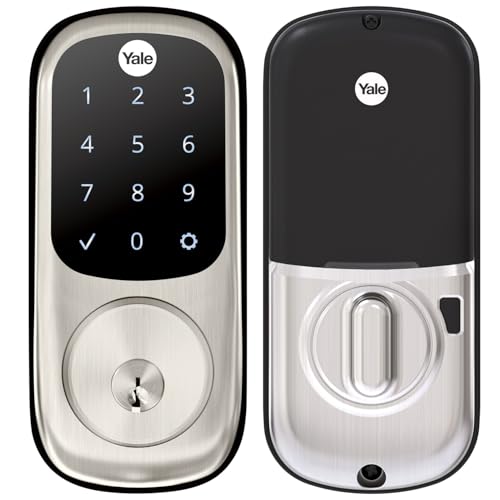
Yale Assure Deadbolt Satin Nickel
Best for: Simple keyless entry without smart features
- Access Method
- Keypad, Touchscreen, Key (what this guide is about)
- Access Methods
- Keypad, Key
- Installation Type
- Deadbolt replacement
- Auto-Lock Delay
- Auto-lock
- Included Door Hardware
- Deadbolt
- Connectivity
- Wi-Fi
This Yale Assure deadbolt uses a touchscreen keypad for keyless entry. It includes a physical key backup for reliability. The lock auto-locks when you leave or go to sleep. It fits standard doors from 1-3/4 to 2-1/4 inches thick. You get unique codes for friends and family. Note that Wi-Fi connectivity requires a separate upgrade kit, making this a local-only entry solution for now.
Pros
- Touchscreen keypad for keyless entry
- Auto-lock feature for peace of mind
- Unique code sharing for guests
- Fits standard door thicknesses
Cons
- No built-in Wi-Fi connectivity
- Requires separate Yale Access Upgrade Kit for smart features
- Physical key backup included
Good fit if
- You want simple keyless entry without smart home integration
- You need a reliable auto-locking deadbolt
- You prefer touchscreen operation over physical buttons
Skip if
- You need built-in Wi-Fi control out of the box
- You want to use your phone as a key immediately
- You have doors under 1-3/8 inches thick without a thin door kit
Verdict: Yale Assure Touchscreen Deadbolt Satin Nickel is a solid choice for you if you want reliable keyless entry without the need for immediate smart home connectivity. It suits those who value simplicity and auto-locking over remote access.

Yale Approach Retrofit Wi-Fi Smart Lock
Best for: retrofitting existing deadbolts with Wi-Fi control
- Access Method
- Keypad, Remote Control (what this guide is about)
- Access Methods
- App, key
- Installation Type
- Interior retrofit
- Connectivity
- Wi-Fi
- Color
- Black
- Dimensions
- 2.5 × 7.5 × 9.75 inches
The Yale Approach is a Wi-Fi smart lock designed for interior retrofit installation. It keeps your existing deadbolt intact while adding keyless entry via the Yale Access app. This model includes a keypad for local access and remote control capabilities through the included Yale Connect module. It supports unlimited virtual keys for sharing access with guests. The unit measures 7.5 inches wide and 9.75 inches tall. It requires four AA batteries for operation.
Pros
- Interior retrofit design preserves original deadbolt
- Wi-Fi connectivity with app remote control
- Includes Yale Connect module for 24/7 access
- Supports unlimited virtual keys for sharing
Cons
- No physical key override mentioned in data
- Retrofit only fits specific door setups
- Requires four AA batteries for power
Good fit if
- You want to keep your existing deadbolt
- You need remote access via Wi-Fi
- You prefer sharing virtual keys over physical ones
Skip if
- You require exterior-only installation
- You need a standard deadbolt replacement
- You prefer battery-free power sources
Verdict: The Yale Approach Retrofit Smart Lock suits renters or homeowners who want to add smart features without replacing their current hardware. Its Wi-Fi connectivity and virtual key sharing make it ideal for managing access remotely.

Yale Z-Wave Fingerprint Keypad Deadbolt
Best for: Z-Wave ecosystems needing fingerprint entry
- Access Method
- Keypad, Fingerprint, Key (what this guide is about)
- Access Methods
- Fingerprint, keypad, app
- Connectivity
- Z-Wave
- Smart Home Compatibility
- Samsung SmartThings, Hubitat
- User Code Capacity
- Unlimited
- Color
- Black
This Yale deadbolt combines a touchscreen keypad with fingerprint access and app control. It connects via Z-Wave for mesh reliability and works with Samsung SmartThings and Hubitat. The lock supports unlimited user codes and includes DoorSense for auto-locking. It is a solid option for users already invested in a Z-Wave smart home ecosystem who need flexible entry methods without relying on Wi-Fi.
Pros
- Supports fingerprint, keypad, and app access
- Integrates with Samsung SmartThings and Hubitat
- Unlimited user code capacity
- Includes DoorSense for auto-locking
Cons
- Requires a separate Z-Wave hub
- US and Canada only compatibility
- No direct Wi-Fi connection
Good fit if
- You use a Z-Wave hub like SmartThings
- You want fingerprint entry speed
- You need unlimited guest codes
Skip if
- You only have Wi-Fi without a hub
- You live outside the US or Canada
- You prefer direct Wi-Fi connectivity
Verdict: Yale Z-Wave Smart Lock with Keypad suits Z-Wave users who want fingerprint speed and unlimited codes. It fits homes with compatible hubs but not Wi-Fi-only setups.

Yale Assure Lock 2 Key-Free Z-Wave Deadbolt
Best for: Z-Wave hub users wanting Oil Rubbed Bronze
- Access Method
- Keypad, Key (what this guide is about)
- Access Methods
- Keypad, Auto-Unlock, Yale Access app
- Connectivity
- Z-Wave
- Smart Home Compatibility
- Samsung SmartThings, Ring Alarm, Wink
- User Code Capacity
- Unlimited
- Color
- Oil Rubbed Bronze
The Yale Assure Lock 2 Deadbolt in Oil Rubbed Bronze offers key-free entry via a touchscreen keypad. It connects through Z-Wave, allowing integration with hubs like Samsung SmartThings and Ring Alarm. You can manage unlimited user codes and enable Auto-Unlock for hands-free access. The lock features Auto-Lock triggered by DoorSense. This model suits those wanting a durable finish and broad smart home compatibility without relying solely on Wi-Fi.
Pros
- Z-Wave connectivity for hub integration
- Unlimited user code capacity
- Auto-Unlock and Auto-Lock features
- Oil Rubbed Bronze finish
Cons
- Requires a compatible Z-Wave hub
- No built-in Wi-Fi
- No Bluetooth mentioned
Good fit if
- You use a Z-Wave smart home hub
- You prefer the Oil Rubbed Bronze finish
- You want unlimited access codes
Skip if
- You need standalone Wi-Fi connectivity
- You do not have a Z-Wave hub
- You prefer Satin Nickel or Black finishes
Verdict: Yale Assure Lock 2 Deadbolt Oil Rubbed Bronze fits users with Z-Wave hubs who want unlimited codes and a specific finish. It lacks built-in Wi-Fi, so hub owners only.

Yale Assure Keypad Deadbolt with Z-Wave
Best for: Z-Wave hub users wanting keypad entry
- Access Method
- Keypad, Key (what this guide is about)
- Access Methods
- Keypad, key, app
- Connectivity
- Z-Wave
- Smart Home Compatibility
- Ring Alarm, Samsung SmartThings, Alexa
- Installation Type
- Full deadbolt replacement
- Color
- Satin Nickel
This Yale deadbolt uses Z-Wave connectivity for smart home integration rather than direct Wi-Fi or Bluetooth. It features a backlit keypad for keyless entry and includes physical keys for backup access. The unit replaces existing deadbolts on standard doors with minimal tools. It works with Samsung SmartThings, Ring Alarm, and Alexa through compatible hubs. The satin nickel finish suits many exterior styles. You get reliable automation without needing a dedicated brand app for core functions.
Pros
- Z-Wave connectivity for broad smart home hub support
- Backlit keypad for easy keyless entry at night
- Includes two physical keys for manual access
- Works with Samsung SmartThings and Ring Alarm
Cons
- Requires a separate Z-Wave hub for smart features
- No direct Wi-Fi or Bluetooth connection
- Does not use the Yale app for operation
Good fit if
- You already have a Z-Wave hub like Samsung SmartThings
- You want keyless entry without relying on Wi-Fi
- You prefer physical keys as a backup access method
Skip if
- You need direct Wi-Fi connectivity without a hub
- You only use Bluetooth for smart home control
- You want to manage the lock via the Yale app
Verdict: Yale Assure Z-Wave Satin Nickel Deadbolt fits users who already have a Z-Wave hub and want reliable keypad entry without Wi-Fi dependency. It is ideal for Samsung SmartThings or Ring Alarm ecosystems.

Yale Assure Lock 2 Keyed Z-Wave Touchscreen Deadbolt
Best for: Z-Wave hub users needing unlimited codes
- Access Method
- Keypad, Touchscreen (what this guide is about)
- Access Methods
- Key, keypad, Auto-Unlock, app
- Connectivity
- Z-Wave
- Smart Home Compatibility
- Samsung SmartThings, Ring Alarm, Wink
- User Code Capacity
- Unlimited
- Color
- Satin Nickel
View on Amazon: Yale Assure Lock 2 Keyed Z-Wave Touchscreen Deadbolt
This Yale deadbolt uses Z-Wave connectivity to integrate with compatible smart home hubs like Samsung SmartThings or Ring Alarm. It features a touchscreen keypad for keyless entry and supports unlimited user codes via the Yale Access app. The lock includes Auto-Unlock and Auto-Lock capabilities triggered by DoorSense. It is finished in Satin Nickel and measures 4.9 by 2.5 inches. This model suits users who want centralized control through a Z-Wave ecosystem rather than direct Wi-Fi.
Pros
- Z-Wave connectivity for hub integration
- Unlimited user code capacity
- Touchscreen keypad for keyless entry
- Auto-Lock and Auto-Unlock support
Cons
- Requires a compatible Z-Wave hub
- Does not include built-in Wi-Fi
- Limited to US and Canada operation
Good fit if
- You use a Z-Wave smart home hub
- You want unlimited access codes for guests
- You prefer keyless entry with a touchscreen
Skip if
- You need direct Wi-Fi without a hub
- You live outside the US or Canada
- You want a lock with built-in Wi-Fi
Verdict: Yale Assure Lock 2 Z-Wave Satin Nickel is a solid choice for homes already using Z-Wave hubs. It delivers reliable keyless entry and extensive code management for families or service providers.

Yale Assure Lock 2 Keypad with Lever
Best for: key-free entry without Wi-Fi
- Access Method
- Keypad (what this guide is about)
- Access Methods
- Keypad, Yale Access app, Auto-Unlock
- Connectivity
- Bluetooth
- Included Door Hardware
- Passage lever
- Color
- Black
- Trigger Type
- Push Button
This Yale smart lock uses a push button keypad for key-free entry. It connects via Bluetooth to the Yale Access app on your smartphone or Apple Watch. The package includes a matching passage lever in black suede. Auto-lock and auto-unlock features handle door security automatically. You get custom entry codes for guests. It is a solid choice if you want local control without Wi-Fi hardware.
Pros
- Push button keypad for key-free access
- Bluetooth connectivity for app control
- Includes matching passage lever hardware
- Auto-lock and auto-unlock capabilities
Cons
- Bluetooth only, no built-in Wi-Fi
- Requires a separate bridge for remote access
- Passage lever lacks locking functionality
Good fit if
- You want key-free entry without Wi-Fi setup
- You prefer a push button interface
- You have a door compatible with a passage lever
Skip if
- You need remote access without extra hardware
- You require a deadbolt for security
- You want built-in Wi-Fi connectivity
Verdict: Yale Assure Lock 2 Bluetooth Push Button fits users who prefer local Bluetooth control and a tactile push button interface over Wi-Fi connectivity. It suits those who do not need a locking deadbolt.

Yale Assure Lock Wi-Fi 1st Gen
Best for: Users wanting hub-free Wi-Fi and auto-relock
- Access Method
- Keypad, Touchscreen, Key, App Control (what this guide is about)
- Access Methods
- Keypad, App, Key, Voice
- Smart Home Compatibility
- Alexa, Google Assistant, Siri
- Installation Type
- Full deadbolt replacement
- Auto-Lock Delay
- Auto-Relock enabled
- Connectivity
- Wi-Fi
This Yale Assure Lock replaces your existing deadbolt with a touchscreen keypad and built-in Wi-Fi. It connects directly to your home network without a hub, allowing you to lock, unlock, and check status via the Yale Access App. You can share unique codes and enable auto-relock. The unit measures 2.75 by 6.06 inches and weighs 4.5 pounds. It supports voice assistants and operates in temperatures from -22 to 140 degrees Fahrenheit.
Pros
- Built-in Wi-Fi requires no additional hub
- Touchscreen keypad for keyless entry
- Auto-relock feature prevents forgotten locks
- Compatible with Alexa, Google, and Siri
Cons
- Limited to U.S. and Canada operation
- Heavier at 4.5 pounds than many peers
- No Bluetooth connectivity listed in specs
Good fit if
- You want direct Wi-Fi without a bridge
- You need auto-relock for security
- You prefer touchscreen entry over physical keys
Skip if
- You live outside the U.S. or Canada
- You require Bluetooth for local control
- You need a lighter lock under 3 pounds
Verdict: Yale Assure Lock Wi-Fi Oil Rubbed Bronze offers direct Wi-Fi connectivity for users who want hub-free app control and auto-relock features.
Specifications side by side
| Spec | Yale Wi-Fi Smart Deadbolt with Keypad | Yale Keyless Deadbolt, Black Suede | Yale Google Nest x Yale Keyless Deadbolt | Yale Assure Lock 2 Touch Key-Free Deadbolt | Yale August Wi-Fi Smart Lock with Keypad Touch | Yale Bluetooth Keypad Smart Deadbolt | Yale Keypad Deadbolt with Bluetooth | Yale Assure Deadbolt Satin Nickel | Yale Approach Retrofit Wi-Fi Smart Lock | Yale Z-Wave Fingerprint Keypad Deadbolt | Yale Assure Lock 2 Key-Free Z-Wave Deadbolt | Yale Assure Keypad Deadbolt with Z-Wave | Yale Assure Lock 2 Keyed Z-Wave Touchscreen Deadbolt | Yale Assure Lock 2 Keypad with Lever | Yale Assure Lock Wi-Fi 1st Gen |
|---|---|---|---|---|---|---|---|---|---|---|---|---|---|---|---|
| Access Methods | Auto-unlock, keypad, app, key | PIN code, Physical key | Keypad, app, passcode | Fingerprint, keypad, app | Fingerprint, keypad, app, key | Auto-unlock, keypad, app, Apple Watch | Auto-unlock, keypad, app, key | Keypad, Key | App, key | Fingerprint, keypad, app | Keypad, Auto-Unlock, Yale Access app | Keypad, key, app | Key, keypad, Auto-Unlock, app | Keypad, Yale Access app, Auto-Unlock | Keypad, App, Key, Voice |
| Connectivity | 2.4 GHz or 5 GHz Wi-Fi | not specified | not specified | Bluetooth | Built-in Wi-Fi, Bluetooth | Bluetooth | Bluetooth | not specified | not specified | Z-Wave | Z-Wave | Z-Wave | Z-Wave | Bluetooth | not specified |
| Smart Home Compatibility | not specified | not specified | not specified | not specified | not specified | not specified | not specified | not specified | not specified | Samsung SmartThings, Hubitat | Samsung SmartThings, Ring Alarm, Wink | Ring Alarm, Samsung SmartThings, Alexa | Samsung SmartThings, Ring Alarm, Wink | not specified | Alexa, Google Assistant, Siri |
| Installation Type | not specified | Deadbolt replacement | Deadbolt replacement | Full deadbolt replacement | not specified | not specified | not specified | Deadbolt replacement | Interior retrofit | not specified | not specified | Full deadbolt replacement | not specified | not specified | Full deadbolt replacement |
| Auto-Lock Delay | not specified | Auto-Lock | not specified | not specified | not specified | not specified | not specified | Auto-lock | not specified | not specified | not specified | not specified | not specified | not specified | Auto-Relock enabled |
| User Code Capacity | Unlimited | 20 | not specified | Unlimited | not specified | Unlimited | Unlimited | not specified | not specified | Unlimited | Unlimited | not specified | Unlimited | not specified | not specified |
| Included Door Hardware | not specified | Deadbolt with backup key | not specified | not specified | not specified | not specified | not specified | Deadbolt | not specified | not specified | not specified | not specified | not specified | Passage lever | not specified |
| Access Method | Keypad | Keypad | Keypad | Keypad, Fingerprint, Key | Keypad, Fingerprint | Keypad | Keypad | Keypad, Touchscreen, Key | Keypad, Remote Control | Keypad, Fingerprint, Key | Keypad, Key | Keypad, Key | Keypad, Touchscreen | Keypad | Keypad, Touchscreen, Key, App Control |
| Color | Lifetime Brass | Black | Satin Nickel | Satin Nickel | Silver | Lifetime Brass | Satin Nickel | Satin Nickel | Black | Black | Oil Rubbed Bronze | Satin Nickel | Satin Nickel | Black | Oil Rubbed Bronze |
| Application | not specified | not specified | Front Door | not specified | not specified | not specified | not specified | not specified | not specified | not specified | not specified | not specified | not specified | not specified | Front Door |
| Included Hardware | not specified | not specified | not specified | not specified | not specified | not specified | not specified | not specified | not specified | not specified | not specified | not specified | not specified | Lever | not specified |
| Trigger Type | not specified | not specified | not specified | not specified | not specified | not specified | not specified | not specified | not specified | not specified | not specified | not specified | not specified | Push Button | not specified |
| Material | Brass | not specified | not specified | not specified | not specified | Brass | not specified | not specified | not specified | not specified | not specified | not specified | not specified | not specified | not specified |
| Dimensions | 0.88 × 2.5 × 4.88 inches | 2.5 × 0.88 × 5.12 inches | 4.5 × 2.59 × 0.8 inches | 0.9 × 2.5 × 3.75 inches | 0.8 × 2.72 × 4.84 inches | 0.88 × 2.6 × 3.75 inches | 0.88 × 2.5 × 3.75 inches | 5.5 × 5.5 × 10 inches | 2.5 × 7.5 × 9.75 inches | 0.9 × 2.5 × 3.75 inches | 2.5 × 3.7 × 2.3 inches | 5.5 × 5.5 × 10 inches | 2.6 × 4.9 × 2.5 inches | 0.88 × 2.5 × 4.88 inches | 1.38 × 2.75 × 6.06 inches |
| Weight | 4 pounds | 3 pounds | 4 pounds | not specified | 2.18 pounds | not specified | 4.23 pounds | 3 pounds | not specified | not specified | not specified | 1 pounds | not specified | 1 pounds | 4.5 pounds |
| Model | YRD410-WF1-P05 | YED210-NR-BSP | RB-YRD540-WV-619 | YRD430-F-BLE-619 | AUG-SL05 | YRD430-BLE-P05 | YRD420-BLE-619 | YRD226-NR-619 | YRR10-WF1-BSP | YRD430-F-ZW3-BSP | YRD430-ZW2-0BP | YRD216-ZW2-619 | YRD420-ZW2-619 | B-YRD410-BLE-VL-BSP | YRD226-CBA-0BP |
| Size | not specified | not specified | 7.03 x 2.78 Inch | Bluetooth | not specified | Bluetooth | Bluetooth | No Wi-Fi | (Pack of 1) | Keypad | Key-Free | Keypad | Keyed | Push Button | Wi-Fi- 1st Gen |
If you need a best refrigerators with lock, check that guide for the latest ranked picks.
Key Specs for Yale Keypad Locks
-
Check connectivity type
Your home network determines which lock works. Wi-Fi models connect directly to your router without a hub. The Yale Wi-Fi Smart Deadbolt offers this direct link. If you use Z-Wave, choose a compatible model like the Yale Assure Lock 2. Bluetooth locks require a nearby phone. Z-Wave and Zigbee models need their respective hubs. Pick the protocol that matches your existing smart home setup to avoid buying extra hardware.
-
Compare access methods
Keypads are standard, but some locks add fingerprints. The Yale August Wi-Fi Smart Lock supports both keypad and fingerprint entry. This allows you to choose between codes and biometrics. Other models rely solely on keypads. Some include physical keys for backup. Decide if you want multiple entry options or just a simple code. Fingerprint sensors offer speed, while keypads are universally understood by guests and service providers.
-
Verify smart home compatibility
Ensure the lock integrates with your platform. The Yale Google Nest x Yale Keyless Deadbolt works with Google Assistant. The Yale Assure Lock 2 Keyed Z-Wave Touchscreen Deadbolt fits Z-Wave hubs. Some models support specific ecosystems like Samsung SmartThings. Check the compatibility list before buying. A mismatch means you cannot control the lock remotely or automate it. Choose a lock that speaks your smart home language for full functionality.
-
Consider retrofitting needs
You might not need a full deadbolt replacement. The Yale Approach Retrofit Wi-Fi Smart Lock fits over existing hardware. This is ideal for renters or those keeping old keys. It adds Wi-Fi control without changing the door structure. Standard deadbolts replace the entire unit. Decide if you want a complete hardware swap or an additive solution. Retrofit options save time and preserve your current door aesthetics while adding modern smart features.
-
Review physical dimensions
Measure your door before purchasing. The Yale Wi-Fi Smart Deadbolt is 4.88 inches tall. The Yale Assure Lock 2 Touch Key-Free Deadbolt is 3.75 inches tall. Widths vary from 2.5 to 2.72 inches. Ensure the lock fits your door thickness and backset. Incorrect dimensions lead to installation failures. Check the spec sheet for height, width, and length. Matching these measurements to your door frame ensures a secure and proper fit without modifications.
Frequently asked questions
Which Yale smart lock with keypad offers the best overall performance?
The Yale Wi-Fi Smart Deadbolt with Keypad is the top pick. It provides direct Wi-Fi connectivity, eliminating the need for a separate hub. The brass construction ensures durability for daily use. You get unlimited user codes, which simplifies access management for households. Its dimensions are 2.5 by 4.88 inches, fitting standard doors securely.
What is the most affordable Yale keypad lock without smart features?
The Yale Keyless Deadbolt in Black Suede is the best budget option. It focuses on simple keyless entry without requiring app setup or smart home connectivity. This model weighs 3 pounds and measures 2.5 by 5.12 inches. It is ideal if you prioritize local code management over remote features or complex configurations.
Does Yale make a keypad lock that works with Google Home?
Yes, the Google Nest x Yale Keyless Deadbolt is designed for Google users. It supports Google Assistant integration for remote management and voice control. The satin nickel finish complements modern interiors. You can manage access remotely through the app. It measures 2.59 by 4.5 inches and weighs 4 pounds for sturdy installation.
Can I use a Yale lock with both fingerprint and keypad access?
Several models support both methods. The Yale Assure Lock 2 Touch offers local fingerprint and keypad entry via Bluetooth. The Yale August Wi-Fi Smart Lock also combines fingerprint scanning with keypad access. These options provide fast entry while maintaining the flexibility of code-based entry for guests or family members.
Which Yale lock is best for retrofitting an existing deadbolt?
The Yale August Wi-Fi Smart Lock with Keypad Touch is designed for retrofitting. It allows you to add keyless entry to your current hardware without full replacement. The Yale Approach Retrofit Wi-Fi Smart Lock is another option for adding smart features to existing setups. Both support Wi-Fi for remote control without extra hubs.
Do Yale keypad locks require a Z-Wave hub?
Some models do, while others do not. The Yale Z-Wave Fingerprint Keypad Deadbolt requires a Z-Wave hub for operation. The Yale Assure Lock 2 Key-Free Z-Wave Deadbolt also depends on a compatible hub. If you prefer direct Wi-Fi connectivity without a hub, consider the Yale Wi-Fi Smart Deadbolt or the Yale Assure Lock Wi-Fi 1st Gen instead.
What is the difference between Bluetooth and Wi-Fi Yale locks?
Wi-Fi locks like the Yale Wi-Fi Smart Deadbolt connect directly to your router for remote access anywhere. Bluetooth models, such as the Yale Bluetooth Keypad Smart Deadbolt, offer local control only. Bluetooth locks require you to be near the door for remote features via a phone. Wi-Fi models provide broader access management without proximity limits.
Does the Yale Assure Lock 2 have an auto-relock feature?
The Yale Assure Lock Wi-Fi 1st Gen explicitly includes auto-relock functionality. It connects via Wi-Fi for hub-free app control and automatically secures the door after entry. Other models like the Yale Assure Lock 2 Touch focus on local fingerprint and keypad entry. Check the specific model attributes to confirm if auto-relock is included in your chosen device.