13 Best Traditional Smart Locks, Compared
As an Amazon Associate we earn from qualifying purchases. Links on this page are affiliate links.
Finding the best traditional deadbolts requires looking past marketing claims and focusing on published specifications. We compared 13 models to help you choose based on verifiable data. The eufy Security C220 Fingerprint Deadbolt leads this list because it offers built-in Wi-Fi and fingerprint access without needing an external hub. These picks are based strictly on the specifications published on the listings. This guide helps you decide which lock matches your door size, connectivity needs, and security level.
Quick picks
The best fit for you
- You want versatile keyless entry with built-in Wi-Fi eufy Security C220 Fingerprint Deadbolt It offers fingerprint access and onboard Wi-Fi without needing an external hub.
- You need remote Wi-Fi control without a hub eufy Security C30 Traditional Lock This model provides reliable remote access and durable physical buttons via direct Wi-Fi.
- You want customizable auto-lock intervals for standalone use Kwikset SmartCode 270 Touchpad Deadbolt It features Grade 2 security with auto-lock timing options up to 10 minutes.
Our 13 picks

eufy Security C220 Fingerprint Deadbolt
Best for: versatile keyless entry with built-in Wi-Fi
- Style
- Traditional (what this guide is about)
- Access Methods
- Fingerprint, app, keypad, key, voice
- Connectivity
- Built-in Wi-Fi
- Smart Home Compatibility
- Alexa, Google Assistant
- Dimensions
- 6.89 × 2.76 × 1.3 inches
The eufy Security C220 is a traditional-style smart deadbolt featuring built-in Wi-Fi and a fingerprint scanner. It offers six unlock methods, including PIN entry, an Apple Watch app, physical keys, and Alexa or Google Assistant voice control. Powered by eight AA batteries lasting roughly eight months, it connects directly to your home network without a separate hub. This lock suits you if you want versatile keyless access for standard 54mm door bores.
Pros
- Built-in Wi-Fi connects directly without an external bridge
- Six unlock methods including fingerprint, keypad, physical key, app, Apple Watch, and voice
- Operating temperature range spans from -22°F to 158°F
- Installs into standard door bores under 54mm without drilling
Cons
- BHMA Grade 3 rating represents basic residential security certification
- Requires eight AA batteries to operate
- IP53 rating provides limited water resistance against direct spray
Good fit if
- You want built-in Wi-Fi remote access without purchasing an additional hub.
- You prefer multiple unlock options, including fingerprint recognition and Apple Watch support.
- You have a standard door bore under 54mm.
Skip if
- You require hardware certified higher than BHMA Grade 3.
- You prefer smart locks that run on fewer than eight AA batteries.
- You need higher than an IP53 rating for fully exposed weather conditions.
Verdict: eufy Security C220 Fingerprint Deadbolt provides versatile multi-point unlocking and onboard Wi-Fi without needing an external hub. It gives standard residential entryways flexible keyless convenience backed by BHMA Grade 3 certification.

eufy Security C30 Traditional Lock
Best for: Users wanting remote Wi-Fi control without a hub
- Style
- Traditional (what this guide is about)
- Access Methods
- Key, Voice, Physical button
- Connectivity
- Built-in Wi-Fi
- Smart Home Compatibility
- Amazon Alexa, Google Assistant
- Installation Type
- Deadbolt replacement
- Auto-Lock Delay
- User-defined time setting
The eufy Security C30 is a traditional smart lock with built-in Wi-Fi. It uses physical buttons instead of a touchscreen for durability. You can control it remotely via the eufy Security app without a bridge. It runs on four AA batteries for up to five months. The lock operates in temperatures from -22°F to 158°F. It fits most standard deadbolts and installs in 15 minutes without drilling.
Pros
- Built-in Wi-Fi requires no bridge for remote control
- Physical buttons offer better durability than touchscreens
- Auto-lock secures the door after a set time
- IPX3 waterproofing handles rain and snow
- Works with Alexa and Google Assistant
Cons
- Batteries are not included in the box
- Lacks fingerprint scanning for keyless entry
- No Z-Wave or Zigbee support for hub integration
Good fit if
- You want remote access without buying a hub
- You prefer physical buttons over touchscreens
- You need a lock for extreme weather conditions
Skip if
- You require fingerprint recognition for entry
- You already use a Z-Wave smart home hub
- You want a lock with included batteries
Verdict: The eufy Security C30 Traditional Smart Lock is a solid choice for users who want reliable Wi-Fi control and durable physical buttons. It suits those who need remote access and weather resistance without the complexity of a hub.

Amazon Basics Keypad Electronic Deadbolt
Best for: basic keypad entry with auto-locking
- Style
- Traditional (what this guide is about)
- Access Methods
- Keypad, traditional key
- Auto-Lock Delay
- 10 to 99 seconds
- User Code Capacity
- 6 user codes
- Dimensions
- 9.05 × 6.13 × 2.99 inches
- Weight
- 2.07 pounds
The Amazon Basics Keypad Electronic Deadbolt gives you keyless access via an electronic keypad and physical key backup. It stores up to six customizable user codes along with temporary single-use codes. The lock fits standard doors measuring 1-3/8 to 1-3/4 inches thick and includes an automatic locking timer adjustable between 10 and 99 seconds. This unit suits you if you need a straightforward traditional electronic deadbolt without wireless connectivity.
Pros
- Stores up to six user codes plus temporary single-use guest codes
- Adjustable auto-lock secures door within 10 to 99 seconds
- Dual operation supports both keypad codes and a physical key
- Fits standard door thicknesses from 1-3/8 to 1-3/4 inches
Cons
- Supports a maximum of six persistent user codes
- No wireless connectivity or mobile app access listed
- No fingerprint scanner included
Good fit if
- You want an auto-locking deadbolt with a 10 to 99-second delay.
- You need basic keypad entry with temporary single-use codes.
- You have a standard door between 1-3/8 and 1-3/4 inches thick.
Skip if
- You need wireless connectivity or remote smart home control.
- You want biometric fingerprint unlocking.
- You need more than six stored user codes.
Verdict: Amazon Basics Keypad Electronic Deadbolt provides dependable keypad access, physical key backup, and auto-locking for standard exterior doors. It delivers straightforward traditional security without wireless complexity.

Kwikset SmartCode 270 Touchpad Deadbolt
Best for: customizable auto-lock intervals and standalone keypad security
- Style
- Traditional (what this guide is about)
- Access Methods
- Keypad, key
- Auto-Lock Delay
- 30 sec, 1 min, 3 min, 5 min or 10 min
- User Code Capacity
- 50
- Color
- Satin Nickel
- Special Features
- Auto Lock
The Kwikset SmartCode 270 is a traditional electronic deadbolt with customizable automated locking. You can set the auto-lock timer to engage after 30 seconds, 1 minute, 3 minutes, 5 minutes, or 10 minutes. It holds BHMA Grade 2 certification, supports up to 50 user codes, and runs for 12 months on four AA batteries. This lock suits you if you want reliable timed auto-locking and straightforward keypad access without network setup.
Pros
- Customizable auto-lock timer for 30 seconds, 1 minute, 3 minutes, 5 minutes, or 10 minutes
- BHMA Grade 2 certified for security, durability, and finish
- Stores up to 50 user codes and 10 one-time codes
- 12-month battery life using standard alkaline cells
Cons
- Requires 4 AA batteries that are not included
- No built-in Wi-Fi or wireless smart home protocols listed
- Does not include a fingerprint scanner
Good fit if
- You want flexible auto-lock timing intervals ranging from 30 seconds to 10 minutes.
- You need distinct codes for family and guests, including one-time access codes.
- You prefer a BHMA Grade 2 certified deadbolt with local keypad programming.
Skip if
- You need remote locking and app control over Wi-Fi or Z-Wave.
- You prefer biometric fingerprint authentication over keypad entry.
Verdict: Kwikset SmartCode 270 Electronic Touchpad Deadbolt provides Grade 2 security paired with versatile auto-lock timing options up to 10 minutes. It delivers dependable keyless entry for doors requiring standalone keypad operation without wireless networking.
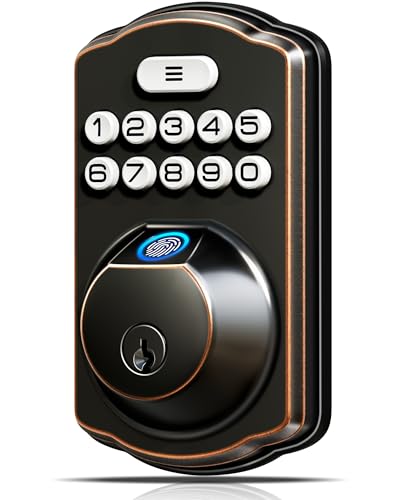
Veise Traditional Fingerprint Keypad Deadbolt
Best for: offline biometric access on standard exterior doors
- Style
- Traditional (what this guide is about)
- Access Methods
- Fingerprint, keypad, key
- Auto-Lock Delay
- 10-99 seconds
- Fingerprint Capacity
- 20
- User Code Capacity
- 20
- Color
- Oil Rubbed Bronze
View on Amazon: Veise Traditional Fingerprint Keypad Deadbolt
This traditional deadbolt gives you keyless entry via a fingerprint scanner, keypad, or physical backup keys. It stores up to 20 fingerprints and 20 user codes locally, with auto-locking customizable between 10 and 99 seconds. An ANSI Grade 3 rating and IP54 weather resistance handle everyday exterior use. It suits you if you want quick biometric access without dealing with wireless network setups or app accounts.
Pros
- Stores up to 20 fingerprints and 20 user passwords locally
- Customizable auto-lock timer from 10 to 99 seconds
- IP54 weather resistance rated for -31°F to 158°F
- Anti-peeping keypad feature masks entered PIN codes
Cons
- No Wi-Fi or Bluetooth connectivity for remote app access
- Requires 4 AA batteries that are not included in the box
- ANSI Grade 3 certified rather than higher commercial-grade ratings
Good fit if
- You want biometric fingerprint access without using a smartphone app
- You need auto-lock protection adjustable between 10 and 99 seconds
- You prefer offline local storage for passwords and credentials
Skip if
- You require remote unlocking and notifications via Wi-Fi
- You need an ANSI Grade 1 or Grade 2 security rating
Verdict: Veise Traditional Fingerprint Keypad Deadbolt delivers standalone biometric security and flexible auto-locking without requiring network configuration. It is a solid choice if you want multiple access options kept strictly offline.

Kwikset Home Connect Z-Wave Deadbolt
Best for: Ring Alarm and SmartThings Z-Wave automation
- Style
- Traditional (what this guide is about)
- Access Methods
- Keypad, key
- Connectivity
- Z-Wave
- Smart Home Compatibility
- Ring Alarm, SmartThings
- Included Door Hardware
- Deadbolt
- Color
- Satin Nickel
The Kwikset Home Connect 620 Z-Wave Deadbolt brings traditional exterior styling to connected home setups. It pairs an illuminated keypad with Z-Wave connectivity for Ring Alarm and SmartThings integration. You can program automatic locking intervals, re-key the cylinder in seconds with SmartKey security, and power it with four included AA batteries. It suits you if you already run a compatible Z-Wave hub and want traditional hardware aesthetics on standard doors.
Pros
- Z-Wave integration with Ring Alarm and SmartThings
- SmartKey security for fast DIY re-keying
- Auto-lock feature with multiple timing options
- Illuminated keypad with one-touch motorized locking
Cons
- Requires a separate Z-Wave hub for wireless operation
- No built-in Wi-Fi connectivity
- Lacks fingerprint access
Good fit if
- You already use a Ring Alarm or SmartThings Z-Wave hub.
- You have a standard door between 1-3/8 and 1-3/4 inches thick.
- You want user-rekeyable physical key backup via SmartKey.
Skip if
- You want direct Wi-Fi connectivity without extra hub hardware.
- You prefer biometric fingerprint access.
Verdict: Kwikset Home Connect 620 Z-Wave Deadbolt integrates cleanly into existing Z-Wave systems while preserving traditional styling and physical key compatibility. It provides reliable motorized keypad access without complicating standard door installation.

eufy Security Familock Traditional Smart Lock
Best for: multi-platform smart homes wanting biometric entry
- Style
- Traditional (what this guide is about)
- Access Methods
- Fingerprint, app
- Connectivity
- Built-in Wi-Fi
- Smart Home Compatibility
- Apple Home, Google Home, Alexa
- Color
- Black
- Dimensions
- 8.07 × 7.64 × 4.41 inches
View on Amazon: eufy Security Familock Traditional Smart Lock
This traditional smart deadbolt uses fingerprint access and built-in Wi-Fi without requiring a separate bridge. It integrates directly with Apple Home, Google Home, Alexa, and SmartThings networks. Powered by eight AA batteries, it operates for up to eight months and functions in temperatures between -22°F and 158°F. It suits you if you want multi-platform smart home compatibility alongside biometric entry on a standard single-cylinder door.
Pros
- Built-in Wi-Fi requires no external bridge
- Works with Apple Home, Google Home, Alexa, and SmartThings
- Self-learning fingerprint scanner
- IP53 weather-resistance rating with operating range of -22°F to 158°F
Cons
- Requires eight AA batteries
- Not compatible with mortise locks or round faceplates
- IP53 rating offers limited water resistance against direct spraying
Good fit if
- You use Apple Home, Google Home, Alexa, or SmartThings automation.
- You prefer biometric access alongside remote app control.
- You have a standard single-cylinder deadbolt door.
Skip if
- You have a door with a mortise lock or round faceplate.
- You prefer a lock that uses fewer batteries.
Verdict: eufy Security Familock Traditional Smart Lock delivers broad smart-platform compatibility and direct Wi-Fi control for standard deadbolt doors. Its fingerprint recognition and temperature tolerance make it a versatile keyless option without extra hub hardware.

LOCKSTAR Smart Deadbolt with App Control
Best for: rental properties needing multiple entry methods
- Style
- Traditional (what this guide is about)
- Installation Type
- Deadbolt
- Access Method
- Keypad, Fingerprint, Key, Key Card
- Color
- Black
- Application
- Home
- Dimensions
- 1.18 × 2.64 × 6.46 inches
The LOCKSTAR LS-SDL is a traditional smart lock designed for home use. It supports multiple entry methods including keypad, fingerprint, key, and key card access. The unit includes a secure app for real-time notifications and event history. It features auto-locking capabilities and requires a single screwdriver for installation. The lock measures 2.64 inches wide and weighs 1 pound. It comes with a wifi gateway for remote control.
Pros
- Supports keypad, fingerprint, key, and key card access
- Includes wifi gateway for app control and notifications
- Features auto-locking to secure the door automatically
- Simple DIY installation with included hardware
Cons
- Requires a separate wifi gateway for remote features
- Only one traditional key entry method listed alongside digital options
- No mention of battery life specifications
Good fit if
- You want multiple entry methods including fingerprint and keypad
- You need auto-locking for convenience
- You are installing a lock in a rental property
Skip if
- You prefer a lock with built-in wifi without a bridge
- You need a lock with a visible display
- You want a lock that does not require a gateway
Verdict: LOCKSTAR LS-SDL Traditional Smart Lock suits renters or homeowners who value multiple entry options and auto-locking. It requires a gateway for full app functionality but offers straightforward installation.

Kwikset Halo Fingerprint Deadbolt with Handleset
Best for: fingerprint access with complete handleset hardware
- Style
- Traditional (what this guide is about)
- Access Methods
- Fingerprint, app
- Smart Home Compatibility
- Amazon Alexa, Google Home
- Fingerprint Capacity
- 100
- Included Door Hardware
- Handleset, interior lever
- Connectivity
- Wi-Fi
View on Amazon: Kwikset Halo Fingerprint Deadbolt with Handleset
The Kwikset Halo Fingerprint Deadbolt with Handleset pairs traditional styling with biometric access and built-in Wi-Fi. It lets you register up to 100 fingerprints across 50 users and connects directly to your home network without a separate bridge. The package includes a matching exterior handleset and interior lever sized for standard 1-3/8-inch to 1-3/4-inch doors. This deadbolt suits you if you want keyless fingerprint entry without adding extra hub hardware.
Pros
- Stores up to 100 fingerprints across 50 users
- Built-in Wi-Fi connects without a separate hub
- Includes exterior handleset and interior lever hardware
- Works with Amazon Alexa and Google Home voice controls
Cons
- Electronics warranty lasts 1 year
- Only fits doors up to 1-3/4 inches thick
- No numeric keypad listed for passcode entry
Good fit if
- You want biometric fingerprint unlocking without carrying keys.
- You need a complete set with an exterior handleset and interior lever.
- You want remote app access without buying an external hub.
Skip if
- You have an exterior door thicker than 1-3/4 inches.
- You prefer typing access codes on a numeric keypad.
Verdict: Kwikset Halo Fingerprint Deadbolt with Handleset delivers direct Wi-Fi management and biometric unlocking in a complete traditional hardware package. It eliminates the need for extra bridges while matching your exterior grip and interior lever.

Kwikset SmartCode 916 Touchscreen Deadbolt
Best for: Zigbee smart homes wanting traditional bronze hardware
- Style
- Traditional (what this guide is about)
- Access Methods
- Touchscreen, key
- Connectivity
- Zigbee 3.0
- Smart Home Compatibility
- Amazon Echo, SmartThings, Wink, Tuya
- User Code Capacity
- 30 codes
- Included Door Hardware
- Deadbolt
The Kwikset 916 Touchscreen Zigbee Deadbolt is a traditional-style smart lock in Venetian Bronze. It connects to Zigbee hubs like SmartThings, Echo 4th Gen, and Abode for app control. The unit offers a touchscreen supporting up to 30 user codes, a BHMA Grade 2 security rating, and a re-keyable SmartKey cylinder. It suits you if you manage a Zigbee smart home and want clean touchscreen access without physical buttons.
Pros
- Connects via Zigbee to hubs including SmartThings, Echo 4th Gen, and Abode
- Stores up to 30 customizable user access codes
- BHMA Grade 2 certified security rating
- SmartKey Security allows direct re-keying
Cons
- Requires a separate compatible Zigbee hub or panel for app control
- No integrated fingerprint scanner
Good fit if
- You use a compatible Zigbee hub or Echo device
- You want touchscreen code entry alongside physical key access
- You need hardware to match a traditional Venetian Bronze finish
Skip if
- You need direct Wi-Fi connectivity without a separate hub
- You prefer raised mechanical push buttons over a touchscreen
Verdict: Kwikset 916 Touchscreen Zigbee Deadbolt delivers BHMA Grade 2 protection and responsive touchscreen access for Zigbee-based home automation setups.

Kwikset SmartCode 914 Traditional Zigbee Deadbolt
Best for: Zigbee smart homes needing traditional brass hardware
- Style
- Traditional (what this guide is about)
- Access Methods
- Keypad, key
- Connectivity
- Zigbee 3.0
- Smart Home Compatibility
- Amazon Echo, SmartThings, Wink, Xfinity
- User Code Capacity
- 30 codes
- Included Door Hardware
- Deadbolt
View on Amazon: Kwikset SmartCode 914 Traditional Zigbee Deadbolt
The Kwikset SmartCode 914 is a traditional deadbolt finished in polished brass and powered by Zigbee connectivity. You get a push-button keypad that holds up to 30 custom user codes, along with BHMA Grade 2 certified security. Built-in SmartKey technology lets you re-key the physical cylinder yourself without removing the hardware. It suits your setup if you manage access codes through compatible Zigbee smart hubs.
Pros
- BHMA Grade 2 certified security rating
- Supports up to 30 customizable user codes
- SmartKey Security allows direct cylinder re-keying
- Integrates with Zigbee 3.0 and HA 1.2 hubs
Cons
- Requires a compatible Zigbee hub for remote access
- No built-in Wi-Fi connectivity
- Lacks a fingerprint scanner
Good fit if
- You use an existing Zigbee hub such as SmartThings or Amazon Echo.
- You want a polished brass finish to match traditional exterior doors.
- You need up to 30 keypad codes alongside key control.
Skip if
- You do not own or plan to install a Zigbee hub.
- You want direct Wi-Fi connectivity without secondary hardware.
Verdict: Kwikset SmartCode 914 Zigbee Deadbolt delivers certified Grade 2 protection and brass styling for homes running on Zigbee automation networks. It gives you flexible code management and DIY physical re-keying in a standard traditional footprint.

Kwikset SmartCode 916 Touchscreen Zigbee Deadbolt
Best for: Zigbee smart homes needing touchscreen access
- Style
- Traditional (what this guide is about)
- Access Methods
- Touchscreen, key
- Connectivity
- Zigbee 3.0
- Smart Home Compatibility
- Amazon Echo, SmartThings, Wink, Tuya
- User Code Capacity
- 30 codes
- Included Door Hardware
- Deadbolt
View on Amazon: Kwikset SmartCode 916 Touchscreen Zigbee Deadbolt
This Kwikset deadbolt pairs traditional exterior styling with a touchscreen interface and Zigbee connectivity. It holds up to 30 customizable user codes for household access and carries a BHMA Grade 2 security certification. The integrated SmartKey cylinder lets you re-key the lock yourself in seconds using standard physical keys. It suits you if you already run a compatible Zigbee hub or Echo device and want smart app control on an exterior door.
Pros
- Integrates with Zigbee hubs and panels including SmartThings and Amazon Echo
- Stores up to 30 customizable user codes
- SmartKey Security allows quick DIY cylinder re-keying
- Certified BHMA Grade 2 for exterior door security
Cons
- Requires a separate Zigbee hub or compatible Echo device for application control
- No built-in fingerprint scanner listed
Good fit if
- You have an existing Zigbee hub, Echo Show 10, or compatible smart home panel.
- You need up to 30 unique user codes for family and visitors.
- You want to re-key the physical lock cylinder yourself without a locksmith.
Skip if
- You want standalone Wi-Fi connectivity without operating a separate hub.
- You prefer fingerprint biometric access over a touchscreen keypad.
Verdict: Kwikset SmartCode 916 Touchscreen Deadbolt combines BHMA Grade 2 security with a responsive touchscreen and Zigbee integration. It is a practical traditional option for homes centered on an established Zigbee smart system.

Amazon Basics Traditional Electronic Keypad
Best for: Interior doors needing keyless entry
- Style
- Traditional (what this guide is about)
- Access Methods
- Keypad, Physical Key
- Included Door Hardware
- Handle set, deadbolt
- Color
- Matte Black
- Dimensions
- 5.08 × 3.08 × 0.1 inches
- Weight
- 4.31 pounds
This Amazon Basics traditional deadbolt features a matte black finish and a motorized keypad for keyless entry. It meets ANSI Grade 3 security standards and includes a reversible lever for both left and right-handed doors. The unit accommodates door thicknesses from 1-3/8 to 1-3/4 inches. It is designed for indoor use only, making it a practical option for interior doors where you need secure, easy access without a traditional key.
Pros
- Motorized deadbolt with one-touch locking
- ANSI Grade 3 security rating
- Reversible lever for left or right doors
- Accommodates 1-3/8 to 1-3/4 inch door thickness
- Matte black traditional style
Cons
- Indoor use only
- ANSI Grade 3 is lower security than Grade 1
- No external Wi-Fi or app connectivity
Good fit if
- You need a secure lock for an interior door
- You prefer a traditional matte black finish
- You want simple keypad access without smartphone integration
Skip if
- You require exterior weatherproofing
- You need high-security Grade 1 ratings
- You want remote access via a mobile app
Verdict: Amazon Basics Matte Black Traditional Deadbolt is a solid choice for interior doors where you need reliable keyless entry without the complexity of smart home features. It suits those who value straightforward installation and traditional aesthetics over remote connectivity.
Specifications side by side
| Spec | eufy Security C220 Fingerprint Deadbolt | eufy Security C30 Traditional Lock | Amazon Basics Keypad Electronic Deadbolt | Kwikset SmartCode 270 Touchpad Deadbolt | Veise Traditional Fingerprint Keypad Deadbolt | Kwikset Home Connect Z-Wave Deadbolt | eufy Security Familock Traditional Smart Lock | LOCKSTAR Smart Deadbolt with App Control | Kwikset Halo Fingerprint Deadbolt with Handleset | Kwikset SmartCode 916 Touchscreen Deadbolt | Kwikset SmartCode 914 Traditional Zigbee Deadbolt | Kwikset SmartCode 916 Touchscreen Zigbee Deadbolt | Amazon Basics Traditional Electronic Keypad |
|---|---|---|---|---|---|---|---|---|---|---|---|---|---|
| Access Methods | Fingerprint, app, keypad, key, voice | Key, Voice, Physical button | Keypad, traditional key | Keypad, key | Fingerprint, keypad, key | Keypad, key | Fingerprint, app | not specified | Fingerprint, app | Touchscreen, key | Keypad, key | Touchscreen, key | Keypad, Physical Key |
| Connectivity | Built-in Wi-Fi | Built-in Wi-Fi | not specified | not specified | not specified | Z-Wave | Built-in Wi-Fi | not specified | not specified | Zigbee 3.0 | Zigbee 3.0 | Zigbee 3.0 | not specified |
| Smart Home Compatibility | Alexa, Google Assistant | Amazon Alexa, Google Assistant | not specified | not specified | not specified | Ring Alarm, SmartThings | Apple Home, Google Home, Alexa | not specified | Amazon Alexa, Google Home | Amazon Echo, SmartThings, Wink, Tuya | Amazon Echo, SmartThings, Wink, Xfinity | Amazon Echo, SmartThings, Wink, Tuya | not specified |
| Installation Type | not specified | Deadbolt replacement | not specified | not specified | not specified | not specified | not specified | Deadbolt | not specified | not specified | not specified | not specified | not specified |
| Auto-Lock Delay | not specified | User-defined time setting | 10 to 99 seconds | 30 sec, 1 min, 3 min, 5 min or 10 min | 10-99 seconds | not specified | not specified | not specified | not specified | not specified | not specified | not specified | not specified |
| Fingerprint Capacity | not specified | not specified | not specified | not specified | 20 | not specified | not specified | not specified | 100 | not specified | not specified | not specified | not specified |
| User Code Capacity | not specified | not specified | 6 user codes | 50 | 20 | not specified | not specified | not specified | not specified | 30 codes | 30 codes | 30 codes | not specified |
| Included Door Hardware | not specified | not specified | not specified | not specified | not specified | Deadbolt | not specified | not specified | Handleset, interior lever | Deadbolt | Deadbolt | Deadbolt | Handle set, deadbolt |
| Access Method | Fingerprint | not specified | Keypad | not specified | Keypad, Fingerprint | not specified | Fingerprint | Keypad, Fingerprint, Key, Key Card | Fingerprint | Touchscreen | Keypad | Touchscreen | Keypad |
| Color | Nickel | Nickel | Oil Bronze | Satin Nickel | Oil Rubbed Bronze | Satin Nickel | Black | Black | Satin Nickel | Venetian Bronze | Polished Brass | Satin Nickel | Matte Black |
| Application | not specified | not specified | not specified | not specified | not specified | Home | not specified | Home | not specified | not specified | not specified | not specified | not specified |
| Included Hardware | not specified | not specified | not specified | not specified | not specified | not specified | not specified | not specified | not specified | not specified | not specified | not specified | Handle |
| Style | Traditional | Traditional | Traditional | Traditional | Traditional | Traditional | Traditional | Traditional | Traditional | Traditional | Traditional | Traditional | Traditional |
| Material | not specified | not specified | not specified | not specified | not specified | not specified | not specified | not specified | not specified | not specified | Brass | not specified | not specified |
| Special Features | not specified | not specified | not specified | Auto Lock | not specified | not specified | not specified | not specified | not specified | SmartKey Security, SmartKey Rekey Security | SmartKey Security, SmartKey Rekey Security | SmartKey Security, SmartKey Rekey Security | not specified |
| Dimensions | 6.89 × 2.76 × 1.3 inches | 2.57 × 1.63 × 6.05 inches | 9.05 × 6.13 × 2.99 inches | 4.13 × 5.19 × 9.91 inches | 2.71 × 1.2 × 5.47 inches | 2.8 × 1.25 × 4.6 inches | 8.07 × 7.64 × 4.41 inches | 1.18 × 2.64 × 6.46 inches | not specified | 1.19 × 2.81 × 5.06 inches | 1.19 × 2.63 × 4.44 inches | 1.19 × 2.81 × 5.06 inches | 5.08 × 3.08 × 0.1 inches |
| Weight | not specified | not specified | 2.07 pounds | 2.31 pounds | not specified | 3.37 pounds | not specified | 1 pounds | not specified | not specified | 1 pounds | 3.4 pounds | 4.31 pounds |
| Model | T8506 | T85D0 | PL13910 | 992700-008 | KS02A | 98690-001 | T85F2 | LS-SDL | Halo | 916TRL TSCR ZB 3.0 11P | 914TRL ZB 3.0 L03 | 916TRL TSCR ZB 3.0 15 | PL1TMS4918 |
| Size | not specified | not specified | 1 Pack | not specified | 1.2 inches x 2.71 inches x 5.47 inches | Traditional | not specified | not specified | not specified | (Pack of 1) | not specified | 1 Count ( Pack of 1) | 5.08 x 3.08 x 0.1 in |
If you are planning other property upgrades, you can compare material and heater specifications for the best traditional saunas.
Key Specs to Compare Before Buying
-
Check the Security Grade
Look for BHMA certification to understand physical durability. The eufy Security C220 holds Grade 3, the highest residential rating, while most Kwikset models use Grade 2. Grade 3 offers stronger resistance to drilling and impact. If you live in a high-traffic area, prioritize this rating. It ensures the lock mechanism withstands repeated stress better than standard hardware. Check the product specs for this label to verify the build quality before purchasing.
-
Choose Your Access Method
Decide between fingerprint, keypad, or touchscreen entry. The Veise KS02A uses a traditional keypad and fingerprint scanner for offline access. The Kwikset 916 relies on a touchscreen interface. Fingerprint sensors offer speed but require clean fingers. Keypads are reliable in all weather. Touchscreens can be less responsive in extreme cold. Match the method to your household habits. If you often carry gloves, a physical keypad or fingerprint sensor may be more practical than a touchscreen.
-
Verify Network Connectivity
Confirm if the lock needs a hub or connects directly. The eufy C30 and Kwikset Halo include built-in Wi-Fi for direct app control. The Kwikset Home Connect requires a Z-Wave hub. The Kwikset 916 uses Zigbee. Direct Wi-Fi models simplify setup but may drain batteries faster. Hub-dependent models integrate better with existing smart home systems. Check your current router or hub compatibility to avoid purchasing extra hardware for connectivity.
-
Review Auto-Lock Features
Some locks offer customizable auto-locking intervals. The Kwikset SmartCode 270 allows you to set the delay up to ten minutes. This feature ensures the door secures automatically after you enter. It prevents accidental unlocked doors. Not all models include this option. The Amazon Basics lock offers basic auto-locking. If you frequently forget to lock up, choose a model with adjustable timing. This spec adds convenience without requiring manual intervention every time.
-
Match the Finish Style
Select a finish that complements your door hardware. Options include Nickel, Oil Rubbed Bronze, Satin Nickel, Black, and Polished Brass. The Veise KS02A features Oil Rubbed Bronze. The Kwikset 914 offers Polished Brass. The eufy C30 comes in Black. Consistency in finish creates a cohesive exterior look. Check the color spec in the product details. Ensure the tone matches your existing hinges or door handles for a clean, professional appearance on your entryway.
Frequently asked questions
Do traditional smart locks work without Wi-Fi?
Yes, many models operate entirely offline. The Amazon Basics Keypad Electronic Deadbolt and Veise Traditional Fingerprint Keypad Deadbolt function without network connections. You can enter via keypad or biometrics locally. These options suit users who prefer standalone security without relying on internet connectivity for basic entry.
Which traditional lock supports Z-Wave automation?
The Kwikset Home Connect Z-Wave Deadbolt integrates directly into Z-Wave systems. It works with platforms like Ring Alarm and SmartThings. You get motorized keypad access while maintaining traditional styling. This model allows you to automate entry without adding extra hubs for Z-Wave compatible smart homes.
Are traditional smart locks available in matte black?
Yes, the Amazon Basics Traditional Electronic Keypad comes in matte black. It is designed for interior doors where keyless entry is needed. You get reliable keypad access without smart home complexity. This finish suits those who want traditional aesthetics for internal room security rather than exterior entry.
Do I need a hub for Wi-Fi locks?
No, several models include built-in Wi-Fi. The eufy Security C220 and Familock Traditional Smart Lock connect directly to your network. You get remote app control without extra hardware. This simplifies installation and reduces clutter by eliminating the need for separate bridges or hubs for connectivity.
Which traditional lock has the highest security grade?
The eufy Security C220 Fingerprint Deadbolt holds BHMA Grade 3 certification. This is the highest residential rating for physical durability. It offers stronger resistance to drilling and impact compared to Grade 2 models. Most other listed locks, including Kwikset options, use Grade 2 for standard protection.
Can traditional locks use fingerprint access?
Yes, multiple models support biometric entry. The eufy Security C220, Familock, and Veise Traditional locks use fingerprint sensors. You can unlock the door by placing your finger on the reader. This method provides quick, keyless entry without needing to remember codes or carry physical keys.