Best Door Knobs with Keypad: 15 Spec-Based Picks
As an Amazon Associate we earn from qualifying purchases. Links on this page are affiliate links.
A door knob with keypad gives you dependable keyless entry for bedrooms, rentals, and offices without physical keys. This guide compares 15 models using only the specifications published on their product listings.
The Evanshow Biometric Fingerprint Door Knob leads the list by combining keypad access with fingerprint, key card, and physical key entry on a 5.5-inch lock body. This breakdown helps you decide which access options, dimensions, and installation features best match your doorway.
Quick picks
The best fit for you
- You need multiple access options for interior rooms. Evanshow Biometric Fingerprint Door Knob It provides keypad, fingerprint, physical key, and key card access.
- You need a waterproof lock with automatic locking. Iulock Keypad Keyless Entry Door Knob Its specs list waterproof resistance, an auto-lock feature, and keypad access.
- You prefer a handle lever over a round knob. DREMUSOUD Biometric Smart Door Handle The included hardware is a handle with keypad and fingerprint access.
- You want a battery-powered lock for front doors. RAFECIEE Keypad Door Knob It specifies battery-powered operation, front door application, and auto-lock capability.
Our 15 picks

Evanshow Biometric Fingerprint Door Knob
Best for: flexible multi-user access on standard interior doors
- Access Method
- Keypad, Fingerprint, Key, Key Card (what this guide is about)
- Access Methods
- Fingerprint, code, key, IC card, app
- Fingerprint Capacity
- Up to 100
- Passcode Capacity
- 50
- App Compatibility
- Tuya
- Application
- Home, Office, Apartment, Bedroom, Hotel
The Evanshow 5-in-1 Keypad Door Knob gives you five unlocking options: keypad codes, fingerprint recognition, IC cards, standard keys, and Tuya app control. It stores up to 50 passwords and 100 fingerprints, fitting standard wooden doors between 1.18 and 1.97 inches thick. If you manage an office, apartment, or bedroom and need flexible guest codes and entry logging without drilling new holes, this lock fits your setup.
Pros
- Stores up to 50 keypad passwords and 100 fingerprints
- Offers five access methods including keypad, IC card, fingerprint, app, and physical key
- Tuya app connectivity enables entry log tracking and temporary code generation
- Installs on standard 1.18- to 1.97-inch thick wooden doors without drilling
Cons
- Emergency USB port powers the lock externally but cannot recharge internal batteries
- Allows any fingerprint to unlock the mechanism until an administrator is registered
Good fit if
- You want multiple entry methods including keypad codes, IC cards, and biometric scans.
- You need to manage guest access codes and review entry logs via a smartphone app.
- You have a left- or right-swing wooden door between 1.18 and 1.97 inches thick.
Skip if
- You have a door thickness outside the supported 1.18 to 1.97-inch range.
- You require an integrated rechargeable battery system rather than replacing standard cells.
Verdict: Evanshow 5-in-1 Keypad Door Knob provides robust code capacity, multi-method access, and app tracking for standard residential or office doors. It delivers versatile keyless operation without requiring extra drilling or hardwiring.

KLLOQUE Rechargeable Keypad Door Knob
Best for: interior doors needing rechargeable keypad access
- Access Method
- Keypad (what this guide is about)
- Access Methods
- Password, app, mechanical key
- Auto-Lock Delay
- 5s
- Included Hardware
- Knob
- Dimensions
- 9 × 3.5 × 3.5 inches
- Weight
- 1.64 pounds
The KLLOQUE Rechargeable Keypad Door Knob provides keyless entry using a PIN code, a Bluetooth app connection, or a mechanical backup key. It features an integrated rechargeable battery powered via USB Type-C that delivers up to a year of operation. With switchable modes including five-second auto-locking, passage, privacy, and silent operation, it suits your interior doors or bedrooms where you want managed privacy without replacing disposable batteries.
Pros
- Built-in rechargeable battery powers the lock for up to one year via USB Type-C
- Four switchable operation settings: 5-second auto-lock Normal Mode, Passage, Privacy, and Silent Mode
- Supports keypad passcode entry, Bluetooth app access, and physical backup keys
- Sends mobile app alerts when the battery charge drops below 20%
Cons
- Not compatible with doors that have weather strips installed
- Requires a separately purchased gateway for remote access outside Bluetooth range
Good fit if
- You want a keypad knob with a built-in USB-C rechargeable battery instead of disposable cells
- You need quick switching between passage, silent, privacy, and five-second auto-lock modes
Skip if
- You have weather stripping installed along your door frame
- You need remote Wi-Fi control out of the box without buying an extra gateway
Verdict: KLLOQUE Rechargeable Keypad Door Knob delivers dependable PIN and app-based access with flexible privacy modes and USB-C recharging. It is a practical interior lock option as long as your door does not have weather stripping.

Iulock Keypad Keyless Entry Door Knob
Best for: all-weather exterior use and multiple pin codes
- Access Method
- Keypad, Key (what this guide is about)
- Access Methods
- Keypad, key
- Passcode Capacity
- 50
- Water Resistance
- Waterproof
- Application
- Garage, Office, Bedroom
- Included Hardware
- Knob
The Iulock Keypad Door Knob with Silicone Grip provides keyless pin access along with physical backup keys. It supports up to 50 user codes ranging from 1 to 15 digits. The housing carries an IP65 weather-resistance rating for temperatures from -22°F to 176°F, and it fits doors from 1-3/8 to 2-1/2 inches thick. It suits you if you need a code-only lock with high user capacity and all-weather exterior durability.
Pros
- Stores up to 50 custom codes from 1 to 15 digits
- IP65 weather resistance rated for -22°F to 176°F
- Adjustable latch fits 2-3/8-inch and 2-3/4-inch backsets
- Emergency Type-C USB port powers lock if batteries drain
Cons
- No biometric fingerprint scanner
- Lacks smartphone app or wireless connectivity
Good fit if
- You manage access for multiple users needing up to 50 unique codes.
- You need an exterior knob rated for extreme heat or cold down to -22°F.
- You want a physical rubber grip over the metal knob.
Skip if
- You prefer unlocking via fingerprint rather than typing a code.
- You want remote app monitoring or smart home network integration.
Verdict: Iulock Keypad Door Knob with Silicone Grip delivers dependable push-button entry and solid IP65 weatherproofing without the complexity of wireless apps. It offers reliable access for busy households and rental properties needing dozens of separate entry codes.

GHome Smart Rechargeable Keypad Door Knob
Best for: rechargeable multi-method access on interior doors
- Access Method
- Keypad, Fingerprint, App Control (what this guide is about)
- Access Methods
- Fingerprint, password, app, key
- Recognition Speed
- 0.2s
- Fingerprint Capacity
- 20
- Passcode Capacity
- 20
- Application
- Home, Garage, Office, Apartment, Bedroom
The GHome Smart Rechargeable Keypad Door Knob provides entry through a keypad, fingerprint scanner, mobile app, or physical key. You can program up to 20 keypad codes and 20 fingerprints with data stored locally rather than in the cloud. It features an integrated 400mAh rechargeable battery, fits doors 1-3/8 to 2-1/4 inches thick, and locks automatically after 5 seconds. It suits private bedrooms, offices, and rental spaces.
Pros
- Stores up to 20 keypad passcodes and 20 fingerprints locally
- Internal 400mAh rechargeable battery provides up to 10,000 unlocks
- App allows passage mode, silent mode, and access log monitoring
- Locks automatically 5 seconds after unlocking
Cons
- App connectivity is limited to Bluetooth range
- Battery recharging takes 4 to 6 hours
- Passcode capacity is limited to 20 codes
Good fit if
- You want a door knob powered by a rechargeable battery instead of disposable cells.
- You need multiple access options including keypad PINs, biometric scans, and backup keys.
- Your door thickness falls between 1-3/8 inches and 2-1/4 inches.
Skip if
- You need to manage door access remotely away from Bluetooth range.
- You manage a high-turnover property requiring more than 20 unique entry codes.
Verdict: GHome Smart Rechargeable Keypad Door Knob combines four entry methods with local credential storage and a built-in rechargeable battery for convenient room security.

DREMUSOUD Biometric Smart Door Handle
Best for: shared bedrooms, home offices, and rentals
- Access Method
- Keypad, Fingerprint (what this guide is about)
- Access Methods
- Fingerprint, password, IC card, app, key
- Recognition Speed
- 0.2s
- Fingerprint Capacity
- 100
- Passcode Capacity
- 50
- Color
- Black
This smart handle combines a keypad, biometric sensor, app control, IC cards, and mechanical keys for interior or residential doors. You can store up to 50 distinct passcodes alongside 100 fingerprints. It fits standard door thicknesses between 1-3/8 inches and 2-1/8 inches with adjustable backsets of 2-3/8 or 2-3/4 inches. A reversible handle layout and emergency USB-C power port suit bedrooms, home offices, and rental spaces needing multiple access methods.
Pros
- Stores up to 50 user passcodes and 100 fingerprints
- Includes emergency USB-C power port and low-battery alarm
- Reversible lever fits both left-handed and right-handed doors
- Fits standard 2-3/8-inch or 2-3/4-inch backset latches
Cons
- Requires four AAA batteries that are not included
- 10-inch overall height requires more door surface clearance than compact knobs
Good fit if
- You need multiple entry methods including a numeric keypad, fingerprint reader, and key cards.
- You manage shared rooms or rentals requiring up to 50 individual access codes.
- You have a door with a standard thickness between 1-3/8 inches and 2-1/8 inches.
Skip if
- You prefer a traditional round knob profile over a lever-style handle.
- You want a lock that includes the necessary operating batteries in the box.
Verdict: DREMUSOUD Keypad and Fingerprint Door Handle delivers flexible entry options with capacity for 50 codes and 100 prints. Its reversible design and emergency USB-C power port provide reliable everyday access for homes or rentals.
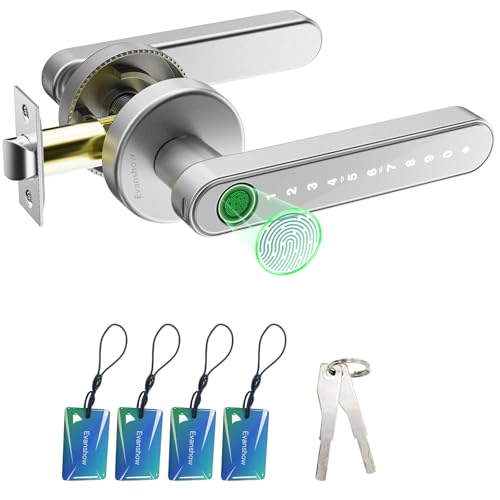
Evanshow Keypad and Biometric Door Knob
Best for: offline multi-credential access on standard wooden doors
- Access Method
- Keypad, Fingerprint (what this guide is about)
- Access Methods
- Fingerprint, password, key, IC card
- Recognition Speed
- 0.5s
- Fingerprint Capacity
- Up to 100
- Passcode Capacity
- 50
- Color
- Silver
This Evanshow door knob provides offline keyless entry using an integrated numeric keypad, biometric scanner, IC cards, and physical keys. It stores up to 50 distinct passcodes and 100 fingerprints, accommodating multiple household members or office staff. Designed for wooden doors between 1.18 and 1.97 inches thick, it operates without an app. You can power it via an external USB port if internal batteries fail, making it suitable for bedrooms and private offices.
Pros
- Supports up to 50 keypad passwords and 100 fingerprints
- Includes 4 IC cards and 2 mechanical backup keys
- Emergency USB port powers lock if batteries die
- Fits left- and right-swing doors between 1.18 and 1.97 inches thick
Cons
- Does not include companion smartphone app support
- Allows any fingerprint to unlock until administrator setup is completed
- Emergency USB port cannot recharge internal batteries
Good fit if
- You need multiple credential options including keypad codes, fingerprints, and IC cards.
- You prefer an offline lock that functions without smartphone apps or network setups.
- You have a wooden door with a thickness between 1.18 and 1.97 inches.
Skip if
- You require mobile app connectivity or remote guest management.
- You need hardware to fit doors thinner than 1.18 inches or thicker than 1.97 inches.
Verdict: Evanshow Keypad and Biometric Door Knob delivers standalone access with 50-code capacity, 100 fingerprint slots, and backup IC cards. It provides straightforward, app-free access control for standard wooden doors.

ThorBolt Keypad and Fingerprint Door Knob
Best for: multi-user interior doors needing quick passage switching
- Access Method
- Keypad, Fingerprint (what this guide is about)
- Access Methods
- Fingerprint, keypad, mechanical key
- Fingerprint Capacity
- 50
- Passcode Capacity
- 100
- Included Hardware
- Knob
- Dimensions
- 6.5 × 2.68 × 2.68 inches
You get an interior door knob with an illuminated touch keypad storing up to 100 passcodes of 4 to 8 digits, plus a top-mounted biometric sensor holding 50 fingerprints. A physical toggle switch lets you quickly switch between passage mode, standard mode, and admin-only access. It fits doors 1-1/4 to 2-1/4 inches thick, making it practical if you manage shared offices, guest rooms, or private interior spaces.
Pros
- Stores up to 100 keypad passcodes ranging from 4 to 8 digits
- Built-in hardware switch toggles Passage, Admin-Only, and Standard modes
- Includes top-mounted biometric scanner holding up to 50 fingerprints
- Provides emergency access via Type-C jump port and two backup keys
Cons
- Requires four AAA batteries that are not included
- Lacks wireless or mobile app connectivity
Good fit if
- You need to assign distinct passcodes to numerous users
- You want a physical passage switch to keep doors unlocked during daytime hours
- You have standard doors between 1-1/4 and 2-1/4 inches thick
Skip if
- You want remote access via smartphone or Wi-Fi bridge
- You prefer an out-of-the-box solution that includes batteries
Verdict: ThorBolt Fingerprint Keypad Door Knob provides robust code capacity and convenient mechanical mode switching directly on the handle. It serves high-traffic interior spaces without requiring network setup.

ThorBolt Fingerprint Keypad Door Knob
Best for: high-capacity multi-user interior door access
- Access Method
- Keypad, Fingerprint (what this guide is about)
- Access Methods
- Fingerprint, keypad, key
- Fingerprint Capacity
- 100
- Passcode Capacity
- 100
- Auto-Lock Delay
- 5 seconds
- Included Hardware
- Knob
You get a zinc-alloy door knob with keypad, biometric scanner, and physical key access. It stores up to 100 passcodes and 100 fingerprints, locking automatically after 5 seconds or via the enter key. Anti-peep input protects entry codes, while an emergency USB-C port supplies backup power. Powered by four AA batteries, it includes Passage Mode and Silent Mode. It suits interior rooms, offices, or rentals needing multi-user code and fingerprint management without apps.
Pros
- Stores up to 100 passcodes and 100 fingerprints
- 5-second auto-lock and instant lock via enter key
- Emergency USB-C port for backup power
- Anti-peep passcode scrambling
Cons
- Requires 4 AA batteries that are not included
- No wireless app connectivity or remote unlocking listed
Good fit if
- You need high user capacity with up to 100 passcodes and fingerprints.
- You want automatic 5-second relocking for an interior room or office.
- You prefer standalone hardware programming without smartphone apps.
Skip if
- You need remote Wi-Fi control or smartphone integration.
- You want included batteries out of the box.
Verdict: ThorBolt Fingerprint Keypad Door Knob provides robust local credential storage for up to 100 users alongside fast 5-second auto-locking. Its emergency USB-C port and physical key ensure dependable access without wireless complexity.

FDFDTO Keypad Door Handle with Fingerprint
Best for: rechargeable keypad access on interior doors
- Access Method
- Keypad, Fingerprint (what this guide is about)
- Access Methods
- Fingerprint, passcode, app, key
- Recognition Speed
- 0.2s
- Color
- Silver
- Application
- Home, Office, Bedroom
- Included Hardware
- Handle
The FDFDTO Keypad Door Handle with Fingerprint gives you keyless entry for interior doors using four methods: a backlit keypad, a 0.2-second biometric scanner, app control, or two physical keys. It features a built-in 400mAh rechargeable battery that charges in four to six hours. With an adjustable latch fitting 2-3/8-inch or 2-3/4-inch backsets, it works well if you need secure, flexible bedroom or office access without swapping disposable batteries.
Pros
- Integrated 400mAh rechargeable battery eliminates standard disposable cells
- Backlit anti-peep keypad supports temporary guest passcodes
- Fingerprint sensor unlocks in 0.2 seconds
- Adjustable latch fits 2-3/8-inch (60mm) and 2-3/4-inch (70mm) backsets
Cons
- Recharging requires 4 to 6 hours of plug-in time
- Fits doors up to 2-1/8 inches thick, excluding thicker custom doors
Good fit if
- You prefer a rechargeable internal battery over replacing alkaline cells.
- You need passage mode or silent mode for an interior bedroom or home office.
- You want multiple entry options including keypad, fingerprint, app, and physical keys.
Skip if
- You have an exterior or custom door thicker than 2-1/8 inches.
- You prefer quickly swapping standard AA batteries instead of recharging the unit.
Verdict: FDFDTO Keypad Door Handle with Fingerprint delivers flexible four-way access with an integrated rechargeable battery designed for standard interior doors. It suits bedrooms and home offices where keypad entry and quick fingerprint unlocking are daily priorities.

Richelock Fingerprint Smart Door Knob
Best for: offline keypad access in extreme outdoor temperatures
- Access Method
- Keypad, Fingerprint (what this guide is about)
- Access Methods
- Fingerprint, keypad, key
- Fingerprint Capacity
- 100
- Passcode Capacity
- 50
- Water Resistance
- Waterproof
- Color
- Matte Black
The Richelock Matte Black Keypad Fingerprint Door Knob provides keyless entry using an illuminated keypad, biometric sensor, or physical key. It stores up to 50 passcodes ranging from 1 to 15 digits, plus offline dynamic codes. Built from zinc alloy, it withstands temperatures from -22°F to 176°F and fits standard 2-3/8-inch or 2-3/4-inch backsets. It suits you if you need compact exterior-rated hardware.
Pros
- Stores up to 50 passcodes with lengths from 1 to 15 digits
- Operates in extreme outdoor temperatures from -22°F to 176°F
- Supports temporary dynamic passcodes without app or internet requirements
- Includes an emergency Type-C port for backup power
Cons
- Lacks Wi-Fi, Bluetooth, or smartphone app integration
- Published specifications do not list compatible door thickness range
Good fit if
- You want an illuminated keypad with flexible 1- to 15-digit code lengths.
- You need weather-resistant hardware rated for temperatures down to -22°F.
- You prefer generating temporary guest passcodes without network connectivity.
Skip if
- You require mobile app management or remote internet access.
- You prefer built-in rechargeable batteries over standard AAA cells.
Verdict: Richelock Matte Black Keypad Fingerprint Door Knob delivers versatile offline access management and broad temperature tolerance in a clean square design. It provides dependable security without requiring network setups or mobile apps.

RAFECIEE Keypad Door Knob
Best for: long battery life and code access
- Access Method
- Keypad (what this guide is about)
- Access Methods
- Passcode, backup key
- Passcode Capacity
- 50
- Power Source
- Battery Powered
- Color
- Black
- Application
- Front Door, Office, Apartment, Bedroom
This electronic lock provides keyless entry using programmable passcodes or a physical key. You get up to 18 months of runtime from four AA batteries, backed by a Type-C emergency power port. It holds 50 user codes and features an IP65 rating against rain and extreme temperatures from -22°F to 176°F. It suits you if you need a durable, low-maintenance keypad lock for exterior or interior doors without wireless setup.
Pros
- Up to 18 months of battery life on four AA batteries
- Stores up to 50 user codes plus one master code
- IP65 weather-resistance rating operating from -22°F to 176°F
- Type-C USB port for emergency backup power
Cons
- No fingerprint or biometric scanner included
- No wireless app control or remote access capabilities
Good fit if
- You need long battery operation without frequent battery swaps.
- You manage access for multiple guests using up to 50 passcodes.
- You require an exterior lock rated for extreme weather.
Skip if
- You want biometric or fingerprint unlocking.
- You require smartphone app connectivity or remote management.
Verdict: RAFECIEE Keypad Door Knob delivers up to 18 months of battery runtime, dependable IP65 weather resistance, and 50 programmable entry codes for straightforward offline access.
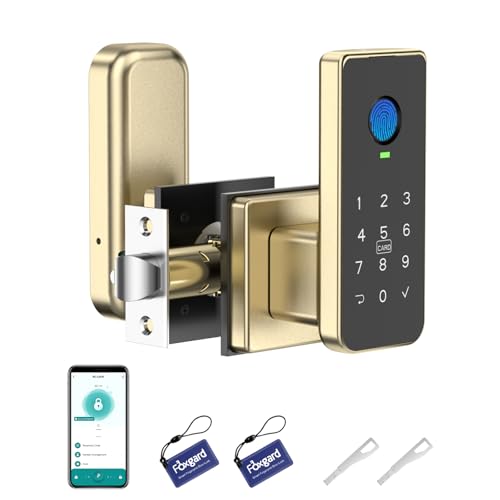
Foxgard Keypad and Fingerprint Door Knob
Best for: managing timed guest codes on interior doors
- Access Method
- Keypad, Fingerprint, Key, App Control (what this guide is about)
- Application
- Office, Bedroom
- Special Features
- Auto Lock
- Dimensions
- 4.8 × 2 × 3.3 inches
- Weight
- 1.59 pounds
This Foxgard lock pairs a backlit digital keypad with fingerprint, app, IC card, and physical key access. It features anti-peep code entry to obscure your PIN, along with automatic and delayed locking settings. You can generate one-time, timed, or dynamic codes directly within the mobile application. Measuring 4.8 inches long by 3.3 inches high, it operates on four AA batteries and suits interior doors like bedrooms or offices.
Pros
- Backlit keypad with anti-peep passcode support
- Five access options including keypad, fingerprint, app, IC card, and physical key
- Configurable auto-lock and delayed lock functions
- App-managed generation of one-time, timed, and dynamic passcodes
Cons
- Requires Foxgard Gateway sold separately for voice and remote control
- Four AA batteries are not included in the package
Good fit if
- You need multiple access methods including anti-peep keypad entry and fingerprint scanning.
- You want to create temporary, timed, or one-time guest codes through a mobile app.
- You prefer automated or delayed locking on bedroom or office doors.
Skip if
- You require remote access and voice control without purchasing an add-on gateway.
- You want a package that includes the required AA batteries.
Verdict: Foxgard Keypad and Fingerprint Door Knob provides versatile entry management with anti-peep passcode protection, biometric access, and scheduled app codes. It is a practical interior locking solution, though remote Wi-Fi features require an external gateway.

Omlepai Keypad and Fingerprint Smart Door Knob
Best for: interior doors needing versatile multi-credential access
- Access Method
- Keypad, Fingerprint, Key, Key Card (what this guide is about)
- Access Methods
- Fingerprint, passcode, key, app
- Recognition Speed
- 0.3s
- Fingerprint Capacity
- Up to 100
- Passcode Capacity
- 50
- Auto-Lock Delay
- 5 seconds
View on Amazon: Omlepai Keypad and Fingerprint Smart Door Knob
The Omlepai Keypad and Fingerprint Smart Door Knob gives you keyless entry via a digital passcode, biometric sensor, key card, app, or physical key. It stores up to 50 passcodes and 100 fingerprints, fitting doors 1-3/8 to 2-1/8 inches thick. With 5-second auto-locking and internal privacy controls, this knob suits interior rooms, home offices, and rental spaces requiring flexible credentials without complex wiring.
Pros
- Stores up to 50 passcodes and 100 fingerprints
- Engages automatic locking after 5 seconds
- Provides emergency USB port for backup power
- Fits standard doors from 1-3/8 to 2-1/8 inches thick
Cons
- Requires four AAA batteries that are not included
- Operates without built-in Wi-Fi connectivity
Good fit if
- You want keypad, fingerprint, and key card access options in one knob.
- You need automatic 5-second locking for bedrooms, offices, or rentals.
Skip if
- You need out-of-the-box Wi-Fi access for remote management.
- You prefer hardware that arrives with batteries included.
Verdict: Omlepai Keypad and Fingerprint Smart Door Knob combines 50-passcode storage with responsive biometric and card access. It delivers straightforward keyless entry on standard interior doors without drilling.

TALVTEC Dual-Sided Keypad Door Knob
Best for: two-sided access control on exterior gates
- Access Method
- Keypad, Key (what this guide is about)
- Access Methods
- Keypad, mechanical key
- Passcode Capacity
- 50 per side
- Auto-Lock Delay
- 2s to 12h (default 5s)
- Color
- Satin Nickel
- Included Hardware
- Knob
This satin nickel door knob features backlit keypads and mechanical key cylinders on both exterior and interior handles. It stores up to 50 user codes per side with code synchronization, auto-locks between two seconds and 12 hours, and operates in temperatures from -22°F to 176°F. If you need two-way access control for courtyard gates, pool barriers, or care settings, this hardware secures both sides of your door without requiring mobile apps.
Pros
- Dual-sided backlit keypads and physical key cylinders on both knobs
- Stores up to 50 unique codes per side with code synchronization
- Extreme weather operating range from -22°F to 176°F
- Adjustable auto-lock timer settable from 2 seconds to 12 hours
- Accommodates door thicknesses from 1-3/8 inches up to 4 inches
Cons
- Two AA batteries required for operation are not included
- No fingerprint reader or wireless app connectivity
- Requires code entry to exit unless set to manual mode
Good fit if
- You need controlled keypad entry and exit on both sides of a gate or door.
- You have a thick door or gate up to 4 inches.
- You want emergency USB-C power ports available on both exterior and interior knobs.
Skip if
- You want biometric fingerprint recognition or remote smartphone unlocking.
- You prefer standard free interior egress without entering a PIN.
Verdict: TALVTEC Dual-Sided Keypad Door Knob provides robust PIN and mechanical key control on both sides of the entryway, making it practical for perimeter gates and safety-restricted areas. Its broad door-thickness compatibility and all-weather rating ensure dependable operation in exposed exterior environments.

Kucacci Reversible Keypad Door Handle
Best for: weather-exposed front doors needing keypad access
- Access Method
- Keypad (what this guide is about)
- Access Methods
- Keypad, mechanical key, app
- Passcode Capacity
- 20
- Auto-Lock Delay
- 5-99 seconds
- Color
- Black
- Application
- Front Door
The Kucacci Reversible Keypad Door Handle is an electronic front door lock configured for keypad entry and physical key backup. It supports up to 20 custom codes ranging from 4 to 8 digits, includes an IP66 weather resistance rating, and features an adjustable auto-lock timer set between 5 and 99 seconds. This lock suits you if you need a weather-resistant entry handle with basic code management for family or short-term visitors.
Pros
- IP66 weather-resistance rating for exterior exposure
- Stores up to 20 user codes between 4 and 8 digits
- Adjustable auto-lock timer from 5 to 99 seconds
- Reversible design fits both left- and right-handed doors
- Backlit keypad with one-touch 2-second manual locking
Cons
- Requires four AA batteries that are not included
- Does not include a biometric fingerprint reader
- Storage capped at 20 user codes
Good fit if
- You need an exterior lock with an IP66 weather resistance rating.
- You want customizable auto-locking between 5 and 99 seconds.
- You want to issue temporary access codes to guests or service workers.
Skip if
- You prefer unlocking your door with a biometric fingerprint scanner.
- You manage access for more than 20 individual users.
Verdict: Kucacci Reversible Keypad Door Handle provides dependable exterior PIN access with IP66 weatherproofing and flexible 5-to-99-second auto-locking. It delivers essential code-based entry without biometric hardware.
Specifications side by side
| Spec | Evanshow Biometric Fingerprint Door Knob | KLLOQUE Rechargeable Keypad Door Knob | Iulock Keypad Keyless Entry Door Knob | GHome Smart Rechargeable Keypad Door Knob | DREMUSOUD Biometric Smart Door Handle | Evanshow Keypad and Biometric Door Knob | ThorBolt Keypad and Fingerprint Door Knob | ThorBolt Fingerprint Keypad Door Knob | FDFDTO Keypad Door Handle with Fingerprint | Richelock Fingerprint Smart Door Knob | RAFECIEE Keypad Door Knob | Foxgard Keypad and Fingerprint Door Knob | Omlepai Keypad and Fingerprint Smart Door Knob | TALVTEC Dual-Sided Keypad Door Knob | Kucacci Reversible Keypad Door Handle |
|---|---|---|---|---|---|---|---|---|---|---|---|---|---|---|---|
| Access Methods | Fingerprint, code, key, IC card, app | Password, app, mechanical key | Keypad, key | Fingerprint, password, app, key | Fingerprint, password, IC card, app, key | Fingerprint, password, key, IC card | Fingerprint, keypad, mechanical key | Fingerprint, keypad, key | Fingerprint, passcode, app, key | Fingerprint, keypad, key | Passcode, backup key | not specified | Fingerprint, passcode, key, app | Keypad, mechanical key | Keypad, mechanical key, app |
| Recognition Speed | not specified | not specified | not specified | 0.2s | 0.2s | 0.5s | not specified | not specified | 0.2s | not specified | not specified | not specified | 0.3s | not specified | not specified |
| Fingerprint Capacity | Up to 100 | not specified | not specified | 20 | 100 | Up to 100 | 50 | 100 | not specified | 100 | not specified | not specified | Up to 100 | not specified | not specified |
| Passcode Capacity | 50 | not specified | 50 | 20 | 50 | 50 | 100 | 100 | not specified | 50 | 50 | not specified | 50 | 50 per side | 20 |
| Auto-Lock Delay | not specified | 5s | not specified | not specified | not specified | not specified | not specified | 5 seconds | not specified | not specified | not specified | not specified | 5 seconds | 2s to 12h (default 5s) | 5-99 seconds |
| App Compatibility | Tuya | not specified | not specified | not specified | not specified | not specified | not specified | not specified | not specified | not specified | not specified | not specified | Tuya Smart | not specified | not specified |
| Power Source | not specified | not specified | not specified | not specified | not specified | not specified | not specified | not specified | not specified | not specified | Battery Powered | not specified | not specified | not specified | not specified |
| Access Method | Keypad, Fingerprint, Key, Key Card | Keypad | Keypad, Key | Keypad, Fingerprint, App Control | Keypad, Fingerprint | Keypad, Fingerprint | Keypad, Fingerprint | Keypad, Fingerprint | Keypad, Fingerprint | Keypad, Fingerprint | Keypad | Keypad, Fingerprint, Key, App Control | Keypad, Fingerprint, Key, Key Card | Keypad, Key | Keypad |
| Water Resistance | not specified | not specified | Waterproof | not specified | not specified | not specified | not specified | not specified | not specified | Waterproof | not specified | not specified | not specified | not specified | not specified |
| Color | BLACK 03 | Bright Silver | Stain Nickel | Glossy Black | Black | Silver | Desert Titanium | Ablack | Silver | Matte Black | Black | Black/Gold | not specified | Satin Nickel | Black |
| Application | Home, Office, Apartment, Bedroom, Hotel | not specified | Garage, Office, Bedroom | Home, Garage, Office, Apartment, Bedroom | Home, Office, Bedroom | Home, Office, Apartment, Bedroom, Hotel | not specified | not specified | Home, Office, Bedroom | Office, Bedroom | Front Door, Office, Apartment, Bedroom | Office, Bedroom | not specified | not specified | Front Door |
| Included Hardware | Knob | Knob | Knob | Knob | Handle | Knob | Knob | Knob | Handle | Knob | Knob | not specified | Knob | Knob | Handle |
| Special Features | not specified | not specified | Auto Lock | Auto Lock | not specified | not specified | not specified | not specified | not specified | Auto Lock | Auto Lock | Auto Lock | not specified | not specified | not specified |
| Dimensions | 5.5 × 5.5 × 5.5 inches | 9 × 3.5 × 3.5 inches | 7 × 4.5 × 3.1 inches | 3.93 × 9.05 × 9.05 inches | 7 × 3 × 10 inches | 1 × 2 × 2 inches | 6.5 × 2.68 × 2.68 inches | 2.95 × 2.95 × 7.48 inches | 3.8 × 3.3 × 9.7 inches | 7 × 3 × 3 inches | 8.74 × 6.5 × 3.74 inches | 4.8 × 2 × 3.3 inches | 6.1 × 2.56 × 2.56 inches | 8.8 × 5.5 × 4.4 inches | 8 × 3.9 × 8.74 inches |
| Weight | 1.2 pounds | 1.64 pounds | 1.88 pounds | 1.68 pounds | not specified | 1.2 pounds | 1.48 pounds | 2.01 pounds | not specified | not specified | not specified | 1.59 pounds | 1.43 pounds | not specified | not specified |
| Size | door lock | not specified | not specified | not specified | not specified | None APP | not specified | Fingerprint | not specified | not specified | not specified | not specified | 6 Key Cards | not specified | 5.3 x 2.8 Inch (Pack of 2) |
| Model | 003 | K10B | IU-30 | K10PRO Smart Door Knob | E008 | 190NOSilver | G1 | MD1 | Q10 | IU51B | G99 s Black | FNL-01 | CL02 | IU62 | KUCACCI Z3 |
If you need controlled storage alongside keypad access for a tasting room, compare specs for the best wine cellars with glass door.
How to Choose the Best Keypad Door Knob
-
Check Water Resistance Ratings
You should check the water resistance specification before installing a keypad lock on an exterior entrance. Standard interior locks lack moisture seals and will malfunction when exposed to rain or humidity. If you plan to install a lock on a garage entry, perimeter gate, or exposed exterior door, look for an explicit waterproof rating. For example, the Iulock Keypad Keyless Entry Door Knob specifies waterproof construction with IP65 protection. Choosing an unrated lock for an exterior location risks electronic failure from direct weather exposure.
-
Compare Power Source Types
You should check how the keypad lock receives power before making a selection. Some locks use replaceable alkaline cells, while others include integrated rechargeable batteries. Rechargeable options eliminate the ongoing upkeep of purchasing replacement cells but require periodic connection to a charging cable. For example, the KLLOQUE Rechargeable Keypad Door Knob features a built-in rechargeable battery that charges via USB-C. If you choose a rechargeable model, ensure the door location allows easy access to a power bank or outlet when the battery level drops.
-
Choose Knobs or Levers
You should evaluate whether a knob or a lever handle matches your physical grip requirements. Round knobs maintain a compact profile on your door frame but can be difficult to turn with full hands or limited grip strength. Lever handles allow you to depress the latch using an elbow or forearm. For example, the DREMUSOUD Biometric Smart Door Handle provides a lever handle format rather than a round knob. Check that your door orientation accommodates the swing of a handle lever without bumping against adjoining trim or adjacent walls.
-
Review Auto Lock Capabilities
You should verify if the lock includes an auto-lock function and check whether its delay duration is adjustable. Basic locks require manual locking every time you leave, which leaves rooms vulnerable if you forget. Models with auto-locking secure the latch automatically after entry. For example, the Kucacci Reversible Keypad Door Handle features auto-locking that can be set between 5 and 99 seconds. Choosing a lock with adjustable delay settings prevents the latch from extending prematurely while you are carrying items through the doorway.
-
Assess Two Sided Security
You should check whether your installation requires access control from both sides of the entryway. Most standard keypad knobs provide keyless entry on the outside and an unrestricted turn knob on the inside. However, perimeter gates and safety-restricted areas require credential verification to exit as well as enter. For example, the TALVTEC Dual-Sided Keypad Door Knob provides keypad and key operation on both interior and exterior sides. Selecting a dual-sided lock prevents unauthorized individuals from reaching through a gate opening to unlock the door.
-
Determine Connectivity Needs
You should evaluate whether you need wireless connectivity or prefer an entirely offline lock. App-enabled models allow you to configure scheduled guest access, update settings, and track entry events from a smartphone. For example, the Foxgard Keypad and Fingerprint Door Knob lists app control for managing scheduled codes, though full remote access requires an external gateway. Standalone offline locks do not require apps or network pairing, making setup simpler if you only need straightforward keypad entry without smartphone management.
Frequently asked questions
Can keypad door knobs lock automatically behind you?
Yes, several keypad door knobs include auto-lock functionality to secure your entryway immediately after closing. For example, the ThorBolt MD1 features a preset five-second auto-lock mechanism, while the Kucacci Reversible Keypad Door Handle offers flexible timing between 5 and 99 seconds. Other options like the Iulock IU-30 and RAFECIEE G99 also list automatic locking among their core specifications.
How do you unlock a keypad door knob if the battery dies?
You can unlock the door using a physical backup key or an emergency external power connection. Models like the ThorBolt MD1 and DREMUSOUD E008 feature an emergency USB-C port to power the lock temporarily when the battery drains. Additionally, locks like the Evanshow Biometric Fingerprint Door Knob and Iulock IU-30 include physical metal keys to bypass electronic components entirely.
Are keypad door knobs suitable for outdoor perimeter gates?
Yes, specific models are built for perimeter access by placing controls on both sides of the entryway. The TALVTEC Dual-Sided Keypad Door Knob provides PIN and mechanical key access on both the exterior and interior faces. This dual-sided design suits outdoor perimeter gates and safety-restricted areas where you need to prevent unauthorized reaching through fencing to open the latch.
What types of doors work with keypad door knobs?
Keypad door knobs are designed primarily for standard residential and office interior or exterior doors. Options like the Evanshow Biometric Fingerprint Door Knob fit standard wooden doors without requiring extra drilling or wiring. However, door configuration matters; for instance, the KLLOQUE Rechargeable Keypad Door Knob specifies interior use on doors without weather stripping, while front-door models like Kucacci accommodate standard exterior entry setups.
Can you manage guest access without using a smartphone app or Wi-Fi?
Yes, many keypad knobs operate entirely offline without network setups, hubs, or mobile applications. Standalone models like the Evanshow 190NOSilver and Richelock IU51B store up to 50 codes directly on local internal memory. You can add or delete passcodes directly via the physical keypad buttons. Models like the ThorBolt G1 even let you switch passage modes directly using mechanical controls on the handle.
What is the difference between keypad door knobs and keypad door handles?
The difference centers on the physical hardware design and lever mechanics. Keypad door knobs feature traditional round or square turning knobs, as seen on the ThorBolt G1 and KLLOQUE K10B. Keypad door handles, such as the DREMUSOUD E008 and Kucacci Z3, use horizontal lever handles. Levers typically require less grip strength to depress and often feature reversible orientation for left-hand or right-hand door swings.
How many unique access codes can a keypad door knob store?
Storage capacity varies by model, but many keypad locks store between 50 and 100 individual credentials. For example, the DREMUSOUD E008, Evanshow 190NOSilver, and RAFECIEE G99 support up to 50 unique entry codes. High-capacity options like the ThorBolt MD1 provide local credential storage for up to 100 users, allowing you to assign separate codes to family members, employees, or rental guests.