Best Yale Deadbolts: 15 Models Compared
As an Amazon Associate we earn from qualifying purchases. Links on this page are affiliate links.
Finding the right yale deadbolt depends on the connectivity and hardware dimensions your entryway requires. The Yale lineup includes full replacement deadbolts and interior retrofit locks, offering keyless touchscreens, push-button keypads, biometric fingerprint scanners, and physical key cylinders across Bluetooth, Wi-Fi, Z-Wave, and Matter configurations.
The Yale Extended Range Wi-Fi Smart Deadbolt leads because it combines keypad, physical key, and app controls with an external Wi-Fi bridge that preserves deadbolt battery life. We compared 15 models based on the specifications published on their listings so you can match the right hardware to your home.
Quick picks
Our 15 picks

Yale Extended Range Wi-Fi Smart Deadbolt
Best for: versatile multi-entry smart deadbolt setups
- Access Methods
- Keypad, app, key, auto-unlock
- Connectivity
- 2.4 or 5 GHz Wi-Fi
- Color
- Satin Nickel
- Dimensions
- 0.88 × 2.5 × 4.88 inches
This smart deadbolt combines a physical keypad, physical key cylinder, and Wi-Fi connectivity via an included plug-in bridge. It supports dual-band 2.4 and 5 GHz networks, features BHMA Grade 2 durability certification, and operates in temperatures from -22°F to 140°F. Built-in DoorSense detects door alignment before triggering auto-locking. It suits you if you need versatile entry options, remote app management, and dual-band network compatibility on your front door.
Pros
- Supports dual-band 2.4 GHz and 5 GHz Wi-Fi networks via bridge
- BHMA Grade 2 commercial-grade durability certification
- Multiple entry methods: keypad, app, Apple Watch, auto-unlock, and backup key
- DoorSense technology detects whether the door is closed before auto-locking
Cons
- Yale Access app functionality is limited to the US and Canada
- Requires a separate Wi-Fi bridge plugged into an outlet
Good fit if
- You want multiple entry methods including a physical key backup, keypad, and auto-unlock.
- You need a lock compatible with dual-band 2.4 GHz and 5 GHz Wi-Fi setups.
- You live in climates with extreme temperatures between -22°F and 140°F.
Skip if
- You live outside the United States or Canada where the Yale Access app is unsupported.
- You prefer built-in Wi-Fi hardware without an external wall-plug bridge.
Verdict: Yale Extended Range Wi-Fi Smart Deadbolt delivers flexible access through keypad, physical key, and app controls backed by BHMA Grade 2 hardware. Its external bridge keeps dual-band Wi-Fi connected without draining deadbolt batteries prematurely.

Yale August Wi-Fi Smart Lock with Keypad Touch
Best for: adding fingerprint access to existing deadbolts
- Access Methods
- Fingerprint, keypad, app, key
- Connectivity
- Built-in Wi-Fi, Bluetooth
- Color
- Silver
- Dimensions
- 0.8 × 2.72 × 4.84 inches
- Weight
- 2.18 pounds
View on Amazon: Yale August Wi-Fi Smart Lock with Keypad Touch
This retrofit smart lock installs on the inside of your door, letting you keep your existing deadbolt and exterior keys. Built-in Wi-Fi connects it directly to your network without extra hubs. You get keyless entry via the included Bluetooth fingerprint keypad, the mobile app, or auto-unlock features. It suits you if you want biometric and keypad access without replacing your exterior door hardware.
Pros
- Installs on the interior to retain existing deadbolt and keys
- Built-in Wi-Fi connects without separate bridge hardware
- Separate Keypad Touch provides fingerprint scanning and PIN codes
- Supports Auto-Lock and Auto-Unlock via Yale Access app
Cons
- Only available in a Silver finish
- Requires mounting a separate keypad unit within Bluetooth range
Good fit if
- You want to keep your existing exterior deadbolt and keys.
- You want fingerprint, PIN, and app entry with built-in Wi-Fi.
- You already have August credentials and want unified account access.
Skip if
- You want an all-in-one replacement for your exterior deadbolt.
- You need a finish other than Silver to match existing hardware.
Verdict: Yale August Wi-Fi Smart Lock with Keypad Touch upgrades your existing deadbolt with fingerprint, keypad, and Wi-Fi access without replacing your exterior hardware. It keeps your original physical keys functional while providing app monitoring and code sharing.

Yale Assure Lock 2 Touchscreen Bluetooth Deadbolt
Best for: local keyless entry and guest code scheduling
- Access Methods
- Keypad, app
- Connectivity
- Bluetooth
- Installation Type
- Deadbolt replacement
- Material
- Brass
- Dimensions
- 0.88 × 2.6 × 3.75 inches
View on Amazon: Yale Assure Lock 2 Touchscreen Bluetooth Deadbolt
The Yale Assure Lock 2 Touchscreen Bluetooth Deadbolt replaces standard deadbolts with key-free entry. It features Bluetooth connectivity, a fingerprint-resistant touchscreen, and DoorSense automatic locking. You can create and share temporary access codes through the Yale Access app without physical keys. Its ANSI/BHMA Grade 2 certification and locally stored credentials suit you if you want secure, local access management inside the United States or Canada.
Pros
- ANSI/BHMA Grade 2 certified security rating
- DoorSense sensor detects door closure for automatic locking
- Matte touchscreen surface resists fingerprints
- Locally stored access codes and encrypted Bluetooth transmission
Cons
- Bluetooth connectivity only with no built-in Wi-Fi
- Operates exclusively in the United States and Canada
- Lacks a physical keyway backup
Good fit if
- You want keyless touchscreen entry with DoorSense auto-locking.
- You manage guest access codes locally via Bluetooth within the US or Canada.
- You want an ANSI/BHMA Grade 2 certified deadbolt installed with standard tools.
Skip if
- You live outside the United States or Canada.
- You need native Wi-Fi connectivity for remote operation.
- You require a physical key slot on your deadbolt.
Verdict: Yale Assure Lock 2 Touchscreen Bluetooth Deadbolt provides ANSI/BHMA Grade 2 key-free access with automated DoorSense locking and local Bluetooth code management. It serves entry doors needing touchscreen access without relying on integrated Wi-Fi.
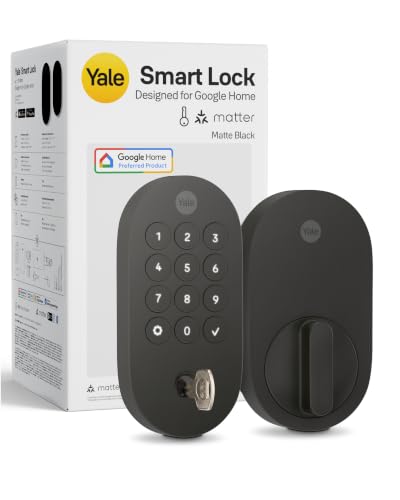
Yale Smart Deadbolt with Matter
Best for: Google Home and Matter smart setups
- Access Methods
- App, keypad, voice, key
- Connectivity
- Matter over Thread
- Smart Home Compatibility
- Google Home, Google Assistant
- Color
- Matte Black
- Dimensions
- 0.88 × 2.56 × 5.38 inches
- Weight
- 3 pounds
This Yale smart deadbolt connects via Matter over Thread to link with Google Home setups and other Matter-compatible devices. You can unlock it using the keypad, a tap on your phone, Google Assistant voice commands, or a physical backup key. Measuring 5.38 by 2.56 inches with BHMA Grade 2 certification, it operates between -22 and 140°F. It suits you if you run a Google Home system and need cross-platform Matter connectivity.
Pros
- Matter over Thread connectivity for cross-ecosystem smart home setups
- Four entry methods: keypad code, phone app tap, Google Assistant, or physical backup key
- BHMA Grade 2 certified security rating
- Operating temperature rating spanning -22°F to 140°F
Cons
- Remote access requires a separate Matter hub
- Google Home and Yale Access app tracking limited to the US and Canada
Good fit if
- You use Google Home hardware like Nest Hub or Google TV to control your devices.
- You already have a Matter hub and want Matter over Thread connectivity.
- You want physical key and keypad options alongside digital unlocking.
Skip if
- You live outside the United States and Canada.
- You do not own a compatible Matter hub for remote access.
Verdict: Yale Smart Deadbolt with Matter gives you flexible entry options and reliable Thread connectivity for Google Home and Matter environments. It delivers certified BHMA Grade 2 security with physical key backup.

Yale Extended Range Wi-Fi Fingerprint Deadbolt
Best for: homes needing biometric entry and dual-band Wi-Fi
- Access Methods
- fingerprint, keypad, app, backup key
- Connectivity
- 2.4 GHz, 5 GHz Wi-Fi
- User Code Capacity
- unlimited
- Power Source
- Battery Powered
- Color
- Black
- Dimensions
- 0.88 × 2.5 × 4.88 inches
View on Amazon: Yale Extended Range Wi-Fi Fingerprint Deadbolt
This Yale smart deadbolt pairs biometric fingerprint access with an included Wi-Fi bridge supporting 2.4 and 5 GHz networks. You get multiple entry options, including a backlit keypad, a physical key cylinder, and smartphone auto-unlock. Built-in DoorSense monitors door closure to trigger auto-locking. With BHMA Grade 2 certification and an operating range of -22°F to 140°F, it gives you reliable exterior protection and extended battery management through its bridge.
Pros
- Fingerprint scanner, backlit keypad, app access, and physical key cylinder
- Includes a Wi-Fi bridge compatible with 2.4 and 5 GHz networks
- BHMA Grade 2 certified for commercial-grade durability
- Includes DoorSense sensor for door position detection and auto-locking
Cons
- Yale Access app features are limited to the US and Canada
- Requires plugging in a separate Wi-Fi bridge unit to connect
Good fit if
- You want fingerprint access alongside a backup physical key.
- You need a smart lock that supports both 2.4 GHz and 5 GHz Wi-Fi networks.
- You live in an area with extreme temperatures between -22°F and 140°F.
Skip if
- You live outside the US or Canada where app functionality is unsupported.
- You prefer a fully built-in Wi-Fi radio without an external bridge.
Verdict: Yale Extended Range Wi-Fi Fingerprint Deadbolt delivers versatile entry methods, including fingerprint scanning and physical keys, backed by BHMA Grade 2 durability. Its separate Wi-Fi bridge preserves battery life while maintaining reliable dual-band connectivity.

Yale Assure Lock 2 Touch Key-Free Deadbolt
Best for: keyless fingerprint entry and compact hardware
- Access Methods
- Fingerprint, keypad, app
- Connectivity
- Bluetooth
- Installation Type
- Full deadbolt replacement
- User Code Capacity
- Unlimited
- Color
- Satin Nickel
- Dimensions
- 0.9 × 2.5 × 3.75 inches
This Yale Assure Lock 2 Touch is a key-free smart deadbolt using Bluetooth for access. It measures 2.5 inches wide by 3.75 inches high and mounts on standard doors with a screwdriver. You get biometric access with under 0.5-second recognition, a touchscreen keypad for entry codes, and hands-free Bluetooth auto-unlocking. It suits you if you want fast fingerprint entry and simple app management without carrying physical keys.
Pros
- Fingerprint sensor unlocks in under 0.5 seconds
- Hands-free auto-unlock via Bluetooth upon approach
- Compact exterior depth of 0.9 inches
- Installs on standard doors using a screwdriver
Cons
- Configured for Bluetooth connection rather than integrated Wi-Fi
- Key-free design provides no physical keyway backup
Good fit if
- You want keyless entry using a fingerprint scanner or numeric codes.
- You prefer automatic hands-free unlocking as you walk up to your door.
Skip if
- You require a traditional physical key cylinder for manual backup entry.
- You want built-in Wi-Fi connectivity straight out of the box.
Verdict: Yale Assure Lock 2 Touch Key-Free Deadbolt delivers rapid biometric access and Bluetooth convenience in a compact 0.9-inch profile. It is a capable choice if you want to eliminate physical keys completely.

Yale Google Nest x Yale Keyless Deadbolt
Best for: Google Assistant users wanting keyless front entry
- Access Methods
- Keypad, app, passcode
- Installation Type
- Deadbolt replacement
- Smart Home Compatibility
- Google Assistant
- Color
- Satin Nickel
- Application
- Front Door
- Dimensions
- 4.5 × 2.59 × 0.8 inches
This deadbolt replaces your existing lock with a key-free LED keypad and remote access via the Nest app. You can unlock your front door from anywhere, assign scheduled passcodes, and monitor status. Built-in sensors alert you to tampering attempts, while Privacy Mode lets you disable the keypad completely. It suits Google Assistant households wanting front door security without physical keys.
Pros
- Remote locking and unlocking through the Nest app
- Tamper-detection alerts sent to your phone
- Privacy Mode disables keypad entry on demand
- One-touch locking and scheduled auto-lock settings
Cons
- No physical key cylinder for manual backup
- Smart home compatibility limited to Google Assistant
Good fit if
- You use Google Assistant or the Nest app to manage smart devices.
- You want keyless PIN entry with scheduling and tamper alerts.
Skip if
- You require a physical key cylinder as a backup option.
- You need integration with Apple HomeKit or Z-Wave networks.
Verdict: Nest x Yale Keypad Smart Deadbolt provides scheduled passcodes and remote control through Google Assistant and the Nest app. It replaces standard deadbolts with key-free entry and built-in tamper detection.

Yale Bluetooth Keypad Smart Deadbolt
Best for: Local keyless security with optional module upgrades
- Access Methods
- Auto-unlock, keypad, app, Apple Watch
- Connectivity
- Bluetooth
- User Code Capacity
- Unlimited
- Material
- Brass
- Dimensions
- 0.88 × 2.6 × 3.75 inches
This deadbolt pairs a push-button keypad with local Bluetooth connectivity. You unlock it via keypad code, the smartphone app, an Apple Watch, or auto-unlock upon arrival. The unit carries BHMA Grade 2 certification, handles temperatures from -22°F to 140°F, and includes DoorSense for door-position monitoring. It suits you if you want dependable local access without relying on cloud servers, with the option to add Wi-Fi or Z-Wave modules later.
Pros
- BHMA Grade 2 certified durability
- Operating temperature rating from -22°F to 140°F
- Included DoorSense detects door closure
- Supports optional add-on Wi-Fi and Z-Wave modules
Cons
- Remote access requires purchasing a separate network module
- No physical keyway for traditional mechanical backup
Good fit if
- You prefer local Bluetooth and keypad access without mandatory network connections.
- You require a lock certified for temperatures down to -22°F.
Skip if
- You need remote access out of the box without buying extra hardware.
- You require a traditional keyed cylinder as a backup entry method.
Verdict: Yale Bluetooth Keypad Smart Deadbolt delivers Grade 2 local access control with DoorSense tracking. It serves homeowners who prioritize local Bluetooth connectivity and want the choice to upgrade networking hardware later.

Yale Z-Wave Fingerprint Keypad Deadbolt
Best for: Z-Wave smart home setups needing fingerprint access
- Access Methods
- Fingerprint, keypad, app
- Connectivity
- Z-Wave
- Smart Home Compatibility
- Samsung SmartThings, Hubitat
- User Code Capacity
- Unlimited
- Color
- Black
- Dimensions
- 0.9 × 2.5 × 3.75 inches
This Yale deadbolt is a smart lock featuring biometric fingerprint access, a backlit keypad, and a physical keyway. It runs on a low-frequency Z-Wave mesh network, connecting directly to hubs like Hubitat and Samsung SmartThings. You also get an included DoorSense module for auto-locking and door status checks, backed by BHMA Grade 2 certification. It suits you if you maintain an existing Z-Wave smart home system and want fast keyless entry without Wi-Fi battery drain.
Pros
- Biometric fingerprint scanner, backlit keypad, and physical key entry methods
- Low-frequency Z-Wave mesh networking for hubs like SmartThings and Hubitat
- BHMA Grade 2 certified deadbolt construction
- DoorSense sensor included for door-state verification and auto-locking
Cons
- Requires a separate compatible Z-Wave hub and app to operate
- Supported for use in the US and Canada only
Good fit if
- You use a compatible Z-Wave smart hub such as Samsung SmartThings or Hubitat.
- You want fingerprint access combined with a physical key backup.
- You want a BHMA Grade 2 certified lock that avoids Wi-Fi power draw.
Skip if
- You do not own or plan to install a compatible Z-Wave hub.
- You live outside the United States or Canada.
Verdict: Yale Z-Wave Fingerprint Keypad Deadbolt delivers versatile entry options and BHMA Grade 2 certified security for your door. It integrates seamlessly into an existing Z-Wave hub ecosystem for reliable automation.
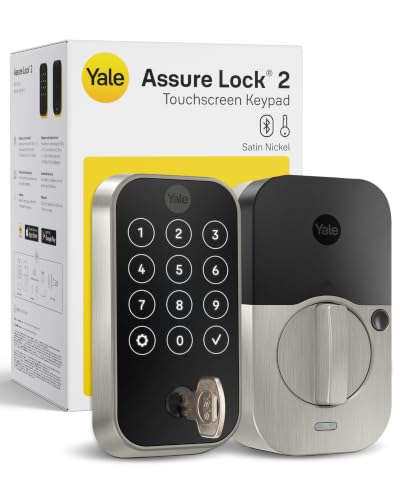
Yale Keypad Deadbolt with Bluetooth
Best for: keypad access with physical key backup
- Access Methods
- Auto-unlock, keypad, app, key
- Connectivity
- Bluetooth
- User Code Capacity
- Unlimited
- Color
- Satin Nickel
- Dimensions
- 0.88 × 2.5 × 3.75 inches
- Weight
- 4.23 pounds
This Yale deadbolt pairs a touchscreen keypad with local Bluetooth connectivity and a physical backup key. Measuring 3.75 inches high and 2.5 inches wide, it features BHMA Grade 2 commercial certification and DoorSense door-position detection. You can program custom codes and set automated locking schedules through the Yale Access app. It suits you if you want secure keypad access and reliable local phone control without requiring immediate network connectivity.
Pros
- BHMA Grade 2 certified for commercial-grade durability
- Multiple entry methods via touchscreen keypad, Bluetooth, and physical key
- DoorSense sensor confirms door closure before auto-locking
- Operating temperature range from -22°F to 140°F
Cons
- Requires separate Wi-Fi or Z-Wave modules for remote network access
- No built-in fingerprint scanner listed
Good fit if
- You want a physical key backup alongside digital keypad entry.
- You prefer local Bluetooth operation without always-on Wi-Fi.
- You need an exterior deadbolt rated to withstand temperatures down to -22°F.
Skip if
- You require out-of-the-box remote access without buying extra modules.
- You prefer biometric or fingerprint unlocking.
Verdict: Yale Keypad Deadbolt with Bluetooth delivers Grade 2 durability, local phone control, and reliable physical key backup for everyday home access. It provides flexible entry options today while leaving room for modular network upgrades later.

Yale Assure Keypad Deadbolt with Z-Wave
Best for: Samsung SmartThings and Z-Wave smart home hubs
- Access Methods
- Keypad, key, app
- Connectivity
- Z-Wave
- Smart Home Compatibility
- Ring Alarm, Samsung SmartThings, Alexa
- Installation Type
- Full deadbolt replacement
- Color
- Satin Nickel
- Dimensions
- 5.5 × 5.5 × 10 inches
This Yale deadbolt pairs a backlit push-button keypad with a traditional keyed cylinder and Z-Wave connectivity. You can integrate it directly into existing smart home setups like Samsung SmartThings or Ring Alarm without needing a proprietary Yale app. It fits standard doors measuring 1-3/4 to 2-1/4 inches thick and includes two physical backup keys. It suits you if you already run a compatible Z-Wave hub.
Pros
- Integrates with Samsung SmartThings and Ring Alarm systems via Z-Wave
- Includes physical keyway and two physical backup keys
- Backlit keypad with one-touch locking and auto-relock capability
- Installs on standard doors 1-3/4 to 2-1/4 inches thick
Cons
- Requires a separate compatible Z-Wave hub for app and remote access
- Does not work with a standalone Yale mobile app
- Not compatible for use outside the U.S. or Canada
Good fit if
- You manage your smart home using a Samsung SmartThings or Ring Alarm hub.
- You want physical backup keys alongside keypad entry.
- You have a standard exterior door between 1-3/4 and 2-1/4 inches thick.
Skip if
- You do not own a separate compatible Z-Wave hub.
- You prefer using a native Yale mobile app for lock controls.
- You live outside the United States or Canada.
Verdict: Yale Assure Keypad Deadbolt with Z-Wave is a practical choice for Samsung SmartThings users wanting physical key backup and automated door locking. It relies completely on your external Z-Wave controller instead of a standalone brand app.

Yale Assure Lock 2 Plus Smart Deadbolt
Best for: Apple users wanting tap-to-unlock entry
- Access Methods
- Apple home keys, app, door codes
- Connectivity
- 2.4 GHz Wi-Fi
- Color
- Satin Nickel
- Dimensions
- 0.88 × 2.5 × 3.75 inches
The Yale Assure Lock 2 Plus Apple Home Keys Deadbolt is a smart deadbolt that adds Apple Wallet unlocking to your front door. You can tap to unlock using an iPhone or Apple Watch. It includes the DoorSense sensor for auto-locking and a plug-in 2.4 GHz Wi-Fi bridge for remote access. This suits you if you prioritize Apple Home entry without managing physical keys.
Pros
- Unlocks via Apple home keys using an iPhone or Apple Watch
- DoorSense sensor detects door closure and triggers auto-locking
- Includes Yale Connect Wi-Fi Bridge for remote app control
- Supports unique temporary access codes for guest check-ins
Cons
- Requires separate plug-in Wi-Fi bridge occupying an electrical outlet
- Home keys feature requires iPhone XS or newer and Apple Watch Series 4 or newer
- Only operates on 2.4 GHz Wi-Fi networks in the US and Canada
Good fit if
- You use an iPhone XS or Apple Watch Series 4 or newer.
- You want doors to lock automatically when closed using DoorSense.
- You need to provide temporary, scheduled check-in codes for guests.
Skip if
- You use an Android smartphone without Apple home keys support.
- You lack an available power outlet near the door for the Wi-Fi bridge.
- You live outside the United States or Canada.
Verdict: Yale Assure Lock 2 Plus Apple Home Keys Deadbolt delivers tap-to-unlock convenience via Apple Wallet alongside automated DoorSense security. It is a practical fit if you rely on Apple devices and need remote Wi-Fi management.

Yale Assure Lock 2 Key-Free Z-Wave Deadbolt
Best for: Z-Wave systems needing oil rubbed bronze hardware
- Access Methods
- Keypad, Auto-Unlock, Yale Access app
- Connectivity
- Z-Wave
- Smart Home Compatibility
- Samsung SmartThings, Ring Alarm, Wink
- User Code Capacity
- Unlimited
- Color
- Oil Rubbed Bronze
- Dimensions
- 2.5 × 3.7 × 2.3 inches
This Yale deadbolt pairs a push-button keypad with integrated Z-Wave connectivity, finished in oil rubbed bronze. You can operate the lock through your phone, Apple Watch, or keypad entry codes. It integrates with compatible Z-Wave hubs like SmartThings or Ring Alarm for remote access. DoorSense technology automates locking when your door closes. This model suits you if you want key-free smart access managed through a dedicated smart home network.
Pros
- Z-Wave integration connects directly to compatible hubs and alarm systems
- DoorSense sensor enables automatic locking once the door closes
- Supports Auto-Unlock via smartphone or Apple Watch proximity
- Allows unlimited trackable access codes via the Yale Access App
Cons
- Requires a separate compatible Z-Wave hub for remote operation
- Key-free design lacks a traditional physical keyway backup
Good fit if
- You use a Z-Wave system such as SmartThings, Ring Alarm, or Alarm.com.
- You prefer a key-free exterior with keypad and phone unlock options.
- You want an oil rubbed bronze finish to match your exterior hardware.
Skip if
- You do not own and do not plan to set up a compatible Z-Wave hub.
- You need a physical keyway for traditional mechanical keys.
Verdict: Yale Assure Lock 2 Key-Free Z-Wave Deadbolt delivers reliable keyless access through keypad codes and mobile app control. Its Z-Wave connectivity makes it a direct fit for compatible smart home hubs.

Yale Assure Lock 2 Keyed Z-Wave Touchscreen Deadbolt
Best for: Z-Wave smart homes wanting physical key backup
- Access Methods
- Key, keypad, Auto-Unlock, app
- Connectivity
- Z-Wave
- Smart Home Compatibility
- Samsung SmartThings, Ring Alarm, Wink
- User Code Capacity
- Unlimited
- Color
- Satin Nickel
- Dimensions
- 2.6 × 4.9 × 2.5 inches
View on Amazon: Yale Assure Lock 2 Keyed Z-Wave Touchscreen Deadbolt
The Yale Assure Lock 2 Keyed Z-Wave Touchscreen Deadbolt integrates with compatible Z-Wave smart home hubs, including SmartThings and Ring Alarm. It features a touchscreen keypad, physical key access, and DoorSense for automatic locking. You can control entry with your smartphone, Apple Watch, or unique entry codes. This model suits you if you already run a Z-Wave network and want modern digital access without losing a traditional physical key backup.
Pros
- Supports Z-Wave smart home hubs and alarm systems
- Retains traditional physical key cylinder backup
- DoorSense sensor enables automatic locking
- Touchscreen keypad with unlimited shareable codes
Cons
- Requires a compatible Z-Wave hub for remote access
- Not operational outside the United States or Canada
- Does not include a fingerprint scanner
Good fit if
- You use a Z-Wave ecosystem like SmartThings or Ring Alarm.
- You want physical key backup alongside touchscreen entry.
- You want automatic locking driven by door-position sensing.
Skip if
- You live outside the United States or Canada.
- You lack a compatible Z-Wave smart home hub.
- You want biometric fingerprint access.
Verdict: Yale Assure Lock 2 Keyed Z-Wave Touchscreen Deadbolt links directly into established Z-Wave smart ecosystems while keeping physical key access intact. It delivers flexible touchscreen and app controls without abandoning standard door hardware security.

Yale Approach Retrofit Wi-Fi Smart Lock
Best for: remote access while keeping existing exterior deadbolts
- Access Methods
- App, key
- Installation Type
- Interior retrofit
- Connectivity
- Wi-Fi
- Color
- Black
- Dimensions
- 2.5 × 7.5 × 9.75 inches
The Yale Approach Retrofit Wi-Fi Smart Lock mounts onto the inside of your door without replacing your current exterior deadbolt. Included Yale Connect hardware enables 24/7 Wi-Fi app access, allowing you to lock, unlock, track door history, and share unlimited virtual keys remotely. You also retain your original physical keys for exterior access. This interior setup suits you if you want remote smart deadbolt control while maintaining your existing exterior hardware.
Pros
- Installs on door interior while keeping existing exterior deadbolt and physical keys
- Includes Yale Connect for Wi-Fi remote access and activity tracking
- Supports unlimited virtual key sharing through the Yale Access app
- Ships with four required AA batteries included
Cons
- Does not include an exterior keypad
- Offered only in black finish
Good fit if
- You want remote access without replacing your existing exterior deadbolt hardware
- You need to distribute unlimited virtual keys via mobile app
- You prefer using your original physical keys as a manual backup
Skip if
- You want an exterior keypad directly included out of the box
- You require lock finish options other than black
Verdict: Yale Approach Retrofit Wi-Fi Smart Lock adds remote access, activity tracking, and virtual keys while keeping your existing exterior deadbolt intact. It gives you app-based control over your entryway without forcing a full lock replacement.
Specifications side by side
| Spec | Yale Extended Range Wi-Fi Smart Deadbolt | Yale August Wi-Fi Smart Lock with Keypad Touch | Yale Assure Lock 2 Touchscreen Bluetooth Deadbolt | Yale Smart Deadbolt with Matter | Yale Extended Range Wi-Fi Fingerprint Deadbolt | Yale Assure Lock 2 Touch Key-Free Deadbolt | Yale Google Nest x Yale Keyless Deadbolt | Yale Bluetooth Keypad Smart Deadbolt | Yale Z-Wave Fingerprint Keypad Deadbolt | Yale Keypad Deadbolt with Bluetooth | Yale Assure Keypad Deadbolt with Z-Wave | Yale Assure Lock 2 Plus Smart Deadbolt | Yale Assure Lock 2 Key-Free Z-Wave Deadbolt | Yale Assure Lock 2 Keyed Z-Wave Touchscreen Deadbolt | Yale Approach Retrofit Wi-Fi Smart Lock |
|---|---|---|---|---|---|---|---|---|---|---|---|---|---|---|---|
| Access Methods | Keypad, app, key, auto-unlock | Fingerprint, keypad, app, key | Keypad, app | App, keypad, voice, key | fingerprint, keypad, app, backup key | Fingerprint, keypad, app | Keypad, app, passcode | Auto-unlock, keypad, app, Apple Watch | Fingerprint, keypad, app | Auto-unlock, keypad, app, key | Keypad, key, app | Apple home keys, app, door codes | Keypad, Auto-Unlock, Yale Access app | Key, keypad, Auto-Unlock, app | App, key |
| Connectivity | 2.4 or 5 GHz Wi-Fi | Built-in Wi-Fi, Bluetooth | Bluetooth | Matter over Thread | 2.4 GHz, 5 GHz Wi-Fi | Bluetooth | not specified | Bluetooth | Z-Wave | Bluetooth | Z-Wave | 2.4 GHz Wi-Fi | Z-Wave | Z-Wave | not specified |
| Smart Home Compatibility | not specified | not specified | not specified | Google Home, Google Assistant | not specified | not specified | not specified | not specified | Samsung SmartThings, Hubitat | not specified | Ring Alarm, Samsung SmartThings, Alexa | not specified | Samsung SmartThings, Ring Alarm, Wink | Samsung SmartThings, Ring Alarm, Wink | not specified |
| Installation Type | not specified | not specified | Deadbolt replacement | not specified | not specified | Full deadbolt replacement | Deadbolt replacement | not specified | not specified | not specified | Full deadbolt replacement | not specified | not specified | not specified | Interior retrofit |
| User Code Capacity | not specified | not specified | not specified | not specified | unlimited | Unlimited | not specified | Unlimited | Unlimited | Unlimited | not specified | not specified | Unlimited | Unlimited | not specified |
| Power Source | not specified | not specified | not specified | not specified | Battery Powered | not specified | not specified | not specified | not specified | not specified | not specified | not specified | not specified | not specified | not specified |
| Access Method | not specified | Keypad, Fingerprint | Touchscreen | not specified | Fingerprint | Keypad, Fingerprint, Key | Keypad | Keypad | Keypad, Fingerprint, Key | Keypad | Keypad, Key | not specified | Keypad, Key | Keypad, Touchscreen | Keypad, Remote Control |
| Color | Satin Nickel | Silver | Lifetime Brass | Matte Black | Black | Satin Nickel | Satin Nickel | Lifetime Brass | Black | Satin Nickel | Satin Nickel | Satin Nickel | Oil Rubbed Bronze | Satin Nickel | Black |
| Application | not specified | not specified | not specified | not specified | not specified | not specified | Front Door | not specified | not specified | not specified | not specified | Home | not specified | not specified | not specified |
| Material | not specified | not specified | Brass | not specified | not specified | not specified | not specified | Brass | not specified | not specified | not specified | not specified | not specified | not specified | not specified |
| Dimensions | 0.88 × 2.5 × 4.88 inches | 0.8 × 2.72 × 4.84 inches | 0.88 × 2.6 × 3.75 inches | 0.88 × 2.56 × 5.38 inches | 0.88 × 2.5 × 4.88 inches | 0.9 × 2.5 × 3.75 inches | 4.5 × 2.59 × 0.8 inches | 0.88 × 2.6 × 3.75 inches | 0.9 × 2.5 × 3.75 inches | 0.88 × 2.5 × 3.75 inches | 5.5 × 5.5 × 10 inches | 0.88 × 2.5 × 3.75 inches | 2.5 × 3.7 × 2.3 inches | 2.6 × 4.9 × 2.5 inches | 2.5 × 7.5 × 9.75 inches |
| Weight | not specified | 2.18 pounds | not specified | 3 pounds | not specified | not specified | 4 pounds | not specified | not specified | 4.23 pounds | 1 pounds | not specified | not specified | not specified | not specified |
| Size | Wi-Fi (Extended Range) | not specified | Bluetooth | 5.38 x 2.56 inch (Pack of 1) | Wi-Fi (Extended Battery Life) | Bluetooth | 7.03 x 2.78 Inch | Bluetooth | Keypad | Bluetooth | Keypad | Wi-Fi | Key-Free | Keyed | (Pack of 1) |
| Model | YRD410-CB1-619 | AUG-SL05 | YRD450-BLE-P05 | YRD510-MT1-BLK | YRD420-F-CB1-BSP | YRD430-F-BLE-619 | RB-YRD540-WV-619 | YRD430-BLE-P05 | YRD430-F-ZW3-BSP | YRD420-BLE-619 | YRD216-ZW2-619 | YRD450-N-CB1-619 | YRD430-ZW2-0BP | YRD420-ZW2-619 | YRR10-WF1-BSP |
Comparing the Yale Deadbolt Lineup
Yale structures its deadbolts around smart home connectivity and installation type. If you run an integrated hub setup, the Yale Smart Deadbolt with Matter pairs over Thread, while the Yale Assure Keypad Deadbolt with Z-Wave links to platforms like Samsung SmartThings. For standalone setups without a hub, the Yale Extended Range Wi-Fi Smart Deadbolt uses a Wi-Fi bridge for dual-band app monitoring.
Access methods separate the remaining models to suit different security preferences. Yale provides options spanning touchscreens, push-button keypads, biometric scanners, and physical key cylinders. If you want fingerprint unlocking while preserving your original keys and exterior hardware, retrofit devices like the Yale August Wi-Fi Smart Lock with Keypad Touch fit that requirement.
Where the Yale Lineup Fits
Yale suits you if you want deadbolt hardware across varied dimensions and finishes. Hardware sizes span from compact bodies measuring 3.75 inches tall and 0.88 inches deep to larger assemblies reaching 10 inches in height. Available finishes include Satin Nickel, Lifetime Brass, Matte Black, Black Suede, and Oil Rubbed Bronze. Entry options cover physical keys, push-button keypads, touchscreens, and fingerprint readers.
Gaps remain across the catalog. None of the 15 listed models integrate built-in cameras, and the selection does not include integrated door handles or hardwired power connections.
If you are outfitting a home office alongside your entryway hardware, our comparison of the best green gaming chairs details dimensions and weight capacities.
Choosing the Right Yale Smart Deadbolt
-
Select Your Access Method
Check how you plan to unlock the door daily. If you want instant entry without remembering codes or carrying keys, pick a model with an integrated fingerprint scanner. Look for hardware like the Yale Extended Range Wi-Fi Fingerprint Deadbolt that combines biometric scanning with PIN access. Biometric scanners read your print directly at the lock face, eliminating physical key management for your household. If multiple family members enter at different times, fingerprint recognition offers fast verification without sharing keypad credentials.
-
Evaluate Lock Replacement Type
Decide whether you want to replace your entire door lock or retain your existing exterior hardware. Retrofit models install only on the inside of the door, keeping your exterior deadbolt and original physical keys functional. If you rent or must match specific building exterior guidelines, examine the Yale Approach Retrofit Wi-Fi Smart Lock. Full replacement deadbolts replace both exterior and interior components with new keypad or touchscreen escutcheons, which provides a uniform hardware look across the entire entryway.
-
Check Wi-Fi Bridge Architecture
Review how the lock connects to your home network for remote management. Built-in Wi-Fi communicates directly with your router but can drain internal deadbolt batteries more quickly. Certain configurations, such as the Yale Extended Range Wi-Fi Smart Deadbolt, utilize an external bridge to manage dual-band Wi-Fi communication. Offloading the wireless transmission to a dedicated plug-in module conserves battery life inside the door hardware while sustaining stable remote access, lock status checks, and activity log tracking from your phone.
-
Match Platform Ecosystem Support
Confirm ecosystem support if you rely on specific mobile platforms. Standard smart deadbolts require manual app launching, numeric code entry, or fingerprint contact to disengage the bolt. If you want contactless tap-to-unlock functionality through Apple Wallet, check for dedicated platform protocols. The Yale Assure Lock 2 Plus Smart Deadbolt supports tap-to-unlock via Apple Home Keys using your compatible iPhone or Apple Watch. This setup allows you to unlock the door by holding your device near the reader without typing codes.
-
Weigh Keyway Backup Options
Determine whether you require a mechanical keyway backup on the lock exterior. Key-free models remove the physical cylinder entirely, eliminating lock-picking vulnerabilities and key duplication concerns. Hardware like the Yale Assure Lock 2 Touchscreen Bluetooth Deadbolt relies strictly on digital credentials, meaning you never carry or lose physical brass keys. If you worry about battery depletion or prefer traditional mechanical options for peace of mind, choose a deadbolt featuring a keyed cylinder alongside the keypad.
-
Select Network Protocol Standards
Examine your smart home network protocols before choosing a connectivity specification. Standalone Bluetooth deadbolts operate strictly when your smartphone is within local range, which keeps setup simple without extra networking equipment. Conversely, models like the Yale Assure Keypad Deadbolt with Z-Wave require a dedicated controller or smart home hub. Choosing a Z-Wave lock lets you tie door lock events directly into established home automation routines, coordinating deadbolt engagement with security sensors, lighting scenes, and multi-device hub schedules.
Frequently asked questions
Can you install a Yale smart lock without replacing your existing exterior deadbolt?
Yes, retrofit models install over your existing interior thumbturn. The Yale August Wi-Fi Smart Lock with Keypad Touch upgrades your door while keeping your exterior hardware and original physical keys functional. Similarly, the Yale Approach Retrofit Wi-Fi Smart Lock mounts inside to deliver remote access and app-based control without forcing a full deadbolt replacement.
Why do some Yale Wi-Fi deadbolts include an external bridge?
External bridges handle network communication to preserve lock battery life. Models like the Yale Extended Range Wi-Fi Smart Deadbolt and the Yale Extended Range Wi-Fi Fingerprint Deadbolt use a separate bridge to maintain dual-band Wi-Fi connectivity. Offloading network traffic to the plug-in bridge prevents continuous wireless transmission from draining your deadbolt batteries prematurely.
How does Apple Home Keys access work on Yale smart deadbolts?
Apple Home Keys allows you to unlock your deadbolt using an iPhone or Apple Watch in Apple Wallet. The Yale Assure Lock 2 Plus Smart Deadbolt includes this tap-to-unlock feature alongside automated DoorSense security. You hold your compatible Apple device near the lock reader to retract the bolt, and the integrated Wi-Fi supports remote management.
What does the DoorSense feature do on Yale deadbolts?
DoorSense monitors whether your entryway is open or closed before applying the motorized deadbolt. Found on hardware such as the Yale Assure Lock 2 Touchscreen Bluetooth Deadbolt and the Yale Bluetooth Keypad Smart Deadbolt, it tracks door position to enable automated locking. This prevents the deadbolt from extending while the door stands ajar, protecting your door frame from strike damage.
Which Yale deadbolts connect with Google Assistant smart homes?
The Yale Google Nest x Yale Keyless Deadbolt connects directly with Google Assistant and the Nest app, offering scheduled passcodes and built-in tamper detection. If you prefer Matter-compatible ecosystems, the Yale Smart Deadbolt with Matter supports Google Assistant integrations over Thread networks. Both options let you monitor your entryway and automate lock controls inside Google smart home setups.
What security rating do Yale replacement deadbolts carry?
Several Yale deadbolts carry certified ANSI/BHMA Grade 2 hardware ratings. Models including the Yale Smart Deadbolt with Matter, Yale Assure Lock 2 Touchscreen Bluetooth Deadbolt, Yale Extended Range Wi-Fi Smart Deadbolt, and Yale Z-Wave Fingerprint Keypad Deadbolt meet this commercial standard. Grade 2 certification establishes verified physical resistance against forced entry and operational durability over extended duty cycles.
Can you manage Yale Bluetooth deadbolts remotely without network upgrades?
No, Yale Bluetooth deadbolts operate primarily within local radio range of your mobile phone. Hardware like the Yale Bluetooth Keypad Smart Deadbolt and Yale Assure Lock 2 Touchscreen Bluetooth Deadbolt manages access codes and DoorSense tracking nearby via Bluetooth. If you require off-site monitoring later, these modular deadbolts allow you to upgrade networking hardware when your requirements change.