Best Yale Black Deadbolts: 14 Spec-Based Picks
As an Amazon Associate we earn from qualifying purchases. Links on this page are affiliate links.
Finding the best yale black deadbolts comes down to matching wireless connectivity and hardware specs to your entryway. We compared 14 models using the specifications published on their listings.
The Yale Extended Range Wi-Fi Deadbolt leads the list because it combines built-in Wi-Fi and DoorSense monitoring with a BHMA Grade 2 rating and a physical backup key. This guide helps you choose the right locking mechanism, wireless protocol, and entry method for your door.
Quick picks
The best fit for you
- You need Wi-Fi control and physical key backup Yale Extended Range Wi-Fi Deadbolt It pairs dual-band Wi-Fi and a keypad with a physical backup key and Grade 2 rating.
- You want biometric fingerprint access with built-in Wi-Fi Yale Extended Range Wi-Fi Fingerprint Deadbolt It provides a built-in fingerprint reader alongside dual-band Wi-Fi and commercial-grade construction.
- You use a Z-Wave network and want biometrics Yale Z-Wave Fingerprint Keypad Deadbolt It pairs local Z-Wave connectivity with a fingerprint reader and BHMA Grade 2 hardware.
- You want smart app access without exterior changes Yale Approach Retrofit Wi-Fi Smart Lock This retrofit lock adds Wi-Fi connectivity while leaving your existing exterior deadbolt in place.
Our 14 picks

Yale Extended Range Wi-Fi Deadbolt
Best for: homes needing Wi-Fi and physical key backup
- Color
- Black (what this guide is about)
- Access Methods
- Keypad, app, key, auto-unlock
- Connectivity
- 2.4 or 5 GHz Wi-Fi
- Dimensions
- 0.88 × 2.5 × 4.88 inches
This Yale deadbolt pairs a Black Suede finish with dual-band 2.4 and 5 GHz Wi-Fi via an included bridge. It gives you flexible entry options, combining a keypad, mobile app control, hands-free auto-unlock, and a traditional physical key backup. Measuring 4.88 inches tall with a BHMA Grade 2 commercial rating, it suits you if you want dependable remote access without sacrificing standard physical key entry.
Pros
- Dual-band 2.4 and 5 GHz Wi-Fi connectivity via included bridge
- Multiple entry methods: keypad, physical key, app, and auto-unlock
- BHMA Grade 2 certified for commercial durability
- Operating temperature range from -22°F to 140°F
- DoorSense sensor confirms door closure before auto-locking
Cons
- Requires an external plug-in Wi-Fi Bridge rather than built-in Wi-Fi
- Yale Access app control is limited to the US and Canada
- Does not include fingerprint biometric access
Good fit if
- You want dual-band 2.4 and 5 GHz Wi-Fi connectivity.
- You prefer having a physical key backup alongside digital keypad access.
- You live in an area with extreme temperatures between -22°F and 140°F.
Skip if
- You live outside the US or Canada where app features are unsupported.
- You want built-in fingerprint recognition.
- You prefer a lock with integrated Wi-Fi instead of an external bridge.
Verdict: Yale Extended Range Wi-Fi Deadbolt with Key delivers versatile access by pairing dual-band Wi-Fi and keypad convenience with a physical backup key. Its BHMA Grade 2 rating and DoorSense monitoring make it a reliable choice for remote management.

Yale Extended Range Wi-Fi Fingerprint Deadbolt
Best for: fingerprint entry with flexible dual-band Wi-Fi
- Color
- Black (what this guide is about)
- Access Methods
- fingerprint, keypad, app, backup key
- Connectivity
- 2.4 GHz, 5 GHz Wi-Fi
- User Code Capacity
- unlimited
- Power Source
- Battery Powered
- Dimensions
- 0.88 × 2.5 × 4.88 inches
View on Amazon: Yale Extended Range Wi-Fi Fingerprint Deadbolt
This Yale smart deadbolt in Black Suede combines dual-band 2.4 and 5 GHz Wi-Fi connectivity with fingerprint, keypad, app, and physical key access. It includes a Wi-Fi Bridge to handle your network link and extend battery life. Built with BHMA Grade 2 certification, it operates between -22°F and 140°F. If you want biometric entry and unlimited guest codes managed via your smartphone, this lock suits your front door.
Pros
- Supports fingerprint scanner, backlit keypad, app, and physical key access
- Connects to both 2.4 GHz and 5 GHz Wi-Fi via included bridge
- Supports unlimited user codes with custom scheduling
- BHMA Grade 2 certified with operating range from -22°F to 140°F
Cons
- Yale Access app works in the US and Canada only
- Requires an external Wi-Fi Bridge plugged into an outlet
Good fit if
- You want multiple entry methods including fingerprint recognition and a backup key.
- You need to distribute unlimited scheduled access codes to visitors.
- You connect smart home devices over a 5 GHz Wi-Fi network.
Skip if
- You reside outside the United States or Canada.
- You prefer an integrated Wi-Fi lock without a separate plug-in bridge.
Verdict: Yale Extended Range Wi-Fi Fingerprint Deadbolt delivers robust dual-band connectivity alongside versatile physical and digital access options. Its commercial-grade rating and unlimited code capacity make it a solid choice for busy households.

Yale Wi-Fi Deadbolt with Fingerprint and Keypad
Best for: direct Wi-Fi connectivity with biometric fingerprint access
- Color
- Black (what this guide is about)
- Access Methods
- Fingerprint, keypad, app
- Connectivity
- 2.4 or 5 GHz Wi-Fi
- User Code Capacity
- Unlimited
- Dimensions
- 0.9 × 2.5 × 3.75 inches
View on Amazon: Yale Wi-Fi Deadbolt with Fingerprint and Keypad
This black deadbolt pairs a built-in fingerprint scanner with a backlit keypad and integrated Wi-Fi. It connects directly to 2.4 GHz or 5 GHz networks without a bridge, letting you manage unlimited entry codes through the Yale Access app. Built with DoorSense and BHMA Grade 2 commercial certification, it suits you if you want direct remote access alongside biometric entry.
Pros
- Direct 2.4 GHz and 5 GHz Wi-Fi connectivity without an external hub
- Fingerprint reader alongside a backlit keypad and app controls
- Unlimited user code capacity with scheduling options
- BHMA Grade 2 certified with operating limits from -22°F to 140°F
- DoorSense sensor detects door closure for automated locking
Cons
- Yale Access app functionality is restricted to the US and Canada
- No Z-Wave support for hubs requiring mesh protocols
Good fit if
- You want direct dual-band Wi-Fi connection without adding an extra bridge.
- You prefer fingerprint and backlit keypad access on the exterior hardware.
- You need to assign and schedule unlimited entry codes for guests.
Skip if
- You reside outside the US or Canada where app support is excluded.
- You rely on a Z-Wave network for your home automation setup.
Verdict: Yale Wi-Fi Fingerprint Smart Deadbolt provides direct dual-band Wi-Fi connectivity and biometric entry in a Black Suede finish. It delivers versatile keyless access without requiring a dedicated hardware bridge.

Yale Assure Lock 2 Wi-Fi Keypad Deadbolt
Best for: remote guest access and keypad entry
- Color
- Black (what this guide is about)
- Access Methods
- Keypad, app
- Installation Type
- Deadbolt replacement
- Connectivity
- Wi-Fi
- Dimensions
- 0.6 × 2.6 × 3.75 inches
This smart deadbolt gives you keypad and mobile app access in a Black Suede finish. It includes a plug-in Wi-Fi bridge for remote control and uses DoorSense to lock automatically once your door shuts. Measuring 3.75 inches tall and 2.6 inches wide, it replaces standard entry door deadbolts using a screwdriver. It suits you if you want remote code management for visitors without adding extra smart home hub hardware.
Pros
- Includes Yale Connect Wi-Fi Bridge for remote app control
- DoorSense sensor enables automatic locking after closing
- Replaces standard deadbolts with basic screwdriver installation
- Supports unique scheduled entry codes for guests
Cons
- Requires a wall outlet for the included Wi-Fi bridge
- No physical keyway or fingerprint scanner listed
- Restricted to use in the United States and Canada
Good fit if
- You want keypad and app access with bundled Wi-Fi hardware.
- You manage guest access and need shareable temporary codes.
- You want automatic door locking via an integrated sensor.
Skip if
- You require a physical backup keyway or fingerprint unlocking.
- You live outside the United States or Canada.
- You do not want an external plug-in bridge occupying an outlet.
Verdict: Yale Assure Lock 2 Wi-Fi Keypad Deadbolt provides reliable keypad and remote access via an included Wi-Fi bridge. Its compact footprint and DoorSense auto-locking make it a straightforward deadbolt upgrade.

Yale Assure Lock 2 Touch Plus Wi-Fi Deadbolt
Best for: Apple home keys and Apple Wallet users
- Color
- Black (what this guide is about)
- Access Methods
- Apple home keys, app, door codes
- Connectivity
- 2.4 GHz Wi-Fi
- Dimensions
- 0.88 × 2.5 × 3.75 inches
View on Amazon: Yale Assure Lock 2 Touch Plus Wi-Fi Deadbolt
This Yale deadbolt pairs a Black Suede finish with native Apple home keys support and included Wi-Fi connectivity. You can unlock your door by tapping an iPhone or Apple Watch via the Apple Wallet app, entering a code, or using the Yale Access app. It includes DoorSense for automatic locking and connects to 2.4 GHz Wi-Fi networks through a plug-in bridge. It suits you if you prioritize Apple ecosystem integration.
Pros
- Supports Apple home keys via iPhone and Apple Watch
- Includes Yale Connect Wi-Fi Bridge for remote management
- DoorSense technology detects closure and locks automatically
- Allows sharing temporary guest access codes in the app
Cons
- Requires a separate plug-in bridge for Wi-Fi connectivity
- Works exclusively on 2.4 GHz Wi-Fi networks
- Full feature set requires specific Apple hardware like iPhone XS or newer
Good fit if
- You use an iPhone XS or Apple Watch Series 4 or newer
- You want to unlock your door via Apple Wallet home keys or keypad codes
- You have an open power outlet near your door for the bridge
Skip if
- You rely solely on Android devices and cannot use Apple home keys
- You prefer built-in Wi-Fi hardware over an external plug-in module
Verdict: Yale Assure Lock 2 Touch Plus Wi-Fi Deadbolt delivers Apple home keys entry and automated DoorSense locking in a Black Suede design. The included 2.4 GHz bridge handles remote connectivity through standard household outlets.

Yale Z-Wave Fingerprint Keypad Deadbolt
Best for: Z-Wave smart homes wanting fingerprint access
- Color
- Black (what this guide is about)
- Access Methods
- Fingerprint, keypad, app
- Connectivity
- Z-Wave
- Smart Home Compatibility
- Samsung SmartThings, Hubitat
- User Code Capacity
- Unlimited
- Dimensions
- 0.9 × 2.5 × 3.75 inches
This Yale deadbolt pairs a backlit keypad and biometric fingerprint scanner with Z-Wave connectivity in a Black Suede finish. It integrates directly with hubs like Samsung SmartThings and Hubitat, offering DoorSense status monitoring and BHMA Grade 2 certified hardware. You can store unlimited access codes and manage entries remotely through your hub's app. It suits you if you already run a Z-Wave smart home and want fast biometric unlocking.
Pros
- Built-in fingerprint reader and backlit keypad for keyless access
- Z-Wave mesh connectivity integrates with Samsung SmartThings and Hubitat
- BHMA Grade 2 certified deadbolt construction
- DoorSense sensor detects whether the door is open or closed
- Supports unlimited user access codes
Cons
- Requires a separate compatible Z-Wave hub for app controls
- Operates only within the US and Canada
Good fit if
- You use a Samsung SmartThings or Hubitat Z-Wave ecosystem.
- You want fingerprint unlocking alongside a backlit numeric keypad.
- You need to assign and schedule unlimited entry codes.
Skip if
- You do not have a compatible Z-Wave hub.
- You live outside the US and Canada.
Verdict: Yale Z-Wave Fingerprint and Keypad Deadbolt provides BHMA Grade 2 security and multi-method access for Z-Wave smart homes. It gives you reliable local mesh connectivity and automated door sensing without the higher battery draw of Wi-Fi.

Yale Assure Lock 2 Key-Free Z-Wave Deadbolt
Best for: Z-Wave smart home setups needing keyless access
- Color
- Black (what this guide is about)
- Access Methods
- Keypad, Auto-Unlock, Yale Access app
- Connectivity
- Z-Wave
- Smart Home Compatibility
- Samsung SmartThings, Ring Alarm, Wink
- User Code Capacity
- Unlimited
- Dimensions
- 2.5 × 3.7 × 2.3 inches
The Yale Assure Lock 2 Key-Free Z-Wave Deadbolt gives you smart keypad access in a black suede finish. It uses Z-Wave to integrate with compatible hubs like Samsung SmartThings and Ring Alarm. You can unlock your door using entry codes, Auto-Unlock, or the Yale Access app. DoorSense provides automatic locking once closed. This deadbolt suits you if you already run a Z-Wave network and want keyless entry.
Pros
- Integrates with Z-Wave hubs including Samsung SmartThings, Ring Alarm, and Wink
- Unlimited user entry codes shareable via the Yale Access app
- DoorSense sensor enables automatic locking after the door closes
- Multiple entry methods via keypad, Auto-Unlock, and smartphone app
Cons
- Requires a compatible Z-Wave hub for remote access and smart integrations
- Key-free design lacks a traditional physical key cylinder backup
- Not operational outside of the United States or Canada
Good fit if
- You use an existing Z-Wave hub like Ring Alarm or Samsung SmartThings.
- You want keyless entry without carrying physical keys.
- You need to provide and track unlimited entry codes for visitors.
Skip if
- You prefer a physical keyhole for backup access.
- You live outside the United States or Canada.
- You do not have a compatible Z-Wave smart home hub.
Verdict: Yale Assure Lock 2 Key-Free Z-Wave Deadbolt integrates seamlessly into Z-Wave smart homes while removing the need for physical keys. It provides reliable automated locking and app-controlled code sharing through a compatible hub.

Yale Assure Touchscreen Z-Wave Deadbolt
Best for: Z-Wave smart home systems needing keyed backup
- Color
- Black (what this guide is about)
- Access Methods
- Keypad, Key, App (via hub)
- Connectivity
- Z-Wave
- Installation Type
- Deadbolt replacement
- Included Door Hardware
- Deadbolt only
- Dimensions
- 5.5 × 5.5 × 10 inches
This Yale Assure deadbolt in Black Suede integrates directly into your existing Z-Wave network, pairing with hubs like SmartThings or Ring Alarm. It features a touchscreen keypad, two physical backup keys, and an auto-lock function. With BHMA Grade 2 certification, it fits doors 1-3/4 to 2-1/4 inches thick, giving you hub-managed access without running a standalone Yale app.
Pros
- BHMA Grade 2 certified motorized deadbolt
- Integrates with Z-Wave systems like Samsung SmartThings and Ring Alarm
- Includes two physical backup keys alongside touchscreen entry
- Automatic locking feature with optional manual disable
Cons
- Requires a separate Z-Wave hub and does not use a native Yale app
- Doors under 1-3/8 inches thick require an additional thin door kit
Good fit if
- You already manage your devices through a compatible Z-Wave smart home hub.
- You want a digital touchscreen keypad with physical backup keys included.
Skip if
- You want direct Wi-Fi or Bluetooth connectivity without buying extra hardware.
- You prefer using a standalone Yale mobile app to control your door.
Verdict: Yale Assure Touchscreen Z-Wave Deadbolt fits smart homes centered on a Z-Wave hub that require Grade 2 security with physical key backup. It provides reliable touchscreen locking without relying on home Wi-Fi.

Yale Keypad Bluetooth Smart Deadbolt
Best for: local smart control with physical key backup
- Color
- Black (what this guide is about)
- Access Methods
- Auto-unlock, keypad, app, key
- Connectivity
- Bluetooth
- User Code Capacity
- Unlimited
- Dimensions
- 0.88 × 2.5 × 3.75 inches
- Weight
- 4 pounds
This Yale deadbolt pairs a touchscreen keypad and physical key backup with local Bluetooth operation in a Black Suede finish. It offers BHMA Grade 2 certified security, DoorSense status monitoring, and support for unlimited user codes. Auto-unlock handles entry when you arrive home. This setup suits you if you want dependable local smart entry without built-in Wi-Fi overhead or network complexity.
Pros
- BHMA Grade 2 certified for commercial-grade durability
- Four access methods: auto-unlock, touchscreen keypad, app, and physical key
- Stores unlimited user codes via the Yale Access App
- DoorSense sensor confirms door is fully closed before engaging auto-lock
Cons
- Requires a separate Wi-Fi or Z-Wave module for remote operation outside Bluetooth range
- Lacks fingerprint access
Good fit if
- You want a traditional keyway backup alongside a digital keypad
- You prefer local Bluetooth operation without always-on network connections
- You need to distribute unlimited guest codes
Skip if
- You require out-of-the-box remote access without purchasing add-on modules
- You want integrated fingerprint scanning
Verdict: Yale Bluetooth Keypad Deadbolt with Key delivers solid Grade 2 entry security with local wireless control and a physical backup cylinder. It serves as an accessible foundation that you can later expand with modular network upgrades.
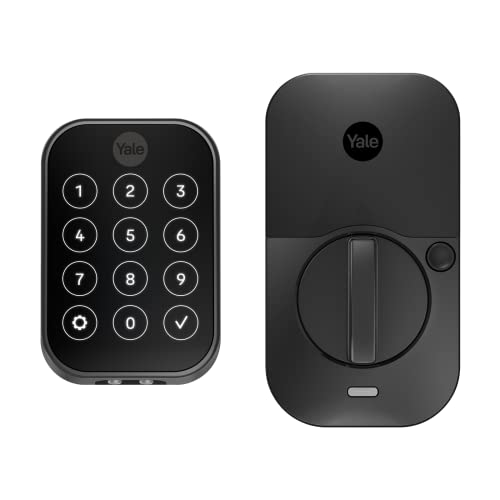
Yale Assure Lock 2 Key-Free Touchscreen Z-Wave Deadbolt
Best for: Z-Wave setups wanting key-free touchscreen entry
- Color
- Black (what this guide is about)
- Access Methods
- Keypad, Auto-Unlock, Yale Access app
- Connectivity
- Z-Wave
- Smart Home Compatibility
- Samsung SmartThings, Ring Alarm, Wink
- User Code Capacity
- Unlimited codes
- Dimensions
- 2.5 × 3.7 × 2.3 inches
View on Amazon: Yale Assure Lock 2 Key-Free Touchscreen Z-Wave Deadbolt
This deadbolt replaces your existing lock with a key-free touchscreen keypad in a Black Suede finish. It uses Z-Wave connectivity to pair directly with compatible hubs like Samsung SmartThings or Ring Alarm. You can unlock via touchscreen codes, the Yale Access app, or hands-free Auto-Unlock. Built-in DoorSense manages automatic locking when your door shuts. It suits you if you run a Z-Wave smart home system and prefer keypad or phone entry without physical keys.
Pros
- Integrates with Z-Wave hubs like Samsung SmartThings and Ring Alarm
- Supports unlimited user codes via the Yale Access app
- Features Auto-Unlock and DoorSense-driven Auto-Lock
- Touchscreen interface provides key-free door access
Cons
- Requires a compatible third-party Z-Wave hub and app
- Lacks a physical keyway for standard key entry
- Does not work outside of the U.S. or Canada
Good fit if
- You already operate a compatible Z-Wave smart home network.
- You want to issue unlimited guest codes through the app.
- You prefer completely key-free touchscreen and automated entry.
Skip if
- You want a physical key cylinder as a backup access method.
- You reside outside the U.S. or Canada.
- You do not own a compatible Z-Wave hub.
Verdict: Yale Assure Lock 2 Key-Free Z-Wave Deadbolt integrates cleanly into established Z-Wave smart home ecosystems. It gives you reliable keyless operation through digital codes, app controls, and automated proximity unlocking.

Yale Approach Retrofit Wi-Fi Smart Lock
Best for: remote app control without exterior lock changes
- Color
- Black (what this guide is about)
- Access Methods
- App, key
- Installation Type
- Interior retrofit
- Connectivity
- Wi-Fi
- Dimensions
- 2.5 × 7.5 × 9.75 inches
The Yale Approach is an interior retrofit smart lock finished in black. Unlike full replacement locks, it mounts strictly on the inside of your door and keeps your existing deadbolt and exterior hardware intact. It includes Wi-Fi connectivity via the Yale Connect bridge, allowing remote control and unlimited virtual key sharing through the Yale Access app. This unit suits you if you want remote app management without altering your outside door hardware.
Pros
- Installs on the interior side without replacing your exterior deadbolt
- Includes Yale Connect for Wi-Fi remote access
- Supports unlimited virtual keys via the Yale Access app
- Comes with four AA batteries included
Cons
- Lacks an exterior keypad in this configuration
- Does not include fingerprint access hardware
Good fit if
- You want to keep your current exterior hardware and physical keys.
- You need remote Wi-Fi locking and app activity tracking.
- You plan to distribute virtual keys to guests.
Skip if
- You want an exterior keypad for direct PIN entry.
- You prefer built-in biometric fingerprint scanning.
Verdict: Yale Approach Smart Wi-Fi Retrofit Deadbolt lets you add remote app access while preserving your exterior deadbolt. It gives you Wi-Fi control without changing the outside appearance of your entryway.

Yale Assure Lock 2 Keypad with Lever
Best for: push-button entry with matching lever hardware
- Color
- Black (what this guide is about)
- Access Methods
- Keypad, Yale Access app, Auto-Unlock
- Connectivity
- Bluetooth
- Included Door Hardware
- Passage lever
- Trigger Type
- Push Button
- Dimensions
- 0.88 × 2.5 × 4.88 inches
This Yale Assure Lock 2 combines a key-free push-button keypad deadbolt with a matching Valdosta passage lever in black. It operates via Bluetooth, letting you unlock with custom keypad codes, the Yale Access app on a phone or Apple Watch, or hands-free Auto-Unlock. With built-in Auto-Lock, your door secures itself automatically. It suits you if you want tactile buttons and an included passage lever.
Pros
- Includes matching Valdosta passage lever hardware
- Physical push-button keypad provides key-free entry
- Supports Bluetooth Auto-Unlock and Auto-Lock features
- Controls via Yale Access app on smartphone or Apple Watch
Cons
- Relies on Bluetooth without built-in Wi-Fi or Z-Wave
- No physical key cylinder for manual key backup
- No integrated fingerprint scanner
Good fit if
- You want physical push buttons rather than a touchscreen keypad.
- You need both a deadbolt and a matching passage lever together.
- You prefer unlocking via Bluetooth, custom codes, or an Apple Watch.
Skip if
- You require out-of-the-box Wi-Fi or Z-Wave connectivity.
- You want a traditional physical key backup.
- You prefer fingerprint biometric access.
Verdict: Yale Assure Lock 2 Push Button Deadbolt with Lever provides tactile keypad entry and bundled passage hardware for a complete door upgrade. Its Bluetooth connection manages automated locking and smartphone access without traditional keys.
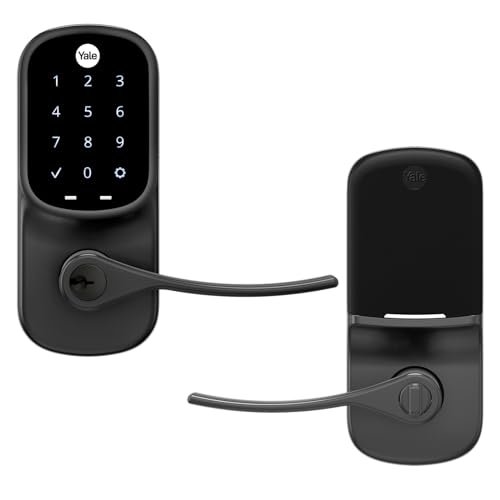
Yale Assure Touchscreen Wi-Fi Lever Lock
Best for: single-hole doors needing automated locking
- Color
- Black (what this guide is about)
- Access Methods
- Keypad
- Installation Type
- Lever or knob replacement
- Included Door Hardware
- Lever handle
- Connectivity
- Wi-Fi
- Special Features
- Auto Lock
The Yale Assure Keypad Lever Lock replaces existing door knobs or levers on doors with a single hole. Finished in Black Suede, this lock pairs a backlit touchscreen keypad with an integrated lever handle. Built-in Wi-Fi and an auto-lock feature secure the entrance automatically behind you. This model suits you if you want automated locking without installing or drilling for a separate deadbolt.
Pros
- Replaces standard knobs and levers on doors with a single hole and no deadbolt
- Auto-Lock feature ensures the door automatically locks behind you
- Backlit touchscreen keypad allows PIN code entry without physical keys
- Wi-Fi connectivity built in directly from the factory
Cons
- Designed only for single-hole doors without a separate deadbolt
- Does not include fingerprint access
Good fit if
- You have a single-hole door setup with no cutout for a standard deadbolt.
- You want an automatic locking function to secure the door whenever it closes.
- You prefer PIN code access using a backlit touchscreen keypad.
Skip if
- You need a standalone deadbolt to pair with a separate door handle.
- You require biometric fingerprint unlocking.
Verdict: Yale Assure Keypad Lever Lock delivers keyless entry and automatic locking for doors configured without a deadbolt. Its integrated handle, touchscreen keypad, and Wi-Fi capability make it a functional choice for single-hole door setups.

Yale Google Nest Keypad Deadbolt
Best for: Google Assistant smart home setups
- Color
- Black (what this guide is about)
- Access Methods
- Keypad, phone
- Installation Type
- Full deadbolt replacement
- Smart Home Compatibility
- Google Assistant
- Application
- Front Door
- Dimensions
- 4.59 × 2.59 × 0.8 inches
This full deadbolt replacement brings Google Assistant integration to your front door in a Black Suede finish. You can unlock the door using the keypad or remotely through your phone. The system lets you assign scheduled passcodes for guests and toggle Privacy Mode to disable keypad access. It suits you if you want full deadbolt control through Google Assistant.
Pros
- Native Google Assistant compatibility
- Dual unlocking through keypad and phone
- Privacy Mode disables keypad access when set
- Custom guest passcodes with scheduling
Cons
- No physical key backup
- No fingerprint sensor
Good fit if
- You use Google Assistant for your smart home setup.
- You want remote phone unlocking and scheduled guest codes.
- You prefer keyless entry with an optional keypad privacy lockout.
Skip if
- You require a traditional physical keyway for mechanical access.
- You prefer unlocking via a built-in fingerprint reader.
Verdict: Yale Google Nest Keypad Deadbolt provides native Google Assistant connectivity, scheduled passcodes, and phone control for full front door replacement.
Specifications side by side
| Spec | Yale Extended Range Wi-Fi Deadbolt | Yale Extended Range Wi-Fi Fingerprint Deadbolt | Yale Wi-Fi Deadbolt with Fingerprint and Keypad | Yale Assure Lock 2 Wi-Fi Keypad Deadbolt | Yale Assure Lock 2 Touch Plus Wi-Fi Deadbolt | Yale Z-Wave Fingerprint Keypad Deadbolt | Yale Assure Lock 2 Key-Free Z-Wave Deadbolt | Yale Assure Touchscreen Z-Wave Deadbolt | Yale Keypad Bluetooth Smart Deadbolt | Yale Assure Lock 2 Key-Free Touchscreen Z-Wave Deadbolt | Yale Approach Retrofit Wi-Fi Smart Lock | Yale Assure Lock 2 Keypad with Lever | Yale Assure Touchscreen Wi-Fi Lever Lock | Yale Google Nest Keypad Deadbolt |
|---|---|---|---|---|---|---|---|---|---|---|---|---|---|---|
| Access Methods | Keypad, app, key, auto-unlock | fingerprint, keypad, app, backup key | Fingerprint, keypad, app | Keypad, app | Apple home keys, app, door codes | Fingerprint, keypad, app | Keypad, Auto-Unlock, Yale Access app | Keypad, Key, App (via hub) | Auto-unlock, keypad, app, key | Keypad, Auto-Unlock, Yale Access app | App, key | Keypad, Yale Access app, Auto-Unlock | Keypad | Keypad, phone |
| Connectivity | 2.4 or 5 GHz Wi-Fi | 2.4 GHz, 5 GHz Wi-Fi | 2.4 or 5 GHz Wi-Fi | not specified | 2.4 GHz Wi-Fi | Z-Wave | Z-Wave | Z-Wave | Bluetooth | Z-Wave | not specified | Bluetooth | not specified | not specified |
| Smart Home Compatibility | not specified | not specified | not specified | not specified | not specified | Samsung SmartThings, Hubitat | Samsung SmartThings, Ring Alarm, Wink | not specified | not specified | Samsung SmartThings, Ring Alarm, Wink | not specified | not specified | not specified | not specified |
| Installation Type | not specified | not specified | not specified | Deadbolt replacement | not specified | not specified | not specified | Deadbolt replacement | not specified | not specified | Interior retrofit | not specified | Lever or knob replacement | Full deadbolt replacement |
| User Code Capacity | not specified | unlimited | Unlimited | not specified | not specified | Unlimited | Unlimited | not specified | Unlimited | Unlimited codes | not specified | not specified | not specified | not specified |
| Included Door Hardware | not specified | not specified | not specified | not specified | not specified | not specified | not specified | Deadbolt only | not specified | not specified | not specified | Passage lever | Lever handle | not specified |
| Power Source | not specified | Battery Powered | not specified | not specified | not specified | not specified | not specified | not specified | not specified | not specified | not specified | not specified | not specified | not specified |
| Access Method | not specified | Fingerprint | Keypad, Fingerprint, Key | Keypad | not specified | Keypad, Fingerprint, Key | Keypad, Key | Touchscreen, Key | Keypad | Keypad, Touchscreen, Key | Keypad, Remote Control | Keypad | Keypad, Touchscreen | Keypad |
| Color | Black | Black | Black | Black | Black | Black | Black | Black | Black | Black | Black | Black | Black | Black |
| Application | not specified | not specified | not specified | not specified | Home | not specified | not specified | not specified | not specified | not specified | not specified | not specified | not specified | Front Door |
| Included Hardware | not specified | not specified | not specified | not specified | not specified | not specified | not specified | not specified | not specified | not specified | not specified | Lever | Lever | not specified |
| Trigger Type | not specified | not specified | not specified | not specified | not specified | not specified | not specified | not specified | not specified | not specified | not specified | Push Button | not specified | not specified |
| Special Features | not specified | not specified | not specified | not specified | not specified | not specified | not specified | not specified | not specified | not specified | not specified | not specified | Auto Lock | not specified |
| Dimensions | 0.88 × 2.5 × 4.88 inches | 0.88 × 2.5 × 4.88 inches | 0.9 × 2.5 × 3.75 inches | 0.6 × 2.6 × 3.75 inches | 0.88 × 2.5 × 3.75 inches | 0.9 × 2.5 × 3.75 inches | 2.5 × 3.7 × 2.3 inches | 5.5 × 5.5 × 10 inches | 0.88 × 2.5 × 3.75 inches | 2.5 × 3.7 × 2.3 inches | 2.5 × 7.5 × 9.75 inches | 0.88 × 2.5 × 4.88 inches | 1.38 × 2.75 × 6.06 inches | 4.59 × 2.59 × 0.8 inches |
| Weight | not specified | not specified | not specified | not specified | not specified | not specified | not specified | 4.41 pounds | 4 pounds | not specified | not specified | 1 pounds | not specified | 4 pounds |
| Size | Wi-Fi (Extended Range) | Wi-Fi (Extended Battery Life) | Wi-Fi | not specified | Wi-Fi | Keypad | Key-Free | Touchscreen | Bluetooth | Key-Free | (Pack of 1) | Push Button | Touchscreen | not specified |
| Model | YRD410-CB1-BSP | YRD420-F-CB1-BSP | YRD430-F-WF1-BSP | YRD430-CB1-BSP | YRD450-N-CB1-BSP | YRD430-F-ZW3-BSP | YRD430-ZW2-BSP | YRD226-ZW2-BSP | YRD420-BLE-BSP | YRD450-ZW2-BSP | YRR10-WF1-BSP | B-YRD410-BLE-VL-BSP | YRL226-NR-BSP | RB-YRD540-WV-BSP |
If you want to coordinate hardware with bedroom textiles, our separate guide compares the best black comforters by fabric specifications.
How to Choose a Yale Black Deadbolt
-
Choose Retrofit or Full Replacement
Check your exterior hardware before buying. A full replacement deadbolt swaps the entire interior and exterior assembly. This works best if you want an all-black exterior keypad on your door. If you rent or want to keep your current exterior door key and exterior finish, choose a retrofit design. The Yale Approach Retrofit Wi-Fi Smart Lock replaces only the interior thumbturn assembly inside your home. This leaves your original outside cylinder intact while giving you motorized locking, digital codes, and wireless app controls.
-
Keyed Backup Versus Key-Free
Consider whether you want a physical keyway on the exterior escutcheon. Keyed deadbolts allow standard brass keys if internal batteries drain unexpectedly. Key-free models eliminate traditional cylinders entirely. Removing the physical keyway prevents mechanical lock picking and cylinder bumping attacks on your front entryway. For keyless setups, models provide external terminal contacts to jump-start the deadbolt using an emergency battery. The Yale Assure Lock 2 Key-Free Z-Wave Deadbolt uses this key-free profile, giving you a sleek Black Suede faceplate that relies solely on keypad codes or digital home automation triggers.
-
Touchscreen Versus Push-Button Keypad
Compare keypad interface styles according to your climate and daily usage preferences. Capacitive touchscreens create a flat, modern surface that activates when pressed, showing backlit numbers on demand. However, push-button models feature individual physical buttons with tactile travel. Physical buttons are easier to operate when you are wearing winter gloves or unlocking the door in direct sunlight without looking down. If you prefer tactile verification on every press, choose a push-button format like the Yale Assure Lock 2 Keypad with Lever, which includes defined physical buttons alongside matching passage hardware.
-
Check Door Bore Hole Configuration
Examine your door preparation before selecting hardware. Standard residential front doors often feature two separate holes: one for a deadbolt and one for an entry latch below. Other entryways or side doors have only a single bore hole. If your door has only a single hole, installing a standalone deadbolt requires drilling fresh cutouts. Instead, look at an all-in-one lever lock. The Yale Assure Touchscreen Wi-Fi Lever Lock consolidates latching and keyless security into a single unit, fitting single-bore doors directly without requiring additional holes or carpentry modifications.
-
Evaluate Standalone Bluetooth Functionality
Identify whether you require constant remote access away from home or simple local proximity control. Locks equipped purely with Bluetooth communicate directly with your smartphone within short wireless range. This local protocol extends battery performance significantly compared to active network adapters that ping continuous wireless signals. If you want direct phone unlocking, automatic proximity detection, and code administration without sending credentials over external home networks, Bluetooth is ideal. The Yale Keypad Bluetooth Smart Deadbolt provides this localized functionality while retaining the option to add network connectivity modules later if requirements change.
-
Match Smart Home Ecosystem Compatibility
Verify that the deadbolt natively supports your preferred smart home ecosystem before buying. Certain Yale models integrate tailored wireless protocols for specific platforms. For instance, some smart deadbolts connect directly with Apple ecosystems, while others coordinate with Google setups. Choosing hardware built around your preferred environment ensures reliable voice control and automated routines. The Yale Google Nest Keypad Deadbolt is built for Google Assistant smart homes, enabling scheduled passcodes, remote lock status checks, and integration with Nest app routines without needing third-party translation software.
Frequently asked questions
What black finish options does Yale offer on smart deadbolts?
Yale smart deadbolts in this lineup primarily come in a Black Suede finish, alongside standard Black. You can find Black Suede across models like the Yale Extended Range Wi-Fi Deadbolt and the Yale Assure SL Touchscreen Deadbolt. This dark finish provides a matte, uniform aesthetic for modern entryways. Other models, such as the Yale Approach Retrofit or Assure Lock 2 Lever, are listed under standard Black.
How do you unlock a Yale black deadbolt if the battery dies?
Your backup options depend on the exact lock model you choose. Units such as the Yale Extended Range Wi-Fi Deadbolt feature a physical key cylinder so you can unlock the door manually with a traditional key. Key-free units like the Yale Assure SL provide external emergency power terminals on the bottom of the keypad, allowing you to connect a standard nine-volt battery to power the keypad temporarily.
Which Yale black deadbolt supports Apple home keys?
The Yale Assure Lock 2 Touch Plus Wi-Fi Deadbolt supports Apple home keys and Apple Wallet. It allows you to tap an iPhone or Apple Watch to unlock your door. This model features a Black Suede finish, DoorSense automated locking technology, and includes a plug-in 2.4 GHz Wi-Fi bridge that connects to standard household electrical outlets for remote access management.
Can you install a Yale black smart lock on a door without a deadbolt hole?
Yes, you can install the Yale Assure Touchscreen Wi-Fi Lever Lock on doors with only a single bore hole. This unit combines a built-in lever handle, touchscreen keypad, and deadlocking latch into one integrated assembly. It connects directly via Wi-Fi and features automated locking, making it suitable for doors that lack separate deadbolt cutouts without requiring you to drill new door holes.
What is the operational difference between Bluetooth and Wi-Fi Yale deadbolts?
Bluetooth deadbolts, like the Yale Keypad Bluetooth Smart Deadbolt, provide direct local wireless communication with your phone while you are within close range. Wi-Fi deadbolts, such as the Yale Extended Range Wi-Fi Deadbolt, connect to your home network either directly or through an included bridge. This Wi-Fi connection enables remote monitoring and remote lock operation when you are away from the house.
Which Yale black deadbolts offer biometric fingerprint entry?
Biometric entry is available on several models, including the Yale Extended Range Wi-Fi Fingerprint Deadbolt, the Yale Wi-Fi Deadbolt with Fingerprint, and the Yale Z-Wave Fingerprint Keypad Deadbolt. These locks let you unlock the door with your fingerprint, a numeric PIN code, or a physical key. The Wi-Fi versions support dual-band networks, while the Z-Wave option integrates into compatible local mesh networks.
Does Yale make a black smart lock that works with Google Assistant?
Yes, the Yale Google Nest Keypad Deadbolt is built specifically for Google Assistant smart home integration. It replaces your existing deadbolt and provides front door phone control, keypad entry, and scheduled passcode functionality. Available in Black Suede, this lock measures 2.59 inches wide and 4.59 inches long, letting you monitor your entryway and operate the deadbolt directly through Google Assistant devices.