15 Best Deadbolts with Auto Lock, Compared
As an Amazon Associate we earn from qualifying purchases. Links on this page are affiliate links.
Finding the best deadbolts with auto lock gives you consistent security without remembering to turn a latch. Automatic locking secures your entryway if you leave your door unattended.
The Philips 4200 Fingerprint Deadbolt with Handle earns the top position because it pairs direct Wi-Fi connectivity with an included handle, keypad, and fingerprint access. We evaluated 15 models using only the specifications published on their official listings. This comparison helps you decide whether a standalone electronic deadbolt, a full handleset, or a connected smart model fits your entryway.
Quick picks
The best fit for you
- You want the most versatile auto-locking setup Philips 4200 Fingerprint Deadbolt with Handle It offers Wi-Fi connectivity, keypad, and fingerprint access in one package.
- You need customizable auto-lock timing intervals Kwikset Powerbolt 250 Keypad Deadbolt This model allows you to adjust the auto-lock intervals to suit your routine.
- You want a budget-friendly standalone auto-lock Amazon Basics Electronic Keypad Deadbolt It provides a 10-to-99-second auto-lock timer with simple keypad entry.
Our 15 picks

Philips 4200 Fingerprint Deadbolt with Handle
Best for: complete front door setups needing versatile auto-locking
- Special Features
- Auto Lock (what this guide is about)
- Access Methods
- Fingerprint, passcode, app, voice
- Connectivity
- 2.4 GHz Wi-Fi
- Smart Home Compatibility
- Alexa, Google Assistant
- Auto-Lock Delay
- 0–180 seconds
- Included Door Hardware
- Handle set
View on Amazon: Philips 4200 Fingerprint Deadbolt with Handle
The Philips 4200 Series Smart Deadbolt with Handle provides keyless access with an app-configurable auto-lock timer ranging from 0 to 180 seconds. Built-in 2.4 GHz Wi-Fi lets you monitor door status and adjust settings remotely without an extra hub. You also get a 0.3-second fingerprint scanner and an included matching exterior handle. It suits homeowners who want an automated deadbolt complete with exterior door hardware and multiple entry methods.
Pros
- Configurable auto-lock delay from 0 to 180 seconds via app
- Built-in 2.4 GHz Wi-Fi requires no separate bridge or hub
- Fast 0.3-second biometric fingerprint scanner
- Comes with a matching exterior handle set
Cons
- Requires eight AA alkaline batteries that are not included
- Fits doors up to 1-3/4 inches thick, excluding thicker custom doors
- Only connects to 2.4 GHz Wi-Fi networks
Good fit if
- You want an adjustable auto-lock timer that locks within 0 to 180 seconds.
- You need a deadbolt bundled with a matching handle set.
- You want remote app control and voice compatibility without an external hub.
Skip if
- You have an exterior door thicker than 1-3/4 inches.
- You only have a 5 GHz Wi-Fi network at home.
Verdict: Philips 4200 Series Smart Deadbolt with Handle delivers versatile auto-locking options and direct Wi-Fi connectivity in a complete hardware package. Its broad passcode options and rapid fingerprint sensor make it a dependable entry upgrade.

Kwikset Powerbolt 250 Keypad Deadbolt
Best for: Users wanting customizable auto-lock timing
- Special Features
- Auto Lock (what this guide is about)
- Access Methods
- Keypad, key
- Auto-Lock Delay
- 30 sec, 1 min, 3 min, 5 min, 10 min
- User Code Capacity
- 25
- Included Door Hardware
- Deadbolt
- Color
- Venetian Bronze
The Kwikset Powerbolt 250 is a deadbolt lock in a Venetian Bronze finish. It offers keyless entry via a 10-button keypad and supports up to 25 user codes. You can set the auto-lock to engage after 30 seconds, 1, 3, 5, or 10 minutes. The unit includes SmartKey security for easy re-keying and an intrusion alert system. It runs on four AA alkaline batteries.
Pros
- Five auto-lock delay options from 30 seconds to 10 minutes
- Supports 25 user codes and 5 one-time codes
- SmartKey security allows quick re-keying to any KW1 key
- LED keypad illuminates for low-light entry
- Vacation mode disables keypad access temporarily
Cons
- No built-in Wi-Fi or app connectivity for remote control
- Requires four AA alkaline batteries which are not included
- Lacks fingerprint or face recognition access methods
Good fit if
- You want a traditional deadbolt with customizable auto-lock timing
- You need a Venetian Bronze finish for your door hardware
- You prefer local code management over smartphone apps
Skip if
- You require remote access via a mobile application
- You need fingerprint or biometric entry capabilities
- You want a lever handle instead of a deadbolt
Verdict: Kwikset Powerbolt 250 Venetian Bronze is a solid choice for homeowners who prioritize reliable local code management and customizable auto-lock intervals over smart connectivity features.

Amazon Basics Electronic Keypad Deadbolt
Best for: standalone keyless entry with timed auto-locking
- Special Features
- Auto Lock (what this guide is about)
- Access Methods
- Keypad, traditional key
- Auto-Lock Delay
- 10 to 99 seconds
- User Code Capacity
- 6 user codes
- Color
- Satin Nickel
- Dimensions
- 7.42 × 5.28 × 4.76 inches
This electronic deadbolt gives you keypad access paired with an automatic locking function. You can set the auto-lock delay between 10 and 99 seconds to ensure your door secures itself after closing. It stores up to six customizable user codes along with temporary single-use codes for guests, and it includes a traditional physical key for manual backup. It fits standard doors measuring 1-3/8 to 1-3/4 inches thick.
Pros
- Adjustable auto-lock timer from 10 to 99 seconds
- Supports 6 user codes plus temporary single-use guest codes
- Includes physical key backup and interior thumbturn
- Fits standard door thicknesses of 1-3/8 to 1-3/4 inches
Cons
- User code memory limited to 6 permanent codes
- No Wi-Fi, Bluetooth, or mobile app features listed
- No fingerprint sensor included
Good fit if
- You want an adjustable 10-to-99-second automatic deadbolt lock without an internet connection.
- You need a keypad deadbolt with physical key backup and up to 6 custom user codes.
- You have a standard exterior door with a thickness between 1-3/8 and 1-3/4 inches.
Skip if
- You need remote app control or smart home integrations.
- You require more than 6 permanent user access codes.
- You want biometric access options like a fingerprint scanner.
Verdict: Amazon Basics Keypad Deadbolt with Auto Lock delivers straightforward electronic security with a customizable 10-to-99-second auto-lock timer and basic code entry. It provides reliable automated locking without the complexity of wireless configurations.

ULTRALOQ Bolt Smart Deadbolt with Handle
Best for: complete handle sets with Matter connectivity
- Special Features
- Auto Lock (what this guide is about)
- Access Methods
- Fingerprint, passcode, app, voice, key
- Smart Home Compatibility
- Apple Home, Alexa, Google Assistant
- Fingerprint Capacity
- Up to 50
- User Code Capacity
- Up to 50
- Included Door Hardware
- Deadbolt and handle
The ULTRALOQ Bolt Deadbolt and Handle provides a complete entryway set featuring timer-based auto locking and one-touch locking. It pairs built-in 2.4 GHz Wi-Fi with Matter over Thread support, allowing direct connection to Apple Home, Alexa, or Google Assistant. You get 50 passcode slots, 50 fingerprint profiles, and an included matching door handle. This setup suits you if you want multiple access methods and automated locking without purchasing a separate handle.
Pros
- Preset timer auto-lock and instant one-touch button locking
- Bundles both deadbolt and matching handle hardware
- Supports Matter over Thread alongside 2.4 GHz Wi-Fi
- Stores up to 50 fingerprints and 50 passcodes
Cons
- Door sensor is not included
- Matter features require a compatible Thread border router
- Wi-Fi operation requires a 2.4 GHz router within 70 feet
Good fit if
- You need both a smart deadbolt and a matching exterior handle.
- You want timed auto-locking alongside fingerprint and keypad entry.
- You run a smart home platform using Matter over Thread or 2.4 GHz Wi-Fi.
Skip if
- You require an included door sensor to detect open versus closed positions.
- You only need a standalone deadbolt replacement.
- You lack a compatible Matter border router and do not use 2.4 GHz Wi-Fi.
Verdict: ULTRALOQ Bolt Deadbolt and Handle delivers flexible auto-locking schedules and multi-ecosystem integration via Wi-Fi and Matter over Thread. It works well if you want to replace both your existing deadbolt and latch handle simultaneously.

Kwikset SmartCode 270 Touchpad Deadbolt
Best for: offline keyless entry with flexible auto-lock timers
- Special Features
- Auto Lock (what this guide is about)
- Access Methods
- Keypad, key
- Auto-Lock Delay
- 30 sec, 1 min, 3 min, 5 min or 10 min
- User Code Capacity
- 50
- Color
- Satin Nickel
- Style
- Traditional
The Kwikset SmartCode 270 Touchpad Deadbolt provides keyless entry and automatic locking for your exterior doors. You can set the auto-lock delay to 30 seconds, 1 minute, 3 minutes, 5 minutes, or 10 minutes. The lock stores up to 50 user codes, holds a BHMA Grade 2 certification, and runs on four AA batteries. It suits you if you want customizable auto-lock timing without Wi-Fi setups.
Pros
- Five auto-lock delay options: 30 seconds, 1, 3, 5, or 10 minutes
- BHMA Grade 2 certified security, durability, and finish
- Stores up to 50 user codes plus 10 one-time access codes
- Rated for 12-month battery life
Cons
- No built-in Wi-Fi or Bluetooth connectivity
- Requires four AA batteries that are not included
- Lacks fingerprint access
Good fit if
- You want configurable auto-lock timing between 30 seconds and 10 minutes.
- You prefer local keypad and physical key access without wireless networks.
- You need separate one-time codes for guests alongside standard user codes.
Skip if
- You want remote access or mobile app control via Wi-Fi.
- You prefer unlocking your deadbolt with a fingerprint.
Verdict: Kwikset SmartCode 270 Touchpad Deadbolt delivers flexible auto-lock timing and Grade 2 security for homeowners seeking offline electronic deadbolts.

Philips Built-in Wi-Fi Smart Deadbolt
Best for: hands-free auto-locking and multi-user keypad access
- Special Features
- Auto Lock (what this guide is about)
- Access Methods
- Passcode, key, app, voice
- Connectivity
- Built-in Wi-Fi
- Smart Home Compatibility
- Amazon Alexa, Google Assistant
- Auto-Lock Delay
- 10-180 seconds
- User Code Capacity
- 100
The Philips Wi-Fi Keypad Deadbolt is a smart lock that connects directly to your home network without an external bridge. For hands-free security, you can set its auto-lock timer between 10 and 180 seconds via the mobile app. It supports voice controls with Alexa and Google Assistant, stores up to 100 codes, and operates via physical push buttons. This deadbolt suits you if you manage entry codes for family or guests.
Pros
- Adjustable auto-lock delay from 10 to 180 seconds
- Direct built-in Wi-Fi connectivity without an extra bridge
- Stores up to 100 permanent, timed, or one-time passcodes
- Physical keypad buttons paired with voice assistant support
Cons
- Requires eight AA batteries that are not included
- No fingerprint access option
Good fit if
- You want an auto-lock deadbolt with built-in Wi-Fi and remote app control.
- You prefer tactile physical buttons instead of a touchscreen.
- You need to issue up to 100 distinct codes for family, guests, or service workers.
Skip if
- You want biometric or fingerprint entry at your door.
- You prefer a lock that runs on fewer than eight batteries.
Verdict: Philips Wi-Fi Keypad Deadbolt combines direct network connectivity with an adjustable auto-lock timer of up to 180 seconds. It delivers reliable push-button access and broad 100-code storage without requiring an extra Wi-Fi bridge.

Philips Fingerprint Wi-Fi Deadbolt with Handle
Best for: full entryway upgrades needing built-in Wi-Fi
- Special Features
- Auto Lock (what this guide is about)
- Access Methods
- Fingerprint, app, passcode, key, voice
- Connectivity
- Built-in 2.4GHz Wi-Fi
- Smart Home Compatibility
- Alexa, Google Assistant
- Auto-Lock Delay
- 10 to 180 seconds
- User Code Capacity
- 100
View on Amazon: Philips Fingerprint Wi-Fi Deadbolt with Handle
This set combines a motorized smart deadbolt with a matching exterior handle. It features built-in 2.4GHz Wi-Fi for hub-free remote management, plus a customizable auto-lock delay that secures your door between 10 and 180 seconds after closing. You also get five access methods, including a 0.3-second fingerprint reader and storage for 100 passcodes. It suits you if you want a complete entryway overhaul with automated locking and mobile activity alerts.
Pros
- Configurable auto-lock delay between 10 and 180 seconds
- Built-in 2.4GHz Wi-Fi eliminates the need for an external bridge
- Includes both an electronic deadbolt and a matching door handle
- Fast 0.3-second biometric fingerprint recognition
- Supports up to 100 custom, time-sensitive access codes
Cons
- Requires four AA batteries that are not included
- Works exclusively on 2.4GHz Wi-Fi bands
- Requires replacing both your existing deadbolt and handle
Good fit if
- You want an auto-locking deadbolt packaged with a matching entry handle.
- You need remote app control and unlock alerts without buying an add-on hub.
- You need to provide and manage up to 100 unique guest codes.
Skip if
- You only want a deadbolt replacement and prefer keeping your current door handle.
- You have a dedicated 5GHz-only home network setup.
Verdict: Philips Wi-Fi Deadbolt and Handle Set delivers a full entryway upgrade with direct network connectivity and flexible 10-to-180-second auto-locking. It gives you comprehensive access control without needing a standalone smart hub.

Sifely Keypad Fingerprint Smart Deadbolt
Best for: apartments and rentals needing multiple access methods
- Special Features
- Auto Lock (what this guide is about)
- Access Methods
- Fingerprint, keypad code, app, fob, key
- Smart Home Compatibility
- Amazon Alexa, Google Assistant
- Fingerprint Capacity
- Up to 100+
- User Code Capacity
- Up to 100+
- Color
- Black
This Sifely deadbolt provides keyless access through fingerprint scanning, keypad codes, key fobs, an app, and standard physical keys. It features built-in auto-lock functionality that secures your door automatically after each entry, along with a dedicated passage mode to leave it temporarily unlocked. It stores over 100 fingerprints and 100 entry codes. This lock fits standard doors using a screwdriver, making it practical for your apartment or rental unit.
Pros
- Auto-locks automatically after entry with optional passage mode
- Stores up to 100+ fingerprints and 100+ user codes
- Five access methods: fingerprint, keypad, app, fob, and physical key
- Installs on left- and right-handed doors using a screwdriver
Cons
- Remote management and voice control require a separate gateway
- Does not include built-in Wi-Fi
Good fit if
- You manage an apartment or rental property needing up to 100+ custom access codes and fingerprints.
- You want auto-lock protection along with passage mode to keep the door unlocked when needed.
Skip if
- You want out-of-the-box Wi-Fi connectivity without purchasing a separate gateway.
- You prefer a lock that operates remotely without extra equipment.
Verdict: Sifely Fingerprint and Keypad Smart Deadbolt delivers flexible multi-method access and automatic locking suitable for shared rentals or apartment living. It handles large user capacities locally while reserving remote features for an optional add-on gateway.

samtechT Bluetooth Smart Lock with Handle
Best for: Silver hardware setups needing versatile access
- Special Features
- Auto Lock (what this guide is about)
- Access Methods
- Fingerprint, keypad, FOB, code, app, key
- Connectivity
- Bluetooth
- Smart Home Compatibility
- Alexa, Google
- Included Door Hardware
- Handle
- Color
- Silver
The samtechT Bluetooth Fingerprint Smart Lock with Handle gives you automated entry hardware in silver. It delivers auto-lock and one-touch locking functions alongside six entry methods, including fingerprint scanning, keypad codes, fobs, an app, and physical keys. You can install it on standard doors measuring 1-3/8 to 2-1/4 inches thick using only a screwdriver. It suits you if you manage rental units or need timed guest access.
Pros
- Auto-lock and one-touch lock features secure the door immediately upon closing
- Provides six unlock methods: fingerprint, keypad, FOB, code, app, and physical key
- Fits standard door thicknesses from 1-3/8 inches to 2-1/4 inches without drilling
- Includes handle hardware and supports time-limited codes in the app
Cons
- Requires an external gateway for Alexa and Google Assistant integration
- Uses Bluetooth instead of built-in Wi-Fi connectivity
Good fit if
- You want multiple access options including fingerprint recognition, fobs, and keypad codes.
- You need scheduled, permanent, or one-time codes for rental guests and cleaners.
- You prefer a complete set that includes an exterior handle and auto-lock capability.
Skip if
- You want direct out-of-the-box Wi-Fi connectivity without purchasing a gateway.
- You have a door thickness outside the 1-3/8 to 2-1/4 inch supported range.
Verdict: samtechT Bluetooth Fingerprint Smart Lock with Handle pairs instant auto-lock functionality with six versatile unlock options and an included handle. It gives you flexible code management and keyless access for standard residential and rental doors.

Philips Wi-Fi Fingerprint Smart Deadbolt
Best for: Homes needing Wi-Fi control and fingerprint access
- Special Features
- Auto Lock (what this guide is about)
- Access Methods
- Fingerprint, PIN, app, voice, key
- Connectivity
- 2.4 GHz Wi-Fi
- Smart Home Compatibility
- Alexa, Google
- Auto-Lock Delay
- 10 to 180 seconds
- Fingerprint Capacity
- 50
The Philips Wi-Fi Fingerprint Smart Deadbolt brings keyless entry to your front door with an integrated 2.4 GHz Wi-Fi connection. You can program an automatic locking timer between 10 and 180 seconds, or secure the door manually with one touch. It stores 50 fingerprints and up to 100 access codes, working with Alexa, Google, and the mobile app. This lock suits you if you want versatile auto-locking options and direct wireless control without an external hub.
Pros
- Configurable auto-lock timer from 10 to 180 seconds
- Built-in 2.4 GHz Wi-Fi requires no extra hub or bridge
- Holds up to 50 fingerprints and 100 passcodes
- Five entry methods: fingerprint, keypad PIN, app, voice, and physical key
Cons
- Requires 8 AA batteries which are not included
- Connects only to 2.4 GHz Wi-Fi networks
Good fit if
- You want an adjustable auto-lock delay between 10 and 180 seconds.
- You need remote access via Wi-Fi without buying an external bridge.
- You want multiple access options including biometric fingerprint scanning and temporary codes.
Skip if
- You prefer a lock that uses four or fewer batteries.
- You only have a 5 GHz Wi-Fi network.
Verdict: Philips Wi-Fi Fingerprint Smart Deadbolt delivers flexible 10-to-180-second auto-locking alongside five unlock options and direct Wi-Fi connectivity. It gives you comprehensive access management for family and visitors without needing an extra smart home hub.

Wyze Lock Bolt Bluetooth Deadbolt
Best for: Biometric entry with local Bluetooth control
- Special Features
- Auto Lock (what this guide is about)
- Access Methods
- Fingerprint, keypad
- Connectivity
- Bluetooth
- Installation Type
- Deadbolt replacement
- Color
- Matte Black
- Dimensions
- 6.8 × 3 × 2.6 inches
The WYZE Lock Bolt Fingerprint Deadbolt replaces your existing deadbolt with keyless entry. It features auto lock, a fingerprint scanner, and a backlit keypad in a matte black finish. Bluetooth connectivity pairs the unit with your smartphone for local management. With an IPX5 weather rating, this deadbolt fits homeowners seeking quick, keyless entry through biometric touch or access codes without traditional physical keys.
Pros
- Fingerprint scanner and backlit keypad access
- Built-in Auto Lock feature
- IPX5 weather-resistance rating
- Direct deadbolt replacement design
Cons
- Bluetooth connectivity lacks built-in Wi-Fi
- No physical keyway included for backup
Good fit if
- You want fingerprint and keypad entry with auto-locking.
- You need an exterior deadbolt rated at IPX5.
- You prefer managing access locally via Bluetooth.
Skip if
- You require built-in Wi-Fi connectivity.
- You need a physical key cylinder option.
Verdict: WYZE Lock Bolt Fingerprint Deadbolt provides keyless entry via keypad or biometrics alongside automated locking. It serves doors that need local Bluetooth control and IPX5 weather protection.
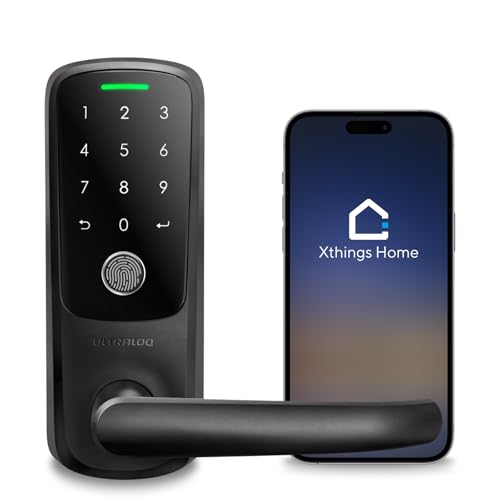
ULTRALOQ Latch 5 Touchscreen Smart Lever Lock
Best for: touchscreen entry on standard lever doors
- Special Features
- Auto Lock (what this guide is about)
- Access Methods
- App, fingerprint, code, mechanical key
- Connectivity
- Built-in 2.4 GHz Wi-Fi
- Color
- Black
- Application
- Home, Front Door, Office, Rental Property
- Included Hardware
- Handle
View on Amazon: ULTRALOQ Latch 5 Touchscreen Smart Lever Lock
The ULTRALOQ Latch 5 is an integrated smart lever lock equipped with auto-lock functionality and built-in 2.4 GHz Wi-Fi. It combines an exterior touchscreen digital keypad, a fingerprint scanner, and a mechanical key override into a single zinc alloy handle assembly. You can manage access logs, configure user codes, and monitor entry from the iOS or Android app without an external gateway. It suits users seeking handle-integrated keyless entry with remote access.
Pros
- Built-in 2.4 GHz Wi-Fi operates without a separate hub or gateway
- Unlocks via touchscreen, fingerprint scanner, mobile app, and mechanical key
- Zinc alloy build with a weatherproof exterior housing
- Fits standard US interior and exterior doors without additional drilling
Cons
- Supports 2.4 GHz Wi-Fi networks only, not 5 GHz bands
- Lever form factor replaces an entire handle rather than a separate deadbolt
Good fit if
- You want an all-in-one lever handle with a touchscreen keypad and fingerprint access.
- You prefer direct Wi-Fi management without setting up a plug-in gateway.
- You need to share temporary guest codes remotely from an iOS or Android device.
Skip if
- You need a standalone deadbolt to pair with an existing passage door handle.
- You operate an exclusively 5 GHz wireless network without a 2.4 GHz band.
Verdict: ULTRALOQ Latch 5 Touchscreen Smart Lever Lock delivers direct Wi-Fi connectivity and versatile entry options in a complete handle replacement. Its auto-lock capability and touchscreen keypad make it a practical pick for doors requiring integrated latch security.

SwitchBot Lock Vision Pro Smart Deadbolt
Best for: hands-free biometrics and long battery life
- Special Features
- Auto Lock (what this guide is about)
- Access Methods
- Face, palm vein, fingerprint, app, PIN
- Connectivity
- WiFi, Bluetooth
- Smart Home Compatibility
- Matter, Apple Home, Alexa, Google
- Power Source
- Battery Powered
- Color
- Matte Black
The SwitchBot Lock Vision Pro Smart Deadbolt is a motorized deadbolt designed around biometric access and long battery runtime. Its 10,000mAh rechargeable battery runs up to 12 months, backed by a secondary CR123A emergency cell. For auto-locking, built-in geomagnetic and accelerometer sensors detect door closure to secure the bolt instantly without relying on a timer. It suits you if you want hands-free entry, reliable auto-locking, and native Matter smart home integration.
Pros
- Dual-power system with a 10,000mAh battery and a CR123A backup cell
- Sensor-based instant auto-lock via geomagnetic and accelerometer detection
- Direct Wi-Fi and Matter-over-Wi-Fi connectivity without a separate bridge
- Multiple biometric methods including 3D face scan, palm vein, and fingerprint
Cons
- Requires using the included SwitchBot cylinder instead of existing door keys
- Does not include onboard video recording despite facial recognition hardware
Good fit if
- You want immediate auto-locking triggered by door closure rather than a fixed timer delay.
- You need extended battery life with secondary backup power and emergency USB-C jump-starting.
- You use Matter-compatible smart home ecosystems like Apple Home or Home Assistant.
Skip if
- You want to rekey the deadbolt to match your existing physical house keys.
- You prefer standard replaceable AA batteries over a rechargeable main power pack.
Verdict: SwitchBot Lock Vision Pro Smart Deadbolt delivers rapid sensor-driven auto-locking alongside versatile biometrics and a robust dual-battery power system. It is a dependable choice for modern smart homes running Matter over Wi-Fi.

ULTRALOQ U-Bolt Bluetooth Smart Deadbolt
Best for: ANSI Grade 1 smartphone app management
- Special Features
- Auto Lock (what this guide is about)
- Access Methods
- Keypad, app, auto unlock, key
- Connectivity
- Bluetooth, 2.4 GHz Wi-Fi
- Smart Home Compatibility
- Alexa, Google Assistant, SmartThings
- Installation Type
- Replace current deadbolt
- Included Door Hardware
- Deadbolt
The ULTRALOQ U-Bolt Keypad Deadbolt replaces your standard deadbolt to add 5-in-1 access and automated security to your door. It includes an auto-lock function that secures the deadbolt on a preset timer, alongside hands-free auto-unlocking via Bluetooth. With an ANSI Grade 1 durability rating and IP65 weather resistance, this model suits homeowners who want flexible smartphone and keypad control backed by commercial-grade mechanical security.
Pros
- ANSI Grade 1 certified strength and durability rating
- Auto-lock secures the door on a preset timer
- Five access options including keypad, smartphone app, and physical keys
- IP65 rated dust and weatherproof exterior housing
Cons
- Requires a separate bridge for Wi-Fi and voice assistant control
- Lacks a built-in fingerprint reader
Good fit if
- You want an auto-locking deadbolt built to ANSI Grade 1 standards.
- You prefer managing guest codes, access logs, and locks via smartphone.
- You want auto-unlock to engage as you arrive at the door.
Skip if
- You want out-of-the-box remote Wi-Fi control without purchasing an add-on bridge.
- You prefer unlocking your door using a biometric fingerprint scanner.
Verdict: ULTRALOQ U-Bolt Keypad Deadbolt combines ANSI Grade 1 build quality with versatile app-managed access and timer-based auto locking. It provides top-tier physical door security, though off-site smart features require an optional bridge.

Tinewa Full Escutcheon Keypad Deadbolt with Handle
Best for: Full handle replacements needing timed auto-locking
- Special Features
- Auto Lock (what this guide is about)
- Access Methods
- Passcode, app, key
- Auto-Lock Delay
- 5-60s
- Included Door Hardware
- Handleset with deadbolt and lever
- Application
- Front Door
- Included Hardware
- Handle
View on Amazon: Tinewa Full Escutcheon Keypad Deadbolt with Handle
The Tinewa Full Escutcheon Smart Handleset Deadbolt replaces your exterior door hardware with a unified handle and keypad deadbolt. It features an automatic lock timer configurable between 5 and 60 seconds to secure your door after closing. You can unlock via digital passcode, companion app, or physical key. This setup suits you if you want an all-in-one handle and deadbolt with adjustable lower-mounting spacing for standard exterior doors.
Pros
- Customizable auto-lock timer closes the bolt within 5 to 60 seconds
- Full escutcheon design features adjustable lower hole spacing from 7.99 to 9.65 inches
- Provides three access methods including keypad passcodes, mobile app, and physical keys
- Fits standard door backsets of 2-3/8 inches to 2-3/4 inches
Cons
- Carries an ANSI Grade 3 security rating rather than Grade 1 or 2
- Lacks a fingerprint scanner
- Does not include built-in Wi-Fi hardware
Good fit if
- You want an automatic deadbolt integrated into a full matching exterior handleset.
- You need adjustable bottom-screw spacing to align with existing door holes.
- You want timed auto-locking customizable between 5 and 60 seconds.
Skip if
- You need an ANSI Grade 1 or Grade 2 high-security deadbolt.
- You want biometric fingerprint unlocking.
- You only need a standalone deadbolt without an attached exterior handle.
Verdict: Tinewa Full Escutcheon Smart Handleset Deadbolt provides complete door coverage with timed auto-locking and flexible hole positioning for standard exterior doors. It delivers straightforward keyless entry without requiring separate handle hardware.
Specifications side by side
| Spec | Philips 4200 Fingerprint Deadbolt with Handle | Kwikset Powerbolt 250 Keypad Deadbolt | Amazon Basics Electronic Keypad Deadbolt | ULTRALOQ Bolt Smart Deadbolt with Handle | Kwikset SmartCode 270 Touchpad Deadbolt | Philips Built-in Wi-Fi Smart Deadbolt | Philips Fingerprint Wi-Fi Deadbolt with Handle | Sifely Keypad Fingerprint Smart Deadbolt | samtechT Bluetooth Smart Lock with Handle | Philips Wi-Fi Fingerprint Smart Deadbolt | Wyze Lock Bolt Bluetooth Deadbolt | ULTRALOQ Latch 5 Touchscreen Smart Lever Lock | SwitchBot Lock Vision Pro Smart Deadbolt | ULTRALOQ U-Bolt Bluetooth Smart Deadbolt | Tinewa Full Escutcheon Keypad Deadbolt with Handle |
|---|---|---|---|---|---|---|---|---|---|---|---|---|---|---|---|
| Access Methods | Fingerprint, passcode, app, voice | Keypad, key | Keypad, traditional key | Fingerprint, passcode, app, voice, key | Keypad, key | Passcode, key, app, voice | Fingerprint, app, passcode, key, voice | Fingerprint, keypad code, app, fob, key | Fingerprint, keypad, FOB, code, app, key | Fingerprint, PIN, app, voice, key | Fingerprint, keypad | App, fingerprint, code, mechanical key | Face, palm vein, fingerprint, app, PIN | Keypad, app, auto unlock, key | Passcode, app, key |
| Connectivity | 2.4 GHz Wi-Fi | not specified | not specified | not specified | not specified | Built-in Wi-Fi | Built-in 2.4GHz Wi-Fi | not specified | Bluetooth | 2.4 GHz Wi-Fi | Bluetooth | Built-in 2.4 GHz Wi-Fi | WiFi, Bluetooth | Bluetooth, 2.4 GHz Wi-Fi | not specified |
| Smart Home Compatibility | Alexa, Google Assistant | not specified | not specified | Apple Home, Alexa, Google Assistant | not specified | Amazon Alexa, Google Assistant | Alexa, Google Assistant | Amazon Alexa, Google Assistant | Alexa, Google | Alexa, Google | not specified | not specified | Matter, Apple Home, Alexa, Google | Alexa, Google Assistant, SmartThings | not specified |
| Installation Type | not specified | not specified | not specified | not specified | not specified | not specified | not specified | not specified | not specified | not specified | Deadbolt replacement | not specified | not specified | Replace current deadbolt | not specified |
| Auto-Lock Delay | 0–180 seconds | 30 sec, 1 min, 3 min, 5 min, 10 min | 10 to 99 seconds | not specified | 30 sec, 1 min, 3 min, 5 min or 10 min | 10-180 seconds | 10 to 180 seconds | not specified | not specified | 10 to 180 seconds | not specified | not specified | not specified | not specified | 5-60s |
| Fingerprint Capacity | not specified | not specified | not specified | Up to 50 | not specified | not specified | not specified | Up to 100+ | not specified | 50 | not specified | not specified | not specified | not specified | not specified |
| User Code Capacity | not specified | 25 | 6 user codes | Up to 50 | 50 | 100 | 100 | Up to 100+ | not specified | 100 | not specified | not specified | not specified | not specified | not specified |
| Included Door Hardware | Handle set | Deadbolt | not specified | Deadbolt and handle | not specified | not specified | Deadbolt and handle | not specified | Handle | not specified | not specified | not specified | not specified | Deadbolt | Handleset with deadbolt and lever |
| Power Source | not specified | not specified | not specified | not specified | not specified | not specified | not specified | not specified | not specified | not specified | not specified | not specified | Battery Powered | not specified | not specified |
| Access Method | Keypad, Fingerprint, Remote Control | Keypad | Keypad | Keypad, Fingerprint, Remote Control | not specified | Remote Control | Keypad, Fingerprint, Remote Control | Keypad, Fingerprint | Keypad, Fingerprint | Keypad, Fingerprint, Remote Control | Keypad, Fingerprint | Keypad, Fingerprint, Touchscreen, Remote Control | Fingerprint | Keypad, App Control | Keypad |
| Water Resistance | not specified | not specified | not specified | not specified | not specified | Waterproof | Waterproof | not specified | not specified | not specified | not specified | not specified | not specified | not specified | not specified |
| Color | Satin Nickel | Venetian Bronze | Satin Nickel | Black | Satin Nickel | Matte Black | Matte Black | Black | Silver | Matte Black | Matte Black | Black | Matte Black | Black | Smart Keyed Handleset-French Style |
| Application | Front Door | not specified | not specified | Home, Front Door | not specified | Front Door | Front Door | Home, Office, Apartment, Rental Property | Home, Rental Property | Front Door | not specified | Home, Front Door, Office, Rental Property | Home, Front Door | Front Door | Front Door |
| Included Hardware | Handle | not specified | not specified | Handle | not specified | not specified | Handle | not specified | Handle | not specified | not specified | Handle | not specified | not specified | Handle |
| Style | not specified | not specified | Traditional | not specified | Traditional | not specified | not specified | not specified | not specified | not specified | not specified | not specified | not specified | not specified | not specified |
| Trigger Type | not specified | Push Button | not specified | not specified | not specified | not specified | not specified | not specified | not specified | not specified | not specified | not specified | not specified | not specified | not specified |
| Special Features | Auto Lock | Auto Lock | Auto Lock | Auto Lock | Auto Lock | Auto Lock | Auto Lock | Auto Lock | Auto Lock | Auto Lock | Auto Lock | Auto Lock | Auto Lock | Auto Lock | Auto Lock |
| Dimensions | 2.7 × 0.73 × 5.72 inches | 0.97 × 2.81 × 4.59 inches | 7.42 × 5.28 × 4.76 inches | 2.95 × 1 × 2.95 inches | 4.13 × 5.19 × 9.91 inches | 6 × 2 × 1.5 inches | 2.7 × 0.73 × 5.72 inches | 6.3 × 2.6 × 1.9 inches | 7 × 3 × 1.12 inches | 6.52 × 3.94 × 3.29 inches | 6.8 × 3 × 2.6 inches | 3.5 × 6.5 × 7 inches | 7 × 3 × 1.2 inches | 2.95 × 2.95 × 0.98 inches | not specified |
| Weight | not specified | 2.26 pounds | 2.04 pounds | 2.87 pounds | 2.31 pounds | 1.4 pounds | not specified | not specified | 1 pounds | not specified | not specified | not specified | 1.21 pounds | 3 pounds | not specified |
| Model | DDL242X-1HW | 992500-009 | PL10S10 | ULTRALOQ BOLT | 992700-008 | DDL242X-15HW | DDL242X-1HW-H-NEW | Sifely Model O Deadbolt | samtechT S | DDL-241-BK | WLCKB1 | Latch 5 | W9022000 | U-Bolt-BK | DLE9902 |
| Size | not specified | Transitional | 1 Pack | Deadbolt+Handle | not specified | not specified | not specified | not specified | Smart Lock | not specified | 1 Pack | Fingerprint | not specified | Bluetooth | 1 Pack |
If you need to manage humidity, see our list of best dehumidifiers with auto defrost.
How to Choose an Auto-Lock Deadbolt
-
Select Your Preferred Access Method
Examine the access methods listed in the product specifications. Keypad deadbolts use physical buttons or touchscreens for numeric passcodes. Models with fingerprint scanners add biometric entry, letting you unlock the door without remembering a code. If you manage multiple guests, entry codes work reliably across family members. For fast, keyless access without punching buttons, a deadbolt with biometric sensors offers immediate entry. Check whether the lock supports keypad entry, biometrics, or remote controls. The Sifely Keypad Fingerprint Smart Deadbolt combines both keypad and fingerprint access for multi-user entry.
-
Check the Included Hardware
Look at the included hardware specification before making your purchase. Standard replacement locks only supply the deadbolt assembly, which fits doors where you plan to retain your current lower handle or door knob. Other packages include a matching handle or lever set alongside the deadbolt. If your existing exterior handle is worn or does not match the deadbolt finish, selecting a complete set ensures unified styling and hole alignment. The Tinewa Full Escutcheon Keypad Deadbolt with Handle provides both the deadbolt and the matching handle hardware in one complete exterior package.
-
Review Auto-Lock Timer Customization
Check the auto-lock timing specifications to ensure the delay matches your daily entry routine. Some deadbolts use fixed delays, while others provide customizable timer intervals. A shorter window locks the door almost immediately after closing, preventing unauthorized entry. A longer timer gives you time to bring in groceries or greet guests before the bolt extends automatically. Compare the minimum and maximum seconds allowed by the internal mechanism. The Philips Built-in Wi-Fi Smart Deadbolt offers an adjustable auto-lock timer that extends up to 180 seconds, giving you broad control over locking intervals.
-
Verify Ecosystem and Protocol Compatibility
Review the smart home specifications if you intend to link your lock to a broader system. Some connected deadbolts support voice platforms like Alexa and Google Assistant, enabling status checks and voice routines. If you utilize cross-platform home automation, check for Matter integration. Matter compatibility allows seamless communication across multiple ecosystems and hubs over unified local connections. Confirm whether the deadbolt connects directly or requires a proprietary bridge. The SwitchBot Lock Vision Pro Smart Deadbolt lists both Wi-Fi and Matter connectivity alongside Alexa and Google Assistant support for flexible smart home setups.
-
Evaluate ANSI Security Grades
Check the physical security rating specified by the manufacturer. Deadbolts are tested against standardized mechanical stress and impact benchmarks. ANSI Grade 1 deadbolts provide the highest commercial-grade residential security rating available, withstanding heavy physical impact and repeated cycling. ANSI Grade 2 locks deliver standard residential protection, balancing everyday durability with dependable performance. If maximum resistance against forced entry is your priority, compare security grades carefully before choosing. The ULTRALOQ U-Bolt Bluetooth Smart Deadbolt provides ANSI Grade 1 build quality for homeowners seeking maximum structural deadbolt strength on exterior doors.
-
Assess Weather Resistance Ratings
Examine the environmental protection specifications if your deadbolt will face direct outdoor elements. Exterior doors without covered porches require locks capable of handling wind, rain, and moisture. Some models feature IPX5 water resistance to prevent liquid penetration into sensitive electronic circuits. Other models list general waterproof exterior construction to safeguard internal keypads and motorized parts. Selecting a lock with documented water protection prevents hardware failure caused by rain or humidity. The WYZE Lock Bolt Bluetooth Deadbolt specifies IPX5 weather protection, making it suitable for exterior entries exposed directly to outdoor weather conditions.
Frequently asked questions
Can I set a custom auto-lock timer on these deadbolts?
Yes, many models allow you to customize the timing. The Amazon Basics Keypad Deadbolt offers a 10-to-99-second interval. The Philips Wi-Fi Keypad Deadbolt extends this range up to 180 seconds. You adjust these settings directly through the device or app to match your routine.
Do I need a separate hub for Wi-Fi deadbolts?
Most Wi-Fi models connect directly to your network without extra hardware. The Philips 4200 and ULTRALOQ Bolt both feature built-in Wi-Fi. This direct connectivity lets you manage locks and view status remotely without purchasing a standalone smart home bridge or hub.
Which deadbolt works best for apartment rentals?
The Sifely Fingerprint and Keypad Smart Deadbolt is designed for shared living spaces. It supports multiple access methods and handles large user capacities locally. This makes it ideal for apartments where you need to manage access for tenants or roommates without relying on remote gateways.
Can I use voice commands with these smart locks?
Several models support integration with major voice assistants. The ULTRALOQ Bolt and Philips Wi-Fi Fingerprint Smart Deadbolt work with Alexa and Google Assistant. This compatibility allows you to control locking features or check status through voice commands when your smart home ecosystem is active.
Are there options that include a door handle?
Yes, several picks replace both the deadbolt and the lever handle. The Philips 4200 and ULTRALOQ Bolt come with included handles. This complete hardware package simplifies installation by updating the entire entryway hardware at once, rather than requiring you to buy separate components.
Do these locks work without an internet connection?
Many models function independently of Wi-Fi for local access. The Kwikset Powerbolt 250 and SmartCode 270 rely on keypad entry and internal timers. You can still use passcodes and auto-lock features offline, ensuring security remains intact even if your network goes down.
Which deadbolt offers the highest security grade?
The ULTRALOQ U-Bolt Bluetooth Smart Deadbolt features ANSI Grade 1 build quality. This is the highest standard for residential deadbolts, providing superior physical resistance against forced entry. It combines this robust hardware with app-managed access and timer-based auto-locking for comprehensive protection.
Can I control the lock from outside my home?
Connected models allow remote management via smartphone apps. The Philips 4200 and ULTRALOQ Bolt provide direct Wi-Fi connectivity for off-site control. You can lock or unlock the door, adjust auto-lock timers, and monitor status from anywhere, provided your device has an internet connection.