14 Best Deadbolts with Bluetooth, Compared
As an Amazon Associate we earn from qualifying purchases. Links on this page are affiliate links.
A deadbolt with bluetooth provides local, keyless access control right from your smartphone. This guide compares 14 models strictly using the specifications published on their official product listings. The samtechT Bluetooth Smart Lock with Handle holds the top spot because it pairs keypad and fingerprint access with included handle hardware and auto-lock functionality.
Other models feature touchscreen entry, Matter compatibility, or retrofit installation on your existing hardware. This guide helps you identify the best combination of lock hardware, entry methods, and smart home platform support for your door.
Our top pick: Yale Lock 2 Touch Biometric Deadbolt.
Quick picks
The best fit for you
- You want the most compact model on the list Yale Lock 2 Touch Biometric Deadbolt The Yale Lock 2 Touch measures 0.88 inches in length, making it the thinnest option available.
- You need a complete set with a lever handle Yale Assure Lock 2 Keypad with Lever The Yale Assure Lock 2 Keypad with Lever includes coordinated hardware for doors requiring both pieces.
- You want to keep your existing exterior hardware August Home Retrofit Bluetooth Smart Lock The August Home Retrofit adds smartphone control to your current deadbolt without altering the outside.
- You need a full set with a door knob Lockly Guard Secure Pro Deadbolt with Knob The Lockly Guard Secure Pro includes a matching knob for a complete entry replacement.
Our 14 picks

Yale Lock 2 Touch Biometric Deadbolt
Best for: fast keyless biometric and smartphone access
- Connectivity
- Wi-Fi, Bluetooth (what this guide is about)
- Access Methods
- Fingerprint, keypad, app
- Color
- Black
- Dimensions
- 0.88 × 2.5 × 4.88 inches
- Weight
- 4 pounds
The Yale Lock 2 Touch Bluetooth Deadbolt is a key-free smart lock featuring biometric entry and a matte keypad. It unlocks via fingerprint in under 0.5 seconds with 99 percent accuracy, through the Yale Access App, or hands-free as you approach. Measuring 4.875 inches tall and 2.5 inches wide, it suits you if you want multiple secure keyless options.
Pros
- Fingerprint scanner unlocks in under 0.5 seconds with 99% accuracy
- Hands-free auto-unlock detects your approach
- Matte keypad surface resists visible fingerprints
- Supports two-factor authentication and biometric verification
Cons
- Key-free design lacks a traditional physical key cylinder
- Product specifications state it will not operate outside the US
Good fit if
- You want sub-second biometric fingerprint entry at your door.
- You prefer hands-free unlocking as you walk up to your entrance.
- You want to share virtual keys and track entry via the Yale Access App.
Skip if
- You require a traditional mechanical keyhole for manual backup.
- You live outside the United States where the lock is not supported.
Verdict: Yale Lock 2 Touch Bluetooth Deadbolt delivers fast biometric unlocking and auto-approach access in a compact keyless format. It gives you secure local Bluetooth management backed by two-factor authentication.

samtechT Bluetooth Smart Lock with Handle
Best for: rental properties needing versatile entry methods
- Connectivity
- Bluetooth (what this guide is about)
- Access Methods
- Fingerprint, keypad, FOB, code, app, key
- Smart Home Compatibility
- Alexa, Google
- Included Door Hardware
- Handle
- Color
- Silver
- Application
- Home, Rental Property
The samtechT Bluetooth Smart Lock with Handle combines a door lever with six entry methods, including a fingerprint reader, digital keypad, key fob, smartphone app, and standard key. It fits doors between 1-3/8 inches and 2-1/4 inches thick and features automated locking. This unit suits you if you want multiple ways to enter without replacing hardware separately, or need timed access codes.
Pros
- Provides six unlock methods: fingerprint, keypad, fob, app, code, and key
- Includes integrated handle hardware in the box
- Supports permanent, one-time, and time-limited entry codes
- Fits standard doors from 1-3/8 inches to 2-1/4 inches thick
Cons
- Requires a separate gateway for Alexa and Google Assistant integration
- Lacks built-in Wi-Fi for direct remote access away from Bluetooth range
Good fit if
- You want both a door handle and smart lock mechanism in one package.
- You need multiple access options, including biometric fingerprint and fob entry.
- You host rental guests who require temporary or one-time digital codes.
Skip if
- You want voice assistant control out of the box without buying a separate gateway.
- You only need a standalone deadbolt and want to keep your existing handle.
Verdict: samtechT Bluetooth Smart Lock with Handle delivers versatile access through six unlock methods alongside bundled lever hardware. It provides practical entry control and flexible code scheduling for residential or rental doors.
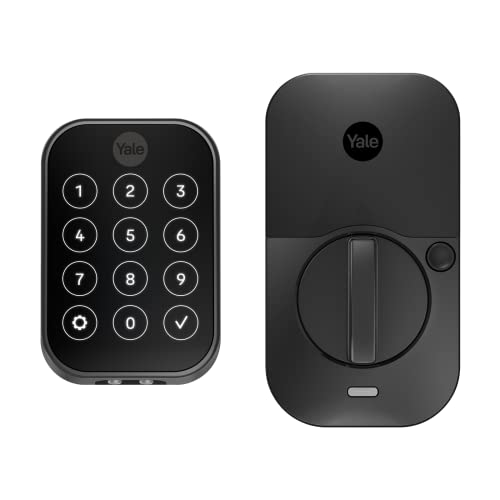
Yale Assure Lock 2 Touchscreen Deadbolt
Best for: keyless touchscreen entry and smartwatch control
- Connectivity
- Wi-Fi, Bluetooth (what this guide is about)
- Access Methods
- Keypad, app, Apple Watch, Auto-Unlock
- Color
- Black
- Application
- Home
- Dimensions
- 2.5 × 3.7 × 2.3 inches
- Weight
- 1 pounds
The Yale Assure Lock 2 Touchscreen Bluetooth Deadbolt provides key-free home entry using a digital touchscreen keypad, Bluetooth, and Wi-Fi connectivity. Measuring 3.7 inches wide, 2.3 inches high, and 2.5 inches long, this 1-pound unit fits residential doors. You can unlock your door using custom entry codes, the Yale Access app on your phone or Apple Watch, or automatic Bluetooth unlocking. It suits you if you want keyless touchscreen access with hands-free operation.
Pros
- Supports Bluetooth and Wi-Fi connectivity
- Digital touchscreen keypad for custom entry codes
- Optional Bluetooth Auto-Unlock and built-in Auto-Lock
- Yale Access app control compatible with smartphones and Apple Watch
Cons
- Key-free design lacks a physical keyhole backup
- No integrated biometric fingerprint reader
Good fit if
- You want keyless entry via a touchscreen, smartphone, or Apple Watch.
- You prefer automatic deadbolt unlocking via Bluetooth when arriving home.
- You need to create and send custom entry codes to visitors.
Skip if
- You require a traditional physical key cylinder for emergency backup.
- You want a lock with an integrated fingerprint scanner.
Verdict: Yale Assure Lock 2 Touchscreen Bluetooth Deadbolt delivers practical key-free security with versatile digital entry methods. It functions reliably for homeowners who want touch and Bluetooth controls without managing physical keys.

Yale Assure Lock 2 Touch Key-Free Deadbolt
Best for: flexible entry with physical key support
- Connectivity
- Wi-Fi, Bluetooth (what this guide is about)
- Access Methods
- Fingerprint, keypad, app
- Installation Type
- Full deadbolt replacement
- User Code Capacity
- Unlimited
- Color
- Satin Nickel
- Dimensions
- 0.9 × 2.5 × 3.75 inches
This smart deadbolt replaces standard entry door locks using a screwdriver. It measures 2.5 inches wide and 3.75 inches high, featuring Bluetooth connectivity alongside keypad, fingerprint, and physical key entry methods. The biometric scanner unlocks in under 0.5 seconds with 99% accuracy. You get Bluetooth auto-unlock when approaching the door, automated locking, and unlimited app access codes. It suits you if you want multiple ways to enter your home.
Pros
- Fingerprint scanner unlocks in under 0.5 seconds with 99% accuracy
- Supports hands-free Bluetooth auto-unlock upon approach
- Provides keypad, fingerprint, and physical key access options
- Replaces deadbolts on standard US doors with just a screwdriver
Cons
- Requires hardware replacement using a screwdriver
- Keyed and key-free designs are sold as separate variations
Good fit if
- You want hands-free Bluetooth unlocking as you approach your door.
- You need multiple entry methods including fingerprint, keypad, and key.
- You want to share unlimited access codes through an app.
Skip if
- You prefer a smart lock that does not replace your deadbolt.
- You do not want an exterior-mounted keypad or fingerprint scanner.
Verdict: Yale Assure Lock 2 Touch Deadbolt provides rapid biometric scanning, keypad access, and hands-free Bluetooth unlocking. It installs on standard US entry doors to give you multiple access options.

Yale Assure Lock 2 Keyless Touchscreen Deadbolt
Best for: key-free digital touchscreen access via Bluetooth
- Connectivity
- Wi-Fi, Bluetooth (what this guide is about)
- Access Methods
- Keypad, app, Apple Watch
- Color
- Satin Nickel
- Dimensions
- 2.5 × 3.7 × 2.3 inches
View on Amazon: Yale Assure Lock 2 Keyless Touchscreen Deadbolt
This deadbolt provides key-free entry through a digital touchscreen keypad, Bluetooth, and Wi-Fi connectivity. You can control access using the Yale Access app on a smartphone or Apple Watch. Hardware specifications include dimensions of 3.7 inches wide, 2.3 inches high, and 2.5 inches long in a Satin Nickel finish. It suits you if you want automated Bluetooth unlocking, auto-locking, and custom entry codes without carrying physical keys.
Pros
- Key-free access via touchscreen keypad, Bluetooth, or Apple Watch
- Supports optional Bluetooth Auto-Unlock and Auto-Lock
- Send custom entry codes through the Yale Access app
- Compact footprint at 3.7 inches wide by 2.3 inches high
Cons
- No physical keyway for backup manual key entry
- No biometric or fingerprint access listed
Good fit if
- You want keyless entry via a touchscreen keypad, phone, or Apple Watch.
- You prefer hands-free Bluetooth auto-unlock when approaching your door.
- You need to create and share custom entry codes for guests.
Skip if
- You require a traditional physical key backup.
- You want built-in fingerprint or biometric recognition.
Verdict: Yale Assure Lock 2 Touchscreen Deadbolt delivers secure, key-free entry through Bluetooth, Wi-Fi, and a digital touchscreen. It gives you flexible code management and hands-free auto-unlock in a compact build.

Wyze Lock Bolt Bluetooth Deadbolt
Best for: fingerprint access and local Bluetooth control
- Connectivity
- Bluetooth (what this guide is about)
- Access Methods
- Fingerprint, keypad
- Installation Type
- Deadbolt replacement
- Color
- Matte Black
- Special Features
- Auto Lock
- Dimensions
- 6.8 × 3 × 2.6 inches
The WYZE Lock Bolt is a replacement deadbolt featuring Bluetooth connectivity and keyless entry. You unlock the door using either the built-in fingerprint scanner or the backlit keypad. Measuring 6.8 inches long by 3 inches wide, the unit includes an IPX5 rating and an auto-lock function. This deadbolt suits you if you want quick biometric entry and reliable keypad access directly over Bluetooth without relying on traditional keys.
Pros
- Backlit keypad and fingerprint access methods
- IPX5 weather-resistance rating
- Built-in auto-lock functionality
Cons
- Operates over Bluetooth with no Wi-Fi connectivity listed
- Lacks a physical keyway for traditional backup keys
- Offered only in Matte Black
Good fit if
- You want keyless entry via a fingerprint sensor or backlit keypad.
- You need an exterior deadbolt rated at IPX5 for weather resistance.
- You prefer automated locking on a Bluetooth-connected setup.
Skip if
- You require a physical keyhole for standard manual keys.
- You want out-of-the-box Wi-Fi connectivity instead of Bluetooth alone.
Verdict: WYZE Lock Bolt Fingerprint Deadbolt provides keyless entry via Bluetooth, fingerprint scanning, and a backlit keypad. It offers auto-locking and IPX5 weather resistance in a matte black finish.

Kwikset Aura Reach Matter Smart Deadbolt
Best for: Matter setups needing hands-free Bluetooth unlocking
- Connectivity
- Bluetooth, Matter (what this guide is about)
- Access Methods
- Keypad, app
- Smart Home Compatibility
- Apple Home, Amazon Alexa, Google Home
- Color
- Matte Black
- Dimensions
- 0.97 × 2.81 × 5.81 inches
- Weight
- 3.52 pounds
The Kwikset Aura Reach Bluetooth Deadbolt gives you keyless door access using Bluetooth and Matter over Thread connectivity. You can manage guest codes and lock settings locally with the Kwikset app, or rely on hands-free auto unlocking when approaching your door. It features a proximity-activated backlit touchpad with tactile feedback and measures 5.81 by 2.81 inches. It suits you if you want modern smart platform integration alongside direct phone access.
Pros
- Bluetooth connectivity for managing access codes and settings in the Kwikset app
- Matter-enabled with Thread for Apple Home, Amazon Alexa, and Google Home
- Hands-free auto-unlocking using Bluetooth and geofencing
- Backlit keypad with proximity wakeup and tactile button feedback
Cons
- No built-in fingerprint reader listed in specifications
- No native Wi-Fi connection listed
Good fit if
- You want hands-free unlocking via phone Bluetooth and geofence detection
- You connect your locks to Apple Home, Google Home, or Alexa via Matter over Thread
- You prefer a tactile keypad that illuminates automatically when you reach for it
Skip if
- You want biometric fingerprint access at the door
- You require built-in Wi-Fi without Matter or Thread hardware
Verdict: Kwikset Aura Reach Bluetooth Deadbolt pairs local Bluetooth controls with Matter over Thread support for flexible smart home setups. Its proximity-activated touchpad and geofenced auto-unlocking make keyless entry straightforward.

Kwikset Aura Bluetooth Keypad Deadbolt
Best for: large households needing extensive guest access codes
- Connectivity
- Bluetooth (what this guide is about)
- Access Methods
- App, keypad, key
- User Code Capacity
- 250
- Color
- Satin Nickel
- Dimensions
- 3.99 × 4.24 × 9.74 inches
- Weight
- 3.1 pounds
The Kwikset Aura is a smart deadbolt that pairs a backlit keypad with Bluetooth connectivity. You can program up to 250 unique user codes, set auto-lock timers, and view entry history logs directly in the smartphone app within Bluetooth range. Built-in SmartKey technology lets you re-key the physical lock cylinder in seconds. It fits standard doors measuring 1-3/8 inches to 2 inches thick, making it ideal if you want high-capacity local code management.
Pros
- Stores up to 250 individual access codes
- SmartKey security allows user re-keying in seconds
- Backlit physical keypad for illuminated entry
- Customizable auto-lock delay duration
- Fits standard door thicknesses from 1-3/8 to 2 inches
Cons
- App notifications and history logs require being within Bluetooth range
- No fingerprint or biometric entry sensor listed
- Electronics warranty coverage limited to 1 year
Good fit if
- You need to assign and schedule up to 250 guest access codes.
- You want to re-key the physical lock yourself using SmartKey.
- You have a door thickness between 1-3/8 inches and 2 inches.
Skip if
- You need remote lock monitoring and notifications beyond Bluetooth range.
- You prefer biometric or fingerprint unlocking methods.
Verdict: Kwikset Aura Bluetooth Keypad Deadbolt delivers extensive code capacity and DIY re-keying for local door management. It operates entirely within Bluetooth range without requiring complex network setup.

Yale Assure Lock 2 Keypad with Lever
Best for: doorways needing a deadbolt and matching handle
- Connectivity
- Bluetooth (what this guide is about)
- Access Methods
- Keypad, Yale Access app, Auto-Unlock
- Included Door Hardware
- Passage lever
- Color
- Black
- Trigger Type
- Push Button
- Dimensions
- 0.88 × 2.5 × 4.88 inches
The Yale Assure Lock 2 Keypad with Lever pairs a key-free push-button deadbolt with a matching passage lever. Operating over Bluetooth, you can manage access using the keypad, Yale Access app, or an Apple Watch. It includes automatic locking and unlocking features while measuring 2.5 inches wide and 4.875 inches high. This package suits you if you need both a smart deadbolt and a coordinated door handle in one setup.
Pros
- Includes a matching Valdosta passage lever
- Supports Bluetooth Auto-Unlock and Auto-Lock
- Multiple unlock options including keypad, smartphone app, and Apple Watch
- Allows custom entry code creation
Cons
- No physical keyway backup
- No built-in fingerprint reader
- Uses push buttons rather than a touchscreen
Good fit if
- You want a matching passage lever bundled with your deadbolt.
- You prefer push-button keypads over touchscreen controls.
- You want keyless entry via an Apple Watch or phone.
Skip if
- You need a traditional physical key slot for emergency access.
- You prefer unlocking via fingerprint recognition.
Verdict: Yale Assure Lock 2 Keypad with Lever provides key-free Bluetooth deadbolt security alongside a coordinated handle set. It delivers practical entry code and app access for doors requiring both hardware pieces.

ULTRALOQ Bolt Fingerprint Matter Smart Lock
Best for: Matter smart homes wanting biometric entry
- Connectivity
- Bluetooth, Matter (what this guide is about)
- Access Methods
- Fingerprint, app, PIN, key, voice
- Auto-Lock Delay
- 10 seconds to 30 minutes
- Fingerprint Capacity
- Up to 50 users (2 per user)
- Dimensions
- 2.96 × 1.35 × 2.96 inches
- Weight
- 3.53 pounds
The ULTRALOQ Bolt is a smart deadbolt featuring Bluetooth and Matter connectivity alongside biometric access. You can unlock your door using the 360-degree fingerprint scanner, temporary PIN codes, physical keys, or your smartphone. It stores up to two fingerprints for 50 users and supports auto-locking between 10 seconds and 30 minutes. This lock suits households needing multiple local access methods with smart home ecosystem expansion.
Pros
- Supports both Bluetooth and Matter connectivity protocols
- 360-degree fingerprint scanner holds up to 50 users with 2 prints each
- Six entry methods including biometric, PIN, app, physical key, and geofencing
- Adjustable auto-lock timer ranging from 10 seconds to 30 minutes
Cons
- Remote app control requires a separate Wi-Fi adaptor or third-party hub
- Magnetic door sensor is an optional add-on
Good fit if
- You want fingerprint, keypad, physical key, and app entry on one deadbolt.
- You use Matter-compatible smart home ecosystems alongside direct Bluetooth control.
- You need to store profiles for up to 50 individual users.
Skip if
- You want out-of-the-box remote app access without an extra Wi-Fi adaptor or hub.
- You require an integrated door sensor included directly in the hardware.
Verdict: ULTRALOQ Bolt Fingerprint Smart Lock delivers versatile entry methods and Matter compatibility over Bluetooth. It handles local access reliably while requiring an additional hub or adaptor for remote Wi-Fi operations.

BAMoONE Bluetooth Face and Palm Smart Deadbolt
Best for: biometric entry with face and palm recognition
- Connectivity
- Bluetooth (what this guide is about)
- Access Methods
- Face, palm vein, app, code, card, key
- Color
- Matte Black
- Dimensions
- 4.76 × 2.76 × 1.18 inches
- Weight
- 1.51 pounds
View on Amazon: BAMoONE Bluetooth Face and Palm Smart Deadbolt
This matte black deadbolt pairs local Bluetooth app control with face and palm vein sensors. You manage user permissions, access logs, and passcodes via the Tuya Smart App within range. It fits standard doors measuring 1-3/8 to 1-31/32 inches thick with adjustable 2-3/8 or 2-3/4 inch backsets. It suits you if you want hands-free biometric unlocking options without requiring an active internet connection for everyday door access.
Pros
- Unlocks via face recognition, palm vein recognition, app, PIN, IC card, or physical key
- Tuya Smart App operates locally via Bluetooth without requiring a Wi-Fi gateway
- Adjustable 60 mm or 70 mm latch fits standard door thicknesses from 35 mm to 50 mm
- Emergency USB power port provides backup power when batteries drain
Cons
- Remote access outside Bluetooth range requires a separate Tuya gateway
- Four AA batteries are not included
- USB port provides temporary power only and does not recharge batteries
Good fit if
- You want multiple entry methods including face and palm vein scanning.
- You prefer managing lock permissions locally over Bluetooth without Wi-Fi.
- You have a standard door between 1-3/8 inches and 1-31/32 inches thick.
Skip if
- You need out-of-the-box remote access without buying a separate gateway.
- You prefer a smart lock that includes rechargeable or packaged batteries.
Verdict: BAMoONE Bluetooth Face and Palm Smart Deadbolt delivers versatile biometric access options and offline Bluetooth management for standard residential doors. It provides reliable local operation, though out-of-range remote controls require an add-on gateway.
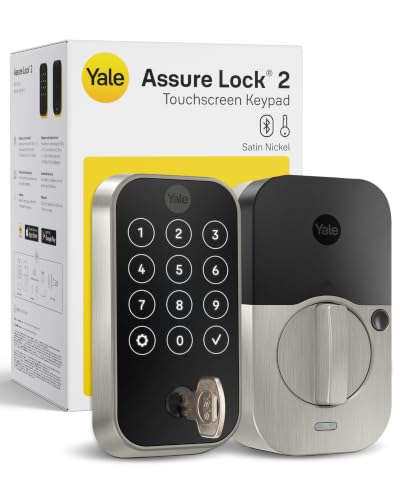
Yale Keypad Deadbolt with Bluetooth
Best for: keypad entry with physical key backup
- Connectivity
- Bluetooth (what this guide is about)
- Access Methods
- Auto-unlock, keypad, app, key
- User Code Capacity
- Unlimited
- Color
- Satin Nickel
- Dimensions
- 0.88 × 2.5 × 3.75 inches
- Weight
- 4.23 pounds
This Yale deadbolt pairs local Bluetooth app control with an exterior touchscreen keypad and a traditional physical key cylinder. It features BHMA Grade 2 commercial-grade certification, DoorSense door position detection, and automatic locking. You can assign unlimited custom access schedules in the Yale Access App within range. It suits you if you want dependable keypad entry and physical key backup with modular upgrade options later.
Pros
- BHMA Grade 2 certified durability rating
- Exterior touchscreen keypad with traditional physical key backup
- DoorSense sensor confirms door is fully closed before auto-locking
- Engineered to withstand temperatures from -22°F to 140°F
- Expansion slot supports add-on Wi-Fi or Z-Wave modules
Cons
- Remote access requires a separate Wi-Fi or Z-Wave module purchase
- Lacks a built-in fingerprint biometric scanner
Good fit if
- You want physical key access alongside a digital touchscreen keypad.
- You require BHMA Grade 2 hardware rated for temperatures down to -22°F.
- You prefer local Bluetooth operation with the option to expand network modules later.
Skip if
- You need remote access out of the box without purchasing extra modules.
- You want biometric fingerprint unlocking directly on the hardware.
Verdict: Yale Bluetooth Keypad Deadbolt with Key delivers reliable Grade 2 physical security with keypad, smartphone, and key entry options. It is a practical choice for local Bluetooth control with an upgrade path for smart home integration.

August Home Retrofit Bluetooth Smart Lock
Best for: retaining existing keys and exterior deadbolt hardware
- Connectivity
- Bluetooth (what this guide is about)
- Access Methods
- Smartphone app
- Smart Home Compatibility
- Alexa
- Application
- Home
- Dimensions
- 1.63 × 2.6 × 4.8 inches
- Weight
- 13.9 ounces
This interior deadbolt adapter converts your existing lock into a Bluetooth smart lock while letting you keep your original exterior hardware and physical keys. It measures 4.8 inches high by 2.6 inches wide and installs on the inside of the door using a screwdriver. It includes DoorSense to confirm whether the door is open or closed, making it ideal if you want smartphone access without changing exterior door hardware.
Pros
- Installs on the inside and keeps existing keys and exterior hardware
- Includes DoorSense technology to indicate if the door is open or closed
- Supports automatic hands-free unlocking and timed auto-locking
- Allows customized guest access schedules by weeks, hours, or minutes
Cons
- Requires a separate Wi-Fi bridge for remote access and Alexa control
- Keypad entry requires an add-on accessory sold separately
Good fit if
- You want to keep your existing exterior deadbolt and standard physical keys.
- You want open and closed door status monitoring with DoorSense.
- You need timed auto-locking and hands-free automatic unlocking via Bluetooth.
Skip if
- You want built-in keypad or fingerprint access out of the box.
- You require direct out-of-the-box Wi-Fi connectivity without purchasing a bridge.
Verdict: August Home Retrofit Bluetooth Smart Lock adds smartphone control to your existing deadbolt without altering outside hardware. It is a practical Bluetooth upgrade if you want DoorSense tracking and auto-unlocking while retaining your original keys.

Lockly Guard Secure Pro Deadbolt with Knob
Best for: doors requiring deadbolt and knob replacement
- Connectivity
- Wi-Fi, Bluetooth (what this guide is about)
- Access Methods
- fingerprint, keypad, app
- Smart Home Compatibility
- Alexa, Google Assistant
- Included Door Hardware
- deadbolt and door knob
The Lockly Guard Secure Pro combines a connected deadbolt with an included door knob for full door hardware replacement. It connects via Bluetooth and includes a Secure Link Wi-Fi hub for integration with Alexa and Google Assistant. You unlock using the 0.3-second fingerprint scanner, PIN Genie randomized keypad, or offline access codes. Powered by eight AA batteries, this UL fire-rated setup suits property managers and doors needing paired knob-and-deadbolt hardware.
Pros
- Includes door knob hardware alongside the deadbolt
- Dual Bluetooth and Wi-Fi connectivity via included hub
- Fingerprint sensor unlocks in 0.3 seconds
- Randomizing PIN Genie keypad prevents pattern tracing
- UL10B/10C fire-rated construction
Cons
- Requires eight AA batteries to operate
- LocklyOS cloud management features require a paid subscription
- Requires plugging in a separate hub for Wi-Fi connectivity
Good fit if
- You need matching deadbolt and door knob hardware in one package.
- You want both local Bluetooth access and an included Wi-Fi bridge.
- You require hardware certified with a UL10B/10C fire rating.
Skip if
- You only want to replace an existing deadbolt without altering your knob.
- You prefer built-in Wi-Fi without maintaining a separate plug-in hub.
- You want a lock that runs on four batteries or fewer.
Verdict: Lockly Guard Secure Pro Deadbolt with Door Knob delivers a complete entry setup with fast fingerprint recognition and Wi-Fi bridge support. Its fire rating and randomized keypad make it well-suited for high-traffic doors requiring matching knob hardware.
Specifications side by side
| Spec | Yale Lock 2 Touch Biometric Deadbolt | samtechT Bluetooth Smart Lock with Handle | Yale Assure Lock 2 Touchscreen Deadbolt | Yale Assure Lock 2 Touch Key-Free Deadbolt | Yale Assure Lock 2 Keyless Touchscreen Deadbolt | Wyze Lock Bolt Bluetooth Deadbolt | Kwikset Aura Reach Matter Smart Deadbolt | Kwikset Aura Bluetooth Keypad Deadbolt | Yale Assure Lock 2 Keypad with Lever | ULTRALOQ Bolt Fingerprint Matter Smart Lock | BAMoONE Bluetooth Face and Palm Smart Deadbolt | Yale Keypad Deadbolt with Bluetooth | August Home Retrofit Bluetooth Smart Lock | Lockly Guard Secure Pro Deadbolt with Knob |
|---|---|---|---|---|---|---|---|---|---|---|---|---|---|---|
| Access Methods | Fingerprint, keypad, app | Fingerprint, keypad, FOB, code, app, key | Keypad, app, Apple Watch, Auto-Unlock | Fingerprint, keypad, app | Keypad, app, Apple Watch | Fingerprint, keypad | Keypad, app | App, keypad, key | Keypad, Yale Access app, Auto-Unlock | Fingerprint, app, PIN, key, voice | Face, palm vein, app, code, card, key | Auto-unlock, keypad, app, key | Smartphone app | fingerprint, keypad, app |
| Connectivity | Bluetooth | Bluetooth | Bluetooth | Bluetooth | Bluetooth | Bluetooth | Matter over Thread, Bluetooth | Bluetooth | Bluetooth | Bluetooth, Matter | Bluetooth | Bluetooth | not specified | Wi-Fi, Bluetooth |
| Smart Home Compatibility | not specified | Alexa, Google | not specified | not specified | not specified | not specified | Apple Home, Amazon Alexa, Google Home | not specified | not specified | not specified | not specified | not specified | Alexa | Alexa, Google Assistant |
| Installation Type | not specified | not specified | not specified | Full deadbolt replacement | not specified | Deadbolt replacement | not specified | not specified | not specified | not specified | not specified | not specified | not specified | not specified |
| Auto-Lock Delay | not specified | not specified | not specified | not specified | not specified | not specified | not specified | not specified | not specified | 10 seconds to 30 minutes | not specified | not specified | not specified | not specified |
| Fingerprint Capacity | not specified | not specified | not specified | not specified | not specified | not specified | not specified | not specified | not specified | Up to 50 users (2 per user) | not specified | not specified | not specified | not specified |
| User Code Capacity | not specified | not specified | not specified | Unlimited | not specified | not specified | not specified | 250 | not specified | not specified | not specified | Unlimited | not specified | not specified |
| Included Door Hardware | not specified | Handle | not specified | not specified | not specified | not specified | not specified | not specified | Passage lever | not specified | not specified | not specified | not specified | deadbolt and door knob |
| Access Method | Keypad, Fingerprint | Keypad, Fingerprint | Keypad, Touchscreen | Keypad, Fingerprint, Key | Keypad, Touchscreen | Keypad, Fingerprint | not specified | Keypad | Keypad | Fingerprint | not specified | Keypad | not specified | Keypad, Fingerprint |
| Color | Black | Silver | Black | Satin Nickel | Satin Nickel | Matte Black | Matte Black | Satin Nickel | Black | Black With Satin Nickel | Matte Black | Satin Nickel | Dark Gray | not specified |
| Application | not specified | Home, Rental Property | Home | not specified | not specified | not specified | not specified | not specified | not specified | not specified | not specified | not specified | Home | not specified |
| Included Hardware | not specified | Handle | not specified | not specified | not specified | not specified | not specified | not specified | Lever | not specified | not specified | not specified | not specified | Knob |
| Trigger Type | not specified | not specified | not specified | not specified | not specified | not specified | not specified | not specified | Push Button | not specified | not specified | not specified | not specified | not specified |
| Special Features | not specified | Auto Lock | not specified | not specified | not specified | Auto Lock | not specified | not specified | not specified | not specified | not specified | not specified | not specified | not specified |
| Dimensions | 0.88 × 2.5 × 4.88 inches | 7 × 3 × 1.12 inches | 2.5 × 3.7 × 2.3 inches | 0.9 × 2.5 × 3.75 inches | 2.5 × 3.7 × 2.3 inches | 6.8 × 3 × 2.6 inches | 0.97 × 2.81 × 5.81 inches | 3.99 × 4.24 × 9.74 inches | 0.88 × 2.5 × 4.88 inches | 2.96 × 1.35 × 2.96 inches | 4.76 × 2.76 × 1.18 inches | 0.88 × 2.5 × 3.75 inches | 1.63 × 2.6 × 4.8 inches | not specified |
| Weight | 4 pounds | 1 pounds | 1 pounds | not specified | not specified | not specified | 3.52 pounds | 3.1 pounds | 1 pounds | 3.53 pounds | 1.51 pounds | 4.23 pounds | 13.9 ounces | not specified |
| Size | Bluetooth | Smart Lock | Bluetooth | Bluetooth | Bluetooth | 1 Pack | not specified | not specified | Push Button | Fingerprint+Matter | Standard | Bluetooth | 100 | not specified |
| Model | YRD420-F-BLE-BSP | samtechT S | YRD450-BLE-BSP | YRD430-F-BLE-619 | YRD430-BLE-619 | WLCKB1 | 994000-004 | 99420-001 | B-YRD410-BLE-VL-BSP | BOLT-F-MATTER-NK | BO1-3-15 | YRD420-BLE-619 | ASL-3B | not specified |
If you need portable audio gear, our comparison of the best bluetooth headphones outlines wireless range and battery specifications.
How to Choose the Right Bluetooth Deadbolt
-
Select Your Preferred Access Methods
Check the access method specifications to match your household habits. Keyless locks rely entirely on biometric scanners, digital touchscreens, or phone signals. If you want a traditional manual failsafe for dead batteries or guest convenience, look for models that list physical keys alongside digital methods. The Yale Assure Lock 2 Touch Key-Free Deadbolt specifies keypad, fingerprint, and physical key entry on a single lock. Choosing hardware with a key cylinder provides standard mechanical access if electronic options fail, while fully key-free models eliminate key management entirely.
-
Check for Bundled Door Hardware
Evaluate whether your door installation requires a standalone deadbolt or coordinated handle hardware. Standard smart deadbolts secure only the upper bore hole, leaving your existing lower door handle in place. If you are outfitting a fresh door or replacing an entire lock set, check the included hardware specification. The Lockly Guard Secure Pro Deadbolt with Knob bundles matching door knob hardware directly with the deadbolt. Choosing a bundle ensures matching finish and trim across both latch points without requiring you to source separate exterior passage hardware.
-
Compare Keypad Trigger Types
Examine the keypad specification to decide between tactile push buttons and smooth touchscreens. Push-button models provide physical click feedback when entering pins, which helps in direct sunlight or dark conditions. Digital touchscreens offer a sleek, flat appearance that activates upon contact and resists mechanical button wear over time. The Yale Assure Lock 2 Touchscreen Deadbolt features a touchscreen interface for digital passcode entry. If you wear gloves or prefer physical button travel, select push-button hardware, but choose a touchscreen surface for modern styling and fewer moving exterior parts.
-
Choose Retrofit or Full Replacement
Review the installation type to see whether the deadbolt replaces all hardware or adapts to existing components. Full-replacement deadbolts swap the exterior key cylinder and interior thumbturn, changing the outside appearance and keying. Retrofit designs mount strictly to the inside of your door, connecting directly to your current deadbolt tailpiece. The August Home Retrofit Bluetooth Smart Lock installs on the interior side while retaining your original exterior deadbolt and standard keys. Pick a retrofit model if you must keep existing exterior keys, or pick full replacements for completely updated locks.
-
Verify Smart Home Voice Compatibility
Check the smart home compatibility spec if you use voice controls in your residence. While Bluetooth links your smartphone directly to the lock, voice integration requires specific assistant protocol support. Some models work natively with smart home platforms, while others stay completely offline. The samtechT Bluetooth Smart Lock with Handle lists compatibility with Alexa and Google Assistant. If you manage door status using voice commands or smart speaker routines, verify that the lock lists your specific platform. Buyers who prefer localized offline security can skip voice integration entirely.
-
Look for Auto Lock Capabilities
Inspect the special features list for auto-lock functionality to maintain consistent door security. Standard deadbolts require manual locking every time you depart, either via a physical key, keypad command, or companion app. Hardware with automated locking sensors can throw the bolt automatically after the door closes or after a predetermined timer expires. The Wyze Lock Bolt Bluetooth Deadbolt lists auto lock as a built-in feature. If you have busy family members or guests who forget to secure doors behind them, prioritize specifications that include automated locking to keep entryways locked continuously.
Frequently asked questions
Do Bluetooth deadbolts work without Wi-Fi?
Yes, most models operate locally over Bluetooth without needing an internet connection. The samtechT Bluetooth Smart Lock with Handle and the WYZE Lock Bolt Fingerprint Deadbolt function entirely within local range. You can unlock the door using a keypad or fingerprint scanner even if your home network is down. Remote access via an app requires Wi-Fi or a separate gateway for some devices.
Which Bluetooth deadbolt supports Matter protocol?
Several models on this list support the Matter standard for broader smart home compatibility. The Kwikset Aura Reach Matter Smart Deadbolt and the ULTRALOQ Bolt Fingerprint Matter Smart Lock both include this feature. This allows you to control the lock through various ecosystems without needing proprietary hubs. These devices maintain local Bluetooth control while offering advanced connectivity options.
Can I use a fingerprint scanner on these locks?
Yes, biometric entry is a common feature among the top picks. The Yale Lock 2 Touch Biometric Deadbolt and the samtechT Bluetooth Smart Lock with Handle both support fingerprint access. You can also find fingerprint options in the WYZE Lock Bolt and the Lockly Guard Secure Pro Deadbolt with Knob. These sensors allow for quick, keyless entry without touching a keypad.
Do I need to replace the entire door handle?
Not necessarily, as many options are designed to fit existing hardware. The Yale Assure Lock 2 Keypad with Lever includes a matching lever handle for a complete set. The Lockly Guard Secure Pro Deadbolt with Door Knob replaces both the deadbolt and the interior knob. If you prefer to keep your current exterior handle, the August Home Retrofit Bluetooth Smart Lock installs inside without altering outside hardware.
Are these locks compatible with Alexa or Google Assistant?
Some models offer direct compatibility with major voice assistants. The samtechT Bluetooth Smart Lock with Handle supports both Alexa and Google Assistant. The Lockly Guard Secure Pro Deadbolt with Door Knob also lists this compatibility. These features allow you to control lock functions or check status through voice commands when integrated with your smart home system.
What is the difference between Wi-Fi and Bluetooth connectivity?
Bluetooth provides local control within range, while Wi-Fi enables remote access from anywhere. The Yale Lock 2 Touch and the Yale Assure Lock 2 Touchscreen Deadbolt include both Wi-Fi and Bluetooth. This dual connectivity lets you manage the lock via an app when you are away. Pure Bluetooth models like the WYZE Lock Bolt require you to be near the door for remote-style commands via a gateway.
Do these deadbolts have auto-locking features?
Several models include automatic locking to ensure the door is secured after entry. The samtechT Bluetooth Smart Lock with Handle and the WYZE Lock Bolt Fingerprint Deadbolt both feature auto-lock. This function engages the deadbolt shortly after you close the door, removing the need to manually turn the lock. It adds a layer of convenience and security for daily use.
Which lock is best for rental properties?
The samtechT Bluetooth Smart Lock with Handle is noted for rental property use. It offers versatile entry methods including keypad and fingerprint access. You can manage flexible code scheduling for tenants without changing physical keys. This makes it practical for managing multiple access points and maintaining security across different occupancy periods in residential or rental settings.