14 Best Door Knobs for Office, Compared
As an Amazon Associate we earn from qualifying purchases. Links on this page are affiliate links.
Choosing the right door knob for office security depends on your daily workplace traffic, entry methods, and locking requirements. We compared 14 products based on the specifications published on their listings.
The Evanshow Biometric Fingerprint Door Knob leads the list by combining keypad, fingerprint, key, and key card access into a 5.5-inch hardware unit. This guide helps you compare access credentials, hardware styles, and locking modes so you can select the right model for your workspace doors.
Quick picks
The best fit for you
- You need several entry methods for office doors Evanshow Biometric Fingerprint Door Knob It includes keypad, fingerprint, physical key, and key card access methods.
- You want keypad access without a biometric scanner Iulock Keypad Keyless Entry Door Knob The lock uses only keypad and physical key access methods.
- You require Matter protocol integration in your office GUSEI Smart Matter Fingerprint Door Handle The specifications include Matter connectivity for networked smart ecosystem setups.
Our 14 picks

Evanshow Biometric Fingerprint Door Knob
Best for: multi-user office doors needing detailed access tracking
- Application
- Home, Office, Apartment, Bedroom, Hotel (what this guide is about)
- Access Methods
- Fingerprint, code, key, IC card, app
- Fingerprint Capacity
- Up to 100
- Passcode Capacity
- 50
- App Compatibility
- Tuya
- Included Hardware
- Knob
The Evanshow 5-in-1 Biometric Fingerprint Door Knob provides keyless entry for office doors between 1.18 and 1.97 inches thick. It stores up to 100 fingerprints and 50 passcodes, managed through the Tuya app alongside IC card and physical key access. You can log employee entries, set temporary access codes, and activate silent mode. It fits left- or right-swing wooden doors without extra wiring.
Pros
- Stores up to 100 fingerprints and 50 numeric passwords
- Offers 5 access methods: biometric, keypad, app, IC card, and physical key
- Tuya app records entry logs and manages temporary guest access
- Compatible with left- and right-swing doors from 1.18 to 1.97 inches thick
Cons
- Unlocks with any fingerprint until an initial administrator is registered
- USB emergency port supplies backup power but cannot recharge internal batteries
Good fit if
- You need multiple credential types for staff, including fingerprints, codes, and IC cards.
- You manage an office space that requires access logs and temporary visitor credentials.
- You have a standard wooden door between 1.18 and 1.97 inches thick.
Skip if
- You have office doors thinner than 1.18 inches or thicker than 1.97 inches.
- You need a door lock with rechargeable internal batteries instead of external emergency power.
Verdict: Evanshow 5-in-1 Biometric Fingerprint Door Knob delivers flexible access control with high user capacity and detailed tracking for office doors.

GHome Smart Rechargeable Keypad Door Knob
Best for: private offices needing passage mode and local security
- Application
- Home, Garage, Office, Apartment, Bedroom (what this guide is about)
- Access Methods
- Fingerprint, password, app, key
- Recognition Speed
- 0.2s
- Fingerprint Capacity
- 20
- Passcode Capacity
- 20
- Included Hardware
- Knob
This smart door knob gives your office keyless security using four entry methods: biometric fingerprint scanning, digital keypad codes, app access via Bluetooth, and mechanical keys. It stores up to 20 fingerprints locally and locks automatically five seconds after closing. With built-in passage mode for busy work hours and silent mode for focus, it suits private office doors measuring 1-3/8 to 2-1/4 inches thick.
Pros
- Four unlock options: fingerprint, passcode, Bluetooth app, and physical key
- Local biometric storage without cloud data transmission
- Built-in passage mode and silent mode for flexible office hours
- Rechargeable 400mAh battery rated for up to 10,000 cycles
Cons
- User storage capped at 20 fingerprints and 20 passcodes
- App control operates only within local Bluetooth range
Good fit if
- You need passage mode to keep the door unlocked during high-traffic office hours.
- You want local credential storage without uploading biometric data to the cloud.
- You have a standard interior door thickness between 1-3/8 and 2-1/4 inches.
Skip if
- You need to store credentials for more than 20 distinct users.
- You require out-of-office remote unlocking without standard Bluetooth proximity.
Verdict: GHome Smart Biometric Door Knob provides versatile access management with fast 0.2-second biometric recognition and a dedicated passage mode. It delivers reliable access control for office spaces requiring local security without cloud dependency.

Iulock Keypad Keyless Entry Door Knob
Best for: offices wanting code access without biometric scanners
- Application
- Garage, Office, Bedroom (what this guide is about)
- Access Methods
- Keypad, key
- Passcode Capacity
- 50
- Water Resistance
- Waterproof
- Included Hardware
- Knob
- Special Features
- Auto Lock
The Iulock Keypad Smart Door Knob provides PIN and physical key entry without biometric sensors. You can program up to 50 user codes ranging from 1 to 15 digits, making it practical for multi-employee office access. It features passage mode for unrestricted daytime entry, silent mode to reduce noise, and an auto-lock function. Powered by four AAA batteries, this unit fits doors measuring 1-3/8 inches to 2-1/2 inches thick.
Pros
- Stores up to 50 distinct user codes from 1 to 15 digits long
- Includes passage mode to keep the door unlocked during office hours
- Equipped with emergency Type-C USB backup power and two mechanical keys
- Rated IP65 for weather resistance with an operating range of -22°F to 176°F
Cons
- Lacks a fingerprint scanner or biometric entry option
- No wireless connectivity, smartphone app control, or remote access
Good fit if
- You want keypad and physical key access without managing biometric data.
- You need passage mode to keep your office door unlatched throughout work hours.
- You manage an office that requires up to 50 separate entry PINs.
Skip if
- You prefer one-touch fingerprint authentication for office access.
- You require remote entry management and mobile app logging.
Verdict: Iulock Keypad Smart Door Knob delivers practical code-based security with passage mode and auto-lock for office environments. It is a dependable option if you want reliable PIN access without dealing with biometric scanners.

DREMUSOUD Biometric Smart Door Handle
Best for: shared offices needing flexible keyless access options
- Application
- Home, Office, Bedroom (what this guide is about)
- Access Methods
- Fingerprint, password, IC card, app, key
- Recognition Speed
- 0.2s
- Fingerprint Capacity
- 100
- Passcode Capacity
- 50
- Color
- Black
The DREMUSOUD Biometric Keypad Smart Door Handle controls access to your office using five methods: fingerprint, keypad passcode, app, IC card, and physical key. It stores up to 100 fingerprints and 50 passcodes, making it suitable for multi-user offices. It fits doors 1-3/8 to 2-1/8 inches thick with reversible left or right orientation. If the four AAA batteries drain, a USB-C port provides emergency power.
Pros
- Stores up to 100 fingerprints and 50 passcodes
- Five entry options including fingerprint, passcode, app, IC card, and physical key
- Emergency USB-C port for backup power
- Reversible handle fits left- and right-handed doors
Cons
- Requires four AAA batteries that are not included
- Only fits doors between 1-3/8 inches and 2-1/8 inches thick
Good fit if
- You need to register access for multiple office users via fingerprint or code.
- You want multiple backup unlocking options, including IC cards and physical keys.
Skip if
- You have an office door outside the 1-3/8 to 2-1/8 inch thickness range.
- You prefer hardware that includes required batteries out of the box.
Verdict: DREMUSOUD Biometric Keypad Smart Door Handle provides versatile five-way access control with ample user storage for office staff. Its reversible design and standard latch backset simplify installation on compatible commercial or home office doors.
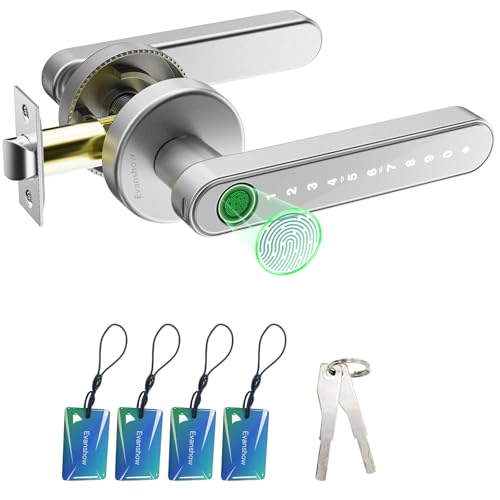
Evanshow Keypad and Biometric Door Knob
Best for: offline multi-credential access in small offices
- Application
- Home, Office, Apartment, Bedroom, Hotel (what this guide is about)
- Access Methods
- Fingerprint, password, key, IC card
- Recognition Speed
- 0.5s
- Fingerprint Capacity
- Up to 100
- Passcode Capacity
- 50
- Color
- Silver
This Evanshow biometric knob gives you standalone keyless access for your private office without requiring an app connection. It stores up to 100 fingerprints, 50 keypad passwords, and includes four IC cards alongside two physical backup keys. The hardware fits standard interior wooden doors measuring 1.18 to 1.97 inches thick. It works well if you need fast 0.5-second access control for staff members without managing smartphone permissions or complex network setups.
Pros
- Stores up to 100 fingerprints and 50 keypad passwords
- Offers four entry methods including IC cards and physical keys
- Sensor recognizes fingerprints in under 0.5 seconds
- Fits left- and right-swing wooden doors from 1.18 to 1.97 inches thick
Cons
- No mobile app support or remote network connectivity
- Emergency USB port does not recharge internal batteries
- Unlocks with any fingerprint until an administrator is registered
Good fit if
- You need multiple offline entry methods for shared office spaces.
- You want standalone hardware that operates without a mobile application.
- You have a standard wooden door between 1.18 and 1.97 inches thick.
Skip if
- You require mobile app control, digital access logs, or remote unlocking.
- You have a door thinner than 1.18 inches or thicker than 1.97 inches.
Verdict: Evanshow Fingerprint Keypad Door Knob provides simple offline access control for office doors using codes, cards, or biometrics. Its standalone setup eliminates app management while retaining high credential capacity.

FDFDTO Keypad Door Handle with Fingerprint
Best for: Offices needing passage mode and rechargeable power
- Application
- Home, Office, Bedroom (what this guide is about)
- Access Methods
- Fingerprint, passcode, app, key
- Recognition Speed
- 0.2s
- Color
- Silver
- Included Hardware
- Handle
- Dimensions
- 3.8 × 3.3 × 9.7 inches
The FDFDTO smart door handle controls office access using fingerprint recognition, a backlit keypad, an app, or physical backup keys. It features passage mode to keep your door unlocked during busy work hours and silent mode for quiet environments. Powered by a 400mAh rechargeable battery, it fits doors 1-1/8 to 2-1/8 inches thick, suiting anyone who wants quick keyless entry without disposable batteries.
Pros
- Passage mode keeps the door unlocked during office hours
- Built-in 400mAh rechargeable battery eliminates disposable cells
- Four entry options: fingerprint, keypad, app, and mechanical key
- Adjustable latch fits 2-3/8-inch or 2-3/4-inch backsets
Cons
- Requires 4 to 6 hours to fully recharge the internal battery
- No keycard or RFID fob support included
- Does not fit doors thicker than 2-1/8 inches
Good fit if
- You want passage mode so staff and guests can enter freely during work hours.
- You prefer an integrated rechargeable battery over swapping disposable batteries.
- You need flexible entry using fingerprint, anti-peep passcode, or smartphone app.
Skip if
- You need RFID card or key fob access for your office setup.
- You have an interior or exterior door thicker than 2-1/8 inches.
Verdict: FDFDTO Fingerprint Keypad Smart Door Handle delivers versatile keyless access and convenient passage mode for busy office spaces. Its internal rechargeable battery and multiple unlocking options make it a practical office upgrade.

AIMNAPS Biometric Smart Door Knob
Best for: Offices needing biometric entry and app passcodes
- Application
- Office, Apartment, Bedroom (what this guide is about)
- Access Methods
- Fingerprint, app
- Recognition Speed
- 0.5s
- App Compatibility
- Tuya
- Included Hardware
- Handle
- Dimensions
- 2 × 2 × 1 inches
The AIMNAPS Smart Fingerprint Door Handle provides keyless access for your office using biometric scanning and remote code management. It unlocks in under 0.5 seconds and fits standard doors measuring 1.18 to 1.97 inches thick without drilling. Using the Tuya app, you can create temporary passcodes for visitors or staff. An external USB port supplies emergency power if batteries fail. It suits office spaces needing fast fingerprint entry and flexible visitor access.
Pros
- Scans and verifies fingerprints in under 0.5 seconds
- Tuya app integration allows remote generation of temporary passcodes
- Fits standard interior doors between 1.18 and 1.97 inches thick without drilling
- Emergency USB port enables power bank connection during battery failure
Cons
- Accepts any fingerprint to unlock until an administrator is registered
- USB port is strictly for emergency power and does not recharge batteries
Good fit if
- You need rapid 0.5-second biometric unlocking for an office door.
- You want to share temporary guest passcodes remotely using an app.
- Your door thickness measures between 1.18 and 1.97 inches.
Skip if
- You require an integrated port that recharges internal batteries directly.
- Your door falls outside the 1.18 to 1.97-inch thickness specification.
Verdict: AIMNAPS Smart Fingerprint Door Handle delivers rapid 0.5-second biometric unlocking and app-managed temporary codes for standard office doors. It serves as a practical keyless option with emergency USB backup power.

EUERTE Fingerprint Smart Door Knob
Best for: offices prioritizing fingerprint access over PIN codes
- Application
- Office, Apartment, Bedroom, Hotel (what this guide is about)
- Access Methods
- Fingerprint, app, physical key
- Recognition Speed
- 0.1s
- Fingerprint Capacity
- 100
- Auto-Lock Delay
- 5s
- App Compatibility
- TT LOCK
The EUERTE Fingerprint Smart Door Knob gives you keyless entry via a 360-degree biometric scanner, the TT LOCK companion app, or physical backup keys. It stores up to 100 fingerprints locally and features a five-second auto-lock timer alongside a passage mode. Built from zinc alloy, it fits offices where you need fast thumbprint access and entry record tracking without relying on numeric keypads or cloud data storage.
Pros
- Stores up to 100 fingerprints locally without cloud upload
- Supports app passage mode, privacy mode, and 5-second auto-locking
- Fast 360-degree biometric recognition down to 0.15 seconds
- Solid zinc alloy build with sweat- and weather-resistant finish
Cons
- Lacks a numerical keypad for PIN code entry
- No RFID keycard support listed
Good fit if
- You prefer using biometric prints or app control over entering keypad digits.
- You need passage mode for continuous access during office work hours.
- You want entry log records and fingerprint data kept on local device storage.
Skip if
- You want visitors or colleagues to access the room via a numeric PIN.
- You prefer scanning RFID keycards for door entry.
Verdict: EUERTE Fingerprint Smart Door Knob delivers rapid local biometric access and reliable app controls in a solid zinc alloy body. It provides straightforward office security without keypad complexity.

Richelock Fingerprint Smart Door Knob
Best for: Offices needing multi-user access without an app
- Application
- Office, Bedroom (what this guide is about)
- Access Methods
- Fingerprint, keypad, key
- Fingerprint Capacity
- 100
- Passcode Capacity
- 50
- Water Resistance
- Waterproof
- Color
- Matte Black
This Richelock smart door knob combines a biometric fingerprint scanner, a digital keypad, and physical keys for office access control. It stores up to 100 fingerprints and 50 custom passcodes ranging from 1 to 15 digits. You can enable silent mode to mute keypad tones during work hours or switch to guest mode for unrestricted daytime entry. It fits standard backsets and suits offices needing multi-user keyless management without network requirements.
Pros
- Stores up to 100 fingerprints and 50 numerical passcodes
- Silent mode mutes keypad audio for shared office spaces
- Guest mode allows free passage without requiring credentials
- Type-C port provides emergency backup power
Cons
- No mobile app or Wi-Fi connectivity listed
- Uses 2 AAA batteries rather than higher-capacity AA cells
Good fit if
- You manage office access for multiple employees via fingerprints and codes
- You need silent operation so keypad tones do not disrupt quiet work areas
- You prefer standalone hardware that operates without an internet connection or app
Skip if
- You need remote access logs or lock management through a smartphone app
- You require an ADA-compliant lever handle rather than a round knob
Verdict: Richelock Keypad Fingerprint Door Knob delivers offline credential management for up to 100 fingerprints and 50 codes across shared offices. Its silent and guest modes make it practical for everyday workplace foot traffic.

RAFECIEE Fingerprint Smart Door Knob
Best for: small offices needing shared biometric access
- Application
- Office, Apartment, Bedroom (what this guide is about)
- Access Methods
- Fingerprint, passcode, app, key
- Recognition Speed
- 0.1s
- Fingerprint Capacity
- 50
- Passcode Capacity
- 50
- Auto-Lock Delay
- 5 seconds
The RAFECIEE Fingerprint Smart Door Knob provides four entry methods for office doors: biometric scanning, passcodes, Bluetooth app control, and physical keys. It stores up to 50 fingerprints and 50 user codes, suiting shared commercial rooms. Built-in passage mode keeps the latch open during busy workday hours, while a 5-second auto-lock restores security when you leave. It installs on standard doors between 1-3/8 inches and 2 inches thick.
Pros
- Stores up to 50 fingerprints and 50 user passcodes
- Includes passage mode and 5-second auto-lock
- Emergency power port and low-battery alerts
- Fingerprint data stored locally off the cloud
Cons
- App control only functions within Bluetooth range
- Does not include the required AAA batteries
- Restricted to doors between 1-3/8 and 2 inches thick
Good fit if
- You manage a shared office needing entry for up to 50 people.
- You want passage mode to leave the door unlocked during work hours.
- You prefer local biometric data storage rather than cloud uploads.
Skip if
- You need remote lock management beyond local Bluetooth range.
- Your door thickness is outside 1-3/8 inches to 2 inches.
Verdict: RAFECIEE Fingerprint Smart Door Knob delivers practical interior access control with local biometric storage, scheduled passage mode, and capacity for 50 users. It secures shared office spaces simply without requiring a cloud connection.
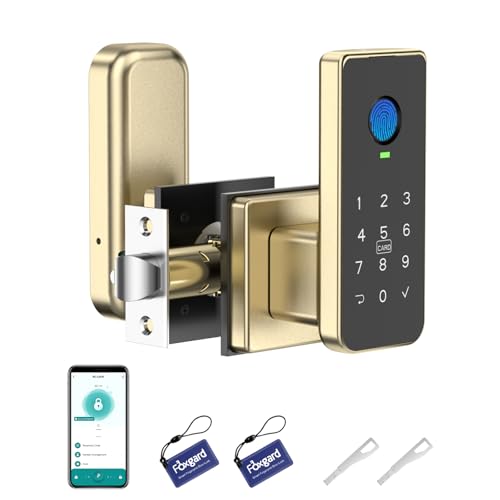
Foxgard Keypad and Fingerprint Door Knob
Best for: offices needing temporary passcodes and privacy control
- Application
- Office, Bedroom (what this guide is about)
- Access Method
- Keypad, Fingerprint, Key, App Control
- Special Features
- Auto Lock
- Dimensions
- 4.8 × 2 × 3.3 inches
- Weight
- 1.59 pounds
This Foxgard smart lock provides five access methods: fingerprint, keypad, app, IC card, and mechanical key. For your office, you can set timed or one-time codes in the app and view access logs. An indoor privacy mode blocks entry from standard credentials when you need undisturbed time. It fits standard doors and runs on four AA batteries. This unit suits office owners who need flexible visitor access and internal privacy control.
Pros
- Offers 5 entry methods: fingerprint, backlit keypad, app, IC card, and mechanical key
- In-app passcode management supports timed, one-time, and dynamic passcodes plus access logs
- Built-in electronic anti-lock provides indoor privacy by locking out regular users
- Keypad features anti-peep random digit entry, auto-lock, and delayed locking
Cons
- Requires Foxgard Gateway sold separately for remote access and voice control
- Requires 4 AA alkaline batteries that are not included
Good fit if
- You need multiple unlocking options including fingerprint scanning and IC cards.
- You want to issue temporary, timed passcodes to visitors or cleaning staff via an app.
- You need an internal privacy lock mode to prevent unwanted entry during meetings.
Skip if
- You require out-of-the-box remote access or voice commands without purchasing extra hardware.
- You prefer a lock package that includes the required alkaline batteries.
Verdict: Foxgard 5-in-1 Biometric Smart Lock delivers versatile entry options and app-based credential scheduling for your office doors. It is an effective access control option, though remote features require an add-on gateway.

Omlepai Fingerprint Door Knob with Keycards
Best for: Offices needing keycard and fingerprint access
- Application
- Home, Office, Bedroom (what this guide is about)
- Access Methods
- Fingerprint, code, keycards, keys, app
- Color
- Black
- Dimensions
- 6.4 × 2.56 × 3 inches
- Weight
- 1.56 pounds
This smart lock provides five distinct entry options for your office door: fingerprint recognition, keypad code, app control, physical keys, and two included keycards. It measures 6.4 inches long, 2.56 inches wide, and 3 inches high, weighing 1.56 pounds. The unit fits standard interior doors without hardwiring. It suits anyone managing an office who needs flexible access methods, allowing you to grant access using cards, codes, or fingerprints.
Pros
- Supports 5 entry methods including fingerprint, passcode, app, keycards, and physical keys
- Comes with 2 keycards and physical backup keys included
- Installs on standard doors without external wiring
Cons
- Only comes in a black finish
- Package includes only two keycards
Good fit if
- You want keycard access alongside fingerprint and numeric code entry.
- You need a battery-operated lock that mounts to standard doors without wiring.
Skip if
- You need more than two keycards provided in the box.
- You require a lock finish other than black to match existing office hardware.
Verdict: Omlepai Smart Fingerprint Door Lock with Keycards delivers 5-in-1 entry versatility for standard office doors, combining biometric, card, code, and app access in a compact black hardware unit.

RAFECIEE Biometric Keypad Door Knob
Best for: Offices wanting offline biometric and passcode entry
- Application
- Home, Garage, Office, Bedroom (what this guide is about)
- Access Methods
- Fingerprint, passcode, backup key
- Recognition Speed
- 0.1s
- Fingerprint Capacity
- 50
- Passcode Capacity
- 50
- Auto-Lock Delay
- 5-30s
The RAFECIEE Fingerprint Keypad Door Knob provides standalone keyless access for your office door without relying on Wi-Fi or mobile apps. It stores up to 50 fingerprints and 50 passcodes locally on the device. An adjustable 5- to 30-second auto-lock feature and an anti-peep keypad keep your workspace secure. It suits office setups where you want simple offline biometric and pin code entry for multiple team members.
Pros
- Stores up to 50 fingerprints and 50 passcodes locally
- Adjustable auto-lock timer from 5 to 30 seconds
- Fits doors 1-1/4 to 2-1/4 inches thick with adjustable latch
- Includes two physical backup keys and a Type-C emergency port
Cons
- Requires 4 AAA batteries that are not included
- No Wi-Fi or smartphone app connectivity for remote monitoring
Good fit if
- You want an offline door lock without app or network dependencies.
- You need to register up to 50 unique fingerprints or PIN codes.
- You prefer an automatic relock timer for office security.
Skip if
- You require remote unlocking or digital access logs over Wi-Fi.
- You want a lock that includes the necessary batteries in the box.
Verdict: RAFECIEE Fingerprint Keypad Door Knob delivers offline biometric and pin security with local storage for offices that do not need Wi-Fi integration. Its adjustable auto-lock and simple installation make it a practical office access solution.

GUSEI Smart Matter Fingerprint Door Handle
Best for: Matter smart office ecosystems
- Application
- Home, Office, Apartment, Bedroom, Hotel (what this guide is about)
- Access Methods
- Fingerprint, code, key, card, app
- Auto-Lock Delay
- 5 seconds
- App Compatibility
- Matter, Tuya
- Color
- Black
- Included Hardware
- Handle
This GUSEI smart door handle provides five entry options: fingerprint scanning, keypad codes, key cards, physical keys, and mobile app control. Its Matter connectivity enables direct integration with Apple Home, Google Home, and Alexa platforms across your office network. The handle features an auto-lock mechanism that engages after five seconds, alongside an emergency Type-C port. It fits offices needing versatile credential access within a unified smart ecosystem.
Pros
- Matter certification enables integration with Apple Home, Alexa, and Google Home
- Five unlock methods: fingerprint, keypad code, card, app, and physical key
- Adjustable auto-lock defaults to securing the door after 5 seconds
- Emergency Type-C port supports temporary power from an external bank
Cons
- Offered only in a black finish
- Large footprint measuring 8.66 inches long and 6.89 inches wide
Good fit if
- You use Matter-compatible smart platforms such as Apple Home, Google Home, or Alexa in your office.
- You want multiple entry options including fingerprints, access cards, and PIN codes.
- You require an automatic door locking function with adjustable timing.
Skip if
- You need office door hardware in a finish other than black.
- You prefer a compact lock assembly rather than an 8.66-inch handle unit.
Verdict: GUSEI Matter Fingerprint Smart Lock Handle delivers broad platform interoperability through Matter support alongside five entry methods for office doors. Its built-in auto-lock and Type-C emergency power port make it a practical choice for connected office spaces.
Specifications side by side
| Spec | Evanshow Biometric Fingerprint Door Knob | GHome Smart Rechargeable Keypad Door Knob | Iulock Keypad Keyless Entry Door Knob | DREMUSOUD Biometric Smart Door Handle | Evanshow Keypad and Biometric Door Knob | FDFDTO Keypad Door Handle with Fingerprint | AIMNAPS Biometric Smart Door Knob | EUERTE Fingerprint Smart Door Knob | Richelock Fingerprint Smart Door Knob | RAFECIEE Fingerprint Smart Door Knob | Foxgard Keypad and Fingerprint Door Knob | Omlepai Fingerprint Door Knob with Keycards | RAFECIEE Biometric Keypad Door Knob | GUSEI Smart Matter Fingerprint Door Handle |
|---|---|---|---|---|---|---|---|---|---|---|---|---|---|---|
| Access Methods | Fingerprint, code, key, IC card, app | Fingerprint, password, app, key | Keypad, key | Fingerprint, password, IC card, app, key | Fingerprint, password, key, IC card | Fingerprint, passcode, app, key | Fingerprint, app | Fingerprint, app, physical key | Fingerprint, keypad, key | Fingerprint, passcode, app, key | not specified | Fingerprint, code, keycards, keys, app | Fingerprint, passcode, backup key | Fingerprint, code, key, card, app |
| Recognition Speed | not specified | 0.2s | not specified | 0.2s | 0.5s | 0.2s | 0.5s | 0.1s | not specified | 0.1s | not specified | not specified | 0.1s | not specified |
| Fingerprint Capacity | Up to 100 | 20 | not specified | 100 | Up to 100 | not specified | not specified | 100 | 100 | 50 | not specified | not specified | 50 | not specified |
| Passcode Capacity | 50 | 20 | 50 | 50 | 50 | not specified | not specified | not specified | 50 | 50 | not specified | not specified | 50 | not specified |
| Auto-Lock Delay | not specified | not specified | not specified | not specified | not specified | not specified | not specified | 5s | not specified | 5 seconds | not specified | not specified | 5-30s | 5 seconds |
| App Compatibility | Tuya | not specified | not specified | not specified | not specified | not specified | Tuya | TT LOCK | not specified | not specified | not specified | not specified | not specified | Matter, Tuya |
| Connectivity | not specified | not specified | not specified | not specified | not specified | not specified | not specified | not specified | not specified | not specified | not specified | not specified | not specified | Matter |
| Access Method | Keypad, Fingerprint, Key, Key Card | Keypad, Fingerprint, App Control | Keypad, Key | Keypad, Fingerprint | Keypad, Fingerprint | Keypad, Fingerprint | Fingerprint | Fingerprint, App Control | Keypad, Fingerprint | Fingerprint, App Control | Keypad, Fingerprint, Key, App Control | Fingerprint, Key, Key Card | Fingerprint, Key | Fingerprint, Key, Key Card |
| Water Resistance | not specified | not specified | Waterproof | not specified | not specified | not specified | not specified | not specified | Waterproof | not specified | not specified | not specified | not specified | not specified |
| Color | BLACK 03 | Glossy Black | Stain Nickel | Black | Silver | Silver | black 01 | Black | Matte Black | Matte Black | Black/Gold | Black | Black | Black |
| Application | Home, Office, Apartment, Bedroom, Hotel | Home, Garage, Office, Apartment, Bedroom | Garage, Office, Bedroom | Home, Office, Bedroom | Home, Office, Apartment, Bedroom, Hotel | Home, Office, Bedroom | Office, Apartment, Bedroom | Office, Apartment, Bedroom, Hotel | Office, Bedroom | Office, Apartment, Bedroom | Office, Bedroom | Home, Office, Bedroom | Home, Garage, Office, Bedroom | Home, Office, Apartment, Bedroom, Hotel |
| Included Hardware | Knob | Knob | Knob | Handle | Knob | Handle | Handle | Knob | Knob | Knob | not specified | not specified | Knob | Handle |
| Special Features | not specified | Auto Lock | Auto Lock | not specified | not specified | not specified | not specified | not specified | Auto Lock | Auto Lock | Auto Lock | not specified | Auto Lock | not specified |
| Dimensions | 5.5 × 5.5 × 5.5 inches | 3.93 × 9.05 × 9.05 inches | 7 × 4.5 × 3.1 inches | 7 × 3 × 10 inches | 1 × 2 × 2 inches | 3.8 × 3.3 × 9.7 inches | 2 × 2 × 1 inches | 9.29 × 3.29 × 3.29 inches | 7 × 3 × 3 inches | 8.74 × 6.5 × 3.74 inches | 4.8 × 2 × 3.3 inches | 6.4 × 2.56 × 3 inches | 8.74 × 6.5 × 6.5 inches | 8.66 × 6.89 × 2.95 inches |
| Weight | 1.2 pounds | 1.68 pounds | 1.88 pounds | not specified | 1.2 pounds | not specified | not specified | 1.72 pounds | not specified | 1.65 pounds | 1.59 pounds | 1.56 pounds | not specified | not specified |
| Size | door lock | not specified | not specified | not specified | None APP | not specified | smart door lock with app | 9.29"L x 3.29"W | not specified | 1 Piece | not specified | 2 Key Cards | 1-1/4" to 2-1/4" | not specified |
| Model | 003 | K10PRO Smart Door Knob | IU-30 | E008 | 190NOSilver | Q10 | Fingerprint Door Lock | S10T | IU51B | G99 plus | FNL-01 | CL02 | G99 Black | GH01-251029 |
If you are furnishing a breakroom, you can compare capacity specifications across the best refrigerators for office use.
How to Choose the Right Office Door Knob
-
Choose Knob or Handle Hardware
You should check whether the lock includes a circular knob or a lever handle. Lever handles allow easy downward pressure to open doors, which helps busy offices with frequent foot traffic. Circular knobs require a full wrist turn and maintain a compact profile against the door surface. Review the included hardware specification for your door. The DREMUSOUD Biometric Smart Door Handle provides handle hardware rather than a round knob. Select a lever handle if your office requires accessible physical entry, or choose a round knob if you prefer traditional hardware.
-
Check Water Resistance Specifications
You should verify the water resistance rating if your office door faces outside corridors, exterior courtyards, or damp utility spaces. Standard interior knobs lack weather protection, which exposes internal electronics to moisture damage. If your door contacts rain, humidity, or cleaning spray, look specifically for a waterproof specification on the listing. The Richelock Fingerprint Smart Door Knob lists waterproof protection in its attributes. Choosing a lock with certified water resistance protects sensitive electronic sensors and prevents hardware failure along perimeter office doors or semi-outdoor entrances.
-
Evaluate Auto Lock Capabilities
You must evaluate whether the lock includes an auto-lock function to maintain consistent security throughout workdays. Without automatic locking, staff members must remember to secure the latch manually every time they leave their desks. An auto-lock mechanism engages the dead latch automatically after a preset duration once the door closes. The GHome Smart Rechargeable Keypad Door Knob includes an auto-lock feature in its specifications. This function suits shared workspaces or private offices where sensitive files require reliable perimeter locking after every exit.
-
Measure Lock Escutcheon Dimensions
You should check physical lock dimensions before purchasing to prevent clearance issues on narrow office door stiles. Large escutcheon plates can collide with door frames, glass inserts, or secondary deadbolts. For instance, the Evanshow Keypad and Biometric Door Knob measures 2 inches wide, 2 inches high, and 1 inch long. Compact dimensions ensure the hardware fits flush on doors with limited surface area around the latch hole. Compare the published width and height against your door measurements to ensure the unit clears the jamb and surrounding molding.
-
Consider Keycard Badging Support
You should check whether the door knob supports physical key cards for office staff access. Key cards provide quick tap entry for employees who prefer not to use biometric fingerprint scans or enter digital passcodes. This access method works well for managing temporary contractors, cleaning staff, or office workers who carry badge lanyards. The Omlepai Fingerprint Door Knob with Keycards includes key card access as a listed entry method. Verify that the hardware lists card support if your workplace relies on card-based physical badges alongside standard keys.
Frequently asked questions
How does passage mode work on an office door knob?
Passage mode keeps your office door unlocked during business hours so staff can walk through freely without entering credentials each time. Models like the GHome Smart K10PRO and FDFDTO Q10 provide this feature to manage daytime traffic. When work hours conclude, disabling the mode restores standard auto-locking security.
Can you use an office door knob without smartphone apps?
Yes, several locks operate completely offline without requiring companion apps or wireless networks. Options like the Evanshow 190NOSilver and Richelock IU51B store all user data locally on the lock body. The Richelock model holds up to 100 fingerprints and 50 codes directly on the hardware for straightforward management.
What happens if an electronic office door knob loses power?
You can unlock the door using physical backup keys or emergency external power. Hardware like the Evanshow Biometric Knob and Omlepai CL02 include traditional physical keys. Alternatively, locks like the AIMNAPS handle and GUSEI Smart Lock feature USB ports for temporary power connections if internal batteries run out.
How fast do biometric fingerprint locks open office doors?
Biometric scanners on office hardware generally read fingerprints and disengage latches in under one second. For instance, the GHome Smart K10PRO unlocks in 0.2 seconds, while the AIMNAPS handle reads prints in 0.5 seconds. Fast recognition prevents delays when employees move between private workspaces throughout the business day.
Are key card locks practical for shared office spaces?
Key cards offer quick tap access for workers who prefer not to type PIN codes or scan biometrics. The Omlepai CL02 and Evanshow 003 models support key card entry alongside mechanical keys. Issuing cards provides a simple way to give physical credentials to office visitors or temporary staff members.
Which office door knobs provide water resistance?
Locks with waterproof ratings protect entries exposed to moisture, damp hallways, or exterior weather. In this comparison, both the Iulock IU-30 and Richelock IU51B specify waterproof construction in their published attributes. This build quality protects internal electronics if your office door leads outside or transitions into a garage area.