15 Best Door Knobs with Fingerprint, Compared
As an Amazon Associate we earn from qualifying purchases. Links on this page are affiliate links.
Replacing standard hardware with a door knob with fingerprint access gives you keyless entry without modifying your door prep. The Evanshow Biometric Fingerprint Door Knob takes the top position because it pairs biometric entry with keypad, key card, and physical key backups within a standard 5.5-inch housing.
This guide compares 15 models strictly using the specifications published on their listings. By reviewing dimensions, entry methods, and power configurations, you can choose the right hardware for your bedroom, office, or rental space.
Quick picks
The best fit for you
- You need multiple credential methods for interior rooms Evanshow Biometric Fingerprint Door Knob It provides 5-in-1 entry via keypad, fingerprint, key card, physical key, and Tuya app integration.
- You need biometric access on an outdoor door Richelock Fingerprint Smart Door Knob It features official waterproof resistance and local memory capacity for up to 100 fingerprints.
- You want a rechargeable lock with auto locking GHome Smart Rechargeable Keypad Door Knob It includes an integrated rechargeable battery, automatic locking, and rapid 0.2-second biometric recognition.
- You prefer fingerprint access without any keypad hardware Buoan Biometric Fingerprint Door Knob It supports up to 50 fingerprints with 0.3-second recognition and excludes numeric keypad entry entirely.
Our 15 picks

Evanshow Biometric Fingerprint Door Knob
Best for: multi-user bedrooms, apartments, and interior offices
- Access Method
- Keypad, Fingerprint, Key, Key Card (what this guide is about)
- Access Methods
- Fingerprint, code, key, IC card, app
- Fingerprint Capacity
- Up to 100
- Passcode Capacity
- 50
- App Compatibility
- Tuya
- Application
- Home, Office, Apartment, Bedroom, Hotel
The Evanshow 5-in-1 Fingerprint Door Knob is a biometric lock designed for 1.18- to 1.97-inch wooden doors with left or right swings. You get storage for up to 100 fingerprints and 50 passwords, alongside Tuya app management, IC card access, and two physical keys. It suits you if you need versatile entry options, guest access scheduling, and silent mode operation for home, office, or bedroom doors.
Pros
- Stores up to 100 fingerprints and 50 passcodes
- Provides 5 unlock methods including fingerprint, keypad, IC card, app, and keys
- App supports entry log tracking, temporary guest codes, and silent mode
- Emergency USB port allows external power bank connection
- Fits left- and right-swing wooden doors from 1.18 to 1.97 inches thick
Cons
- USB port cannot recharge internal lock batteries
- Any fingerprint unlocks the door until an administrator profile is set
- Limited to doors between 1.18 and 1.97 inches thick
Good fit if
- You need multiple backup entry methods including keys and IC cards.
- You manage many visitors and need up to 100 stored fingerprints.
- You want app-based control for guest access and entry logs.
Skip if
- You have a door thinner than 1.18 inches or thicker than 1.97 inches.
- You want a lock with an integrated rechargeable battery system.
Verdict: Evanshow 5-in-1 Fingerprint Door Knob delivers flexible access methods and high credential capacity for standard wooden doors. It provides solid access management via the Tuya app alongside manual mechanical backups.

KLLOQUE Rechargeable Fingerprint Door Knob
Best for: interior bedrooms needing rechargeable biometric access
- Access Method
- Fingerprint (what this guide is about)
- Access Methods
- Fingerprint, app, mechanical key
- Auto-Lock Delay
- 5s
- Color
- Matte Black
- Included Hardware
- Knob
- Dimensions
- 9 × 3.5 × 3.5 inches
This interior door knob gives you keyless entry via biometric fingerprint, Bluetooth app, or physical backup keys. It features a built-in rechargeable battery powered by USB Type-C with up to a one-year lifespan and under-twenty-percent app notifications. You can toggle between Passage, Normal, Privacy, and Silent modes right from the interior thumb turn. It suits bedrooms, interior rooms, or rental spaces that lack exterior weather stripping.
Pros
- Built-in rechargeable battery charges via USB Type-C with up to one year of runtime
- Four thumb-turn modes: Passage, 5-second Normal auto-lock, Privacy, and Silent
- Triple unlock methods via biometric fingerprint scanner, Bluetooth app, or mechanical key
- In-app access logs and low-battery warning alerts below 20 percent
Cons
- Not compatible with doors that have weather strips installed
- Out-of-home remote control requires a separate Wi-Fi gateway
- Lacks a digital keypad for PIN code entry
Good fit if
- You want a rechargeable lock with USB Type-C charging instead of disposable batteries.
- You need multiple functional settings like Silent Mode and Passage Mode selectable via thumb turn.
- You plan to manage access logs and guest permissions locally over Bluetooth.
Skip if
- You have doors fitted with weather strips.
- You need remote Wi-Fi operation straight out of the box without buying an extra gateway.
- You require a numeric PIN keypad for unlocking without a phone or fingerprint.
Verdict: KLLOQUE Rechargeable Fingerprint Door Knob provides convenient biometric and Bluetooth operation with versatile thumb-turn operating modes. It is an effective interior solution as long as your door does not have weather stripping.

GHome Smart Rechargeable Keypad Door Knob
Best for: Rechargeable convenience on interior residential doors
- Access Method
- Keypad, Fingerprint, App Control (what this guide is about)
- Access Methods
- Fingerprint, password, app, key
- Recognition Speed
- 0.2s
- Fingerprint Capacity
- 20
- Passcode Capacity
- 20
- Application
- Home, Garage, Office, Apartment, Bedroom
This door knob provides keyless entry using a biometric sensor with 0.2-second recognition, storing up to 20 fingerprints locally. You also get a digital keypad, physical backup keys, and Bluetooth app access. Its internal 400mAh rechargeable battery delivers up to 10,000 unlocks per charge. It suits you if you want quick fingerprint access and passage mode control for standard interior doors without managing disposable batteries.
Pros
- Fast 0.2-second biometric recognition with local-only fingerprint data storage
- Built-in 400mAh rechargeable battery rated for up to 10,000 unlocks
- Four access options including fingerprint, keypad, Bluetooth app, and mechanical key
- Includes customizable auto-lock, passage mode, and silent mode settings
Cons
- App controls function only within local Bluetooth range
- Biometric capacity capped at 20 fingerprints
- Recharging the built-in battery takes 4 to 6 hours
Good fit if
- You want an integrated rechargeable battery instead of buying replacement cells.
- You prefer fingerprint biometric records stored locally without cloud access.
- You need passage mode to keep the door unlocked during active hours.
Skip if
- You require remote unlocking over Wi-Fi away from home.
- You need to register more than 20 unique fingerprints.
Verdict: GHome Smart Rechargeable Fingerprint Door Knob delivers quick 0.2-second biometric unlocking and local data storage backed by a built-in rechargeable battery. It offers versatile everyday access for interior doors, provided you do not require Wi-Fi connectivity.

DREMUSOUD Biometric Smart Door Handle
Best for: busy home offices, bedrooms, and rental rooms
- Access Method
- Keypad, Fingerprint (what this guide is about)
- Access Methods
- Fingerprint, password, IC card, app, key
- Recognition Speed
- 0.2s
- Fingerprint Capacity
- 100
- Passcode Capacity
- 50
- Color
- Black
The DREMUSOUD Fingerprint Smart Door Handle provides biometric entry using a 160 by 160 DPI sensor that reads prints in 0.2 seconds. It stores up to 100 fingerprints and offers keypad, mobile app, IC card, and physical key access. It fits standard doors measuring 1-3/8 to 2-1/8 inches thick. This setup suits you if you need versatile access options and high fingerprint storage for a bedroom, office, or rental property.
Pros
- Stores up to 100 fingerprints and 50 passwords
- 160 by 160 DPI fingerprint sensor with 0.2-second recognition
- Five unlock methods: fingerprint, keypad, IC card, app, and physical key
- Emergency USB-C port provides power connection if batteries fail
- Reversible handle fits left-handed and right-handed door swings
Cons
- Requires four AAA batteries that are not included in the box
- Needs a mobile app configured to use smartphone unlocking features
Good fit if
- You need to store up to 100 fingerprints for frequent household members or guests.
- You want multiple entry methods including fobs, codes, keys, and an app alongside biometric access.
- You have a standard interior door thickness between 1-3/8 and 2-1/8 inches.
Skip if
- You want a smart lock that includes the necessary AAA batteries out of the box.
- You have an exterior or custom door thickness outside the 1-3/8 to 2-1/8 inch range.
Verdict: DREMUSOUD Fingerprint Smart Door Handle delivers fast 0.2-second recognition and generous storage for 100 fingerprints across five entry methods. It is an adaptable hardware solution for standard interior doors needing keyless access.
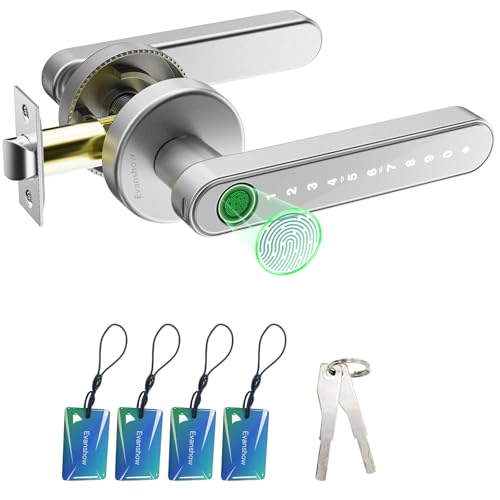
Evanshow Keypad and Biometric Door Knob
Best for: standalone keyless entry on interior wooden doors
- Access Method
- Keypad, Fingerprint (what this guide is about)
- Access Methods
- Fingerprint, password, key, IC card
- Recognition Speed
- 0.5s
- Fingerprint Capacity
- Up to 100
- Passcode Capacity
- 50
- Color
- Silver
The Evanshow Fingerprint Door Knob with Keypad gives you standalone keyless access for wooden doors measuring 1.18 to 1.97 inches thick. It stores up to 100 fingerprints and 50 passwords, with recognition under 0.5 seconds. You also get four IC cards and two physical keys for backup. Without app connectivity, it suits you if you want quick biometric entry for an office or bedroom without smart software.
Pros
- Stores up to 100 fingerprints and 50 passwords
- Four entry options: biometric scanner, keypad, IC cards, and mechanical keys
- Sensor unlocks in less than 0.5 seconds
- Emergency USB port powers unit if internal batteries deplete
Cons
- Has no companion mobile app or wireless connectivity
- Emergency USB port cannot recharge internal batteries
- Unlocks with any fingerprint until an administrator print is registered
Good fit if
- You want local access methods without setting up an app account.
- You have an interior wooden door between 1.18 and 1.97 inches thick.
- You need high fingerprint and passcode capacity for multiple users.
Skip if
- You require remote unlocking or smartphone tracking.
- You have a door thicker than 1.97 inches.
Verdict: Evanshow Fingerprint Door Knob with Keypad provides offline multi-credential entry for interior doors without requiring software setup. It combines fast 0.5-second fingerprint reading with physical key and IC card backups.

ThorBolt Keypad and Fingerprint Door Knob
Best for: flexible mode switching on interior doors
- Access Method
- Keypad, Fingerprint (what this guide is about)
- Access Methods
- Fingerprint, keypad, mechanical key
- Fingerprint Capacity
- 50
- Passcode Capacity
- 100
- Included Hardware
- Knob
- Dimensions
- 6.5 × 2.68 × 2.68 inches
The ThorBolt Fingerprint Keypad Door Knob provides keyless entry for standard interior doors using biometrics, passcodes, or physical keys. It stores up to 50 fingerprints and 100 access codes directly on the unit. A physical toggle switch lets you quickly swap between standard operation, continuous passage mode, and admin-only restriction. This hardware suits you if you need flexible access control for an office, bedroom, or shared interior space.
Pros
- Stores up to 50 fingerprints and 100 passcodes
- Hardware toggle switch for standard, passage, and admin-only modes
- Emergency Type-C power port and two physical backup keys included
- Fits doors with thicknesses from 1-1/4 inches to 2-1/4 inches
Cons
- Requires four AAA batteries that are not included
- No wireless app or network connectivity listed
Good fit if
- You want a physical switch to toggle continuous unlocked passage mode
- You need local storage for up to 50 fingerprints and 100 PIN codes
Skip if
- You want batteries provided in the box
- You require mobile app access or remote unlocking capabilities
Verdict: ThorBolt Fingerprint Keypad Door Knob delivers multi-user biometric and passcode access with convenient physical mode switching. Its dedicated passage and admin settings give you flexible control for interior spaces without requiring network setup.

ThorBolt Fingerprint Keypad Door Knob
Best for: multi-user interior rooms needing high code capacity
- Access Method
- Keypad, Fingerprint (what this guide is about)
- Access Methods
- Fingerprint, keypad, key
- Fingerprint Capacity
- 100
- Passcode Capacity
- 100
- Auto-Lock Delay
- 5 seconds
- Included Hardware
- Knob
The ThorBolt Keypad Fingerprint Door Knob gives you keyless entry via a biometric scanner, a digital keypad, and physical backup keys. It stores up to 100 fingerprints and 100 passcodes, making it suitable for interior spaces like home offices or rental rooms. The zinc alloy unit auto-locks after five seconds, includes a Type-C emergency power port, and features passage mode when you need continuous access without unlocking.
Pros
- Stores up to 100 fingerprints and 100 passcodes
- Bottom Type-C port provides emergency backup power
- Auto-locks after 5 seconds with an instant-lock enter key option
- Zinc alloy build with passage and silent modes
Cons
- Requires 4 AA batteries that are not included
- No smartphone app or remote connectivity listed
Good fit if
- You want local keyless entry with fingerprint, keypad, and mechanical key options.
- You manage multiple users and need storage for up to 100 unique prints and codes.
- You need a passage mode setting for unhindered room access during busy hours.
Skip if
- You need Wi-Fi or Bluetooth app control to unlock doors remotely.
- You prefer a lock that includes the required four AA batteries in the box.
Verdict: ThorBolt Keypad Fingerprint Door Knob delivers offline biometric and keypad security with ample onboard memory for interior doors. Its Type-C emergency port and passage mode make it a practical stand-alone hardware upgrade.

Buoan Biometric Fingerprint Door Knob
Best for: simple fingerprint entry without keypad codes
- Access Method
- Fingerprint (what this guide is about)
- Access Methods
- Fingerprint, mechanical key
- Recognition Speed
- 0.3s
- Fingerprint Capacity
- 50
- Auto-Lock Delay
- 5s
- Color
- Black
The Buoan Biometric Fingerprint Door Knob is a dedicated keyless entry handle designed for standard interior or exterior doors. You get two access methods: an integrated 360-degree biometric scanner with 0.3-second recognition and a mechanical backup key. It holds up to 50 fingerprints and automatically locks after five seconds, though you can switch to passage or silent mode. It suits you if you want quick, direct biometric security without managing numerical codes.
Pros
- 0.3-second fingerprint recognition speed with 360-degree sensor
- Stores up to 50 individual fingerprint profiles
- Fixed 5-second auto-locking with optional passage and silent modes
- Includes mechanical keys for manual backup access
Cons
- No numeric keypad for PIN code access
- Automatic 5-second locking cannot be turned off or adjusted
- No wireless connectivity or smartphone app integration
Good fit if
- You want biometric entry backed by a traditional physical key.
- You need to store up to 50 user fingerprints for family or staff.
- You prefer mandatory 5-second auto-locking for hands-free door security.
Skip if
- You want a keypad for entering temporary or permanent PIN codes.
- You require customizable auto-lock timing or want to disable auto-lock permanently.
- You need remote unlocking or mobile app controls.
Verdict: Buoan Biometric Fingerprint Door Knob delivers fast 0.3-second biometric entry and mechanical key access for up to 50 registered users. It provides reliable, keypad-free hardware security with built-in passage mode and mandatory five-second auto-locking.

FDFDTO Keypad Door Handle with Fingerprint
Best for: interior rooms needing rechargeable biometric entry
- Access Method
- Keypad, Fingerprint (what this guide is about)
- Access Methods
- Fingerprint, passcode, app, key
- Recognition Speed
- 0.2s
- Color
- Silver
- Application
- Home, Office, Bedroom
- Included Hardware
- Handle
The FDFDTO Rechargeable Fingerprint Door Handle gives you four entry options: a 0.2-second fingerprint scanner, an anti-peep keypad, an app, and backup keys. Power comes from an integrated 400mAh rechargeable battery that charges in four to six hours. Designed with an adjustable latch fitting 2-3/8-inch to 2-3/4-inch backsets, it suits you if you want passage mode, silent mode, and quick biometric entry for an interior door.
Pros
- Fast 0.2-second fingerprint recognition
- Integrated 400mAh rechargeable battery
- Adjustable latch fits 2-3/8-inch and 2-3/4-inch backsets
- Four unlock options including fingerprint, keypad, app, and mechanical keys
Cons
- Requires 4 to 6 hours to recharge fully
- Only fits door thicknesses between 1-1/8 inches and 2-1/8 inches
Good fit if
- You want a rechargeable lock rather than replacing batteries.
- You need features like passage mode and silent mode for an office or bedroom.
- You have a door with a standard backset between 2-3/8 inches and 2-3/4 inches.
Skip if
- You have a door thickness outside the 1-1/8-inch to 2-1/8-inch range.
- You do not want to wait 4 to 6 hours for battery recharging.
Verdict: FDFDTO Rechargeable Fingerprint Door Handle provides reliable 0.2-second biometric recognition paired with an integrated rechargeable power cell. It delivers versatile access via keypad, app, and keys while supporting passage mode for busy interior spaces.

AIMNAPS Biometric Smart Door Knob
Best for: interior bedroom and office door security
- Access Method
- Fingerprint (what this guide is about)
- Access Methods
- Fingerprint, app
- Recognition Speed
- 0.5s
- App Compatibility
- Tuya
- Application
- Office, Apartment, Bedroom
- Included Hardware
- Handle
The AIMNAPS Fingerprint Door Knob provides biometric access for your bedroom, office, or apartment doors. Its built-in scanner unlocks in under 0.5 seconds, while Tuya app connectivity lets you generate temporary passcodes remotely for guests. It fits standard doors with thicknesses between 1.18 and 1.97 inches without drilling. An emergency USB port gives you backup power access if the batteries deplete, making it ideal for interior room security.
Pros
- Fingerprint scanner unlocks in under 0.5 seconds
- Tuya app allows remote temporary passcode generation
- Fits doors between 1.18 inches and 1.97 inches thick without drilling
- USB port provides emergency temporary power via power bank
Cons
- Lock opens for any fingerprint until an administrator fingerprint is registered
- USB port provides temporary power only and cannot recharge internal batteries
Good fit if
- You want biometric entry with fingerprint recognition in under 0.5 seconds.
- You need to share temporary passcodes remotely using the Tuya app.
- You have an interior door between 1.18 and 1.97 inches thick.
Skip if
- You want a lock with an integrated rechargeable battery.
- You need a lock for a door thinner than 1.18 inches or thicker than 1.97 inches.
Verdict: AIMNAPS Fingerprint Door Knob delivers fast biometric entry and remote temporary passcodes for interior apartment, bedroom, or office doors. It installs without drilling on standard door thicknesses and includes an emergency USB port for power bank backup.
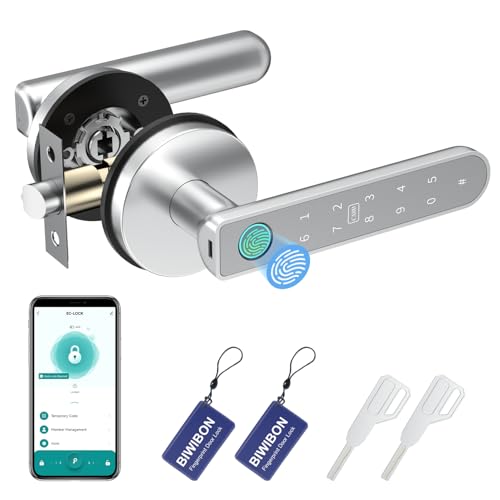
BIWIBON 5-in-1 Fingerprint Smart Door Knob
Best for: multi-user rooms needing local data privacy
- Access Method
- Fingerprint (what this guide is about)
- Access Methods
- Fingerprint, passcode, app, IC card, key
- Fingerprint Capacity
- 100
- Passcode Capacity
- 100
- Included Hardware
- Knob
- Dimensions
- 5.7 × 2.75 × 2.75 inches
This smart door knob offers five entry methods, storing up to 100 fingerprints, 100 passcodes, and 100 IC cards. You can adjust the auto-lock delay, set anti-peep PINs, and manage access logs directly from your phone. It stores all biometric and app data locally rather than uploading to cloud servers. It fits standard doors measuring 1-1/8 to 2-1/8 inches thick, making it practical for home offices, bedrooms, or rental rooms.
Pros
- Holds up to 100 fingerprints, 100 passcodes, and 100 IC cards
- Five unlock methods: fingerprint, passcode, app, IC card, and mechanical key
- Biometric and app data stores locally without cloud uploads
- Includes anti-peep passcode support and customizable auto-lock timing
Cons
- Requires app proximity for code creation and log viewing without a separate gateway
- Includes only two IC cards and two mechanical backup keys
Good fit if
- You need multiple credential types, including IC cards and PINs, for up to 100 users.
- You prefer storing biometric and lock access data locally rather than in the cloud.
- You want customizable auto-lock timing and passage mode for an interior or rental door.
Skip if
- You require remote Wi-Fi management out of the box without manual app proximity.
- You have doors thicker than 2-1/8 inches or thinner than 1-1/8 inches.
Verdict: BIWIBON 5-in-1 Fingerprint Door Knob delivers generous user capacity and flexible entry methods with local data storage. It is a solid choice if you want multi-user access control without sending personal data to cloud servers.

EUERTE Fingerprint Smart Door Knob
Best for: private interior rooms and local credential storage
- Access Method
- Fingerprint, App Control (what this guide is about)
- Access Methods
- Fingerprint, app, physical key
- Recognition Speed
- 0.1s
- Fingerprint Capacity
- 100
- Auto-Lock Delay
- 5s
- App Compatibility
- TT LOCK
The EUERTE Fingerprint Smart Door Knob provides keyless entry using local biometric scanning, physical keys, or the TT LOCK app. Its zinc alloy chassis houses a 360-degree sensor that stores up to 100 fingerprints locally without uploading data to the cloud. You get built-in passage mode, auto-locking, and unlock record tracking. This lock suits you if you need secure, multi-user access control for an interior bedroom, office, or rental room.
Pros
- Stores up to 100 fingerprints directly on device without cloud storage
- Three unlock methods including fingerprint, mobile app, and physical key
- Zinc alloy build with sweat- and weather-resistant design
- TT LOCK app tracks access records and battery capacity
Cons
- No numeric keypad for PIN code entry
- Requires app or physical key as the only alternative entry methods
Good fit if
- You want biometric access that keeps fingerprint data off cloud servers.
- You need to store up to 100 individual fingerprints for multiple users.
- You want app-based control to configure auto-lock and passage modes.
Skip if
- You prefer entering a numerical passcode on a built-in keypad.
- You do not want to manage lock settings using a smartphone app.
Verdict: EUERTE Fingerprint Smart Door Knob delivers rapid biometric unlocking alongside app-managed entry tracking and on-device credential storage. It serves as a dependable security upgrade for interior spaces requiring multi-user access.

Richelock Fingerprint Smart Door Knob
Best for: outdoor doors needing weather-resistant biometric access
- Access Method
- Keypad, Fingerprint (what this guide is about)
- Access Methods
- Fingerprint, keypad, key
- Fingerprint Capacity
- 100
- Passcode Capacity
- 50
- Water Resistance
- Waterproof
- Color
- Matte Black
This Richelock door knob combines fingerprint access with a digital keypad and physical key backup. It stores up to 100 fingerprints and 50 passcodes while offering waterproof electronics rated from -22°F to 176°F. It operates on two AAA batteries and fits standard 2-3/8 inch or 2-3/4 inch door backsets. If you need outdoor-ready biometric entry without app setup, this lock gives you durable hardware and offline dynamic guest codes.
Pros
- Stores up to 100 fingerprints and 50 user passcodes
- Rated for outdoor temperatures from -22°F to 176°F with waterproof electronics
- Generates temporary dynamic passcodes without an app or internet connection
- Includes emergency Type-C backup power port and physical key access
Cons
- Operates on 2 AAA batteries rather than standard AA cells
- Does not include Wi-Fi or smartphone app control
Good fit if
- You need a weather-resistant fingerprint lock for outdoor temperature extremes.
- You manage guest access using offline dynamic passcodes without managing an app.
- You want high fingerprint storage capacity for up to 100 prints.
Skip if
- You want smartphone app integration or wireless remote unlocking.
- You prefer locks powered by larger AA battery cells.
Verdict: Richelock Waterproof Fingerprint Door Knob delivers solid outdoor weather protection alongside local 100-fingerprint memory and offline code generation. It provides reliable physical security for exterior or interior doors without requiring internet connectivity.

RAFECIEE Fingerprint Smart Door Knob
Best for: local biometric storage on interior doors
- Access Method
- Fingerprint, App Control (what this guide is about)
- Access Methods
- Fingerprint, passcode, app, key
- Recognition Speed
- 0.1s
- Fingerprint Capacity
- 50
- Passcode Capacity
- 50
- Auto-Lock Delay
- 5 seconds
The RAFECIEE Fingerprint Smart Door Knob provides keyless entry for interior doors using biometric recognition, keypad passcodes, Bluetooth app control, or physical keys. It stores up to 50 fingerprints locally on the device with a 0.1-second read speed. Designed for standard doors 1-3/8 to 2 inches thick, it suits you if you want customizable security with a 5-second auto-lock and passage mode for interior rooms.
Pros
- Unlocks in 0.1 seconds via biometric sensor
- Stores up to 50 fingerprints and 50 passcodes locally
- Automatic locking triggers after 5 seconds
- Emergency power bank port for battery backup
Cons
- App control is limited to Bluetooth range
- Requires four AAA batteries that are not included
Good fit if
- You need storage for up to 50 individual fingerprints.
- You want biometric data kept locally rather than uploaded to the cloud.
- You have standard doors with thickness between 1-3/8 and 2 inches.
Skip if
- You require remote Wi-Fi app access outside Bluetooth range.
- You want a lock that includes pre-installed batteries.
Verdict: RAFECIEE Fingerprint Smart Door Knob delivers quick 0.1-second biometric access and local credential storage for standard doors. It provides flexible offline access control without routing your data through the cloud.

Foxgard Biometric Smart Door Knob
Best for: flexible multi-user access in interior rooms
- Access Method
- Fingerprint (what this guide is about)
- Access Methods
- Fingerprint, code, app, IC card, key
- Color
- Black
- Included Hardware
- Knob
- Dimensions
- 4.8 × 2 × 2 inches
- Weight
- 1.63 pounds
The Foxgard 5-in-1 Fingerprint Door Knob gives you five entry methods: fingerprint recognition, a backlit keypad, app access, IC cards, and physical keys. Built with an aluminum alloy body, it features auto-locking, anti-peep digit entry, and an electronic deadlock for interior privacy. It operates on four AA batteries and fits standard interior doors. This knob suits you if you need versatile entry credentials for bedrooms, home offices, or rental units.
Pros
- Five unlock options: fingerprint, keypad, mobile app, IC card, and mechanical key
- Backlit keypad includes anti-peep passcode support
- Indoor electronic deadlock locks out standard credentials for privacy
- Aluminum alloy construction with auto-lock and delayed-lock settings
Cons
- Foxgard Gateway required for remote access and voice control is sold separately
- Requires four AA alkaline batteries that are not included
Good fit if
- You want multiple access options including IC cards and scheduled app passcodes.
- You need an indoor privacy lock feature to restrict credential access.
- You prefer standard screwdriver installation without drilling or wiring.
Skip if
- You want remote access or voice control out of the box without buying a gateway.
- You need batteries included in the package.
Verdict: Foxgard 5-in-1 Fingerprint Door Knob delivers flexible access control across five entry methods and reliable aluminum alloy hardware. It provides solid interior privacy features, though remote network control requires an extra gateway.
Specifications side by side
| Spec | Evanshow Biometric Fingerprint Door Knob | KLLOQUE Rechargeable Fingerprint Door Knob | GHome Smart Rechargeable Keypad Door Knob | DREMUSOUD Biometric Smart Door Handle | Evanshow Keypad and Biometric Door Knob | ThorBolt Keypad and Fingerprint Door Knob | ThorBolt Fingerprint Keypad Door Knob | Buoan Biometric Fingerprint Door Knob | FDFDTO Keypad Door Handle with Fingerprint | AIMNAPS Biometric Smart Door Knob | BIWIBON 5-in-1 Fingerprint Smart Door Knob | EUERTE Fingerprint Smart Door Knob | Richelock Fingerprint Smart Door Knob | RAFECIEE Fingerprint Smart Door Knob | Foxgard Biometric Smart Door Knob |
|---|---|---|---|---|---|---|---|---|---|---|---|---|---|---|---|
| Access Methods | Fingerprint, code, key, IC card, app | Fingerprint, app, mechanical key | Fingerprint, password, app, key | Fingerprint, password, IC card, app, key | Fingerprint, password, key, IC card | Fingerprint, keypad, mechanical key | Fingerprint, keypad, key | Fingerprint, mechanical key | Fingerprint, passcode, app, key | Fingerprint, app | Fingerprint, passcode, app, IC card, key | Fingerprint, app, physical key | Fingerprint, keypad, key | Fingerprint, passcode, app, key | Fingerprint, code, app, IC card, key |
| Recognition Speed | not specified | not specified | 0.2s | 0.2s | 0.5s | not specified | not specified | 0.3s | 0.2s | 0.5s | not specified | 0.1s | not specified | 0.1s | not specified |
| Fingerprint Capacity | Up to 100 | not specified | 20 | 100 | Up to 100 | 50 | 100 | 50 | not specified | not specified | 100 | 100 | 100 | 50 | not specified |
| Passcode Capacity | 50 | not specified | 20 | 50 | 50 | 100 | 100 | not specified | not specified | not specified | 100 | not specified | 50 | 50 | not specified |
| Auto-Lock Delay | not specified | 5s | not specified | not specified | not specified | not specified | 5 seconds | 5s | not specified | not specified | not specified | 5s | not specified | 5 seconds | not specified |
| App Compatibility | Tuya | not specified | not specified | not specified | not specified | not specified | not specified | not specified | not specified | Tuya | not specified | TT LOCK | not specified | not specified | not specified |
| Access Method | Keypad, Fingerprint, Key, Key Card | Fingerprint | Keypad, Fingerprint, App Control | Keypad, Fingerprint | Keypad, Fingerprint | Keypad, Fingerprint | Keypad, Fingerprint | Fingerprint | Keypad, Fingerprint | Fingerprint | Fingerprint | Fingerprint, App Control | Keypad, Fingerprint | Fingerprint, App Control | Fingerprint |
| Water Resistance | not specified | not specified | not specified | not specified | not specified | not specified | not specified | not specified | not specified | not specified | not specified | not specified | Waterproof | not specified | not specified |
| Color | BLACK 03 | Matte Black | Glossy Black | Black | Silver | Desert Titanium | Ablack | Black | Silver | black 01 | Silver 02 | Black | Matte Black | Matte Black | Black |
| Application | Home, Office, Apartment, Bedroom, Hotel | not specified | Home, Garage, Office, Apartment, Bedroom | Home, Office, Bedroom | Home, Office, Apartment, Bedroom, Hotel | not specified | not specified | not specified | Home, Office, Bedroom | Office, Apartment, Bedroom | not specified | Office, Apartment, Bedroom, Hotel | Office, Bedroom | Office, Apartment, Bedroom | not specified |
| Included Hardware | Knob | Knob | Knob | Handle | Knob | Knob | Knob | Knob | Handle | Handle | Knob | Knob | Knob | Knob | Knob |
| Special Features | not specified | not specified | Auto Lock | not specified | not specified | not specified | not specified | not specified | not specified | not specified | not specified | not specified | Auto Lock | Auto Lock | not specified |
| Dimensions | 5.5 × 5.5 × 5.5 inches | 9 × 3.5 × 3.5 inches | 3.93 × 9.05 × 9.05 inches | 7 × 3 × 10 inches | 1 × 2 × 2 inches | 6.5 × 2.68 × 2.68 inches | 2.95 × 2.95 × 7.48 inches | 7.4 × 2.95 × 2.95 inches | 3.8 × 3.3 × 9.7 inches | 2 × 2 × 1 inches | 5.7 × 2.75 × 2.75 inches | 9.29 × 3.29 × 3.29 inches | 7 × 3 × 3 inches | 8.74 × 6.5 × 3.74 inches | 4.8 × 2 × 2 inches |
| Weight | 1.2 pounds | 1.63 pounds | 1.68 pounds | not specified | 1.2 pounds | 1.48 pounds | 2.01 pounds | not specified | not specified | not specified | 2.15 pounds | 1.72 pounds | not specified | 1.65 pounds | 1.63 pounds |
| Size | door lock | 1 Piece | not specified | not specified | None APP | not specified | Fingerprint | not specified | not specified | smart door lock with app | 1 Pack | 9.29"L x 3.29"W | not specified | 1 Piece | not specified |
| Model | 003 | K10B | K10PRO Smart Door Knob | E008 | 190NOSilver | G1 | MD1 | YL-98JA-Black | Q10 | Fingerprint Door Lock | BCA-02 | S10T | IU51B | G99 plus | FNL-01 |
If you are updating kitchen appliances next, the guide to the best air fryers with french doors compares capacity and wattage specifications.
How to Choose a Fingerprint Door Knob
-
Power Source and Rechargeability
Check the power supply mechanism before you buy. Some biometric door knobs use built-in rechargeable batteries that eliminate disposable cell replacements. Others rely on replaceable battery cells and offer an exterior USB or Type-C emergency port to jump-start the hardware if power depletes completely. A rechargeable model suits doors near electrical outlets or living spaces where periodic recharging is simple. If you install hardware on less accessible doors, verify whether the lock includes a Type-C backup port. The GHome Smart Rechargeable Keypad Door Knob highlights integrated rechargeable power.
-
Hardware Form Factor
Review the physical hardware format on the product spec sheet. Smart locks in this category come as traditional round knobs or horizontal lever handles. Round knobs maintain a compact profile that matches standard interior residential doors. Lever handles offer easier physical grip and leverage, which helps in high-traffic offices, rental rooms, or spaces where occupants carry items frequently. Verify your door swing direction and clearance before choosing lever hardware. The DREMUSOUD Biometric Smart Door Handle uses a lever handle format designed for frequent operation across residential and home office doors.
-
Standalone Versus App Connectivity
Decide whether you want smartphone app management or direct standalone configuration. App-enabled models let you configure users, view unlock logs, and set access parameters from a mobile device. Standalone locks require manual enrollment directly on the knob using master codes or administrative fingerprints. Standalone models eliminate software updates, account logins, and wireless dependencies, making them practical for utility rooms or simple privacy doors. If you prefer to avoid application setup entirely, look for models designed without apps. The Evanshow Keypad and Biometric Door Knob provides standalone offline programming without software requirements.
-
Passage and Auto-Lock Modes
Check how the lock controls latching behavior during daily use. Many biometric door knobs feature an automatic locking mode that re-engages the latch seconds after every entry. This setting provides consistent privacy for offices and bedrooms. However, rooms with continuous foot traffic benefit from a dedicated passage mode. Passage mode leaves the latch unlocked so you can enter and exit without scanning a fingerprint repeatedly. Compare how each unit toggles between settings, such as physical mode buttons or interior turn controls. The ThorBolt Keypad and Fingerprint Door Knob includes dedicated physical mode switching.
-
Biometric Recognition Speed
Compare the rated fingerprint sensor recognition speed on the specification sheet. Biometric door locks range from 0.1 seconds up to 0.5 seconds for scan verification. Faster response times reduce entry lag, which matters on doors you pass through multiple times a day. Slower sensors can feel hesitant if you are accustomed to mechanical latch movement. If fast daily access is your priority, select hardware with recognition ratings under 0.3 seconds. The RAFECIEE Fingerprint Smart Door Knob specifies rapid 0.1-second biometric access for quick interior door entry.
-
Local Storage Architecture
Examine how the lock stores your biometric templates. Certain fingerprint door knobs process and store fingerprint credentials locally on the device memory rather than syncing profile data to remote cloud servers. Local data architecture protects user privacy and guarantees that fingerprint recognition functions normally without active network connections or external server uptime. If you manage multiple household members or room occupants and want privacy assurance, check for onboard memory specifications. The BIWIBON 5-in-1 Fingerprint Smart Door Knob retains user credentials directly through local data storage without cloud transmission.
Frequently asked questions
How fast do biometric fingerprint door knobs unlock?
Most biometric fingerprint door knobs unlock in under one second. For example, the RAFECIEE door knob specifies recognition in 0.1 seconds, while models from GHome Smart, DREMUSOUD, and FDFDTO register scans within 0.2 seconds. The Buoan unlocks in 0.3 seconds, and the standalone Evanshow keypad model verifies prints in 0.5 seconds. Rapid biometric sensors ensure you can enter without delay.
Do fingerprint door knobs require an active internet connection?
No, fingerprint door knobs do not require an active internet connection to operate. Models like the ThorBolt G1, BIWIBON, and Evanshow 190NOSilver store your biometric credentials locally on the hardware itself. Even connected options like the GHome Smart operate without Wi-Fi connectivity. If you want remote network management on certain locks, such as the Foxgard biometric knob, you must pair them with an optional Wi-Fi gateway.
How do you unlock a fingerprint door knob if the battery dies?
You can use an emergency mechanical backup key or an external power connection if the battery drains completely. Locks such as the Evanshow 003, Buoan, and FDFDTO come equipped with physical backup keys. Additionally, units like the ThorBolt MD1 and AIMNAPS include external USB or Type-C ports. Connecting a portable power bank to this port temporarily energizes the scanner so you can unlock the door.
How many users can register their fingerprints on a single lock?
User capacity varies by lock hardware, ranging from dozens to one hundred individual profiles. For example, the Buoan door knob stores up to 50 unique fingerprints directly in memory. Larger capacity models, including the DREMUSOUD handle and the Richelock smart knob, support up to 100 registered fingerprints. This allows multiple household members or office coworkers to enroll several fingers each for reliable, convenient entry.
What does passage mode do on a biometric door knob?
Passage mode disables the auto-lock feature so the door stays unlatched and opens freely without scanning a credential. Models like the ThorBolt G1 feature physical mode switches to toggle between passage and secure admin states. The Buoan knob and FDFDTO handle also offer built-in passage modes. This setting is useful in high-traffic offices, bedrooms, or party scenarios where you need continuous, unrestricted room access.
Can you share access with guests who do not have registered fingerprints?
Yes, you can grant access to guests using secondary entry methods available on hybrid locks. Locks like the Evanshow 003 support IC key cards, while the AIMNAPS lock lets you generate temporary passcodes via an app. Keypad-equipped models, such as the ThorBolt MD1 and Richelock, let visitors punch in numeric codes. These alternatives allow you to admit family, cleaners, or guests without registering their biometric data.
Do biometric door knobs lock automatically after closing?
Yes, most biometric door knobs incorporate an auto-lock function that secures the latch shortly after you enter. Models such as the GHome Smart, Richelock, and RAFECIEE include dedicated auto-lock features as standard specifications. The Buoan knob engages a mandatory five-second auto-lock after reading a print. This mechanism protects private rooms like home offices, bedrooms, and rental apartments by ensuring doors never accidentally remain unlocked behind you.