6 Best Alternatives to the NUKI Retrofit Smart Deadbolt (2026)
As an Amazon Associate we earn from qualifying purchases. Links on this page are affiliate links.
The Nuki Retrofit Smart Deadbolt is a compact, silver lock that mounts inside your door over an existing deadbolt. It connects via Wi-Fi and supports Matter over Thread for reliable smart home integration. If you are looking for nuki smart lock alternatives, you might need different specs or a larger footprint. The Nuki is small and round, measuring just 2.24 inches wide. Other options offer video, fingerprints, or full handle replacements. Some buyers prefer a black finish or a touchscreen interface. These alternatives were chosen because their core specs overlap with the original, such as Wi-Fi connectivity and app control. They cover different entry methods like keypads or biometric scanners. You might want a device with a built-in camera for visual verification. Or you may need a lock that includes a new handle for older doors. Each option on this list of 6 picks addresses a specific gap in the Nuki design. We focused on practical differences like size, power source, and access methods. This helps you find a lock that fits your door and your security needs without extra drilling or complex setup.
How alternatives compare to Nuki
Anybell Smart Deadbolt with 2K Camera
The Anybell DK86 integrates a 2K camera directly into the deadbolt, offering video verification that the compact Nuki lock lacks. You get fingerprint and app access, plus auto-lock features, all in a larger, black unit measuring 12 inches tall. This is a full replacement, not a retrofit, so you must drill new holes. It suits front doors with strong Wi-Fi signals where you want visual confirmation of visitors. The Nuki remains invisible from the outside and mounts over your existing deadbolt in minutes. Choose the Anybell if you prioritize video security and biometric entry over a low-profile, non-invasive installation.
Kwikset Halo Touchscreen Wi-Fi Deadbolt
The Kwikset Halo Touchscreen is a full deadbolt replacement with a matte black finish, contrasting with Nuki’s silver, interior-only design. It features a touchscreen keypad for guest codes, offering high capacity for visitors without relying on fingerprints or app-only access. The unit is heavier at 3.6 pounds and measures 9.74 inches tall. It connects via Wi-Fi and supports voice control, similar to Nuki’s smart home compatibility. You trade the Nuki’s quick, no-drill retrofit installation for a more robust, traditional deadbolt structure. Pick this if you need extensive guest code management and prefer a visible, touchscreen interface over a hidden smart add-on.
SwitchBot Lock Vision Pro Smart Deadbolt
The SwitchBot Lock Vision Pro supports Matter and direct Wi-Fi, matching Nuki’s connectivity standards while adding fingerprint access. It features auto-locking and works with Alexa and Google Assistant. The unit is matte black and weighs 1.21 pounds, making it lighter than the Kwikset but bulkier than the Nuki’s compact form. It is designed for contactless entry and integrates seamlessly into smart home setups without a hub. Unlike the Nuki, which mounts over an existing deadbolt, this lock replaces the mechanism. Choose this if you want Matter compatibility and biometric entry in a sleek, modern design that prioritizes direct network connection.
Sifely S WiFi Fingerprint Lock
The Sifely S WiFi Fingerprint Lock includes a handle, making it a complete package rather than a retrofit add-on like the Nuki. It offers keypad, fingerprint, and app control, providing more access methods than the Nuki’s app and auto-unlock focus. The black unit connects via Wi-Fi for remote access without a gateway, similar to Nuki’s direct connection. It supports Alexa and Google Assistant for voice control. The design is larger, measuring 7 inches in length, compared to Nuki’s compact 2.24-inch width. Select this if you want a full door handle set with rapid biometric entry and direct Wi-Fi control, rather than a small device mounted inside your door.
TCL Wi-Fi Touchscreen Smart Deadbolt
The TCL D2 Plus Smart Deadbolt features a touchscreen, keypad, and fingerprint scanner, offering more access options than the Nuki’s app-centric approach. It connects via Wi-Fi and supports Alexa and Google Assistant, matching Nuki’s smart home integration. The dark grey unit is battery-powered and weighs 2.05 pounds. It is designed for direct Wi-Fi setup, simplifying installation for renters or homeowners. Unlike the Nuki’s compact, invisible design, the TCL is a full deadbolt replacement with a visible interface. Choose this if you prioritize high user code capacity and multiple entry methods, including touchscreens, over a low-profile retrofit solution.
Sifely Keypad Smart Deadbolt
The Sifely Keypad Smart Deadbolt is tailored for rental properties, offering high passcode capacity and physical fob options that the Nuki does not mention. It connects via Wi-Fi and supports Alexa and Google Assistant, providing similar smart home integration. The silver unit features auto-locking and weighs 2 pounds. It is a full deadbolt replacement, unlike the Nuki’s interior retrofit design. The keypad and fingerprint access offer more entry methods than the Nuki’s app and key backup. Pick this if you manage rental properties and need robust guest code management and physical fob support, rather than a compact, invisible smart lock add-on.
Quick picks
Our 7 picks
Nuki Retrofit Smart Deadbolt
Best for: existing deadbolts needing smart upgrades
- Access Methods
- App, auto-unlock, key
- Connectivity
- Bluetooth, Wi-Fi, Matter over Thread
- Smart Home Compatibility
- Apple Home, Alexa, Google Home
- Installation Type
- Interior retrofit
- Color
- Silver
- Application
- Home, Front Door
View on Amazon: Nuki Retrofit Smart Deadbolt Affiliate link
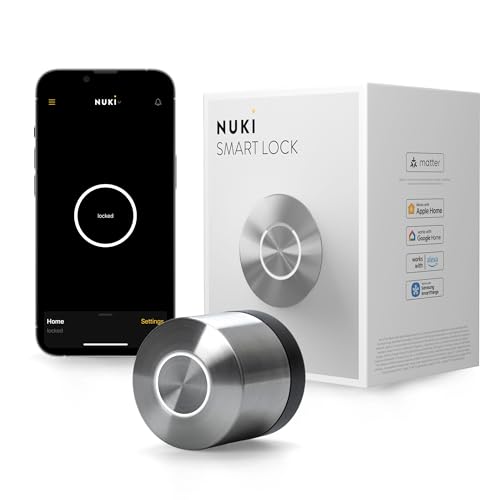
The Nuki Smart Lock is a compact, interior-mounted retrofit device that replaces your existing deadbolt mechanism. It supports Bluetooth, Wi-Fi, and Matter over Thread for reliable connectivity. You get hands-free auto-unlock, app control, and bank-level encryption. The silver unit measures 2.24 by 2.28 inches. It integrates with Apple Home, Alexa, and Google Home. This lock suits renters or homeowners who want keyless entry without drilling new holes.
Pros
- Supports Matter over Thread for future-proof smart home integration
- Installs in under 15 minutes on the interior side of the door
- Unlocks in under a second with auto-unlock feature
- Uses bank-level encryption for secure access
Cons
- Requires existing deadbolt to function as a retrofit unit
- No physical keypad or fingerprint sensor for keyless entry
- Battery lasts for months but requires periodic charging
Good fit if
- You want to add smart features without replacing the entire lock hardware
- You need hands-free entry as you approach your door
- You use Apple Home, Alexa, or Google Home ecosystems
Skip if
- You prefer a lock with a built-in keypad for code entry
- You need a complete lock replacement rather than an interior retrofit
- You do not have an existing deadbolt to mount the device on
Verdict: The Nuki Smart Lock Silver is a practical retrofit solution for users who value quick installation and Matter compatibility. It fits buyers who already have a deadbolt and want app-controlled access without drilling new holes.

Anybell Smart Deadbolt with 2K Camera
Best for: keyless entry with integrated video verification
- Access Methods
- Fingerprint, passcode, app, voice, key
- Connectivity
- Built-in 2.4 GHz Wi-Fi
- Smart Home Compatibility
- Amazon Alexa, Google Assistant
- Resolution
- 2K
- Storage Type
- Local Storage
- Color
- Black
View on Amazon: Anybell Smart Deadbolt with 2K Camera Affiliate link
The Anybell DK86 is a smart deadbolt featuring a 110° 2K camera and built-in Wi-Fi. It supports five unlock methods, including fingerprint and voice control via Alexa or Google Assistant. The unit includes a 10500mAh battery and IP65 rating for outdoor use. It connects directly to 2.4 GHz networks without a hub. This lock suits homeowners needing video verification and keyless entry for front doors.
Pros
- 110° 2K panoramic camera with night vision
- Built-in 2.4 GHz Wi-Fi without a hub
- Five access methods including fingerprint and voice
- 10500mAh rechargeable battery for long operation
Cons
- Heavier build at 3.5 pounds
- Limited to 2.4 GHz Wi-Fi networks
- No mention of Bluetooth connectivity
Good fit if
- You need video verification before unlocking
- You want to avoid buying a separate hub
- You prefer fingerprint or voice access methods
Skip if
- You only have 5 GHz Wi-Fi available
- You require a lighter door lock assembly
- You need Bluetooth local control options
Verdict: Anybell DK86 Wi-Fi Fingerprint Lock fits users who want integrated video and keyless entry without extra hardware. It works best for front doors where Wi-Fi signal is strong and heavy installation is acceptable.

Kwikset Halo Touchscreen Wi-Fi Deadbolt
Best for: Users needing high guest code capacity
- Access Methods
- Touchscreen, app, auto-unlock
- Smart Home Compatibility
- Amazon Alexa, Google Home
- User Code Capacity
- Up to 250
- Included Door Hardware
- Deadbolt
- Connectivity
- Wi-Fi
- Color
- Matte Black
View on Amazon: Kwikset Halo Touchscreen Wi-Fi Deadbolt Affiliate link
The Kwikset Halo is a Wi-Fi enabled deadbolt with no hub required. It features a backlit touchscreen and app control for keyless entry. You can store up to 250 access codes for guests. The lock supports Amazon Alexa and Google Home. It includes intrusion detection and auto-lock settings. This matte black unit weighs 3.6 pounds and fits standard door thicknesses.
Pros
- Wi-Fi connectivity without a hub
- Supports up to 250 user codes
- Compatible with Alexa and Google Home
- Includes intrusion detection alerts
Cons
- Only 1-year electronics warranty
- No fingerprint sensor listed
- No Bluetooth option mentioned
Good fit if
- You want to share codes with many guests
- You need voice control via Alexa or Google
- You prefer a touchscreen interface
Skip if
- You require a fingerprint scanner
- You need a longer electronics warranty
- You want Bluetooth connectivity
Verdict: Kwikset Halo Wi-Fi Touchscreen Deadbolt offers high code capacity and voice control for users who value guest access management. It suits those who prioritize touchscreen convenience and smart home integration over biometric entry.

SwitchBot Lock Vision Pro Smart Deadbolt
Best for: contactless entry and direct WiFi integration
- Access Methods
- Face, palm vein, fingerprint, PIN, NFC
- Connectivity
- Wi-Fi, Bluetooth
- Installation Type
- Deadbolt replacement
- Auto-Lock Delay
- Instant
- Included Door Hardware
- Deadbolt
- Power Source
- Battery Powered
View on Amazon: SwitchBot Lock Vision Pro Smart Deadbolt Affiliate link
This deadbolt uses 3D face recognition, palm vein scanning, and fingerprint sensors for keyless entry. It connects directly to WiFi without a hub and supports Matter over WiFi for Apple Home, Alexa, and Google. The 10,000mAh battery lasts up to 12 months, with a CR123A backup. It installs in 15 minutes and auto-locks when the door closes. It fits most US doors with a standard crossbore.
Pros
- Supports 3D face, palm vein, and fingerprint access methods
- Connects directly to WiFi with no hub required
- CSA-certified Matter compatibility for major smart home platforms
- 10,000mAh battery provides up to 12 months of power
- Instant auto-lock via geomagnetic sensor detects door closing
Cons
- Requires the included SwitchBot lock cylinder; existing cylinders are not supported
- Palm vein reading requires 3 to 10 inches distance
- Fingerprint storage limited to 90 prints
Good fit if
- You want contactless entry options like palm vein scanning
- You need a WiFi lock that works without a separate hub
- You use Apple Home, Alexa, or Google Assistant for control
Skip if
- You prefer to keep your existing lock cylinder
- You need a physical key override for emergencies
- You require a lock that fits non-standard door thicknesses
Verdict: SwitchBot Lock Vision Pro Smart Lock fits households that value multiple contactless entry methods and direct WiFi connectivity. It is ideal for users who want instant auto-locking and broad smart home integration without a hub.
Sifely S WiFi Fingerprint Lock
Best for: Remote access without a gateway
- Access Methods
- Fingerprint, passcode, app, FOB, key
- Connectivity
- Built-in Wi-Fi
- Smart Home Compatibility
- Amazon Alexa, Google Assistant
- Color
- Black
- Application
- Home, Front Door
- Included Hardware
- Handle
View on Amazon: Sifely S WiFi Fingerprint Lock Affiliate link
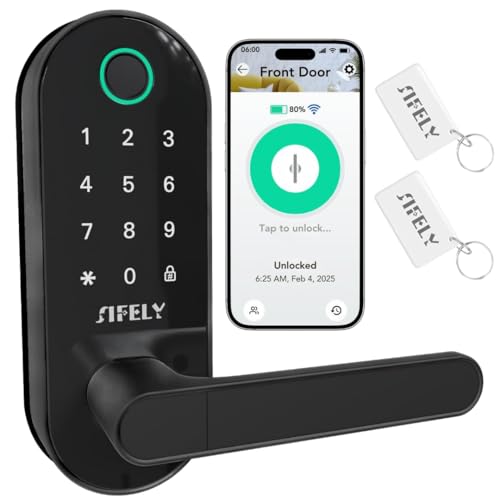
The Sifely S WiFi is a black keyless entry deadbolt with a built-in handle. It uses a fingerprint sensor that unlocks in 0.3 seconds. You can also use a keypad, app, FOB, or mechanical key. The lock connects directly to Wi-Fi without a gateway. It works with Alexa and Google Assistant. This model suits renters or homeowners who want remote access and fast biometric entry for their front door.
Pros
- Built-in Wi-Fi connectivity eliminates the need for a separate gateway.
- Fingerprint sensor recognizes users in 0.3 seconds.
- Includes a handle for immediate installation.
- Compatible with Amazon Alexa and Google Assistant.
Cons
- No Bluetooth connectivity is listed in the specifications.
- Does not support Apple HomeKit integration.
- App control requires an active Wi-Fi connection.
Good fit if
- You want to control the lock remotely without buying extra hardware.
- You need a quick fingerprint unlock for daily entry.
- You prefer a single unit that includes the handle.
Skip if
- You require native Apple HomeKit support.
- You need Bluetooth access for local control.
- You are looking for a lock without an integrated handle.
Verdict: Sifely S WiFi Fingerprint Lock offers direct Wi-Fi control and rapid biometric entry for users who want a complete package. It fits buyers who prioritize remote access and convenience over local Bluetooth connectivity.

TCL Wi-Fi Touchscreen Smart Deadbolt
Best for: Direct Wi-Fi setup and high user capacity
- Access Methods
- Fingerprint, keypad, key
- Connectivity
- Built-in 2.4 GHz Wi-Fi
- Smart Home Compatibility
- Alexa, Google Assistant
- Fingerprint Capacity
- 50 fingerprints
- User Code Capacity
- 100 PIN codes
- Application
- Front Door
View on Amazon: TCL Wi-Fi Touchscreen Smart Deadbolt Affiliate link
The TCL D2 Plus smart deadbolt offers built-in 2.4GHz Wi-Fi for direct app control without a hub. It supports 50 fingerprints and 100 PIN codes for household access. The unit runs on eight AA batteries for up to 8 months and includes a Type-C emergency port. It weighs 2.05 pounds and fits standard doors. This model suits users seeking keyless entry with voice assistant compatibility.
Pros
- Built-in 2.4GHz Wi-Fi connects directly to your network
- Stores 50 fingerprints and 100 PIN codes
- 8-month battery life on 8 AA batteries
- Compatible with Alexa and Google Assistant
Cons
- Heavier build at 2.05 pounds
- Requires 8 AA batteries instead of rechargeable packs
- No mention of Bluetooth connectivity
Good fit if
- You want direct Wi-Fi control without a hub
- You need to store many user codes
- You prefer fingerprint access over a touchscreen
Skip if
- You require a rechargeable battery system
- You need Bluetooth for local control
- You prefer a lighter lock under 1.5 pounds
Verdict: The TCL D2 Plus Smart Deadbolt fits renters or homeowners who want simple Wi-Fi setup and high code capacity. It works best for users who prioritize fingerprint speed and long battery intervals.

Sifely Keypad Smart Deadbolt
Best for: rental hosts needing high passcode capacity
- Access Methods
- Keypad, app, key, fob, one-touch lock
- Smart Home Compatibility
- Alexa, Google
- User Code Capacity
- 150+
- Connectivity
- Wi-Fi
- Color
- Silver
- Application
- Home, Rental Property
View on Amazon: Sifely Keypad Smart Deadbolt Affiliate link
The Sifely Keypad Smart Deadbolt replaces your existing hardware with a dedicated digital lock. You can store over 150 passcodes, issue recurring or one-time guest access, and unlock doors using key fobs, physical keys, or the mobile app. It suits you if you manage a rental property and need auto-lock and passage modes.
Pros
- Stores over 150 passcodes for permanent, temporary, or recurring entry
- Provides five entry methods including keypad, fob, app, and physical key
- Includes passage mode alongside programmable auto-lock
- Provides free web portal and app access tracking
Cons
- Requires an optional gateway for Alexa, Google, and remote Wi-Fi features
- Lacks an integrated fingerprint scanner
Good fit if
- You manage rental units and need separate codes for numerous guests.
- You want physical key fobs for occupants alongside code entry.
- You need a passage mode to keep the deadbolt unlocked during shared hours.
Skip if
- You require built-in Wi-Fi without adding an external gateway.
- You want one-touch fingerprint authentication directly on the lock.
Verdict: Sifely Keypad Smart Deadbolt delivers high passcode capacity and physical fob options for rental hosts handling high visitor turnover.
Specifications side by side
| Spec | Nuki Retrofit Smart Deadbolt | Anybell Smart Deadbolt with 2K Camera | Kwikset Halo Touchscreen Wi-Fi Deadbolt | SwitchBot Lock Vision Pro Smart Deadbolt | Sifely S WiFi Fingerprint Lock | TCL Wi-Fi Touchscreen Smart Deadbolt | Sifely Keypad Smart Deadbolt |
|---|---|---|---|---|---|---|---|
| Access Methods | App, auto-unlock, key | Fingerprint, passcode, app, voice, key | Touchscreen, app, auto-unlock | Face, palm vein, fingerprint, PIN, NFC | Fingerprint, passcode, app, FOB, key | Fingerprint, keypad, key | Keypad, app, key, fob, one-touch lock |
| Connectivity | Bluetooth, Wi-Fi, Matter over Thread | Built-in 2.4 GHz Wi-Fi | not stated | Wi-Fi, Bluetooth | Built-in Wi-Fi | Built-in 2.4 GHz Wi-Fi | not stated |
| Smart Home Compatibility | Apple Home, Alexa, Google Home | Amazon Alexa, Google Assistant | Amazon Alexa, Google Home | not stated | Amazon Alexa, Google Assistant | Alexa, Google Assistant | Alexa, Google |
| Installation Type | Interior retrofit | not stated | not stated | Deadbolt replacement | not stated | not stated | not stated |
| Auto-Lock Delay | not stated | not stated | not stated | Instant | not stated | not stated | not stated |
| Fingerprint Capacity | not stated | not stated | not stated | not stated | not stated | 50 fingerprints | not stated |
| User Code Capacity | not stated | not stated | Up to 250 | not stated | not stated | 100 PIN codes | 150+ |
| Included Door Hardware | not stated | not stated | Deadbolt | Deadbolt | not stated | not stated | not stated |
| Power Source | not stated | not stated | not stated | Battery Powered | not stated | not stated | not stated |
| Resolution | not stated | 2K | not stated | not stated | not stated | not stated | not stated |
| Access Method | App Control | Fingerprint, Remote Control | Touchscreen, App Control | Fingerprint | Keypad, Fingerprint, App Control | Fingerprint | Keypad, Fingerprint, App Control |
| Storage Type | not stated | Local Storage | not stated | not stated | not stated | not stated | not stated |
| Color | Silver | Black | Matte Black | Matte Black | Black | Dark Grey | Silver |
| Application | Home, Front Door | Home | Front Door | Home, Front Door | Home, Front Door | Front Door | Home, Rental Property |
| Included Hardware | not stated | not stated | not stated | not stated | Handle | not stated | not stated |
| Special Features | not stated | Auto Lock | not stated | Auto Lock | not stated | Auto Lock | Auto Lock |
| Dimensions | 2.24 × 2.24 × 2.28 inches | 6.5 × 3.5 × 12 inches | 3.99 × 4.24 × 9.74 inches | 3 × 7 × 1.2 inches | 7 × 3 × 1.12 inches | 6.2 × 2.5 × 1.3 inches | 6.3 × 2.6 × 1.9 inches |
| Weight | not stated | 3.5 pounds | 3.6 pounds | 1.21 pounds | not stated | 2.05 pounds | 2 pounds |
| Size | Round | not stated | not stated | not stated | Deadbolt, Keypad, Knob, Handle | D2 Plus | not stated |
| Model | 221146 | DK86 | 99390-004 | W9022000 | Sifely S WiFi | D2 Plus | Model Ot Deadbolt |
Frequently asked questions
Which smart deadbolt offers the best value for budget-conscious buyers?
The Anybell DK86 is the top budget choice. It combines a 2K camera with fingerprint and app access. This all-in-one unit measures 12 inches tall and weighs 3.5 pounds. You get video verification and auto-lock features without needing extra hardware. It requires a strong Wi-Fi signal for reliable operation.
How many guest codes can the Kwikset Halo deadbolt store?
The Kwikset Halo Touchscreen Wi-Fi Deadbolt supports a high guest code capacity. This makes it ideal for managing frequent visitors. It features a matte black touchscreen and app control. You can manage access remotely while maintaining a premium aesthetic on your front door. It weighs 3.6 pounds.
Does the SwitchBot Lock Vision Pro require a separate hub?
No, the SwitchBot Lock Vision Pro connects directly via Wi-Fi. It supports Matter for broad smart home integration with Alexa and Google Assistant. You can use fingerprint entry and enjoy instant auto-locking. The matte black unit is compact, measuring 7 inches long and weighing just 1.21 pounds.
Which lock includes a handle for easy installation?
The Sifely S WiFi Fingerprint Lock comes with a handle included. This complete package simplifies installation for your front door. It offers direct Wi-Fi control for remote access without a gateway. You can use the keypad, fingerprint, or app to enter. The black unit measures 7 inches long.
What is the best smart lock for rental properties?
The Sifely Keypad Smart Deadbolt is designed for rental hosts. It provides high passcode capacity and physical fob options. This handles high visitor turnover efficiently. You get Wi-Fi connectivity and auto-lock features. The silver unit measures 6.3 inches long and weighs 2 pounds, fitting standard home doors.
Which smart deadbolt supports fingerprint entry for keyless access?
Several alternatives support fingerprint entry for keyless access. The Anybell DK86 and SwitchBot Lock Vision Pro both use biometric scans. The Sifely S and TCL D2 Plus also offer fingerprint options. These locks combine speed with app control. You can unlock your door quickly without carrying keys.
Can I control these locks using voice assistants?
Yes, most listed locks support voice control via Alexa or Google Assistant. The SwitchBot, Sifely S, TCL D2 Plus, and Sifely Keypad models all offer this compatibility. You can lock or unlock your door using voice commands. This adds convenience to your daily routine without needing to open an app.