Best Smart Locks Under $30 in 2026: 7 Picks Ranked by Specs
As an Amazon Associate we earn from qualifying purchases. Links on this page are affiliate links.
Finding the best deadbolts under $30 requires careful comparison of published specifications. The Kwikset 660 Matte Black Deadbolt leads this list because its SmartKey Security feature allows for self-rekeying without tools, a practical benefit for renters. We analyzed 7 options strictly by their data sheets to ensure objective rankings. This guide helps you decide which lock meets your specific security needs, whether you prioritize physical durability, biometric speed, or gateway compatibility for your existing hardware.
Quick picks
The best fit for you
- You need self-rekeying security for a rental Kwikset 660 Matte Black Deadbolt It includes SmartKey Security for quick rekeying without a locksmith.
- You want fast local access via fingerprint Biquole Keyless Entry Deadbolt This model uses fingerprint access for immediate entry without codes.
- You want to add Wi-Fi to Bluetooth locks Ulecoce WiFi Gateway for Bluetooth Locks This gateway adds Wi-Fi connectivity to existing Bluetooth deadbolts.
Our 7 picks
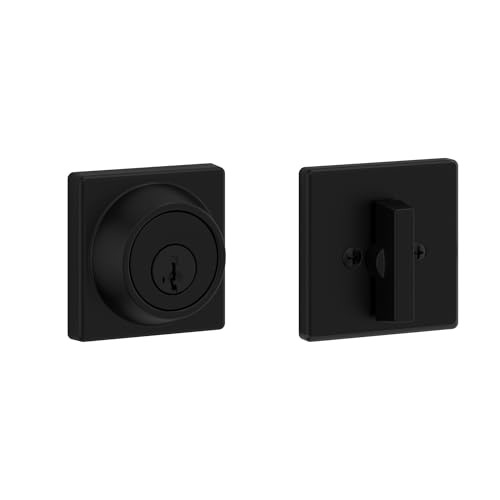
Kwikset 660 Matte Black Deadbolt
Best for: renters needing self-rekeying security
- Access Methods
- Key, turn piece
- Included Door Hardware
- Deadbolt
- Color
- Matte Black
- Application
- Front Door
- Special Features
- SmartKey Security, SmartKey Rekey Security
- Dimensions
- 1.06 × 2.44 × 2.44 inches
The Kwikset 660 is a Grade 3 BHMA certified single cylinder deadbolt designed for exterior doors. It features SmartKey Security to resist advanced break-ins and allows self-rekeying in seconds. The matte black square design fits standard doors 1-3/8" to 1-3/4" thick with an adjustable backset. It includes a lifetime mechanical and finish warranty. This lock suits homeowners and renters needing reliable, DIY-friendly security without smart connectivity.
Pros
- Grade 3 BHMA certified for security and durability
- SmartKey Security protects against advanced break-in techniques
- Self-rekeying capability in seconds with included tool
- Lifetime mechanical and finish warranty
Cons
- Lacks Wi-Fi or Bluetooth smart connectivity
- No remote access or app control
- Requires physical key for exterior entry
Good fit if
- You want a reliable deadbolt with self-rekeying capability
- You prefer a matte black square design
- You need a Grade 3 certified lock for exterior doors
Skip if
- You require remote access or smartphone control
- You need a smart lock with Wi-Fi integration
- You want a keyless entry system
Verdict: Kwikset 660 Deadbolt, Matte Black fits renters and homeowners who value physical security and self-rekeying over smart features. It is a practical choice for standard doors needing reliable, certified protection.

Biquole Keyless Entry Deadbolt
Best for: fast local access and guest codes
- Access Methods
- Fingerprint, keypad, fob, app, key
- Connectivity
- Bluetooth
- Auto-Lock Delay
- Up to 180 seconds
- Fingerprint Capacity
- 100
- User Code Capacity
- 100
- Included Door Hardware
- Deadbolt
The Biquole QEK-S03 is a keyless entry deadbolt featuring a 0.3-second fingerprint reader and 100-user capacity. It supports five access methods: key, keypad, fingerprint, fob, and app. The unit connects via Bluetooth and includes an anti-peep touchscreen. You get 100 fingerprint and 100 user code slots. It fits doors 1-3/8 to 2 inches thick. This model suits users wanting fast local access without monthly fees.
Pros
- Recognizes fingerprints in 0.3 seconds
- Stores 100 fingerprints and 100 codes
- Bluetooth app control for local management
- IP54 weather resistance rating
Cons
- Remote access requires a separate G2 Gateway
- Only ANSI Grade 3 security rating
- Auto-lock delay maxes out at 180 seconds
Good fit if
- You want quick fingerprint entry
- You need multiple user codes
- You prefer local Bluetooth control
Skip if
- You need built-in Wi-Fi
- You require Grade 1 security
- You want remote access without extra hardware
Verdict: Biquole QEK-S03 Fingerprint Deadbolt fits renters who value speed and local control over remote features. It delivers reliable entry for households with frequent guests.

Yamiry Mini Wi-Fi Gateway
Best for: Upgrading compatible YR series locks
- Connectivity
- 2.4 GHz Wi-Fi
- Smart Home Compatibility
- Alexa, Google Assistant
- Color
- White
- Dimensions
- 1.97 × 1.97 × 0.39 inches
This Yamiry gateway adds remote control to compatible smart locks via the Nice Digi App. It connects to 2.4GHz Wi-Fi and supports multiple locks within a 30-foot range. You can unlock doors, manage passwords, and use voice commands through Alexa or Google Assistant. The mini unit measures 1.97 by 1.97 by 0.39 inches. It fits well if you need to upgrade existing locks to smart functionality without replacing them entirely.
Pros
- Connects multiple locks within 30 feet
- Enables remote unlocking via app
- Supports Alexa and Google Assistant
- Compact 1.97-inch square design
Cons
- Requires 2.4GHz Wi-Fi only
- Limited to specific lock models
- Not a standalone lock
Good fit if
- You own compatible YR01, YR02, or YR05 locks
- You need remote access for multiple doors
- You use Alexa or Google Assistant
Skip if
- You need 5GHz Wi-Fi support
- You want a complete lock replacement
- You use locks outside the compatible list
Verdict: Yamiry Mini Wi-Fi Gateway enables remote control for compatible locks. It is a practical solution for users with specific YR series locks who need app-based management.

Ulecoce WiFi Gateway for Bluetooth Locks
Best for: Adding WiFi to Bluetooth deadbolts
- Connectivity
- 2.4 GHz, 5 GHz Wi-Fi, Bluetooth
- Smart Home Compatibility
- Alexa, Google Assistant
- Color
- Black
- Dimensions
- 3.5 × 2.8 × 2 inches
This Ulecoce gateway connects Bluetooth-only deadbolts to your home network. It supports both 2.4GHz and 5GHz WiFi bands for stable connections. You can manage locks remotely via the Tuya or Smart Life apps. It also works with Amazon Alexa and Google Assistant. Keep the device within 32 feet of the lock for reliable communication. It fits apartments or rentals needing remote access.
Pros
- Dual-band WiFi support for stable connections
- Compatible with Tuya and Smart Life apps
- Remote lock and unlock capabilities
- Works with Alexa and Google Assistant
Cons
- Requires proximity within 32 feet of the lock
- Only works with Bluetooth-enabled deadbolts
- Not compatible with third-party lock apps
Good fit if
- You have a Bluetooth-only smart lock
- You need remote access via app
- You use Alexa or Google Assistant
Skip if
- You already have a WiFi-enabled lock
- You prefer proprietary lock apps
- You need long-range Bluetooth without a gateway
Verdict: Ulecoce WiFi Gateway for Smart Locks is ideal for owners of Bluetooth deadbolts who want remote app control and voice assistant integration without replacing their existing hardware.

Philips Standalone Touchscreen Deadbolt
Best for: remote one-time code sharing
- Access Methods
- PIN code, one-time PIN code
- Auto-Lock Delay
- 30-180s
- User Code Capacity
- 20 permanent user PIN codes
- Color
- Matte Black
- Dimensions
- 3.36 × 2.53 × 1.38 inches
- Weight
- 1 pounds
This standalone Philips lock uses a touchscreen keypad for entry. It supports one master PIN and 20 permanent user codes. You can also generate one-time PIN codes remotely to share with guests. The unit features a matte black finish and weighs 1 pound. It includes auto-lock settings from 30 to 180 seconds. This model suits users who want keyless access without a connected app.
Pros
- Generates one-time PIN codes remotely
- Stores 20 permanent user PIN codes
- Auto-lock delay adjustable from 30 to 180 seconds
- Durable metal construction
Cons
- No mobile app for remote management
- Limited to 20 permanent user codes
- Electronic warranty covers only 2 years
Good fit if
- You want to share temporary access codes
- You prefer a standalone lock without Wi-Fi
- You need a touchscreen keypad entry
Skip if
- You require a mobile app for control
- You need more than 20 permanent codes
- You want a longer electronic warranty
Verdict: Philips Keyless Entry Door Lock fits users who value remote one-time code generation and standalone simplicity over app connectivity.
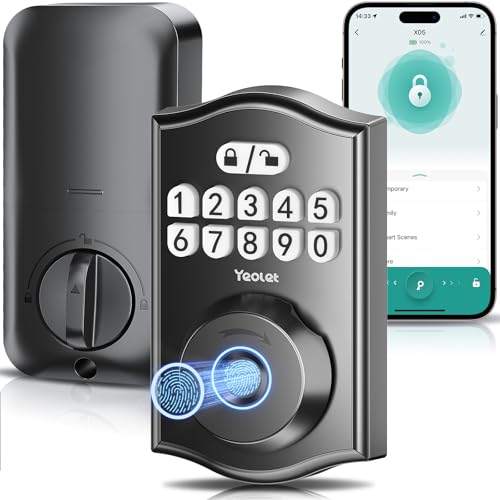
Ulecoce Y58 Matte Black Smart Lock
Best for: Quick local access and physical security
- Access Methods
- Fingerprint, App, Passcode, Key
- Connectivity
- Wi-Fi (via gateway)
- Smart Home Compatibility
- Alexa, Google Assistant
- Installation Type
- Full deadbolt replacement
- Auto-Lock Delay
- 5–60 seconds
- Fingerprint Capacity
- 100
The Ulecoce Y58 is a matte black deadbolt with fingerprint, app, keypad, key, and temporary code entry. It unlocks in 0.3 seconds and stores 100 fingerprints. You get 100 passcodes with anti-peeping protection. The zinc alloy body is IPX5 waterproof and fits standard doors. It requires a separate gateway for remote and voice control. This lock suits renters or homeowners who want quick access and strong physical security without complex wiring.
Pros
- 0.3-second AI fingerprint recognition
- 100 fingerprint and passcode storage
- IPX5 waterproof zinc alloy build
- 5-60 second customizable auto-lock
Cons
- Remote features require a separate gateway
- No built-in Wi-Fi for direct app control
- Limited to 100 fingerprint sets
Good fit if
- You want fast fingerprint entry
- You need strong physical security
- You rent and want easy installation
Skip if
- You need built-in Wi-Fi
- You want voice control without extra hardware
- You prefer a different color
Verdict: Ulecoce Y58 Keyless Entry Deadbolt offers solid local security and quick access. It fits users who prioritize speed and durability over wireless convenience.

Solity AT10 Auto Lock Deadbolt
Best for: Local keyless entry without app control
- Access Methods
- Fingerprint, Keypad, One-time password
- Installation Type
- Deadbolt replacement
- Auto-Lock Delay
- 10-99 seconds
- Fingerprint Capacity
- 50
- User Code Capacity
- 50
- Special Features
- Auto Lock
The Solity AT10 is a keyless deadbolt with auto-lock capabilities. It supports 50 fingerprints and 50 codes, plus one-time guest passwords. The unit is IP55 rated for weather resistance and features a C-type USB port for emergency power. It weighs 3.84 ounces and installs on standard doors. This lock suits users wanting reliable biometric entry without Wi-Fi connectivity.
Pros
- Supports up to 50 fingerprint scans and 50 custom codes
- Auto-lock timer adjustable from 10 to 99 seconds
- IP55 certified for dust and water resistance
- Includes C-type USB port for emergency charging
Cons
- No Wi-Fi or Bluetooth connectivity for remote management
- No smartphone app integration for code management
- Electronic components covered by 1-year warranty only
Good fit if
- You want a secure, keyless entry system without app dependencies
- You need reliable biometric access for family members
- You prefer a simple installation on standard doors
Skip if
- You require remote locking via a smartphone app
- You need real-time activity logs on your phone
- You want to manage codes from anywhere via Wi-Fi
Verdict: Solity AT10 Auto Lock Deadbolt offers solid local security with biometric speed and weather resistance, making it ideal for users who prioritize physical access control over remote digital features.
Specifications side by side
| Spec | Kwikset 660 Matte Black Deadbolt | Biquole Keyless Entry Deadbolt | Yamiry Mini Wi-Fi Gateway | Ulecoce WiFi Gateway for Bluetooth Locks | Philips Standalone Touchscreen Deadbolt | Ulecoce Y58 Matte Black Smart Lock | Solity AT10 Auto Lock Deadbolt |
|---|---|---|---|---|---|---|---|
| Access Methods | Key, turn piece | Fingerprint, keypad, fob, app, key | not specified | not specified | PIN code, one-time PIN code | Fingerprint, App, Passcode, Key | Fingerprint, Keypad, One-time password |
| Connectivity | not specified | Bluetooth | 2.4 GHz Wi-Fi | 2.4 GHz, 5 GHz Wi-Fi, Bluetooth | not specified | Wi-Fi (via gateway) | not specified |
| Smart Home Compatibility | not specified | not specified | Alexa, Google Assistant | Alexa, Google Assistant | not specified | Alexa, Google Assistant | not specified |
| Installation Type | not specified | not specified | not specified | not specified | not specified | Full deadbolt replacement | Deadbolt replacement |
| Auto-Lock Delay | not specified | Up to 180 seconds | not specified | not specified | 30-180s | 5–60 seconds | 10-99 seconds |
| Fingerprint Capacity | not specified | 100 | not specified | not specified | not specified | 100 | 50 |
| User Code Capacity | not specified | 100 | not specified | not specified | 20 permanent user PIN codes | 100 | 50 |
| Included Door Hardware | Deadbolt | Deadbolt | not specified | not specified | not specified | Deadbolt only | not specified |
| Access Method | not specified | Keypad, Fingerprint, App Control | not specified | not specified | Keypad, Touchscreen | Keypad, Fingerprint, App Control | Keypad |
| Color | Matte Black | Gold Rim Black | White | Black | Matte Black | Black | Matt Black |
| Application | Front Door | Front Door | not specified | not specified | not specified | not specified | not specified |
| Special Features | SmartKey Security, SmartKey Rekey Security | not specified | not specified | not specified | not specified | Auto Lock | Auto Lock |
| Dimensions | 1.06 × 2.44 × 2.44 inches | 8.27 × 5.71 × 3.94 inches | 1.97 × 1.97 × 0.39 inches | 3.5 × 2.8 × 2 inches | 3.36 × 2.53 × 1.38 inches | 3 × 1.8 × 1.5 inches | 1.5 × 7.5 × 3.51 inches |
| Weight | 1.23 pounds | 2.47 pounds | not specified | not specified | 1 pounds | 1 pounds | 3.84 ounces |
| Size | Square | not specified | Mini | not specified | not specified | not specified | not specified |
| Model | 96600-857 | QEK-S03 | BT03 | THP01-B-V6 | B0BTZZX8M1 | Y58 | AT10 |
For household items evaluated by dimensions and materials, the specs for best pillows under 30 follow a similar breakdown.
How to choose the right one
-
Check access methods
You should match the entry method to your daily habits. The Biquole QEK-S03 uses fingerprint technology for quick local entry, which is ideal for households with frequent guests. The Philips B0BTZZX8M1 relies on a touchscreen keypad, offering a traditional code-based approach. If you prefer physical keys with digital upgrades, the Kwikset 660 provides SmartKey Security for self-rekeying. Consider how you and your family prefer to enter. Fingerprint readers are faster, while keypads offer more flexibility for temporary codes without needing a smartphone.
-
Verify connectivity needs
Most locks in this price range lack built-in Wi-Fi. You must check if you need a separate gateway for remote features. The Yamiry Mini Gateway and Ulecoce THP01-B-V6 add Wi-Fi connectivity to compatible Bluetooth locks. This allows app-based management and voice assistant integration. If you do not need remote access, a standalone lock like the Kwikset 660 or Solity AT10 is simpler. Ensure your existing lock supports the gateway you choose. Without the correct gateway, you cannot control the lock remotely or receive notifications.
-
Consider auto-locking
Auto-locking prevents you from forgetting to secure your door. The Solity AT10 Deadbolt features this function, engaging the bolt automatically after entry. This is useful for busy households where manual locking is often overlooked. Other models like the Philips B0BTZZX8M1 or Biquole QEK-S03 require manual engagement. Decide if automatic security is worth the trade-off in complexity. Auto-locking adds convenience but may require specific battery conditions to function reliably. Check the product specifications to confirm this feature is present and how it operates.
-
Review physical dimensions
You must ensure the lock fits your door’s backset and thickness. The Kwikset 660 measures 2.44 inches in width and height, with a length of 1.06 inches. The Biquole QEK-S03 is larger, measuring 5.71 inches wide and 3.94 inches high. The Philips B0BTZZX8M1 is compact at 2.53 inches wide. Compare these dimensions to your existing door frame. Incorrect sizing can prevent installation or compromise security. Measure your door’s edge and face before purchasing. Standard doors usually accept square or rectangular faceplates, but specific models may require unique preparations.
-
Assess weight and build
Heavier locks often indicate more robust internal mechanisms. The Biquole QEK-S03 weighs 2.47 pounds, suggesting a solid build. The Solity AT10 is lighter at 3.84 ounces, which may affect durability perceptions. The Kwikset 660 weighs 1.23 pounds, balancing sturdiness with ease of handling. Weight can influence how the lock feels and performs over time. Heavier units may resist forced entry better. However, ensure your door can support the weight without sagging. Check the specifications for exact weight. This helps you gauge the material quality and potential longevity of the hardware.
Frequently asked questions
Can I rekey my deadbolt without a locksmith under $30?
Yes, the Kwikset 660 Matte Black Deadbolt features SmartKey Security for self-rekeying. This allows you to change the lock cylinder quickly without tools or a professional. It is designed for renters who need reliable, certified protection without extra service costs.
Which smart lock uses fingerprint recognition for quick entry?
The Biquole Keyless Entry Deadbolt and the Ulecoce Y58 Matte Black Smart Lock both use fingerprint access. The Biquole model offers a gold rim black finish, while the Ulecoce option provides a standard black color. Both prioritize speed and local control over remote features.
How do I add Wi-Fi to a Bluetooth deadbolt?
You can use the Ulecoce WiFi Gateway or the Yamiry Mini Wi-Fi Gateway to add connectivity. The Ulecoce device fits Bluetooth deadbolts for remote app control. The Yamiry gateway works with compatible YR series locks to enable app-based management for existing hardware.
Is there a touchscreen deadbolt available in this price range?
The Philips Standalone Touchscreen Deadbolt includes a touchscreen keypad for access. It allows for remote one-time code sharing, which is useful for guests. This model operates as a standalone unit, focusing on simplicity rather than complex app connectivity.
Do any of these locks lock automatically after entering?
The Solity AT10 Auto Lock Deadbolt includes an auto-lock feature. It combines a keypad with automatic locking for convenience. This is ideal for users who want physical access control without needing to manually engage the bolt every time they enter.
What size are these deadbolts for standard doors?
Dimensions vary by model. The Kwikset 660 measures 2.44 inches wide and 1.06 inches long. The Biquole QEK-S03 is larger at 5.71 inches wide. The Yamiry Mini Gateway is compact, measuring 1.97 inches square. Check the length and width to ensure fit.
Can I generate one-time codes for guests with these locks?
The Philips Standalone Touchscreen Deadbolt supports remote one-time code generation. This lets you share temporary access with visitors without giving them a permanent code. Other models like the Biquole rely on local fingerprint or keypad entry without this specific remote code feature.