7 Best Smart Locks Under $500, Compared
As an Amazon Associate we earn from qualifying purchases. Links on this page are affiliate links.
Finding the best deadbolts under $500 requires matching connectivity and access methods to your home setup. We compared 7 options using only published specifications. The Yale Assure Lock 2 Key-Free Z-Wave Deadbolt leads because it offers Z-Wave connectivity and keypad entry for Z-Wave smart homes wanting keyless entry. These picks are based strictly on the specs published on the listings. This guide helps you decide which lock fits your security needs and existing smart hub.
Quick picks
The best fit for you
- You want the most versatile keyless entry for Z-Wave homes Yale Assure Lock 2 Key-Free Z-Wave Deadbolt It connects via Z-Wave and offers keypad access without physical keys.
- You need Grade 2 security for an existing Zigbee hub Kwikset SmartCode 916 Touchscreen Deadbolt This model supports Zigbee connectivity and includes SmartKey re-keying security.
- You want to secure two doors with matching Venetian Bronze hardware Kwikset SmartCode Zigbee Touchscreen Deadbolt It comes in a pack of two with Venetian Bronze finish and Zigbee support.
- You require basic keyless entry without smart home connectivity Amazon Basics PL1TMS2918 Keypad Deadbolt It provides keypad and key access but lacks wireless smart features.
- You need direct Wi-Fi connectivity for a two-door setup Yale Wi-Fi Keypad Deadbolt 2-Pack This pack of two connects directly via Wi-Fi for app control.
Our 7 picks

Yale Assure Lock 2 Key-Free Z-Wave Deadbolt
Best for: Z-Wave smart homes wanting keyless entry
- Access Methods
- Keypad, app, Apple Watch, auto-unlock
- Connectivity
- Z-Wave
- Smart Home Compatibility
- Samsung SmartThings, Ring, Wink, ADT
- User Code Capacity
- Unlimited
- Color
- Black
- Dimensions
- 2.5 × 3.7 × 2.3 inches
The Yale Assure Lock 2 Z-Wave Deadbolt is a key-free electronic lock for your smart home setup. It connects via Z-Wave to hubs like Samsung SmartThings and Ring Alarm, letting you control access remotely. You can unlock using the keypad, the Yale Access app, an Apple Watch, or hands-free auto-unlock. It supports unlimited user codes and DoorSense auto-locking, making it a dependable choice if you already run a compatible smart hub.
Pros
- Multiple entry options including keypad, mobile app, Apple Watch, and auto-unlock
- Unlimited user code capacity managed through the Yale Access app
- Built-in DoorSense sensor triggers automatic locking when the door closes
- Connects with Z-Wave platforms such as Samsung SmartThings, Ring, and ADT
Cons
- Requires a separate compatible Z-Wave hub for remote operation
- Key-free design does not include a physical key cylinder
- Operates only within the United States and Canada
Good fit if
- You already manage your home with a compatible Z-Wave hub or security system.
- You want hands-free entry using auto-unlock or an Apple Watch.
- You need to provide trackable access codes to multiple visitors.
Skip if
- You live outside the United States or Canada.
- You prefer having a standard physical key backup on your door.
- You do not own and do not plan to buy a compatible Z-Wave hub.
Verdict: Yale Assure Lock 2 Z-Wave Deadbolt delivers versatile hands-free entry and unlimited code sharing for Z-Wave ecosystems. It gives you flexible access methods without the clutter of physical keys.

Kwikset SmartCode 916 Touchscreen Deadbolt
Best for: homes with existing Zigbee smart hubs
- Access Methods
- Touchscreen, key, app
- Connectivity
- ZigBee 3.0
- Smart Home Compatibility
- Amazon Echo, SmartThings, Wink, Abode
- User Code Capacity
- Up to 30
- Color
- Satin Nickel
- Style
- Traditional
This satin nickel deadbolt pairs a touchscreen keypad with Zigbee 3.0 technology for keyless door access. You can program up to 30 custom user codes or unlock the door with a standard key and app controls through supported hubs. With BHMA Grade 2 security certification and built-in SmartKey re-keying, you can change the physical keying yourself. It fits homes already running Zigbee systems such as SmartThings, Abode, or compatible Echo devices.
Pros
- Supports up to 30 customizable user codes
- BHMA Grade 2 certified exterior door security
- Built-in SmartKey feature allows manual re-keying in seconds
- Connects to Zigbee 3.0 and HA 1.2 hubs including SmartThings and Abode
Cons
- Requires a separate Zigbee hub or panel for app and smart control
- Does not list direct Wi-Fi or Bluetooth connectivity
Good fit if
- You already manage a compatible Zigbee hub like SmartThings, Abode, or an Echo with Zigbee.
- You want physical key backup alongside touchscreen and app access.
- You need to quickly re-key your lock cylinder yourself.
Skip if
- You want a standalone lock that connects directly to home Wi-Fi without a hub.
- You require capacity for more than 30 user codes.
Verdict: Kwikset SmartCode 916 Touchscreen Deadbolt provides Grade 2 security and convenient SmartKey re-keying for homes with an existing Zigbee ecosystem. It delivers versatile access options across touchscreen, standard keys, and hub-connected app controls.

Kwikset SmartCode Zigbee Touchscreen Deadbolt
Best for: Zigbee smart homes needing two deadbolts
- Access Methods
- Touchscreen, key, app
- Connectivity
- ZigBee 3.0
- Smart Home Compatibility
- Amazon Echo, SmartThings, Wink, Abode
- User Code Capacity
- Up to 30
- Color
- Venetian Bronze
- Style
- Traditional
View on Amazon: Kwikset SmartCode Zigbee Touchscreen Deadbolt
This package includes two Kwikset SmartCode deadbolts featuring touchscreen keypads, physical key access, and Zigbee 3.0 wireless integration. Each unit provides BHMA Grade 2 security and holds up to 30 custom user codes for family and guests. With SmartKey technology, you can re-key the cylinders yourself in seconds. It suits you if you already run a compatible Zigbee smart hub and need secure keyless entry on two exterior doors.
Pros
- BHMA Grade 2 security certification
- Zigbee 3.0 connectivity for smart hub integration
- Stores up to 30 customizable user codes
- SmartKey feature enables DIY cylinder re-keying
Cons
- Requires a compatible Zigbee hub for app control
- Lacks direct Wi-Fi connectivity
Good fit if
- You already manage a compatible Zigbee hub such as SmartThings or Amazon Echo.
- You want to re-key locks yourself using SmartKey Security.
- You need two exterior deadbolts that support up to 30 user codes.
Skip if
- You want direct Wi-Fi connection without an external hub.
- You do not operate a Zigbee-compatible network.
Verdict: Kwikset SmartCode Zigbee Touchscreen Deadbolt delivers BHMA Grade 2 protection alongside flexible touchscreen and physical key access. It is a solid choice if you already use a Zigbee hub and need multi-door coverage.

Amazon Basics PL1TMS2918 Keypad Deadbolt
Best for: Basic keyless entry needs
- Access Methods
- Keypad, Key
- Installation Type
- Full handle set replacement
- Auto-Lock Delay
- One-touch
- Included Door Hardware
- Handle set with deadbolt
- Color
- Oil Rubbed Bronze
- Application
- Front Door
The Amazon Basics Traditional Electronic Keypad Deadbolt offers keyless entry via a built-in keypad and motorized bolt. It meets ANSI Grade 3 security standards. The reversible lever fits left or right-handed doors. It accommodates door thicknesses from 1-3/8 to 1-3/4 inches. You get a 1-year limited warranty. This lock suits renters or homeowners needing simple, reliable access without complex smart features.
Pros
- ANSI Grade 3 security rating
- Motorized deadbolt with one-touch locking
- Reversible lever for any door hand
- Fits standard 2-1/8-inch hole sizes
- Includes all necessary installation hardware
Cons
- Lacks Wi-Fi or app connectivity
- No Bluetooth integration for remote access
- Lower ANSI Grade 3 security rating
Good fit if
- You need a straightforward keyless entry system
- You prefer mechanical reliability over smart features
- You want a lock with reversible lever installation
Skip if
- You require remote access via a smartphone app
- You need high-security Grade 1 or 2 ratings
- You want integration with other smart home devices
Verdict: Amazon Basics Keypad Deadbolt is a solid, no-frills option for users who prioritize basic keyless convenience and standard security over smart connectivity features.

Yale Wi-Fi Keypad Deadbolt 2-Pack
Best for: two-door setups needing oil rubbed bronze hardware
- Access Methods
- Keypad, app, voice, auto-unlock
- Smart Home Compatibility
- Apple Home, Amazon Alexa, Hey Google
- Installation Type
- Deadbolt replacement
- Connectivity
- Wi-Fi
- Color
- Oil Rubbed Bronze
- Dimensions
- 0.88 × 2.5 × 4.88 inches
This package provides two Yale replacement deadbolts finished in oil rubbed bronze. Each lock connects directly via Wi-Fi and works with Apple Home, Amazon Alexa, and Hey Google. You can unlock your doors using the matte keypad, auto-unlock, or the Yale Access app. Built-in DoorSense technology confirms closure before triggering the auto-lock feature. This bundle suits you if you need matching smart security across two standard exterior doors using simple screwdriver installation.
Pros
- Includes two deadbolts in an oil rubbed bronze finish
- Direct Wi-Fi integration with Apple Home, Alexa, and Google Assistant
- DoorSense hardware confirms the door is shut before auto-locking
- Offers keyless entry through keypad, app, voice, or auto-unlock
Cons
- Packaged as a two-lock bundle rather than an individual deadbolt
- Does not include integrated exterior door handles
Good fit if
- You need to outfit two entryways with matching oil rubbed bronze hardware.
- You use smart home systems like Apple Home, Alexa, or Hey Google.
- You prefer hands-free unlocking alongside numeric keypad access.
Skip if
- You only need a deadbolt for a single doorway.
- You require a lockset bundled with a matching handle.
Verdict: Yale Wi-Fi Smart Lock Deadbolt 2-Pack outfits two entryways with matching oil rubbed bronze deadbolts, direct Wi-Fi connectivity, and major smart home integrations. It installs using a standard screwdriver to provide keypad, app, and automated access.
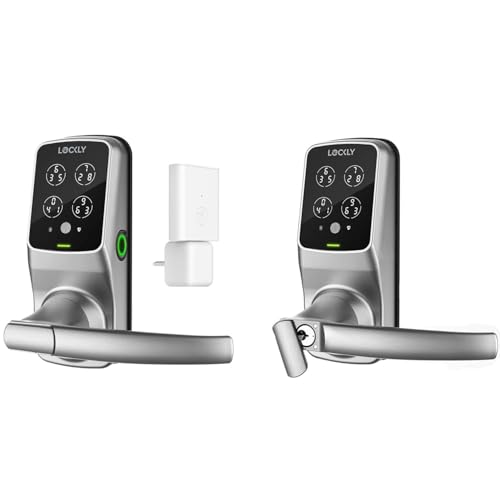
Lockly Secure Pro Wi-Fi Smart Lock with Handle
Best for: homes needing bundled handles and fingerprint entry
- Access Methods
- Keypad, fingerprint, app, voice, key
- Fingerprint Capacity
- Up to 99
- Included Door Hardware
- Handle
- Connectivity
- Wi-Fi
View on Amazon: Lockly Secure Pro Wi-Fi Smart Lock with Handle
The Lockly Secure Pro Smart Lock with Handle combines a deadbolt and door handle into one set. It provides five entry options, including physical keys, voice control, app management, a 99-print 3D biometric sensor, and a scrambling PIN Genie keypad. With an IPX4 weather rating and offline access code generation, it suits property managers and homeowners seeking bundled hardware and high user capacity.
Pros
- Stores up to 99 fingerprints on 3D biometric sensor
- PIN Genie keypad reshuffles digit positions after use
- Offers keypad, fingerprint, app, voice, and physical key access
- Generates Offline Access Codes without requiring internet
- Includes exterior 9V battery terminals for emergency power
Cons
- Extended remote functionality requires an optional Wi-Fi hub
- Weather resistance capped at an IPX4 splash rating
- Includes handle hardware that is unnecessary for deadbolt-only setups
Good fit if
- You want a single package that includes both the lock and a matching handle.
- You need to store up to 99 distinct fingerprints for multiple users.
- You prefer a keypad layout that constantly randomizes numbers.
Skip if
- You only need a standalone deadbolt replacement.
- You want full Wi-Fi functionality without buying an optional hub.
Verdict: Lockly Secure Pro Smart Lock with Handle delivers versatile access control through its scrambling keypad and 99-fingerprint memory. It is a practical fit if you need integrated handle hardware and offline guest code support.

Lockly Secure Pro Smart Lock with Handle
Best for: biometric entry with matching handle hardware
- Access Methods
- Fingerprint, keypad, app, physical key
- Fingerprint Capacity
- 99
- Included Door Hardware
- Handle
- Connectivity
- Wi-Fi
The Lockly Secure Pro Smart Lock with Handle is a complete entry set combining a deadbolt and door handle. It provides access through an integrated 3D fingerprint sensor storing 99 prints, physical keys, and a reshuffling PIN Genie keypad. You can also generate offline access codes for guests. It suits you if you need multiple keyless entry methods alongside matching door hardware for residential exterior doors.
Pros
- Stores up to 99 fingerprints on a 3D biometric sensor
- PIN Genie keypad reshuffles digit locations after each entry
- Package includes matching door handle hardware
- Emergency 9V battery terminal provides backup power access
Cons
- Extended smart functionality requires an optional Wi-Fi hub
- Replaces your entire handle set rather than only the deadbolt
Good fit if
- You want fingerprint storage for up to 99 individual scans.
- You need a bundle that replaces both your lock and door handle.
- You prefer a keypad that shuffles numbers to conceal your code.
Skip if
- You want to keep your existing exterior door handle.
- You want all extended remote features without an optional hub.
Verdict: Lockly Secure Pro Smart Lock with Handle delivers versatile entry options and matching exterior hardware for busy entryways. Its reshuffling keypad and 99-print biometric reader provide practical keyless access without compromising PIN security.
Specifications side by side
| Spec | Yale Assure Lock 2 Key-Free Z-Wave Deadbolt | Kwikset SmartCode 916 Touchscreen Deadbolt | Kwikset SmartCode Zigbee Touchscreen Deadbolt | Amazon Basics PL1TMS2918 Keypad Deadbolt | Yale Wi-Fi Keypad Deadbolt 2-Pack | Lockly Secure Pro Wi-Fi Smart Lock with Handle | Lockly Secure Pro Smart Lock with Handle |
|---|---|---|---|---|---|---|---|
| Access Methods | Keypad, app, Apple Watch, auto-unlock | Touchscreen, key, app | Touchscreen, key, app | Keypad, Key | Keypad, app, voice, auto-unlock | Keypad, fingerprint, app, voice, key | Fingerprint, keypad, app, physical key |
| Connectivity | Z-Wave | ZigBee 3.0 | ZigBee 3.0 | not specified | not specified | not specified | not specified |
| Smart Home Compatibility | Samsung SmartThings, Ring, Wink, ADT | Amazon Echo, SmartThings, Wink, Abode | Amazon Echo, SmartThings, Wink, Abode | not specified | Apple Home, Amazon Alexa, Hey Google | not specified | not specified |
| Installation Type | not specified | not specified | not specified | Full handle set replacement | Deadbolt replacement | not specified | not specified |
| Auto-Lock Delay | not specified | not specified | not specified | One-touch | not specified | not specified | not specified |
| Fingerprint Capacity | not specified | not specified | not specified | not specified | not specified | Up to 99 | 99 |
| User Code Capacity | Unlimited | Up to 30 | Up to 30 | not specified | not specified | not specified | not specified |
| Included Door Hardware | not specified | not specified | not specified | Handle set with deadbolt | not specified | Handle | Handle |
| Access Method | Keypad, Key | Touchscreen | Touchscreen | Keypad, Key | Keypad, Key | not specified | not specified |
| Color | Black | Satin Nickel | Venetian Bronze | Oil Rubbed Bronze | Oil Rubbed Bronze | not specified | not specified |
| Application | not specified | not specified | not specified | Front Door | not specified | not specified | not specified |
| Included Hardware | not specified | not specified | not specified | Handle | not specified | Handle | Handle |
| Style | not specified | Traditional | Traditional | Traditional | not specified | not specified | not specified |
| Special Features | not specified | SmartKey Security, SmartKey Rekey Security | SmartKey Security, SmartKey Rekey Security | not specified | not specified | not specified | not specified |
| Dimensions | 2.5 × 3.7 × 2.3 inches | 1.19 × 2.81 × 5.06 inches | 1.19 × 2.81 × 5.06 inches | 5.08 × 3.08 × 0.1 inches | 0.88 × 2.5 × 4.88 inches | not specified | not specified |
| Weight | 4.5 pounds | 6.8 pounds | 7.43 pounds | 4.31 pounds | 4.5 pounds | not specified | not specified |
| Size | Key-Free (Pack of 2) | 1 Count ( Pack of 2) | (Pack of 2) | 129.2mm H Upper x 65mm H Lower | Wi-Fi (Pack of 2) | not specified | not specified |
| Model | YRD450-ZW2-BSP | 916TRL TSCR ZB 3.0 15 | 916TRL TSCR ZB 3.0 11P | PL1TMS2918 | YRD410-WF1-0BP | not specified | not specified |
If you plan yard upgrades alongside entry security, the best pergolas under 500 compares outdoor frame materials and structural specs.
How to Choose the Right Smart Lock
-
Match Your Smart Hub
Your existing smart home ecosystem determines which lock works best. If you use a Z-Wave hub, the Yale Assure Lock 2 connects directly to your system. For homes with Zigbee hubs, the Kwikset SmartCode 916 is a strong option. Wi-Fi models like the Yale Wi-Fi Keypad Deadbolt operate independently without a separate hub. Check your current setup first. Choosing the wrong connectivity type means you cannot automate the lock or receive remote notifications. Ensure the protocol matches your infrastructure for seamless integration.
-
Check Access Methods
Decide how you prefer to enter your home. The Yale Assure Lock 2 offers keypad entry without requiring physical keys, providing a clean, key-free experience. The Kwikset SmartCode 916 supports both touchscreen entry and standard keys for flexibility. The Amazon Basics model also includes keypad and key options. If you frequently lose keys, prioritize keypad or biometric access. If you prefer traditional methods, ensure the lock includes a physical key override. Match the access method to your daily habits and security preferences for the best user experience.
-
Verify Security Grades
Security ratings indicate the lock's resistance to forced entry. The Kwikset SmartCode 916 and Kwikset SmartCode Zigbee models both deliver BHMA Grade 2 protection. This rating signifies a higher level of durability and security compared to standard residential locks. The Yale Assure Lock 2 also provides robust security for key-free entry. When comparing options, look for these certifications. Grade 2 locks are suitable for most residential applications. Higher grades offer better protection against picking and drilling. Prioritize locks with verified security standards for peace of mind.
-
Consider Biometric Options
Biometric locks offer fingerprint access for quick entry. The Lockly Secure Pro models feature a 99-fingerprint memory reader. This allows multiple users to enter without memorizing codes. The scrambling keypad adds an extra layer of security against visual observation. If you have many household members or frequent guests, biometric entry is convenient. It eliminates the need to share or change codes regularly. Check the fingerprint capacity to ensure it meets your needs. Biometric access is ideal for busy households seeking speed and security.
-
Look at Included Hardware
Some locks come with integrated handles, while others are deadbolts only. The Lockly Secure Pro models include the handle hardware, simplifying installation if you need a full set. The Amazon Basics Keypad Deadbolt also includes a handle. Other models, like the Yale Assure Lock 2, are standalone deadbolts. Check if the package includes the necessary exterior hardware. Buying separately can increase costs and complicate matching finishes. Ensure the included hardware matches your door type and aesthetic preferences for a cohesive look.
Frequently asked questions
Which smart lock works best for Z-Wave homes?
The Yale Assure Lock 2 Key-Free Z-Wave Deadbolt is the top choice for Z-Wave ecosystems. It connects directly to your hub and offers keypad entry. This model removes the need for physical keys. It is designed for versatile hands-free access. The unit features a black suede finish and includes a pack of two locks.
What is the best budget option for Zigbee users?
The Kwikset SmartCode 916 Touchscreen Deadbolt is the best budget pick for Zigbee hubs. It provides Grade 2 security and SmartKey re-keying. You can use the touchscreen or standard keys for entry. The satin nickel finish fits traditional styles. This model connects via Zigbee for app control and automated access.
Are there smart locks that include handles?
Yes, the Lockly Secure Pro models include integrated handle hardware. These Wi-Fi locks offer fingerprint entry and a scrambling keypad. They support up to 99 fingerprint memories. This design simplifies installation by bundling the lock and handle. They are practical for busy entryways needing biometric access.
How many locks come in the Yale Wi-Fi pack?
The Yale Wi-Fi Keypad Deadbolt is sold as a two-pack. It provides direct Wi-Fi connectivity for each unit. The oil rubbed bronze finish matches both locks. You get keypad and key access for two doors. This setup allows for independent operation without a separate hub.
What security grade do the Kwikset locks have?
The Kwikset SmartCode models feature BHMA Grade 2 security. This rating indicates a high level of durability and resistance to forced entry. Both the 916 and the standard Zigbee version hold this grade. They also include SmartKey re-keying security for easy changes.
Can I use a smart lock without a hub?
The Yale Wi-Fi Keypad Deadbolt and Lockly Secure Pro models connect via Wi-Fi. They do not require a separate smart home hub. You can control them directly through an app. This setup is ideal for basic keyless entry needs or multi-door setups.
What color options are available for the Yale Assure Lock?
The Yale Assure Lock 2 Key-Free Z-Wave Deadbolt comes in black suede. It is available in a pack of two. The compact design measures 3.7 inches wide. It fits standard doors without cluttering the entryway. The key-free design relies on keypad entry.