Best Smart Locks with Z-Wave: 7 Spec-Based Picks
As an Amazon Associate we earn from qualifying purchases. Links on this page are affiliate links.
Finding the best deadbolts with z wave requires looking at specific technical details. We compared 7 models based strictly on published specifications. The Kwikset Home Connect Z-Wave Deadbolt leads because it offers dual key and PIN entry for Ring Alarm and SmartThings setups. Its satin nickel finish and traditional size fit standard residential doors. Each pick here is chosen for how its specs match real home needs. Use this guide to decide which lock fits your existing smart home network.
Quick picks
The best fit for you
- You need the best overall Z-Wave deadbolt for Ring or SmartThings Kwikset Home Connect Z-Wave Deadbolt It offers dual key and PIN entry with clean integration into Ring or SmartThings networks.
- You want matte black finish with S2 encryption on Z-Wave Schlage Connect Camelot Matte Black Deadbolt This model provides S2 encryption and supports up to 30 codes for balanced security.
- You prefer fingerprint access combined with keypad on Z-Wave networks Yale Z-Wave Fingerprint Keypad Deadbolt It combines Grade 2 physical security with rapid biometric and keypad entry for flexible access.
- You seek a budget key-free Z-Wave lock in oil rubbed bronze Yale Assure Lock 2 Key-Free Z-Wave Deadbolt This deadbolt eliminates traditional physical keys while providing multi-method keyless entry and Z-Wave connectivity.
Our 7 picks

Kwikset Home Connect Z-Wave Deadbolt
Best for: Ring Alarm and SmartThings Z-Wave setups
- Connectivity
- Z-Wave (what this guide is about)
- Access Methods
- Keypad, key
- Smart Home Compatibility
- Ring Alarm, SmartThings
- Included Door Hardware
- Deadbolt
- Color
- Satin Nickel
- Application
- Home
The Kwikset Home Connect 620 is a motorized Z-Wave smart deadbolt designed for residential security. It pairs with hubs like SmartThings and Ring Alarm for wireless control and automated locking. You get two entry methods: an illuminated pushbutton keypad and a traditional physical keyhole with SmartKey re-keying technology. Powered by four included AA batteries, it fits standard doors between 1-3/8 and 1-3/4 inches thick.
Pros
- Works with Ring Alarm and SmartThings via Z-Wave
- SmartKey feature lets you re-key the physical lock in seconds
- Includes illuminated keypad with one-touch locking and timed auto-lock
- Comes with 4 AA batteries rated for 12 months or longer
Cons
- Requires a separate Z-Wave hub for wireless operation
- No fingerprint or biometric entry option
- Door thickness compatibility caps at 1-3/4 inches
Good fit if
- You use a Z-Wave system like Ring Alarm or SmartThings.
- You want keypad entry backed by a traditional re-keyable key cylinder.
- You need auto-locking with customizable time delays.
Skip if
- You do not own and do not plan to buy a Z-Wave hub.
- You want fingerprint access directly on the lock hardware.
- You have an exterior door thicker than 1-3/4 inches.
Verdict: Kwikset Home Connect 620 Z-Wave Deadbolt provides dependable keypad access and clean integration into Ring or SmartThings networks. It is a practical pick for standard residential doors needing dual key and PIN entry.
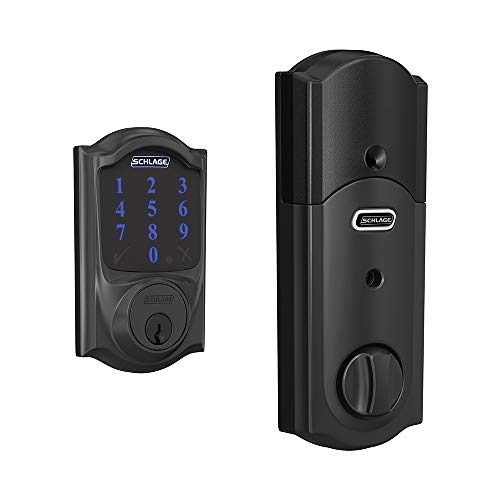
Schlage Connect Camelot Matte Black Deadbolt
Best for: matte black doors using Z-Wave systems
- Connectivity
- Z-Wave (what this guide is about)
- Access Methods
- Touchscreen, key
- Smart Home Compatibility
- Samsung SmartThings, Ring Alarm
- User Code Capacity
- 30
- Color
- Matte Black
- Dimensions
- 5 × 3 × 1 inches
View on Amazon: Schlage Connect Camelot Matte Black Deadbolt
This deadbolt integrates with Z-Wave Plus networks such as Ring Alarm and Samsung SmartThings. It features a fingerprint-resistant touchscreen, holds up to 30 custom user access codes, and includes a traditional key backup. S2 security encryption protects wireless communication, while Snap 'n Stay hardware simplifies physical installation. You will find this lock suits your entry door if you want centralized smart hub control paired with a durable matte black exterior.
Pros
- Z-Wave Plus connectivity with S2 security encryption
- Stores up to 30 custom user access codes
- Fingerprint-resistant touchscreen with physical key backup
- Snap 'n Stay design keeps deadbolt in place during installation
Cons
- Maximum capacity limited to 30 user codes
- Requires separate Z-Wave hub for app and voice control
- No built-in fingerprint scanner
Good fit if
- You manage your home security through Samsung SmartThings or Ring Alarm.
- You prefer both touchscreen code entry and a physical key backup.
- You need an exterior rating down to -35C in a matte black finish.
Skip if
- You require onboard biometric fingerprint entry.
- You need to store more than 30 user codes.
Verdict: Schlage Connect Camelot Matte Black Deadbolt provides dependable Z-Wave Plus integration and dual touchscreen-plus-key entry for homes running compatible smart hubs. Its S2 encryption and 30-code capacity deliver balanced security for standard residential doors.

Yale Z-Wave Fingerprint Keypad Deadbolt
Best for: fingerprint access on Z-Wave networks
- Connectivity
- Z-Wave (what this guide is about)
- Access Methods
- Fingerprint, smartphone app, keypad
- Smart Home Compatibility
- Samsung SmartThings, Hubitat
- User Code Capacity
- Unlimited
- Color
- Black
- Application
- Home
This smart deadbolt links to your setup via Z-Wave and gives you multiple entry methods, including a fingerprint reader, a backlit keypad, and app access. It features BHMA Grade 2 certification, unlimited user code capacity, and DoorSense technology for automatic locking. It suits you if you want biometric entry integrated into an existing Samsung SmartThings or Hubitat network.
Pros
- Integrated fingerprint scanner and backlit keypad
- BHMA Grade 2 certified security rating
- DoorSense sensor confirms door closure before auto-locking
- Supports unlimited user access codes
Cons
- Requires a separate compatible Z-Wave hub and app
- Z-Wave functionality limited to the US and Canada
Good fit if
- You want biometric fingerprint unlocking alongside a keypad.
- You manage your home with a Samsung SmartThings or Hubitat hub.
- You need to issue unlimited custom entry codes.
Skip if
- You do not own a compatible Z-Wave smart hub.
- You reside outside the United States or Canada.
Verdict: Yale Z-Wave Deadbolt with Fingerprint & Keypad combines Grade 2 physical security with rapid biometric and keypad entry. It delivers flexible access control directly into your SmartThings or Hubitat environment.

Yale Assure Lock 2 Key-Free Z-Wave Deadbolt
Best for: key-free Z-Wave access in oil rubbed bronze
- Connectivity
- Z-Wave (what this guide is about)
- Access Methods
- Keypad, Auto-Unlock, Yale Access app
- Smart Home Compatibility
- Samsung SmartThings, Ring Alarm, Wink
- User Code Capacity
- Unlimited
- Color
- Oil Rubbed Bronze
- Dimensions
- 2.5 × 3.7 × 2.3 inches
The Yale Assure Lock 2 Key-Free Deadbolt gives you keyless door access in an oil rubbed bronze finish with integrated Z-Wave connectivity. It connects with smart hubs like Samsung SmartThings and Ring Alarm for remote management. You can unlock via the keypad, Yale Access app, Apple Watch, or Auto-Unlock. With unlimited user code capacity and DoorSense auto-locking, it suits households wanting a fully keyless entry setup.
Pros
- Unlimited user code capacity
- Multiple unlock options including keypad, Auto-Unlock, and Yale Access app
- DoorSense sensor enables automatic locking
- Integrates with Z-Wave hubs such as Samsung SmartThings and Ring Alarm
Cons
- Lacks a physical keyway for traditional manual key override
- Requires a separate compatible Z-Wave hub for remote network access
Good fit if
- You want a completely key-free deadbolt with an oil rubbed bronze finish.
- You need unlimited guest codes managed through the Yale Access app.
- You already run a compatible Z-Wave hub like Ring Alarm or Samsung SmartThings.
Skip if
- You require a physical backup key cylinder on your deadbolt.
- You do not own and do not plan to set up a Z-Wave hub.
Verdict: Yale Assure Lock 2 Key-Free Deadbolt combines multi-method keyless entry with Z-Wave smart home connectivity in an oil rubbed bronze design. It is a capable choice if you want to eliminate traditional physical keys completely.

Yale Assure Keypad Deadbolt with Z-Wave
Best for: Z-Wave setups needing physical key backup
- Connectivity
- Z-Wave (what this guide is about)
- Access Methods
- Keypad, key, app
- Smart Home Compatibility
- Ring Alarm, Samsung SmartThings, Alexa
- Installation Type
- Full deadbolt replacement
- Color
- Satin Nickel
- Dimensions
- 5.5 × 5.5 × 10 inches
This Yale Assure Lock replaces your standard deadbolt with a push-button backlit keypad, two physical backup keys, and Z-Wave connectivity. It links directly to hubs like Samsung SmartThings or Ring Alarm for remote control through their respective apps. You also get an auto-relock function and one-touch locking. This lock suits you if you want dependable Z-Wave automation and traditional key access without running a standalone Yale app.
Pros
- Integrates with Z-Wave hubs including Samsung SmartThings and Ring Alarm
- Includes two physical backup keys alongside the backlit keypad
- Auto-relock feature and one-touch locking by pressing any button
- Mounting hardware and batteries included in the box
Cons
- Requires a separate Z-Wave hub for remote access and smart features
- Does not use a standalone Yale app
- Fits only doors between 1-3/4 inches and 2-1/4 inches thick
Good fit if
- You already use a compatible Z-Wave hub or alarm system.
- You prefer having physical backup keys alongside a backlit keypad.
- You want automated locking and one-touch keypad locking.
Skip if
- You do not own and do not plan to buy a compatible Z-Wave hub.
- You want to manage your lock using a dedicated Yale app.
- You live outside the United States or Canada.
Verdict: Yale Assure Lock Keypad Deadbolt with Z-Wave delivers straightforward hub-managed entry with physical key redundancy and reliable keypad access. It is an ideal fit if your home already relies on a Z-Wave ecosystem.

Yale Assure Lock 2 Keyed Z-Wave Touchscreen Deadbolt
Best for: touchscreen entry with physical key backup
- Connectivity
- Z-Wave (what this guide is about)
- Access Methods
- Key, keypad, Auto-Unlock, app
- Smart Home Compatibility
- Samsung SmartThings, Ring Alarm, Wink
- User Code Capacity
- Unlimited
- Color
- Satin Nickel
- Dimensions
- 2.6 × 4.9 × 2.5 inches
View on Amazon: Yale Assure Lock 2 Keyed Z-Wave Touchscreen Deadbolt
The Yale Assure Lock 2 is a Z-Wave deadbolt featuring a touchscreen keypad and a traditional physical key cylinder. You can pair it with hubs like Samsung SmartThings or Ring Alarm to manage access remotely. It supports unlimited user codes through the Yale Access app and includes DoorSense technology for automatic locking. This lock suits you if you want modern touchscreen access backed by a standard physical key.
Pros
- Unlimited user code capacity via the Yale Access app
- Multiple entry methods including touchscreen, key, app, and Auto-Unlock
- DoorSense sensor confirms door closure before triggering Auto-Lock
- Works with Z-Wave hubs like Samsung SmartThings and Ring Alarm
Cons
- Requires a compatible Z-Wave hub for remote access
- Does not work outside the U.S. or Canada
- Lacks a built-in fingerprint reader
Good fit if
- You want touchscreen entry alongside a traditional physical key backup.
- You need to manage unlimited user codes for guests via an app.
- You already run a compatible Z-Wave hub like SmartThings or Ring Alarm.
Skip if
- You live outside the U.S. or Canada.
- You want built-in fingerprint authentication at the door.
- You do not have a compatible Z-Wave hub.
Verdict: Yale Assure Lock 2 Keyed Touchscreen Deadbolt delivers versatile entry through its touchscreen interface and physical keyway. It integrates smoothly into compatible Z-Wave smart home systems for automated access management.

Kwikset SmartCode 888 Z-Wave Deadbolt
Best for: Venetian Bronze doors using Z-Wave systems
- Connectivity
- Z-Wave (what this guide is about)
- Access Methods
- Touchpad, phone
- User Code Capacity
- Up to 30
- Color
- Venetian Bronze
- Special Features
- SmartKey Security, SmartKey Rekey Security
- Dimensions
- 9.74 × 4.24 × 3.99 inches
This deadbolt pairs Z-Wave Plus wireless connectivity with a touchpad in a Venetian Bronze finish. It stores up to 30 programmable user access codes for family or visitors and works with your supporting smart home system for phone control. It also includes SmartKey re-key technology and an adjustable backset fitting standard door preparations. This lock suits you if you need keyless Z-Wave automation matching bronze hardware.
Pros
- Connects wirelessly via Z-Wave Plus to supporting smart home systems
- Stores up to 30 programmable user access codes
- SmartKey security allows re-keying in three steps
- Adjustable latch fits 2 3/8-inch to 2 3/4-inch backsets
Cons
- Requires a separate supporting smart home system for phone control
- Does not feature a fingerprint reader
- Code capacity is limited to 30 entries
Good fit if
- You want a Z-Wave deadbolt finished in Venetian Bronze.
- You need up to 30 individual touchpad codes for guests and family.
- You already have a supporting smart home system for mobile control.
Skip if
- You want fingerprint or biometric access at the door.
- You require more than 30 user access codes.
Verdict: Kwikset SmartCode 888 Z-Wave Deadbolt integrates keypad access and Z-Wave Plus connectivity into a Venetian Bronze deadbolt. It provides practical remote monitoring through your smart home system alongside quick three-step SmartKey re-keying.
Specifications side by side
| Spec | Kwikset Home Connect Z-Wave Deadbolt | Schlage Connect Camelot Matte Black Deadbolt | Yale Z-Wave Fingerprint Keypad Deadbolt | Yale Assure Lock 2 Key-Free Z-Wave Deadbolt | Yale Assure Keypad Deadbolt with Z-Wave | Yale Assure Lock 2 Keyed Z-Wave Touchscreen Deadbolt | Kwikset SmartCode 888 Z-Wave Deadbolt |
|---|---|---|---|---|---|---|---|
| Access Methods | Keypad, key | Touchscreen, key | Fingerprint, smartphone app, keypad | Keypad, Auto-Unlock, Yale Access app | Keypad, key, app | Key, keypad, Auto-Unlock, app | Touchpad, phone |
| Connectivity | Z-Wave | Z-Wave Plus | Z-Wave | Z-Wave | Z-Wave | Z-Wave | Z-Wave Plus |
| Smart Home Compatibility | Ring Alarm, SmartThings | Samsung SmartThings, Ring Alarm | Samsung SmartThings, Hubitat | Samsung SmartThings, Ring Alarm, Wink | Ring Alarm, Samsung SmartThings, Alexa | Samsung SmartThings, Ring Alarm, Wink | not specified |
| Installation Type | not specified | not specified | not specified | not specified | Full deadbolt replacement | not specified | not specified |
| User Code Capacity | not specified | 30 | Unlimited | Unlimited | not specified | Unlimited | Up to 30 |
| Included Door Hardware | Deadbolt | not specified | not specified | not specified | not specified | not specified | not specified |
| Access Method | not specified | not specified | Keypad, Fingerprint, Key | Keypad, Key | Keypad, Key | Keypad, Touchscreen | not specified |
| Color | Satin Nickel | Matte Black | Black | Oil Rubbed Bronze | Satin Nickel | Satin Nickel | Venetian Bronze |
| Application | Home | not specified | Home | not specified | not specified | not specified | not specified |
| Style | Traditional | not specified | not specified | not specified | not specified | not specified | not specified |
| Special Features | not specified | not specified | not specified | not specified | not specified | not specified | SmartKey Security, SmartKey Rekey Security |
| Dimensions | 2.8 × 1.25 × 4.6 inches | 5 × 3 × 1 inches | 0.9 × 2.5 × 3.75 inches | 2.5 × 3.7 × 2.3 inches | 5.5 × 5.5 × 10 inches | 2.6 × 4.9 × 2.5 inches | 9.74 × 4.24 × 3.99 inches |
| Weight | 3.37 pounds | 3.75 pounds | not specified | not specified | 1 pounds | not specified | not specified |
| Size | Traditional | Camelot | Keypad | Key-Free | Keypad | Keyed | not specified |
| Model | 98690-001 | BE469ZP CAM 622 | YRD430-F-ZW3-BSP | YRD430-ZW2-0BP | YRD216-ZW2-619 | YRD420-ZW2-619 | 98880-005 |
If you plan to add lighting controls to your setup, review the best z wave smart switches by their specifications.
How to Choose the Right Z-Wave Deadbolt
-
Check Smart Home Compatibility
Ensure the lock works with your existing hub. The Kwikset Home Connect integrates cleanly with Ring Alarm and SmartThings systems. This compatibility allows for seamless automation and remote monitoring. If you use a different ecosystem, verify support before buying. Most Z-Wave locks require a compatible hub to function fully. Without the right hub, you lose remote access features. Check the manufacturer’s list of supported platforms. This step prevents connectivity issues later. Proper compatibility ensures your door lock responds to commands instantly. It also allows for integration with other smart devices in your home network.
-
Select Your Access Method
Choose how you want to enter your home. The Yale Assure Lock 2 Key-Free eliminates physical keys entirely. It relies on keypad codes or fingerprint scans for entry. If you prefer traditional backups, the Yale Assure Lock Keypad includes a physical keyway. The Kwikset Home Connect also supports dual key and PIN entry. Your choice depends on your security habits and convenience needs. Biometric options offer speed, while keypads provide code flexibility. Physical keys serve as a reliable fail-safe. Consider who needs access and how they prefer to enter.
-
Verify Z-Wave Plus Support
Look for Z-Wave Plus certification for better performance. The Schlage Connect Camelot supports Z-Wave Plus technology. This standard ensures faster communication and greater network reliability. It also allows the lock to act as a repeater, extending your network range. Not all Z-Wave locks offer this enhanced feature. Check the specifications for the Plus label. This detail matters for larger homes with many devices. Better signal strength reduces latency in commands. It also improves overall system stability. Confirming this spec helps you build a robust smart home infrastructure.
-
Review Physical Security Grade
Check the ANSI security rating for durability. The Yale Z-Wave Fingerprint Deadbolt offers Grade 2 physical security. This rating indicates resistance to forced entry and wear. Higher grades provide better protection against brute force attacks. Most residential locks fall into Grade 1 or 2. Grade 1 is commercial grade, while Grade 2 is standard residential. Verify the grade in the product specifications. This number reflects the lock’s mechanical strength. It does not cover electronic features. Prioritize locks with higher grades for exterior doors that see heavy traffic.
-
Consider Finish and Size
Match the lock finish to your door hardware. The Schlage Connect Camelot comes in matte black. The Kwikset Home Connect features a satin nickel finish. The Yale Assure Lock 2 offers oil rubbed bronze. Choose a color that complements your existing door hardware. Also, check the physical dimensions. The Yale Assure Lock Keypad is larger than the Yale Fingerprint model. Ensure the lock fits your door’s backset and thickness. Proper sizing prevents installation issues. The right finish also maintains aesthetic consistency across your entryway.
Frequently asked questions
What is the difference between Z-Wave and Z-Wave Plus?
Z-Wave Plus is an updated version of the Z-Wave protocol. It offers faster data rates and better range than the original standard. Many modern locks, including the Kwikset SmartCode 888, support Z-Wave Plus. This ensures reliable communication with your smart home hub. You get more stable connections for remote locking and unlocking tasks.
Which Z-Wave locks support fingerprint access?
The Yale Z-Wave Fingerprint Keypad Deadbolt supports biometric entry. It allows you to unlock the door using your fingerprint or a keypad code. This model combines Grade 2 physical security with rapid access. It integrates directly into SmartThings or Hubitat environments. This option is ideal if you want to eliminate keys entirely.
Do I need a physical key backup with these locks?
Some models include a physical keyway for redundancy. The Yale Assure Lock 2 Keyed Touchscreen Deadbolt and the Yale Assure Keypad Deadbolt both offer this feature. If you prefer a completely key-free experience, the Yale Assure Lock 2 Key-Free Z-Wave Deadbolt is an alternative. It relies solely on keypad or fingerprint entry methods.
How many user codes can these locks store?
The Schlage Connect Camelot Matte Black Deadbolt supports up to 30 user codes. This capacity is sufficient for most households. Other models, like the Kwikset Home Connect, also provide keypad access for multiple users. You can assign unique codes to family members or service providers for easy management.
Which locks work with SmartThings or Ring Alarm?
The Kwikset Home Connect Z-Wave Deadbolt is designed for Ring Alarm and SmartThings setups. It offers clean integration into these specific networks. The Yale Assure Keypad Deadbolt is also compatible with SmartThings. These locks allow you to manage access and monitor status through your preferred smart home ecosystem.
What finishes are available for Z-Wave deadbolts?
You can choose from several finishes to match your door. Options include Satin Nickel, Matte Black, Black Suede, Oil Rubbed Bronze, and Venetian Bronze. The Schlage Connect features a Matte Black finish. The Yale Assure Lock 2 is available in Oil Rubbed Bronze. The Kwikset Home Connect comes in Satin Nickel.
Are these locks secure enough for residential use?
Yes, these locks are designed for standard residential doors. The Yale Z-Wave Fingerprint model offers Grade 2 physical security. The Schlage Connect uses S2 encryption for secure communication. These features provide balanced security for home entry points. They are practical picks for protecting your home while offering smart convenience.