6 Best Alternatives to the eufy Security Wi-Fi Smart Deadbolt (2026)
As an Amazon Associate we earn from qualifying purchases. Links on this page are affiliate links.
You may already own the eufy Security Wi-Fi Smart Deadbolt, or you might be researching eufy security smart lock c210 alternatives before buying. The original model offers direct Wi-Fi connectivity, meaning you control the lock from anywhere without an external bridge. It supports five unlock methods, including app, keypad, physical key, Apple Watch, and voice commands via Alexa or Google Assistant. The unit is BHMA certified for durability and includes easy installation for most standard US deadbolts.
However, you might want a different form factor, such as a lever handle for single-hole doors, or specific features like fingerprint scanning. Some buyers prefer longer battery life or higher fingerprint capacity for larger households. We selected these alternatives because their core specifications overlap with the original lock. Each option here provides reliable Wi-Fi control and keyless entry. We focused on models that match the original’s connectivity and access methods while offering distinct hardware or sensor options to fit your specific door and security needs.
How each alternative compares
The ULTRALOQ Bolt Matter Smart Deadbolt adds Matter protocol support alongside standard Wi-Fi, allowing integration with Thread border routers. It stores up to 50 fingerprints, whereas the eufy C210 relies on app, keypad, key, Apple Watch, or voice commands without biometric options. The ULTRALOQ features an IP65-rated housing for weather resistance, a durability spec not listed for the eufy model. You gain broader smart home ecosystem compatibility if you use Matter-enabled devices. However, you lose the seamless Apple Watch unlock method available on the eufy. This lock suits users prioritizing fingerprint speed and modern smart home standards over the eufy's simpler, bridge-free setup.
The Sifely St Model WiFi Door Lock includes a physical handle and knob in addition to the deadbolt, offering a complete hardware set for installation. The eufy C210 is a standalone deadbolt. Sifely supports Alexa voice control, matching the eufy's smart home compatibility. It features auto-lock functionality, ensuring the door secures itself after entry, a feature absent from the eufy's listed specs. This model is designed for rental property management, allowing multiple passcode management. You choose this if you need a full handle assembly and automated locking. You give up the eufy's Apple Watch and keypad access methods in favor of key-based and app control.
DESLOC Fingerprint Smart Lock with Handle
The DESLOC Fingerprint Smart Lock with Handle provides direct fingerprint access, a method the eufy C210 does not offer. It includes a handle, whereas the eufy is a deadbolt-only unit. Both locks use built-in Wi-Fi without a hub and support Alexa. The DESLOC model is designed for quick access and visible status feedback, improving user experience during entry. You gain biometric convenience and a complete handle set. You lose the eufy's versatility with Apple Watch, physical keys, and keypad entry. This alternative is best for users who prefer fingerprint scanning over multiple unlock methods and want a single unit that includes the door handle hardware.
The Sifely S WiFi Fingerprint Lock combines keypad, fingerprint, and app control into one unit with a handle. The eufy C210 offers five access methods including Apple Watch and physical keys, which this Sifely model lacks. Both locks support Alexa and Google Assistant for voice control. The Sifely model focuses on remote app access and biometric entry, streamlining the unlock process. You gain fingerprint speed and dual smart home compatibility. You give up the eufy's broader access options like Apple Watch and physical keys. This lock is ideal for users who want fast biometric entry and remote app management without needing the diverse unlock methods provided by the eufy.
The Sifely Model O Built-in Wi-Fi Deadbolt offers keypad and fingerprint entry, adding biometric access that the eufy C210 does not provide. It supports both Alexa and Google Assistant, matching the eufy's smart home integration. This model features auto-lock functionality, ensuring the door secures automatically after use, a feature not listed for the eufy. It is designed for rental properties and homes needing remote access. You gain fingerprint convenience and automated locking. You lose the eufy's Apple Watch, physical key, and voice assistant unlock options. This alternative suits users who prioritize fingerprint entry and auto-locking over the eufy's multi-method access approach.
The ULTRALOQ U-Bolt Deadbolt with Wi-Fi Bridge delivers ANSI Grade 1 security certification, a durability standard not specified for the eufy C210. It requires a Wi-Fi bridge for connectivity, whereas the eufy has built-in Wi-Fi. Both locks support app control and keypad entry. The ULTRALOQ model offers auto-unlock features and extensive smart home integration. You gain higher certified security ratings and auto-unlock convenience. You lose the eufy's direct Wi-Fi connection and Apple Watch access. This lock is best for users who prioritize ANSI Grade 1 durability and do not mind using an external bridge for Wi-Fi connectivity instead of built-in wireless support.
Quick picks
Our 7 picks

eufy Security Wi-Fi Smart Deadbolt
Best for: bridge-free Wi-Fi and keypad access
- Access Methods
- App, keypad, key, Apple Watch, voice
- Connectivity
- Built-in Wi-Fi
- Smart Home Compatibility
- Alexa, Google Voice Assistant
- Color
- Black
- Dimensions
- 220 × 80 × 180 inches
- Weight
- 1.48 pounds
View on Amazon: eufy Security Wi-Fi Smart Deadbolt Affiliate link
The eufy Security Wi-Fi Smart Deadbolt replaces your existing deadbolt without drilling. It connects straight to your home network via built-in Wi-Fi, skipping extra hubs. You get five entry methods, including a physical keypad, mechanical keys, the mobile app, Apple Watch, and Alexa or Google voice control. It fits you if you want dependable keyless access and already run eufy security gear, backed by BHMA certification for over 100,000 unlock cycles.
Pros
- Built-in Wi-Fi connects without an external bridge
- Five unlock methods including keypad, key, app, Apple Watch, and voice
- BHMA certified for more than 100,000 lock cycles
- Standard 15-minute install requires no drilling
Cons
- No built-in fingerprint scanner
- Lacks Apple HomeKit integration
Good fit if
- You already own a eufy doorbell and want linked routines in one app.
- You want remote access without plugging in a separate Wi-Fi bridge.
- You prefer using a keypad, physical key, or Apple Watch for entry.
Skip if
- You prefer unlocking your door with a fingerprint scanner.
- You manage your smart home devices primarily through Apple HomeKit.
Verdict: eufy Security Wi-Fi Smart Deadbolt delivers direct Wi-Fi connectivity and multiple entry methods without needing an external bridge. It is an ideal anchor lock for standard doors if you do not need biometric entry.
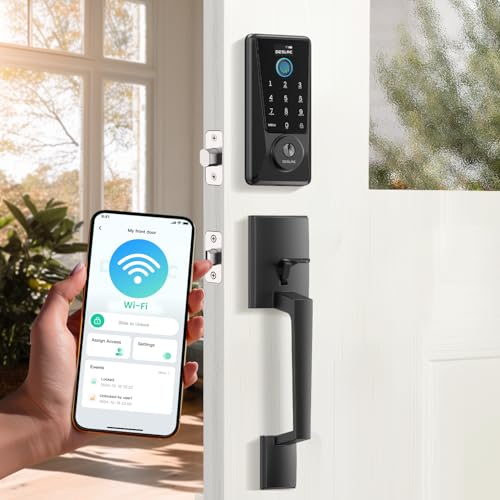
DESLOC Fingerprint Smart Lock with Handle
Best for: Users wanting visible status feedback
- Access Methods
- Fingerprint, passcode, app, key, fob
- Connectivity
- Built-in Wi-Fi
- Smart Home Compatibility
- Amazon Alexa, Google Assistant
- Included Door Hardware
- Handle set
- Color
- Black
- Application
- Front Door
View on Amazon: DESLOC Fingerprint Smart Lock with Handle Affiliate link
The DESLOC D110Plus is a built-in Wi-Fi smart lock with a handle set. It unlocks in under 0.2 seconds via fingerprint. You can also use passcodes, voice commands, or the app. It features a visible display for battery status and IP54 weather resistance. The lock supports Google Assistant and Alexa. It includes a 1-year warranty and Type-C emergency power.
Pros
- Built-in Wi-Fi with no hub needed
- 0.2-second fingerprint unlock speed
- Visible touchscreen display for status
- IP54 weather resistance rating
- Anti-peeping PIN code protection
Cons
- Only 1-year product warranty
- No video doorbell integration
- No physical key override mentioned
Good fit if
- You want a visible status display
- You need fast fingerprint entry
- You prefer built-in Wi-Fi
Skip if
- You require a video doorbell
- You need a longer warranty
- You prefer a deadbolt only
Verdict: The DESLOC D110Plus Fingerprint Smart Lock suits users who want quick access and clear status feedback. It fits homes needing reliable Wi-Fi control without a hub.

Tapo Smart Wi-Fi Fingerprint Deadbolt
Best for: long battery life and high fingerprint capacity
- Access Methods
- Fingerprint, keypad, assistant, keys
- Connectivity
- Wi-Fi, Bluetooth
- Fingerprint Capacity
- Up to 100
- Power Source
- Battery Powered
- Color
- Black
- Dimensions
- 5.91 × 2.69 × 1.29 inches
View on Amazon: Tapo Smart Wi-Fi Fingerprint Deadbolt Affiliate link
The Tapo DL110 is a battery-powered deadbolt with Wi-Fi and Bluetooth connectivity. It supports six access methods, including fingerprint recognition and a touchscreen keypad. The unit holds up to 100 fingerprints and features a removable, rechargeable battery rated for one year of operation. Its compact dimensions are 2.91 by 7.83 by 1.83 inches. This model suits users seeking a keyless entry solution with long battery life.
Pros
- One-year battery life with removable rechargeable unit
- Fingerprint recognition in 0.42 seconds
- Supports up to 100 registered fingerprints
- Wi-Fi and Bluetooth connectivity
- Six access methods including keypad and keys
Cons
- Heavier build at 4.61 pounds compared to lighter alternatives
- Smaller width of 2.69 inches may limit mounting options
- Single color option in black
Good fit if
- You want a battery-powered lock with a full year of operation
- You need to store up to 100 fingerprints for family members
- You prefer a keyless entry system with Wi-Fi management
Skip if
- You require a lock with multiple color finishes
- You need a palm vein recognition sensor instead of fingerprint
- You prefer a lighter deadbolt under 4 pounds
Verdict: The Tapo DL110 Battery-Powered Wi-Fi Lock offers reliable one-year battery performance and high fingerprint capacity for households with many users. It fits buyers who prioritize long maintenance intervals and secure, keyless access over aesthetic variety.
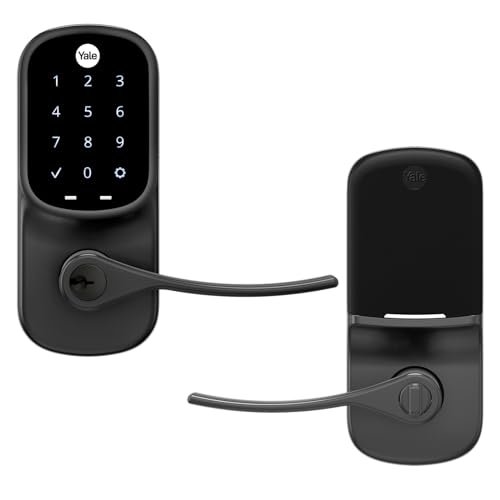
Yale Assure Touchscreen Wi-Fi Lever Lock
Best for: single-hole doors without deadbolts
- Access Methods
- Keypad
- Installation Type
- Lever or knob replacement
- Included Door Hardware
- Lever handle
- Connectivity
- Wi-Fi
- Color
- Black
- Special Features
- Auto Lock
View on Amazon: Yale Assure Touchscreen Wi-Fi Lever Lock Affiliate link
This Yale lever lock replaces existing door handles on doors without a deadbolt. It features a backlit touchscreen keypad for keyless entry and Wi-Fi connectivity for remote management. The unit includes an auto-lock function to secure the door automatically. It is designed for single-hole installations and comes with a lifetime limited warranty on the finish and mechanical parts. The Black Suede finish matches other Yale hardware.
Pros
- Wi-Fi connectivity for remote access
- Backlit touchscreen keypad for easy entry
- Auto-lock feature secures door automatically
- Lifetime limited warranty on finish and mechanics
Cons
- Requires door without a deadbolt for installation
- Only offers keypad and touchscreen access methods
Good fit if
- You have a door with a single hole and no deadbolt
- You prefer keyless entry via a backlit touchscreen
- You want auto-lock functionality for convenience
Skip if
- You need a traditional deadbolt replacement
- You require fingerprint or app-only unlocking
- You are installing on a door with a deadbolt
Verdict: Yale Assure Lever Lock Black Suede is a solid choice for homeowners with single-hole doors who want reliable keyless entry. It fits those who value the convenience of auto-locking and remote Wi-Fi control without needing a deadbolt.

Yale Wi-Fi Touchscreen Deadbolt
Best for: direct Wi-Fi connectivity and unlimited codes
- Access Methods
- touchscreen keypad, app, Apple Watch
- Connectivity
- 2.4 or 5 GHz Wi-Fi
- User Code Capacity
- unlimited
- Color
- Black
- Dimensions
- 0.88 × 2.5 × 3.75 inches
- Weight
- 1 pounds
View on Amazon: Yale Wi-Fi Touchscreen Deadbolt Affiliate link
The Yale Assure Lock 2 connects to 2.4 or 5 GHz Wi-Fi without a hub. It offers touchscreen keypad entry, app control, and Apple Watch access. The lock supports unlimited user codes and features DoorSense for auto-locking. It is Grade 2 certified for durability. This model suits users who want direct Wi-Fi connectivity and versatile entry methods for their home.
Pros
- Connects directly to 2.4 or 5 GHz Wi-Fi
- Supports unlimited user codes for sharing access
- Includes Apple Watch control and app access
- Grade 2 BHMA certified for durability
Cons
- Limited to US and Canada for app functionality
- Heavier at 1 pound compared to lighter alternatives
- Wi-Fi only model lacks Bluetooth variation in this specific SKU
Good fit if
- You need direct Wi-Fi connectivity without a hub
- You want to manage access via smartphone app
- You require unlimited codes for frequent guests
Skip if
- You live outside the US or Canada
- You prefer a lock with Bluetooth-only connectivity
- You need a lever handle for doors without a deadbolt
Verdict: Yale Assure Lock 2 Wi-Fi Black Suede fits users who need direct Wi-Fi connectivity and unlimited code sharing. It is ideal for those in the US or Canada who want app-based control and Apple Watch access.
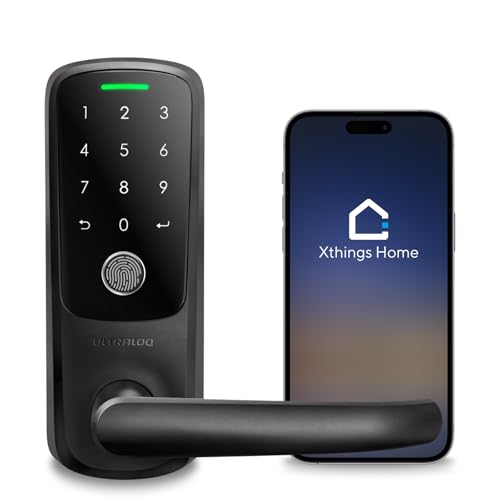
ULTRALOQ Latch 5 Touchscreen Smart Lever Lock
Best for: remote access via built-in Wi-Fi
- Access Methods
- App, fingerprint, code, mechanical key
- Connectivity
- Built-in 2.4 GHz Wi-Fi
- Included Door Hardware
- Lever handle
- Color
- Black
- Application
- Front Door, Office, Rental Property
- Special Features
- Auto Lock
View on Amazon: ULTRALOQ Latch 5 Touchscreen Smart Lever Lock Affiliate link
The ULTRALOQ Latch 5 is a built-in Wi-Fi smart lever lock designed for US standard doors. It connects via 2.4 GHz Wi-Fi without a gateway. You can unlock it using the app, fingerprint, code, or mechanical key. The zinc alloy body is weatherproof and includes auto-lock. This remote control model suits rental hosts and homeowners who need to manage access from anywhere.
Pros
- Built-in 2.4 GHz Wi-Fi connectivity
- Four access methods: app, fingerprint, code, key
- Sturdy zinc alloy construction
- Remote user management via smartphone app
- Auto-lock feature included
Cons
- Limited to 2.4 GHz Wi-Fi networks only
- Available only in Black or Satin Nickel finishes
- Requires mechanical key backup for access
Good fit if
- You need to share temporary passwords remotely
- You want a lever handle instead of a deadbolt
- You prefer fingerprint and code entry options
Skip if
- You require 5 GHz Wi-Fi support
- You need a deadbolt mechanism
- You want a silver or gold finish
Verdict: ULTRALOQ Latch 5 Smart Lever Lock fits renters and homeowners who need remote access control without a gateway. It is best for users who prefer lever handles and multiple unlock methods.
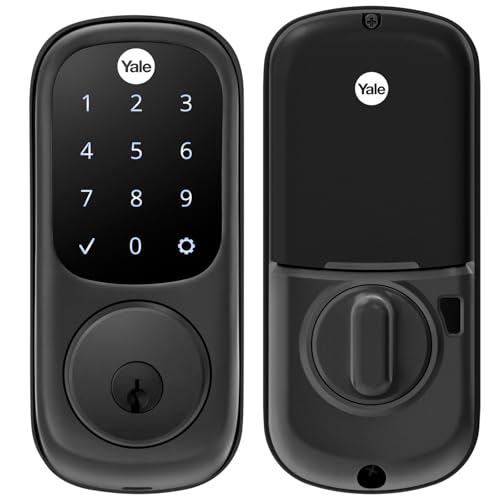
Yale Assure Touchscreen Deadbolt, Black Suede
Best for: keypad entry and auto-locking
- Access Methods
- Keypad, Key
- Installation Type
- Full deadbolt replacement
- Connectivity
- Wi-Fi
- Color
- Black
- Dimensions
- 5.5 × 5.5 × 10 inches
- Weight
- 1 pounds
View on Amazon: Yale Assure Touchscreen Deadbolt, Black Suede Affiliate link
This Yale deadbolt uses a touchscreen keypad and physical key for entry. It fits standard doors from 1-3/4 to 2-1/4 inches thick. The unit weighs 1 pound and measures 10 inches tall. It includes auto-locking to secure your door automatically. You can generate unique codes for family and guests. This model does not connect to Wi-Fi on its own. You must buy the Yale Access Upgrade Kit separately for smartphone control.
Pros
- Touchscreen keypad for keyless entry
- Auto-lock feature for security
- Fits standard door thicknesses
- Generates unique access codes
Cons
- No built-in Wi-Fi connectivity
- Requires separate upgrade kit for smart features
Good fit if
- You want a reliable keyless entry system
- You prefer physical keypad access over app control
- You need a lock for standard door thicknesses
Skip if
- You need built-in Wi-Fi connectivity
- You want a smart lock without extra purchases
- You have doors under 1-3/8 inches thick
Verdict: Yale Assure Black Suede Keypad Deadbolt suits those who prioritize simple keypad entry and auto-locking over built-in smart connectivity. It is a solid choice for standard doors where you do not need immediate app integration.
Specifications side by side
| Spec | eufy Security Wi-Fi Smart Deadbolt | DESLOC Fingerprint Smart Lock with Handle | Tapo Smart Wi-Fi Fingerprint Deadbolt | Yale Assure Touchscreen Wi-Fi Lever Lock | Yale Wi-Fi Touchscreen Deadbolt | ULTRALOQ Latch 5 Touchscreen Smart Lever Lock | Yale Assure Touchscreen Deadbolt, Black Suede |
|---|---|---|---|---|---|---|---|
| Access Methods | App, keypad, key, Apple Watch, voice | Fingerprint, passcode, app, key, fob | Fingerprint, keypad, assistant, keys | Keypad | touchscreen keypad, app, Apple Watch | App, fingerprint, code, mechanical key | Keypad, Key |
| Connectivity | Built-in Wi-Fi | Built-in Wi-Fi | Wi-Fi, Bluetooth | not stated | 2.4 or 5 GHz Wi-Fi | Built-in 2.4 GHz Wi-Fi | not stated |
| Smart Home Compatibility | Alexa, Google Voice Assistant | Amazon Alexa, Google Assistant | not stated | not stated | not stated | not stated | not stated |
| Installation Type | not stated | not stated | not stated | Lever or knob replacement | not stated | not stated | Full deadbolt replacement |
| Fingerprint Capacity | not stated | not stated | Up to 100 | not stated | not stated | not stated | not stated |
| User Code Capacity | not stated | not stated | not stated | not stated | unlimited | not stated | not stated |
| Included Door Hardware | not stated | Handle set | not stated | Lever handle | not stated | Lever handle | not stated |
| Power Source | not stated | not stated | Battery Powered | not stated | not stated | not stated | not stated |
| Access Method | Keypad, Touchscreen | Keypad, Fingerprint, Touchscreen | Keypad, Fingerprint, Touchscreen | Keypad, Touchscreen | Keypad, Touchscreen, App Control | Keypad, Fingerprint, Touchscreen, Remote Control | Keypad, Touchscreen, Key |
| Color | Black | Black | Black | Black | Black | Black | Black |
| Application | not stated | Front Door | not stated | not stated | not stated | Front Door, Office, Rental Property | not stated |
| Included Hardware | not stated | Handle | not stated | Lever | not stated | Handle | not stated |
| Special Features | not stated | Auto Lock | not stated | Auto Lock | not stated | Auto Lock | not stated |
| Dimensions | 220 × 80 × 180 inches | 14.4 × 11.1 × 4.02 inches | 5.91 × 2.69 × 1.29 inches | 1.38 × 2.75 × 6.06 inches | 0.88 × 2.5 × 3.75 inches | 3.5 × 6.5 × 7 inches | 5.5 × 5.5 × 10 inches |
| Weight | 1.48 pounds | not stated | 4.61 pounds | not stated | 1 pounds | not stated | 1 pounds |
| Model | T8502 | D110Plus Set A | Tapo DL110 | YRL226-NR-BSP | YRD450-WF1-BSP | Latch 5 | YRD226-NR-BSP |
| Size | not stated | not stated | 2.91 x 7.83 x 1.83 inches | Touchscreen | Wi-Fi | Fingerprint | No Wi-Fi |
If you need outdoor video alongside your deadbolt, evaluate eufy security eufycam s330 alternatives based on solar and resolution specs.
Frequently asked questions
Can I use these smart locks without a separate hub?
Yes, most options on this list feature built-in Wi-Fi for direct internet connection. The eufy Security Wi-Fi Smart Deadbolt, DESLOC Fingerprint Smart Lock, Tapo DL110, Yale Assure models, and ULTRALOQ Latch 5 all connect directly to your network. This eliminates the need for an external bridge or hub, simplifying your setup and reducing potential points of failure.
Which lock supports fingerprint scanning for quick entry?
Several models include biometric fingerprint access for fast, keyless entry. The DESLOC D110Plus, Tapo DL110, and ULTRALOQ Latch 5 all support fingerprint scanning. The Tapo DL110 is particularly noted for its high fingerprint capacity, making it suitable for households with many users who need reliable, repeated access without memorizing codes.
Do these locks work on single-hole doors without a deadbolt?
Yes, if you have a single-hole door, the Yale Assure Touchscreen Wi-Fi Lever Lock is designed for this specific configuration. It includes a lever handle and functions without a traditional deadbolt. This makes it a practical choice for renters or homeowners who want keyless entry and remote control without replacing their entire door hardware.
Which smart lock offers the best battery life?
The Tapo DL110 is highlighted for its reliable one-year battery performance. As a battery-powered Wi-Fi lock, it minimizes maintenance intervals, which is ideal for users who prioritize long-lasting power over aesthetic variety. Other models like the DESLOC and Yale Assure also rely on batteries, but the Tapo model specifically emphasizes extended operational duration.
Can I control these locks remotely via an app?
All listed Wi-Fi models allow remote control through a smartphone application. The Yale Assure Lock 2 Wi-Fi is specifically noted for its app-based control and unlimited code sharing. This feature lets you lock or unlock your door, grant temporary access, and monitor status from anywhere, providing convenience and security without being physically present.
Do any of these locks include auto-locking functionality?
Yes, several models feature automatic locking to ensure your door is secure after entry. The DESLOC D110Plus, Yale Assure Touchscreen Wi-Fi Lever Lock, and ULTRALOQ Latch 5 all include auto-lock as a special feature. This function engages the lock automatically after you close the door, removing the need to manually turn the key or push the bolt.
Which lock is best for users who want to share unlimited codes?
The Yale Assure Lock 2 Wi-Fi is ideal for users needing unlimited code sharing. It supports direct Wi-Fi connectivity and allows you to generate and distribute an unlimited number of access codes via the app. This is particularly useful for managing access for family members, cleaners, or contractors without needing to physically hand over a key.