The Best ULTRALOQ Smart Locks in 2026: 10 Picks
As an Amazon Associate we earn from qualifying purchases. Links on this page are affiliate links.
ULTRALOQ makes one of the widest smart deadbolt lineups, with Wi-Fi, Matter over Thread, Z-Wave and Bluetooth versions. Our top pick is the ULTRALOQ U-Bolt Pro WiFi: up to 100 fingerprints, 50 codes, built-in Wi-Fi, a door sensor, ANSI Grade 1 and IP65, and it works with Alexa, Google Home and SmartThings. For less, the Bolt SE adds Matter for Apple Home with 50 fingerprints and an 18-month battery claim. We compared 10 ULTRALOQ models from listings and published specs, not hands-on testing.
Our top pick: ULTRALOQ U-Bolt Pro WiFi Deadbolt.
Quick picks
Our 10 picks
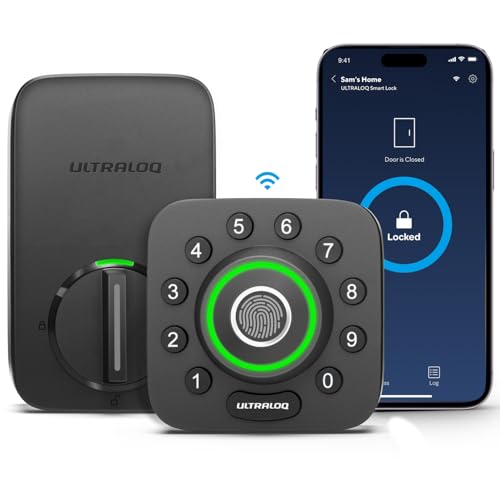
ULTRALOQ U-Bolt Pro WiFi Deadbolt
Best for: Overall
- Access Methods
- Fingerprint, passcode, app, keys
- Connectivity
- 2.4 GHz Wi-Fi, Bluetooth
- Smart Home Compatibility
- Amazon Alexa, Google Home, SmartThings
- Installation Type
- Replace current deadbolt
- Fingerprint Capacity
- Up to 100 fingerprints
- User Code Capacity
- Up to 50 codes
View on Amazon: ULTRALOQ U-Bolt Pro WiFi Deadbolt Affiliate link
The U-Bolt Pro WiFi stores up to 100 fingerprints (2 per user) and 50 codes, connects directly to Wi-Fi, and includes a door sensor for open-door alerts and auto-lock on close. It meets ANSI Grade 1, lists IP65, and works with Alexa, Google Home, SmartThings and IFTTT.
Pros
- Grade 1 and IP65
- 100 fingerprints
- Door sensor included
Cons
- Not for metal doors
- No Matter
Good fit if
- You want the strongest all-round ULTRALOQ
- You want open-door alerts
Skip if
- Your door is metal
- You want Apple Home
Verdict: The best ULTRALOQ overall.

ULTRALOQ Bolt Matter Smart Deadbolt
Best for: Value
- Access Methods
- Fingerprint, keypad, app, key
- Connectivity
- Built-in 2.4 GHz Wi-Fi, Thread
- Smart Home Compatibility
- Apple Home, Alexa, Google, Matter
- Fingerprint Capacity
- 50
- User Code Capacity
- 50
- Included Door Hardware
- Deadbolt
View on Amazon: ULTRALOQ Bolt Matter Smart Deadbolt Affiliate link
The Bolt SE (black) gives 50 fingerprints, 50 codes, built-in Wi-Fi and Matter over Thread for Apple Home, Alexa and Google, with Siri voice. Thread lets the battery last up to 18 months, and it lists IP65; a door sensor for the Bolt SE has to be bought separately.
Pros
- Matter plus Wi-Fi
- 18-month battery claim
- Lowest Bolt price
Cons
- Door sensor sold separately
- 50 fingerprints
Good fit if
- You want Apple Home for less
- You hate battery swaps
Skip if
- You want a sensor in the box
- You need 100 prints
Verdict: The value ULTRALOQ.

ULTRALOQ Bolt NFC Wi-Fi Deadbolt
Best for: Phone tap
- Access Methods
- NFC, app, code, fob, key, voice
- Connectivity
- 2.4 GHz Wi-Fi
- Smart Home Compatibility
- Alexa, Apple Home, Google, SmartThings
- User Code Capacity
- 50
- Included Door Hardware
- Deadbolt
- Color
- Black
View on Amazon: ULTRALOQ Bolt NFC Wi-Fi Deadbolt Affiliate link
The Bolt NFC (black) unlocks with a tap of an iPhone, Apple Watch or Android NFC phone, stored for up to 50 devices, plus app, 50 codes and Siri, Alexa or Google voice. It is BHMA Grade 1, runs up to 1 year on 8 AA, and auto-locks with a door sensor.
Pros
- Apple Home Key and Android tap
- Grade 1
- Up to 1 year on 8 AA
Cons
- No fingerprint
- 8 AA batteries
Good fit if
- You want phone-tap entry
- Your home mixes iPhone and Android
Skip if
- You want fingerprint
- You want fewer batteries
Verdict: The tap-to-unlock pick.

ULTRALOQ Bolt Fingerprint Wi-Fi Deadbolt
Best for: Fingerprint Wi-Fi
- Access Methods
- Fingerprint, app, voice, codes, key
- Smart Home Compatibility
- Alexa, Google Home, SmartThings, IFTTT
- Connectivity
- Wi-Fi
- Color
- Black
- Application
- Front Door
- Special Features
- Auto Lock
View on Amazon: ULTRALOQ Bolt Fingerprint Wi-Fi Deadbolt Affiliate link
The Bolt Fingerprint WiFi (black) uses a 360° fingerprint reader, built-in Wi-Fi through the U-home app, auto-unlock on approach and relock when the door closes, using its included door sensor. It works with Alexa, Google Home, SmartThings and IFTTT.
Pros
- Fingerprint plus Wi-Fi
- Door sensor included
- Auto-sense lock and unlock
Cons
- No Matter
- Grade not stated in this listing
Good fit if
- You want fingerprint without a hub
- You use SmartThings
Skip if
- You use Apple Home
- You need a stated grade
Verdict: The Wi-Fi fingerprint Bolt.

ULTRALOQ Bolt Fingerprint Matter Smart Lock
Best for: Fingerprint Matter
- Access Methods
- Fingerprint, app, PIN, key, voice
- Connectivity
- Matter over Thread, Bluetooth
- Smart Home Compatibility
- Apple Home, Alexa, Google, SmartThings
- Auto-Lock Delay
- 10 seconds to 30 minutes
- Fingerprint Capacity
- 50 users (2 fingerprints per user)
- Included Door Hardware
- Deadbolt
View on Amazon: ULTRALOQ Bolt Fingerprint Matter Smart Lock Affiliate link
The Bolt Fingerprint Matter (black with satin nickel) runs on Matter over Thread with Bluetooth for the app. It supports up to 50 users by fingerprint, 4-8 digit temporary PINs, geofence auto-unlock and auto-lock from 10 seconds to 30 minutes, with an optional magnetic door sensor.
Pros
- Matter over Thread
- Long auto-lock range
- Fingerprint
Cons
- Needs a Thread hub for remote
- Sensor optional
Good fit if
- You have an Apple TV or HomePod hub
- You want local Matter control
Skip if
- You have no Thread hub
- You want Wi-Fi
Verdict: The fingerprint Bolt for Matter homes.

ULTRALOQ Bolt Mission UWB Smart Lock
Best for: Hands-free
- Access Methods
- UWB, NFC, app, PIN code, key
- Connectivity
- Matter over Thread, UWB
- Smart Home Compatibility
- Apple Home, Alexa, Google, SmartThings
- Included Door Hardware
- Deadbolt
- Dimensions
- 2.96 × 1.25 × 2.96 inches
- Weight
- 3 pounds
View on Amazon: ULTRALOQ Bolt Mission UWB Smart Lock Affiliate link
The Bolt Mission (black with satin nickel) is ULTRALOQ's UWB lock: it unlocks when you actually reach the door, not when you are near the house. It also takes Android NFC tap, app, PIN and key, uses Matter over Thread for Apple Home, Alexa, Google, SmartThings or Home Assistant, lists IP65 and up to 18 months of battery.
Pros
- UWB approach-to-unlock
- Matter and Home Assistant
- IP65
Cons
- Highest price here
- UWB needs a supported phone
Good fit if
- You want true hands-free entry
- You use Home Assistant
Skip if
- Your phone lacks UWB
- You want the lowest price
Verdict: The hands-free flagship.

ULTRALOQ Bolt Z-Wave Deadbolt
Best for: Z-Wave
- Access Methods
- Keypad, app
- Connectivity
- Z-Wave, Z-Wave Long Range
- Smart Home Compatibility
- Alarm.com, Home Assistant, SmartThings
- Installation Type
- Deadbolt replacement
- Included Door Hardware
- Deadbolt
- Power Source
- Battery Powered
View on Amazon: ULTRALOQ Bolt Z-Wave Deadbolt Affiliate link
The Bolt Z-Wave (black) uses an 800 Series chip with Z-Wave Long Range for alarm panels and hubs such as Alarm.com, Home Assistant and SmartThings. It has keypad, app, auto-lock and auto-unlock, BHMA Grade 1 and IP65 on 4 AA.
Pros
- Z-Wave Long Range
- Grade 1, IP65
- 4 AA
Cons
- Z-Wave hub required
- No fingerprint
Good fit if
- You have an alarm panel
- Your door is far from the hub
Skip if
- You have no Z-Wave hub
- You want biometrics
Verdict: The ULTRALOQ for Z-Wave systems.
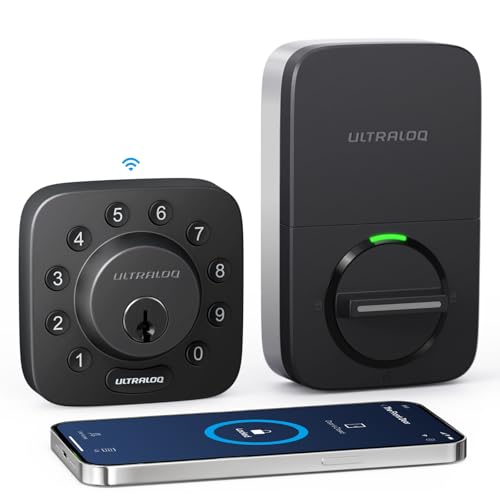
ULTRALOQ U-Bolt Wi-Fi Smart Deadbolt with Sensor
Best for: Keypad Wi-Fi
- Access Methods
- Passcode, app, eKey, key, web portal
- Connectivity
- 2.4 GHz Wi-Fi, Bluetooth
- Smart Home Compatibility
- Amazon Alexa, Google Assistant
- User Code Capacity
- 50 passcodes
- Color
- Black
- Dimensions
- 2.95 × 0.99 × 2.95 inches
View on Amazon: ULTRALOQ U-Bolt Wi-Fi Smart Deadbolt with Sensor Affiliate link
The U-Bolt WiFi (black) is a Grade 1 keypad deadbolt with built-in 2.4 GHz Wi-Fi, a door sensor and batteries included. It holds 50 codes with one-time or scheduled access, has a lockout mode for trips, lasts up to 8 months and fits doors 1-3/8 to 1-3/4 in thick.
Pros
- Grade 1
- Wi-Fi with door sensor
- Lockout mode
Cons
- No fingerprint
- Up to 8 months per set
Good fit if
- You want Wi-Fi without biometrics
- You run a rental
Skip if
- You want fingerprint
- You want long battery life
Verdict: The Wi-Fi keypad ULTRALOQ.

ULTRALOQ Latch 5 NFC Smart Lock
Best for: Lever doors
- Access Methods
- App, NFC, key fob, code, mechanical key
- Connectivity
- Built-in 2.4 GHz Wi-Fi, Bluetooth 4.0 LE
- Included Door Hardware
- Handle lock
- Color
- Black
- Application
- Home, Front Door, Office, Rental Property
- Special Features
- Auto Lock
View on Amazon: ULTRALOQ Latch 5 NFC Smart Lock Affiliate link
The Latch 5 NFC (black) is a lever lock with a touchscreen keypad, NFC key fobs, Bluetooth and built-in 2.4 GHz Wi-Fi app control, and a mechanical key. It suits doors without a deadbolt and rental units that share temporary codes remotely with no gateway.
Pros
- Lever lock with Wi-Fi
- NFC fobs
- No gateway needed
Cons
- Not a deadbolt
- No grade or battery data listed
Good fit if
- Your door has a single lever
- You hand out fobs
Skip if
- You want deadbolt security
- You want published ratings
Verdict: The ULTRALOQ lever.

ULTRALOQ U-Bolt Bluetooth Smart Deadbolt
Best for: Budget
- Access Methods
- Keypad, app, auto unlock, key
- Connectivity
- Bluetooth, 2.4 GHz Wi-Fi
- Smart Home Compatibility
- Alexa, Google Assistant, SmartThings
- Installation Type
- Replace current deadbolt
- Included Door Hardware
- Deadbolt
- Color
- Black
View on Amazon: ULTRALOQ U-Bolt Bluetooth Smart Deadbolt Affiliate link
The U-Bolt (Bluetooth, black) is the cheapest ULTRALOQ: keypad, app, auto-unlock, smart watch app and 2 keys, with ANSI Grade 1 and IP65. Alexa, Google and remote access need the ULTRALOQ Bridge, sold separately.
Pros
- Grade 1 and IP65 at the lowest price
- Auto-unlock
- Anti-peep code
Cons
- Bridge needed for remote
- No fingerprint
Good fit if
- You want a strong keypad deadbolt for less
- You only need near-door app control
Skip if
- You want remote access in the box
- You want biometrics
Verdict: The budget ULTRALOQ.
Specifications side by side
| Spec | ULTRALOQ U-Bolt Pro WiFi Deadbolt | ULTRALOQ Bolt Matter Smart Deadbolt | ULTRALOQ Bolt NFC Wi-Fi Deadbolt | ULTRALOQ Bolt Fingerprint Wi-Fi Deadbolt | ULTRALOQ Bolt Fingerprint Matter Smart Lock | ULTRALOQ Bolt Mission UWB Smart Lock | ULTRALOQ Bolt Z-Wave Deadbolt | ULTRALOQ U-Bolt Wi-Fi Smart Deadbolt with Sensor | ULTRALOQ Latch 5 NFC Smart Lock | ULTRALOQ U-Bolt Bluetooth Smart Deadbolt |
|---|---|---|---|---|---|---|---|---|---|---|
| Access Methods | Fingerprint, passcode, app, keys | Fingerprint, keypad, app, key | NFC, app, code, fob, key, voice | Fingerprint, app, voice, codes, key | Fingerprint, app, PIN, key, voice | UWB, NFC, app, PIN code, key | Keypad, app | Passcode, app, eKey, key, web portal | App, NFC, key fob, code, mechanical key | Keypad, app, auto unlock, key |
| Connectivity | 2.4 GHz Wi-Fi, Bluetooth | Built-in 2.4 GHz Wi-Fi, Thread | 2.4 GHz Wi-Fi | not stated | Matter over Thread, Bluetooth | Matter over Thread, UWB | Z-Wave, Z-Wave Long Range | 2.4 GHz Wi-Fi, Bluetooth | Built-in 2.4 GHz Wi-Fi, Bluetooth 4.0 LE | Bluetooth, 2.4 GHz Wi-Fi |
| Smart Home Compatibility | Amazon Alexa, Google Home, SmartThings | Apple Home, Alexa, Google, Matter | Alexa, Apple Home, Google, SmartThings | Alexa, Google Home, SmartThings, IFTTT | Apple Home, Alexa, Google, SmartThings | Apple Home, Alexa, Google, SmartThings | Alarm.com, Home Assistant, SmartThings | Amazon Alexa, Google Assistant | not stated | Alexa, Google Assistant, SmartThings |
| Installation Type | Replace current deadbolt | not stated | not stated | not stated | not stated | not stated | Deadbolt replacement | not stated | not stated | Replace current deadbolt |
| Auto-Lock Delay | not stated | not stated | not stated | not stated | 10 seconds to 30 minutes | not stated | not stated | not stated | not stated | not stated |
| Fingerprint Capacity | Up to 100 fingerprints | 50 | not stated | not stated | 50 users (2 fingerprints per user) | not stated | not stated | not stated | not stated | not stated |
| User Code Capacity | Up to 50 codes | 50 | 50 | not stated | not stated | not stated | not stated | 50 passcodes | not stated | not stated |
| Included Door Hardware | Deadbolt | Deadbolt | Deadbolt | not stated | Deadbolt | Deadbolt | Deadbolt | not stated | Handle lock | Deadbolt |
| Power Source | not stated | not stated | not stated | not stated | not stated | not stated | Battery Powered | not stated | not stated | not stated |
| Access Method | Fingerprint, Remote Control | Fingerprint, Remote Control | Key, Remote Control | Fingerprint, Remote Control | Fingerprint | not stated | not stated | not stated | Keypad, Touchscreen, Remote Control | Keypad, App Control |
| Color | Black | Black | Black | Black | Black With Satin Nickel | Black with Satin Nickel | Black | Black | Black | Black |
| Application | Front Door | Home, Front Door | Home | Front Door | Home | Home | Home | not stated | Home, Front Door, Office, Rental Property | Front Door |
| Included Hardware | not stated | not stated | not stated | not stated | not stated | not stated | not stated | not stated | Handle | not stated |
| Special Features | Auto Lock | Auto Lock | not stated | Auto Lock | Auto Lock | not stated | Auto Lock | not stated | Auto Lock | Auto Lock |
| Dimensions | 2.95 × 2.95 × 1.19 inches | 2.95 × 1 × 2.95 inches | 2.96 × 1.35 × 2.96 inches | 2.96 × 1.25 × 2.96 inches | 2.96 × 1.35 × 2.96 inches | 2.96 × 1.25 × 2.96 inches | 2.95 × 0.99 × 2.99 inches | 2.95 × 0.99 × 2.95 inches | 6 × 7 × 3 inches | 2.95 × 2.95 × 0.98 inches |
| Weight | 2.8 pounds | not stated | 3.4 pounds | 3.3 pounds | 3.53 pounds | 3 pounds | 2.6 pounds | not stated | 5.78 pounds | 3 pounds |
| Size | Bluetooth + Built-in WiFi + Door Sensor | Deadbolt | Homekey+WiFi | Fingerprint+WiFi | Fingerprint+Matter | not stated | not stated | Bluetooth + Built-in WiFi + Door Sensor | NFC | Bluetooth |
| Model | U-BOLT-PRO-WiFi | ULTRALOQ BOLT SE | BOLT-N-W-NK | BOLT-F-W-NK | BOLT-F-MATTER-NK | Bolt Mission | BOLT Z-Wave | U-BOLT-WiFi | Latch 5 NFC | U-Bolt-BK |
The ULTRALOQ range
U-Bolt family: U-Bolt (Bluetooth, keypad, needs the ULTRALOQ Bridge for remote use), U-Bolt WiFi (keypad, door sensor) and U-Bolt Pro WiFi (adds fingerprint). Bolt family: Bolt Fingerprint in Wi-Fi or Matter versions, Bolt NFC with Apple Home Key and Android tap, Bolt SE with Wi-Fi plus Matter, Bolt Z-Wave with 800 Series Long Range, and Bolt Mission with UWB approach-to-unlock. Latch 5 NFC is a lever lock for doors without a deadbolt.
Several models also ship as lever or handle kits; buy the kit only if you are replacing the handle too.
ULTRALOQ against other brands
ULTRALOQ lists BHMA Grade 1 and IP65 on most deadbolts, which Yale and most Kwikset Wi-Fi models do not match. It also offers Z-Wave Long Range and UWB, which few rivals have. Against Yale, it lacks DoorSense on some models (the Bolt SE door sensor is sold separately) and it is not as common in alarm-company bundles. Against budget brands, the price is higher but the grade, weather rating and 18-month electronics coverage are stronger.
If you are setting up a home office alongside your security upgrades, the comparison of the best green gaming chairs outlines build specifications and weight capacities.
How to pick an ULTRALOQ
-
Connection
No hub: U-Bolt WiFi, U-Bolt Pro WiFi, Bolt Fingerprint WiFi, Bolt NFC, Bolt SE, Latch 5. Thread border router: Bolt Fingerprint Matter, Bolt Mission. Z-Wave hub: Bolt Z-Wave. Bridge: U-Bolt.
-
Entry method
Fingerprint: U-Bolt Pro, Bolt Fingerprint, Bolt SE. Phone tap: Bolt NFC, Bolt Mission. Keypad only: U-Bolt, U-Bolt WiFi, Bolt Z-Wave.
-
Door sensor
The U-Bolt WiFi, U-Bolt Pro WiFi and Bolt Fingerprint WiFi include one; for the Bolt SE it is not included.
-
Door fit
The U-Bolt WiFi lists 1-3/8 to 1-3/4 in doors; ULTRALOQ does not recommend the U-Bolt Pro for metal doors.
-
Battery
Thread models (Bolt SE, Bolt Mission) list up to 18 months; the Bolt NFC up to 1 year on 8 AA; the U-Bolt WiFi up to 8 months.
Frequently asked questions
Which ULTRALOQ smart lock is best?
The ULTRALOQ U-Bolt Pro WiFi: fingerprint, code, app, auto-unlock, voice and key entry, built-in Wi-Fi with a door sensor, ANSI Grade 1 and IP65.
Which ULTRALOQ works with Apple Home Key?
The ULTRALOQ Bolt NFC, which also supports Android NFC tap and lists BHMA Grade 1 and up to 1 year on 8 AA.
Does the ULTRALOQ U-Bolt need a bridge?
Yes. The Bluetooth U-Bolt needs the ULTRALOQ Bridge (sold separately) for remote access and Alexa or Google voice.
What is UWB on the ULTRALOQ Bolt Mission?
Ultra-wideband measures your phone's distance precisely, so the Bolt Mission unlocks when you reach the door rather than when you are merely nearby.