PHILIPS Deadbolts: 15 Picks Ranked by Specs
As an Amazon Associate we earn from qualifying purchases. Links on this page are affiliate links.
Finding the right PHILIPS deadbolt depends on whether you need a standalone lock, an interior retrofit unit, or a complete set with matching handles. Across the lineup, you will find standalone keypad models, retrofit deadbolts that preserve exterior keys, and full door packages with levers or handles in Matte Black and Satin Nickel.
The Philips 4200 Series Wi-Fi Deadbolt with Handle earns the top position because it pairs built-in Wi-Fi with 0.3-second fingerprint access and a matching handle. We compared 15 models strictly using the specifications published on their listings to help you find the right fit.
Quick picks
Our 15 picks

Philips 4200 Series Wi-Fi Deadbolt with Handle
Best for: front door Wi-Fi upgrades with matching handles
- Access Methods
- App, keypad PIN, fingerprint, voice
- Connectivity
- Built-in 2.4 GHz Wi-Fi
- Smart Home Compatibility
- Alexa, Google Assistant
- Auto-Lock Delay
- 0–180 seconds
- Included Door Hardware
- Handle set
- Color
- Matte Black
View on Amazon: Philips 4200 Series Wi-Fi Deadbolt with Handle
This smart deadbolt combines a 0.3-second fingerprint scanner, a keypad, and a matching exterior handle in one package. It connects directly to your 2.4 GHz Wi-Fi network without a dedicated bridge or hub. You can set auto-lock timers between 0 and 180 seconds, issue recurring or one-time passcodes, and monitor status via an app. It suits you if you want a complete hardware upgrade with built-in remote connectivity.
Pros
- Direct 2.4 GHz Wi-Fi connectivity without an external hub
- Fast 0.3-second fingerprint recognition
- Includes matching exterior handle hardware
- Configurable auto-lock delay from 0 to 180 seconds
- Works with Alexa and Google Assistant voice controls
Cons
- Does not include the required 1.5V alkaline batteries
- Requires installation within 33 feet of your Wi-Fi router
- Cannot use rechargeable or lithium batteries
Good fit if
- You want an all-in-one setup that includes a matching door handle.
- You prefer direct Wi-Fi management without buying an additional hub.
- You need multiple access options including fingerprint, app, and keypad PINs.
Skip if
- You want to power your lock using rechargeable batteries.
- Your front door is located farther than 33 feet from your Wi-Fi router.
Verdict: Philips 4200 Wi-Fi Deadbolt with Handle delivers fast 0.3-second fingerprint entry and direct 2.4 GHz Wi-Fi control without an external hub. It gives you a complete hardware replacement thanks to the bundled matching handle set.

Philips Wi-Fi Smart Deadbolt
Best for: hub-free remote access and fingerprint entry
- Access Methods
- App, passcode, fingerprint, key, voice
- Connectivity
- Built-in 2.4 GHz Wi-Fi
- Smart Home Compatibility
- Alexa, Google Assistant
- Auto-Lock Delay
- 10 to 180 seconds
- User Code Capacity
- 100
- Application
- Front Door
This deadbolt provides keyless entry with built-in 2.4 GHz Wi-Fi, eliminating the need for an external bridge. You can unlock your door using a fingerprint sensor, touchscreen keypad with up to 100 codes, mobile app, physical key, or voice commands via Alexa and Google Assistant. It includes timed auto-locking from 10 to 180 seconds. It suits households wanting direct remote access and versatile biometric entry without extra hardware.
Pros
- Direct Wi-Fi connection without a separate hub
- Five unlock methods: fingerprint, keypad, app, voice, and physical key
- Stores up to 100 customizable access codes
- Adjustable auto-lock timer between 10 and 180 seconds
Cons
- Lacks an integrated door sensor for open or closed detection
- Limited to 2.4 GHz Wi-Fi networks within 65 feet of the router
- AA alkaline batteries are not included
Good fit if
- You want remote app control without purchasing a dedicated hub.
- You prefer multiple access options including biometric fingerprint scanning.
- You manage rental guests or service visitors using up to 100 custom codes.
Skip if
- You need a door sensor to verify the door is fully shut before locking.
- You rely strictly on a 5 GHz Wi-Fi network.
- You want batteries included in the box.
Verdict: Philips Wi-Fi Fingerprint Keypad Deadbolt delivers standalone wireless access and versatile entry options directly out of the box. It gives you flexible control across app, touch, and voice platforms without requiring an external gateway.

Philips Built-in Wi-Fi Smart Deadbolt
Best for: standalone Wi-Fi keypad deadbolt entry
- Access Methods
- Passcode, key, app, voice
- Connectivity
- Built-in Wi-Fi
- Smart Home Compatibility
- Amazon Alexa, Google Assistant
- Auto-Lock Delay
- 10-180 seconds
- User Code Capacity
- 100
- Water Resistance
- Waterproof
This Philips Wi-Fi Keypad Deadbolt replaces standard front door deadbolts with keyless entry using physical buttons. It connects directly to your home Wi-Fi network without an external bridge, letting you manage up to 100 codes through the mobile app. You get hands-free control with Alexa or Google Assistant, configurable auto-locking from 10 to 180 seconds, and IP54 weather resistance. It suits you if you want straightforward code access and remote app control.
Pros
- Built-in Wi-Fi connects directly to your home network without a separate hub
- Stores up to 100 permanent, one-time, and timed user passcodes
- Configurable automatic lock timer between 10 and 180 seconds
- Physical push-button keypad works with Alexa and Google Assistant voice commands
- Operates in extreme temperatures from -31°F to 150°F with an IP54 rating
Cons
- Requires eight AA batteries that are not included in the box
- Lacks a fingerprint sensor or palm vein scanner for biometric access
- Does not include an integrated exterior door handle or lever
Good fit if
- You want direct Wi-Fi control and auto-locking without installing an external bridge.
- You need to grant custom one-time or scheduled entry codes for guests.
- You prefer tactile physical buttons over a touchscreen keypad.
Skip if
- You want biometric unlocking via a built-in fingerprint reader.
- You need a bundled lockset that includes a matching entry handle.
Verdict: Philips Wi-Fi Keypad Deadbolt delivers standalone wireless connectivity and physical button entry without requiring a separate network bridge. It gives you dependable core access management, timed auto-locking, and smart assistant pairing in a compact deadbolt design.
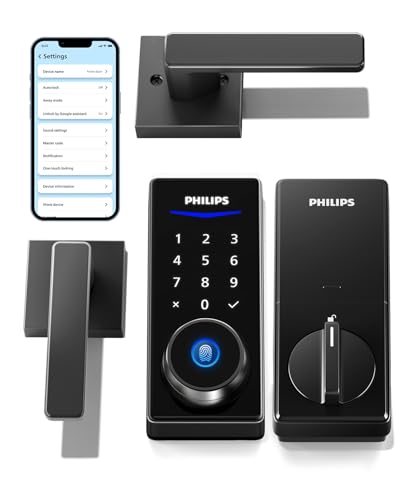
Philips Smart Deadbolt with Lever Handle Set
Best for: full door handle and deadbolt replacements
- Access Methods
- Fingerprints, PIN codes, keys, app
- Connectivity
- Bluetooth
- Smart Home Compatibility
- Amazon Alexa, Google Assistant
- User Code Capacity
- 100 user PINs, unlimited one-time
- Included Door Hardware
- 2 lever handles
- Color
- Matte Black
View on Amazon: Philips Smart Deadbolt with Lever Handle Set
This package pairs a smart deadbolt with two matching lever handles for your exterior and interior door setup. You get fingerprint access for up to 50 prints, 100 user PIN codes, and a physical key override. Built-in Bluetooth operates within 8 to 10 meters, while remote app features and voice assistant integration require a separate Wi-Fi bridge. It suits you if you want a complete lock and handle replacement.
Pros
- Includes two lever handles in the package
- Fingerprint scanner stores up to 50 fingerprints
- Keypad stores 100 user PINs and unlimited one-time PINs
- Four entry options: fingerprint, PIN code, physical key, and app
Cons
- Remote access and voice controls require a separate Wi-Fi gateway
- Auto-lock mechanism lacks an integrated door sensor
Good fit if
- You need matching lever handles alongside your smart deadbolt.
- You want local access via fingerprint, PIN, physical key, and Bluetooth.
- You manage access for multiple users with up to 100 PIN codes.
Skip if
- You want built-in Wi-Fi without purchasing a separate bridge.
- You require an integrated door sensor to confirm the door is shut before locking.
Verdict: Philips Smart Deadbolt with 2 Lever Handles replaces your entire door hardware set with four local unlocking methods. It delivers flexible entry options, though remote connectivity and voice control require an extra add-on.

Philips Fingerprint Wi-Fi Deadbolt with Handle
Best for: full entryway hardware replacement with biometric entry
- Access Methods
- Fingerprint, app, passcode, key, voice
- Connectivity
- Built-in 2.4GHz Wi-Fi
- Smart Home Compatibility
- Alexa, Google Assistant
- Auto-Lock Delay
- 10 to 180 seconds
- User Code Capacity
- 100
- Included Door Hardware
- Deadbolt and handle
View on Amazon: Philips Fingerprint Wi-Fi Deadbolt with Handle
The Philips Wi-Fi Fingerprint Deadbolt with Handle is an integrated front-door lock set that combines an electronic deadbolt with a matching lower handle. It features built-in 2.4GHz Wi-Fi, eliminating the need for a separate hub. You can unlock it in 0.3 seconds using the fingerprint scanner, enter numeric codes, or use voice commands via Alexa and Google Assistant. It suits households that want full handle-and-deadbolt replacement with multiple access methods.
Pros
- Built-in 2.4GHz Wi-Fi connects without external hubs
- 0.3-second fingerprint scanner recognition
- Stores up to 100 customizable passcodes
- Configurable auto-lock timer from 10 to 180 seconds
- Includes matching lower exterior door handle
Cons
- Requires 4 AA batteries that are not included
- Customer support is limited to Monday through Friday
- Requires a 2.4GHz Wi-Fi network connection
Good fit if
- You want a complete entryway set with both a deadbolt and matching handle.
- You need rapid biometric entry alongside remote app management.
- You want to assign unique access codes to up to 100 individuals.
Skip if
- You already have an exterior door handle you want to keep.
- You need technical support availability on weekends.
- You have a door thickness outside the 1-3/8-inch to 2-inch range.
Verdict: Philips Wi-Fi Fingerprint Deadbolt with Handle delivers versatile keyless access and direct hub-free network connectivity in a single complete hardware package. Its responsive fingerprint scanner and broad code capacity make managing multi-user entry straightforward.

Philips Wi-Fi Smart Deadbolt Set with Handles
Best for: full entry door hardware upgrades with handles
- Access Methods
- App, fingerprint, PIN, key, voice
- Smart Home Compatibility
- Amazon Alexa, Google Assistant
- Auto-Lock Delay
- 30 to 180 seconds
- User Code Capacity
- Up to 100
- Included Door Hardware
- Deadbolt with 2 handles
- Connectivity
- Wi-Fi
View on Amazon: Philips Wi-Fi Smart Deadbolt Set with Handles
This Philips Wi-Fi deadbolt set pairs a smart lock with two matching handles in jet black. You get five unlocking methods: fingerprint, PIN code, physical key, the Philips mobile app, and voice control via Alexa or Google Assistant. It stores up to 100 user codes, offers auto-locking between 30 and 180 seconds, and fits standard doors between 35 and 50 millimeters thick. It suits households wanting a complete, multi-access entryway package.
Pros
- Includes two coordinated handles alongside the deadbolt lock
- Five access options: fingerprint, PIN code, app, key, and voice
- Supports up to 100 user PIN codes and unlimited one-time codes
- Customizable auto-lock timer from 30 to 180 seconds
- Built-in Wi-Fi connectivity for remote app access
Cons
- Only fits doors within 35 to 50 mm door thickness
- Available only in jet black
Good fit if
- You need a complete lock set that includes matching door handles.
- You want remote access without buying a separate Wi-Fi bridge.
- You manage multiple guests using temporary and one-time PIN codes.
Skip if
- You have a door thinner than 35 mm or thicker than 50 mm.
- You already have exterior door handles you prefer to keep.
Verdict: Philips Wi-Fi Deadbolt Set with 2 Handles delivers comprehensive entry management with five access methods and included matching hardware. It provides a complete smart lock replacement for standard residential doors.
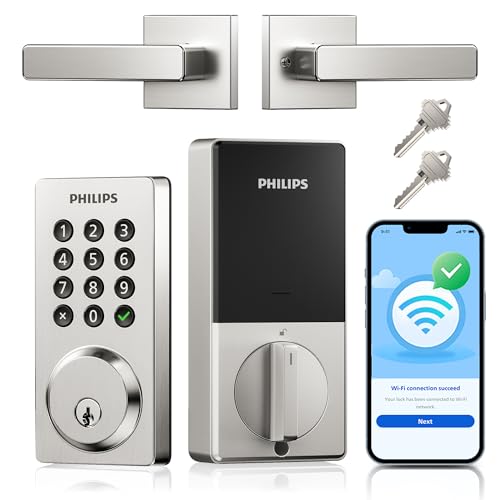
Philips Wi-Fi Keypad Deadbolt with Handle
Best for: remote app control and scheduled guest codes
- Access Methods
- Key, passcode, app, voice
- Connectivity
- Built-in Wi-Fi
- Smart Home Compatibility
- Alexa, Google Assistant
- Auto-Lock Delay
- 10-180 seconds
- User Code Capacity
- Up to 100
- Color
- Satin Nickel
This Philips smart deadbolt pairs built-in Wi-Fi with an included matching handle and physical push buttons. You can manage access through the Philips Home Access App without a bridge, track event logs, and store up to 100 permanent, timed, or one-time codes. With IP54 weather resistance, 10-to-180-second auto-locking, and compatibility with standard 1-3/8-inch to 2-inch doors, it suits homeowners who want thorough smartphone controls alongside physical buttons.
Pros
- Built-in Wi-Fi connects directly to home networks without a gateway hub
- Stores up to 100 codes with permanent, timed, and one-time options
- Operates in temperatures from -31°F to 150°F with IP54 water resistance
- Configurable auto-lock timer adjusts from 10 to 180 seconds
Cons
- Does not include a fingerprint scanner
- Requires eight AA batteries that are not included
Good fit if
- You want app access logs, real-time alerts, and remote unlocking via Wi-Fi.
- You prefer tactile physical keypad buttons over touchscreens.
- You need to issue up to 100 custom codes for guests, tenants, or cleaners.
Skip if
- You want biometric fingerprint unlocking.
- You have a door thicker than 2 inches or thinner than 1-3/8 inches.
Verdict: Philips Wi-Fi Keypad Deadbolt with Handle provides versatile app-based access control and reliable physical buttons without needing an external bridge. It is a solid choice if you prioritize remote monitoring, scheduling, and standard door compatibility.

Philips Wi-Fi Deadbolt with Dual Handles
Best for: full entryway upgrades needing handles and gateway
- Access Methods
- App, fingerprint, PIN code, key, voice
- Connectivity
- 2.4 GHz Wi-Fi
- Smart Home Compatibility
- Amazon Alexa, Google Assistant
- Auto-Lock Delay
- 30 to 180 seconds
- User Code Capacity
- Up to 100 user codes
- Included Door Hardware
- Deadbolt with 2 handles
This smart lock set combines a Wi-Fi deadbolt with two matching handles and an included gateway. You get five unlocking options: a 0.3-second fingerprint scanner, keypad PINs with up to 100 user codes, physical keys, app access, and voice control via Alexa or Google Assistant. It fits standard doors measuring 1-3/8 to 2 inches thick and features an adjustable auto-lock timer ranging from 30 to 180 seconds for hands-free security.
Pros
- Includes two matching handles and an external Wi-Fi gateway
- Biometric scanner unlocks in 0.3 seconds with 99.99% accuracy
- Stores up to 100 user PINs plus unlimited one-time access codes
- Customizable auto-lock timer from 30 to 180 seconds
Cons
- Supports 2.4 GHz Wi-Fi networks only
- Requires the gateway connected for voice control to function
- May require drilling an extra 3/8-inch hole during installation
Good fit if
- You want a complete door hardware set with matching handles included.
- You need multiple access options, including fingerprint recognition and PIN codes.
- You want automated locking configured between 30 and 180 seconds.
Skip if
- You rely exclusively on a 5 GHz Wi-Fi network.
- You do not want to plug in a separate gateway module for voice commands.
Verdict: Philips Wi-Fi Deadbolt with Dual Handles delivers a full entryway upgrade with rapid fingerprint entry and flexible PIN options. It gives you comprehensive smart deadbolt functionality provided your setup supports 2.4 GHz Wi-Fi.

Philips Wi-Fi Fingerprint Smart Deadbolt
Best for: homes needing hub-free access with fingerprint entry
- Access Methods
- Fingerprint, PIN, app, voice, key
- Connectivity
- 2.4 GHz Wi-Fi
- Smart Home Compatibility
- Alexa, Google
- Auto-Lock Delay
- 10 to 180 seconds
- Fingerprint Capacity
- 50
- User Code Capacity
- 100
The Philips Wi-Fi Fingerprint Smart Deadbolt connects directly to 2.4GHz Wi-Fi without an external hub. It gives you five ways to open your door, including a 7.17-degree tilted fingerprint sensor, a keypad supporting up to 100 codes, app control, voice assistants, and a physical key. With customizable auto-locking between 10 and 180 seconds, this deadbolt suits homeowners and rental hosts seeking flexible access control on standard doors.
Pros
- Built-in 2.4GHz Wi-Fi requires no extra hub or bridge
- Stores up to 50 fingerprints and 100 custom passcodes
- Adjustable auto-lock timer ranges from 10 to 180 seconds
- Supports voice management with Alexa and Google Assistant
Cons
- Requires eight AA batteries, which are not included
- Only compatible with 2.4GHz Wi-Fi networks
- Fits doors up to 2 inches thick, excluding thicker custom doors
Good fit if
- You want hub-free remote management over 2.4GHz Wi-Fi.
- You need multiple access methods like fingerprints, codes, and physical keys.
- You manage rental guests and require up to 100 unique codes.
Skip if
- You have a door thicker than 2 inches.
- You do not want a lock that requires eight AA batteries.
- You need support for 5GHz Wi-Fi frequencies.
Verdict: Philips Wi-Fi Fingerprint Smart Deadbolt combines five access methods with direct Wi-Fi connectivity for straightforward door control. It delivers dependable keyless entry for standard front doors without requiring an added bridge.
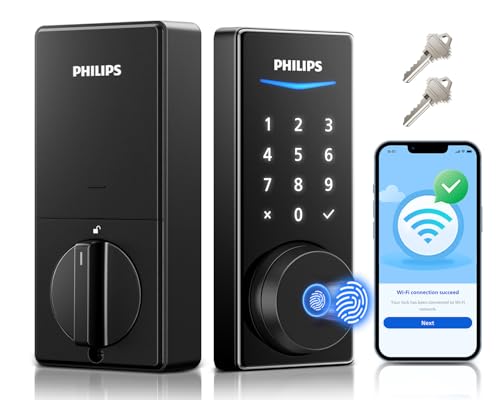
Philips Wi-Fi Fingerprint Smart Deadbolt
Best for: hub-free biometric and Wi-Fi access
- Access Methods
- App, fingerprint, PIN, voice, key
- Connectivity
- Built-in Wi-Fi
- Smart Home Compatibility
- Amazon Alexa, Google Assistant
- Auto-Lock Delay
- 30–180 seconds
- Color
- Matte Black
- Dimensions
- 6 × 2 × 1.5 inches
This Philips smart deadbolt integrates built-in Wi-Fi directly into the lock, eliminating the need for an external bridge. You can unlock your door five different ways: using the 0.3-second fingerprint sensor, keypad PINs, voice commands via Alexa or Google Assistant, the smartphone app, or a standard physical key. Configurable auto-locking secures the door between 30 and 180 seconds. It suits homeowners who want multiple keyless entry methods without extra bridge hardware.
Pros
- Built-in Wi-Fi connects directly without a dedicated hub
- Biometric fingerprint scanner unlocks in 0.3 seconds
- Five access options: fingerprint, PIN code, app, voice assistant, and key
- Adjustable auto-lock timer ranges from 30 to 180 seconds
Cons
- Does not include an exterior door handle or passage lever
- Auto-lock requires fully closed door and sufficient battery charge
Good fit if
- You want biometric fingerprint access along with keypad PIN entry
- You prefer direct Wi-Fi control without installing an extra bridge
- You use Alexa or Google Assistant voice commands to unlock doors
Skip if
- You need a bundle that includes a matching entry door handle
- You want a lock with an integrated video doorbell
Verdict: Philips Wi-Fi Fingerprint Smart Deadbolt delivers fast biometric unlocking and standalone Wi-Fi connectivity without requiring an additional network hub. It is a solid choice if you want five distinct access methods in a single unit.

Philips Standalone Touchscreen Deadbolt
Best for: standalone touchscreen entry without Wi-Fi setups
- Access Methods
- PIN code, one-time PIN code
- Auto-Lock Delay
- 30-180s
- User Code Capacity
- 20 permanent user PIN codes
- Color
- Matte Black
- Dimensions
- 3.36 × 2.53 × 1.38 inches
- Weight
- 1 pounds
This standalone touchscreen deadbolt provides keyless entry without requiring an internet connection. You can manage access using one master code, 20 permanent user PINs, or remotely generated one-time PIN codes. It includes an adjustable 30-to-180-second auto-lock timer, an away-mode security alarm, and up to one year of battery life. It suits you if you want dependable touchscreen operation on standard doors without managing Wi-Fi networks or mobile applications.
Pros
- Stores 1 master PIN code and up to 20 user PIN codes
- Generates one-time PIN codes remotely without an internet connection
- Configurable auto-lock delay from 30 to 180 seconds
- Built-in away mode alarm detects unauthorized indoor unlocking
- Rated for up to 1 year of battery life
Cons
- Lacks Wi-Fi or Bluetooth connectivity for live app control
- No physical backup key option listed in specifications
- Does not include fingerprint biometric recognition
Good fit if
- You want a non-connected touchscreen deadbolt without network setup.
- You need to share temporary guest codes remotely without Wi-Fi.
- You prefer customizable auto-locking between 30 and 180 seconds.
Skip if
- You want remote lock status monitoring through a smartphone app.
- You require a physical mechanical key cylinder for entry.
- You prefer unlocking your door using a fingerprint sensor.
Verdict: Philips Touchscreen Standalone Keypad Deadbolt delivers offline PIN entry with customizable auto-locking and remote one-time codes. It is a practical choice if you want responsive touchscreen access without managing wireless connections.
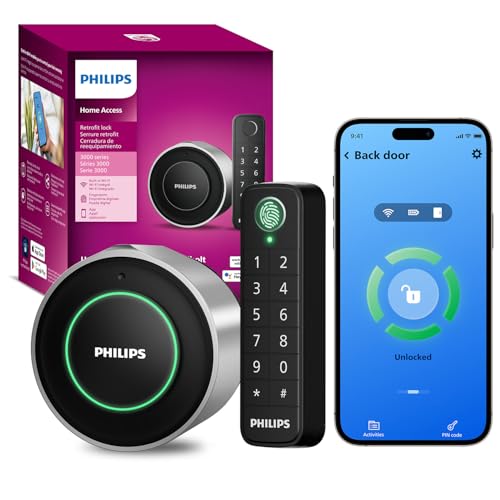
Philips Retrofit Smart Deadbolt with Keypad
Best for: retaining your existing exterior deadbolt hardware
- Access Methods
- Fingerprint, passcode, app, voice, key
- Connectivity
- Built-in 2.4GHz Wi-Fi
- Smart Home Compatibility
- Amazon Alexa, Google Assistant
- Installation Type
- Interior retrofit
- Auto-Lock Delay
- 10 to 180 seconds
- Included Hardware
- Knob
This retrofit smart deadbolt replaces your existing interior thumbturn while keeping exterior hardware and physical keys intact. Built-in 2.4GHz Wi-Fi connects directly to your network without an extra hub. You operate the exterior via an included wireless keypad featuring fingerprint and passcode access within 39 inches. It suits you if you want keyless fingerprint entry and smartphone management without altering your door exterior or replacing current deadbolt keys.
Pros
- Retains exterior lock hardware and existing physical keys
- Built-in 2.4GHz Wi-Fi requires no separate bridge
- Wireless keypad supports fingerprint and anti-peep passcodes
- Configurable auto-lock timer from 10 to 180 seconds
Cons
- Up to 4 months of battery life on two CR123 cells
- Keypad mounting range limited to 39 inches from the door
Good fit if
- You want to keep your outside deadbolt and original physical keys.
- You prefer unlocking via fingerprint or keypad without running wires.
- You use Amazon Alexa or Google Assistant for voice control.
Skip if
- You want an integrated all-in-one exterior deadbolt replacement.
- You prefer standard AA batteries over CR123 cells.
Verdict: Philips Retrofit Smart Deadbolt with Keypad upgrades interior door operation to wireless smart control while preserving original exterior keys and deadbolt hardware.

Philips Retrofit Smart Lock with Fingerprint Keypad
Best for: upgrading existing deadbolts without replacing exterior hardware
- Access Methods
- App, fingerprint, keypad, key
- Connectivity
- Built-in Wi-Fi
- Installation Type
- Retrofit
- Color
- Matte Black
- Special Features
- Auto Lock
- Dimensions
- 2.9 × 3 × 2.2 inches
View on Amazon: Philips Retrofit Smart Lock with Fingerprint Keypad
This retrofit deadbolt attaches to your existing single-cylinder lock, letting you keep your exterior hardware and original physical keys. Built-in Wi-Fi connects directly to the Philips Home Access app without an added bridge for remote locking and activity tracking. It includes a wireless keypad supporting both PIN codes and fingerprint scans, along with an auto-lock door sensor. This setup fits you if you want keyless entry without replacing exterior door trim.
Pros
- Retrofits over existing single-cylinder deadbolts to retain original exterior hardware and keys
- Built-in Wi-Fi connects without requiring a separate network bridge
- Includes an external keypad supporting both fingerprint scanning and PIN entry
- Door sensor enables automated locking upon closure
Cons
- Door sensor performance may degrade on metal door frames
- Sensor and magnet require precise alignment within 20 millimeters
- Only fits single-cylinder deadbolts
Good fit if
- You want to retain your existing exterior deadbolt hardware and mechanical keys
- You prefer Wi-Fi connectivity without purchasing an external gateway or bridge
- You want fingerprint and keypad entry options beside smartphone app control
Skip if
- You have a metal door frame that might interfere with the magnetic door sensor
- You need a complete lock replacement that swaps out exterior hardware entirely
Verdict: Philips Retrofit Smart Lock with Fingerprint Keypad converts your existing deadbolt into a connected lock while adding exterior biometric and keypad entry without replacing your outside hardware.

Philips 3000 Series Wi-Fi Retrofit Smart Lock
Best for: upgrading deadbolts while keeping original keys
- Access Methods
- App, key
- Connectivity
- Built-in 2.4 GHz Wi-Fi
- Smart Home Compatibility
- Amazon Alexa, Google Assistant
- Installation Type
- Retrofit
- Color
- Matte Black
- Special Features
- Auto Lock
View on Amazon: Philips 3000 Series Wi-Fi Retrofit Smart Lock
This retrofit lock mounts over your interior deadbolt, letting you keep existing exterior hardware and physical keys. It features built-in 2.4GHz Wi-Fi for remote control through the Philips Home Access app without a separate bridge. The included door sensor enables automatic locking upon closing, and voice control works with Alexa and Google Assistant. It suits you if you want app access while preserving your exterior door hardware.
Pros
- Keeps existing exterior hardware and original physical keys
- Built-in 2.4GHz Wi-Fi requires no additional bridge
- Includes door sensor for automatic locking when shut
- Integrates with Amazon Alexa and Google Assistant
Cons
- Uses CR123A batteries with roughly five months of battery life
- No external keypad or fingerprint scanner included
- Supports 2.4GHz Wi-Fi networks only
Good fit if
- You want to keep your exterior deadbolt hardware and existing keys.
- You need remote app control without purchasing a separate Wi-Fi bridge.
- You plan to automate locking with a magnetic door sensor.
Skip if
- You want an exterior keypad or fingerprint reader for pin access.
- You have a 5GHz-only home Wi-Fi network.
Verdict: Philips 3000 Series Wi-Fi Retrofit Smart Lock adds remote app control and auto-locking to your existing deadbolt without altering outside hardware. It is an effective upgrade if you want voice and Wi-Fi access while keeping original keys.

Philips 5000 Series Palm Vein Smart Deadbolt
Best for: touchless front door entry with doorbell alerts
- Access Methods
- Palm vein, app, voice
- Connectivity
- Built-in Wi-Fi
- Smart Home Compatibility
- Amazon Alexa, Google Assistant
- Color
- Satin Nickel
- Application
- Front Door
- Dimensions
- 28 × 9.09 × 74.6 inches
View on Amazon: Philips 5000 Series Palm Vein Smart Deadbolt
This deadbolt combines palm vein recognition with an integrated doorbell and wireless chime. You unlock the door without physical contact using internal vein scanning rather than surface fingerprints. Built-in Wi-Fi connects directly to your network without an external bridge, letting you check lock logs and operate it via an app or voice assistants. It suits you if you want touchless entry and visitor alerts within a single front door fixture.
Pros
- Contactless palm vein scanner unlocks without surface touch
- Built-in Wi-Fi connects without a separate bridge
- Integrated doorbell includes a plug-in wireless chime
- Works with Amazon Alexa and Google Assistant voice controls
Cons
- No physical key cylinder listed for manual key override
- No numeric keypad for standard PIN code entry
Good fit if
- You want contactless entry that works despite sweaty or dirty hands.
- You want a built-in doorbell and indoor wireless chime in your deadbolt.
- You prefer direct Wi-Fi pairing without buying an extra hub.
Skip if
- You prefer entering a traditional numeric PIN code on a keypad.
- You require a physical mechanical key cylinder for backup access.
Verdict: Philips 5000 Series Palm Vein Smart Deadbolt replaces conventional fingerprint readers with internal vein scanning and packs a wireless doorbell into one unit. It delivers secure, bridge-free Wi-Fi control for households wanting modern touchless access.
Specifications side by side
| Spec | Philips 4200 Series Wi-Fi Deadbolt with Handle | Philips Wi-Fi Smart Deadbolt | Philips Built-in Wi-Fi Smart Deadbolt | Philips Smart Deadbolt with Lever Handle Set | Philips Fingerprint Wi-Fi Deadbolt with Handle | Philips Wi-Fi Smart Deadbolt Set with Handles | Philips Wi-Fi Keypad Deadbolt with Handle | Philips Wi-Fi Deadbolt with Dual Handles | Philips Wi-Fi Fingerprint Smart Deadbolt | Philips Wi-Fi Fingerprint Smart Deadbolt | Philips Standalone Touchscreen Deadbolt | Philips Retrofit Smart Deadbolt with Keypad | Philips Retrofit Smart Lock with Fingerprint Keypad | Philips 3000 Series Wi-Fi Retrofit Smart Lock | Philips 5000 Series Palm Vein Smart Deadbolt |
|---|---|---|---|---|---|---|---|---|---|---|---|---|---|---|---|
| Access Methods | App, keypad PIN, fingerprint, voice | App, passcode, fingerprint, key, voice | Passcode, key, app, voice | Fingerprints, PIN codes, keys, app | Fingerprint, app, passcode, key, voice | App, fingerprint, PIN, key, voice | Key, passcode, app, voice | App, fingerprint, PIN code, key, voice | Fingerprint, PIN, app, voice, key | App, fingerprint, PIN, voice, key | PIN code, one-time PIN code | Fingerprint, passcode, app, voice, key | App, fingerprint, keypad, key | App, key | Palm vein, app, voice |
| Connectivity | Built-in 2.4 GHz Wi-Fi | Built-in 2.4 GHz Wi-Fi | Built-in Wi-Fi | Bluetooth | Built-in 2.4GHz Wi-Fi | not specified | Built-in Wi-Fi | 2.4 GHz Wi-Fi | 2.4 GHz Wi-Fi | Built-in Wi-Fi | not specified | Built-in 2.4GHz Wi-Fi | Built-in Wi-Fi | Built-in 2.4 GHz Wi-Fi | Built-in Wi-Fi |
| Smart Home Compatibility | Alexa, Google Assistant | Alexa, Google Assistant | Amazon Alexa, Google Assistant | Amazon Alexa, Google Assistant | Alexa, Google Assistant | Amazon Alexa, Google Assistant | Alexa, Google Assistant | Amazon Alexa, Google Assistant | Alexa, Google | Amazon Alexa, Google Assistant | not specified | Amazon Alexa, Google Assistant | not specified | Amazon Alexa, Google Assistant | Amazon Alexa, Google Assistant |
| Installation Type | not specified | not specified | not specified | not specified | not specified | not specified | not specified | not specified | not specified | not specified | not specified | Interior retrofit | Retrofit | Retrofit | not specified |
| Auto-Lock Delay | 0–180 seconds | 10 to 180 seconds | 10-180 seconds | not specified | 10 to 180 seconds | 30 to 180 seconds | 10-180 seconds | 30 to 180 seconds | 10 to 180 seconds | 30–180 seconds | 30-180s | 10 to 180 seconds | not specified | not specified | not specified |
| Fingerprint Capacity | not specified | not specified | not specified | not specified | not specified | not specified | not specified | not specified | 50 | not specified | not specified | not specified | not specified | not specified | not specified |
| User Code Capacity | not specified | 100 | 100 | 100 user PINs, unlimited one-time | 100 | Up to 100 | Up to 100 | Up to 100 user codes | 100 | not specified | 20 permanent user PIN codes | not specified | not specified | not specified | not specified |
| Included Door Hardware | Handle set | not specified | not specified | 2 lever handles | Deadbolt and handle | Deadbolt with 2 handles | not specified | Deadbolt with 2 handles | not specified | not specified | not specified | not specified | not specified | not specified | not specified |
| Access Method | Keypad, Remote Control | Keypad | Remote Control | Keypad | Keypad, Fingerprint, Remote Control | Keypad | Keypad, App Control | not specified | Keypad, Fingerprint, Remote Control | Fingerprint | Keypad, Touchscreen | Keypad, Fingerprint, Remote Control | Keypad, Fingerprint, Remote Control | Remote Control | Remote Control |
| Water Resistance | not specified | not specified | Waterproof | not specified | Waterproof | not specified | not specified | not specified | not specified | not specified | not specified | not specified | not specified | not specified | not specified |
| Color | Matte Black | Matt Black | Matte Black | Matte Black | Matte Black | Jet black | Satin Nickel | Matte Black | Matte Black | Matte Black | Matte Black | Sliver | Matte Black | Matte Black | Satin Nickel |
| Application | not specified | Front Door | Front Door | Front Door | Front Door | not specified | not specified | not specified | Front Door | not specified | not specified | not specified | not specified | not specified | Front Door |
| Included Hardware | Handle | not specified | not specified | Lever | Handle | Handle | Handle | Handle | not specified | not specified | not specified | Knob | not specified | not specified | not specified |
| Special Features | not specified | not specified | Auto Lock | not specified | Auto Lock | not specified | not specified | not specified | Auto Lock | not specified | not specified | Auto Lock | Auto Lock | Auto Lock | not specified |
| Dimensions | 6 × 2.2 × 1.5 inches | 6 × 2 × 1.5 inches | 6 × 2 × 1.5 inches | 6.7 × 8.7 × 4.2 inches | 2.7 × 0.73 × 5.72 inches | 11 × 9 × 4 inches | 9 × 7.5 × 4.45 inches | 13.2 × 9.7 × 4.5 inches | 6.52 × 3.94 × 3.29 inches | 6 × 2 × 1.5 inches | 3.36 × 2.53 × 1.38 inches | 2 × 2 × 2 inches | 2.9 × 3 × 2.2 inches | 2.93 × 3.03 × 2.21 inches | 28 × 9.09 × 74.6 inches |
| Weight | not specified | 1.4 pounds | 1.4 pounds | 6.55 pounds | not specified | not specified | not specified | 6.79 pounds | not specified | 0.64 ounces | 1 pounds | not specified | 1 pounds | 15 ounces | not specified |
| Size | 2.2 inches x 6 inches x 1.5 inches | 2 inches x 6 inches x 1.5 inches | not specified | not specified | not specified | not specified | not specified | not specified | not specified | not specified | not specified | WiFi Deadbolt + Fingerprint Keypad | WiFi Smart Lock+Fingerprint Keypad | WiFi Smart Lock | not specified |
| Model | DDL242X-1HW-L | DDL242X-1HW | DDL242X-15HW | DDL240X-1HB-L | DDL242X-1HW-H-NEW | DDL240X-1HW-H2 | DDL242X-15HW-L | DDL240X-1HBG-H | DDL-241-BK | DDL240X-1HW | B0BTZZX8M1 | DDL230X-1HWP-Sliver-V2 | DDL230X-1HWP | DDL230X-10HW | DDL250X-14HWC |
Comparing the PHILIPS Deadbolt Lineup
Connectivity divides the lineup. Most models feature built-in Wi-Fi and pair with Alexa and Google Assistant, including the Philips Built-in Wi-Fi Smart Deadbolt and the Philips 5000 Series Palm Vein Smart Deadbolt. These fit households wanting voice integration and hub-free remote access. If you prefer offline security without network management, the Philips Standalone Touchscreen Deadbolt relies strictly on local PIN codes.
Access hardware further differentiates each model. Biometric versions add fingerprint sensors or vein scanning, whereas standard models provide numeric keypad entry. If you need full door hardware, sets like the Philips 4200 Series Wi-Fi Deadbolt with Handle include matching physical levers. Standalone deadbolts suit setups where you only need to swap the locking bolt mechanism.
Where the PHILIPS Range Fits
PHILIPS suits you if you need Matte Black, Satin Nickel, or silver front door hardware. Form factors span from compact two-inch square retrofit interior modules to large thirteen-inch exterior handle sets. Shapes include rectangular deadbolts, lever sets, and square thumbturns. Entry options cover physical push buttons, touchscreens, fingerprint scanners, and palm vein readers. None of the listed models specify backlit keypad lighting. Notable lineup gaps exist. You get no brass or bronze finishes. The lineup excludes built-in video cameras, and no models support Apple HomeKit, Z-Wave, or Zigbee protocols.
If you are outfitting an office alongside your smart home hardware, you can compare specifications for the best green gaming chairs in a separate guide.
How to Choose a Philips Deadbolt
-
Matching Your Access Method
Check what entry options you require every day. Keypad models suit households sharing numeric codes with guests or service workers. Biometric scanners provide one-touch entry without memorizing numbers. For instance, the Philips 4200 Series Wi-Fi Deadbolt with Handle includes fingerprint access that unlocks in 0.3 seconds. Touchscreen panels offer flat interfaces, while remote control options let you unlock via connected controls. Select a model that lists the specific combination of fingerprint, keypad, or remote control entry matching your family habits.
-
Evaluating Included Door Hardware
Examine whether you need only a locking mechanism or a full entryway hardware replacement. Standard deadbolts replace just the upper lock, leaving your current handle intact. If you want matching trim across both holes on your door, check the included hardware specification. Models like the Philips Smart Deadbolt with Lever Handle Set bundle levers directly in the package. Bundled sets provide uniform styling and replace worn bottom handles simultaneously. If your existing latch handle is in good condition, choose a deadbolt-only unit to avoid unneeded hardware removal.
-
Deciding on Network Connectivity
Determine whether you need remote network management or prefer a completely disconnected system. Models with integrated 2.4 GHz Wi-Fi communicate directly with mobile applications without external bridges. They let you check lock status and generate codes remotely. If you do not want wireless radios active on your door, examine standalone options. The Philips Standalone Touchscreen Deadbolt operates without wireless connectivity, relying entirely on local touchscreen pin codes. Choose a standalone model if you prefer offline security, or select Wi-Fi if remote access matters for your schedule.
-
Checking Smart Home Integration
Check smart platform support if you plan to link your lock to wider household routines. Some models include direct voice assistant pairing, while others operate only through dedicated keypads or proprietary controls. If you use smart speakers, look for listed compatibility with Amazon Alexa or Google Assistant. The Philips Built-in Wi-Fi Smart Deadbolt specifies compatibility with both platforms, allowing integration into established voice systems. If you do not utilize voice assistants, you can disregard this specification and focus strictly on local entry methods like pins or physical keys.
-
Verifying Outdoor Weather Resistance
Examine the exterior exposure of your entryway before selecting a deadbolt model. Exterior keypads on uncovered porches encounter direct rain, snow, and moisture throughout the year. In these situations, inspect the specifications for explicit water resistance ratings. Units such as the Philips Fingerprint Wi-Fi Deadbolt with Handle list waterproof construction to protect exterior biometric sensors and keypads from moisture damage. For interior doors, sheltered apartment corridors, or fully covered porches, specialized water resistance ratings are less critical, allowing you to prioritize physical dimensions or finish instead.
-
Confirming Auto Lock Functionality
Consider whether you want the deadbolt to secure itself after closing. For busy entryways where household members frequently forget to throw the manual latch, an auto-locking feature prevents the door from remaining unsecured. Check the special features list for auto lock functionality. The Philips Retrofit Smart Lock with Fingerprint Keypad specifies built-in auto lock capability to secure the bolt automatically. If you run an exterior door that stays unlocked during certain hours or prefer manual confirmation every time you leave, ensure you want this automated behavior before selecting.
Frequently asked questions
Do Philips smart deadbolts require an external Wi-Fi bridge or hub?
Most Philips smart deadbolts connect directly to your home network without an external hub. Wi-Fi models like the Philips 4200 Series and Philips Built-in Wi-Fi Deadbolt communicate straight over 2.4 GHz wireless networks. In contrast, local-only units like the Philips Standalone Touchscreen Deadbolt or the Lever Handle Set operate offline unless you add a separate network gateway.
Can you install a Philips smart deadbolt without replacing your exterior lock keys?
Yes, you can keep your original keys by choosing a Philips retrofit smart lock. Models such as the Philips 3000 Series Retrofit and the Philips Retrofit Smart Deadbolt with Keypad mount solely to the inside of your door. They replace only the interior thumbturn assembly, allowing your outside deadbolt cylinder and existing physical keys to function exactly as before.
What biometric entry options do Philips smart deadbolts use?
Philips offers both fingerprint scanning and palm vein scanning depending on the model. Units like the Philips 4200 Series and Philips Fingerprint Wi-Fi Deadbolt feature rapid fingerprint scanners that unlock in as little as 0.3 seconds. For touchless access, the Philips 5000 Series uses internal palm vein scanning technology alongside an integrated wireless doorbell.
Which Philips smart deadbolt models include matching door handles?
Multiple Philips smart deadbolts ship with bundled door handles for a unified setup. The Philips 4200 Series Wi-Fi Deadbolt, Philips Wi-Fi Keypad Deadbolt with Handle, and Philips Smart Deadbolt with Lever Handle Set all package matching exterior handles or levers. The Philips Wi-Fi Smart Deadbolt Set (DDL240X-1HW-H2) goes further by supplying two matching handles in jet black.
Are Philips smart deadbolts weather-resistant for outdoor installation?
Certain Philips smart deadbolts feature waterproof construction designed specifically for exposed exterior doors. For instance, the Philips Built-in Wi-Fi Smart Deadbolt (DDL242X-15HW) and the Philips Fingerprint Wi-Fi Deadbolt with Handle (DDL242X-1HW-H-NEW) both list waterproof protection in their published specifications. This protection shields keypad buttons, biometric sensors, and locking mechanisms from outdoor rain and moisture.
Which voice platforms work with Philips Wi-Fi deadbolts?
Compatible Philips Wi-Fi deadbolts work directly with Amazon Alexa and Google Assistant. Models featuring this integration include the Philips Built-in Wi-Fi Smart Deadbolt (DDL242X-15HW), Philips Wi-Fi Fingerprint Deadbolt (DDL-241-BK), and Philips 5000 Series Palm Vein Smart Deadbolt. These smart home integrations allow you to control deadbolt locks or confirm entryway security using standard voice commands.
How does the auto-lock feature work on Philips deadbolts?
The auto-lock feature automatically extends the deadbolt after a preset duration once your door shuts. Available on models like the Philips Built-in Wi-Fi Smart Deadbolt, Philips 3000 Series Retrofit, and Philips Retrofit Smart Deadbolt with Keypad, this function secures the door without manual input. It prevents your front door from remaining unlocked if someone forgets to lock up.