Best Yale Smart Locks Under $200: 14 Spec-Based Picks
As an Amazon Associate we earn from qualifying purchases. Links on this page are affiliate links.
Finding the best yale deadbolts under $200 requires checking specific technical details. We compared 14 models based strictly on the specifications published on their listings. The top pick is the Yale Wi-Fi Smart Deadbolt with Keypad. It leads because it offers direct Wi-Fi connectivity and unlimited code management without needing a separate hub. This brass unit weighs 4 pounds and measures 2.5 by 4.88 inches. These specs ensure durability and easy remote access. This guide helps you decide which lock fits your door and smart home setup.
Quick picks
The best fit for you
- You need direct Wi-Fi connectivity and unlimited code management Yale Wi-Fi Smart Deadbolt with Keypad It offers direct Wi-Fi connectivity and brass construction without requiring a separate hub.
- You want fingerprint speed and Wi-Fi remote access Yale Assure Lock 2 Touch Wi-Fi Deadbolt This model combines fingerprint scanning with Wi-Fi for remote access and keyless entry.
- You are a Google Home user wanting Matter connectivity Yale Smart Deadbolt with Matter It provides stable Matter connectivity and battery power for reliable Google Assistant integration.
- You need simple code-based entry with physical backups Yale Assure Lock Oil Rubbed Bronze It features a touchscreen keypad and key access in an Oil Rubbed Bronze finish.
Our 14 picks

Yale Wi-Fi Smart Deadbolt with Keypad
Best for: Direct Wi-Fi connectivity and unlimited code management
- Access Methods
- Auto-unlock, keypad, app, key
- Connectivity
- 2.4 or 5 GHz Wi-Fi
- User Code Capacity
- Unlimited
- Included Door Hardware
- Deadbolt
- Material
- Brass
- Dimensions
- 0.88 × 2.5 × 4.88 inches
View on Amazon: Yale Wi-Fi Smart Deadbolt with Keypad Affiliate link
This Yale smart lock connects directly to 2.4 or 5 GHz Wi-Fi, removing the need for a hub. It supports auto-unlock, keypad entry, app control, and a backup key. The device holds unlimited user codes and features DoorSense for automatic locking. It carries a Grade 2 BHMA certification and operates between -22°F and 140°F. You get real-time alerts via the Yale Access app.
Pros
- Direct 2.4 or 5 GHz Wi-Fi connectivity without a hub
- Unlimited user code capacity for flexible access management
- Grade 2 BHMA certification for commercial-grade durability
- DoorSense technology automatically locks the door when closed
Cons
- Heavier build at 4 pounds compared to lighter competitors
- Limited to 2.4 or 5 GHz Wi-Fi bands only
- App access restricted to US and Canada regions
Good fit if
- You want direct Wi-Fi connectivity without buying a separate hub
- You need to manage unlimited access codes for guests or staff
- You require a durable lock certified for harsh temperature ranges
Skip if
- You live outside the US or Canada and need global app support
- You prefer a lighter lock under 4 pounds for easier installation
- You need Z-Wave or Bluetooth-only connectivity without Wi-Fi
Verdict: Yale Assure Lock 2 Wi-Fi Deadbolt suits you if you need direct Wi-Fi connectivity and unlimited code management without a hub. It is a solid choice for users in the US or Canada who prioritize durability and automatic locking features.

Yale Assure Lock 2 Touch Wi-Fi Deadbolt
Best for: Users wanting fingerprint speed and Wi-Fi remote access
- Access Methods
- Fingerprint, keypad, key, app
- Connectivity
- Wi-Fi
- Material
- Brass
- Dimensions
- 0.6 × 2.6 × 3.75 inches
View on Amazon: Yale Assure Lock 2 Touch Wi-Fi Deadbolt Affiliate link
This Yale Assure Lock 2 combines Wi-Fi connectivity with biometric fingerprint access. It measures 2.6 inches wide and 3.75 inches high. You can unlock it using a fingerprint, keypad code, physical key, or the app. The Lifetime Brass finish uses brass material. It supports two-factor authentication and virtual key sharing. This model suits you if you want secure keyless entry with remote monitoring capabilities.
Pros
- Wi-Fi connectivity for remote app control
- Fingerprint recognition with <0.5 second response time
- 99% fingerprint accuracy for reliable access
- Lifetime Brass finish made of brass material
Cons
- Wi-Fi model may consume more battery than Bluetooth versions
- 2.6 inch width is narrower than some standard deadbolts
Good fit if
- You want to unlock your door with your fingerprint
- You need remote access via Wi-Fi without a hub
- You prefer a brass finish for your entryway
Skip if
- You only want Bluetooth connectivity
- You need a Z-Wave or Matter compatible lock
- You prefer a key-free design without a physical key option
Verdict: Yale Assure Lock 2 Wi-Fi Fingerprint is a secure option for users who prioritize biometric speed and remote Wi-Fi access. It fits homes where you want to eliminate keys while maintaining high security standards.

Yale Google Nest x Yale Keyless Deadbolt
Best for: Remote app access and Google Assistant users
- Access Methods
- Keypad, app, passcode
- Installation Type
- Deadbolt replacement
- Smart Home Compatibility
- Google Assistant
- Color
- Satin Nickel
- Application
- Front Door
- Dimensions
- 4.5 × 2.59 × 0.8 inches
View on Amazon: Yale Google Nest x Yale Keyless Deadbolt Affiliate link
The Yale Google Nest x Yale Lock is a satin nickel deadbolt replacement designed for front doors. It supports keyless entry via an LED keypad and remote control through the Nest app. The device measures 7.03 by 2.78 inches and weighs 4 pounds. It integrates with Google Assistant and offers unique passcode scheduling. This lock suits users seeking app-based guest access and automated locking features.
Pros
- LED keypad provides keyless entry with audible confirmation chimes
- Remote lock and unlock capabilities via the Nest app
- Unique passcode scheduling for family and guest access
- Automatic locking when you are away from home
- Tamper alerts and door status checks from anywhere
Cons
- Weighs 4 pounds, which is heavier than many slim smart locks
- Requires a deadbolt replacement installation rather than a simple add-on
- Limited to Google Assistant smart home compatibility
Good fit if
- You want to unlock the door remotely using your phone
- You need to schedule unique passcodes for temporary guests
- You prefer automatic locking when you leave your home
Skip if
- You require compatibility with Amazon Alexa or Apple HomeKit
- You need a lock that fits existing strike plates without modification
- You prefer a lightweight design under 3 pounds
Verdict: The Yale Google Nest x Yale Lock Satin Nickel fits users who prioritize remote app control and Google Assistant integration. Its 4-pound build and deadbolt replacement design suit those willing to install a heavier, feature-rich unit.
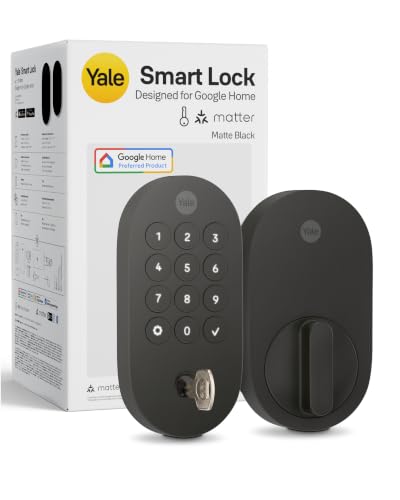
Yale Smart Deadbolt with Matter
Best for: Google Home users wanting Matter connectivity
- Access Methods
- App, keypad, voice, backup key
- Connectivity
- Matter over Thread
- Smart Home Compatibility
- Google Home, Google Assistant, Matter
- Power Source
- Battery Powered
- Color
- Matte Black
- Dimensions
- 0.88 × 2.56 × 5.38 inches
View on Amazon: Yale Smart Deadbolt with Matter Affiliate link
This Yale deadbolt uses Matter over Thread for stable smart home integration. You control it via the Yale Access App, Google Home, or keypad. It supports voice commands and includes a backup key. The Grade 2 BHMA certification ensures durability. It fits well if you use Google Assistant and want reliable remote access without Wi-Fi dependency.
Pros
- Matter over Thread connectivity for low power usage
- Compatible with Google Home and Assistant
- Keyless entry via app, keypad, voice, or key
- Grade 2 BHMA certified durability
Cons
- Requires a Matter hub for remote access
- Limited to Google ecosystem integration
- No fingerprint sensor included
Good fit if
- You use Google Home or Nest devices
- You want reliable remote access via Matter
- You prefer keypad or voice entry
Skip if
- You need fingerprint scanning
- You use Apple HomeKit exclusively
- You want direct Wi-Fi without a hub
Verdict: Yale Matter Deadbolt Matte Black is ideal for Google Home users seeking stable Matter connectivity. It offers robust keyless entry options and reliable remote control through a compatible hub.

Yale Assure Lock 2 Touchscreen Bluetooth Deadbolt
Best for: Standard doors needing simple keyless entry
- Access Methods
- Touchscreen keypad, app
- Connectivity
- Bluetooth
- Installation Type
- Deadbolt replacement
- Material
- Brass
- Special Features
- Auto Lock
- Dimensions
- 0.88 × 2.6 × 3.75 inches
View on Amazon: Yale Assure Lock 2 Touchscreen Bluetooth Deadbolt Affiliate link
The Yale Assure Lock 2 is a Bluetooth-enabled deadbolt with a touchscreen keypad. It offers local code storage and automatic locking via DoorSense. This model is ideal for renters or homeowners who want keyless entry without Wi-Fi hardware. It fits standard US doors and uses a screwdriver for installation. The matte keypad resists fingerprints, and the brass construction provides durability.
Pros
- Bluetooth connectivity for app-based code sharing
- Automatic locking when DoorSense detects closure
- ANSI/BHMA Grade 2 security certification
- Matte keypad resists fingerprint smudges
- Local storage of access codes
Cons
- Bluetooth only lacks built-in Wi-Fi for remote access
- No fingerprint sensor included in this model
- Limited to US and Canada regions
Good fit if
- You want keyless entry without extra Wi-Fi hardware
- You prefer automatic locking for convenience
- You need a standard deadbolt replacement
Skip if
- You require remote access outside Bluetooth range
- You want biometric fingerprint scanning
- You live outside the US or Canada
Verdict: Yale Assure Lock 2 Bluetooth Deadbolt suits users who value simplicity and local security over remote connectivity. It is a solid choice for standard doors where app control is sufficient.

Yale Bluetooth Keypad Deadbolt in Lifetime Brass
Best for: Local control with expandable smart home integration
- Access Methods
- Keypad, Bluetooth app, key
- Connectivity
- Bluetooth
- User Code Capacity
- Unlimited
- Included Door Hardware
- Deadbolt
- Material
- Brass
- Special Features
- Auto Lock
View on Amazon: Yale Bluetooth Keypad Deadbolt in Lifetime Brass Affiliate link
The Yale Assure Lock 2 Bluetooth offers keyless entry via a touchscreen keypad, the Yale Access app, or a backup key. It supports unlimited user codes and includes Auto-Lock with DoorSense for automatic securing. This Grade 2 deadbolt is built for reliability in extreme temperatures. It is a solid choice if you prefer local Bluetooth control and plan to add Wi-Fi or Z-Wave modules later for remote access.
Pros
- Supports unlimited user codes for flexible access management.
- Includes Auto-Lock and DoorSense to secure the door automatically.
- Grade 2 BHMA certification for commercial-grade durability.
- Operates reliably in temperatures from -22°F to 140°F.
Cons
- Connectivity is limited to Bluetooth without an included remote module.
- Heavier build at 4 pounds compared to lighter alternatives.
- Requires a separate purchase for Wi-Fi or Z-Wave integration.
Good fit if
- You want a durable deadbolt with local app control.
- You plan to add remote access modules later.
- You need a lock that handles extreme weather conditions.
Skip if
- You need immediate remote access without buying extra modules.
- You prefer a lighter lock for easier installation.
- You want Z-Wave or Wi-Fi built directly into the unit.
Verdict: Yale Assure Lock 2 Bluetooth is a durable, Grade 2 deadbolt for users who prioritize local control and plan to expand connectivity later. It suits those who need unlimited codes and automatic locking without the weight of a heavier smart lock.

Yale Assure Lock Oil Rubbed Bronze
Best for: users wanting simple code-based entry
- Access Methods
- Keypad, Key
- Installation Type
- Deadbolt replacement
- Auto-Lock Delay
- Auto-lock
- Included Door Hardware
- Deadbolt
- Connectivity
- Wi-Fi
- Color
- Oil Rubbed Bronze
View on Amazon: Yale Assure Lock Oil Rubbed Bronze Affiliate link
This Yale deadbolt uses a touchscreen keypad for code entry and includes a physical key backup. It features an auto-lock function that secures the door when you leave. The unit is designed for standard doors between 1-¾ and 2-¼ inches thick. It is a solid choice for those who want reliable keyless entry without immediate smart home integration.
Pros
- Touchscreen keypad for code entry
- Auto-lock function for security
- Physical key backup included
- Fits standard door thicknesses
Cons
- No built-in Wi-Fi connectivity
- Smart features require separate upgrade kit
- Heavier build at 3.5 pounds
Good fit if
- You want reliable code entry without monthly fees
- You prefer a physical key backup for peace of mind
- You are installing on a standard thickness door
Skip if
- You need built-in Wi-Fi for remote control
- You want to control the lock via smartphone app immediately
- You have a door thinner than 1-⅜ inches
Verdict: Yale Assure Lock Oil Rubbed Bronze is a dependable keyless entry option for users who prioritize simple keypad access and physical backups over integrated smart connectivity.

Yale Assure Lock 2 Touch Fingerprint
Best for: Z-Wave hub users wanting fingerprint access
- Access Methods
- Fingerprint, keypad, app, key
- Connectivity
- Z-Wave
- Smart Home Compatibility
- Samsung SmartThings, Hubitat
- User Code Capacity
- Unlimited
- Color
- Satin Nickel
- Application
- Home
View on Amazon: Yale Assure Lock 2 Touch Fingerprint Affiliate link
The Yale Assure Lock 2 Touch Fingerprint Deadbolt combines a keypad and fingerprint scanner for keyless entry. It connects via Z-Wave to hubs like Samsung SmartThings and Hubitat. The lock features DoorSense for auto-locking and supports unlimited access codes. It is Grade 2 certified and operates on a low-frequency mesh network for reliability. This model suits users who already have a Z-Wave smart home system and want reliable, code-free access.
Pros
- Fingerprint and keypad access methods
- Z-Wave connectivity for hub integration
- DoorSense auto-lock feature
- Unlimited access codes
- Grade 2 BHMA certification
Cons
- Requires a separate Z-Wave hub for full functionality
- Limited to US and Canada compatibility for apps
- Heavier build compared to Bluetooth-only models
Good fit if
- You already own a Z-Wave hub like Samsung SmartThings
- You prefer fingerprint entry over traditional keys
- You want auto-locking via DoorSense
Skip if
- You only have Wi-Fi or Bluetooth devices
- You live outside the US or Canada
- You want a lock without a hub requirement
Verdict: The Yale Assure Lock 2 Touch Fingerprint Z-Wave is a reliable choice for homes with existing Z-Wave infrastructure. It offers robust security through fingerprint scanning and auto-locking, making it ideal for users seeking seamless integration with their smart home ecosystem.

Yale Assure SL Touchscreen Deadbolt with Z-Wave
Best for: Z-Wave smart home users
- Access Methods
- Keypad, app
- Connectivity
- Z-Wave
- Smart Home Compatibility
- SmartThings, Ring Alarm, Wink, Alexa
- Installation Type
- Replaces existing deadbolt
- Included Door Hardware
- Deadbolt
- Color
- Black
View on Amazon: Yale Assure SL Touchscreen Deadbolt with Z-Wave Affiliate link
This Yale Assure SL deadbolt uses Z-Wave connectivity to integrate with smart home hubs like Samsung SmartThings, Ring Alarm, and Wink. It features a touchscreen keypad for keyless entry and works with Alexa via a compatible controller. The unit weighs 3.5 pounds and measures 10 inches in height. It replaces existing deadbolts on standard doors. This model suits users who already have a Z-Wave ecosystem.
Pros
- Z-Wave connectivity for hub integration
- Touchscreen keypad for code entry
- Backlit keypad for night access
- 9V battery backup for dead batteries
- Compatible with Alexa via hub
Cons
- Requires a separate Z-Wave hub for smart features
- Heavier build at 3.5 pounds
- Limited to Z-Wave smart home systems
Good fit if
- You use Samsung SmartThings or Ring Alarm
- You want a Z-Wave compatible deadbolt
- You prefer touchscreen code entry
Skip if
- You need native Wi-Fi connectivity
- You want to use the Yale app
- You prefer a lighter lock under 3 pounds
Verdict: Yale Assure SL Z-Wave Black Suede fits users with existing Z-Wave hubs who need reliable touchscreen entry. It is a solid choice for those integrated into the Z-Wave ecosystem.

Yale Assure Lock 2 Keyed Z-Wave Touchscreen Deadbolt
Best for: Z-Wave smart home users needing unlimited codes
- Access Methods
- Key, keypad, Auto-Unlock, app
- Connectivity
- Z-Wave
- Smart Home Compatibility
- Samsung SmartThings, Ring Alarm, Wink
- User Code Capacity
- Unlimited
- Color
- Satin Nickel
- Dimensions
- 2.6 × 4.9 × 2.5 inches
View on Amazon: Yale Assure Lock 2 Keyed Z-Wave Touchscreen Deadbolt Affiliate link
This Yale deadbolt uses Z-Wave connectivity for integration with smart home hubs like Samsung SmartThings and Ring Alarm. It features a touchscreen keypad and supports unlimited user codes for flexible access management. The satin nickel finish measures 4.9 inches wide. You get auto-locking via DoorSense and optional auto-unlock. It suits those already invested in a Z-Wave ecosystem who need reliable, key-free entry without relying on Wi-Fi.
Pros
- Z-Wave connectivity for hub integration
- Unlimited user code capacity
- Touchscreen keypad access
- Auto-lock with DoorSense
Cons
- Requires a compatible Z-Wave hub for remote access
- Limited to Z-Wave protocol, excluding Wi-Fi direct
- Satin nickel finish offers fewer color options
Good fit if
- You use Samsung SmartThings or Ring Alarm
- You need unlimited user codes for guests
- You prefer Z-Wave over Wi-Fi
Skip if
- You want built-in Wi-Fi without a hub
- You need fingerprint scanning access
- You require Apple HomeKit native support
Verdict: Yale Assure Lock 2 Z-Wave Deadbolt fits users with existing Z-Wave hubs who need unlimited codes and reliable auto-locking. It is a solid choice for smart home integrations but not for those seeking direct Wi-Fi connectivity.

Yale Assure Lock 2 Bluetooth Lever
Best for: app-controlled entry with lever handles
- Access Methods
- Keypad, app, Auto-Unlock
- Connectivity
- Bluetooth
- Included Door Hardware
- Passage lever
- Color
- Black
- Trigger Type
- Push Button
- Dimensions
- 0.88 × 2.5 × 3.75 inches
View on Amazon: Yale Assure Lock 2 Bluetooth Lever Affiliate link
This Yale Assure Lock 2 uses Bluetooth for local control via the Yale Access app. It includes a Black Suede Valdosta Lever for key-free entry. The keypad measures 2.5 inches wide and 3.75 inches high. You can send custom codes to guests. Auto-Lock ensures the door stays secured without manual effort. It is a solid option for renters or those who want simple, app-based management without Wi-Fi hardware.
Pros
- Bluetooth connectivity for app control
- Includes matching Valdosta Lever hardware
- Auto-Lock feature for security
- Custom entry code generation
Cons
- Bluetooth only, no Wi-Fi or Z-Wave
- Limited to 2.5 inches width for keypad
Good fit if
- You want app control without extra hubs
- You prefer a lever handle over a knob
- You need custom guest codes
Skip if
- You need remote access outside Bluetooth range
- You require Wi-Fi or Z-Wave integration
- You want a touchscreen fingerprint reader
Verdict: Yale Assure Lock 2 Bluetooth Lever fits users who want secure, app-managed entry with a lever handle. It suits those who do not need remote Wi-Fi access or smart home hub integration.

Yale Assure Lock 2 Keypad with Lever
Best for: Bluetooth users who prefer lever handles
- Access Methods
- Keypad, Yale Access app, Auto-Unlock
- Connectivity
- Bluetooth
- Included Door Hardware
- Passage lever
- Color
- Black
- Trigger Type
- Push Button
- Dimensions
- 0.88 × 2.5 × 4.88 inches
View on Amazon: Yale Assure Lock 2 Keypad with Lever Affiliate link
This Yale smart lock pairs a Bluetooth keypad with a black suede passage lever. It supports key-free entry via the Yale Access app, smartphone, or Apple Watch. Optional Auto-Unlock and Auto-Lock features handle access and security automatically. You get custom entry codes for guests. The unit weighs 1 pound and measures 2.5 by 4.88 inches. It suits renters or homeowners who want simple, app-controlled access without WiFi.
Pros
- Bluetooth connectivity for local control
- Includes matching passage lever hardware
- Supports Apple Watch and smartphone access
- Auto-Lock and Auto-Unlock options available
Cons
- No built-in WiFi requires a separate bridge
- No fingerprint sensor for biometric entry
- Passage lever lacks privacy function
Good fit if
- You want app control without WiFi setup
- You prefer a lever handle over a knob
- You need simple guest code management
Skip if
- You need remote access outside Bluetooth range
- You require fingerprint recognition
- You want a deadbolt without a lever
Verdict: Yale Assure Lock 2 Keypad with Lever offers reliable Bluetooth-based access with included hardware. It fits users who value app control and lever aesthetics over remote connectivity.

Yale Assure Z-Wave Lever Lock
Best for: Z-Wave smart home users
- Access Methods
- Touchscreen keypad
- Connectivity
- Z-Wave
- Smart Home Compatibility
- Ring Alarm, Samsung SmartThings, Wink
- Installation Type
- Deadbolt replacement
- Included Door Hardware
- Deadbolt with matching passage lever
- Color
- Satin Nickel
View on Amazon: Yale Assure Z-Wave Lever Lock Affiliate link
This Yale Assure Lock uses Z-Wave connectivity for integration with hubs like Samsung SmartThings and Ring Alarm. It features a satin nickel touchscreen keypad that replaces your existing deadbolt and includes a matching passage lever. You unlock the door by entering a code on the backlit keypad. The unit measures 2.75 inches wide and 6 inches tall. Auto Relock ensures the door secures itself after entry. This model suits users with Z-Wave based smart home ecosystems.
Pros
- Z-Wave connectivity for hub integration
- Touchscreen keypad for keyless entry
- Includes matching passage lever
- Auto Relock feature for security
Cons
- Requires a separate Z-Wave hub for full functionality
- Limited to Z-Wave networks, excluding Wi-Fi direct connection
- Satin Nickel finish may not match all door hardware styles
Good fit if
- You use Samsung SmartThings or Ring Alarm
- You prefer a touchscreen keypad over a traditional key
- You want automatic relocking for peace of mind
Skip if
- You need Wi-Fi connectivity without a hub
- You require fingerprint scanning access
- You prefer a lever handle that is not included
Verdict: Yale Assure Z-Wave Norwood is a solid choice for homeowners using Z-Wave hubs like SmartThings who want reliable keyless entry with a touchscreen keypad.

Yale Assure Lock 2 Z-Wave Satin Nickel
Best for: Z-Wave hub users wanting auto-lock
- Access Methods
- Keypad, app, Apple Watch, voice
- Connectivity
- Z-Wave
- Installation Type
- Deadbolt replacement
- User Code Capacity
- Unlimited
- Color
- Satin Nickel
- Special Features
- Auto Lock
View on Amazon: Yale Assure Lock 2 Z-Wave Satin Nickel Affiliate link
This Yale Assure Lock 2 uses Z-Wave connectivity for integration with smart home hubs. It features a Satin Nickel finish and a keypad for key-free entry. The lock includes Auto-Lock to secure the door automatically. It supports voice assistant commands and app-based access management. The unit weighs 4.5 pounds and measures 4.9 inches wide. It is designed for standard US entry doors.
Pros
- Z-Wave connectivity for hub integration
- Auto-Lock feature for automatic securing
- Keypad access for key-free entry
- Voice assistant support for hands-free operation
- Satin Nickel finish with matte keypad
Cons
- Requires a compatible Z-Wave hub to function
- Heavier at 4.5 pounds compared to lighter alternatives
- Limited to Z-Wave protocol only
Good fit if
- You already use a Z-Wave smart home hub
- You want automatic locking without manual effort
- You prefer key-free entry with a keypad
Skip if
- You do not have a Z-Wave hub
- You need Wi-Fi or Bluetooth connectivity
- You want a lighter weight lock
Verdict: Yale Assure Lock 2 Z-Wave Satin Nickel suits users with existing Z-Wave hubs who value automatic locking and key-free entry. It integrates well into compatible smart home ecosystems.
Specifications side by side
| Spec | Yale Wi-Fi Smart Deadbolt with Keypad | Yale Assure Lock 2 Touch Wi-Fi Deadbolt | Yale Google Nest x Yale Keyless Deadbolt | Yale Smart Deadbolt with Matter | Yale Assure Lock 2 Touchscreen Bluetooth Deadbolt | Yale Bluetooth Keypad Deadbolt in Lifetime Brass | Yale Assure Lock Oil Rubbed Bronze | Yale Assure Lock 2 Touch Fingerprint | Yale Assure SL Touchscreen Deadbolt with Z-Wave | Yale Assure Lock 2 Keyed Z-Wave Touchscreen Deadbolt | Yale Assure Lock 2 Bluetooth Lever | Yale Assure Lock 2 Keypad with Lever | Yale Assure Z-Wave Lever Lock | Yale Assure Lock 2 Z-Wave Satin Nickel |
|---|---|---|---|---|---|---|---|---|---|---|---|---|---|---|
| Access Methods | Auto-unlock, keypad, app, key | Fingerprint, keypad, key, app | Keypad, app, passcode | App, keypad, voice, backup key | Touchscreen keypad, app | Keypad, Bluetooth app, key | Keypad, Key | Fingerprint, keypad, app, key | Keypad, app | Key, keypad, Auto-Unlock, app | Keypad, app, Auto-Unlock | Keypad, Yale Access app, Auto-Unlock | Touchscreen keypad | Keypad, app, Apple Watch, voice |
| Connectivity | 2.4 or 5 GHz Wi-Fi | not stated | not stated | Matter over Thread | Bluetooth | Bluetooth | not stated | Z-Wave | Z-Wave | Z-Wave | Bluetooth | Bluetooth | Z-Wave | Z-Wave |
| Smart Home Compatibility | not stated | not stated | not stated | Google Home, Google Assistant, Matter | not stated | not stated | not stated | Samsung SmartThings, Hubitat | SmartThings, Ring Alarm, Wink, Alexa | Samsung SmartThings, Ring Alarm, Wink | not stated | not stated | Ring Alarm, Samsung SmartThings, Wink | not stated |
| Installation Type | not stated | not stated | Deadbolt replacement | not stated | Deadbolt replacement | not stated | Deadbolt replacement | not stated | Replaces existing deadbolt | not stated | not stated | not stated | Deadbolt replacement | Deadbolt replacement |
| Auto-Lock Delay | not stated | not stated | not stated | not stated | not stated | not stated | Auto-lock | not stated | not stated | not stated | not stated | not stated | not stated | not stated |
| User Code Capacity | Unlimited | not stated | not stated | not stated | not stated | Unlimited | not stated | Unlimited | not stated | Unlimited | not stated | not stated | not stated | Unlimited |
| Included Door Hardware | Deadbolt | not stated | not stated | not stated | not stated | Deadbolt | Deadbolt | not stated | Deadbolt | not stated | Passage lever | Passage lever | Deadbolt with matching passage lever | not stated |
| Power Source | not stated | not stated | not stated | Battery Powered | not stated | not stated | not stated | not stated | not stated | not stated | not stated | not stated | not stated | not stated |
| Access Method | Keypad, Key, App Control | Fingerprint, Key | Keypad | not stated | Keypad, Touchscreen | Keypad, Key | Keypad, Touchscreen, Key | Keypad, Fingerprint | Keypad, Touchscreen, Key | Keypad, Touchscreen | Keypad, Key | Keypad | Touchscreen | Keypad |
| Color | Lifetime Brass | Lifetime Brass | Satin Nickel | Matte Black | Lifetime Brass | Lifetime Brass | Oil Rubbed Bronze | Satin Nickel | Black | Satin Nickel | Black | Black | Satin Nickel | Satin Nickel |
| Application | not stated | not stated | Front Door | Home | not stated | not stated | not stated | Home | not stated | not stated | not stated | not stated | not stated | not stated |
| Included Hardware | not stated | not stated | not stated | not stated | not stated | not stated | not stated | not stated | not stated | not stated | Lever | Lever | Lever | not stated |
| Trigger Type | not stated | not stated | not stated | not stated | not stated | not stated | not stated | not stated | not stated | not stated | Push Button | Push Button | not stated | not stated |
| Material | Brass | Brass | not stated | not stated | Brass | Brass | not stated | not stated | not stated | not stated | not stated | not stated | not stated | not stated |
| Special Features | not stated | not stated | not stated | not stated | Auto Lock | Auto Lock | not stated | not stated | not stated | not stated | not stated | not stated | not stated | Auto Lock |
| Dimensions | 0.88 × 2.5 × 4.88 inches | 0.6 × 2.6 × 3.75 inches | 4.5 × 2.59 × 0.8 inches | 0.88 × 2.56 × 5.38 inches | 0.88 × 2.6 × 3.75 inches | 0.88 × 2.6 × 4.88 inches | 5.5 × 5.5 × 10 inches | 0.9 × 2.5 × 4.9 inches | 5.5 × 5.5 × 10 inches | 2.6 × 4.9 × 2.5 inches | 0.88 × 2.5 × 3.75 inches | 0.88 × 2.5 × 4.88 inches | 3.5 × 2.75 × 6 inches | 2.6 × 4.9 × 2.5 inches |
| Weight | 4 pounds | not stated | 4 pounds | 3 pounds | not stated | 4 pounds | 3.5 pounds | not stated | 3.5 pounds | not stated | not stated | 1 pounds | not stated | 4.5 pounds |
| Model | YRD410-WF1-P05 | YRD430-F-WF1-P05 | RB-YRD540-WV-619 | YRD510-MT1-BLK | YRD450-BLE-P05 | YRD420-BLE-P05 | YRD226-NR-0BP | YRD410-F-ZW3-619 | YRD256-ZW2-BSP | YRD420-ZW2-619 | B-YRD430-BLE-VL-BSP | B-YRD410-BLE-VL-BSP | B-YRD226-ZW-NW-619 | YRD410-ZW3-619 |
| Size | not stated | Wi-Fi | 7.03 x 2.78 Inch | 5.38 x 2.56 inch (Pack of 1) | Bluetooth | Bluetooth | No Wi-Fi | Keypad | Touchscreen | Keyed | Key Free Push Button | Push Button | Touchscreen | Keyed |
When planning outdoor shelter alongside entryway security, you can compare dimensions and materials for best canopies under 200.
How to choose the right one
-
Check Wi-Fi range needs
Standard Wi-Fi locks work well if your router is close to the door. The Yale Extended Range Wi-Fi Smart Deadbolt uses an external bridge to extend connectivity. This setup helps if your router is far away. It also improves battery life by reducing the power needed for direct transmission. If your door is near the network, a standard Wi-Fi model may suffice. You do not need the bridge hardware in that case. Choose based on your router distance and battery preferences.
-
Select access method
Decide how you want to enter your home most often. The Yale Assure Lock 2 Touchscreen Bluetooth Deadbolt uses a touchscreen keypad for simple code entry. If you prefer biometrics, the Yale Extended Range Wi-Fi Fingerprint Deadbolt supports fingerprint scanning. Some models, like the Yale Assure Lock Oil Rubbed Bronze, offer both keypad and key options. Fingerprint entry is faster for daily use. Keypads are reliable for guests. Keys serve as a physical backup. Match the method to your daily routine and household members.
-
Verify smart home compatibility
Ensure the lock works with your existing ecosystem. The Yale Smart Deadbolt with Matter connects via Matter protocol, which is ideal for Google Home users. It requires a compatible hub for full automation. The Yale Assure Keypad Deadbolt with Z-Wave works with Z-Wave hubs like SmartThings. These options integrate directly into broader home systems. If you use a different platform, check the supported protocols. Matter offers broad compatibility across brands. Z-Wave requires a specific hub. Choose the protocol that matches your current setup.
-
Consider Bluetooth range
Bluetooth locks require your phone to be nearby for remote control. The Yale Assure Lock 2 Touch Bluetooth Deadbolt relies on this proximity. It is suitable if you are often near the door when unlocking. It does not offer true remote management from afar. If you need to lock the door from work, Bluetooth alone is insufficient. You would need Wi-Fi or a hub. Bluetooth models are often simpler to install. They do not require network configuration. Use them if local control meets your needs.
-
Match finish to door
The finish affects how the lock looks on your door. The Yale Extended Range Wi-Fi Smart Deadbolt comes in Satin Nickel. The Yale Assure Lock 2 Touch Bluetooth Deadbolt is available in Oil Rubbed Bronze. The Yale Assure Lock 2 Touchscreen Bluetooth Deadbolt offers Lifetime Brass. Match the color to your existing hardware. Satin Nickel is neutral and common. Oil Rubbed Bronze is darker and distinct. Lifetime Brass is bright and metallic. These options ensure the lock blends with your door style. Check the product listing for available finishes before purchasing.
Frequently asked questions
Which Yale smart lock has the best Wi-Fi connectivity?
The Yale Wi-Fi Smart Deadbolt with Keypad is the top choice for direct connectivity. It uses Wi-Fi to connect without a hub. This model supports unlimited code management via an app. It features brass construction and automatic locking. The dimensions are 2.5 by 4.88 inches. It weighs 4 pounds for sturdy installation.
Can I use a Yale lock with Google Assistant?
Yes, several models support Google Assistant integration. The Yale Google Nest x Yale Keyless Deadbolt works with Google Assistant. The Yale Smart Deadbolt with Matter also offers compatibility. Matter connectivity requires a compatible hub for remote control. These options provide stable integration for users in the Google Home ecosystem.
Does the Yale Assure Lock 2 have fingerprint access?
Yes, specific versions include fingerprint scanning. The Yale Assure Lock 2 Touch Wi-Fi Deadbolt combines fingerprint speed with Wi-Fi remote access. Another option is the Yale Assure Lock 2 Touch Fingerprint Z-Wave. Both eliminate the need for keys while maintaining high security standards through biometric entry.
What is the difference between Wi-Fi and Z-Wave Yale locks?
Wi-Fi locks connect directly to your router without extra hardware. The Yale Wi-Fi Smart Deadbolt offers this direct link. Z-Wave locks require a compatible hub for automation and remote access. Models like the Yale Assure Lock 2 Z-Wave Deadbelt fit homes with existing Z-Wave infrastructure. Choose based on your current smart home setup.
Are there Yale deadbolts with lever handles?
Yes, Yale offers lever handle options for interior or specific exterior doors. The Yale Assure Lock 2 Bluetooth Lever includes a lever handle. It provides app-controlled entry via Bluetooth. Another model is the Yale Assure Z-Wave Lever Lock. These suits users who prefer lever aesthetics over traditional knob designs.
Do Yale smart locks auto-lock?
Many Yale models feature automatic locking for convenience. The Yale Wi-Fi Smart Deadbolt includes this feature. The Yale Assure Lock 2 Bluetooth Deadbolt also auto-locks. The Yale Assure Lock 2 Z-Wave Satin Nickel version has auto-lock capabilities. This ensures the door secures itself after entry without manual engagement.
Which Yale lock is best for Z-Wave hubs?
The Yale Assure Lock 2 Touch Fingerprint Z-Wave is ideal for Z-Wave users. It offers fingerprint access and integrates with existing hubs. The Yale Assure SL Touchscreen Deadbolt with Z-Wave is another solid choice. It provides reliable touchscreen entry for homes integrated into the Z-Wave ecosystem.