August Home Retrofit Bluetooth Smart Lock Alternatives: 6 Similar Picks Compared
As an Amazon Associate we earn from qualifying purchases. Links on this page are affiliate links.
The August Home Retrofit Bluetooth Smart Lock offers keyless entry for existing deadbolts. You might look for august home smart lock alternatives if you need different access methods or connectivity options. This model attaches to your current hardware and unlocks via smartphone app. It also includes Door Sense to track if the door is closed. However, remote access requires a separate Wi-Fi bridge. Some buyers prefer built-in keypads or fingerprint scanners instead.
This guide compares 6 similar picks based on overlapping specifications. We selected these alternatives because they share core features with the August lock. The list includes options with Bluetooth, Wi-Fi, and fingerprint access. You will find models with handles, keypads, and auto-lock functions. Each product is ranked by its suitability for specific needs. You can review the specs to find the best fit for your door. The selection covers budget, premium, and touchscreen choices. All listed products are designed for home use.
How these alternatives compare
samtechT Bluetooth Smart Lock with Handle
The samtechT Bluetooth Smart Lock replaces your existing handle rather than retrofitting your deadbolt. It includes the handle hardware, whereas the August model keeps your current lock. This unit supports both keypad and fingerprint access, offering more entry methods than the August app-only approach. It also connects to Alexa and Google Assistant, expanding smart home compatibility beyond the August’s Alexa-only support. You gain auto-lock features and a broader range of access options. However, you lose the ability to keep your existing deadbolt hardware. This pick suits renters or homeowners who want a complete hardware replacement with built-in biometric security and voice control integration.
Yale Assure Lock 2 Touch Deadbolt
The Yale Assure Lock 2 Touch Deadbolt is a standalone deadbolt, not a retrofit adapter. It requires replacing your existing deadbolt entirely, unlike the August model which attaches to it. This Yale unit offers keypad, fingerprint, and key access methods, providing significantly more entry options than the August smartphone-only approach. It supports both Wi-Fi and Bluetooth connectivity, allowing for remote access without needing a separate bridge. The August model requires an additional purchase for Wi-Fi features. You gain speed and convenience with fingerprint scanning and auto-unlock capabilities. This choice is ideal for users who prioritize fast biometric entry and do not mind replacing their entire lock hardware for enhanced features.
Sifely Fingerprint Smart Lock with Handle
The Sifely Fingerprint Smart Lock with Handle replaces your door handle rather than retrofitting your deadbolt. It includes the handle hardware, whereas the August model preserves your existing deadbolt. This Sifely unit supports both keypad and fingerprint access, offering more entry methods than the August app-only approach. It also connects to Alexa and Google Assistant, expanding smart home compatibility beyond the August’s Alexa-only support. You gain fingerprint speed and voice control integration. However, you lose the ability to keep your existing deadbolt hardware. This pick suits renters or homeowners who value quick biometric entry and want a complete hardware replacement with versatile access options and broader smart home support.
Aqara U50 Keyed Smart Deadbolt
The Aqara U50 Keyed Smart Deadbolt is a standalone deadbolt, not a retrofit adapter. It requires replacing your existing deadbolt entirely, unlike the August model which attaches to it. This Aqara unit supports physical key access, providing a backup method that the August relies on for. It integrates with Apple Home for tap-to-unlock convenience, targeting a different ecosystem than the August’s primary smartphone app focus. You gain compatibility with Apple devices and a physical key backup. However, you need a Zigbee hub for full remote features, whereas the August uses Bluetooth directly. This choice is ideal for Apple Home users who want physical key backup and tap-to-unlock convenience without relying solely on smartphone apps.
Yale Assure Lock 2 Touchscreen Deadbolt
The Yale Assure Lock 2 Touchscreen Deadbolt is a standalone deadbolt, not a retrofit adapter. It requires replacing your existing deadbolt entirely, unlike the August model which attaches to it. This Yale unit offers keypad and touchscreen access, providing more entry methods than the August app-only approach. It supports both Wi-Fi and Bluetooth connectivity, allowing for remote access without needing a separate bridge. The August model requires an additional purchase for Wi-Fi features. You gain a tactile keypad experience and Apple Watch integration. This choice is ideal for users who value a physical keypad interface and smart watch control, preferring a complete hardware replacement over a retrofit solution for enhanced functionality.
Sifely S Bluetooth Smart Lock
The Sifely S Bluetooth Smart Lock replaces your door handle rather than retrofitting your deadbolt. It includes the handle hardware, whereas the August model preserves your existing deadbolt. This Sifely unit supports both keypad and fingerprint access, offering more entry methods than the August app-only approach. It also connects to Alexa and Google Assistant, expanding smart home compatibility beyond the August’s Alexa-only support. You gain fingerprint speed and voice control integration. However, you lose the ability to keep your existing deadbolt hardware. This pick suits renters or homeowners who want quick biometric entry on front doors and prefer a complete hardware replacement with versatile access options and broader smart home support.
Quick picks
Our 7 picks

August Home Retrofit Bluetooth Smart Lock
Best for: existing deadbolt retrofit users
- Access Methods
- Smartphone app, auto-unlock
- Smart Home Compatibility
- Alexa
- Installation Type
- Attaches to existing deadbolt
- Connectivity
- Bluetooth
- Application
- Home
- Dimensions
- 1.63 × 2.6 × 4.8 inches
View on Amazon: August Home Retrofit Bluetooth Smart Lock Affiliate link
This retrofit lock attaches to your existing deadbolt, keeping your current keys. It uses Bluetooth and a smartphone app for entry. You get auto-unlock on arrival and Door Sense to check if the door is closed. It works with Alexa. You need a Wi-Fi Bridge for remote access and a separate Smart Keypad for code entry. It fits standard US doors.
Pros
- Attaches to existing deadbolt in under 10 minutes
- Door Sense sensor confirms if door is closed
- Auto-unlock feature when you arrive
- Alexa integration for status and control
Cons
- Wi-Fi Bridge sold separately for remote access
- Smart Keypad sold separately for code entry
- Requires 110 to 240 volts for operation
Good fit if
- You want to keep your existing keys
- You prefer smartphone control over keypads
- You need auto-unlock on arrival
Skip if
- You need built-in Wi-Fi without extra parts
- You want a standard keypad included
- You do not have a smartphone
Verdict: August Home Smart Lock Dark Gray suits renters who want keyless entry without replacing hardware. It fits you if you prioritize app control and auto-unlock over included keypads.

samtechT Bluetooth Smart Lock with Handle
Best for: renters needing easy keyless access
- Access Methods
- Fingerprint, keypad, FOB, code, app, key
- Connectivity
- Bluetooth
- Smart Home Compatibility
- Alexa, Google
- Included Door Hardware
- Handle
- Color
- Silver
- Application
- Home, Rental Property
View on Amazon: samtechT Bluetooth Smart Lock with Handle Affiliate link
This samtechT smart lock offers six unlock methods, including fingerprint, keypad, app, and physical key. It includes the handle, fitting most US doors from 1-3/8 to 2-1/4 inches thick. The device supports auto-locking and works with Alexa and Google Assistant when paired with a gateway. It is a practical option for renters or homeowners seeking keyless entry without complex installation.
Pros
- Six access methods including fingerprint and app
- Includes handle for standard US doors
- Auto-lock feature for added security
- Compatible with Alexa and Google Assistant
Cons
- Requires a separate gateway for voice control
- Bluetooth range limits remote access
- No video or camera integration
Good fit if
- You want a complete lock set with handle
- You need multiple access codes for guests
- You prefer fingerprint or keypad entry
Skip if
- You require built-in video recording
- You need Wi-Fi connectivity without a gateway
- You have non-standard door thicknesses
Verdict: samtechT Bluetooth Fingerprint Lock provides solid keyless entry for standard doors. It suits renters or homeowners who prioritize convenience over remote monitoring.

Yale Assure Lock 2 Touch Deadbolt
Best for: fingerprint and auto-unlock entry
- Access Methods
- Fingerprint, keypad, app
- Connectivity
- Bluetooth
- Color
- Satin Nickel
- Dimensions
- 0.88 × 2.5 × 3.75 inches
View on Amazon: Yale Assure Lock 2 Touch Deadbolt Affiliate link
The Yale Assure Lock 2 Bluetooth is a keyless entry deadbolt in Satin Nickel. It uses fingerprint, keypad, or app access. The fingerprint sensor offers 99% accuracy with under 0.5 second recognition. It also features auto-unlock as you approach. This lock suits you if you want secure, hands-free entry without complex wiring.
Pros
- Fingerprint recognition in under 0.5 seconds
- 99% fingerprint accuracy
- Auto-unlock on approach
- Two-factor authentication support
Cons
- Bluetooth only, no built-in Wi-Fi
- Requires Yale Access App for remote features
- No physical key included in this variant
Good fit if
- You want fast fingerprint entry
- You prefer app control over Wi-Fi
- You need hands-free auto-unlock
Skip if
- You require built-in Wi-Fi
- You need a physical key backup
- You want a different finish
Verdict: Yale Assure Lock 2 Bluetooth fits you if you prioritize speed and convenience with fingerprint and auto-unlock features. It is a solid choice for those comfortable with app-based management.

Sifely Fingerprint Smart Lock with Handle
Best for: renters needing reversible handle hardware
- Access Methods
- Fingerprint, keypad, app, FOB, key
- Connectivity
- Bluetooth
- Smart Home Compatibility
- Amazon Alexa, Google Assistant
- Included Door Hardware
- Handle
- Color
- Silver
- Application
- Home, Rental Property
View on Amazon: Sifely Fingerprint Smart Lock with Handle Affiliate link
The Sifely S is a Bluetooth smart lock featuring a red knob handle and five access methods. You can unlock it using fingerprints, a keypad, the app, a FOB, or a physical key. It supports Alexa and Google Assistant for voice control when paired with an optional WiFi gateway. This lock includes reversible hardware for left or right doors. It suits renters and homeowners who want keyless entry without complex installation.
Pros
- Supports five access methods including fingerprint and keypad
- Includes reversible handle for left or right doors
- Compatible with Alexa and Google Assistant via gateway
- Allows remote access logs through the app
Cons
- Requires optional WiFi gateway for remote unlocking
- Only includes the handle, not a full deadbolt
- Limited to Bluetooth connectivity without add-ons
Good fit if
- You want a fingerprint lock with a handle
- You need reversible hardware for your door
- You use Alexa or Google Assistant
Skip if
- You need a standard deadbolt design
- You require built-in WiFi without extra hardware
- You prefer a traditional black or nickel finish
Verdict: Sifely S Fingerprint Smart Lock with Handle offers versatile entry options for renters. It fits users who value fingerprint speed and voice control integration.

Aqara U50 Keyed Smart Deadbolt
Best for: Apple Home users needing physical key backup
- Access Methods
- Apple Home Key, keypad, app, key
- Connectivity
- Matter over Thread
- Smart Home Compatibility
- Apple HomeKit, Alexa, Google, IFTTT
- Included Door Hardware
- Deadbolt
- Color
- Black
- Dimensions
- 5.31 × 2.91 × 3.46 inches
View on Amazon: Aqara U50 Keyed Smart Deadbolt Affiliate link
The Aqara U50 is a black zinc alloy deadbolt designed for Apple Home integration. It supports Apple Home Key for unlocking via iPhone or Apple Watch, even when the device is powered off. You can also use a keypad, temporary passwords, or a physical key. The lock includes a built-in gyroscope for auto-locking and offers up to six months of battery life on four AA cells. It fits well in smart homes using Zigbee hubs.
Pros
- Supports Apple Home Key for tap-to-unlock with iPhone or Apple Watch
- Includes auto-lock feature powered by a built-in gyroscope
- Compatible with Google Home, Alexa, and IFTTT via a Zigbee 3.0 hub
- Uses standard 4 AA batteries with a USB-C emergency charging port
- Cylinder is rekeyable to match existing physical keys
Cons
- Requires a separate Aqara Zigbee 3.0 hub for remote app control
- NFC card is not included and must be purchased separately
- No built-in Bluetooth for direct phone pairing without a hub
Good fit if
- You already use Apple Home and want seamless Home Key integration
- You need a lock that works with an existing physical key
- You have a Zigbee hub to enable remote access and automations
Skip if
- You want a lock that works without any additional smart home hub
- You prefer direct Bluetooth connection to your phone for all features
- You need an included NFC card for keyless entry
Verdict: The Aqara U50 Apple Home Key Deadbolt is a solid choice for Apple users who want tap-to-unlock convenience and existing key compatibility, provided you have a Zigbee hub for full remote features.
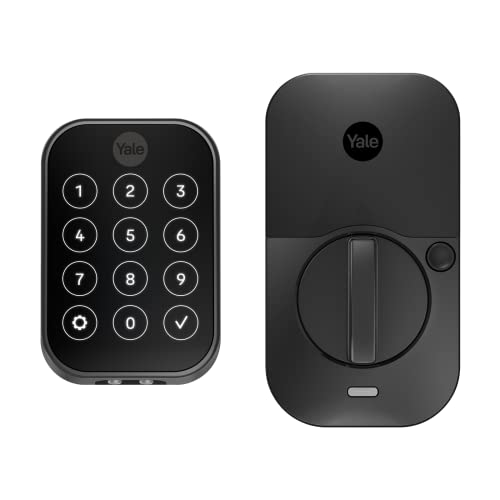
Yale Assure Lock 2 Touchscreen Deadbolt
Best for: touchscreen keypad users
- Access Methods
- Keypad, app, Apple Watch, Auto-Unlock
- Connectivity
- Bluetooth
- Color
- Black
- Application
- Home
- Dimensions
- 2.5 × 3.7 × 2.3 inches
- Weight
- 1 pounds
View on Amazon: Yale Assure Lock 2 Touchscreen Deadbolt Affiliate link
This Yale deadbolt combines a touchscreen keypad with Bluetooth connectivity for keyless entry. You unlock it via the Yale Access app, Apple Watch, or optional Auto-Unlock. The unit weighs 1 pound and measures 3.7 by 2.3 inches. It supports custom entry codes for guests and includes Auto-Lock to secure the door automatically. This model is ideal for users who want a reliable touchscreen interface without needing Wi-Fi hardware.
Pros
- Touchscreen keypad for code entry
- Bluetooth connectivity for app control
- Compatible with Apple Watch
- Optional Auto-Unlock feature
- Auto-Lock functionality
Cons
- Bluetooth only, no built-in Wi-Fi
- Requires optional gateway for remote access
- Heavier than some slim alternatives
Good fit if
- You prefer a physical touchscreen keypad
- You use an Apple Watch for access
- You want auto-locking without Wi-Fi
Skip if
- You need built-in Wi-Fi connectivity
- You want a slim profile under 2 inches
- You prefer fingerprint scanning over codes
Verdict: Yale Assure Lock 2 Bluetooth Touchscreen suits you if you value a tactile keypad and Apple Watch integration. It is a solid choice for Bluetooth users who do not require immediate remote Wi-Fi access.

Sifely S Bluetooth Smart Lock
Best for: Quick biometric entry without WiFi
- Access Methods
- Fingerprint, passcode, app, FOB, key
- Connectivity
- Bluetooth
- Smart Home Compatibility
- Amazon Alexa, Google Assistant
- Included Door Hardware
- Handle
- Color
- Black
- Application
- Home, Front Door, Rental Property
View on Amazon: Sifely S Bluetooth Smart Lock Affiliate link
The Sifely S is a Bluetooth-enabled smart lock with a built-in handle. It uses a biometric sensor that recognizes fingerprints in 0.3 seconds. You can also unlock it with a keypad passcode, app, FOB, or mechanical key. The device connects to Alexa and Google Assistant for voice control. It includes access logs and low-battery alerts. This lock is designed for front doors, homes, and rental properties.
Pros
- Fast 0.3-second fingerprint recognition
- Built-in handle and deadbolt knob
- Works with Alexa and Google Assistant
- Multiple unlock methods including app and FOB
Cons
- Bluetooth only, no WiFi connectivity
- Requires mechanical key backup
- Limited to single deadbolt knob design
Good fit if
- You want fast fingerprint access
- You need a lock with a built-in handle
- You use Alexa or Google Assistant
Skip if
- You require WiFi remote access
- You prefer a traditional deadbolt only
- You need multi-user code management
Verdict: Sifely S Fingerprint Smart Lock suits renters who want quick biometric entry without WiFi setup. It fits well on front doors where a built-in handle is preferred.
Specifications side by side
| Spec | August Home Retrofit Bluetooth Smart Lock | samtechT Bluetooth Smart Lock with Handle | Yale Assure Lock 2 Touch Deadbolt | Sifely Fingerprint Smart Lock with Handle | Aqara U50 Keyed Smart Deadbolt | Yale Assure Lock 2 Touchscreen Deadbolt | Sifely S Bluetooth Smart Lock |
|---|---|---|---|---|---|---|---|
| Access Methods | Smartphone app, auto-unlock | Fingerprint, keypad, FOB, code, app, key | Fingerprint, keypad, app | Fingerprint, keypad, app, FOB, key | Apple Home Key, keypad, app, key | Keypad, app, Apple Watch, Auto-Unlock | Fingerprint, passcode, app, FOB, key |
| Connectivity | not stated | Bluetooth | Bluetooth | Bluetooth | Matter over Thread | Bluetooth | Bluetooth |
| Smart Home Compatibility | Alexa | Alexa, Google | not stated | Amazon Alexa, Google Assistant | Apple HomeKit, Alexa, Google, IFTTT | not stated | Amazon Alexa, Google Assistant |
| Installation Type | Attaches to existing deadbolt | not stated | not stated | not stated | not stated | not stated | not stated |
| Included Door Hardware | not stated | Handle | not stated | Handle | Deadbolt | not stated | Handle |
| Access Method | not stated | Keypad, Fingerprint | Keypad, Fingerprint, Key | Keypad, Fingerprint | Keypad, Touchscreen, Key | Keypad, Touchscreen | Keypad, Fingerprint |
| Color | Dark Gray | Silver | Satin Nickel | Silver | Black | Black | Black |
| Application | Home | Home, Rental Property | not stated | Home, Rental Property | Home | Home | Home, Front Door, Rental Property |
| Included Hardware | not stated | Handle | not stated | Handle | not stated | not stated | Handle |
| Special Features | not stated | Auto Lock | not stated | not stated | not stated | not stated | not stated |
| Dimensions | 1.63 × 2.6 × 4.8 inches | 7 × 3 × 1.12 inches | 0.88 × 2.5 × 3.75 inches | 7 × 3 × 1.12 inches | 5.31 × 2.91 × 3.46 inches | 2.5 × 3.7 × 2.3 inches | 1.2 × 3 × 7 inches |
| Weight | 13.9 ounces | 1 pounds | not stated | 6 pounds | 11 pounds | 1 pounds | 2 pounds |
| Size | 100 | Smart Lock | Bluetooth | Knob | 5.31 x 2.91 x 3.46 inches | Bluetooth | not stated |
| Model | AUG-SL04-M01-G04 | samtechT S | YRD450-F-BLE-619 | Sifely S | DL-D05D | YRD450-BLE-BSP | Sifely S |
For a related comparison, read speediance smart home gym alternatives.
Frequently asked questions
Which smart lock offers the best fingerprint access?
The Yale Assure Lock 2 Touch Deadbolt supports fingerprint entry alongside keypad and key options. It connects via Wi-Fi and Bluetooth for app management. This model suits users who prioritize speed and convenience. The Sifely Fingerprint Smart Lock with Handle also provides fingerprint and keypad access. It includes handle hardware and works with Alexa and Google Assistant.
Do any alternatives include the door handle hardware?
Yes, several models replace your existing handle rather than retrofitting the deadbolt. The samtechT Bluetooth Smart Lock includes the handle hardware. The Sifely Fingerprint Smart Lock with Handle also comes with a handle. The Sifely S Bluetooth Smart Lock includes handle hardware as well. These options are suitable if you want a complete hardware replacement.
Which locks support Apple Home or Apple Watch?
The Yale Assure Lock 2 Touchscreen Deadbolt integrates with Apple Watch. It connects via Wi-Fi and Bluetooth. The Aqara U50 Keyed Smart Deadbolt supports Apple Home Key for tap-to-unlock convenience. It requires a Zigbee hub for full remote features. Both models offer integration with Apple ecosystems for users who prefer that platform.
Can I use these locks without a Wi-Fi hub?
Several models function with Bluetooth only. The August Home Retrofit Bluetooth Smart Lock uses Bluetooth for app control. The samtechT Bluetooth Smart Lock connects via Bluetooth. The Sifely S Bluetooth Smart Lock also relies on Bluetooth. The Yale Assure Lock 2 Touch Deadbolt works with Bluetooth, though it also supports Wi-Fi. These options allow local control without immediate remote access.
Which option is best for renters who need a physical key backup?
The Aqara U50 Keyed Smart Deadbolt includes a physical key backup. It supports Apple Home Key for tap-to-unlock convenience. The Yale Assure Lock 2 Touch Deadbolt also accepts a key alongside fingerprint and keypad access. The August Home Retrofit Bluetooth Smart Lock is designed for existing deadbolts, which typically retain key functionality. These models provide traditional key access alongside smart features.
Which smart lock is the most compact in size?
The Yale Assure Lock 2 Touch Deadbolt has a slim profile measuring 0.88 inches in length. The August Home Retrofit Bluetooth Smart Lock measures 1.63 inches in length. The samtechT Bluetooth Smart Lock is 1.12 inches in length. The Sifely S Bluetooth Smart Lock is also 1.2 inches in length. These dimensions indicate a relatively small footprint for most models on the list.
Do any models support voice control with Alexa or Google?
Yes, multiple locks support voice assistants. The samtechT Bluetooth Smart Lock is compatible with Alexa and Google Assistant. The Sifely Fingerprint Smart Lock with Handle supports both Alexa and Google Assistant. The Sifely S Bluetooth Smart Lock also works with Alexa and Google Assistant. These integrations allow you to control the lock or check status using voice commands.
Which lock is best for quick biometric entry?
The Sifely S Bluetooth Smart Lock is designed for quick biometric entry. It uses fingerprint and keypad access methods. It connects via Bluetooth, avoiding WiFi setup complexity. The Yale Assure Lock 2 Touch Deadbolt also prioritizes speed with fingerprint and auto-unlock features. Both models suit users who value fast, convenient entry without relying on remote Wi-Fi connections.