Lockly Visage Zeno Smart Lock or Lockly Secure Pro Wi-Fi Smart? Which Lockly Model to Buy
As an Amazon Associate we earn from qualifying purchases. Links on this page are affiliate links.
The lockly visage zeno smart lock vs secure pro wi fi smart comparison focuses on two Lockly models with distinct strengths. Both feature built-in Wi-Fi, 3D fingerprint sensors storing up to 99 prints, and app control. The main difference lies in access methods and included hardware. The Visage Zeno adds facial recognition and Apple Home Key support. The Secure Pro includes a door handle and uses a PIN Genie keypad. You should choose based on your preferred entry style and existing smart home ecosystem.
Key differences
| Aspect | Lockly Visage Zeno Smart Lock | Lockly Secure Pro Wi-Fi Smart Lock with Handle |
|---|---|---|
| Facial Recognition | Yes, with dual infrared sensors | Not listed |
| Apple Home Key | Yes, supports iPhone and Apple Watch | Not listed |
| Included Hardware | Not listed | Includes door handle |
| Keypad Technology | Standard keypad | PIN Genie reshuffling keypad |
| Battery Backup | 2 x 10,000mAh rechargeable batteries | 9V emergency battery port |
Which one should you choose?
Choose Lockly Visage Zeno Smart Lock if
- You want to unlock your door with your face or Apple Watch
- You prefer rechargeable batteries over disposable backups
- You use Apple Home and want Home Key support
Choose Lockly Secure Pro Wi-Fi Smart Lock with Handle if
- You need a door handle included with the lock
- You prefer a PIN keypad that reshuffles numbers for security
- You want a 9V emergency power option
Verdict: The Visage Zeno is better for users who want hands-free facial recognition or Apple Home Key convenience. The Secure Pro is more practical if you need an included handle or prefer the security of a reshuffling PIN keypad. Your choice depends on whether you prioritize biometric speed or included hardware.
Visage Zeno vs Secure Pro Comparison
Access methods
The Lockly Visage Zeno Smart Lock offers facial recognition as a primary unlock method, using dual infrared sensors for accuracy in any lighting. It also supports fingerprint, app, keypad, physical key, and Apple Home Key. The Lockly Secure Pro Wi-Fi Smart Lock with Handle uses a 3D fingerprint sensor, PIN Genie keypad, app, voice commands, and physical keys. It does not list facial recognition. If you prefer unlocking by simply walking up to the door, the Visage Zeno provides that convenience. The Secure Pro relies on traditional methods like the keypad and fingerprint. Both store up to 99 fingerprints for household members.
Smart home compatibility
The Lockly Visage Zeno Smart Lock integrates directly with Apple Home Key, allowing you to unlock the door with an iPhone or Apple Watch, even if the device is out of power. You can also use Siri for voice commands. It works with Alexa and Google Assistant. The Lockly Secure Pro Wi-Fi Smart Lock with Handle supports voice commands via Alexa and Google Assistant and offers app control. It does not mention Apple Home Key compatibility. If you rely heavily on the Apple ecosystem for home automation and quick access via watch, the Visage Zeno is the better fit. The Secure Pro is suitable for general smart home users without Apple-specific needs.
Included hardware
The Lockly Secure Pro Wi-Fi Smart Lock with Handle comes with a handle included in the package. This is useful if you need to replace or update your door hardware along with the lock. The product title explicitly states it includes the handle. The Lockly Visage Zeno Smart Lock data does not mention a handle being included. You may need to purchase a handle separately if you choose the Visage Zeno. This difference matters if you are upgrading an entire door entry system. For buyers wanting a complete package with existing door hardware, the Secure Pro offers more value in terms of included components.
Power source
The Lockly Visage Zeno Smart Lock includes two 10,000mAh lithium batteries, providing up to six months of use with normal frequency. These are rechargeable batteries, which helps reduce waste and replacement costs over time. The Lockly Secure Pro Wi-Fi Smart Lock with Handle features a 9V emergency battery port for backup power. The data does not specify the main battery type or capacity for the Secure Pro. If you want long-lasting rechargeable power without frequent changes, the Visage Zeno is advantageous. The Secure Pro offers a standard emergency backup option, which is helpful but different from a high-capacity rechargeable system.
Connectivity
Both locks feature built-in Wi-Fi, allowing you to control and monitor the door from anywhere using the Lockly Home app without needing a separate bridge or hub. The Lockly Visage Zeno Smart Lock uses this built-in Wi-Fi for remote locking, unlocking, and activity monitoring. The Lockly Secure Pro Wi-Fi Smart Lock with Handle also has built-in Wi-Fi for app control and real-time alerts. It mentions an optional Secure Link Wi-Fi hub for extended functionality, but the base unit connects directly. Since both offer direct Wi-Fi connectivity, there is no significant difference in this area for standard remote access needs.
Which Lockly Model Fits Your Needs
Apple ecosystem users seeking hands-free entry
The Lockly Visage Zeno Smart Lock supports Apple Home Key. You can unlock your door with an iPhone or Apple Watch tap. This works even if your device battery is dead. The lock also features facial recognition with dual infrared sensors. This allows automatic unlocking in any lighting. You get versatile access via face, fingerprint, app, keypad, or voice assistants.
Buyers needing a complete door handle set
The Lockly Secure Pro Wi-Fi Smart Lock includes a handle. This is ideal if you need new door hardware. It features a PIN Genie keypad that reshuffles numbers for security. You also get a 3D fingerprint sensor storing up to 99 prints. The lock offers remote app control and voice assistant compatibility. It includes a 9V emergency battery port for backup power access.
Users wanting advanced biometric facial recognition
Only the Lockly Visage Zeno Smart Lock offers facial recognition. It uses dual infrared sensors to detect your face for automatic unlocking. This works accurately even at night. Your facial data is encrypted on the device. You also retain fingerprint, app, keypad, key, and Apple Home Key options. This model provides the most diverse biometric and smart home integration.
The products compared

Lockly Visage Zeno Smart Lock
Best for: Users wanting facial recognition and Apple Home Key
- Access Methods
- Face, fingerprint, app, keypad, key
- Connectivity
- Built-in Wi-Fi
- Smart Home Compatibility
- Apple Home, Alexa, Google Home
- Fingerprint Capacity
- Up to 99
- Application
- Home, Front Door
- Dimensions
- 8 × 8.8 × 5.3 inches
View on Amazon: Lockly Visage Zeno Smart Lock Affiliate link
The Lockly Visage Zeno uses facial recognition and AI fingerprint scanning for keyless entry. It supports Apple Home Key, allowing iPhone or Apple Watch access. Built-in Wi-Fi connects directly to the Lockly Home app without a bridge. The lock stores 99 fingerprints and includes two 10,000mAh batteries for up to six months of use. It fits standard doors from 1 3/8 to 2 inches thick.
Pros
- Facial recognition with dual infrared sensors for day and night use
- Apple Home Key support for iPhone and Apple Watch access
- Built-in Wi-Fi requires no separate bridge or hub
- Stores up to 99 fingerprints with 0.2-second recognition speed
- Includes two 10,000mAh rechargeable batteries lasting up to six months
Cons
- Requires a smartphone for initial setup and remote management
- Physical keys are included as a backup but not primary
- Limited to specific door thicknesses between 1 3/8 and 2 inches
Good fit if
- You want to unlock your door with your face or Apple Watch
- You prefer direct Wi-Fi connectivity without extra hardware
- You have multiple family members needing quick biometric access
Skip if
- You need a lock that works without any internet connection
- You do not use Apple devices or the Lockly app
- Your door thickness is outside the 1 3/8 to 2 inch range
Verdict: The Lockly Visage Zeno Smart Lock is ideal for users who prioritize facial recognition and Apple Home Key integration for seamless, keyless entry.
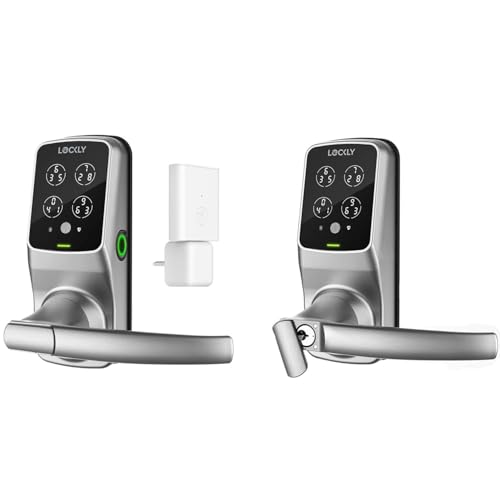
Lockly Secure Pro Wi-Fi Smart Lock with Handle
Best for: Remote access and handle integration
- Access Methods
- Keypad, fingerprint, app, voice, key
- Fingerprint Capacity
- Up to 99
- Included Door Hardware
- Handle
- Connectivity
- Wi-Fi
View on Amazon: Lockly Secure Pro Wi-Fi Smart Lock with Handle Affiliate link
This Lockly model combines Wi-Fi connectivity with a handle design. It supports five access methods: keypad, fingerprint, app, voice, and physical keys. The 3D biometric sensor stores up to 99 fingerprints. You get real-time alerts and temporary access codes. The lock includes an IPX4 rating for weather resistance. It suits users who want remote management without extra hubs.
Pros
- Wi-Fi connectivity for remote app control
- Stores up to 99 fingerprints
- Includes door handle in the package
- IPX4 weather resistance rating
- PIN Genie keypad with reshuffling numbers
Cons
- Facial recognition is not available
- No built-in camera for video monitoring
- Voice commands require compatible assistants
Good fit if
- You need Wi-Fi without an extra hub
- You want a lock with an integrated handle
- You require high fingerprint capacity for families
Skip if
- You require facial recognition unlocking
- You want a video doorbell lock
- You prefer a keyless entry without a handle
Verdict: Lockly Secure Pro Wi-Fi Smart Lock fits households needing remote access via Wi-Fi and a handle design. It works best for users who prioritize fingerprint storage and keypad security over facial recognition.
Specifications side by side
| Spec | Lockly Visage Zeno Smart Lock | Lockly Secure Pro Wi-Fi Smart Lock with Handle |
|---|---|---|
| Access Methods | Face, fingerprint, app, keypad, key | Keypad, fingerprint, app, voice, key |
| Connectivity | Built-in Wi-Fi | not stated |
| Smart Home Compatibility | Apple Home, Alexa, Google Home | not stated |
| Fingerprint Capacity | Up to 99 | Up to 99 |
| Included Door Hardware | not stated | Handle |
| Access Method | Keypad, Fingerprint, Key, App Control | not stated |
| Application | Home, Front Door | not stated |
| Included Hardware | not stated | Handle |
| Dimensions | 8 × 8.8 × 5.3 inches | not stated |
| Color | Satin Nickle | not stated |
| Model | PGK728WRHK | not stated |
Frequently asked questions
Does the Lockly Visage Zeno Smart Lock include a handle?
No, the product data for the Lockly Visage Zeno Smart Lock does not list a handle as included hardware. It focuses on facial recognition and Apple Home Key integration. If you need a handle, the Lockly Secure Pro Wi-Fi Smart Lock with Handle is the alternative choice that includes this component.
Which lock supports Apple Home Key?
The Lockly Visage Zeno Smart Lock supports Apple Home Key. This allows you to unlock your door using an iPhone or Apple Watch. The Lockly Secure Pro Wi-Fi Smart Lock with Handle does not mention this specific integration in its specifications, making the Zeno the better option for Apple ecosystem users.
What is the main difference in connectivity between these two locks?
Both locks feature built-in Wi-Fi for app control. The Lockly Secure Pro Wi-Fi Smart Lock with Handle explicitly highlights this connectivity in its attributes. The Lockly Visage Zeno Smart Lock also includes Wi-Fi but distinguishes itself with facial recognition capabilities rather than emphasizing connectivity as its primary differentiator.
Can I use a fingerprint on both models?
Yes, both models support fingerprint access. The Lockly Visage Zeno Smart Lock uses a fingerprint as its primary access method alongside facial recognition. The Lockly Secure Pro Wi-Fi Smart Lock with Handle also supports fingerprint storage, offering it as a secure option alongside keypad entry and remote access features.
Which lock is better for remote access?
The Lockly Secure Pro Wi-Fi Smart Lock with Handle is best for remote access. Its description highlights remote access via Wi-Fi as a key feature. While the Visage Zeno also has Wi-Fi, the Secure Pro is specifically noted for households needing to manage entry remotely with its handle design and connectivity focus.
What color options are available for the Visage Zeno?
The Lockly Visage Zeno Smart Lock is available in Satin Nickel. This specific color is listed in its specifications. The data does not provide color options for the Lockly Secure Pro Wi-Fi Smart Lock with Handle, so you may need to check other sources for its available finishes.