Best Lockly Satin Nickel Smart Locks in 2026: 12 Picks
As an Amazon Associate we earn from qualifying purchases. Links on this page are affiliate links.
We compared 12 best lockly satin nickel deadbolts to help you choose. The Lockly Secure Deadbolt with Wi-Fi Hub leads because it offers ANSI Grade 1 security. Our picks rely strictly on the specifications published on the product listings. This approach ensures you get factual details about connectivity, access methods, and physical dimensions. You will find clear comparisons of Wi-Fi models, fingerprint readers, and keypad options. Use this guide to decide which lock fits your door and your security needs.
Quick picks
The best fit for you
- You need maximum remote security with a hub Lockly Secure Deadbolt with Wi-Fi Hub It features an ANSI Grade 1 rating and includes a Wi-Fi hub for remote monitoring.
- You want standalone Wi-Fi without extra hardware Lockly Secure Pro Wi-Fi Deadbolt This model offers built-in Wi-Fi and fast fingerprint unlocking without requiring a separate hub.
- You need a complete handle and lock replacement Lockly Secure Pro Smart Lock with Handle It replaces your exterior door hardware entirely and includes a handle with biometric access.
- You use Apple Home and want built-in Wi-Fi Lockly PIN Genie Pro Zeno Smart Deadbolt It supports Apple Home Key and includes built-in Wi-Fi for direct integration.
- You want integrated video and fingerprint access Lockly Vision Satin Nickel Video Smart Lock This unit combines video monitoring capabilities with fingerprint entry in a single Satin Nickel design.
Our 12 picks
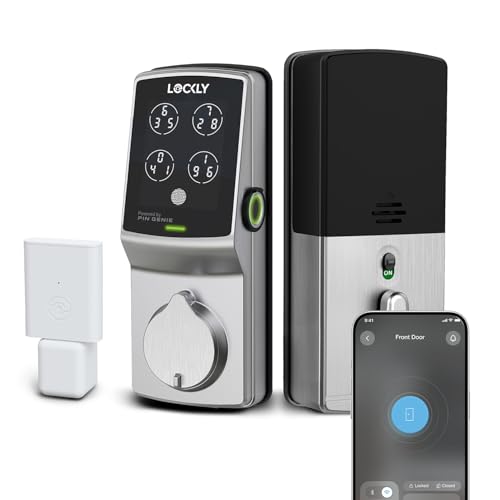
Lockly Secure Deadbolt with Wi-Fi Hub
Best for: ANSI Grade 1 remote deadbolt security
- Color
- Satin Nickel (what this guide is about)
- Access Methods
- Keypad, fingerprint, app, key
- Smart Home Compatibility
- Amazon Alexa, Google Assistant
- Fingerprint Capacity
- 99 fingerprints
- User Code Capacity
- 33 PIN codes
- Connectivity
- Wi-Fi
This Satin Nickel deadbolt delivers ANSI Grade 1 residential security with four access methods: a shuffling PIN Genie keypad, a 0.3-second fingerprint scanner, a physical key, and app control. It stores up to 99 fingerprints and 33 user codes locally. The included Secure Link Wi-Fi hub enables remote access and works with Alexa and Google Assistant. It suits you if you need commercial-grade deadbolt strength with complete remote management out of the box.
Pros
- ANSI Grade 1 residential security rating
- Stores up to 99 fingerprints and 33 PIN codes
- Includes Secure Link Wi-Fi Hub for remote app access
- Patented shuffling keypad obscures PIN entry
- Rekeyable 6-pin cylinder allows manual key rekeying
Cons
- Requires a separate plug-in hub for Wi-Fi features
- Fingerprint profiles do not transfer wirelessly between locks
- Does not support Apple HomeKit
Good fit if
- You need ANSI Grade 1 deadbolt construction.
- You store up to 99 fingerprints for family or staff.
- You want remote app control with an included Wi-Fi hub.
Skip if
- You run your home automation primarily on Apple HomeKit.
- You prefer Wi-Fi built directly into the lock casing without a wall hub.
Verdict: Lockly Secure Deadbolt with Wi-Fi Hub pairs an ANSI Grade 1 physical security rating with fast biometric entry and shuffling keypad codes. The bundled Secure Link Wi-Fi hub provides immediate remote monitoring and voice assistant control.
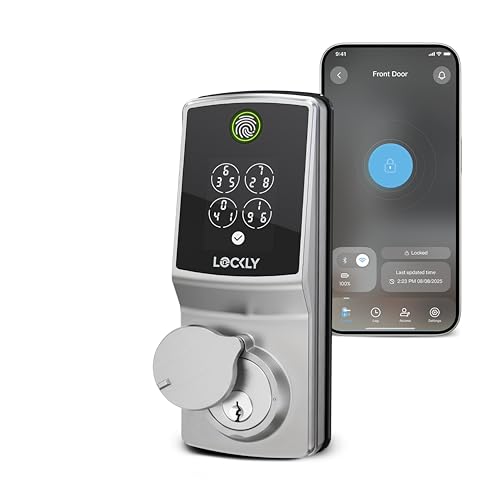
Lockly Secure Pro Wi-Fi Deadbolt
Best for: hub-free Wi-Fi and fast fingerprint unlocking
- Color
- Satin Nickel (what this guide is about)
- Access Methods
- Fingerprint, keypad, app, key, voice
- Connectivity
- Built-in Wi-Fi
- Smart Home Compatibility
- Amazon Alexa, Google Assistant
- Included Door Hardware
- Deadbolt
- Dimensions
- 8.4 × 8.8 × 4.6 inches
This satin nickel smart deadbolt replaces standard door hardware to give you direct remote control via built-in Wi-Fi without an external hub. It features a 3D fingerprint sensor with 0.2-second recognition, a scrambling PIN Genie keypad, and offline guest codes. It fits left- or right-swinging doors between 1⅜ and 2 inches thick. It suits you if you want integrated Wi-Fi connectivity and biometric access without adding extra bridge hardware.
Pros
- Built-in Wi-Fi connects directly to network without a separate hub
- 3D biometric fingerprint scanner authenticates in roughly 0.2 seconds
- Patented PIN Genie keypad scrambles digit positions on every use
- Redesigned interior housing is approximately 25% smaller than original
Cons
- Incompatible with storm doors and round latch holes
- Lacks Apple HomeKit support
Good fit if
- You want direct Wi-Fi access without plugging in an extra bridge hub.
- You have a standard exterior door between 1⅜ and 2 inches thick.
- You prefer unlocking via rapid fingerprint scanning or a peek-proof keypad.
Skip if
- You need a deadbolt compatible with a storm door or round latch hole.
- You rely on Apple HomeKit for your smart home ecosystem.
Verdict: Lockly Secure Pro Wi-Fi Deadbolt provides standalone Wi-Fi connectivity and 0.2-second biometric unlocking in a compact satin nickel deadbolt. It delivers flexible access options via fingerprint, scrambling keypad, app, or physical key without requiring a plug-in hub.
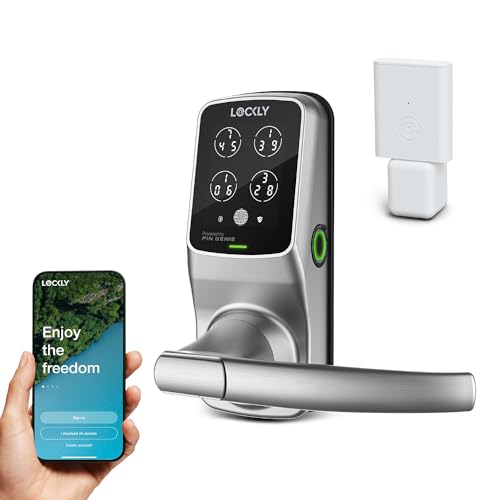
Lockly Secure Pro Smart Lock with Handle
Best for: all-in-one handle and fingerprint access
- Color
- Satin Nickel (what this guide is about)
- Access Methods
- Keypad, fingerprint, app, voice, keys
- Fingerprint Capacity
- Up to 99 fingerprints
- Included Door Hardware
- Handle
- Connectivity
- Wi-Fi
- Dimensions
- 7.8 × 2.9 × 7.2 inches
The Lockly Secure Pro Wi-Fi Smart Lock with Handle is a satin nickel lock setup featuring built-in Wi-Fi and an integrated handle. You get multiple access options, including a 3D fingerprint scanner storing up to 99 prints, a scrambling PIN Genie keypad, app controls, and physical keys. With an IPX4 weather rating and a 9V emergency battery port, it suits you if you want a complete entry system.
Pros
- Stores up to 99 fingerprints on a 3D biometric sensor
- Keypad numbers reshuffle after every use to prevent pattern tracking
- Includes an integrated exterior handle in matching satin nickel
- Features a backup 9V emergency power port and physical keys
Cons
- Requires an optional Wi-Fi hub for extended smart functionality
- Uses a full latch-and-handle form factor rather than fitting as a standalone deadbolt
Good fit if
- You want an all-in-one smart latch and handle set in satin nickel.
- You need to store biometric profiles for up to 99 users.
- You want a keypad that scrambles digit positions after every entry.
Skip if
- You only need a standalone deadbolt to pair with your existing door handle.
- You want full extended hub features included without purchasing separate hardware.
Verdict: Lockly Secure Pro Wi-Fi Smart Lock with Handle provides a complete exterior door hardware replacement with biometric, digital, and keyed access. Its 99-print storage and randomized keypad make it a practical choice for multi-user security.

Lockly PIN Genie Pro Zeno Smart Deadbolt
Best for: Apple Home users wanting built-in Wi-Fi
- Color
- Satin Nickel (what this guide is about)
- Access Methods
- Keypad, Apple Home Key, app, key, voice
- Connectivity
- Built-in Wi-Fi
- Smart Home Compatibility
- Apple Home, Google Assistant, Alexa
- User Code Capacity
- Up to 65 PINs
- Dimensions
- 5.31 × 3.03 × 4.53 inches
This satin nickel deadbolt gives you keyless access via Apple Home Key, a digital keypad, physical keys, or the mobile app. Built-in Wi-Fi allows remote management directly from your network without an added hub. The shuffling keypad stores up to 65 access codes, and the hardware mounts on doors between 1 3/8 and 3 1/8 inches thick. It suits you if you want direct Apple Wallet integration alongside standard smart home controls.
Pros
- Built-in Wi-Fi eliminates the need for a separate hub
- Works with Apple Home Key via iPhone or Apple Watch
- PIN Genie keypad shuffles digits and stores up to 65 codes
- Fits door thicknesses from 1 3/8 inches to 3 1/8 inches
Cons
- Lacks an integrated fingerprint scanner
- Does not include an RFID key fob reader
Good fit if
- You want tap-to-unlock access using Apple Home Key
- You need remote Wi-Fi management without buying an add-on bridge
- You need up to 65 randomized keypad codes for family or guests
Skip if
- You require biometric fingerprint authentication
- You prefer using physical RFID cards for entry
Verdict: Lockly PIN Genie Pro Zeno Deadbolt with Apple Home Key provides core connected features like built-in Wi-Fi and Apple Wallet tapping. It delivers solid access management for doors of various thicknesses without requiring an external bridge.

Lockly Vision Zeno Satin Nickel Smart Lock
Best for: Apple Home Key users wanting video doorbell integration
- Color
- Satin Nickel (what this guide is about)
- Smart Home Compatibility
- Alexa, Google Assistant, Apple Home
- Installation Type
- Full deadbolt replacement
- Access Method
- Key
- Dimensions
- 6.89 × 3.03 × 4.53 inches
- Weight
- 5.29 pounds
The Lockly Vision Zeno integrates a 2K camera, video doorbell, and AI fingerprint reader into one Satin Nickel deadbolt. It supports Apple Home Key for tap-to-unlock via iPhone or Apple Watch, plus Wi-Fi remote management through the Lockly App. The zinc alloy build withstands weather, and two rechargeable lithium batteries provide up to six months of use. It suits users wanting video verification alongside keyless entry.
Pros
- 2K security camera with night vision and two-way audio
- Supports Apple Home Key for tap-to-unlock with iPhone or Apple Watch
- AI fingerprint reader offers 0.2s keyless entry
- Wi-Fi connectivity enables remote management via Lockly App
- Includes two rechargeable lithium batteries lasting up to 6 months
Cons
- Heavier at 5.29 pounds compared to standard deadbolts
- Requires Wi-Fi for remote features and app control
- Larger dimensions (6.89 inches length) may not fit all door styles
Good fit if
- You want video verification of visitors before unlocking
- You use Apple devices and prefer Home Key access
- You need remote lock management via Wi-Fi
Skip if
- You prefer a lightweight lock under 4 pounds
- You do not have Wi-Fi available near the door
- You want a lock without a built-in camera
Verdict: The Lockly Vision Zeno Satin Nickel Smart Lock is ideal for Apple users who want video doorbell features and remote access in a single, weather-resistant unit.

Lockly Secure Plus RFID Smart Deadbolt
Best for: offline access and diverse entry options
- Color
- Satin Nickel (what this guide is about)
- Access Methods
- Keypad, fingerprint, key, RFID card
- Fingerprint Capacity
- 99 fingerprints
- Dimensions
- 7.36 × 3.15 × 4.49 inches
- Weight
- 1 pounds
The Lockly Secure Plus is a Satin Nickel deadbolt offering five distinct entry methods. You can unlock via a 3D fingerprint scanner storing 99 profiles, a peek-proof PIN Genie keypad, RFID cards, offline codes, or a physical key. It recognizes fingerprints in 0.3 seconds. This lock suits you if you prioritize multiple local entry options and offline operation over built-in Wi-Fi connectivity.
Pros
- Stores up to 99 fingerprints with 0.3-second sensor recognition
- Peek-proof keypad mixes digit locations across four virtual buttons
- Includes RFID card access and offline access code capability
- Rekeyable cylinder works with standard rekey kits
Cons
- Requires an additional Wi-Fi hub for real-time alerts and remote monitoring
- Configured specifically as a Right Fingerprint Edition
Good fit if
- You want multiple access options including RFID cards, fingerprint scanning, and PIN codes
- You need to grant offline access codes without an active internet connection
- You plan to use a separate Lockly Wi-Fi hub for remote monitoring
Skip if
- You need built-in Wi-Fi connectivity directly out of the box
- You prefer a left-hand oriented fingerprint scanner setup
Verdict: Lockly Secure Plus RFID Smart Deadbolt delivers fast fingerprint recognition and flexible offline access methods in a Satin Nickel finish. It works reliably if you want high-capacity local access without requiring built-in Wi-Fi hardware.

Lockly Vision Satin Nickel Video Smart Lock
Best for: integrated video and fingerprint access
- Color
- Satin Nickel (what this guide is about)
- Access Methods
- Fingerprint, app, keypad, key
- Smart Home Compatibility
- Alexa, Google
- Fingerprint Capacity
- Up to 99
- Included Door Hardware
- Deadbolt
- Connectivity
- Wi-Fi
This Lockly Vision smart lock combines a video doorbell with keyless entry in a satin nickel finish. It features a 3D biometric sensor that unlocks in under 0.3 seconds and stores up to 99 fingerprints. The built-in camera supports two-way audio and remote monitoring. You can also use the PIN Genie keypad, an app, or voice commands. It fits standard US doors between 1-3/8 and 2 inches thick.
Pros
- Integrated video camera with two-way audio
- Fingerprint recognition in under 0.3 seconds
- Stores up to 99 fingerprints
- Patented PIN Genie keypad for privacy
- Compatible with Alexa and Google voice control
Cons
- Requires standard door thickness between 1-3/8 and 2 inches
- Not compatible with storm doors
- Not compatible with round latch holes
Good fit if
- You want a video doorbell and smart lock in one unit
- You prefer quick fingerprint access over keys
- You have a standard US household door
Skip if
- You have a storm door
- Your door has a round latch hole
- Your door thickness is outside the 1-3/8 to 2 inch range
Verdict: The Lockly Vision Satin Nickel Video Smart Lock is a practical choice for homeowners who want integrated video monitoring and fast biometric entry on standard doors.

Lockly Secure Pro Left Fingerprint Satin Nickel
Best for: remote access and left-side fingerprint readers
- Color
- Satin Nickel (what this guide is about)
- Smart Home Compatibility
- Alexa, Google Assistant
- Installation Type
- Full deadbolt replacement
- Auto-Lock Delay
- Customizable
- Fingerprint Capacity
- 99
- Connectivity
- Wi-Fi
View on Amazon: Lockly Secure Pro Left Fingerprint Satin Nickel
This Lockly Secure Pro deadbolt features a left-side 3D fingerprint reader and built-in Wi-Fi. It stores up to 99 fingerprints with recognition under 0.3 seconds. The patented PIN Genie keypad prevents shoulder surfing. You can control it via the app or voice assistants like Alexa. It includes real-time alerts and auto-locking. This model fits doors from 1⅜ to 2 inches thick.
Pros
- Built-in Wi-Fi for remote app control
- 3D fingerprint sensor unlocks in under 0.3 seconds
- Stores up to 99 unique fingerprints
- Patented PIN Genie keypad with changing virtual buttons
Cons
- Fingerprint reader is positioned on the left side only
- Not compatible with storm doors or round latch holes
- Requires standard rekey kit to change the key cylinder
Good fit if
- You need remote access without a separate hub
- You prefer left-side mounted fingerprint readers
- You want to store many user fingerprints
Skip if
- You have a right-swing door only
- You use a door with a round latch hole
- You do not want built-in Wi-Fi
Verdict: Lockly Secure Pro Left Fingerprint Satin Nickel offers fast biometric entry and integrated Wi-Fi for users who need remote management and high-capacity fingerprint storage. It suits those with left-side compatible doors who value the secure PIN Genie keypad.

Lockly Guard Secure Pro Fingerprint Deadbolt
Best for: commercial properties and multi-unit rental management
- Color
- Satin Nickel (what this guide is about)
- Access Methods
- Fingerprint, keypad, app, key, voice
- Smart Home Compatibility
- Alexa, Google Assistant
- Dimensions
- 8.4 × 8.8 × 4.6 inches
View on Amazon: Lockly Guard Secure Pro Fingerprint Deadbolt
This satin nickel deadbolt gives you commercial-grade access management for doors measuring 1⅜ to 2 inches thick. It features a 0.3-second 3D fingerprint reader, a randomized PIN Genie keypad, and a rekeyable cylinder. Powered by eight AA batteries, it includes a separate Secure Link Wi-Fi Hub for remote control via Alexa and Google Assistant. It suits property managers or offices needing eBadges, eKeys, and fire-rated hardware.
Pros
- Includes Secure Link Wi-Fi Hub for remote and voice control
- UL10B/10C fire-rated commercial construction
- 0.3-second 3D fingerprint recognition sensor
- Patented PIN Genie keypad randomizes digit positions
- Rekeyable deadbolt cylinder simplifies key management
Cons
- LocklyOS cloud access features require a paid subscription
- Incompatible with storm doors and round latch holes
- Requires eight AA batteries for operation
Good fit if
- You need a fire-rated commercial lock for doors 1⅜ to 2 inches thick.
- You want remote access without purchasing a separate Wi-Fi bridge.
- You manage shared spaces using eBadges, eKeys, and offline codes.
Skip if
- You have storm doors or round latch door holes.
- You want full cloud management software without subscription fees.
Verdict: Lockly Guard Secure Pro Fingerprint Deadbolt provides commercial-grade, fire-rated security with versatile access options for offices and multi-unit facilities. Its included Wi-Fi hub and rekeyable design ensure straightforward integration into existing property hardware.

Lockly Model 6S Satin Nickel Smart Lock
Best for: users who prioritize keypad security
- Color
- Satin Nickel (what this guide is about)
- Access Methods
- Keypad, App, Voice, Key
- Connectivity
- Bluetooth
- Smart Home Compatibility
- Alexa, Google Assistant (with hub)
- Installation Type
- Handle set replacement
- Included Door Hardware
- Keypad with Handle
The Lockly Model 6S is a Bluetooth smart lock in Satin Nickel finish. It features a patented PIN Genie touchscreen keypad that changes numbers to prevent peeking. You can unlock it via the app, voice commands with an optional Wi-Fi hub, or a physical key. It includes programmable auto-locking and eKeys for remote access. This model lacks a fingerprint sensor, relying on its secure keypad and app control for entry.
Pros
- Patented PIN Genie touchscreen keypad with changing numbers
- Bluetooth app control for locking and monitoring
- Supports eKeys and offline access codes
- Programmable auto-locking feature
Cons
- No fingerprint sensor for biometric entry
- Wi-Fi and voice control require an optional hub
- Relies on physical key as backup only
Good fit if
- You want a secure keypad without fingerprint sensors
- You manage rentals with eKeys and offline codes
- You prefer app control over biometric scanning
Skip if
- You need built-in Wi-Fi connectivity
- You require fingerprint recognition for entry
- You want voice control without extra hardware
Verdict: Lockly Model 6S Satin Nickel Smart Lock is a solid choice for users who prioritize keypad security and app management over biometric speed. It suits renters or homeowners who value the PIN Genie privacy feature and do not need immediate Wi-Fi integration.
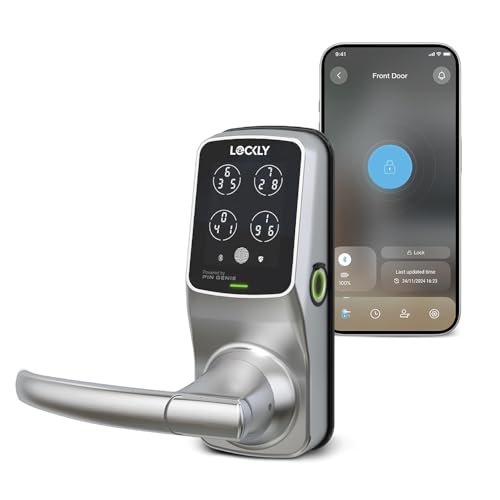
Lockly Secure Plus Bluetooth Smart Lock
Best for: Bluetooth users wanting a handle-integrated lock
- Color
- Satin Nickel (what this guide is about)
- Connectivity
- Bluetooth
- Smart Home Compatibility
- Alexa, Google Assistant
- Installation Type
- Handle set
- Auto-Lock Delay
- Auto lock
- Fingerprint Capacity
- 99
This Lockly Secure Plus deadbolt features a Satin Nickel finish and includes a handle. It unlocks via a 3D fingerprint sensor, PIN Genie keypad, or Bluetooth app. The fingerprint sensor recognizes users in 0.3 seconds and stores 99 entries. It supports voice control only with an optional Wi-Fi hub. The unit weighs 6.48 pounds and measures 7.2 inches in height.
Pros
- 3D biometric fingerprint sensor with 0.3-second recognition
- Patented PIN Genie keypad with virtual buttons
- Stores up to 99 fingerprints
- Includes handle and Bluetooth connectivity
- Offline Access Codes for guests
Cons
- Bluetooth only; Wi-Fi requires optional hub
- No built-in video camera or doorbell
- Heavier at 6.48 pounds
Good fit if
- You want a handle-integrated design
- You prefer Bluetooth control without extra hubs
- You need offline access codes for guests
Skip if
- You require built-in Wi-Fi connectivity
- You need a video doorbell camera
- You prefer a lighter lock under 6 pounds
Verdict: Lockly Secure Plus Bluetooth Satin Nickel offers reliable fingerprint access and a handle design for users who do not need built-in Wi-Fi or video features.

Lockly Access Touch Retrofit Smart Lock
Best for: retrofitting existing deadbolts with fingerprint access
- Color
- Satin Nickel (what this guide is about)
- Access Methods
- Fingerprint, app
- Connectivity
- Wi-Fi (via included hub)
- Installation Type
- Retrofit
- Fingerprint Capacity
- Up to 99 fingerprints
- Dimensions
- 7.8 × 5.2 × 9 inches
The Lockly Access Touch Retrofit Smart Lock converts your existing single-cylinder deadbolt into a smart lock without replacing exterior hardware. It relies on a 3D biometric fingerprint scanner storing up to 99 prints, alongside smartphone app controls. An included Secure Link Wi-Fi hub provides remote access and live monitoring. This lock suits you if you want keyless biometric entry on your current deadbolt while skipping a visible keypad exterior.
Pros
- Retrofits over your existing single-cylinder deadbolt
- 3D biometric sensor stores up to 99 fingerprints
- Includes Secure Link Wi-Fi Hub for remote access
- Fits left- and right-swing doors 1⅜ to 2 inches thick
Cons
- Lacks a physical or touchscreen numeric keypad
- Incompatible with storm doors and round latch holes
- Requires the separate plug-in hub for Wi-Fi access
Good fit if
- You want to keep your existing exterior deadbolt hardware.
- You prefer unlocking via fingerprint or smartphone instead of a keypad code.
- You have a door between 1⅜ and 2 inches thick.
Skip if
- You need a numeric keypad for entry codes.
- You have a storm door or round latch holes.
Verdict: Lockly Access Touch Retrofit Smart Lock upgrades your existing deadbolt with 99-print biometric recognition and remote app control via an included Wi-Fi hub.
Specifications side by side
| Spec | Lockly Secure Deadbolt with Wi-Fi Hub | Lockly Secure Pro Wi-Fi Deadbolt | Lockly Secure Pro Smart Lock with Handle | Lockly PIN Genie Pro Zeno Smart Deadbolt | Lockly Vision Zeno Satin Nickel Smart Lock | Lockly Secure Plus RFID Smart Deadbolt | Lockly Vision Satin Nickel Video Smart Lock | Lockly Secure Pro Left Fingerprint Satin Nickel | Lockly Guard Secure Pro Fingerprint Deadbolt | Lockly Model 6S Satin Nickel Smart Lock | Lockly Secure Plus Bluetooth Smart Lock | Lockly Access Touch Retrofit Smart Lock |
|---|---|---|---|---|---|---|---|---|---|---|---|---|
| Access Methods | Keypad, fingerprint, app, key | Fingerprint, keypad, app, key, voice | Keypad, fingerprint, app, voice, keys | Keypad, Apple Home Key, app, key, voice | not specified | Keypad, fingerprint, key, RFID card | Fingerprint, app, keypad, key | not specified | Fingerprint, keypad, app, key, voice | Keypad, App, Voice, Key | not specified | Fingerprint, app |
| Connectivity | not specified | Built-in Wi-Fi | not specified | Built-in Wi-Fi | not specified | not specified | not specified | not specified | not specified | Bluetooth | Bluetooth | Wi-Fi (via included hub) |
| Smart Home Compatibility | Amazon Alexa, Google Assistant | Amazon Alexa, Google Assistant | not specified | Apple Home, Google Assistant, Alexa | Alexa, Google Assistant, Apple Home | not specified | Alexa, Google | Alexa, Google Assistant | Alexa, Google Assistant | Alexa, Google Assistant (with hub) | Alexa, Google Assistant | not specified |
| Installation Type | not specified | not specified | not specified | not specified | Full deadbolt replacement | not specified | not specified | Full deadbolt replacement | not specified | Handle set replacement | Handle set | Retrofit |
| Auto-Lock Delay | not specified | not specified | not specified | not specified | not specified | not specified | not specified | Customizable | not specified | not specified | Auto lock | not specified |
| Fingerprint Capacity | 99 fingerprints | not specified | Up to 99 fingerprints | not specified | not specified | 99 fingerprints | Up to 99 | 99 | not specified | not specified | 99 | Up to 99 fingerprints |
| User Code Capacity | 33 PIN codes | not specified | not specified | Up to 65 PINs | not specified | not specified | not specified | not specified | not specified | not specified | not specified | not specified |
| Included Door Hardware | not specified | Deadbolt | Handle | not specified | not specified | not specified | Deadbolt | not specified | not specified | Keypad with Handle | not specified | not specified |
| Access Method | not specified | Fingerprint | not specified | Key | Key | Fingerprint | Keypad, Fingerprint, Remote Control | Fingerprint | Fingerprint | Keypad, Touchscreen, App Control | not specified | not specified |
| Color | Satin Nickel | Satin Nickel | Satin Nickel | Satin Nickel | Satin Nickel | Satin Nickel | Satin Nickel | Satin Nickel | Satin Nickel | Satin Nickel | Satin Nickel | Satin Nickel |
| Application | not specified | not specified | not specified | Home | Home | not specified | Front Door | not specified | not specified | not specified | not specified | not specified |
| Included Hardware | not specified | not specified | Handle | not specified | not specified | not specified | not specified | not specified | not specified | not specified | Handle | not specified |
| Trigger Type | not specified | not specified | not specified | not specified | not specified | not specified | Motion Sensor | not specified | not specified | not specified | not specified | not specified |
| Special Features | not specified | not specified | not specified | not specified | not specified | not specified | Auto Lock | not specified | not specified | Auto Lock | not specified | not specified |
| Dimensions | 7.4 × 3.15 × 4.5 inches | 8.4 × 8.8 × 4.6 inches | 7.8 × 2.9 × 7.2 inches | 5.31 × 3.03 × 4.53 inches | 6.89 × 3.03 × 4.53 inches | 7.36 × 3.15 × 4.49 inches | 7 × 3 × 1.5 inches | 7.3 × 3.15 × 4.5 inches | 8.4 × 8.8 × 4.6 inches | 6.69 × 1 × 7 inches | 7.8 × 2.9 × 7.2 inches | 7.8 × 5.2 × 9 inches |
| Weight | 3.8 pounds | not specified | 2.5 pounds | 3.31 pounds | 5.29 pounds | 1 pounds | not specified | 3.8 pounds | not specified | not specified | 6.48 pounds | not specified |
| Model | PGD728WASN | PGD728WSNE1 | PGD628W | PGK7SWHK | PGK798HK | Secure Plus | 1 | PGD728WYSN | PGD728WPU | PGD6SSN | PGD628F | PGD7AWSN |
| Size | not specified | not specified | Latch | not specified | not specified | Right Fingerprint Edition | not specified | Left Fingerprint Reader | not specified | No fingerprint | Latch | not specified |
When matching hardware finishes across your home, specifications for the best brushed nickel bathtubs detail basin dimensions and materials.
How to choose the right one
-
Check physical dimensions
Measure your door thickness and backset before buying. The Lockly Secure Deadbolt measures 7.4 inches in length and weighs 3.8 pounds. In contrast, the Model 6S is smaller at 6.69 inches long but weighs only 1 inch in width. The Vision Zeno is heavier at 5.29 pounds. Ensure the lock body fits your existing hole patterns. Mismatched dimensions can prevent installation or leave gaps that compromise security. Always verify the width and height specs against your door frame.
-
Select access method
Choose how you want to enter. The Secure Pro offers 0.2-second fingerprint unlocking for speed. The Model 6S relies on a keypad and touchscreen, which is better if you prefer codes over biometrics. The PIN Genie Pro Zeno supports Apple Wallet tapping for seamless entry. Some models like the Secure Plus RFID focus on offline fingerprint recognition. Decide if you need biometric speed, code flexibility, or physical key backup for your specific daily routine.
-
Verify connectivity type
Determine if you need remote access from anywhere. The Secure Pro Wi-Fi Deadbolt connects directly to your network without extra hardware. The Model 6S uses Bluetooth, which requires your phone to be nearby. The Secure Plus RFID operates offline, which is useful if you lack reliable internet. Built-in Wi-Fi allows you to lock or unlock the door remotely via an app. Bluetooth models are simpler to install but lack true remote capabilities without a bridge.
-
Consider included hardware
Check if the lock includes a handle. The Secure Pro Smart Lock with Handle replaces your entire exterior door hardware. The Secure Plus Bluetooth also includes a handle for a complete upgrade. Most other models, like the Secure Deadbolt, are deadbolts only and require a separate lever or knob. If you want to modernize the look of your door, choose a unit with integrated handles. Otherwise, a standard deadbolt is sufficient if you keep your existing hardware.
-
Review smart features
Look for specific automation capabilities. The PIN Genie Pro Zeno supports Apple Home Key for direct wallet integration. The Secure Pro Wi-Fi Deadbolt features a scrambling keypad for privacy. The Model 6S includes an auto-lock feature to prevent accidental entry. Some models offer high-capacity fingerprint storage for multiple users. Decide which digital features matter most, whether it is privacy codes, automatic locking, or specific voice assistant compatibility for your home ecosystem.
Frequently asked questions
Which Lockly satin nickel deadbolt is best for ANSI Grade 1 security?
The Lockly Secure Deadbolt with Wi-Fi Hub is the top choice for maximum physical security. It carries an ANSI Grade 1 rating, which is the highest standard for residential deadbolts. This model also includes a bundled Wi-Fi hub for remote monitoring and voice assistant control.
Can I use Lockly satin nickel locks with Apple Home Key?
Yes, specific models support Apple Home Key for seamless integration. The Lockly PIN Genie Pro Zeno and the Lockly Vision Zeno both feature built-in Wi-Fi and support Apple Wallet tapping. These units allow you to unlock doors using compatible Apple devices without needing an external bridge.
Do any of these locks require a separate Wi-Fi hub?
Most models include a hub, but some operate standalone. The Lockly Secure Pro Wi-Fi Deadbolt provides built-in Wi-Fi connectivity without needing a separate plug-in hub. In contrast, the Lockly Secure Deadbolt with Wi-Fi Hub requires the included Secure Link hub for remote features and voice control.
Which Lockly satin nickel lock is best for left-handed doors?
The Lockly Secure Pro Left Fingerprint Satin Nickel is designed for left-side compatible doors. It features a left-side fingerprint reader and integrated Wi-Fi for remote management. This model offers high-capacity fingerprint storage and the secure PIN Genie keypad for flexible access options.
Are there Lockly satin nickel locks with built-in video?
Yes, two models integrate video monitoring directly into the lock. The Lockly Vision Zeno Satin Nickel Smart Lock offers video doorbell features and remote access in a weather-resistant unit. The Lockly Vision Satin Nickel Video Smart Lock also provides integrated video monitoring alongside fast biometric entry.
Which model is best for commercial or multi-unit properties?
The Lockly Guard Secure Pro Fingerprint Deadbolt is suited for commercial and multi-unit facilities. It provides commercial-grade, fire-rated security with versatile access options. The unit includes a Wi-Fi hub and features a rekeyable design for straightforward integration into existing property hardware.
What is the difference between Wi-Fi and Bluetooth connectivity in these locks?
Wi-Fi models allow remote access and monitoring from anywhere via the internet. Bluetooth models, like the Model 6S, require your phone to be nearby for control. Wi-Fi locks generally offer faster remote management, while Bluetooth options provide reliable local access without needing a constant internet connection.