Smart Locks Buying Guide (2026): What Matters and 8 Picks
As an Amazon Associate we earn from qualifying purchases. Links on this page are affiliate links.
This deadbolt buying guide helps you choose the right lock by focusing on published specifications. You will learn how connectivity options, access methods, and physical dimensions affect daily use. We compare features like Wi-Fi integration, keypad reliability, and biometric sensors to clarify what each spec means for your home. The goal is to help you decide whether you need hub-free control, offline code entry, or hands-free proximity access.
We selected 8 models based strictly on their technical data. Each pick addresses a specific need, from multi-user code management to integrated video monitoring. You can review the size, weight, and mounting requirements to ensure compatibility with your door. This approach removes guesswork and lets you match hardware to your security priorities. Read on to see how these specifications translate into practical performance for your front door.
Our top pick: Schlage Encode Smart WiFi Deadbolt.
What to Look for in Smart Locks
Connectivity type
Wi-Fi locks connect directly to your home network, removing the need for a separate hub. This simplifies setup and allows remote control from anywhere. Products like the Schlage Encode and Philips 4200 Series use this method. Keypad-only models, such as the TEEHO or Kwikset Powerbolt, operate offline. They lack remote features but avoid network dependency. Choose Wi-Fi if you need real-time status updates or remote locking. Pick offline models for basic code access without internet reliance. Consider your router’s signal strength at the door location to ensure stable connections for Wi-Fi devices.
- Built-in Wi-Fi module
- No separate hub required
- 2.4GHz network support
Access methods
Locks offer various entry options, including keypads, fingerprints, mobile apps, and physical keys. The eufy C220 combines Wi-Fi with fingerprint scanning for quick entry. The Chamberlain myQ adds video doorbell integration for visual verification before unlocking. Some models, like the Aqara U400, use Ultra-Wideband (UWB) for hands-free proximity entry with compatible phones. Keypad-only options provide reliable code access without biometric sensors. Select a method that matches your daily routine. Fingerprint sensors offer speed, while keypads ensure access without a phone. Verify the number of supported methods for flexibility.
- Fingerprint sensor capacity
- Keypad button durability
- App-based remote entry
Smart home compatibility
Integration with voice assistants and automation platforms expands lock utility. The Schlage Encode supports voice commands for hands-free operation. The Aqara U400 is optimized for Apple users, leveraging UWB for seamless proximity unlocking. Most Wi-Fi locks work with major ecosystems via their respective apps. Check if the lock supports your existing smart home setup before purchasing. Compatibility ensures you can automate routines, such as locking the door when you leave. Lack of support may limit functionality to basic app control. Verify platform support in the product specifications.
- Alexa or Google support
- Apple HomeKit compatibility
- Matter protocol support
Physical dimensions
Lock dimensions determine fit for your door’s bore hole and backset. The Schlage Encode measures 3 inches wide by 5 inches high. The TEEHO keypad is slightly narrower at 2.95 inches wide. Ensure the lock fits your door’s existing hardware or plan for drilling adjustments. Larger units may accommodate more batteries or sensors. Compact designs suit narrower door frames. Measure your door’s edge bore and face bore before buying. Mismatched dimensions can prevent installation or require professional modification. Check width, height, and thickness specs carefully.
- 2-1/8 inch bore hole fit
- Standard backset compatibility
- Door thickness range
Build quality and rating
Durability depends on materials and security ratings. The eufy C220 carries a BHMA Grade 3 rating, indicating high resistance to forced entry. Look for solid metal construction and weather-resistant finishes like satin nickel or matte black. The Chamberlain myQ includes a 2K HDR camera, adding visual security. IP53 ratings, like on the eufy, protect against light dust and water spray. Higher ratings offer better long-term reliability in harsh weather. Cheaper plastic components may degrade faster. Prioritize locks with recognized security certifications for peace of mind.
- BHMA Grade 1 or 3
- IP53 or higher rating
- Solid metal construction
Power source
Most smart locks use batteries, typically AA or lithium cells. Wi-Fi models consume more power than Bluetooth or keypad-only locks. The Philips 4200 Series and Schlage Encode rely on battery packs. Check battery life estimates in the specifications. Some locks offer low-battery alerts via app or audible chimes. Consider locks with USB charging ports for emergency power. Battery replacement frequency impacts convenience. High-traffic doors may drain batteries faster. Ensure you can easily access the battery compartment for swaps.
- Battery type and count
- Estimated battery life months
- Low-battery alert system
Types of Smart Locks and Doorbells
Wi-Fi Deadbolts
These locks connect directly to your home network without a separate hub. The Schlage Encode uses Wi-Fi for remote monitoring and voice assistant support. You get high-capacity code storage and built-in alarms. This setup simplifies installation but requires a stable 2.4GHz connection. It suits users who want hub-free control and multi-user access from any location.
Keypad Deadbolts
Keypad models rely on code entry for access. The TEEHO and Kwikset Powerbolt 250 offer straightforward, code-based security. They often include auto-locking features and fit standard bore holes. Some, like the Kwikset, manage codes locally without an app. This type is ideal for those who prefer physical security and reliable hardware over digital connectivity or remote features.
Biometric Smart Locks
Biometric locks use fingerprint sensors for quick entry. The eufy Security C220 offers direct Wi-Fi access with fingerprint unlocking. It features a BHMA Grade 3 build and an IP53 weather rating. The Aqara U400 adds UWB technology for hands-free entry with Apple devices. These locks suit users wanting fast, keyless access while maintaining robust physical security standards.
Video Doorbell Locks
These units combine a deadbolt with a video camera. The Chamberlain myQ 3-in-1 includes a 2K HDR camera and color night vision. It provides hands-free facial recognition alongside four other entry methods. This all-in-one design gives you comprehensive front-door oversight. It is best for users who want security and visual monitoring in a single frame without separate devices.
Integrated Handle Locks
Some locks replace the entire exterior hardware, including the handle. The Philips 4200 Series Wi-Fi Deadbolt with Handle offers integrated hardware. It provides fast biometric unlocking and direct network connectivity. This type is suitable for full front door replacements. You get remote access and customizable code scheduling without needing to install separate components on your door.
Common Mistakes When Buying Smart Locks
Assuming all smart locks fit your door
Ignoring the backset measurement can prevent installation. Measure the distance from the edge of the door to the center of the hole. Standard sizes are 2-3/8 inches or 2-3/4 inches. Mismatched dimensions require drilling new holes or buying an adapter plate.
Overlooking the need for remote access
Bluetooth-only locks require your phone to be nearby to operate. They lack remote access capabilities. Choose a model with Wi-Fi or a separate hub if you need to lock or unlock the door from a distance. This ensures convenience when you are away from home.
Underestimating battery maintenance requirements
Battery life varies significantly between models. Some last months, while others require frequent changes. Check the battery type and estimated duration in the specs. Plan for replacements or select models with low-battery alerts to avoid being locked out unexpectedly during travel or emergencies.
Forgetting to check for physical key backup
Physical keys provide a critical backup when electronic systems fail. Ensure the lock includes a traditional key override. This feature allows entry during power outages or technical glitches. Do not rely solely on digital codes or smartphone apps for essential home access.
Not verifying door thickness compatibility
Door thickness affects compatibility. Most locks fit doors between one and three inches thick. Verify your door’s exact measurement before purchasing. If your door is unusually thick or thin, standard models may not mount correctly. This prevents hardware damage and installation failures.
Quick picks
Our 8 picks

Schlage Encode Smart WiFi Deadbolt
Best for: hub-free Wi-Fi control and multi-user access
- Access Methods
- Touchscreen keypad, app, key
- Connectivity
- Built-in Wi-Fi
- Smart Home Compatibility
- Alexa, Google Home, Ring, Airbnb
- User Code Capacity
- Up to 100 access codes
- Color
- Satin Nickel
- Dimensions
- 0.9 × 3 × 5 inches
The Schlage Encode Smart WiFi Deadbolt is a single deadbolt featuring direct Wi-Fi connectivity and a touchscreen keypad. It links directly to your home wireless network through the Schlage Home app, letting you configure up to 100 access codes without an external bridge. With an integrated forced-entry alarm, auto-lock timers, and standard residential door fitment, this lock suits you if you want remote access management.
Pros
- Built-in Wi-Fi connects directly to home networks without an external hub
- Stores and manages up to 100 customizable access codes
- Built-in customizable alarm detects door movement and forced entry
- Certified highest residential rating for Security, Durability, and Finish by BHMA
Cons
- Battery life rated for up to six months with typical use
- Does not include a biometric fingerprint scanner
- Limited to door thicknesses between 1-3/8 inches and 1-3/4 inches
Good fit if
- You want direct Wi-Fi control without purchasing an extra hub.
- You need to create and manage up to 100 unique guest codes.
- You use Alexa or Google Home for voice-enabled locking.
Skip if
- You require biometric or fingerprint unlocking methods.
- You have an exterior door thicker than 1-3/4 inches.
Verdict: Schlage Encode Smart WiFi Deadbolt provides hub-free wireless connectivity, high-capacity code storage, and a built-in security alarm. It is a solid choice for standard doors where remote monitoring and voice assistant support are needed.
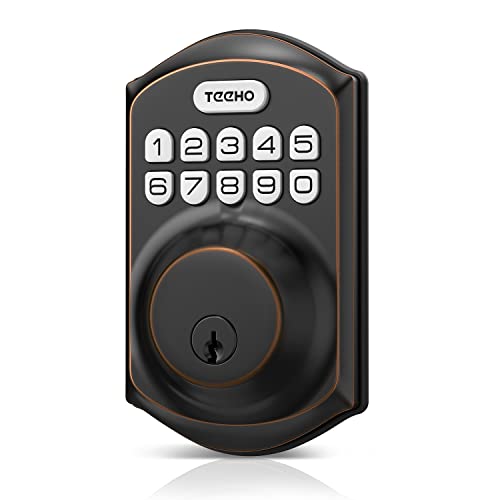
TEEHO Keyless Entry Keypad Deadbolt
Best for: offline keypad access on standard exterior doors
- Access Methods
- Keypad, key
- Auto-Lock Delay
- 10-99 seconds
- User Code Capacity
- 20 access codes
- Power Source
- Battery Powered
- Water Resistance
- Waterproof
- Color
- Oil Rubbed Bronze
The TEEHO Keyless Entry Keypad Deadbolt provides pin-based access for your exterior door without requiring network connections. It stores up to 20 user passcodes alongside one single-use guest code. You can configure auto-locking between 10 and 99 seconds or press any key for two seconds to secure the deadbolt. With an IP54 weather-resistance rating and aluminum alloy construction, it suits standard doors with 2-1/8-inch bore holes.
Pros
- Stores up to 20 user access codes plus one single-use code
- Configurable auto-lock delay from 10 to 99 seconds
- IP54 weather resistance rating with aluminum alloy build
- Battery life up to 365 days with low-power warning indicator
Cons
- Not compatible with 38mm door holes
- Four AA batteries are not included
Good fit if
- You want standalone keypad access with up to 20 user codes.
- You have a door prepared with a standard 2-1/8-inch hole.
- You prefer timed auto-locking without needing mobile apps.
Skip if
- You have a door with a 38mm hole cutout.
- You require wireless connectivity or remote smartphone operation.
Verdict: TEEHO Keyless Entry Keypad Deadbolt delivers straightforward, code-based security with dependable hardware and practical auto-locking options. It serves as a reliable standalone deadbolt for doors with standard 2-1/8-inch bore holes.

eufy Security C220 Wi-Fi Fingerprint Smart Lock
Best for: direct Wi-Fi access with fingerprint unlocking
- Access Methods
- Fingerprint, app, keypad, key, voice
- Connectivity
- Built-in Wi-Fi
- Smart Home Compatibility
- Alexa, Google Voice Assistant
- Included Door Hardware
- Deadbolt
- Power Source
- Battery Powered
- Water Resistance
- Waterproof
View on Amazon: eufy Security C220 Wi-Fi Fingerprint Smart Lock
The eufy Security Smart Lock C220 is a keyless deadbolt featuring built-in Wi-Fi and a fingerprint scanner. It gives you six entry methods, including app control, keypad codes, Apple Watch access, and physical keys. Operating on eight AA batteries for an estimated eight months, it carries a BHMA Grade 3 rating. It suits you if you want remote access and biometric entry without installing a separate wireless bridge.
Pros
- Built-in Wi-Fi eliminates the need for an external bridge
- Six unlock options including fingerprint, Apple Watch, and voice assistant
- Operating temperature range from -22°F to 158°F
- Fits doors with bores under 54 mm without drilling
Cons
- Carries a BHMA Grade 3 rating rather than Grade 1 or 2
- Requires eight AA batteries to operate
- IP53 rating provides limited protection against direct water spray
Good fit if
- You want fingerprint unlocking alongside app, voice, and keypad controls.
- You need direct Wi-Fi connectivity without setting up an additional bridge.
- You already use eufy Security devices and want routine integration.
Skip if
- You require a deadbolt tested to BHMA Grade 1 or Grade 2 standards.
- You prefer hardware that runs on fewer than eight AA batteries.
Verdict: eufy Security Smart Lock C220 delivers versatile biometric and Wi-Fi access without needing an extra hub. Its BHMA Grade 3 build and IP53 rating make it a practical choice for standard exterior doors.

Chamberlain myQ 3-in-1 Video Doorbell Smart Lock
Best for: all-in-one deadbolt security and video monitoring
- Access Methods
- Face, fingerprint, PIN, app, key
- Resolution
- 2K
- Night Vision
- Color Night Vision
- Color
- Black
- Dimensions
- 2.95 × 3.84 × 6.85 inches
- Weight
- 4.87 pounds
View on Amazon: Chamberlain myQ 3-in-1 Video Doorbell Smart Lock
The Chamberlain myQ unit combines a smart deadbolt, a 2K HDR video doorbell, and color night vision into one housing. You can unlock your door five ways: face access, fingerprint scanning, PIN codes, physical key, or the myQ app. Power runs on a rechargeable battery lasting 4 to 6 months per charge. It fits you if you want camera surveillance and keyless entry hardware combined into a single deadbolt installation.
Pros
- Integrated 2K HDR camera with color night vision and wide-angle lens
- Five access methods including facial recognition, fingerprint, PIN, key, and app
- Rechargeable battery lasting 4 to 6 months with pop-out removal
- Unified lock, video doorbell, and remote app control in one unit
Cons
- Smart detection for people, packages, and vehicles requires a subscription
- Spare battery for zero-downtime swaps is sold separately
- Tall exterior footprint measuring 6.85 inches high and 4.87 pounds
Good fit if
- You want an all-in-one video doorbell and deadbolt lock.
- You prefer hands-free unlocking through facial recognition or fingerprint access.
- You need 2K HDR video with color night vision at the front door.
Skip if
- You want advanced AI detection alerts without paying for a subscription.
- You prefer standard replaceable alkaline batteries over recharging a battery pack.
Verdict: Chamberlain myQ 3-in-1 Smart Lock & Doorbell merges deadbolt security with a 2K HDR camera into a single frame. It gives you comprehensive front-door oversight with hands-free facial recognition and four additional entry methods.

Aqara U400 UWB Smart Deadbolt
Best for: Apple users wanting hands-free UWB entry
- Access Methods
- UWB, Apple Home Key, fingerprint, key
- Connectivity
- Thread
- Smart Home Compatibility
- Apple Home, Matter
- Color
- Silver
- Dimensions
- 3 × 4.2 × 7 inches
The Aqara U400 uses Ultra-Wideband technology for hands-free entry when you approach. It supports Apple Home Key, fingerprint scans, and passcodes. The lock connects via Thread for stable smart home integration. A rechargeable lithium battery lasts up to six months. It features an IP65 rating for outdoor durability and BHMA certification for security. This deadbolt suits users seeking advanced proximity unlocking.
Pros
- UWB hands-free unlocking detects your presence and intent
- Supports Apple Home Key and fingerprint access
- Rechargeable battery lasts up to six months
- IP65 rated exterior resists dust and water
- Matter over Thread ensures stable connectivity
Cons
- UWB hands-free feature requires specific Apple devices
- NFC cards are sold separately
- No built-in WiFi; requires a Thread hub
Good fit if
- You own an iPhone 11 or later with iOS 18.5+
- You want hands-free entry when your hands are full
- You use an Apple Home ecosystem with a Thread hub
Skip if
- You do not have an Apple Watch or compatible iPhone
- You prefer a lock with built-in WiFi
- You need NFC cards included in the box
Verdict: Aqara U400 UWB Smart Lock delivers convenient proximity entry for Apple users. It fits those who want automatic unlocking without touching the hardware.

Philips 4200 Series Wi-Fi Deadbolt with Handle
Best for: Full front door deadbolt and handle replacements
- Access Methods
- App, keypad PIN, fingerprint, voice
- Connectivity
- Built-in 2.4 GHz Wi-Fi
- Smart Home Compatibility
- Alexa, Google Assistant
- Auto-Lock Delay
- 0–180 seconds
- Included Door Hardware
- Handle set
- Color
- Matte Black
View on Amazon: Philips 4200 Series Wi-Fi Deadbolt with Handle
The Philips 4200 Series Wi-Fi Deadbolt includes a matching handle set, a keypad, and a 0.3-second fingerprint scanner. It connects directly to 2.4GHz Wi-Fi without an added hub, allowing you to manage access, check entry logs, and configure 0-to-180-second auto-lock timers in the mobile app. This lock suits you if you want a complete hardware replacement with remote management and multiple entry methods out of the box.
Pros
- Includes a matching exterior door handle set
- Direct 2.4GHz Wi-Fi connection requires no separate hub
- 0.3-second biometric fingerprint scanner
- Supports permanent, one-time, periodic, and recurring PIN codes
Cons
- Batteries are not included in the package
- Requires placement within 33 feet of your Wi-Fi router
- Incompatible with rechargeable or high-power lithium batteries
Good fit if
- You need a bundled deadbolt and matching handle set for a full replacement.
- You want direct Wi-Fi control without purchasing an external hub.
- You require recurring or temporary access codes for guests and cleaners.
Skip if
- You plan to power your smart lock with rechargeable batteries.
- You have a front door positioned more than 33 feet away from your router.
Verdict: Philips 4200 Series Wi-Fi Deadbolt with Handle delivers integrated hardware, fast biometric unlocking, and direct network connectivity without an extra bridge. It provides dependable remote access and customizable code scheduling over your standard 2.4GHz home network.

Kwikset Powerbolt 250 Keypad Deadbolt
Best for: Local code management without app connectivity
- Access Methods
- Keypad, key
- Auto-Lock Delay
- 30 sec, 1 min, 3 min, 5 min, 10 min
- User Code Capacity
- 25
- Color
- Matte Black
- Dimensions
- 0.97 × 2.69 × 4.59 inches
- Weight
- 2.26 pounds
The Kwikset Powerbolt 250 is a transitional keypad deadbolt in matte black. It supports 25 user codes and five one-time codes. Auto-lock delays range from 30 seconds to 10 minutes. The unit weighs 2.26 pounds and measures 2.69 inches wide. SmartKey allows you to re-key the lock yourself. It uses four AA batteries for at least 12 months of operation.
Pros
- Supports up to 25 user codes
- Customizable auto-lock from 30 sec to 10 min
- SmartKey allows self-rekeying to any KW1 key
- Bright LED keypad for low light entry
Cons
- No built-in WiFi or app control
- No fingerprint or biometric access
- No integration with smart home ecosystems
Good fit if
- You want a reliable keypad lock without app complexity
- You need to manage multiple user codes locally
- You prefer a traditional deadbolt design
Skip if
- You require remote access via a smartphone app
- You want to unlock the door with your fingerprint
- You need integration with Alexa or Google Home
Verdict: The Kwikset Powerbolt 250 Transitional Keypad Lock fits homeowners who value local code management and physical security over digital connectivity. It is a solid choice for those who do not need app-based control.

Philips Wi-Fi Smart Deadbolt
Best for: remote access and multiple user codes
- Access Methods
- App, passcode, fingerprint, key, voice
- Connectivity
- Built-in 2.4 GHz Wi-Fi
- Smart Home Compatibility
- Alexa, Google Assistant
- Auto-Lock Delay
- 10 to 180 seconds
- User Code Capacity
- 100
- Application
- Front Door
This Philips deadbolt offers five access methods: app, passcode, fingerprint, key, and voice. Built-in 2.4 GHz Wi-Fi enables remote control without a hub. You can create up to 100 custom passcodes and store multiple fingerprints. The unit includes a built-in door sensor and auto-lock settings ranging from 10 to 180 seconds. It fits front doors and weighs 1.4 pounds.
Pros
- Built-in 2.4 GHz Wi-Fi for remote app control
- Supports app, passcode, fingerprint, key, and voice access
- Stores up to 100 custom user codes
- Includes built-in door sensor for accurate status
- Auto-lock delay adjustable from 10 to 180 seconds
Cons
- Limited to 2.4 GHz Wi-Fi networks only
- Requires AA alkaline batteries, which are not included
- Away mode disables all methods except the master code
Good fit if
- You want to control the lock remotely via Wi-Fi
- You need to manage multiple user passcodes or fingerprints
- You prefer voice control through Alexa or Google Assistant
Skip if
- You require 5 GHz Wi-Fi connectivity
- You need a lock with a built-in rechargeable battery
- You want to unlock the door via Bluetooth without Wi-Fi
Verdict: Philips Wi-Fi Deadbolt Matt Black suits households needing flexible access and remote management. It works best for users who value multiple unlock options and detailed access history.
Specifications side by side
| Spec | Schlage Encode Smart WiFi Deadbolt | TEEHO Keyless Entry Keypad Deadbolt | eufy Security C220 Wi-Fi Fingerprint Smart Lock | Chamberlain myQ 3-in-1 Video Doorbell Smart Lock | Aqara U400 UWB Smart Deadbolt | Philips 4200 Series Wi-Fi Deadbolt with Handle | Kwikset Powerbolt 250 Keypad Deadbolt | Philips Wi-Fi Smart Deadbolt |
|---|---|---|---|---|---|---|---|---|
| Access Methods | Touchscreen keypad, app, key | Keypad, key | Fingerprint, app, keypad, key, voice | Face, fingerprint, PIN, app, key | UWB, Apple Home Key, fingerprint, key | App, keypad PIN, fingerprint, voice | Keypad, key | App, passcode, fingerprint, key, voice |
| Connectivity | Built-in Wi-Fi | not specified | Built-in Wi-Fi | not specified | Thread | Built-in 2.4 GHz Wi-Fi | not specified | Built-in 2.4 GHz Wi-Fi |
| Smart Home Compatibility | Alexa, Google Home, Ring, Airbnb | not specified | Alexa, Google Voice Assistant | not specified | Apple Home, Matter | Alexa, Google Assistant | not specified | Alexa, Google Assistant |
| Auto-Lock Delay | not specified | 10-99 seconds | not specified | not specified | not specified | 0–180 seconds | 30 sec, 1 min, 3 min, 5 min, 10 min | 10 to 180 seconds |
| User Code Capacity | Up to 100 access codes | 20 access codes | not specified | not specified | not specified | not specified | 25 | 100 |
| Included Door Hardware | not specified | not specified | Deadbolt | not specified | not specified | Handle set | not specified | not specified |
| Power Source | not specified | Battery Powered | Battery Powered | not specified | not specified | not specified | not specified | not specified |
| Resolution | not specified | not specified | not specified | 2K | not specified | not specified | not specified | not specified |
| Access Method | Keypad, Touchscreen, App Control | Keypad | Fingerprint, Remote Control | Fingerprint, App Control | Fingerprint, Key | Keypad, Remote Control | Keypad | Keypad |
| Night Vision | not specified | not specified | not specified | Color Night Vision | not specified | not specified | not specified | not specified |
| Water Resistance | not specified | Waterproof | Waterproof | not specified | not specified | not specified | not specified | not specified |
| Color | Satin Nickel | Oil Rubbed Bronze | Black | Black | Silver | Matte Black | Matte Black | Matt Black |
| Application | Home | Front Door | Front Door | not specified | Home | not specified | not specified | Front Door |
| Included Hardware | not specified | not specified | not specified | not specified | not specified | Handle | not specified | not specified |
| Style | not specified | not specified | Modern | not specified | not specified | not specified | not specified | not specified |
| Dimensions | 0.9 × 3 × 5 inches | 5.12 × 2.95 × 1.3 inches | 7.67 × 4.49 × 4.41 inches | 2.95 × 3.84 × 6.85 inches | 3 × 4.2 × 7 inches | 6 × 2.2 × 1.5 inches | 0.97 × 2.69 × 4.59 inches | 6 × 2 × 1.5 inches |
| Weight | 3.31 pounds | 1.76 pounds | not specified | 4.87 pounds | not specified | not specified | 2.26 pounds | 1.4 pounds |
| Size | Encode | 5.125 x 3 x 4.25 inches | not specified | 1 Count (Pack of 1) | not specified | 2.2 inches x 6 inches x 1.5 inches | Transitional | 2 inches x 6 inches x 1.5 inches |
| Model | BE489WBCAM619 | TE001 | T8506 | MYQL90AXXB | DL-D16E | DDL242X-1HW-L | 992500-008 | DDL242X-1HW |
If you need weather protection specs for outdoor hardware, read the cover buying guide.
Frequently asked questions
Do I need a hub for Wi-Fi smart locks?
No, you do not need a separate hub for Wi-Fi models. The Schlage Encode and Philips 4200 Series connect directly to your home network. This direct connection simplifies setup and allows you to control the lock remotely without extra hardware bridging the gap.
What is the best access method for families?
Keypad access is often the most practical for households with multiple users. The TEEHO and Philips Wi-Fi Deadbolt rely on code entry, allowing you to grant temporary or permanent codes to guests. This method avoids the need to carry physical keys or manage digital app permissions for every visitor.
Can I use my fingerprint to unlock the door?
Yes, several models support biometric fingerprint unlocking. The eufy Security C220 and Chamberlain myQ 3-in-1 both feature fingerprint sensors for quick entry. These locks also offer alternative methods like app control or keypads, ensuring you have options if your fingers are wet or dirty.
Is there a lock that works with Apple devices?
The Aqara U400 UWB Smart Deadbolt is designed for Apple users. It uses ultra-wideband technology to provide hands-free proximity entry. This allows the lock to recognize your presence automatically, unlocking the door without you needing to touch the hardware or use your phone explicitly.
Do smart locks include a door handle?
Most smart deadbolts replace only the lock mechanism, but some include handles. The Philips 4200 Series comes with an integrated handle, replacing your entire front door assembly. Other models, like the Schlage Encode, are standalone deadbolts that fit into existing door preparations without altering the exterior handle.
Can I monitor my door with a video lock?
Yes, the Chamberlain myQ 3-in-1 combines a deadbolt with a 2K HDR camera. It provides visual oversight of your entrance alongside security locking. This all-in-one design offers hands-free facial recognition and four additional entry methods, consolidating monitoring and access control into a single frame.
Do I need an app for basic operation?
No, you can operate some locks without an app. The Kwikset Powerbolt 250 focuses on local code management via its keypad. It suits users who prefer physical security and simple code entry over digital connectivity. You can manage access directly on the device without relying on network connections.