Best Deadbolts with Keypad: 15 Spec-Based Picks
As an Amazon Associate we earn from qualifying purchases. Links on this page are affiliate links.
A deadbolt with keypad upgrades your home security by adding simple, keyless door access. We compared 15 products based strictly on the specifications published on the listings to find the most practical options. The TEEHO Keyless Entry Keypad Deadbolt leads the list because its IP54 aluminum alloy build provides durable weather protection alongside a 21-code capacity.
This guide helps you decide between offline deadbolts, connected Wi-Fi models, and sets with integrated handles for your front door.
Quick picks
The best fit for you
- You want reliable keypad access for a front door TEEHO Keyless Entry Keypad Deadbolt It features 21 entry codes, customizable auto-locking, and an IP54 aluminum alloy exterior.
- You want heavy-duty hardware with manual thumbturn operation Schlage Electronic Keypad Deadbolt It provides Grade 2 metal construction paired with up to two years of battery life.
- You want built-in Wi-Fi and bundled handle hardware Philips 4200 Series Wi-Fi Deadbolt with Handle It features direct Wi-Fi connectivity without an extra bridge and includes matching handle hardware.
- You need maximum user passcode storage capacity Kwikset Halo Wi-Fi Keypad Deadbolt It stores up to 250 user PIN codes alongside direct Wi-Fi connectivity.
Our 15 picks
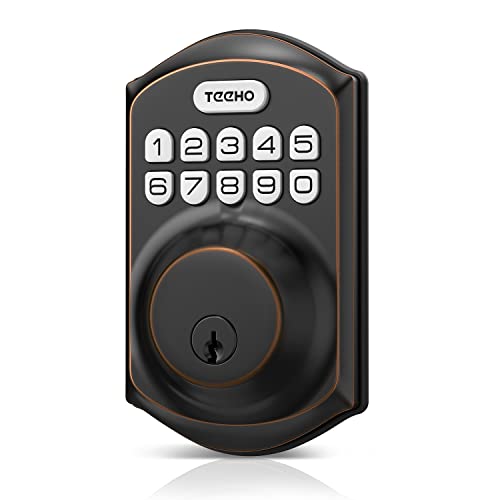
TEEHO Keyless Entry Keypad Deadbolt
Best for: reliable everyday keypad access on standard doors
- Access Method
- Keypad (what this guide is about)
- Access Methods
- Keypad
- Auto-Lock Delay
- 10-99 seconds
- User Code Capacity
- 20 codes
- Color
- Oil Rubbed Bronze
- Application
- Front Door
This deadbolt provides dedicated keypad entry for your front door using up to 20 user access codes and one single-use guest code. It features automatic locking configurable from 10 to 99 seconds, IP54 weather resistance, and an aluminum alloy body. Powered by four AA batteries lasting up to 365 days, it fits standard doors with 2-1/8-inch bore holes. It suits you if you want straightforward code-based access without complex features.
Pros
- Stores up to 20 user codes and 1 single-use temporary code
- Configurable auto-lock delay from 10 to 99 seconds
- IP54 weather resistance rating with aluminum alloy construction
- Rated for up to 365 days of battery life
Cons
- Incompatible with 38mm door bore holes
- Requires four AA batteries that are not included in the box
Good fit if
- You want multiple PIN codes for family alongside single-use codes for guests.
- You have a door with a standard 2-1/8-inch (54mm) bore hole.
- You prefer customizable auto-locking between 10 and 99 seconds.
Skip if
- You have a door with a 38mm bore hole.
- You require batteries to be included in the box.
Verdict: TEEHO Keyless Entry Keypad Deadbolt delivers straightforward keypad security with customizable auto-locking and capacity for 21 total codes. Its IP54 aluminum alloy build and long battery life make it a solid fit for standard front doors.

Schlage Electronic Keypad Deadbolt
Best for: durable Grade 2 keyless door security
- Access Method
- Keypad (what this guide is about)
- Access Methods
- Keypad, app
- User Code Capacity
- 19
- Dimensions
- 4.25 × 3.25 × 5.5 inches
- Weight
- 5.1 pounds
The Schlage Camelot Keypad Deadbolt provides keyless entry using a backlit silicone keypad. It stores up to 19 custom user codes and arrives with two pre-programmed codes. Built with Grade 2 metal construction, it fits doors between 1-3/8 inches and 1-3/4 inches thick. You throw the bolt manually with exterior and interior thumbturns. It suits you if you want sturdy, standalone hardware with multi-year battery life.
Pros
- Grade 2/AAA security rating with metal construction
- Up to 2-year battery life using an included 9V battery
- Illuminated silicone keypad for visibility in the dark
- Pre-programmed with two codes and holds up to 19 total
Cons
- Requires manual thumbturn rotation to lock and unlock the deadbolt
- Code storage capacity capped at 19 users
- Does not fit doors thicker than 1-3/4 inches
Good fit if
- You want a Grade 2 security rated deadbolt with heavy metal construction.
- You prefer long battery life from a standard 9V battery with a low-battery indicator.
- You need 19 or fewer access codes for household members.
Skip if
- You have a door thicker than 1-3/4 inches.
- You require storage for more than 19 entry codes.
- You prefer a motorized lock that extends the bolt automatically without turning a thumbturn.
Verdict: Schlage Camelot Keypad Deadbolt delivers Grade 2 metal security and reliable code access with up to two years of battery life. It is a dependable choice if you prefer manual thumbturn operation over motorized deadbolts.

Philips 4200 Series Wi-Fi Deadbolt with Handle
Best for: hub-free Wi-Fi control and bundled handle hardware
- Access Method
- Keypad, Remote Control (what this guide is about)
- Access Methods
- App, keypad PIN, fingerprint, voice
- Connectivity
- Built-in 2.4 GHz Wi-Fi
- Smart Home Compatibility
- Alexa, Google Assistant
- Auto-Lock Delay
- 0–180 seconds
- Included Door Hardware
- Handle set
View on Amazon: Philips 4200 Series Wi-Fi Deadbolt with Handle
This smart lock pairs a PIN keypad with integrated 2.4GHz Wi-Fi and an included matching handle set. You can program permanent, one-time, periodic, or recurring PIN codes directly from your smartphone without purchasing an external hub. The system also features 0.3-second fingerprint access, voice assistant integration, and an auto-lock timer adjustable up to 180 seconds. It suits you if you want complete remote code management directly from your phone.
Pros
- Built-in 2.4GHz Wi-Fi connects directly without a hub
- Supports permanent, one-time, periodic, and recurring passcodes
- Includes complete matching handle set in the box
- Fast 0.3-second biometric fingerprint scanner
Cons
- Requires Wi-Fi router placement within 33 feet
- Incompatible with rechargeable or lithium batteries
- Auto-lock is disabled by default
Good fit if
- You want hub-free remote management over a 2.4GHz Wi-Fi network.
- You need scheduled recurring or one-time keypad passcodes.
- You want a bundled matching handle set included in the box.
Skip if
- You cannot install the deadbolt within 33 feet of your Wi-Fi router.
- You prefer powering locks with rechargeable or lithium batteries.
Verdict: Philips 4200 Series Wi-Fi Keypad Deadbolt with Handle provides full app control without requiring a secondary bridge. It combines versatile PIN scheduling with bundled handle hardware for an all-in-one setup.

Yamiry Keypad Lock with Handle
Best for: Keypad entry with an integrated door handle
- Access Method
- Keypad (what this guide is about)
- Access Methods
- Keypad, key
- Auto-Lock Delay
- 5 to 99 seconds
- User Code Capacity
- 20
- Included Door Hardware
- Door knob
- Color
- Matte Black
The Yamiry Keypad Door Lock with Handle provides PIN-based entry via a backlit keypad with an integrated handle. It stores up to 20 user codes plus one-time guest codes, with code lengths from 4 to 8 digits. Constructed from aluminum alloy with an IP54 weather resistance rating, it includes an auto-lock timer adjustable between 5 and 99 seconds. This suits you if you need an all-in-one handle and numeric keypad lock for exterior doors.
Pros
- Stores up to 20 user codes and one-time guest access
- IP54 weather resistance rating with aluminum alloy construction
- Adjustable auto-lock delay from 5 to 99 seconds
- Backlit keypad with anti-prying user code support
Cons
- No wireless connectivity, Bluetooth, or app control listed
- Limits code memory to 20 user codes
Good fit if
- You want an integrated handle and keypad rather than a standalone deadbolt.
- You need timed auto-locking configurable between 5 and 99 seconds.
- You want standalone keypad access supporting 4- to 8-digit codes.
Skip if
- You want Wi-Fi or smartphone integration for remote lock management.
- You need credential storage for more than 20 regular users.
Verdict: Yamiry Keypad Door Lock with Handle delivers standalone code entry and physical key backup inside an IP54-rated aluminum housing. It is a practical pick if you want an integrated handle and auto-locking keypad without smart network features.

Philips Wi-Fi Smart Deadbolt
Best for: hub-free Wi-Fi control and multiple access options
- Access Method
- Keypad (what this guide is about)
- Access Methods
- App, passcode, fingerprint, key, voice
- Connectivity
- Built-in 2.4 GHz Wi-Fi
- Smart Home Compatibility
- Alexa, Google Assistant
- Auto-Lock Delay
- 10 to 180 seconds
- User Code Capacity
- 100
This Philips deadbolt integrates a keypad with built-in 2.4 GHz Wi-Fi, eliminating the need for an external hub. You can program up to 100 distinct access codes, use the integrated fingerprint scanner, or rely on a physical key. It also supports remote app management, auto-locking from 10 to 180 seconds, and Alexa or Google Assistant voice commands. It suits you if you want versatile entry methods without extra bridge hardware.
Pros
- Built-in 2.4 GHz Wi-Fi connects directly without a dedicated hub
- Stores up to 100 customizable passcodes for visitors or family
- Multiple entry methods including fingerprint scanner, keypad, and physical key
- Adjustable auto-lock timer from 10 to 180 seconds
Cons
- Requires a 2.4 GHz network and lacks 5 GHz Wi-Fi support
- Does not include an integrated door sensor
- AA alkaline batteries are not included
Good fit if
- You want direct Wi-Fi connectivity without purchasing a separate bridge or hub.
- You need up to 100 unique access codes for family, guests, or service workers.
- You want multiple entry methods including a keypad, fingerprint reader, and physical key.
Skip if
- You only have a 5 GHz Wi-Fi network.
- You need an integrated door sensor to detect open or closed door status.
- Your Wi-Fi router is located farther than 65 feet from the deadbolt.
Verdict: Philips Wi-Fi Smart Keypad Deadbolt delivers versatile entry through its 100-code keypad, fingerprint reader, and built-in Wi-Fi without needing a separate bridge. It is an effective solution if you want comprehensive remote access and code customization on a 2.4 GHz setup.

Kwikset Powerbolt 250 Keypad Deadbolt
Best for: offline keypad entry with easy re-keying
- Access Method
- Keypad (what this guide is about)
- Access Methods
- Keypad, key
- Auto-Lock Delay
- 30 sec, 1 min, 3 min, 5 min, 10 min
- User Code Capacity
- 25
- Color
- Matte Black
- Dimensions
- 0.97 × 2.69 × 4.59 inches
The Kwikset Powerbolt 250 is an electronic keypad deadbolt designed for standalone door access. It holds up to 25 customizable user codes and five one-time codes for guests. You can set auto-lock delays between 30 seconds and 10 minutes or activate vacation mode to shut down keypad input. It suits you if you want keypad code management, KW1 SmartKey re-keying, and long battery life without app connections.
Pros
- Supports 25 regular user codes and 5 one-time codes
- SmartKey cylinder allows re-keying to existing KW1 keys
- Configurable auto-lock delay from 30 seconds to 10 minutes
- Tamper alarm and 1-minute lockout after 3 failed attempts
- Up to 12-month battery life on four AA alkaline cells
Cons
- No Wi-Fi, Bluetooth, or mobile app connectivity
- Four AA alkaline batteries are not included
- No fingerprint reader built into the hardware
Good fit if
- You want offline code entry with up to 25 regular and 5 temporary codes.
- You already use KW1 keys and want to re-key the cylinder yourself.
- You need automated locking intervals ranging from 30 seconds to 10 minutes.
Skip if
- You want remote control or mobile app management over Wi-Fi.
- You prefer biometric unlocking via a fingerprint scanner.
Verdict: Kwikset Powerbolt 250 Keypad Deadbolt delivers dependable offline entry with ample code storage and straightforward SmartKey re-keying. It operates reliably without network connectivity or smartphone apps.

Ulecoce Fingerprint Deadbolt with Knob
Best for: all-in-one deadbolt and door knob replacements
- Access Method
- Keypad, Fingerprint (what this guide is about)
- Access Methods
- Fingerprint, keypad, app, key, voice
- Smart Home Compatibility
- Amazon Alexa, Google Assistant
- Auto-Lock Delay
- 5 to 60 seconds
- Included Door Hardware
- Knob set
- Color
- Black
The Ulecoce Fingerprint Keypad Deadbolt with Knob combines an exterior keypad, a 0.3-second fingerprint scanner, and a passage knob in a single set. It stores up to 512 total passcodes and fingerprints, giving you options for permanent, recurring, or one-time guest codes. You can also configure an automatic lock timer between 5 and 60 seconds. This setup suits you if you want multiple entry methods and matching door hardware in one package.
Pros
- Stores up to 512 combinations of fingerprints and keypad passcodes
- Adjustable auto-lock timer from 5 to 60 seconds
- Includes matching door knob hardware in the box
- Supports one-time, scheduled, recurring, and permanent access codes
Cons
- Requires a separate gateway for Alexa, Google Assistant, and remote control
- App-based unlocking without the gateway operates within a 5-meter range
Good fit if
- You want both a keypad deadbolt and a matching door knob in one set.
- You need high passcode capacity for families, guests, or recurring visitors.
- You want hands-free auto-locking configured between 5 and 60 seconds.
Skip if
- You need out-of-the-box Wi-Fi connectivity without purchasing an extra gateway.
- You prefer a standalone deadbolt without an included door knob.
Verdict: Ulecoce Fingerprint Keypad Deadbolt with Knob delivers versatile keypad access, fingerprint reading, and included knob hardware for complete entry door control. It provides strong local passcode management, though remote app and voice features require an add-on gateway.

Veise Keypad Deadbolt with Lever Handles
Best for: standard doors needing an all-in-one lever set
- Access Method
- Keypad (what this guide is about)
- Access Methods
- Keypad, key
- Auto-Lock Delay
- 10–99 seconds
- User Code Capacity
- 20
- Included Door Hardware
- 2 lever handles set
- Color
- Satin Nickel
The Veise Keypad Door Lock with Levers pairs an electronic keypad lock with matching dual lever handles. It stores 20 permanent access codes alongside one-time guest passwords and features adjustable auto-locking between 10 and 99 seconds. Built to ANSI Grade 3 standards with IP54 water resistance, it fits standard doors measuring 1-3/8 to 2 inches thick. You receive a complete keypad and handle replacement ready for straightforward screwdriver installation.
Pros
- Includes dual lever handles to complete the door installation
- Stores up to 20 permanent access codes and temporary one-time guest passwords
- Adjustable auto-lock timer programs between 10 and 99 seconds
- IP54 weather rating and ANSI Grade 3 certified zinc alloy build
Cons
- Requires four AA batteries that are not included in the box
- Lacks Wi-Fi, Bluetooth, or mobile app remote connectivity
- Specification requires avoiding prolonged direct sunlight and liquids on the keyhole
Good fit if
- You want a matching lever handle set packaged directly with your keypad lock.
- You manage guest access with single-use codes and distinct household pins.
- You prefer standalone push-button operation without wireless apps or smart home hubs.
Skip if
- You want remote unlocking and notifications via Wi-Fi or smartphone apps.
- You require commercial-grade ANSI Grade 1 or Grade 2 security ratings.
Verdict: Veise Keypad Door Lock with Levers combines keypad security and ergonomic handle hardware in a single coordinated package. It provides practical code management and flexible auto-locking for standard residential entryways.

NICE DIGI Keypad Door Lock with Handle
Best for: offline passcode access with an integrated handle
- Access Method
- Keypad (what this guide is about)
- Access Methods
- Passcode, key
- Auto-Lock Delay
- 5–99 seconds
- User Code Capacity
- 20 codes
- Included Door Hardware
- Handle
- Color
- Black
The NICE DIGI Keypad Door Lock with Reversible Handle combines a backlit keypad with an integrated door handle. It stores up to 20 user passcodes ranging from 4 to 8 digits and operates entirely offline without Wi-Fi, Bluetooth, or mobile apps. You get customizable auto-lock timing between 5 and 99 seconds, passage mode, and IP54 weather resistance, making it suitable if you want self-contained keypad hardware without network configuration.
Pros
- Stores up to 20 user codes (4–8 digits) and temporary one-time codes
- Auto-lock adjustable from 5 to 99 seconds plus passage mode
- IP54 weather-resistant aluminum alloy build with backlit keypad
- Reversible handle fits both left- and right-handed doors
Cons
- No Wi-Fi, Bluetooth, or mobile app connectivity
- Requires 4 AA batteries that are not included
- Lacks a fingerprint scanner
Good fit if
- You want an offline keypad lock without app setup or wireless connectivity.
- You need an integrated handle rather than a standalone deadbolt.
- You want flexible auto-lock timing or manual passage mode.
Skip if
- You need remote phone control or access tracking over Wi-Fi or Bluetooth.
- You prefer biometric fingerprint entry.
Verdict: NICE DIGI Keypad Door Lock with Reversible Handle delivers fully offline passcode entry with built-in handle hardware. It is a solid choice when you want straightforward code access without mobile apps or wireless configuration.

Yamiry Fingerprint Keypad Door Handle Lock
Best for: rental managers needing flexible keyless entry methods
- Access Method
- Keypad, Fingerprint (what this guide is about)
- Access Methods
- Fingerprint, app, passcode, fob, key
- Connectivity
- Bluetooth
- Smart Home Compatibility
- Amazon Alexa
- Color
- Matte Black
- Application
- Front Door
This front door smart lock combines a keypad with a fingerprint reader, Bluetooth app control, and physical keys. It includes a reversible handle designed to fit standard wooden doors without additional drilling. You can generate one-time passcodes and track access history using your smartphone. It suits property managers or homeowners who want multiple entry options in a single handle unit instead of a separate deadbolt.
Pros
- Reversible handle fits both left-handed and right-handed doors
- Offers six entry methods including keypad, fingerprint, fob, app, and mechanical key
- App enables one-time guest passcode creation and logs access history
- Installs into standard wooden door prep without additional drilling
Cons
- Requires a separately sold Wi-Fi gateway for remote unlock and Alexa voice control
- Specification only notes compatibility with standard wooden doors
Good fit if
- You want multiple entry methods including a numeric keypad and fingerprint scanner.
- You manage rental units and need to distribute temporary passcodes using a smartphone app.
- You need a reversible handle compatible with either left-handed or right-handed door swings.
Skip if
- You need built-in Wi-Fi and voice control without buying an add-on gateway.
- You have a non-wooden door or non-standard door prep.
Verdict: Yamiry Keypad and Fingerprint Smart Handle Lock delivers versatile access management with keypad, fingerprint, and app-based credential options. It works best for rental managers and homeowners needing an integrated handle solution that installs without new drilling.

Yamiry Fingerprint Smart Door Handle Lock
Best for: multi-method access with an integrated handle
- Access Method
- Keypad, Fingerprint (what this guide is about)
- Access Methods
- app, password, fob, fingerprint, key
- Connectivity
- Bluetooth
- Fingerprint Capacity
- 50
- User Code Capacity
- 50
- Color
- Matte Black
The Yamiry Keypad Fingerprint Door Handle Lock combines a digital keypad, fingerprint reader, and handle into one aluminum unit. It stores up to 50 passwords, fingerprints, and key fobs, while pairing via Bluetooth for local app management. You can lock it manually, via app, or through auto-lock. It suits you if you want multiple keyless entry methods on an interior or standard exterior door without installing a separate deadbolt.
Pros
- Supports five unlock methods: keypad, fingerprint, key fob, app, and physical key
- Stores up to 50 passwords, 50 fingerprints, and 50 key fobs
- Provides auto-lock, in-app locking, and one-touch keypad locking
- Constructed with corrosion-resistant aluminum hardware
Cons
- Requires a separate gateway for remote Wi-Fi control
- Integrated handle design replaces the door knob rather than mounting as a standalone deadbolt
Good fit if
- You want multiple access options including keypad codes, fingerprints, and key fobs
- You prefer an all-in-one handle and lock mechanism rather than a separate deadbolt
- You are satisfied managing user codes locally using Bluetooth
Skip if
- You need built-in Wi-Fi connectivity without purchasing additional hardware
- You want a dedicated deadbolt to pair with an existing handle set
Verdict: Yamiry Keypad Fingerprint Door Handle Lock delivers versatile 5-in-1 entry with solid aluminum hardware and local Bluetooth control. It functions as a complete knob replacement, though remote operations require an optional Wi-Fi gateway.

Yale Wi-Fi Smart Deadbolt with Keypad
Best for: hub-free Wi-Fi control and scheduled guest access
- Access Method
- Keypad (what this guide is about)
- Access Methods
- Keypad, smartphone, Apple Watch, key
- Connectivity
- 2.4 or 5 GHz Wi-Fi
- User Code Capacity
- Unlimited
- Color
- Oil Rubbed Bronze
- Dimensions
- 0.88 × 2.5 × 4.88 inches
This Yale deadbolt pairs an exterior keypad with built-in dual-band Wi-Fi, eliminating the need for an extra bridge. It offers a physical key cylinder alongside keypad and auto-unlock access. Rated BHMA Grade 2, the lock operates in temperatures from -22°F to 140°F. DoorSense confirms door alignment before the auto-lock engages. You can manage unlimited access codes via the Yale Access app, making it suitable if you host guests or need remote control.
Pros
- Built-in 2.4 GHz and 5 GHz Wi-Fi requires no extra hub
- BHMA Grade 2 commercial-grade durability rating
- DoorSense sensor detects if door is closed before auto-locking
- Operates in extreme temperatures from -22°F to 140°F
Cons
- Yale Access app functions only in the US and Canada
- Lacks a fingerprint scanner
Good fit if
- You want built-in dual-band Wi-Fi connectivity without setting up a plug-in bridge.
- You need a BHMA Grade 2 certified lock that withstands temperatures down to -22°F.
- You prefer multiple access methods including keypad entry, phone auto-unlock, and a backup physical key.
Skip if
- You live outside the US or Canada where the mobile app is unsupported.
- You want biometric fingerprint access directly on the lock hardware.
Verdict: Yale Wi-Fi Smart Lock Deadbolt with Keypad provides hub-free dual-band Wi-Fi, BHMA Grade 2 hardware, and DoorSense monitoring. It delivers versatile access options for front doors requiring reliable remote code management.

Kwikset Halo Wi-Fi Keypad Deadbolt
Best for: large households needing hub-free Wi-Fi guest codes
- Access Method
- Keypad (what this guide is about)
- Access Methods
- Keypad, Kwikset app, geofencing
- Smart Home Compatibility
- Amazon Alexa, Google Home
- User Code Capacity
- Up to 250 access codes
- Connectivity
- Wi-Fi
- Color
- Satin Nickel
The Kwikset Halo Wi-Fi Keypad Deadbolt gives you direct Wi-Fi control without a separate hub. You can manage entry via a backlit keypad that stores up to 250 codes, or unlock automatically using mobile geofencing. It integrates directly with Amazon Alexa and Google Home for voice routines. This lock suits you if you need extensive guest code capacity alongside remote access and intrusion alerts for standard 1-3/8-inch to 1-3/4-inch doors.
Pros
- Built-in Wi-Fi connects directly to your network without an added hub
- Backlit keypad stores up to 250 individual access codes
- Supports smartphone geofencing for automated keyless entry
- Integrates with Amazon Alexa and Google Home for voice control
Cons
- Electronics warranty lasts 1 year compared to the lifetime mechanical coverage
- Lacks a fingerprint sensor for biometric entry
- Does not fit doors thicker than 1-3/4 inches
Good fit if
- You want remote lock access over Wi-Fi without buying a dedicated bridge or hub
- You need to issue and manage up to 250 individual guest codes
- You want hands-free entry using smartphone geofencing
Skip if
- You have an exterior door thicker than 1-3/4 inches
- You prefer biometric fingerprint access over entering keypad codes
Verdict: Kwikset Halo Wi-Fi Keypad Deadbolt provides hub-free Wi-Fi control and a high code capacity of 250 user pins. It is a solid choice if you need voice assistant integration, geofencing, and intrusion alerts on standard exterior doors.
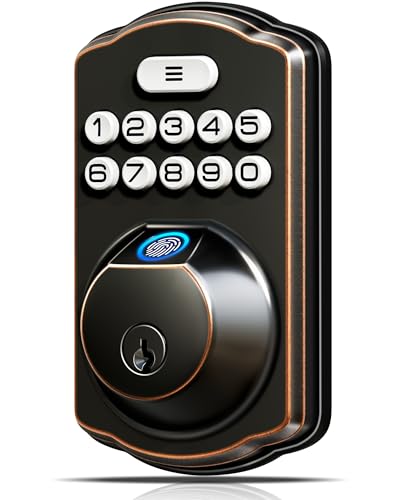
Veise Traditional Fingerprint Keypad Deadbolt
Best for: offline keypad entry with traditional styling
- Access Method
- Keypad, Fingerprint (what this guide is about)
- Access Methods
- Fingerprint, keypad, key
- Auto-Lock Delay
- 10-99 seconds
- Fingerprint Capacity
- 20
- User Code Capacity
- 20
- Color
- Oil Rubbed Bronze
View on Amazon: Veise Traditional Fingerprint Keypad Deadbolt
This deadbolt combines a traditional exterior with keypad and biometric access. You can store up to 20 user passwords, 20 fingerprints, and temporary one-time codes for guests. It supports adjustable auto-locking between 10 and 99 seconds, alongside anti-peeping digit entry. If you want offline electronic security for standard 1-3/8-inch to 2-inch doors without needing network connections or smartphone apps, this lock fits your setup.
Pros
- Stores up to 20 fingerprints and 20 user passwords
- Adjustable auto-lock timer from 10 to 99 seconds
- Rated IP54 weather resistant with an operating range of -31°F to 158°F
- Anti-peeping protection allows extra digits before or after your PIN
Cons
- Requires four AA batteries that are not included
- Lacks Wi-Fi or smartphone app connectivity
- Caps memory at 20 fingerprints and 20 user codes
Good fit if
- You want traditional door hardware styling paired with keypad and fingerprint entry.
- You need an offline deadbolt that operates without smartphone apps or Wi-Fi.
- You want customizable auto-locking between 10 and 99 seconds.
Skip if
- You require remote access control or smart home app integration.
- You need to store more than 20 user passcodes or 20 fingerprints.
Verdict: Veise Traditional Keypad and Fingerprint Deadbolt gives you multi-method offline entry with traditional styling and auto-locking features. It delivers dependable keypad and biometric access without requiring network setup or app management.

DESLOC Fingerprint Smart Lock Deadbolt
Best for: remote app control with included Wi-Fi bridge
- Access Method
- Keypad, Fingerprint, App Control (what this guide is about)
- Access Methods
- Fingerprint, PIN, key, app, fob, voice
- Connectivity
- Bluetooth, Wi-Fi
- Smart Home Compatibility
- Alexa, Google Voice Assistant
- Color
- Black
- Dimensions
- 7.28 × 6.3 × 3.27 inches
The DESLOC WiFi Fingerprint Keypad Deadbolt gives you remote access management via the included G2 Wi-Fi gateway and TTLock app. You can unlock using the keypad, fingerprint sensor, physical keys, fobs, or mobile app. It operates in temperatures from -22°F to 158°F with an IP54 weather resistance rating. This setup suits you if you want keypad entry with scheduled temporary codes and remote app controls included out of the box.
Pros
- Includes G2 Wi-Fi gateway for remote TTLock app management
- Supports keypad PINs, fingerprints, physical keys, fobs, and voice control
- Rated IP54 weather resistant with operating range from -22°F to 158°F
- Features USB-C port for emergency backup power
Cons
- Requires four AA batteries that are not included
- Requires a door backset hole depth greater than 1 inch
Good fit if
- You want an included Wi-Fi gateway to manage entry codes remotely.
- You need multiple entry options including keypad, fingerprint, and app access.
- You need an exterior keypad rated for sub-zero temperatures.
Skip if
- You want batteries included in the package.
- You have a door with a backset hole depth of 1 inch or less.
Verdict: DESLOC WiFi Fingerprint Keypad Deadbolt combines keypad and biometric access with an included Wi-Fi gateway for remote app control. It delivers versatile access methods and scheduling without requiring a separate network bridge purchase.
Specifications side by side
| Spec | TEEHO Keyless Entry Keypad Deadbolt | Schlage Electronic Keypad Deadbolt | Philips 4200 Series Wi-Fi Deadbolt with Handle | Yamiry Keypad Lock with Handle | Philips Wi-Fi Smart Deadbolt | Kwikset Powerbolt 250 Keypad Deadbolt | Ulecoce Fingerprint Deadbolt with Knob | Veise Keypad Deadbolt with Lever Handles | NICE DIGI Keypad Door Lock with Handle | Yamiry Fingerprint Keypad Door Handle Lock | Yamiry Fingerprint Smart Door Handle Lock | Yale Wi-Fi Smart Deadbolt with Keypad | Kwikset Halo Wi-Fi Keypad Deadbolt | Veise Traditional Fingerprint Keypad Deadbolt | DESLOC Fingerprint Smart Lock Deadbolt |
|---|---|---|---|---|---|---|---|---|---|---|---|---|---|---|---|
| Access Methods | Keypad | Keypad, app | App, keypad PIN, fingerprint, voice | Keypad, key | App, passcode, fingerprint, key, voice | Keypad, key | Fingerprint, keypad, app, key, voice | Keypad, key | Passcode, key | Fingerprint, app, passcode, fob, key | app, password, fob, fingerprint, key | Keypad, smartphone, Apple Watch, key | Keypad, Kwikset app, geofencing | Fingerprint, keypad, key | Fingerprint, PIN, key, app, fob, voice |
| Connectivity | not specified | not specified | Built-in 2.4 GHz Wi-Fi | not specified | Built-in 2.4 GHz Wi-Fi | not specified | not specified | not specified | not specified | Bluetooth | Bluetooth | 2.4 or 5 GHz Wi-Fi | not specified | not specified | Bluetooth, Wi-Fi |
| Smart Home Compatibility | not specified | not specified | Alexa, Google Assistant | not specified | Alexa, Google Assistant | not specified | Amazon Alexa, Google Assistant | not specified | not specified | Amazon Alexa | not specified | not specified | Amazon Alexa, Google Home | not specified | Alexa, Google Voice Assistant |
| Auto-Lock Delay | 10-99 seconds | not specified | 0–180 seconds | 5 to 99 seconds | 10 to 180 seconds | 30 sec, 1 min, 3 min, 5 min, 10 min | 5 to 60 seconds | 10–99 seconds | 5–99 seconds | not specified | not specified | not specified | not specified | 10-99 seconds | not specified |
| Fingerprint Capacity | not specified | not specified | not specified | not specified | not specified | not specified | not specified | not specified | not specified | not specified | 50 | not specified | not specified | 20 | not specified |
| User Code Capacity | 20 codes | 19 | not specified | 20 | 100 | 25 | not specified | 20 | 20 codes | not specified | 50 | Unlimited | Up to 250 access codes | 20 | not specified |
| Included Door Hardware | not specified | not specified | Handle set | Door knob | not specified | not specified | Knob set | 2 lever handles set | Handle | not specified | not specified | not specified | not specified | not specified | not specified |
| Access Method | Keypad | Keypad | Keypad, Remote Control | Keypad | Keypad | Keypad | Keypad, Fingerprint | Keypad | Keypad | Keypad, Fingerprint | Keypad, Fingerprint | Keypad | Keypad | Keypad, Fingerprint | Keypad, Fingerprint, App Control |
| Color | Oil Rubbed Bronze | Aged Bronze (Pack of 1) | Matte Black | Matte Black | Matt Black | Matte Black | Black | Satin Nickel | Black | Matte Black | Matte Black | Oil Rubbed Bronze | Satin Nickel | Oil Rubbed Bronze | Black |
| Application | Front Door | not specified | not specified | not specified | Front Door | not specified | not specified | not specified | Front Door | Front Door | not specified | not specified | not specified | not specified | not specified |
| Included Hardware | not specified | not specified | Handle | Handle | not specified | not specified | Knob | Lever | Handle | Handle | Handle | not specified | not specified | not specified | not specified |
| Style | not specified | not specified | not specified | not specified | not specified | not specified | not specified | not specified | not specified | not specified | not specified | not specified | not specified | Traditional | not specified |
| Dimensions | 5.12 × 2.95 × 1.3 inches | 4.25 × 3.25 × 5.5 inches | 6 × 2.2 × 1.5 inches | 5.62 × 2.7 × 3 inches | 6 × 2 × 1.5 inches | 0.97 × 2.69 × 4.59 inches | 3.54 × 7.17 × 11 inches | 2.56 × 5.35 × 6.22 inches | 5.39 × 2.79 × 2.7 inches | 5.5 × 2.95 × 0.79 inches | 5.62 × 2.69 × 3 inches | 0.88 × 2.5 × 4.88 inches | 3.99 × 4.24 × 9.74 inches | 2.71 × 1.2 × 5.47 inches | 7.28 × 6.3 × 3.27 inches |
| Weight | 1.76 pounds | 5.1 pounds | not specified | 2.6 pounds | 1.4 pounds | 2.26 pounds | 3.45 pounds | 2.9 pounds | not specified | not specified | 2.6 pounds | not specified | 2.5 pounds | not specified | not specified |
| Size | 5.125 x 3 x 4.25 inches | 2.25 x 5.5 x 3.25 inch | 2.2 inches x 6 inches x 1.5 inches | 2.7 inches x 5.62 inches x 3 inches | 2 inches x 6 inches x 1.5 inches | Transitional | / | 2.96 x 6.3 x 1.15 inches | not specified | not specified | Regular | Wi-Fi | not specified | 1.2 inches x 2.71 inches x 5.47 inches | not specified |
| Model | TE001 | BE365VCAM716 | DDL242X-1HW-L | YR04 | DDL242X-1HW | 992500-008 | Ulecoce U68 | KS01B | Z1A | Yamiry YR01 | YR05 | YRD410-WF1-0BP | 99380-001 | KS02A | B200 |
How to Choose a Keypad Deadbolt
-
Check User Code Capacity
Evaluate how many individual PINs your household or property requires before choosing a lock. Basic keypad deadbolts often store 20 to 30 custom passcodes, which suits single-family homes and occasional guests. If you manage rental properties, host frequent visitors, or run an office, select a model engineered for higher capacity. The Kwikset Halo Wi-Fi Keypad Deadbolt supports up to 250 user pins, allowing you to assign unique credentials to every visitor without constantly erasing existing codes. Verify storage specs to match your regular traffic.
-
Match Door Hardware Configurations
Determine whether you need a standalone deadbolt unit or a full door hardware replacement. A standalone deadbolt installs in place of your existing top lock while keeping your current door pull intact. If you want matching finishes or need to replace a worn latch simultaneously, pick a bundle that includes complementary lower hardware. For example, the Veise Keypad Deadbolt with Lever Handles supplies both the electronic keypad deadbolt and matching handle hardware in one package. Inspect your door prep to confirm hole spacing before selecting a bundled set.
-
Consider Multi-Method Biometric Entry
Decide if your entry setup requires secondary unlocking methods alongside the primary keypad. Push-button and touchscreen keypads work well for shared family access, but biometric sensors eliminate the need to memorize or punch in digits. If you want faster entry when carrying groceries or entering in low light, look for hybrid models with integrated fingerprint scanners. The Philips Wi-Fi Smart Deadbolt includes a fingerprint scanner alongside its 100-code keypad, giving you flexible entry alternatives. Check whether multi-access options suit household members who struggle with PIN codes.
-
Verify Network Bridge Requirements
Examine how connected locks link to your home network before planning an installation. While some smart locks feature built-in Wi-Fi radios that connect directly to standard 2.4 GHz routers, others rely on dedicated bridge modules to enable app-based locking and notifications. The DESLOC Fingerprint Smart Lock Deadbolt comes packaged with an included Wi-Fi gateway, eliminating the need to buy auxiliary bridge hardware later. If you want remote control away from home, verify whether the lock package contains all required network accessories or if a separate gateway purchase is mandatory.
-
Check Key Cylinder Compatibility
Review how physical backup keys operate on your keypad deadbolt. Even on digital locks, mechanical cylinders provide critical access if batteries drain or electronics fail. If your home uses existing exterior keys that you prefer not to replace, look for locks designed with rapid re-keying mechanisms. The Kwikset Powerbolt 250 Keypad Deadbolt incorporates SmartKey re-keying technology, which lets you reset the cylinder to match existing house keys in seconds. Checking cylinder type ensures you do not have to carry extra keys for every entryway.
-
Review Exterior Ingress Ratings
Inspect the ingress protection specifications if your deadbolt will face direct outdoor exposure. Exterior doors without deep porch overhangs expose electronic keypads to windborne debris, splashing water, and temperature shifts. Deadbolts designed with certified weather ratings provide sealed interior components to protect against moisture intrusion. The Yamiry Keypad Lock with Handle features an IP54-rated aluminum housing built to withstand dust and rain. Check the product specifications for formal IP ratings or weatherproofing details before installing a keypad lock on an uncovered entryway.
Frequently asked questions
Do keypad deadbolts work if the power or internet goes out?
Yes, keypad deadbolts run on self-contained battery power and remain operational during electrical or network outages. Offline models store access codes directly on the internal hardware without needing network access. Even on Wi-Fi models, the physical keypad grants local entry without internet service. Furthermore, units like the Yamiry Keypad Lock and Kwikset Powerbolt 250 feature backup physical key cylinders so you can unlock the door manually.
What is the difference between a standalone keypad and a Wi-Fi deadbolt?
Standalone keypad deadbolts operate completely offline, while Wi-Fi deadbolts support remote configuration and real-time status updates over a network. Standalone hardware like the NICE DIGI Z1A requires you to program and manage user credentials directly at the door. Connected options like the Kwikset Halo and Yale Wi-Fi Smart Deadbolt connect to wireless networks to deliver mobile guest scheduling, remote locking, and intrusion alerts.
Can you rekey a keypad deadbolt to match your existing house key?
You can rekey a keypad deadbolt if the unit incorporates an adjustable key cylinder. The Kwikset Powerbolt 250 includes SmartKey technology, allowing you to re-key the exterior cylinder to match an existing Kwikset house key in seconds. Locks without specialized re-key cylinders use standard physical key profiles that require traditional locksmith servicing or dedicated backup keys supplied with the hardware.
Do keypad deadbolts come with replacement handles or knobs?
Some deadbolts sell as standalone units, while others package matching entry hardware in the box. Single deadbolts like the TEEHO TE001 mount above your existing door knob or lever. In contrast, all-in-one sets like the Veise KS01B bundle coordinated lever handles, and the Ulecoce U68 includes an entry knob. Choosing a bundled set allows you to replace all front door hardware simultaneously with matching finishes.
What happens when the batteries die on an electronic keypad deadbolt?
When batteries run out, the electronic keypad stops processing entry codes until you swap the cells. You can still open your door using physical backup keys included with units like the Yamiry Keypad Lock. On locks with manual thumbturns, like the Schlage BE365, turning the knob operates the bolt directly, and its battery lasts up to two years. Replacing the batteries immediately restores code functionality.
Do keypad deadbolts support fingerprint access?
Yes, several keypad deadbolts incorporate biometric fingerprint scanners alongside standard pushbuttons. Models such as the Philips Wi-Fi Smart Deadbolt and DESLOC B200 provide both numeric keypads and integrated fingerprint sensors. Biometric scanners grant immediate access with a single touch, while the keypad provides an alternative entry method for guests or family members who prefer using a numeric passcode.
Do you need an extra hub or gateway for a keypad smart lock?
It depends on whether the deadbolt integrates native Wi-Fi or uses a separate bridge. The Yale Wi-Fi Smart Deadbolt and Philips 4200 Series connect directly to Wi-Fi without secondary adapters. The DESLOC B200 includes a Wi-Fi gateway directly in the package. Other units, such as the Ulecoce U68 and Yamiry YR05, operate via local keypad or Bluetooth, requiring an optional add-on gateway for remote controls.