Best Deadbolts Under $200 in 2026: 15 Picks Ranked by Specs
As an Amazon Associate we earn from qualifying purchases. Links on this page are affiliate links.
Finding a dependable deadbolt under 200 means balancing hardware durability with the right access methods for your door. We compared 15 models based on the specifications published on the listings to help you find the right fit.
The Schlage Keypad Electronic Deadbolt earns the top spot for offline security because it supports up to 19 access codes with no wiring required. This guide helps you choose between standalone keypads, connected Wi-Fi locks, and biometric setups based on physical dimensions, connectivity, and door compatibility.
Quick picks
The best fit for you
- You want simple keypad access without any smart features Schlage Keypad Electronic Deadbolt It operates completely offline with keypad access and stores up to 19 user codes without wiring.
- You want built-in video monitoring inside your deadbolt Chamberlain myQ Secure View Smart Deadbolt It features a built-in 2K resolution camera with color night vision and battery power.
- You want smart integration through the Matter standard Yale Smart Deadbolt with Matter This model includes native Matter connectivity and direct compatibility with Google Assistant.
Our 15 picks

Schlage Keypad Electronic Deadbolt
Best for: offline, code-based deadbolt security
- Access Methods
- Keypad
- User Code Capacity
- Up to 19
- Dimensions
- 2.63 × 3.17 × 5.43 inches
- Weight
- 4.24 pounds
The Schlage Keypad Electronic Deadbolt gives you standalone keyless door access using a dedicated silicone-coated numeric keypad. You can program and manage up to 19 custom access codes directly on the hardware without running any wiring. It features a manual Turn Lock exterior knob for fast locking without a key. This lock suits you if you want dependable code-based entry without dealing with wireless connectivity, smart home integration, or complex apps.
Pros
- Stores up to 19 individual user access codes
- Silicone-coated keypad prevents digit wear over time
- Turn Lock feature allows locking without using a physical key
- Wire-free design installs with no electrical wiring needed
Cons
- No Wi-Fi, Bluetooth, or smart home wireless connectivity
- Lacks fingerprint or biometric access options
- Capacity capped at 19 stored codes
Good fit if
- You want direct keypad access without managing phone apps or Wi-Fi
- You need to assign up to 19 distinct codes for family and visitors
- You want quick one-touch locking when leaving the house
Skip if
- You require remote lock control or smart home hub connectivity
- You want biometric fingerprint entry
Verdict: Schlage Keypad Electronic Deadbolt delivers reliable offline security with support for up to 19 access codes and no wiring required. It is an ideal pick if you want pure keypad convenience without smart platform requirements.

Yale Wi-Fi Smart Deadbolt with Keypad
Best for: dual-band Wi-Fi and Grade 2 security
- Access Methods
- Keypad, smartphone, Apple Watch, key
- Connectivity
- 2.4 or 5 GHz Wi-Fi
- User Code Capacity
- Unlimited
- Color
- Black
- Dimensions
- 0.88 × 2.5 × 4.88 inches
- Weight
- 1 pounds
The Yale Wi-Fi Smart Deadbolt provides keyless entry using an integrated keypad, direct 2.4 GHz or 5 GHz Wi-Fi connectivity, and a physical backup key. It pairs with the Yale Access app for smartphone and Apple Watch control without requiring an external bridge. Featuring BHMA Grade 2 certification and DoorSense auto-locking, this deadbolt suits you if you want dual-band Wi-Fi access paired with verified commercial-grade hardware.
Pros
- Supports both 2.4 GHz and 5 GHz Wi-Fi networks without an external hub
- BHMA Grade 2 certified for commercial-grade durability
- DoorSense detects door closure status before engaging auto-lock
- Offers keypad, app, Apple Watch, auto-unlock, and a physical key entry
Cons
- Yale Access app control is restricted to the US and Canada
- Lacks a built-in biometric or fingerprint scanner
Good fit if
- You need a smart lock that connects directly to 5 GHz or 2.4 GHz Wi-Fi networks.
- You want a physical backup key cylinder alongside keypad entry.
- You use an Apple Watch or smartphone for hands-free auto-unlock features.
Skip if
- You reside outside the US or Canada where the Yale Access app is unavailable.
- You want fingerprint recognition built directly into the deadbolt.
Verdict: Yale Wi-Fi Smart Deadbolt with Keypad delivers dual-band Wi-Fi and BHMA Grade 2 durability without requiring an extra hub. It gives you flexible entry options including auto-unlock, keypad codes, and a traditional physical key.

Kwikset Halo Wi-Fi Touchscreen Smart Deadbolt
Best for: large households needing hub-free guest code management
- Access Methods
- Touchscreen, app, auto-unlock
- Smart Home Compatibility
- Amazon Alexa, Google Home
- User Code Capacity
- Up to 250
- Included Door Hardware
- Deadbolt
- Connectivity
- Wi-Fi
- Dimensions
- 3.99 × 4.24 × 9.74 inches
View on Amazon: Kwikset Halo Wi-Fi Touchscreen Smart Deadbolt
The Kwikset Halo Wi-Fi Touchscreen Smart Deadbolt gives you direct wireless control without an external hub. It connects to your Wi-Fi network, pairs with Alexa or Google Home, and holds up to 250 access codes. You get built-in intrusion alerts, geofence auto-unlock, and an adjustable backset fitting doors 1-3/8 to 1-3/4 inches thick. It suits households that manage access for multiple guests without extra bridge hardware.
Pros
- Stores up to 250 custom access codes
- Built-in Wi-Fi requires no external hub
- Geofence auto-unlock and customizable auto-lock timer
- Grade AAA certified with intrusion detection alerts
Cons
- Electronics warranty covers only 1 year
- Max door thickness supported is 1-3/4 inches
Good fit if
- You need to assign up to 250 unique guest codes.
- You want Wi-Fi connectivity without adding an external hub.
- You control smart home gear via Amazon Alexa or Google Home.
Skip if
- You have a door thicker than 1-3/4 inches.
- You require electronics warranty coverage beyond one year.
Verdict: Kwikset Halo Wi-Fi Touchscreen Smart Deadbolt delivers hub-free Wi-Fi control and massive code capacity for busy homes.

Schlage Arrive Wi-Fi Smart Deadbolt
Best for: managing many guest codes over Wi-Fi
- Access Methods
- Keypad, app, voice control
- Connectivity
- Built-in Wi-Fi
- Smart Home Compatibility
- Alexa, Google Home
- User Code Capacity
- Up to 250 access codes
- Color
- Satin Nickel
- Dimensions
- 0.83 × 2.5 × 4.49 inches
The Schlage Arrive Wi-Fi Smart Deadbolt connects directly to your home network without an external bridge. You can manage up to 250 unique access codes in the Schlage Home app and check lock history from anywhere. The lock features backlit silicone push buttons, pairs with Alexa and Google Home, and carries the highest residential BHMA rating. It fits standard doors measuring 1-3/8 to 1-3/4 inches thick with no hardwiring required.
Pros
- Built-in Wi-Fi connects directly to your home network without an added bridge
- Stores up to 250 access codes for guests and household members
- Certified highest residential BHMA rating for security, durability, and finish
- Integrates with Alexa and Google Home for voice control and routines
Cons
- Lacks a fingerprint scanner for biometric access
- Door thickness compatibility caps at 1-3/4 inches
Good fit if
- You need to store and manage up to 250 unique guest codes.
- You want remote app control over Wi-Fi without buying an extra hub.
- You integrate your door locks into Alexa or Google Home automation routines.
Skip if
- You prefer biometric fingerprint unlocking instead of push buttons.
- You have an exterior door thicker than 1-3/4 inches.
Verdict: Schlage Arrive Wi-Fi Smart Deadbolt pairs direct Wi-Fi control with an expansive 250-code capacity and top-tier residential BHMA certification. It delivers robust physical security and flexible remote access without requiring extra bridge hardware.

Chamberlain myQ Secure View Smart Deadbolt
Best for: all-in-one video doorbell and deadbolt security
- Access Methods
- Face, fingerprint, PIN, app, key
- Included Door Hardware
- Deadbolt
- Power Source
- Battery Powered
- Resolution
- 2K
- Night Vision
- Color Night Vision
- Color
- Black
The Chamberlain myQ Secure View combines a deadbolt, video doorbell, and 2K HDR camera into a single battery-powered unit. You get color night vision, motion alerts, and five ways to unlock, including facial recognition, fingerprint scanning, PIN codes, physical keys, and app control. It suits you if you want an all-in-one front-door entry device without wiring separate hardware.
Pros
- Built-in 2K HDR camera with color night vision
- Five access methods: face recognition, fingerprint, PIN, app, and physical key
- Comes bundled with a chime and an extra battery
- Battery-powered setup requires no hardwired electrical connections
Cons
- Face and fingerprint recognition unavailable in Illinois, Texas, or outside US/Canada
- Large footprint measuring 6.85 inches tall and weighing 6.15 pounds
Good fit if
- You want an integrated 2K video doorbell directly inside your deadbolt.
- You prefer hands-free unlocking using facial recognition or biometric entry.
- You need a battery-operated lock bundle that includes an extra battery and chime.
Skip if
- You live in Illinois, Texas, or outside the United States and Canada.
- You prefer a compact deadbolt that occupies minimal space on the door.
Verdict: Chamberlain myQ Secure View Smart Deadbolt integrates a 2K HDR camera, video doorbell, and multi-method keyless lock into one battery-powered unit. It gives you comprehensive doorstep monitoring and hands-free entry without requiring hardwired power.
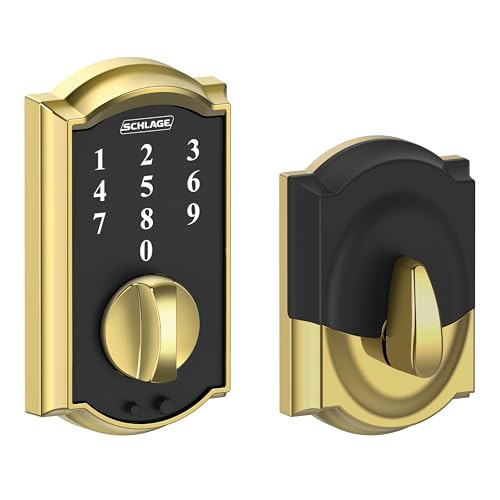
Schlage Touch Camelot Brass Deadbolt
Best for: standalone keyless entry in classic brass
- Access Methods
- Touchscreen keypad
- User Code Capacity
- Up to 19 codes
- Material
- Brass
- Dimensions
- 1.71 × 3 × 5.4 inches
- Weight
- 2.96 pounds
This deadbolt pairs a bright brass finish with a cylinder-free build. You enter via a backlit, fingerprint-resistant touchscreen that holds up to 19 access codes. Because the unit lacks a physical keyway, picking and bumping are impossible. It carries a Grade 2 security rating and runs on a 9V battery with exterior jump-start terminals. Choose this model if you want simple keyless access without wireless networking.
Pros
- Cylinder-free design eliminates key picking and bumping
- Stores up to 19 user codes with 2 pre-programmed
- Grade 2/AAA security rating for durability
- Exterior 9V jump-start feature prevents lockout during battery failure
- Slim 1.71-inch exterior profile fits behind screen doors
Cons
- No physical keyhole for traditional mechanical backup
- Lacks Wi-Fi, Bluetooth, or smart home app connectivity
- Capacity capped at 19 total access codes
Good fit if
- You want keyless entry without managing physical keys.
- You need a bright brass deadbolt with a Grade 2 rating.
- You prefer standalone numeric keypad operation without network setup.
Skip if
- You require remote locking, Wi-Fi support, or mobile app controls.
- You prefer a physical keyway for backup manual entry.
- You need to store codes for more than 19 users.
Verdict: Schlage Touch Camelot Brass Deadbolt delivers pick-proof standalone electronic security in a classic bright brass casing. It trades wireless integrations for dependable offline keypad access and a Grade 2 build.

Schlage Connect Century Z-Wave Smart Deadbolt
Best for: Z-Wave smart homes wanting Grade 1 security
- Access Methods
- Touchscreen, keypad, key
- Connectivity
- Z-Wave Plus
- Smart Home Compatibility
- Samsung SmartThings, Ring Alarm
- User Code Capacity
- 30
- Color
- Satin Nickel
- Dimensions
- 1 × 3 × 5 inches
View on Amazon: Schlage Connect Century Z-Wave Smart Deadbolt
The Schlage Connect Century Z-Wave Smart Deadbolt pairs with existing Z-Wave hubs like Samsung SmartThings or Ring Alarm. You get an ANSI/BHMA Grade 1 security rating, a built-in alarm, and storage for up to 30 unique keypad access codes. It runs on four included AA batteries for up to one year. This lock suits you if you already run a compatible Z-Wave home automation network and need certified heavy-duty physical security for standard exterior doors.
Pros
- ANSI/BHMA Grade 1/AAA security rating with built-in alarm
- Stores up to 30 unique access codes on backlit touchscreen
- Z-Wave Plus connectivity with S2 Security encryption
- Includes physical backup key and 4 AA batteries
Cons
- Requires a separate Z-Wave hub for remote access
- Lacks native Wi-Fi connectivity
- No biometric fingerprint scanner
Good fit if
- You already operate a Z-Wave system such as Samsung SmartThings or Ring Alarm.
- You require Grade 1 security hardware with a built-in audible alarm.
- You want keypad entry for up to 30 codes plus a physical key backup.
Skip if
- You want direct Wi-Fi connectivity without purchasing a separate hub.
- You prefer biometric unlocking via a fingerprint reader.
Verdict: Schlage Connect Century Z-Wave Smart Deadbolt delivers Grade 1 certified security and reliable code entry for homes with a Z-Wave hub. It provides dependable local keypad access and system integration without built-in Wi-Fi hardware.

Veise Wi-Fi Smart Deadbolt with Handle Set
- Access Methods
- Voice, fingerprint, app, code, card, key
- Smart Home Compatibility
- Amazon Alexa, Google
- Auto-Lock Delay
- 0-180s
- Fingerprint Capacity
- 20+
- User Code Capacity
- 100+
- Included Door Hardware
- Handle set

Philips Wi-Fi Smart Deadbolt Set with Handles
Best for: complete door handle and biometric deadbolt upgrades
- Access Methods
- App, fingerprint, PIN, key, voice
- Smart Home Compatibility
- Amazon Alexa, Google Assistant
- Auto-Lock Delay
- 30 to 180 seconds
- User Code Capacity
- Up to 100
- Included Door Hardware
- Deadbolt with 2 handles
- Connectivity
- Wi-Fi
View on Amazon: Philips Wi-Fi Smart Deadbolt Set with Handles
The Philips Wi-Fi Smart Lock Set pairs a connected keypad deadbolt with two matching door handles in jet black. Built-in Wi-Fi lets you unlock via fingerprint, PIN code, physical key, the Philips app, or voice assistants without an extra bridge. It stores up to 100 user codes and fits doors 35 to 50 millimeters thick. This set suits you if you need a complete handle and deadbolt replacement.
Pros
- Five unlock methods: fingerprint, PIN code, mobile app, physical key, and voice
- Direct Wi-Fi connectivity without a separate bridge
- Includes two matching door handles in the box
- Stores up to 100 user codes plus unlimited one-time PINs
- Configurable auto-lock delay from 30 to 180 seconds
Cons
- Only fits doors between 35 mm and 50 mm thick
- Limited to a single jet black color option
Good fit if
- You want a matched package that includes both the smart deadbolt and door handles.
- You prefer multiple access options, including fingerprint scanning and voice control.
- You manage guest access using up to 100 permanent or temporary PINs.
Skip if
- You have a door thinner than 35 mm or thicker than 50 mm.
- You need door hardware finished in nickel or brass rather than jet black.
Verdict: Philips Wi-Fi Smart Deadbolt Set with Handles provides an all-in-one hardware bundle featuring fingerprint recognition, app control, and broad PIN scheduling. It delivers flexible keyless access for standard residential doors.

HIDALIFE Keyless Keypad Deadbolt with Handle 4-Pack
Best for: multi-door keyless entry without smart apps
- Access Methods
- Touchpad
- Auto-Lock Delay
- 5 seconds
- User Code Capacity
- Up to 9 PINs
- Included Door Hardware
- Deadbolt with handle (4 pack)
- Color
- Satin Nickel
- Dimensions
- 15.2 × 8.58 × 7.83 inches
View on Amazon: HIDALIFE Keyless Keypad Deadbolt with Handle 4-Pack
This bundle includes four touchscreen keypad deadbolts with matching handles. Each lock features a zinc alloy build, 5-second auto-locking, and storage for up to 9 PIN codes with privacy digits. You operate everything directly on the backlit keypad without smartphones, Wi-Fi, or apps. It fits standard doors with 2-1/8-inch boreholes. This set suits you if you need to secure multiple doors across a property without network setup.
Pros
- Includes 4 keypad deadbolts and matching door handles
- Zinc alloy construction tested for 2,000N pressure and 250,000 cycles
- Supports up to 9 user PINs with random privacy digits
- Automatic locking activates after 5 seconds
Cons
- No Wi-Fi, Bluetooth, or mobile app integration
- Does not fit doors with 38mm boreholes
- Capacity limited to 9 user codes
Good fit if
- You need matching keypad deadbolts and handles for up to four doors.
- You want standalone keyless entry without managing phone apps or hubs.
- You have standard doors with 2-1/8-inch boreholes.
Skip if
- You need remote app control or smart home platform integration.
- You have doors with 38mm boreholes.
- You need to store more than 9 unique access codes.
Verdict: HIDALIFE Keyless Keypad Deadbolt with Handle 4-Pack delivers multi-door offline keyless access without app or network dependencies. It provides durable zinc alloy hardware and backlit keypad programming for standard US door preparations.
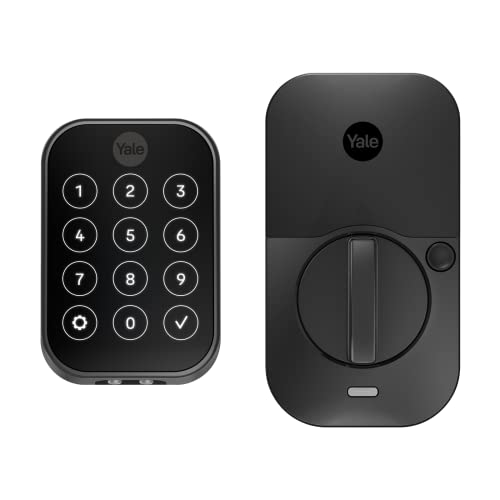
Yale Assure Lock 2 Touchscreen Deadbolt
Best for: Apple Watch and Bluetooth hands-free entry
- Access Methods
- Keypad, app, Apple Watch, Auto-Unlock
- Connectivity
- Bluetooth
- Color
- Black
- Application
- Home
- Dimensions
- 2.5 × 3.7 × 2.3 inches
- Weight
- 1 pounds
The Yale Assure Lock 2 is a key-free smart deadbolt designed for residential doors. It features a digital touchscreen keypad alongside Bluetooth connectivity for your smartphone or Apple Watch. Built-in Auto-Unlock detects your approach to open the door, while Auto-Lock secures it after you enter. Measuring 2.3 inches high and weighing one pound, this compact hardware suits you if you want multiple digital entry methods without carrying physical keys.
Pros
- Digital touchscreen keypad for keyless code entry
- Hands-free entry with Bluetooth Auto-Unlock
- Unlocks via Yale Access app on Apple Watch or smartphone
- Automatic locking feature
Cons
- No physical keyway cylinder for backup keys
- No biometric fingerprint scanner
Good fit if
- You want keyless entry via touchscreen, phone, or Apple Watch.
- You want your door to unlock automatically via Bluetooth proximity.
- You need a compact deadbolt profile measuring 2.3 inches high.
Skip if
- You require a physical key cylinder as a backup entry method.
- You want built-in fingerprint access.
Verdict: Yale Assure Lock 2 Touchscreen Deadbolt provides completely key-free access with flexible app, code, and Apple Watch controls. Its automated locking functions and Bluetooth sensing make home entry seamless without traditional keys.
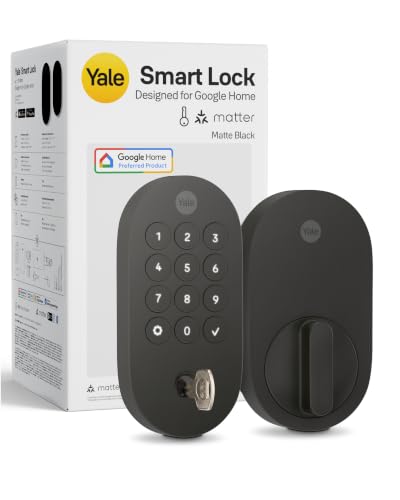
Yale Smart Deadbolt with Matter
Best for: Google Home setups using Matter
- Access Methods
- App, keypad, voice, key
- Connectivity
- Matter over Thread
- Smart Home Compatibility
- Google Home, Google Assistant
- Color
- Matte Black
- Dimensions
- 0.88 × 2.56 × 5.38 inches
- Weight
- 3 pounds
The Yale Smart Deadbolt with Matter connects to your front door using Matter over Thread technology. It features BHMA Grade 2 certification and operates in temperatures ranging from -22°F to 140°F. You can unlock the door using the keypad, the Yale Access App, Google Assistant voice controls, or a traditional physical key. This deadbolt suits you if you want flexible ecosystem integration with certified hardware.
Pros
- Supports Matter over Thread connectivity
- Certified BHMA Grade 2 security rating
- Four access options: keypad, app, voice commands, and physical key
- Operating temperature range of -22°F to 140°F
Cons
- Requires a compatible Matter hub for remote access features
- Google Home app control is restricted to the US and Canada
Good fit if
- You have a Matter-compatible hub and use Google Home
- You prefer having a standard physical key backup alongside keypad entry
- You need hardware rated to withstand temperatures as low as -22°F
Skip if
- You lack a Matter hub and require out-of-the-box remote access
- You reside outside the US or Canada and rely on Google Home integration
Verdict: Yale Smart Deadbolt with Matter delivers certified Grade 2 physical security alongside versatile Matter over Thread integration.

Yale Lock 2 Touch Biometric Deadbolt
Best for: fast keyless fingerprint access
- Access Methods
- Fingerprint, keypad, app
- Connectivity
- Bluetooth
- Color
- Black
- Dimensions
- 0.88 × 2.5 × 4.88 inches
- Weight
- 4 pounds
This smart deadbolt gives you key-free entry through a biometric fingerprint scanner and a matte keypad. It measures 4.875 inches tall by 2.5 inches wide, offering Bluetooth and Wi-Fi connectivity. The sensor unlocks in under 0.5 seconds with 99% accuracy. It suits you if you want hands-free auto-unlocking, app-based guest access, and fast entry without traditional keys.
Pros
- Fingerprint sensor unlocks in under 0.5 seconds with 99% accuracy
- Matte keypad designed for fingerprint resistance
- Supports hands-free auto-unlocking as you approach
- Offers both Bluetooth and Wi-Fi connectivity
Cons
- Key-free design lacks a physical key backup cylinder
- Requires the Yale Access App for activity feed tracking and virtual keys
Good fit if
- You want sub-second biometric fingerprint unlocking.
- You prefer completely keyless entry with hands-free auto-unlock.
- You want to manage access codes and track entry history via an app.
Skip if
- You want a physical keyway for emergency manual access.
- You prefer an offline deadbolt that does not rely on an app.
Verdict: Yale Lock 2 Touch Biometric Deadbolt delivers quick sub-second fingerprint access and hands-free auto-unlocking for fully keyless entry.

Yale WiFi Smart Lock Deadbolt, Keypad & Fingerprint Access, Keyless Entry
- Access Methods
- Fingerprint, keypad, app
- Connectivity
- 2.4 GHz, 5 GHz Wi-Fi
- User Code Capacity
- Unlimited
- Color
- Satin Nickel
- Dimensions
- 0.9 × 2.5 × 3.75 inches
View on Amazon: Yale WiFi Smart Lock Deadbolt, Keypad & Fingerprint Access, Keyless Entry
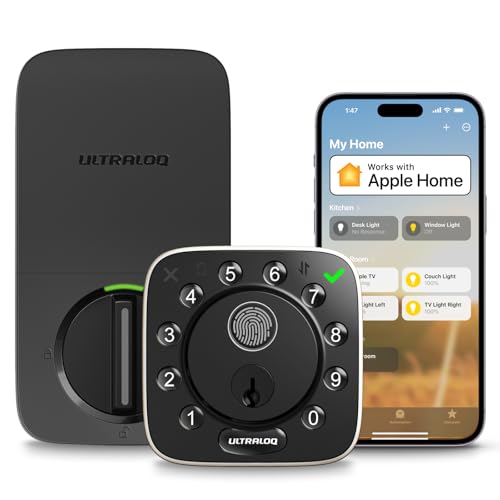
ULTRALOQ Bolt Wi-Fi Fingerprint Deadbolt
- Access Methods
- Fingerprint, passcode, app, key, voice
- Connectivity
- 2.4 GHz Wi-Fi
- Smart Home Compatibility
- Alexa, Apple Home, Google Home, IFTTT
- Fingerprint Capacity
- Up to 100 fingerprints
- User Code Capacity
- Up to 50 codes
- Dimensions
- 2.96 × 1.35 × 2.96 inches
Specifications side by side
| Spec | Schlage Keypad Electronic Deadbolt | Yale Wi-Fi Smart Deadbolt with Keypad | Kwikset Halo Wi-Fi Touchscreen Smart Deadbolt | Schlage Arrive Wi-Fi Smart Deadbolt | Chamberlain myQ Secure View Smart Deadbolt | Schlage Touch Camelot Brass Deadbolt | Schlage Connect Century Z-Wave Smart Deadbolt | Veise Wi-Fi Smart Deadbolt with Handle Set | Philips Wi-Fi Smart Deadbolt Set with Handles | HIDALIFE Keyless Keypad Deadbolt with Handle 4-Pack | Yale Assure Lock 2 Touchscreen Deadbolt | Yale Smart Deadbolt with Matter | Yale Lock 2 Touch Biometric Deadbolt | Yale WiFi Smart Lock Deadbolt, Keypad & Fingerprint Access, Keyless Entry | ULTRALOQ Bolt Wi-Fi Fingerprint Deadbolt |
|---|---|---|---|---|---|---|---|---|---|---|---|---|---|---|---|
| Access Methods | Keypad | Keypad, smartphone, Apple Watch, key | Touchscreen, app, auto-unlock | Keypad, app, voice control | Face, fingerprint, PIN, app, key | Touchscreen keypad | Touchscreen, keypad, key | Voice, fingerprint, app, code, card, key | App, fingerprint, PIN, key, voice | Touchpad | Keypad, app, Apple Watch, Auto-Unlock | App, keypad, voice, key | Fingerprint, keypad, app | Fingerprint, keypad, app | Fingerprint, passcode, app, key, voice |
| Connectivity | not specified | 2.4 or 5 GHz Wi-Fi | not specified | Built-in Wi-Fi | not specified | not specified | Z-Wave Plus | not specified | not specified | not specified | Bluetooth | Matter over Thread | Bluetooth | 2.4 GHz, 5 GHz Wi-Fi | 2.4 GHz Wi-Fi |
| Smart Home Compatibility | not specified | not specified | Amazon Alexa, Google Home | Alexa, Google Home | not specified | not specified | Samsung SmartThings, Ring Alarm | Amazon Alexa, Google | Amazon Alexa, Google Assistant | not specified | not specified | Google Home, Google Assistant | not specified | not specified | Alexa, Apple Home, Google Home, IFTTT |
| Auto-Lock Delay | not specified | not specified | not specified | not specified | not specified | not specified | not specified | 0-180s | 30 to 180 seconds | 5 seconds | not specified | not specified | not specified | not specified | not specified |
| Fingerprint Capacity | not specified | not specified | not specified | not specified | not specified | not specified | not specified | 20+ | not specified | not specified | not specified | not specified | not specified | not specified | Up to 100 fingerprints |
| User Code Capacity | Up to 19 | Unlimited | Up to 250 | Up to 250 access codes | not specified | Up to 19 codes | 30 | 100+ | Up to 100 | Up to 9 PINs | not specified | not specified | not specified | Unlimited | Up to 50 codes |
| Included Door Hardware | not specified | not specified | Deadbolt | not specified | Deadbolt | not specified | not specified | Handle set | Deadbolt with 2 handles | Deadbolt with handle (4 pack) | not specified | not specified | not specified | not specified | not specified |
| Power Source | not specified | not specified | not specified | not specified | Battery Powered | not specified | not specified | not specified | not specified | not specified | not specified | not specified | not specified | not specified | not specified |
| Resolution | not specified | not specified | not specified | not specified | 2K | not specified | not specified | not specified | not specified | not specified | not specified | not specified | not specified | not specified | not specified |
| Access Method | Keypad | Keypad | Touchscreen | not specified | Fingerprint, App Control | not specified | not specified | not specified | Keypad | Keypad | Keypad, Touchscreen | not specified | Keypad, Fingerprint | Keypad, Fingerprint, Key | Fingerprint, Remote Control |
| Night Vision | not specified | not specified | not specified | not specified | Color Night Vision | not specified | not specified | not specified | not specified | not specified | not specified | not specified | not specified | not specified | not specified |
| Color | Antique Pewter (Pack of 1) | Black | Polished Chrome | Satin Nickel | Black | Bright Brass | Satin Nickel | Matte Black | Jet black | Satin Nickel | Black | Matte Black | Black | Satin Nickel | Black with Satin Nickel |
| Application | not specified | not specified | not specified | not specified | not specified | not specified | not specified | not specified | not specified | not specified | Home | not specified | not specified | not specified | not specified |
| Included Hardware | not specified | not specified | not specified | not specified | not specified | not specified | not specified | Handle | Handle | Handle | not specified | not specified | not specified | not specified | not specified |
| Material | not specified | not specified | not specified | not specified | not specified | Brass | not specified | not specified | not specified | not specified | not specified | not specified | not specified | not specified | not specified |
| Dimensions | 2.63 × 3.17 × 5.43 inches | 0.88 × 2.5 × 4.88 inches | 3.99 × 4.24 × 9.74 inches | 0.83 × 2.5 × 4.49 inches | 2.95 × 3.84 × 6.85 inches | 1.71 × 3 × 5.4 inches | 1 × 3 × 5 inches | 12.8 × 9.29 × 3.74 inches | 11 × 9 × 4 inches | 15.2 × 8.58 × 7.83 inches | 2.5 × 3.7 × 2.3 inches | 0.88 × 2.56 × 5.38 inches | 0.88 × 2.5 × 4.88 inches | 0.9 × 2.5 × 3.75 inches | 2.96 × 1.35 × 2.96 inches |
| Weight | 4.24 pounds | 1 pounds | 3.6 pounds | 2.4 pounds | 6.15 pounds | 2.96 pounds | 3 pounds | 5.29 pounds | not specified | 16.8 pounds | 1 pounds | 3 pounds | 4 pounds | not specified | 3.4 pounds |
| Model | BE365PLY620 | YRD410-WF1-BSP | 99390-003 | BE459WBCAM619 | MYQ-ND0BXAB1 | BE375CAM605 | BE469ZPCEN619 | VE017G-H | DDL240X-1HW-H2 | HL-669 | YRD450-BLE-BSP | YRD510-MT1-BLK | YRD420-F-BLE-BSP | YRD430-F-WF1-619 | BOLT-F-NK |
| Size | not specified | Wi-Fi | not specified | not specified | not specified | not specified | Century | not specified | not specified | HL-668 Satin Nickel 4-Pack | Bluetooth | 5.38 x 2.56 inch (Pack of 1) | Bluetooth | Wi-Fi | Deadbolt |
How to Choose the Right Deadbolt
-
Match Included Hardware
Check if you need a replacement handle alongside the deadbolt. Units like the Veise Smart Deadbolt Handle Set bundle an exterior handle and deadbolt together for a complete refresh. Standalone deadbolts mount above an existing door lever or knob. Look at the included hardware specification to confirm whether the lock replaces only the upper deadbolt bore hole or requires a multi-hole installation that accommodates an exterior handle.
-
Compare Entry Access Methods
Choose your preferred entry method based on how family members unlock the door. Keypad deadbolts use physical pushbuttons or numeric touchscreens to accept passcodes. If you prefer not to memorize codes, biometric models like the Yale Lock 2 Touch Biometric Deadbolt offer fingerprint access alongside digital keypads. Check the listed access method specs to see if the lock supports fingerprints, app control, physical keys, or touchscreens before deciding what fits your household routine best.
-
Evaluate Guest Code Capacity
Look closely at user code storage specifications if you plan to share access with guests, service workers, or large families. The Schlage Arrive Wi-Fi Smart Deadbolt accommodates up to 250 access codes, making it practical for frequent turnover and multiple users. Standard offline locks often cap memory at smaller thresholds, such as 19 codes. Check the code capacity specs so you can assign unique PINs without continually deleting existing credentials from the deadbolt.
-
Verify Smart Home Protocols
Review smart home compatibility specifications to confirm the deadbolt works with your preferred home management platform. Certain models like the Yale Smart Deadbolt with Matter support Matter protocols for integration with Google Assistant setups. Matching these communication protocols ensures your lock communicates smoothly with your existing smart home controllers. Check the listed specifications for compatible ecosystems and protocols before buying to confirm your hub or controller can manage the lock directly.
-
Check Exterior Lock Dimensions
Examine physical exterior dimensions to ensure the deadbolt fits your door without interference. Locks like the Kwikset Halo Wi-Fi Touchscreen Smart Deadbolt measure 9.74 inches in height and need adequate vertical clearance above your existing door knob or handle. A taller lock body can overlap decorative trim or handle rosettes if spacing is limited. Compare the published height, width, and length specifications against the flat area on your door face to avoid clearance problems during installation.
-
Review Multi Pack Quantities
Determine how many doors you need to secure before selecting individual hardware. If you are rekeying multiple entryways, package bundles like the HIDALIFE Keyless Keypad Deadbolt with Handle 4-Pack provide uniform hardware for four separate doors. Purchasing bundled units helps maintain consistent exterior finishes and identical programming across front, side, and garage entrances. Check the package size in the specifications to verify whether you are receiving a single deadbolt or a multi-door hardware set.
Frequently asked questions
Which deadbolts come bundled with matching door handles?
Several deadbolts provide an exterior door handle in the same package. The eufy Security C220 Smart Lock Handle Set bundles a traditional handle with built-in fingerprint and Wi-Fi access. The Philips Wi-Fi Smart Deadbolt Set and the Veise Smart Deadbolt Handle Set also include exterior handles for complete door hardware updates. For multi-door installations, HIDALIFE offers a four-pack with matching satin nickel handles.
What deadbolts support Matter connectivity for smart home setups?
You can use the Yale Smart Deadbolt with Matter to integrate directly into platforms like Google Assistant. This lock uses Matter over Thread connectivity to link with compatible smart home systems without requiring separate proprietary bridges. It also carries a certified Grade 2 physical security build and comes in a matte black finish with compact exterior dimensions.
Which deadbolts support fingerprint scanning for keyless unlocking?
Multiple models include integrated biometric fingerprint scanners for quick access. The Yale Lock 2 Touch Biometric Deadbolt provides fingerprint recognition alongside Wi-Fi and Bluetooth options. You can also get biometric entry with the Chamberlain myQ Secure View Smart Deadbolt, the Philips Wi-Fi Smart Deadbolt Set, or the eufy Security C220, giving you options across standalone deadbolts and bundled handle assemblies.
Can you install an electronic deadbolt that does not use Wi-Fi or Bluetooth?
Yes, you can choose fully offline electronic deadbolts that rely strictly on programmed push buttons or touchpads. The Schlage Touch Camelot Brass Deadbolt provides standalone Grade 2 keyless operation in a bright brass finish without any wireless radios. Similarly, the HIDALIFE Keyless Keypad Deadbolt pack functions entirely offline, letting you manage door access without mobile apps, networks, or smart hub configurations.
How many guest access codes can a smart deadbolt store?
Capacity depends on the specific deadbolt hardware you select. If you need high capacity for frequent visitors or rental management, the Schlage Arrive Wi-Fi Smart Deadbolt supports up to 250 guest codes managed directly over Wi-Fi. The Kwikset Halo Wi-Fi Touchscreen Smart Deadbolt also provides expansive code management, making both options suitable for large households requiring distinct entry credentials.
Which smart deadbolt options work with Z-Wave smart home systems?
The Schlage Connect Century Z-Wave Smart Deadbolt and the Kwikset Home Connect 620 Z-Wave Deadbolt both communicate via Z-Wave wireless protocols. The Schlage Connect Century provides commercial-grade ANSI/BHMA Grade 1 physical construction for top-tier door strength. Meanwhile, the Kwikset Home Connect 620 offers SmartKey re-keying and verified compatibility with hubs like SmartThings in a traditional Venetian bronze housing.
Are there deadbolts designed for completely key-free entry without a traditional keyway?
Yes, models like the Yale Assure Lock 2 Touchscreen Deadbolt eliminate traditional cylinder keyways entirely. This design prevents physical lock picking by relying strictly on digital touchpads, Bluetooth proximity sensing, and mobile applications for door access. It also supports unlocking via an Apple Watch, ensuring you can unlock your door securely without carrying a physical metal key.