15 Best Deadbolts with Fingerprint, Compared
As an Amazon Associate we earn from qualifying purchases. Links on this page are affiliate links.
A deadbolt with fingerprint access provides reliable keyless entry and fast unlocking for your front door. The Philips 4200 Fingerprint Deadbolt with Handle leads the rankings because it delivers 0.3-second biometric entry, standalone Wi-Fi connectivity, and an included handle in one kit.
We compared 15 models based strictly on the specifications published on their official product listings. This comparison details physical dimensions, supported access methods, and network compatibility. The guide helps you decide which hardware configuration, wireless standard, and biometric entry system best suit your door setup.
Quick picks
The best fit for you
- You need a complete biometric handle and deadbolt kit Philips 4200 Fingerprint Deadbolt with Handle It includes an exterior handle and provides built-in Wi-Fi alongside fingerprint, keypad, and remote control access.
- You want video doorbell surveillance built into your deadbolt Chamberlain myQ 3-in-1 Video Doorbell Smart Lock It integrates a 2K camera with color night vision directly into a fingerprint-enabled lock assembly.
- You want Matter compatibility for your smart home ecosystem ULTRALOQ Bolt Smart Deadbolt with Handle It features native Matter and Wi-Fi support alongside Alexa and Google Assistant compatibility.
- You prefer a standalone deadbolt without network app requirements Veise Traditional Fingerprint Keypad Deadbolt It provides local access using only an integrated keypad and fingerprint scanner in an oil rubbed bronze finish.
Our 15 picks

Philips 4200 Fingerprint Deadbolt with Handle
Best for: all-in-one front door biometric upgrades
- Access Method
- Keypad, Fingerprint, Remote Control (what this guide is about)
- Access Methods
- Fingerprint, passcode, app, voice
- Connectivity
- 2.4 GHz Wi-Fi
- Smart Home Compatibility
- Alexa, Google Assistant
- Auto-Lock Delay
- 0–180 seconds
- Included Door Hardware
- Handle set
View on Amazon: Philips 4200 Fingerprint Deadbolt with Handle
This smart deadbolt combines a 0.3-second fingerprint scanner with a matching exterior handle and direct 2.4GHz Wi-Fi connectivity, requiring no bridge or hub. You can manage recurring or one-time passcodes, set auto-lock timers from 0 to 180 seconds, and monitor access history via the companion app. It fits standard doors measuring 1-3/8 inches to 1-3/4 inches thick and suits anyone wanting an all-in-one handle set with biometric entry.
Pros
- Fast 0.3-second biometric fingerprint recognition
- Built-in 2.4GHz Wi-Fi connects without a separate bridge
- Includes a complete matching handle set in the box
- Customizable auto-lock delays ranging from 0 to 180 seconds
Cons
- Requires 8 AA alkaline batteries that are not included
- Compatible only with doors between 1-3/8 and 1-3/4 inches thick
Good fit if
- You want an all-in-one package that includes a matching entry handle.
- You prefer direct Wi-Fi management without buying an external hub.
- You need flexible access sharing via one-time or recurring PIN codes.
Skip if
- You have a door thicker than 1-3/4 inches.
- You prefer a smart lock that runs on fewer batteries or includes them.
Verdict: Philips 4200 Fingerprint Deadbolt with Handle delivers fast 0.3-second biometric entry and standalone Wi-Fi app control in a complete door hardware kit. It is a solid primary choice if your door matches standard thickness specifications.

Chamberlain myQ 3-in-1 Video Doorbell Smart Lock
Best for: all-in-one smart lock and video doorbell security
- Access Method
- Fingerprint, App Control (what this guide is about)
- Access Methods
- Face access, fingerprint, PIN, app, key
- Resolution
- 2K
- Night Vision
- Color Night Vision
- Color
- Black
- Dimensions
- 2.95 × 3.84 × 6.85 inches
View on Amazon: Chamberlain myQ 3-in-1 Video Doorbell Smart Lock
The Chamberlain myQ Secure View 3-in-1 Video Deadbolt integrates a smart lock and a 2K HDR video doorbell camera into one front door unit. For access, you can use the built-in fingerprint scanner, facial recognition, a PIN code, a physical key, or the companion app. It runs on a rechargeable battery rated for 4 to 6 months. This unit suits you if you want integrated video monitoring alongside biometric door access.
Pros
- Combines deadbolt lock, doorbell, and 2K HDR camera
- Supports fingerprint, facial recognition, PIN, app, and key entry
- Color night vision with wide-angle lens
- Rechargeable battery lasts 4 to 6 months
Cons
- Smart AI detection requires a paid subscription
- Spare battery is sold separately
- Substantial footprint at 6.85 inches tall and 4.87 pounds
Good fit if
- You want a built-in 2K HDR camera combined with your fingerprint deadbolt.
- You prefer hands-free unlocking via facial recognition alongside fingerprint entry.
- You want multiple unlock options including PIN, physical key, and app access.
Skip if
- You do not want a subscription for advanced smart detection features.
- You only want a simple, standalone fingerprint deadbolt without a video camera.
Verdict: Chamberlain myQ Secure View 3-in-1 Video Deadbolt gives you fingerprint and facial recognition access paired directly with a 2K HDR video doorbell. It eliminates the need for separate door security hardware if you want both a camera and a smart lock.

eufy Security C220 Wi-Fi Fingerprint Smart Lock
Best for: bridge-free Wi-Fi and fast biometric access
- Access Method
- Fingerprint (what this guide is about)
- Access Methods
- Fingerprint, app, keypad, key, voice
- Connectivity
- Built-in Wi-Fi
- Smart Home Compatibility
- Alexa, Google Voice Assistant
- Color
- Black
- Style
- Modern
View on Amazon: eufy Security C220 Wi-Fi Fingerprint Smart Lock
This smart deadbolt gives you keyless entry via a self-learning fingerprint scanner that recognizes your print in under one second. It features built-in Wi-Fi for remote app management without an added bridge, voice control integration, and an IP53 weather resistance rating. Powered by eight AA batteries lasting up to eight months, this BHMA Grade 3 certified lock suits you if you want multiple access methods paired with standalone wireless connectivity.
Pros
- Sub-one-second fingerprint recognition with self-learning AI
- Built-in Wi-Fi connects directly without a separate bridge
- Six unlock methods including keypad, physical key, Apple Watch, and voice assistants
- Tested to BHMA Grade 3 durability for over 100,000 cycles
- Wide operating temperature range from -22°F to 158°F
Cons
- Requires eight AA batteries to operate
- Weatherproofing is limited to an IP53 water resistance rating
- Meets Grade 3 security rather than higher residential grades
Good fit if
- You want direct Wi-Fi app control without purchasing a separate bridge.
- You need fast biometric entry backed by multiple keyless unlocking options.
- You already use compatible eufy ecosystem devices like a video doorbell.
Skip if
- You require a lock with higher than BHMA Grade 3 certification.
- You need heavy moisture protection exceeding an IP53 spray rating.
Verdict: eufy Security Modern Fingerprint Deadbolt provides fast biometric entry and direct Wi-Fi management without requiring an external network hub. It serves as a practical, versatile deadbolt for standard doors seeking multiple access methods.

Veise Fingerprint Smart Lock with App Control
Best for: Fast biometric entry with local credential storage
- Access Method
- Fingerprint, App Control (what this guide is about)
- Access Methods
- Fingerprint, app, fob card, code, key
- Smart Home Compatibility
- Amazon Alexa, Google Assistant
- Auto-Lock Delay
- 0–180 seconds
- Color
- Matte Black
- Dimensions
- 2.7 × 5.8 × 3 inches
View on Amazon: Veise Fingerprint Smart Lock with App Control
This deadbolt provides keyless entry using a Swedish FPC fingerprint sensor that scans in under 0.2 seconds. It stores your biometric credentials locally with AES128 encryption. You can program auto-locking from 0 to 180 seconds, issue one-time or recurring keypad codes, and use physical keys or fobs. It suits you if you prioritize fast biometric response and local security, though full remote control requires a separate gateway.
Pros
- Under 0.2-second fingerprint verification with on-device AI recognition
- Local AES128 encrypted storage for fingerprints and access logs
- Auto-lock timing adjustable between 0 and 180 seconds via app
- Emergency USB-C port and physical key override for backup access
Cons
- Requires separate G1 Gateway for Wi-Fi remote access and voice control
- Four AA batteries are not included
Good fit if
- You want rapid biometric unlocking with on-device data encryption
- You need flexible entry codes including recurring, duration, and one-time options
- You prefer configuring custom auto-lock timers directly from an app
Skip if
- You require built-in Wi-Fi without buying an add-on gateway
- You prefer a lock that comes with batteries in the box
Verdict: Veise Fingerprint Smart Deadbolt delivers rapid biometric scanning and secure local storage for reliable daily access. You will need an add-on gateway if you require remote Wi-Fi control.

Ulecoce Fingerprint Deadbolt with Knob
Best for: homes needing a deadbolt with matching knob
- Access Method
- Keypad, Fingerprint (what this guide is about)
- Access Methods
- Fingerprint, keypad, app, key, voice
- Smart Home Compatibility
- Amazon Alexa, Google Assistant
- Auto-Lock Delay
- 5 to 60 seconds
- Included Door Hardware
- Knob set
- Color
- Black
This set pairs a fingerprint deadbolt with a matching door knob for standard left- or right-handed doors. The biometric sensor reads prints in 0.3 seconds and holds up to 512 fingerprints and keypad passcodes combined. You can customize auto-locking between 5 and 60 seconds or use physical backup keys. It suits you if you need a high-capacity biometric deadbolt packaged together with replacement door knob hardware.
Pros
- Stores up to 512 fingerprints and passcodes combined
- Unlocks via fingerprint recognition in 0.3 seconds
- Includes matching knob hardware in the box
- Customizable auto-lock timer from 5 to 60 seconds
Cons
- Requires an external gateway sold separately for voice and Wi-Fi access
- Direct app unlock range is limited to 5 meters
Good fit if
- You want a matching door knob included with your fingerprint deadbolt
- You manage access for many users and need up to 512 stored credentials
- You want adjustable auto-locking between 5 and 60 seconds
Skip if
- You need out-of-the-box Wi-Fi control without buying a separate gateway
- You prefer a lever handle rather than a round door knob
Verdict: Ulecoce Fingerprint Deadbolt with Knob Set delivers rapid 0.3-second biometric entry and huge credential storage alongside matching knob hardware. It is a practical option if you do not mind purchasing a separate gateway for remote smart home control.

Yamiry Fingerprint Keypad Door Handle Lock
Best for: rental property managers needing versatile keyless entry
- Access Method
- Keypad, Fingerprint (what this guide is about)
- Access Methods
- Fingerprint, app, passcode, fob, key
- Connectivity
- Bluetooth
- Smart Home Compatibility
- Amazon Alexa
- Color
- Matte Black
- Application
- Front Door
This Yamiry smart handle lock combines biometric fingerprint access with a keypad, physical keys, key fobs, and Bluetooth app control. Designed for standard wooden front doors, it features a reversible handle and measures 5.5 inches long by 2.95 inches wide. You can track entry logs and manage temporary guest codes directly from your smartphone, making it suitable if you run a rental property.
Pros
- Supports fingerprint, passcode, key fob, physical key, and app entry
- Reversible handle fits left-handed and right-handed door setups
- App enables temporary passcode generation and activity log tracking
- Installs into standard door cutouts without additional drilling
Cons
- Requires a separate Wi-Fi gateway for remote control and Alexa voice unlock
- Built-in app connectivity is limited to Bluetooth range
Good fit if
- You want multiple access options including fingerprint, key fobs, and keypad codes
- You manage rental properties and need to distribute temporary passcodes
- You need a reversible handle to suit your door's swing orientation
Skip if
- You need built-in Wi-Fi connectivity without purchasing an extra gateway
- You prefer a separate deadbolt unit instead of an integrated handle lock
Verdict: Yamiry Fingerprint Smart Door Handle Lock provides flexible entry methods and app-based code scheduling for standard entry doors. It serves as a practical handle replacement, though remote operations require adding a separate gateway.

Yamiry Fingerprint Smart Door Handle Lock
Best for: handle-based entry with multiple access methods
- Access Method
- Keypad, Fingerprint (what this guide is about)
- Access Methods
- app, password, fob, fingerprint, key
- Connectivity
- Bluetooth
- Fingerprint Capacity
- 50
- User Code Capacity
- 50
- Color
- Matte Black
This Yamiry smart door knob combines fingerprint access with a built-in handle and digital keypad. Built from aluminum, it stores up to 50 fingerprints, passwords, and key fobs. You can unlock via Bluetooth, key fob, physical key, code, or fingerprint. It fits standard American doors and features automatic locking. This unit suits you if you need an all-in-one knob with multiple entry methods.
Pros
- Stores up to 50 fingerprints, passwords, and key fobs
- Five unlock methods: fingerprint, app, code, fob, and physical key
- Three locking modes including auto lock and button-press locking
- Aluminum construction provides corrosion resistance
Cons
- Wi-Fi gateway is sold separately for remote access
- Uses an integrated knob design instead of a dedicated deadbolt
Good fit if
- You want an all-in-one handle lock with fingerprint, fob, and passcode entry.
- You need storage capacity for up to 50 credentials.
- You prefer auto-locking capabilities on standard doors.
Skip if
- You need built-in Wi-Fi access without buying a separate gateway.
- You require a dedicated standalone deadbolt mechanism.
Verdict: Yamiry Fingerprint Keypad Smart Door Knob provides compact handle-based access with five entry methods and capacity for 50 fingerprints. It operates locally via Bluetooth unless paired with an optional Wi-Fi gateway.
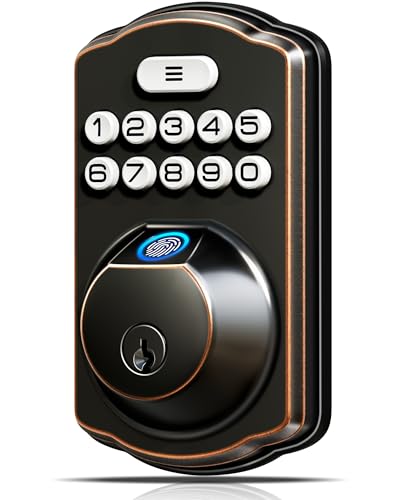
Veise Traditional Fingerprint Keypad Deadbolt
Best for: offline biometric and keypad door security
- Access Method
- Keypad, Fingerprint (what this guide is about)
- Access Methods
- Fingerprint, keypad, key
- Auto-Lock Delay
- 10-99 seconds
- Fingerprint Capacity
- 20
- User Code Capacity
- 20
- Color
- Oil Rubbed Bronze
View on Amazon: Veise Traditional Fingerprint Keypad Deadbolt
This standalone deadbolt gives you keyless entry via a fingerprint scanner, keypad, or physical key. The sensor stores up to 20 fingerprints and reads in 0.2 seconds. It supports 20 user codes, auto-locks between 10 and 99 seconds, and holds an IP54 weather rating for exterior doors. It suits you if you want quick biometric entry without needing a smartphone app, Wi-Fi bridge, or home network setup.
Pros
- Fingerprint scanner unlocks in 0.2 seconds and stores 20 prints
- Auto-locks automatically within an adjustable 10 to 99 seconds
- IP54 weather resistance rated for temperatures from -31°F to 158°F
- Runs up to 365 days on four AA batteries
Cons
- No Wi-Fi, Bluetooth, or mobile app connectivity
- Requires four AA batteries that are not included
- Fingerprint storage capacity is limited to 20 prints
Good fit if
- You want an offline fingerprint lock without wireless setup
- You need timed auto-locking or passage mode for daily entry
- You want to issue one-time access codes to visitors
Skip if
- You require remote app management or smart home integrations
- You need to store more than 20 distinct fingerprints
Verdict: Veise Fingerprint Keypad Deadbolt provides local biometric security and timed auto-locking without requiring internet access or app setup. It is a straightforward deadbolt for doors that need fast physical access without network dependencies.

Veise Fingerprint Deadbolt with Handle Set
Best for: complete entry door hardware with local fingerprint access
- Access Method
- Fingerprint (what this guide is about)
- Access Methods
- Fingerprint, keypad, key
- Auto-Lock Delay
- 10–99 seconds
- Fingerprint Capacity
- 20
- User Code Capacity
- 20
- Included Door Hardware
- Handle set
The Veise Fingerprint Deadbolt with Handle Set combines a biometric deadbolt with a matching zinc alloy exterior handle. The 500 DPI scanner identifies prints within 0.3 seconds and holds up to 20 stored fingerprints alongside 20 passcodes. It includes an IP54 weather-resistance rating, ANSI Grade 3 certification, and an auto-lock timer adjustable from 10 to 99 seconds. This suits entry doors where you want complete matching hardware without network setup.
Pros
- 500 DPI fingerprint sensor identifies prints within 0.3 seconds
- Stores 20 fingerprints, 20 passcodes, and 1 one-time code
- Includes matching zinc alloy exterior handle weighing over 3 pounds
- IP54 dust and water resistance with -31 °F to 158 °F operating range
- Configurable auto-lock delay between 10 and 99 seconds
Cons
- Requires 4 AA batteries that are not included
- Carries an ANSI Grade 3 security rating rather than Grade 1 or 2
- Lacks Wi-Fi or Bluetooth app connectivity for remote management
Good fit if
- You want an all-in-one deadbolt and matching exterior handle package
- You need quick biometric unlocking for up to 20 individual fingerprints
- You prefer an offline keypad deadbolt without wireless network requirements
Skip if
- You need remote app control or integration with smart home platforms
- You require high-tier ANSI Grade 1 or Grade 2 certified hardware
Verdict: Veise Fingerprint Deadbolt with Handle Set provides a complete entryway upgrade featuring rapid 0.3-second biometric entry and robust local PIN options. Its durable zinc alloy construction and wide temperature resistance make it a practical standalone security solution.

DESLOC Fingerprint Keyless Deadbolt
Best for: homes in extreme climates needing fast fingerprint entry
- Access Method
- Fingerprint (what this guide is about)
- Access Methods
- Fingerprint, PIN, app, eKeys, fobs, key
- Connectivity
- Bluetooth
- Smart Home Compatibility
- Amazon Alexa, Google Assistant
- Fingerprint Capacity
- Up to 50
- Color
- Black
This electronic deadbolt gives you keyless entry via an integrated biometric sensor, digital keypad, physical keys, or key fobs. The fingerprint scanner unlocks in under 0.3 seconds and holds up to 50 individual profiles. Built with an IP54 weather rating and functional down to -22°F, it suits homeowners who need fast, cold-weather access without carrying keys, though remote voice management requires an add-on gateway.
Pros
- Unlocks via fingerprint in under 0.3 seconds and stores 50 fingerprints
- Operates in extreme temperatures from -22°F to 158°F with IP54 water resistance
- Includes emergency USB-C power port and physical backup keys
- Supports multiple unlock methods including TTLock app, fobs, and keypad codes
Cons
- Requires a separately sold G2 Gateway for Wi-Fi and voice control
- Four AA batteries are not included in the package
- Certified to BHMA Grade 3 rather than higher commercial security grades
Good fit if
- You want quick biometric entry that stores up to 50 fingerprints
- You live in an area with extreme temperatures between -22°F and 158°F
- You prefer having backup unlock options like key fobs and a USB-C jump port
Skip if
- You need built-in Wi-Fi connectivity without purchasing an extra hub
- You require a lock meeting BHMA Grade 1 or Grade 2 standards
Verdict: DESLOC Fingerprint Smart Deadbolt delivers rapid sub-0.3-second biometric entry and robust cold-weather durability. It provides versatile local access options for standard doors, provided you do not require out-of-the-box Wi-Fi connectivity.

ULTRALOQ Bolt Smart Deadbolt with Handle
Best for: Matter-enabled smart home ecosystems
- Access Method
- Keypad, Fingerprint, Remote Control (what this guide is about)
- Access Methods
- Fingerprint, passcode, app, voice, key
- Smart Home Compatibility
- Apple Home, Alexa, Google Assistant
- Fingerprint Capacity
- Up to 50
- User Code Capacity
- Up to 50
- Included Door Hardware
- Deadbolt and handle
The ULTRALOQ Bolt Fingerprint Deadbolt with Handle pairs a biometric scanner with dual 2.4 GHz Wi-Fi and Matter over Thread connectivity. Its fingerprint reader stores up to 50 prints alongside 50 custom passcodes. With Thread networking, battery life reaches up to 18 months. Built from zinc alloy with BHMA certification, it suits households seeking unified access through Apple Home, Alexa, or Google Assistant ecosystems without requiring an external Wi-Fi bridge.
Pros
- Stores up to 50 fingerprints and 50 passcodes
- Supports Matter over Thread and 2.4 GHz Wi-Fi
- Battery life reaches up to 18 months on Thread
- Includes exterior handle and two mechanical backup keys
Cons
- Door sensor is not included for auto-lock verification
- Matter features require a separate Thread border router
- Wi-Fi connectivity operates exclusively on 2.4 GHz networks
Good fit if
- You use Apple Home, Alexa, or Google Assistant via Matter.
- You need storage for up to 50 distinct fingerprints.
- You want a matching handle included with your deadbolt.
Skip if
- You lack a Thread border router or Matter hub for Thread features.
- You require an integrated door sensor to verify closure.
Verdict: ULTRALOQ Bolt Fingerprint Deadbolt with Handle delivers broad smart-home compatibility through built-in Wi-Fi and Matter over Thread. It gives you dependable biometric entry backed by physical keys and an 18-month battery rating.

TEEHO Fingerprint Keypad Deadbolt
Best for: offline biometric entry on standard doors
- Access Method
- Keypad, Fingerprint (what this guide is about)
- Access Methods
- Fingerprint, passcode, key, PIN
- Auto-Lock Delay
- 10–99 seconds
- Fingerprint Capacity
- 20
- User Code Capacity
- 20
- Color
- Matte Black
The TEEHO Fingerprint Keypad Deadbolt is an offline electronic lock with biometric and PIN access. It stores up to 20 fingerprints with a 0.3-second recognition speed, plus 20 key codes. You get customizable auto-locking between 10 and 99 seconds, IP54 weather resistance, and BHMA Grade 3 aluminum construction. This deadbolt suits you if you want quick biometric entry and code-sharing without managing an app or wireless connection.
Pros
- Stores up to 20 fingerprints and 20 passcodes
- Biometric scanner recognizes prints in 0.3 seconds
- Configurable auto-lock delay from 10 to 99 seconds
- IP54 weather resistance rating with aluminum alloy build
- Up to 365-day battery life on 4 AA batteries
Cons
- Lacks Wi-Fi, Bluetooth, or mobile app connectivity
- Only fits doors with a 2-1/8-inch (54 mm) hole
- Four AA batteries are not included
Good fit if
- You want biometric and keypad access without smartphone apps or network setups.
- You need customizable auto-locking between 10 and 99 seconds.
- You require temporary one-time PINs for visitors.
Skip if
- You want remote unlocking or status checks via Wi-Fi or a mobile app.
- You have a door hole size other than 2-1/8 inches (54 mm).
Verdict: TEEHO Fingerprint Keypad Deadbolt delivers responsive local biometric entry and flexible keypad codes without smart app complexity. It is an effective standalone lock for standard doors needing reliable physical and digital security.

Veise Fingerprint Door Lock with Lever Handles
Best for: complete dual-bore door hardware replacements
- Access Method
- Fingerprint (what this guide is about)
- Access Methods
- Fingerprint, keypad, key
- Auto-Lock Delay
- 10-99 seconds
- Fingerprint Capacity
- 20
- User Code Capacity
- 20
- Included Door Hardware
- 2 lever handles
View on Amazon: Veise Fingerprint Door Lock with Lever Handles
This Veise lock set pairs a fingerprint deadbolt with two matching lever handles for standard interior or exterior doors. It holds up to 20 fingerprints and 20 keypad passcodes, alongside physical backup keys and temporary codes. With an IP54 weather-resistance rating, ANSI Grade 3 durability, and adjustable auto-locking between 10 and 99 seconds, it suits you if you want a complete entry hardware setup without app requirements.
Pros
- Includes two zinc alloy lever handles alongside the deadbolt
- Stores up to 20 fingerprints and 20 user passcodes
- IP54 rated with an operating temperature range of -31°F to 158°F
- Configurable auto-lock delay from 10 to 99 seconds
Cons
- Does not include the 4 AA batteries required for operation
- Requires door prep with two separate 2-1/8-inch bore holes
- Lacks Wi-Fi or Bluetooth connectivity for smartphone management
Good fit if
- You need a bundled deadbolt and lever set for a two-bore door.
- You want standalone access using fingerprints, PINs, or physical keys without an app.
- You prefer automatic locking that engages between 10 and 99 seconds.
Skip if
- You want remote access or mobile app control.
- Your door has only a single borehole.
Verdict: Veise Fingerprint Door Lock with Lever Handles provides an all-in-one hardware package with fast biometric scanning and keypad entry. It delivers reliable standalone perimeter security for doors prepped with dual boreholes.

Veise WiFi Fingerprint Smart Deadbolt
Best for: homes needing direct Wi-Fi and fingerprint access
- Access Method
- Fingerprint (what this guide is about)
- Access Methods
- App, fingerprint, PIN code, key, voice
- Connectivity
- Built-in 2.4 GHz Wi-Fi
- Smart Home Compatibility
- Amazon Alexa, Google Assistant
- Auto-Lock Delay
- 10-180 seconds
- Fingerprint Capacity
- 20
The Veise WiFi Fingerprint Smart Deadbolt gives you keyless entry via a fingerprint scanner, keypad, mobile app, and physical keys. It features built-in 2.4GHz Wi-Fi, eliminating the need for an external bridge. The scanner stores up to 20 fingerprints with a 0.2-second read time. Powered by eight AA batteries, this lock suits you if you want direct network connectivity, app management, and customizable auto-lock timing between 10 and 180 seconds.
Pros
- Built-in 2.4GHz Wi-Fi requires no external hub
- Fingerprint sensor unlocks in 0.2 seconds
- Stores up to 20 fingerprints and 100 custom PINs
- Meets ANSI/BHMA Grade 3 standards and IP55 water resistance
Cons
- Requires eight AA batteries that are not included
- Limits fingerprint storage to 20 profiles
Good fit if
- You want built-in Wi-Fi access without connecting an external hub.
- You need multiple unlocking methods, including voice control, app access, and physical keys.
- You want timed auto-lock options adjustable between 10 and 180 seconds.
Skip if
- You need to store more than 20 unique fingerprints.
- You prefer an integrated rechargeable battery over standard AA cells.
Verdict: Veise WiFi Fingerprint Smart Deadbolt combines standalone Wi-Fi connectivity with rapid biometric access. It provides flexible entry management without requiring extra gateway hardware.

Chamberlain myQ Secure View Smart Deadbolt
Best for: all-in-one video monitoring and fingerprint access
- Access Method
- Fingerprint, App Control (what this guide is about)
- Access Methods
- Face, fingerprint, PIN, app, key
- Included Door Hardware
- Deadbolt
- Power Source
- Battery Powered
- Resolution
- 2K
- Night Vision
- Color Night Vision
The Chamberlain myQ Secure View Smart Deadbolt combines a motorized deadbolt with a 2K HDR video doorbell camera in a single battery-powered frame. You gain five entry options, including fingerprint scanning, facial recognition, keypad PINs, mobile app access, and physical keys. An included chime and backup battery keep the hardware running smoothly. This unit suits you if you want front-door video monitoring and biometric unlocking without installing separate devices.
Pros
- Includes a 2K HDR video doorbell camera with color night vision
- Supports five entry options including fingerprint and facial recognition
- Supplied with an extra battery and dedicated chime accessory
- Offers app control for remote locking and visitor monitoring
Cons
- Fingerprint and facial recognition unavailable in Illinois, Texas, and outside the U.S. or Canada
- Heavier than standard deadbolts at 6.15 pounds
- Deep 2.95-inch profile projects out from the door
Good fit if
- You want a single battery-powered unit for fingerprint access and video monitoring.
- You want an extra backup battery on hand to eliminate recharging downtime.
- You reside in an unrestricted region within the U.S. or Canada.
Skip if
- You live in Illinois, Texas, or outside the U.S. and Canada where biometrics are restricted.
- You want a slim, lightweight deadbolt without an integrated camera.
Verdict: Chamberlain myQ Secure View Smart Deadbolt packages fingerprint recognition, facial scanning, and 2K HDR video surveillance into one battery-operated assembly. It offers extensive access options and spare battery coverage if your location permits its biometric features.
Specifications side by side
| Spec | Philips 4200 Fingerprint Deadbolt with Handle | Chamberlain myQ 3-in-1 Video Doorbell Smart Lock | eufy Security C220 Wi-Fi Fingerprint Smart Lock | Veise Fingerprint Smart Lock with App Control | Ulecoce Fingerprint Deadbolt with Knob | Yamiry Fingerprint Keypad Door Handle Lock | Yamiry Fingerprint Smart Door Handle Lock | Veise Traditional Fingerprint Keypad Deadbolt | Veise Fingerprint Deadbolt with Handle Set | DESLOC Fingerprint Keyless Deadbolt | ULTRALOQ Bolt Smart Deadbolt with Handle | TEEHO Fingerprint Keypad Deadbolt | Veise Fingerprint Door Lock with Lever Handles | Veise WiFi Fingerprint Smart Deadbolt | Chamberlain myQ Secure View Smart Deadbolt |
|---|---|---|---|---|---|---|---|---|---|---|---|---|---|---|---|
| Access Methods | Fingerprint, passcode, app, voice | Face access, fingerprint, PIN, app, key | Fingerprint, app, keypad, key, voice | Fingerprint, app, fob card, code, key | Fingerprint, keypad, app, key, voice | Fingerprint, app, passcode, fob, key | app, password, fob, fingerprint, key | Fingerprint, keypad, key | Fingerprint, keypad, key | Fingerprint, PIN, app, eKeys, fobs, key | Fingerprint, passcode, app, voice, key | Fingerprint, passcode, key, PIN | Fingerprint, keypad, key | App, fingerprint, PIN code, key, voice | Face, fingerprint, PIN, app, key |
| Connectivity | 2.4 GHz Wi-Fi | not specified | Built-in Wi-Fi | not specified | not specified | Bluetooth | Bluetooth | not specified | not specified | Bluetooth | not specified | not specified | not specified | Built-in 2.4 GHz Wi-Fi | not specified |
| Smart Home Compatibility | Alexa, Google Assistant | not specified | Alexa, Google Voice Assistant | Amazon Alexa, Google Assistant | Amazon Alexa, Google Assistant | Amazon Alexa | not specified | not specified | not specified | Amazon Alexa, Google Assistant | Apple Home, Alexa, Google Assistant | not specified | not specified | Amazon Alexa, Google Assistant | not specified |
| Auto-Lock Delay | 0–180 seconds | not specified | not specified | 0–180 seconds | 5 to 60 seconds | not specified | not specified | 10-99 seconds | 10–99 seconds | not specified | not specified | 10–99 seconds | 10-99 seconds | 10-180 seconds | not specified |
| Fingerprint Capacity | not specified | not specified | not specified | not specified | not specified | not specified | 50 | 20 | 20 | Up to 50 | Up to 50 | 20 | 20 | 20 | not specified |
| User Code Capacity | not specified | not specified | not specified | not specified | not specified | not specified | 50 | 20 | 20 | not specified | Up to 50 | 20 | 20 | 100+ | not specified |
| Included Door Hardware | Handle set | not specified | not specified | not specified | Knob set | not specified | not specified | not specified | Handle set | not specified | Deadbolt and handle | not specified | 2 lever handles | not specified | Deadbolt |
| Power Source | not specified | not specified | not specified | not specified | not specified | not specified | not specified | not specified | not specified | not specified | not specified | not specified | not specified | not specified | Battery Powered |
| Resolution | not specified | 2K | not specified | not specified | not specified | not specified | not specified | not specified | not specified | not specified | not specified | not specified | not specified | not specified | 2K |
| Access Method | Keypad, Fingerprint, Remote Control | Fingerprint, App Control | Fingerprint | Fingerprint, App Control | Keypad, Fingerprint | Keypad, Fingerprint | Keypad, Fingerprint | Keypad, Fingerprint | Fingerprint | Fingerprint | Keypad, Fingerprint, Remote Control | Keypad, Fingerprint | Fingerprint | Fingerprint | Fingerprint, App Control |
| Night Vision | not specified | Color Night Vision | not specified | not specified | not specified | not specified | not specified | not specified | not specified | not specified | not specified | not specified | not specified | not specified | Color Night Vision |
| Color | Satin Nickel | Black | Black | Matte Black | Black | Matte Black | Matte Black | Oil Rubbed Bronze | Bronze | Black | Black | Matte Black | Oil Rubbed Bronze | Black | Black |
| Application | Front Door | not specified | not specified | not specified | not specified | Front Door | not specified | not specified | not specified | not specified | Home, Front Door | Front Door | not specified | Front Door | not specified |
| Included Hardware | Handle | not specified | not specified | not specified | Knob | Handle | Handle | not specified | Handle | not specified | Handle | not specified | Lever | not specified | not specified |
| Style | not specified | not specified | Modern | not specified | not specified | not specified | not specified | Traditional | not specified | not specified | not specified | not specified | not specified | not specified | not specified |
| Special Features | Auto Lock | not specified | not specified | not specified | not specified | not specified | not specified | not specified | not specified | not specified | Auto Lock | not specified | not specified | not specified | not specified |
| Dimensions | 2.7 × 0.73 × 5.72 inches | 2.95 × 3.84 × 6.85 inches | 7.67 × 4.49 × 4.41 inches | 2.7 × 5.8 × 3 inches | 3.54 × 7.17 × 11 inches | 5.5 × 2.95 × 0.79 inches | 5.62 × 2.69 × 3 inches | 2.71 × 1.2 × 5.47 inches | 18 × 7 × 4 inches | 7.28 × 6.3 × 3.27 inches | 2.95 × 1 × 2.95 inches | 5.12 × 2.95 × 1.3 inches | 5.35 × 6.22 × 2.56 inches | 3 × 1.3 × 5.1 inches | 2.95 × 3.84 × 6.85 inches |
| Weight | not specified | 4.87 pounds | not specified | 2.25 pounds | 3.45 pounds | not specified | 2.6 pounds | not specified | not specified | 2.03 pounds | 2.87 pounds | 1 pounds | not specified | 1.68 pounds | 6.15 pounds |
| Model | DDL242X-1HW | MYQL90AXXB | T8506 | VE017 | Ulecoce U68 | Yamiry YR01 | YR05 | KS02A | KS02D | B200 | ULTRALOQ BOLT | TE002 | KS02B | VE012W | MYQ-ND0BXAB1 |
| Size | not specified | not specified | not specified | not specified | / | not specified | Regular | 1.2 inches x 2.71 inches x 5.47 inches | not specified | not specified | Deadbolt+Handle | US Standard Door Sizes | not specified | 3 x 1.3 x 5.1 inches | not specified |
How to Choose a Fingerprint Deadbolt
-
Match Door Hardware Configuration
Check your exterior door layout to decide between a standalone deadbolt and a multi-piece set. Standard single-bore preparations accept standalone biometric deadbolts. Doors with dual boreholes require paired hardware to replace both upper and lower mechanisms. If you replace both locks at once, choose a model that includes matching hardware. For instance, the Ulecoce U68 bundles a fingerprint deadbolt with a matching entry knob. Selecting a complete set ensures uniform finish and aligned mechanical fit without sourcing separate handles.
-
Evaluate Integrated Video Specs
Determine whether your entryway needs video surveillance directly inside the deadbolt assembly. Standard biometric locks lack cameras, while hybrid models combine optical sensors with biometric access. Check the resolution and night vision ratings in the hardware specifications. The Chamberlain MYQ-ND0BXAB1 integrates a 2K resolution camera and color night vision into the battery-powered deadbolt body. This specification eliminates mounting a separate doorbell camera on your doorframe. Choose 2K imaging if you want clear daytime and low-light visual monitoring from the exact height of your deadbolt.
-
Select Secondary Access Methods
Review the access method specifications to ensure entry options match household needs beyond fingerprint scanning. Some deadbolts combine biometric sensors with physical or digital keypads, while others rely primarily on smartphone applications. If you manage guest access or prefer backup codes, look for models listing keypad capability. For setups requiring digital management, models like the Veise VE017 provide fingerprint recognition paired with app control. Choosing a lock with complementary access options ensures you can still unlock the door if biometric scanning is impractical due to wet hands or guest visits.
-
Check Automated Locking Features
Examine the special features specification to confirm whether the deadbolt supports auto-locking. Standard mechanical deadbolts require manual locking every time someone leaves or enters. An automatic lock engages the deadbolt bolt automatically after a set interval once the door closes. The Philips DDL242X-1HW lists auto lock among its core special features. This capability suits busy entryways where household members frequently forget to turn the thumbturn or press a lock button. If maintaining constant perimeter security is essential, confirm that auto lock is explicitly listed in the lock specifications.
-
Compare Finish and Architectural Style
Review the color and style attributes to match the deadbolt with your exterior door aesthetic. Finishes across fingerprint deadbolts include matte black, satin nickel, bronze, and oil rubbed bronze. Styles range from traditional profiles to sleek modern housings. The eufy T8506 features a modern style in black, which pairs cleanly with contemporary door trim. If your entryway features heritage trim, look for traditional designs in bronze or oil rubbed bronze. Verifying color and styling specifications ensures the biometric hardware integrates cleanly with existing exterior lighting and door decor.
-
Verify Exterior Hardware Dimensions
Inspect the exterior lock dimensions to make sure the unit fits your door surface without hitting trim, weatherstripping, or glass inserts. Width, height, and length vary significantly between models. For example, the DESLOC B200 measures 6.3 inches wide, 3.27 inches high, and 7.28 inches long. Measure the distance from the center of your borehole to the edge of the door frame before buying. Comparing dimensions in the product specifications prevents clearance problems, especially on narrow stiles or entry doors with raised decorative moldings and surrounding glass lites.
Frequently asked questions
Can fingerprint deadbolts unlock without an internet connection?
Yes, biometric scanning operates locally on the lock hardware itself. Locks like the Veise KS02A and TEEHO TE002 process fingerprint data directly on the device, functioning without an active Wi-Fi network or mobile app. Even connected smart deadbolts maintain local credential storage on board, ensuring you can unlock your door during network outages or internet service interruptions.
Do fingerprint deadbolts come with physical passage hardware?
Many biometric deadbolts ship with coordinating passage hardware to refresh your entire entryway. You can choose sets like the Veise KS02B that provide matching lever handles, or the Ulecoce U68 which includes a matching door knob. If your door already has functional lower hardware, standalone deadbolts like the eufy Security C220 mount independently without requiring handle changes.
How do smart deadbolts combine video cameras with biometric scanners?
Combination models house an integrated camera module and a biometric scanner within a single exterior lock body. For example, the Chamberlain myQ Secure View pairs 2K resolution video and color night vision directly with fingerprint access. This unified configuration provides entryway monitoring and recorded visual security without requiring you to install a separate video doorbell next to your deadbolt.
What alternative entry methods are available on biometric locks?
Biometric deadbolts typically provide multiple entry methods alongside fingerprint access for added flexibility. Locks like the Philips 4200 and Yamiry YR01 include numeric keypads for custom entry codes. Furthermore, units such as the ULTRALOQ Bolt support remote app control alongside physical keypad input, giving you alternative access routes if family members or guests do not have stored fingerprint profiles.
Which smart home platforms work with fingerprint smart deadbolts?
Smart home compatibility depends on the wireless protocols built into each specific deadbolt. The ULTRALOQ Bolt integrates Matter connectivity and built-in Wi-Fi to communicate directly with Amazon Alexa and Google Assistant systems. Other smart models, such as the Veise VE012W and eufy Security C220, utilize dedicated Wi-Fi connections for direct mobile app management without linking into third-party automation platforms.
What finish and style options are available for fingerprint deadbolts?
Manufacturers produce biometric deadbolts in various metal finishes and styling profiles to match your home exterior. You can select traditional Oil Rubbed Bronze on the Veise KS02A, Satin Nickel on the Philips 4200, or modern Matte Black on the Yamiry YR05. Clean geometric enclosures like the eufy Security C220 offer contemporary aesthetics for newer architectural styles.
How fast do fingerprint sensors read credentials on smart deadbolts?
Biometric sensors on modern smart deadbolts authenticate stored fingerprints in fractions of a second. Hardware such as the Philips 4200, Veise KS02D, and Ulecoce U68 features 0.3-second biometric recognition ratings. This immediate processing allows you to touch the sensor and unlatch the deadbolt instantly without waiting for mobile connectivity or typing PIN numbers on a keypad.