Best Deadbolts with Key: 15 Spec-Based Picks
As an Amazon Associate we earn from qualifying purchases. Links on this page are affiliate links.
Choosing the best deadbolts with key backup gives you traditional mechanical security alongside digital entry methods. We compared 15 models strictly using the specifications published on each manufacturer listing.
The Aqara U400 UWB Smart Deadbolt earns the top spot because it pairs physical key and fingerprint access methods with Matter over Thread connectivity. This guide helps you decide which keyed smart deadbolt matches your door dimensions, wireless networking protocols, and everyday access needs.
Quick picks
The best fit for you
- You want hands-free entry with a physical key backup Aqara U400 UWB Smart Deadbolt It pairs UWB hands-free access with standard physical key entry for reliable fallback.
- You need the most compact exterior footprint available Yale Assure Lock 2 Touch Wi-Fi Deadbolt Its 0.88-inch length and 2.5-inch width make it the slimmest model on the list.
- You want a lever handle instead of a deadbolt ULTRALOQ Latch 5 Pro Smart Lever Lock It includes lever hardware for doors that require a handle rather than a standard deadbolt.
Our 15 picks

Aqara U400 UWB Smart Deadbolt
Best for: hands-free smart entry with physical key backup
- Access Method
- Fingerprint, Key (what this guide is about)
- Access Methods
- UWB, Apple Home Key, fingerprint, key
- Connectivity
- Thread
- Smart Home Compatibility
- Apple Home, Matter
- Color
- Silver
- Dimensions
- 3 × 4.2 × 7 inches
The Aqara U400 is a smart deadbolt that combines a physical keyway with modern digital entry methods. For physical security, it includes a rekeyable cylinder and BHMA certification alongside an IP65 weather rating. You can unlock it using hands-free UWB, Apple Home Key, a fingerprint scanner, passcodes, or your standard key. It suits you if you want hands-free wireless entry backed up by a traditional keyed lock and Matter over Thread.
Pros
- Rekeyable physical key cylinder with BHMA security certification
- Multiple access options including UWB hands-free, Apple Home Key, fingerprint, and physical key
- IP65 weather-resistance rating on the exterior assembly
- Rechargeable lithium battery with USB-C port lasting up to 6 months per charge
Cons
- UWB hands-free unlock requires specific Apple hardware and a Thread hub
- NFC entry cards must be purchased separately
Good fit if
- You want physical key backup alongside hands-free UWB and Apple Home Key access.
- You run an Apple Home or Matter-over-Thread smart home setup.
Skip if
- You lack a Thread-enabled Matter controller to manage network connectivity.
- You use older mobile devices that do not meet the minimum OS and hardware requirements for UWB.
Verdict: Aqara U400 UWB Deadbolt with Physical Key pairs tested mechanical security and standard keys with hands-free UWB and Matter over Thread connectivity. It is a capable choice if you want traditional key access alongside modern digital methods.

Aqara U100 Keyed Fingerprint Deadbolt
Best for: Apple Home users wanting keyed biometric deadbolts
- Access Method
- Fingerprint, Key (what this guide is about)
- Access Methods
- Apple Home Key, fingerprint, app, key
- Connectivity
- Zigbee 3.0
- Smart Home Compatibility
- Apple Home, Google Home, Alexa, IFTTT
- Fingerprint Capacity
- 50
- Color
- Gray
The Aqara U100 is a smart deadbolt that combines a physical key cylinder with digital entry options. You can unlock your door using a physical key, Apple Home Key, or the integrated fingerprint scanner holding up to 50 prints. It features an IP65 weather rating and operates on four AA batteries for up to eight months. It suits you if you want Apple Home integration alongside traditional key backup.
Pros
- Includes physical key access for emergency manual entry
- Supports Apple Home Key unlocking via iPhone or Apple Watch
- Fingerprint reader stores up to 50 profiles locally with AES encryption
- Zinc alloy housing holds an IP65 weather resistance rating
Cons
- Requires an Aqara Zigbee 3.0 hub for remote passwords and Alexa or Google Home support
- Requires an Apple Home Hub to share Apple Home Keys with guests
- NFC access cards are sold separately
Good fit if
- You want Apple Home Key convenience paired with a physical backup key.
- You need biometric access for multiple users with up to 50 stored fingerprints.
- You already own or plan to install an Aqara Zigbee 3.0 hub.
Skip if
- You want remote access and third-party voice automations without an extra hub.
- You expect NFC cards to be included in the box.
Verdict: Aqara U100 Fingerprint Keyed Smart Deadbolt delivers versatile entry through physical keys, Apple Home Key, and biometric scanning in an IP65-rated housing. It provides strong local hardware features while relying on an Aqara hub for external platform automations.

Yale Assure Lock 2 Touch Wi-Fi Deadbolt
Best for: biometric and keyed access with Wi-Fi
- Access Method
- Keypad, Fingerprint, Key (what this guide is about)
- Access Methods
- Fingerprint, keypad, app
- Connectivity
- Wi-Fi
- Color
- Satin Nickel
- Dimensions
- 0.88 × 2.5 × 3.75 inches
This smart deadbolt combines Wi-Fi connectivity with fingerprint, keypad, physical key, and app access. Measuring 2.5 inches wide and 3.75 inches high, it fits standard doors and locks or unlocks via a matte touch keypad, a scanner with under 0.5-second recognition, or the Yale Access App. It suits you if you want multiple entry options, including physical key and biometric entry, alongside remote management without an external bridge.
Pros
- Fingerprint scanner features 99% accuracy and unlocks in under 0.5 seconds
- Built-in Wi-Fi enables remote access and activity tracking via the Yale Access App
- Multiple entry methods including fingerprint, keypad, app, and physical key
- Matte touch keypad resists fingerprint marks
Cons
- Does not work outside the United States or Canada
- Touch surface lacks tactile physical buttons
Good fit if
- You live in the United States or Canada
- You want fingerprint recognition alongside physical key backup
- You prefer built-in Wi-Fi for remote app control and activity feeds
Skip if
- You reside outside the U.S. or Canada where it will not operate
- You prefer tactile push buttons over a smooth touch keypad
Verdict: Yale Assure Lock 2 Touch Wi-Fi Deadbolt delivers fast fingerprint scanning alongside key and keypad access with direct Wi-Fi control. It offers versatile entry options in a compact exterior footprint.

Yale Assure Lock 2 Bluetooth Touchscreen Deadbolt
Best for: Bluetooth touchscreen access with flexible entry options
- Access Method
- Touchscreen, Key (what this guide is about)
- Access Methods
- Keypad, app, Apple Watch, Auto-Unlock
- Connectivity
- Bluetooth
- Color
- Oil Rubbed Bronze
- Dimensions
- 2.5 × 3.7 × 2.3 inches
View on Amazon: Yale Assure Lock 2 Bluetooth Touchscreen Deadbolt
The Yale Assure Lock 2 Touchscreen Deadbolt is a smart deadbolt featuring Bluetooth connectivity, touchscreen access, and key-based entry options. You can unlock your door using custom entry codes, the Yale Access smartphone app, an Apple Watch, or automatic Bluetooth unlocking. It also includes an auto-lock function to secure the door behind you. This setup suits you if you want multiple local access options without needing built-in Wi-Fi hardware.
Pros
- Supports multiple entry methods: touchscreen keypad, key, app, and Apple Watch
- Includes hands-free auto-unlock and auto-lock capabilities via Bluetooth
- Allows sending custom entry codes through the Yale Access app
- Compact footprint measuring 3.7 inches wide and 2.3 inches high
Cons
- Relies on Bluetooth without built-in Wi-Fi connectivity
- Does not include a built-in fingerprint scanner
Good fit if
- You want to unlock via touchscreen keypad, smartphone app, Apple Watch, or key.
- You prefer hands-free auto-unlocking and automated locking via Bluetooth.
- You need to share custom entry codes with guests.
Skip if
- You require built-in Wi-Fi connectivity directly out of the box.
- You prefer fingerprint biometrics as your primary unlocking method.
Verdict: Yale Assure Lock 2 Touchscreen Deadbolt delivers versatile local access through Bluetooth, a touchscreen keypad, and physical key support. It provides dependable automated locking and custom guest codes for everyday home security.

Yale Assure Lock 2 Touch Key-Free Deadbolt
Best for: fast fingerprint and hands-free Bluetooth entry
- Access Method
- Keypad, Fingerprint, Key (what this guide is about)
- Access Methods
- Fingerprint, keypad, app
- Connectivity
- Bluetooth
- Installation Type
- Full deadbolt replacement
- User Code Capacity
- Unlimited
- Color
- Satin Nickel
This deadbolt replaces your existing lock on standard entry doors using a screwdriver. It pairs Bluetooth connectivity with a fingerprint reader that registers in under 0.5 seconds, alongside a digital keypad. You get hands-free Bluetooth auto-unlock, automatic locking, and unlimited digital access codes managed in the app. It measures 2.5 by 3.75 inches on the exterior, making it a compact option if you want biometric and code entry without carrying physical keys.
Pros
- Fingerprint reader unlocks in under 0.5 seconds with 99% accuracy
- Installs on standard doors using only a screwdriver
- Supports hands-free Bluetooth proximity unlocking and automatic locking
- Stores unlimited user codes created through the mobile app
Cons
- Key-free design includes no traditional physical keyway
- Requires a separate Wi-Fi module or variant for remote network access
Good fit if
- You want fingerprint access alongside a digital keypad
- You want hands-free Bluetooth auto-unlock when approaching your door
- You manage access for multiple guests using unlimited digital codes
Skip if
- You require a physical cylinder for standard key backup
- You need native out-of-the-box Wi-Fi connectivity without variant upgrades
Verdict: Yale Assure Lock 2 Touch Deadbolt delivers fast fingerprint recognition, proximity unlocking, and unlimited code capacity in a compact exterior build. It provides flexible keyless entry for standard doors via local Bluetooth.

Yale Security Assure Lock 2 Wi-Fi Deadbolt
Best for: homes needing dual-band Wi-Fi with physical key backup
- Access Method
- Key (what this guide is about)
- Access Methods
- Touchscreen keypad, app, Apple Watch
- Connectivity
- 2.4 or 5 GHz Wi-Fi
- User Code Capacity
- Unlimited
- Color
- Satin Nickel
- Dimensions
- 0.88 × 2.5 × 3.75 inches
The Yale Assure Lock 2 Wi-Fi Deadbolt with Key gives you physical key access paired with dual-band 2.4 and 5 GHz Wi-Fi connectivity without an external bridge. It features a touchscreen keypad, DoorSense sensor, and BHMA Grade 2 certification rated for temperatures between -22°F and 140°F. If you need key-based backup entry alongside unlimited digital guest codes, app control, and auto-unlocking, this smart deadbolt fits standard doors needing certified durability.
Pros
- Direct 2.4 GHz and 5 GHz Wi-Fi support with no separate hub
- BHMA Grade 2 certified for commercial-grade durability
- Unlimited user code capacity for visitor access
- Operating temperature range from -22°F to 140°F
- Included DoorSense module detects door open and closed states
Cons
- Yale Access app is limited to US and Canada accounts
- Lacks a fingerprint scanner for biometric entry
- Requires periodic battery replacements based on low-power alerts
Good fit if
- You want direct Wi-Fi connectivity on 2.4 GHz or 5 GHz bands without buying a separate bridge.
- You need physical key entry alongside a touchscreen keypad and Apple Watch unlocking.
- You manage frequent visitors or rentals and require unlimited scheduled entry codes.
Skip if
- You live outside the US and Canada where the companion app is unsupported.
- You prefer built-in fingerprint unlocking directly on the deadbolt hardware.
Verdict: Yale Assure Lock 2 Wi-Fi Deadbolt with Key combines physical cylinder access with direct dual-band Wi-Fi and BHMA Grade 2 hardware. It is a dependable pick if you want flexible code sharing and auto-locking without managing an extra hub.

Aqara U50 Keyed Smart Deadbolt
Best for: Apple Home users wanting keyed backup entry
- Access Method
- Key (what this guide is about)
- Access Methods
- Apple Home Key, keypad, app, key
- Smart Home Compatibility
- Apple Home, Google Home, Alexa, IFTTT
- Included Door Hardware
- Deadbolt
- Color
- Black
- Dimensions
- 5.31 × 2.91 × 3.46 inches
The Aqara U50 is a smart deadbolt designed with physical key access and Apple Home Key integration. You get a rekeyable 5-pin cylinder that works with standard keys, alongside a digital keypad and an IPX5-rated exterior. It runs on four included AA batteries for up to six months of power. This lock suits you if you want Apple device tapping while keeping traditional key hardware for backup entry.
Pros
- Rekeyable lock cylinder compatible with standard 5-pin keys
- Apple Home Key support for unlocking with an iPhone or Apple Watch
- IPX5 weather-resistant zinc alloy construction
- USB-C port for emergency external power
Cons
- Requires a separate Aqara Zigbee 3.0 hub for remote passwords and Alexa or Google Home support
- NFC cards are not included in the box and must be purchased separately
Good fit if
- You want to match the lock cylinder to your existing 5-pin house keys.
- You use Apple Home Key to unlock your door via an iPhone or Apple Watch.
Skip if
- You require out-of-the-box Wi-Fi access without buying a secondary hub hardware unit.
- You plan to use NFC key cards without buying them as separate add-on accessories.
Verdict: Aqara U50 Keyed Smart Deadbolt delivers Apple Home Key convenience alongside a rekeyable physical cylinder. It provides dependable entry flexibility provided you add an Aqara hub for remote network controls.
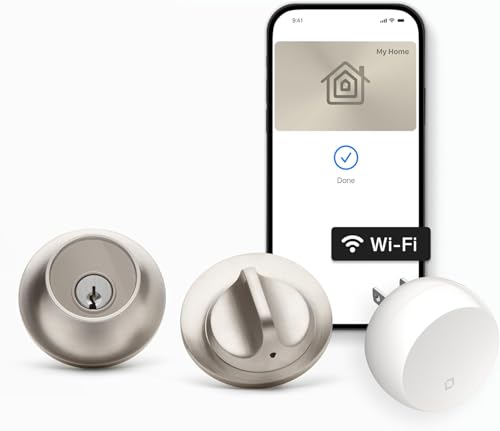
Level Lock+ WiFi Smart Deadbolt
Best for: compact Alexa and Apple Home Key setups
- Access Method
- Key (what this guide is about)
- Access Methods
- Apple Home Key, app, key fob
- Connectivity
- 2.4 GHz Wi-Fi
- Smart Home Compatibility
- Apple HomeKit, Google Home, Amazon Alexa
- Color
- Satin Nickel
- Dimensions
- 4.5 × 2.75 × 2.75 inches
The Level Lock+ WiFi Smart Deadbolt pairs physical key access with Amazon Alexa voice integration. Measuring 2.75 by 2.75 inches, it fits standard doors without bulky external housings. The included Wi-Fi bridge connects the deadbolt to 2.4 GHz networks for remote locking, while support for Apple Home Key, key fobs, and mobile apps provides multiple entry options. It suits you if you want discreet hardware with full smart assistant control.
Pros
- Works with Amazon Alexa, Google Home, and Apple HomeKit
- Includes Level Connect Wi-Fi bridge for 2.4 GHz remote operation
- Supports Apple Home Key tap-to-unlock via iPhone or Apple Watch
- Comes with a dedicated key fob and physical key access
Cons
- Requires a separate bridge plug-in for Wi-Fi connectivity
- No built-in numeric keypad on the lock body
- No fingerprint scanner included
Good fit if
- You use Amazon Alexa voice commands to lock or unlock your door.
- You prefer a compact 2.75-inch deadbolt profile with no visible external electronics.
- You want entry via Apple Home Key, key fob, or standard key.
Skip if
- You want a keypad directly integrated into the deadbolt exterior.
- You need biometric fingerprint scanning at the door.
Verdict: Level Lock+ WiFi Smart Deadbolt delivers Alexa voice connectivity and Apple Home Key access inside a compact, traditional deadbolt footprint. It gives you flexible entry options without cluttering your door exterior.

Yale Wi-Fi Smart Deadbolt with Apple Home Key
Best for: Apple Home users wanting dual-band Wi-Fi
- Access Method
- Keypad, Key (what this guide is about)
- Access Methods
- Apple Home Key, keypad, app
- Connectivity
- 2.4 or 5 GHz Wi-Fi
- Smart Home Compatibility
- Apple Home, Siri
- User Code Capacity
- Unlimited
- Color
- Oil Rubbed Bronze
View on Amazon: Yale Wi-Fi Smart Deadbolt with Apple Home Key
This smart deadbolt equips your entry door with built-in dual-band 2.4 and 5 GHz Wi-Fi and Apple Home Key integration. You can unlock using an iPhone, Apple Watch, key, or the touchscreen keypad. DoorSense technology verifies whether your door is closed, while BHMA Grade 2 certification ensures structural durability. It suits you if you run an Apple Home setup and manage guest entry with unlimited digital access codes.
Pros
- Dual-band 2.4 GHz and 5 GHz Wi-Fi connectivity
- Apple Home Key support for iPhone and Apple Watch
- BHMA Grade 2 commercial durability rating
- DoorSense sensor for door open or closed detection
Cons
- Yale Access app remote functionality limited to US and Canada
- Apple TV or HomePod required for remote Apple Home features
- Fingerprint recognition hardware not included
Good fit if
- You want Apple Home Key access with tap-to-unlock convenience.
- You need direct dual-band Wi-Fi connection without an external bridge.
- You share access frequently and require unlimited user codes.
Skip if
- You live outside the US or Canada where app access is restricted.
- You require biometric fingerprint authentication.
- You prioritize smart platforms other than Apple Home or Siri.
Verdict: Yale Wi-Fi Smart Lock Deadbolt with Keypad delivers seamless Apple Home Key integration and dual-band Wi-Fi inside a BHMA Grade 2 deadbolt. It provides flexible entry management with unlimited access codes and DoorSense auto-locking.

Yale Z-Wave Fingerprint Keypad Deadbolt
Best for: Z-Wave smart homes wanting biometric entry
- Access Method
- Keypad, Fingerprint, Key (what this guide is about)
- Access Methods
- Fingerprint, keypad, app
- Connectivity
- Z-Wave
- Smart Home Compatibility
- Samsung SmartThings, Hubitat
- User Code Capacity
- Unlimited
- Color
- Black
The Yale Z-Wave Fingerprint Keypad Deadbolt pairs physical key access with a fingerprint reader and backlit keypad. It connects via Z-Wave to hubs like Samsung SmartThings and Hubitat rather than using standalone Wi-Fi. With BHMA Grade 2 certification, unlimited user codes, and DoorSense auto-locking, you get multi-factor entry in a compact profile. This suits you if you run a Z-Wave network and want biometric and keyed access.
Pros
- Fingerprint scanner, backlit keypad, and traditional key access
- BHMA Grade 2 certified deadbolt construction
- DoorSense sensor detects closure status for auto-locking
- Integrates with Samsung SmartThings and Hubitat hubs
Cons
- Requires a separate compatible Z-Wave hub and app
- Z-Wave integration operates only in the US and Canada
Good fit if
- You already manage your home through a Samsung SmartThings or Hubitat Z-Wave hub.
- You want fingerprint, keypad, and physical key entry on a single door.
- You need unlimited guest codes with automated scheduling.
Skip if
- You do not own and do not want to set up a Z-Wave smart hub.
- You reside outside the US or Canada.
Verdict: Yale Z-Wave Fingerprint Keypad Deadbolt delivers versatile entry options and BHMA Grade 2 hardware for existing Z-Wave systems. It provides biometric, code, and key access while using low-frequency mesh networking for battery efficiency.

Yale Assure Lock 2 Key-Free Z-Wave Deadbolt
Best for: Z-Wave smart home and alarm setups
- Access Method
- Keypad, Key (what this guide is about)
- Access Methods
- Keypad, Auto-Unlock, Yale Access app
- Connectivity
- Z-Wave
- Smart Home Compatibility
- Samsung SmartThings, Ring Alarm, Wink
- User Code Capacity
- Unlimited
- Color
- Oil Rubbed Bronze
This deadbolt gives you keypad access, Z-Wave connectivity, and integration with the Yale Access app. You get unlimited user codes, automated locking via DoorSense, and hands-free unlocking from your smartphone or Apple Watch. It connects to hubs like Samsung SmartThings, Ring Alarm, and Wink for remote operation. Choose this lock if you run an established Z-Wave smart home platform and want trackable guest codes without physical keys.
Pros
- Supports unlimited user codes via the Yale Access app
- Connects to Z-Wave systems including Samsung SmartThings, Ring Alarm, and Wink
- Auto-Lock feature uses DoorSense to lock automatically once closed
- Auto-Unlock provides hands-free entry using a phone or Apple Watch
Cons
- Requires a compatible Z-Wave hub for remote access and smart features
- Key-free design provides no physical keyway cylinder for manual keys
Good fit if
- You already use a Z-Wave hub such as Ring Alarm, Wink, or SmartThings.
- You want to distribute unlimited guest access codes through an app.
- You prefer automated hands-free unlocking via your phone or Apple Watch.
Skip if
- You do not own a compatible Z-Wave hub or alarm system.
- You require a physical mechanical key cylinder for entry.
Verdict: Yale Assure Lock 2 Z-Wave Keypad Deadbolt delivers flexible digital access and unlimited codes for Z-Wave smart ecosystems. It provides automated security features but requires an external hub for remote controls.

Yale Assure Keypad Deadbolt with Z-Wave
Best for: Samsung SmartThings users wanting physical key access
- Access Method
- Keypad, Key (what this guide is about)
- Access Methods
- Keypad, key, app
- Connectivity
- Z-Wave
- Smart Home Compatibility
- Ring Alarm, Samsung SmartThings, Alexa
- Installation Type
- Full deadbolt replacement
- Color
- Satin Nickel
The Yale Assure Z-Wave Keypad Deadbolt is a smart lock that uses physical keys, a backlit push-button keypad, and Z-Wave connectivity. It includes two physical keys for standard mechanical entry. You integrate it directly into systems like Samsung SmartThings or Ring Alarm without using a dedicated Yale app. This lock suits you if you already run a Z-Wave smart home hub and want reliable physical key backup alongside keypad access.
Pros
- Includes two physical keys for manual backup access
- Integrates with Samsung SmartThings, Ring Alarm, and Alexa via Z-Wave
- Backlit keypad supports code entry and one-touch locking
- Replaces existing deadbolts on standard 1-3/4-inch to 2-1/4-inch doors
Cons
- Requires a separate compatible Z-Wave hub for app control
- Does not use a standalone Yale app
- Operates only in the United States and Canada
Good fit if
- You use a Samsung SmartThings or Ring Alarm hub for smart home automation.
- You want traditional physical keys as a backup to push-button keypad access.
- You have a standard door between 1-3/4 inches and 2-1/4 inches thick.
Skip if
- You do not own or plan to buy a separate Z-Wave hub.
- You live outside the United States or Canada.
Verdict: Yale Assure Z-Wave Keypad Deadbolt combines keyed entry with Z-Wave connectivity for integrated smart homes. It is a solid pick if you manage your door security through Samsung SmartThings.

ULTRALOQ Latch 5 Pro Smart Lever Lock
Best for: Matter smart home setups needing lever handles
- Access Method
- Key (what this guide is about)
- Access Methods
- Digital key, fingerprint, PIN, app, fob
- Connectivity
- 2.4 GHz Wi-Fi, Matter over Thread
- Smart Home Compatibility
- Apple Home, Alexa, Google, SmartThings
- Included Door Hardware
- Lever handle
- Color
- Black
The ULTRALOQ Latch 5 Pro Smart Lever Lock replaces standard lever handles on doors measuring 1-3/8 to 1-3/4 inches thick. It connects through 2.4 GHz Wi-Fi and Matter over Thread, integrating with Apple Home, Alexa, Google Home, and SmartThings. You can unlock via mechanical key, fingerprint, PIN, keyfob, app, or digital key. It suits you if you need multi-platform Matter connectivity and physical key backup on a lever-prep door.
Pros
- Supports Matter over Thread alongside 2.4 GHz Wi-Fi
- Physical key, fingerprint, PIN, app, fob, and digital key access
- Six AA batteries included with estimated life up to 1.5 years on Thread
- Fits standard lever-bore doors without wiring
Cons
- Built as a lever handle rather than a dedicated deadbolt
- Interior assembly is not weather-resistant and must remain indoors
- Wi-Fi radio is limited to 2.4 GHz networks
Good fit if
- You want Matter over Thread integration with Apple Home, Alexa, or Google Home.
- You need a lever-handle replacement with both physical key and digital access methods.
- You have a door thickness between 1-3/8 and 1-3/4 inches.
Skip if
- You need a standalone deadbolt rather than an integrated lever handle.
- You require an interior unit rated for outdoor weather exposure.
- You use a 5 GHz Wi-Fi network without 2.4 GHz support.
Verdict: ULTRALOQ Latch 5 Pro Smart Lever Lock delivers broad smart home integration via Matter over Thread while preserving mechanical key access. It provides versatile entry options for doors requiring an all-in-one lever handle.

Yale Assure Lock 2 Z-Wave Touchscreen Deadbolt
Best for: Z-Wave smart home hub setups
- Access Method
- Keypad, Touchscreen, Key (what this guide is about)
- Access Methods
- Keypad, Auto-Unlock, Yale Access app
- Connectivity
- Z-Wave
- Smart Home Compatibility
- Samsung SmartThings, Ring Alarm, Wink
- User Code Capacity
- Unlimited
- Color
- Satin Nickel
View on Amazon: Yale Assure Lock 2 Z-Wave Touchscreen Deadbolt
The Yale Assure Lock 2 is a smart deadbolt featuring Z-Wave connectivity and a touchscreen keypad. It supports unlock methods including the Yale Access app, Auto-Unlock, and custom codes. You get unlimited code capacity and DoorSense technology for automatic locking. This lock suits you if you already run a compatible Z-Wave hub, such as Samsung SmartThings or Ring Alarm, in the United States or Canada.
Pros
- Integrates with Z-Wave hubs like Samsung SmartThings, Ring Alarm, and Wink
- Supports unlimited user access codes via the Yale Access app
- Features DoorSense technology for automatic door locking
- Offers Auto-Unlock alongside touchscreen keypad access
Cons
- Requires a compatible Z-Wave hub and app to operate remotely
- Operates only within the United States and Canada
Good fit if
- You use a Z-Wave ecosystem such as Samsung SmartThings or Ring Alarm.
- You want hands-free entry using smartphone Auto-Unlock.
- You need to provide unlimited access codes to visitors.
Skip if
- You live outside the United States or Canada.
- You lack a compatible Z-Wave smart home hub.
Verdict: Yale Assure Lock 2 Key-Free Z-Wave Deadbolt delivers versatile keyless access and DoorSense auto-locking for existing Z-Wave smart home setups. It is an effective option if you want automated entry and unlimited digital codes without physical keys.

Lockly Secure Pro Zeno Deadbolt with Apple Home Key
Best for: Apple Home Key users wanting physical keys
- Access Method
- Key (what this guide is about)
- Access Methods
- Fingerprint, keypad, app, key, voice
- Connectivity
- Built-in Wi-Fi
- Smart Home Compatibility
- Apple Home, Alexa, Google Assistant
- User Code Capacity
- Up to 65 PIN codes
- Dimensions
- 5.31 × 3.03 × 4.53 inches
View on Amazon: Lockly Secure Pro Zeno Deadbolt with Apple Home Key
The Lockly Secure Pro Zeno Wi-Fi Deadbolt combines traditional physical key access with modern digital entry. It features built-in Wi-Fi, Apple Home Key support, and a 0.2-second fingerprint reader. You can store up to 65 user codes on its PIN Genie scrambling keypad or manage access via the Lockly Home app. It fits door thicknesses from 1 ⅜ to 3 ⅛ inches, making it a flexible choice if you want versatile entry options.
Pros
- Supports Apple Home Key via iPhone and Apple Watch
- Fast 0.2-second 3D fingerprint recognition
- Built-in Wi-Fi for remote app access without an external bridge
- Scrambling keypad holds up to 65 distinct PIN codes
Cons
- PIN code storage is capped at 65 codes
- Requires a door thickness of at least 1 ⅜ inches
Good fit if
- You want Apple Home Key tap unlocking alongside physical key access.
- You prefer built-in Wi-Fi without purchasing a separate bridge.
- You have a door between 1 ⅜ inches and 3 ⅛ inches thick.
Skip if
- You have a door thinner than 1 ⅜ inches.
- You manage a property requiring more than 65 distinct PIN codes.
Verdict: Lockly Secure Pro Zeno Wi-Fi Deadbolt delivers broad access versatility by combining physical keys with Apple Home Key, Wi-Fi, and biometric unlocking. It provides comprehensive smart control directly out of the box without requiring extra bridge hardware.
Specifications side by side
| Spec | Aqara U400 UWB Smart Deadbolt | Aqara U100 Keyed Fingerprint Deadbolt | Yale Assure Lock 2 Touch Wi-Fi Deadbolt | Yale Assure Lock 2 Bluetooth Touchscreen Deadbolt | Yale Assure Lock 2 Touch Key-Free Deadbolt | Yale Security Assure Lock 2 Wi-Fi Deadbolt | Aqara U50 Keyed Smart Deadbolt | Level Lock+ WiFi Smart Deadbolt | Yale Wi-Fi Smart Deadbolt with Apple Home Key | Yale Z-Wave Fingerprint Keypad Deadbolt | Yale Assure Lock 2 Key-Free Z-Wave Deadbolt | Yale Assure Keypad Deadbolt with Z-Wave | ULTRALOQ Latch 5 Pro Smart Lever Lock | Yale Assure Lock 2 Z-Wave Touchscreen Deadbolt | Lockly Secure Pro Zeno Deadbolt with Apple Home Key |
|---|---|---|---|---|---|---|---|---|---|---|---|---|---|---|---|
| Access Methods | UWB, Apple Home Key, fingerprint, key | Apple Home Key, fingerprint, app, key | Fingerprint, keypad, app | Keypad, app, Apple Watch, Auto-Unlock | Fingerprint, keypad, app | Touchscreen keypad, app, Apple Watch | Apple Home Key, keypad, app, key | Apple Home Key, app, key fob | Apple Home Key, keypad, app | Fingerprint, keypad, app | Keypad, Auto-Unlock, Yale Access app | Keypad, key, app | Digital key, fingerprint, PIN, app, fob | Keypad, Auto-Unlock, Yale Access app | Fingerprint, keypad, app, key, voice |
| Connectivity | Thread | Zigbee 3.0 | not specified | Bluetooth | Bluetooth | 2.4 or 5 GHz Wi-Fi | not specified | 2.4 GHz Wi-Fi | 2.4 or 5 GHz Wi-Fi | Z-Wave | Z-Wave | Z-Wave | 2.4 GHz Wi-Fi, Matter over Thread | Z-Wave | Built-in Wi-Fi |
| Smart Home Compatibility | Apple Home, Matter | Apple Home, Google Home, Alexa, IFTTT | not specified | not specified | not specified | not specified | Apple Home, Google Home, Alexa, IFTTT | Apple HomeKit, Google Home, Amazon Alexa | Apple Home, Siri | Samsung SmartThings, Hubitat | Samsung SmartThings, Ring Alarm, Wink | Ring Alarm, Samsung SmartThings, Alexa | Apple Home, Alexa, Google, SmartThings | Samsung SmartThings, Ring Alarm, Wink | Apple Home, Alexa, Google Assistant |
| Installation Type | not specified | not specified | not specified | not specified | Full deadbolt replacement | not specified | not specified | not specified | not specified | not specified | not specified | Full deadbolt replacement | not specified | not specified | not specified |
| Fingerprint Capacity | not specified | 50 | not specified | not specified | not specified | not specified | not specified | not specified | not specified | not specified | not specified | not specified | not specified | not specified | not specified |
| User Code Capacity | not specified | not specified | not specified | not specified | Unlimited | Unlimited | not specified | not specified | Unlimited | Unlimited | Unlimited | not specified | not specified | Unlimited | Up to 65 PIN codes |
| Included Door Hardware | not specified | not specified | not specified | not specified | not specified | not specified | Deadbolt | not specified | not specified | not specified | not specified | not specified | Lever handle | not specified | not specified |
| Access Method | Fingerprint, Key | Fingerprint, Key | Keypad, Fingerprint, Key | Touchscreen, Key | Keypad, Fingerprint, Key | Key | Key | Key | Keypad, Key | Keypad, Fingerprint, Key | Keypad, Key | Keypad, Key | Key | Keypad, Touchscreen, Key | Key |
| Color | Silver | Gray | Satin Nickel | Oil Rubbed Bronze | Satin Nickel | Satin Nickel | Black | Satin Nickel | Oil Rubbed Bronze | Black | Oil Rubbed Bronze | Satin Nickel | Black | Satin Nickel | Satin Nickle |
| Application | Home | Home | not specified | not specified | not specified | not specified | Home | Home | Home | not specified | not specified | not specified | Home | not specified | Home |
| Included Hardware | not specified | not specified | not specified | not specified | not specified | not specified | not specified | not specified | not specified | not specified | not specified | not specified | Lever | not specified | not specified |
| Dimensions | 3 × 4.2 × 7 inches | 5.27 × 3.46 × 2.91 inches | 0.88 × 2.5 × 3.75 inches | 2.5 × 3.7 × 2.3 inches | 0.9 × 2.5 × 3.75 inches | 0.88 × 2.5 × 3.75 inches | 5.31 × 2.91 × 3.46 inches | 4.5 × 2.75 × 2.75 inches | 0.88 × 2.5 × 3.75 inches | 0.9 × 2.5 × 3.75 inches | 2.5 × 3.7 × 2.3 inches | 5.5 × 5.5 × 10 inches | 6 × 3.12 × 7 inches | 2.5 × 3.7 × 2.3 inches | 5.31 × 3.03 × 4.53 inches |
| Weight | not specified | 2.59 pounds | not specified | not specified | not specified | not specified | 11 pounds | not specified | not specified | not specified | not specified | 1 pounds | not specified | not specified | 3.31 pounds |
| Model | DL-D16E | SDL-D01 | YRD450-F-WF1-619 | YRD450-BLE-0BP | YRD430-F-BLE-619 | YRD430-WF1-619 | DL-D05D | C-F12U-S1 | YRD450-N-WF1-0BP | YRD430-F-ZW3-BSP | YRD430-ZW2-0BP | YRD216-ZW2-619 | LATCH5 Pro | YRD450-ZW2-619 | PGK728WHK |
| Size | not specified | not specified | Wi-Fi | Bluetooth | Bluetooth | Wi-Fi | 5.31 x 2.91 x 3.46 inches | Lock+ WiFi | Wi-Fi | Keypad | Key-Free | Keypad | Fingerprint | Key-Free | 5 5⁄16 in x 2 9⁄16 in x 1 1⁄8 in |
For seating options, review the best GTPLAYER red gaming chairs to find a suitable match for your setup.
Key Factors When Choosing Keyed Deadbolts
-
Biometric Verification Options
Examine the access method specifications if you want secondary digital entry alongside your mechanical key. Several locks combine standard keyways with capacitive fingerprint scanners and touchpads. If you prefer fast entry without carrying keys or remembering numerical codes, select a model with biometric support like the Yale Assure Lock 2 Touch Wi-Fi Deadbolt. Check whether the listed access methods include fingerprint scanning, a keypad, or physical keys alone. Matching entry methods to your family routines ensures convenient everyday operation.
-
Smart Ecosystem Integration
Review smart home compatibility attributes to verify that the lock functions natively with your current voice assistants and controllers. Certain locks support platforms like Apple Home Key for tap-to-unlock convenience, while others link directly into smart hubs. For example, the Level Lock+ WiFi Smart Deadbolt lists compatibility with Alexa and Google Assistant alongside its keyed interface. Check manufacturer specifications for your platform before buying. Picking a lock designed for your existing setup prevents communication issues and simplifies automation across your home.
-
Exterior Hardware Dimensions
Check the exterior dimensions in the product specifications before choosing a deadbolt. Exterior escutcheon sizing varies significantly across models. For instance, the Level Lock+ WiFi Smart Deadbolt features a compact 2.75-inch width and 2.75-inch height, maintaining a clean profile on standard doors. Larger models with integrated keypads or touchscreens can measure up to ten inches tall. Measure the clearance between your deadbolt borehole and decorative trim or handle rosettes to ensure the new lock housing fits flush against your exterior door.
-
Door Hardware Configuration
Verify whether your opening requires a standard deadbolt replacement or an integrated latch handle. Most models on this list fit standard deadbolt boreholes, operating solely as auxiliary locking bolts. However, setups needing an all-in-one latch mechanism require dedicated hardware. For example, the ULTRALOQ Latch 5 Pro Smart Lever Lock includes lever hardware directly in the package. Check the included hardware specifications to confirm whether you are replacing an independent deadbolt or an entire handle assembly on your exterior or interior entry door.
-
Weather Resistance Ratings
Inspect the environmental protection specifications if your exterior door is exposed directly to wind and precipitation. Uncovered entrances require durable hardware that prevents water and dust ingress from damaging internal electronic components. For instance, the Aqara U100 Keyed Fingerprint Deadbolt specifies an IP65-rated housing designed to handle harsh outdoor weather exposure. If your entrance lacks an overhead porch or storm door, confirm the ingress rating in the product specifications to ensure dependable mechanical and electronic function year-round.
-
Exterior Finish Selection
Review the color and finish specifications to coordinate the lock hardware with your existing door handles, hinges, and exterior fixtures. Manufacturers offer varying finishes across their deadbolt lines, ranging from Satin Nickel and Black Suede to Silver. For example, the Yale Assure Lock 2 Bluetooth Touchscreen Deadbolt comes in Oil Rubbed Bronze to match darker, traditional trim. Matching the finish spec to your current door hardware creates a unified appearance without requiring you to replace functioning latch sets or surrounding decorative accessories.
Frequently asked questions
Can I use Apple Home Key with a keyed deadbolt?
Yes. Several models on this list support Apple Home Key while retaining physical key access. The Aqara U100 and Yale Wi-Fi Smart Deadbolt both offer this combination. You can unlock the door with your iPhone or Apple Watch and fall back to a traditional key if needed.
Which deadbolt works best with Z-Wave systems?
The Yale Z-Wave Fingerprint Keypad Deadbolt is designed for existing Z-Wave networks. It uses low-frequency mesh networking for battery efficiency. It also provides biometric, code, and key access. This model integrates directly with your Z-Wave hub without requiring additional bridge hardware.
Do I need a hub for Wi-Fi deadbolts?
No. Models like the Yale Assure Lock 2 Wi-Fi Deadbolt connect directly to your network. They support dual-band Wi-Fi for stable connectivity. This setup allows for remote controls and code sharing without managing an extra hub, unlike Z-Wave or Thread-only models.
What is the smallest deadbolt exterior footprint?
The Yale Assure Lock 2 Touch Wi-Fi Deadbolt has the slimmest profile. Its exterior measures 0.88 inches in length and 2.5 inches in width. This compact design minimizes clutter on your door while still providing fingerprint, keypad, and key access options for versatile entry.
Are there lever handle options with key backup?
Yes. The ULTRALOQ Latch 5 Pro Smart Lever Lock includes a lever handle instead of a traditional knob. It preserves mechanical key access while supporting Matter over Thread connectivity. This all-in-one design is suitable for doors that require a lever handle for accessibility or style.
Which deadbolt offers UWB hands-free entry?
The Aqara U400 UWB Smart Deadbolt provides hands-free entry using Ultra-Wideband technology. It pairs this modern feature with standard physical key entry for reliable fallback. This model is ideal if you want traditional mechanical security alongside advanced digital access methods without carrying keys.
Can I use voice commands with a keyed deadbolt?
Yes. The Level Lock+ WiFi Smart Deadbolt supports Alexa voice connectivity. It also integrates with Apple Home Key for flexible entry. This model delivers voice control and smart home compatibility inside a compact, traditional deadbolt footprint that retains physical key access for security.