Best Deadbolts with Remote Control in 2026: 15 Picks Ranked by Specs
As an Amazon Associate we earn from qualifying purchases. Links on this page are affiliate links.
Finding the best deadbolts with remote control gives you convenient keyless entry and lock management for your home. We evaluated 15 products based on the specifications published on their listings.
The Philips 4200 Series Wi-Fi Deadbolt with Handle leads the ranking because it combines direct Wi-Fi connectivity with an included handle set without requiring an external bridge. This guide helps you compare dimensions, connectivity specs, and access methods so you can decide which lock fits your door setup.
Quick picks
The best fit for you
- You want an all-in-one deadbolt and handle upgrade Philips 4200 Series Wi-Fi Deadbolt with Handle It includes a matching handle set and built-in Wi-Fi connectivity for remote control without extra bridges.
- You need Matter integration across multiple smart home platforms ULTRALOQ Bolt Smart Deadbolt with Handle Dual Wi-Fi and Matter support allow direct remote control across Alexa and Google Assistant platforms.
- You manage a rental property requiring remote access codes ULTRALOQ Latch 5 Touchscreen Smart Lever Lock It provides built-in Wi-Fi connectivity and a touchscreen keypad suited for rental property door installations.
- You want remote control without replacing your exterior deadbolt Yale Approach Retrofit Wi-Fi Smart Lock This retrofit lock adds Wi-Fi remote access without altering your door's existing exterior lock hardware.
Our 15 picks

Philips 4200 Series Wi-Fi Deadbolt with Handle
Best for: all-in-one deadbolt and handle upgrades
- Access Method
- Keypad, Remote Control (what this guide is about)
- Access Methods
- App, keypad PIN, fingerprint, voice
- Connectivity
- Built-in 2.4 GHz Wi-Fi
- Smart Home Compatibility
- Alexa, Google Assistant
- Auto-Lock Delay
- 0–180 seconds
- Included Door Hardware
- Handle set
View on Amazon: Philips 4200 Series Wi-Fi Deadbolt with Handle
This deadbolt gives you built-in 2.4 GHz Wi-Fi app control without a separate bridge, paired with a matching exterior handle set. You can unlock via the Philips Home Access app, a 0.3-second fingerprint scanner, PIN codes, or Alexa and Google Assistant voice commands. It includes an adjustable 0 to 180-second auto-lock timer, making it a reliable fit if you want a complete hardware package with remote management from anywhere.
Pros
- Connects directly to 2.4 GHz Wi-Fi without an external hub or bridge
- Fast 0.3-second biometric fingerprint recognition
- Includes a full matching door handle set in the box
- Supports permanent, one-time, periodic, and recurring PIN codes
- Compatible with Alexa and Google Assistant voice commands
Cons
- Does not include batteries in the package
- Incompatible with rechargeable or lithium batteries
- Requires placement within 33 feet of your Wi-Fi router
Good fit if
- You want an all-in-one package that includes both the smart deadbolt and a matching handle.
- You need direct remote app control and status tracking without buying an extra bridge.
- You want multiple entry methods including biometric recognition, customized PINs, and voice controls.
Skip if
- You plan to power your smart lock with rechargeable or lithium batteries.
- Your front door is located more than 33 feet away from your Wi-Fi router.
Verdict: Philips 4200 Series Wi-Fi Deadbolt with Handle combines direct Wi-Fi remote management with an included handle set and fast biometric access. It provides versatile keyless entry options out of the box without requiring a separate network bridge.

ULTRALOQ Bolt Smart Deadbolt with Handle
Best for: Matter-based multi-platform smart home setups
- Access Method
- Keypad, Fingerprint, Remote Control (what this guide is about)
- Access Methods
- Fingerprint, passcode, app, voice, key
- Smart Home Compatibility
- Apple Home, Alexa, Google Assistant
- Fingerprint Capacity
- Up to 50
- User Code Capacity
- Up to 50
- Included Door Hardware
- Deadbolt and handle
This smart deadbolt and handle set pairs built-in 2.4 GHz Wi-Fi with Matter over Thread integration for remote control across Apple Home, Alexa, and Google Assistant. You can manage up to 50 passcodes, store 50 fingerprints, or unlock remotely via smartphone. Thread connectivity enables up to 18 months of battery life. It suits you if you want flexible remote access options connected directly to your existing smart home ecosystem.
Pros
- Supports Matter over Thread alongside built-in 2.4 GHz Wi-Fi
- Stores up to 50 fingerprints and 50 user passcodes
- Thread networking delivers up to 18 months of battery life
- Includes matching door handle hardware with deadbolt
Cons
- Matter over Thread operation requires a separate compatible hub or border router
- Door position sensor is not included for status detection
- Wi-Fi connectivity is limited to 2.4 GHz networks
Good fit if
- You want remote access unified across Apple Home, Google Assistant, or Alexa via Matter.
- You need multiple access options including fingerprint, passcode, mobile app, and mechanical keys.
- You prefer a full front-door package that includes both deadbolt and matching handle.
Skip if
- You do not have a Matter over Thread border router for smart ecosystem pairing.
- You require an included magnetic door sensor to confirm physical door alignment.
Verdict: ULTRALOQ Bolt Matter Deadbolt with Handle provides versatile remote control across major platforms through dual Wi-Fi and Matter over Thread connectivity. Its 50-code capacity, fingerprint reader, and included handle make it a comprehensive entry solution.

Philips Built-in Wi-Fi Smart Deadbolt
Best for: hub-free Wi-Fi control and physical keypad access
- Access Method
- Remote Control (what this guide is about)
- Access Methods
- Passcode, key, app, voice
- Connectivity
- Built-in Wi-Fi
- Smart Home Compatibility
- Amazon Alexa, Google Assistant
- Auto-Lock Delay
- 10-180 seconds
- User Code Capacity
- 100
This smart deadbolt connects directly to your home network via built-in Wi-Fi, allowing you to lock, unlock, and manage permissions through a mobile app from anywhere. It features physical keypad buttons, support for up to 100 custom access codes, and an adjustable auto-lock timer from 10 to 180 seconds. It suits you if you want dependable remote access and push-button entry without purchasing a dedicated bridge or hub.
Pros
- Built-in Wi-Fi connects directly to your network without an added hub
- Stores up to 100 user passcodes with timed and one-time options
- Auto-locks automatically with adjustable delay from 10 to 180 seconds
- IP54 rated with an operating temperature range of -31°F to 150°F
Cons
- Requires 8 AA batteries that are not included in the box
- Lacks a fingerprint sensor or biometric access option
Good fit if
- You want direct Wi-Fi app control without setting up a separate bridge.
- You prefer tactile physical push buttons instead of a touchscreen keypad.
- You manage access for guests using temporary or scheduled passcodes.
Skip if
- You prefer fingerprint recognition for keyless unlocking.
- You want a lock that includes batteries in the packaging.
Verdict: Philips Wi-Fi Keypad Deadbolt delivers direct Wi-Fi remote management and reliable physical push buttons without requiring a bridge.

Philips Fingerprint Wi-Fi Deadbolt with Handle
Best for: complete entry door hardware replacement with Wi-Fi
- Access Method
- Keypad, Fingerprint, Remote Control (what this guide is about)
- Access Methods
- Fingerprint, app, passcode, key, voice
- Connectivity
- Built-in 2.4GHz Wi-Fi
- Smart Home Compatibility
- Alexa, Google Assistant
- Auto-Lock Delay
- 10 to 180 seconds
- User Code Capacity
- 100
View on Amazon: Philips Fingerprint Wi-Fi Deadbolt with Handle
Built-in 2.4GHz Wi-Fi eliminates separate hubs for app-based remote locking, unlocking, and activity alerts. The bundle pairs an electronic deadbolt with a matching front door handle. You get five entry options, including 0.3-second fingerprint recognition and 100 passcode slots. An adjustable 10-to-180-second auto-lock manages closure automatically. It fits standard doors measuring 1-3/8 to 2 inches thick, suiting households that need complete entryway hardware with remote control access.
Pros
- Built-in 2.4GHz Wi-Fi provides remote app control without a separate hub
- Includes both electronic deadbolt and matching front door handle
- Fingerprint scanner unlocks in 0.3 seconds
- Stores up to 100 time-sensitive user passcodes
- Customizable auto-lock timer adjusts from 10 to 180 seconds
Cons
- Requires 4 AA batteries that are not included in the package
- Only connects to 2.4GHz Wi-Fi bands
- Requires replacing both deadbolt and handle rather than retrofitting existing hardware
Good fit if
- You want remote access without plugging in an extra Wi-Fi bridge
- You need a coordinated deadbolt and door handle set in matte black
- You manage guest access using up to 100 distinct passcodes
Skip if
- You want a retrofit deadbolt that keeps your existing exterior hardware
- You run an exclusively 5GHz home Wi-Fi network
Verdict: Philips Wi-Fi Smart Deadbolt with Handle delivers integrated remote control and multi-method entry without needing an external bridge. It replaces your complete exterior door lockset with direct Wi-Fi connectivity and rapid fingerprint access.

Philips Wi-Fi Fingerprint Smart Deadbolt
Best for: hub-free remote access and large households
- Access Method
- Keypad, Fingerprint, Remote Control (what this guide is about)
- Access Methods
- Fingerprint, PIN, app, voice, key
- Connectivity
- 2.4 GHz Wi-Fi
- Smart Home Compatibility
- Alexa, Google
- Auto-Lock Delay
- 10 to 180 seconds
- Fingerprint Capacity
- 50
This electronic deadbolt connects directly to your 2.4 GHz Wi-Fi network without an external hub, letting you lock, unlock, and monitor activity remotely via the companion app. It supports voice commands through Alexa and Google Assistant, stores up to 50 fingerprints, and holds 100 passcodes. With customizable auto-lock timing from 10 to 180 seconds, it suits homeowners and rental hosts who want full remote management alongside multiple physical entry options.
Pros
- Direct 2.4 GHz Wi-Fi connection requires no separate hub for remote access
- Stores up to 50 fingerprints and 100 customizable user passcodes
- Configurable auto-lock delay from 10 to 180 seconds
- Works with Amazon Alexa and Google Assistant voice controls
Cons
- Requires eight AA batteries, which are sold separately
- Limited to 2.4 GHz Wi-Fi bands with no 5 GHz support
Good fit if
- You want remote app control and activity logs without buying a separate bridge
- You need to create up to 100 recurring, scheduled, or one-time passcodes
- You prefer fast biometric unlocking for up to 50 saved fingerprints
Skip if
- You have a door thicker than 2 inches
- You do not have an active 2.4 GHz Wi-Fi network
- You want an all-in-one set that includes an exterior handle
Verdict: Philips Wi-Fi Fingerprint Smart Deadbolt delivers remote app control and activity tracking over built-in Wi-Fi without needing an external bridge. Its 50-fingerprint scanner and 100 passcode slots make it a capable deadbolt for busy homes or short-term rentals.
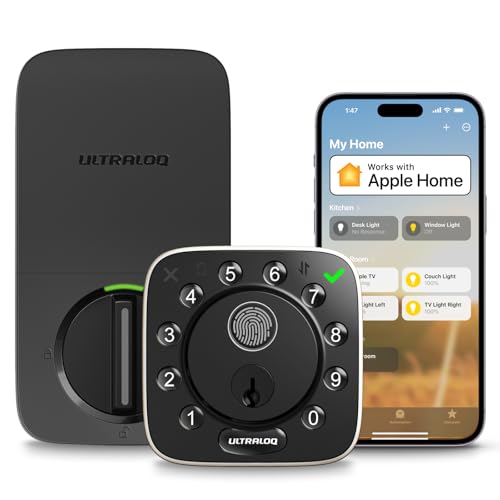
ULTRALOQ Bolt Wi-Fi Fingerprint Deadbolt
Best for: Grade 1 security with broad platform compatibility
- Access Method
- Fingerprint, Remote Control (what this guide is about)
- Access Methods
- Fingerprint, passcode, app, key, voice
- Connectivity
- 2.4 GHz Wi-Fi
- Smart Home Compatibility
- Alexa, Apple Home, Google Home, IFTTT
- Fingerprint Capacity
- Up to 100 fingerprints
- User Code Capacity
- Up to 50 codes
This ANSI/BHMA Grade 1 smart deadbolt gives you remote control through built-in 2.4 GHz Wi-Fi without an external hub. It features an integrated fingerprint sensor reading in 0.3 seconds, storage for 100 prints, and capacity for 50 passcodes. Integrations cover Apple Home, Alexa, and Google Home alongside auto-unlock via smartphone proximity. It suits property managers and homeowners needing high-grade physical security with flexible off-site management.
Pros
- ANSI/BHMA Grade 1 certified zinc alloy construction
- Built-in 2.4 GHz Wi-Fi connects directly without a bridge
- Stores up to 100 fingerprints and 50 passcodes
- Works with Apple Home, Alexa, Google Home, SmartThings, and IFTTT
- IP65 weather-resistance rating
Cons
- Operates exclusively on 2.4 GHz Wi-Fi networks
- Requires Wi-Fi router placement within 70 feet
- Max door thickness supported is 1-3/4 inches
Good fit if
- You want ANSI/BHMA Grade 1 certified deadbolt strength with remote app access.
- You manage entry via Apple Home, Alexa, Google Home, or SmartThings.
- You need fast biometric access alongside temporary passcodes for guests.
Skip if
- You rely solely on a 5 GHz Wi-Fi network without 2.4 GHz support.
- Your door thickness exceeds 1-3/4 inches.
Verdict: ULTRALOQ Bolt Wi-Fi Fingerprint Deadbolt pairs top-tier ANSI/BHMA Grade 1 hardware with direct Wi-Fi remote access and extensive smart home integration. It provides dependable physical protection and multi-platform automation without requiring an add-on bridge.
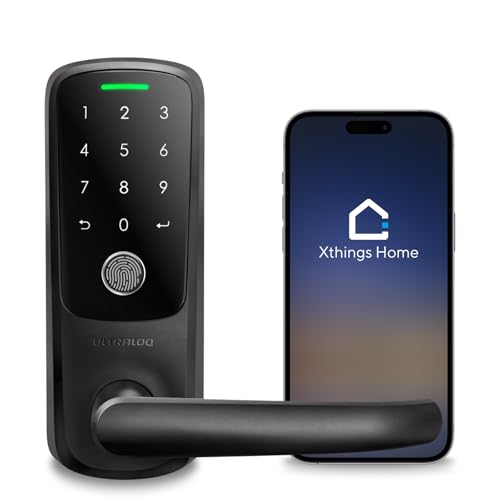
ULTRALOQ Latch 5 Touchscreen Smart Lever Lock
Best for: rental hosts needing remote code management
- Access Method
- Keypad, Fingerprint, Touchscreen, Remote Control (what this guide is about)
- Access Methods
- App, fingerprint, code, mechanical key
- Connectivity
- Built-in 2.4 GHz Wi-Fi
- Color
- Black
- Application
- Home, Front Door, Office, Rental Property
- Included Hardware
- Handle
View on Amazon: ULTRALOQ Latch 5 Touchscreen Smart Lever Lock
The ULTRALOQ Latch 5 is an integrated smart lever lock equipped with built-in 2.4 GHz Wi-Fi, eliminating the need for an external gateway. You get multiple access methods, including fingerprint recognition, a touchscreen digital keypad, mechanical keys, and smartphone remote control via iOS or Android. Because you can share temporary codes remotely and review real-time activity logs, this lock suits rental property hosts managing exterior or interior standard US doors.
Pros
- Built-in 2.4 GHz Wi-Fi operates without a separate gateway
- Four access options with fingerprint, keypad, mechanical key, and mobile app
- Zinc alloy build with a weatherproof exterior assembly
- App supports remote temporary password generation and real-time activity logging
Cons
- Supports 2.4 GHz Wi-Fi connections only
- Lever form factor replaces standard door handles rather than standalone deadbolts
Good fit if
- You manage rental properties and need to provide guests with temporary access codes remotely.
- You want an all-in-one lever handle featuring fingerprint and touchscreen entry.
- You are outfitting standard US interior or exterior doors without doing additional drilling.
Skip if
- You need a standalone deadbolt mechanism that works alongside an existing handle.
- You require 5 GHz Wi-Fi band compatibility.
Verdict: ULTRALOQ Latch 5 Smart Lever Lock provides comprehensive access control with direct Wi-Fi connectivity and remote code sharing for standard doors.

Yale Approach Retrofit Wi-Fi Smart Lock
Best for: retrofit smart lock installations with remote control
- Access Method
- Keypad, Remote Control (what this guide is about)
- Access Methods
- App, key
- Installation Type
- Interior retrofit
- Connectivity
- Wi-Fi
- Color
- Black
- Dimensions
- 2.5 × 7.5 × 9.75 inches
The Yale Approach is an interior retrofit smart lock that upgrades your door without replacing your existing deadbolt hardware. It features Wi-Fi connectivity via the included Yale Connect module, letting you lock and unlock remotely using the Yale Access app. You can share unlimited virtual keys and track entry through an activity feed while keeping your exterior key. It suits anyone wanting remote management without altering outdoor lock hardware.
Pros
- Installs on the interior side without replacing existing deadbolt hardware
- Includes Yale Connect for Wi-Fi remote access through the Yale Access app
- Supports unlimited virtual keys and 24/7 activity feed tracking
- Comes with 4 AA batteries included
Cons
- Lacks an exterior keypad in this configuration
- Does not include biometric or fingerprint scanning
Good fit if
- You want to keep your existing exterior deadbolt and original physical keys.
- You need remote lock management and virtual guest keys over Wi-Fi.
Skip if
- You prefer built-in keypad or fingerprint access at the door.
- You want a complete hardware replacement for both sides of the door.
Verdict: Yale Approach Retrofit Wi-Fi Smart Lock adds remote app control to your existing deadbolt without altering your exterior hardware. It delivers solid remote monitoring and virtual key management while keeping your backup keys fully functional.
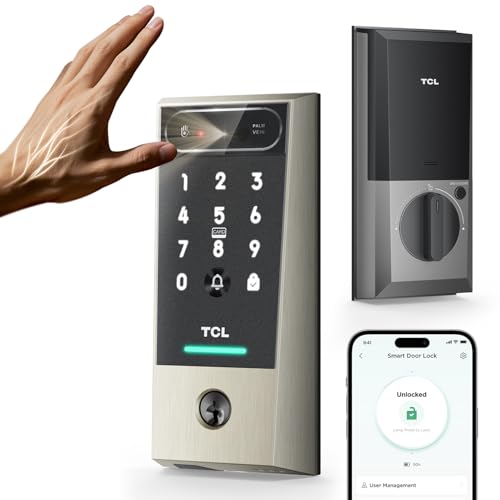
TCL Palm Vein Wi-Fi Smart Deadbolt
Best for: households wanting palm vein and remote Wi-Fi access
- Access Method
- Keypad, Remote Control (what this guide is about)
- Access Methods
- Palm vein scan, code, app, card, key
- Smart Home Compatibility
- Alexa, Google Assistant
- Power Source
- Battery Powered
- Connectivity
- Wi-Fi
- Application
- Front Door
This Wi-Fi deadbolt gives you remote door control via the TCL Home app without requiring an external bridge. You can check lock status, generate temporary guest passcodes, and monitor activity remotely. The hardware pairs built-in Wi-Fi and voice platform support with contactless palm vein scanning and a 10,000mAh rechargeable battery. It suits you if you want keyless remote management alongside biometric access that works with wet or aging hands.
Pros
- Built-in Wi-Fi enables app control and remote lock management without extra bridges
- Rechargeable 10,000mAh battery provides up to 8 months of runtime
- Contactless palm vein recognition unlocks in 0.2 seconds
- Six entry methods include palm vein scan, passcode, app, voice, NFC card, and key
- Customizable auto-lock timer secures the door after closing
Cons
- Uses a dedicated rechargeable battery pack instead of standard replaceable AA cells
- Weather resistance is limited to an IP55 rating
- Does not include an exterior door handle or lever
Good fit if
- You want remote access control and activity logs through a direct Wi-Fi connection.
- You need biometric entry that reads internal palm veins when fingerprints fail.
- You prefer a rechargeable 10,000mAh power pack with USB-C emergency backup.
Skip if
- You prefer a smart lock that runs on standard off-the-shelf AA alkaline batteries.
- You need a complete lockset that includes a matching exterior door handle.
Verdict: TCL Palm Vein Wi-Fi Smart Deadbolt provides direct Wi-Fi remote management alongside quick contactless biometric scanning. It gives you flexible entry options and reliable remote monitoring without extra network adapters.

YUHANUS Keyless Hidden Deadbolt with 4 Remotes
Best for: concealed deadbolt security using physical remote controls
- Access Method
- Remote Control (what this guide is about)
- Access Methods
- Remote control
- Application
- Home
- Dimensions
- 8.66 × 6.3 × 2.36 inches
View on Amazon: YUHANUS Keyless Hidden Deadbolt with 4 Remotes
The YUHANUS Hidden Keyless Deadbolt with 4 Remotes is an interior-mounted lock that leaves no exterior keyhole on your door. You control access exclusively using the four included remote controls. It runs on four AA batteries with an estimated one-year lifespan and requires no tools for battery swaps. Built from zinc alloy and stainless steel, it measures 8.66 by 6.3 by 2.36 inches, making it a fit if you want completely hidden hardware.
Pros
- Package includes 4 remote controls
- Hidden interior design leaves no exterior lock hole
- Constructed from corrosion-resistant zinc alloy and stainless steel
- Runs up to one year on 4 AA batteries with tool-free replacement
Cons
- No exterior keypad or mechanical backup keyhole
- Access method is limited strictly to remote controls
- Relatively large interior profile at 8.66 by 6.3 inches
Good fit if
- You want an interior-mounted deadbolt with zero exterior hardware visible
- You want multiple physical remote controls for household entry
- You need a rust-resistant zinc alloy and stainless steel build
Skip if
- You need a keypad, fingerprint scanner, or traditional key backup
- You want a slim, low-profile interior lock mechanism
Verdict: YUHANUS Hidden Keyless Deadbolt with 4 Remotes provides a completely concealed deadbolt setup operated solely by dedicated remote transmitters. It gives you basic, exterior-invisible security without keypads or physical keyways.
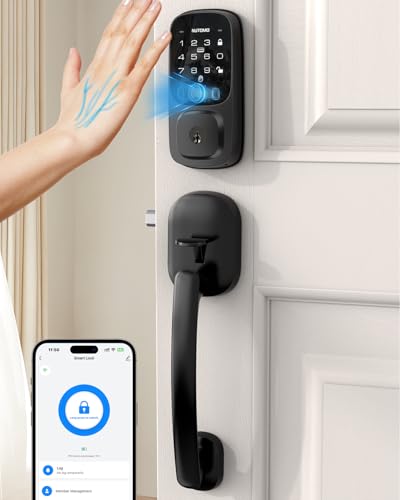
NUTOMO Palm Vein Smart Lock with Handle
Best for: touch-free palm recognition and built-in Wi-Fi
- Access Method
- Keypad, Remote Control (what this guide is about)
- Access Methods
- Palm vein, code, IC card, app, key
- Connectivity
- 2.4G Wi-Fi
- Smart Home Compatibility
- Amazon Alexa
- Included Door Hardware
- Handle set
- Power Source
- Battery Powered
The NUTOMO Palm Vein Smart Lock pairs an entry handle with touch-free biometric recognition and built-in 2.4 GHz Wi-Fi. You can control the lock remotely through a smartphone app or Alexa voice commands without an external hub. It features a 7,800 mAh rechargeable battery rated for 240 days of use, local biometric data storage, and IC card access. This setup suits you if you want keyless, touchless entry with complete remote access management.
Pros
- Built-in 2.4 GHz Wi-Fi enables app control without a separate bridge
- Touch-free palm vein recognition with local data storage
- Rechargeable 7,800 mAh battery lasts up to 240 days per charge
- Includes matching exterior and interior handle hardware
Cons
- Only connects to 2.4 GHz Wi-Fi networks
- Smart home voice integration is limited to Amazon Alexa
- Does not fit doors thinner than 1.38 inches or thicker than 2.17 inches
Good fit if
- You want touchless biometric entry along with Wi-Fi app remote access.
- You prefer a high-capacity rechargeable battery over replacing disposable AA cells.
- You need an all-in-one package that includes the lock and matching door handle.
Skip if
- You rely on Apple Home or Google Assistant for smart home voice control.
- You have a door thickness outside the 1.38-inch to 2.17-inch supported range.
Verdict: NUTOMO Palm Vein Smart Lock with Handle delivers versatile remote Wi-Fi control and touch-free biometric unlocking backed by a high-capacity rechargeable battery. It provides an all-in-one solution for standard doors seeking keyless access and remote management without an extra hub.
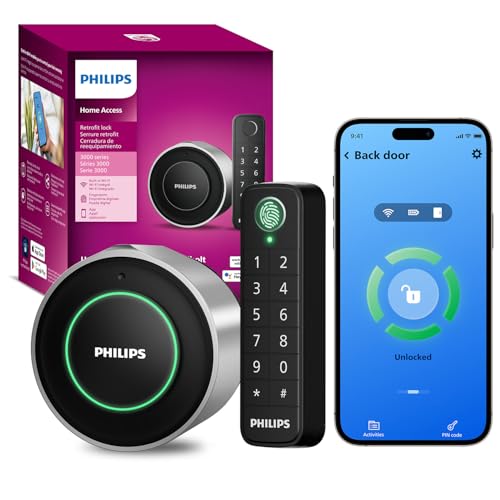
Philips Retrofit Smart Deadbolt with Keypad
Best for: upgrading existing deadbolts with wireless keypad access
- Access Method
- Keypad, Fingerprint, Remote Control (what this guide is about)
- Access Methods
- Fingerprint, passcode, app, voice, key
- Connectivity
- Built-in 2.4GHz Wi-Fi
- Smart Home Compatibility
- Amazon Alexa, Google Assistant
- Installation Type
- Interior retrofit
- Auto-Lock Delay
- 10 to 180 seconds
This interior retrofit lock upgrades your door while keeping your exterior hardware and original keys intact. Built-in 2.4GHz Wi-Fi gives you app remote control and smart assistant integration without extra hubs. It includes a separate wireless keypad with fingerprint and passcode entry that mounts within 39 inches of the door. It suits you if you want keyless wireless access and remote operation without altering the outside appearance of your entryway.
Pros
- Built-in 2.4GHz Wi-Fi provides app remote control without an external hub
- Retrofit design keeps existing exterior deadbolt hardware and physical keys
- Separate wireless keypad supports fingerprint and passcode entry
- Configurable auto-lock delay from 10 to 180 seconds
- Integrates with Amazon Alexa and Google Assistant
Cons
- Up to 4 months of battery life on two CR123 batteries
- Keypad mounting distance limited to 39 inches from the door
- Requires a 2.4GHz Wi-Fi network connection
Good fit if
- You want to keep your original exterior deadbolt and physical keys.
- You need remote app control directly over 2.4GHz Wi-Fi without adding a bridge.
- You prefer unlocking via a separate wireless fingerprint keypad.
Skip if
- You need battery longevity beyond 4 months or prefer standard AA batteries.
- You want to mount the external keypad farther than 39 inches from the lock.
- You prefer completely replacing both interior and exterior door hardware.
Verdict: Philips Retrofit Deadbolt with Wireless Keypad updates your existing hardware with Wi-Fi connectivity and biometric entry without altering your door's exterior look. It provides responsive remote control and flexible access management, provided four-month battery replacements fit your maintenance schedule.

Sophies Frameless Glass Door Wi-Fi Lock
Best for: Frameless glass sliding doors needing Wi-Fi
- Access Method
- Remote Control (what this guide is about)
- Access Methods
- Fingerprint, password, card, app, key
- Connectivity
- Built-in Wi-Fi
- Auto-Lock Delay
- 3-900 seconds
- Fingerprint Capacity
- Up to 100 fingerprints
- User Code Capacity
- 350 sets (passwords and cards)
The Sophies Wi-Fi Frameless Glass Door Smart Lock secures sliding or swinging glass doors without drilling. Built-in Wi-Fi provides remote control through the Tuya app without an external hub, letting you manage logs and dynamic passwords. It features a 3-to-900-second auto-lock delay, double hook latch, and capacity for 100 fingerprints plus 350 passcode or card sets. This suits you if your frameless glass measures 10 to 12 mm thick.
Pros
- Built-in Wi-Fi connects directly to the Tuya app without an external bridge
- No-drill installation preserves 10–12 mm frameless glass doors
- Stores up to 100 fingerprints and 350 passcode or swipe card sets
- Configurable auto-lock delay from 3 to 900 seconds
Cons
- Incompatible with standard wooden and metal pre-drilled doors
- Requires a precise door seam clearance between 4 mm and 8 mm
- Doors between 8 mm and 10 mm thick may leave fitting gaps
Good fit if
- You need remote Wi-Fi locking on a frameless glass sliding door.
- You want direct app management without installing an additional hub.
- You manage high user turnover requiring up to 350 codes and cards.
Skip if
- You need a deadbolt for a standard wood or metal door.
- You have a door seam clearance outside the 4–8 mm range.
- You have glass thinner than 8 mm or thicker than 12 mm.
Verdict: Sophies Wi-Fi Frameless Glass Door Smart Lock provides standalone Wi-Fi control and versatile entry methods tailored specifically for frameless glass sliding doors. It delivers dependable keyless security without requiring permanent drill holes.

ULTRALOQ U-Bolt WiFi Deadbolt with Lever Set
Best for: full door handle and Wi-Fi deadbolt replacements
- Access Method
- Remote Control (what this guide is about)
- Access Methods
- Keypad, app, Apple Watch, voice, key
- Connectivity
- Built-in 2.4GHz WiFi
- Smart Home Compatibility
- Alexa, Google Assistant
- Included Door Hardware
- Lever set
- Color
- Black
View on Amazon: ULTRALOQ U-Bolt WiFi Deadbolt with Lever Set
The ULTRALOQ U-Bolt with Lever Set is a Wi-Fi-enabled smart deadbolt that comes packaged with matching door handle hardware. It includes built-in 2.4GHz Wi-Fi, removing the need for a separate bridge to manage access remotely. You get multiple unlocking options, including an anti-peep keypad, smartphone app control, Apple Watch integration, and voice commands through Alexa or Google Assistant. It suits you if you want a complete lock and lever package with native wireless control.
Pros
- Includes a matching passage lever set in the box
- Built-in 2.4GHz Wi-Fi without needing an external hub
- Multiple entry options including anti-peep keypad, Apple Watch, and voice control
- Door sensor enables auto-lock, auto-unlock, and open-door notifications
Cons
- Supports only 2.4GHz Wi-Fi networks
- Lacks a fingerprint or biometric reader
Good fit if
- You need a deadbolt bundled directly with a matching door lever.
- You want remote access without buying a separate Wi-Fi bridge.
- You use Alexa or Google Assistant for voice-activated locking.
Skip if
- You require a 5GHz Wi-Fi connection.
- You want biometric or fingerprint unlocking.
Verdict: ULTRALOQ U-Bolt Wi-Fi Deadbolt with Lever provides all-in-one entrance hardware with built-in wireless control and no extra bridge required. It delivers reliable remote operation and flexible access methods directly out of the box.
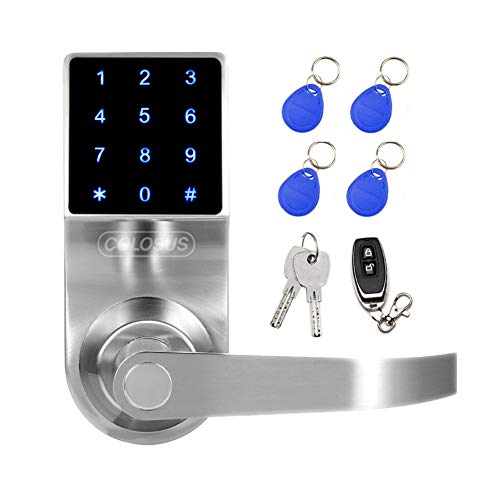
Colosus Electronic Door Lock with Remote and Keys
Best for: sheltered doors needing remote and key access
- Access Method
- Touchscreen, Key, Remote Control (what this guide is about)
- Access Methods
- PIN code, RFID card, remote control, key
- Application
- Home, Office
- Dimensions
- 6.4 × 3 × 6.1 inches
- Weight
- 4.58 pounds
View on Amazon: Colosus Electronic Door Lock with Remote and Keys
This Colosus electronic door lock provides access using an included remote control, a PIN touchscreen, four RFID key fobs, and two physical metal keys. It fits doors between 35mm and 60mm thick and comes with a 60mm standard latch. Because the housing is not waterproof, you must keep it away from direct water. It suits you if you want versatile physical access modes for a sheltered home or office entry.
Pros
- Four entry modes: PIN code, RFID card, remote control, and physical key
- Comes bundled with four RFID key fobs and one remote control
- Supports door thicknesses from 35mm to 60mm
- Includes two metal backup keys in the package
Cons
- Not waterproof and cannot be exposed to direct water
- Included metal keys cannot be copied or replaced
- Requires drilling an extra hole in the door to secure
Good fit if
- You want multiple physical entry options including remote controls and RFID key fobs.
- You have a sheltered door between 35mm and 60mm thick.
- You want physical backup keys included in the box.
Skip if
- You need a waterproof lock for a door exposed to outdoor weather.
- You require replaceable or copyable physical backup keys.
- You do not want to drill an extra hole into your door.
Verdict: Colosus Electronic Door Lock with Remote and Keys delivers versatile entry through its included remote, RFID fobs, and non-duplicable keys. It works well on standard-thickness sheltered doors that will not encounter direct water exposure.
Specifications side by side
| Spec | Philips 4200 Series Wi-Fi Deadbolt with Handle | ULTRALOQ Bolt Smart Deadbolt with Handle | Philips Built-in Wi-Fi Smart Deadbolt | Philips Fingerprint Wi-Fi Deadbolt with Handle | Philips Wi-Fi Fingerprint Smart Deadbolt | ULTRALOQ Bolt Wi-Fi Fingerprint Deadbolt | ULTRALOQ Latch 5 Touchscreen Smart Lever Lock | Yale Approach Retrofit Wi-Fi Smart Lock | TCL Palm Vein Wi-Fi Smart Deadbolt | YUHANUS Keyless Hidden Deadbolt with 4 Remotes | NUTOMO Palm Vein Smart Lock with Handle | Philips Retrofit Smart Deadbolt with Keypad | Sophies Frameless Glass Door Wi-Fi Lock | ULTRALOQ U-Bolt WiFi Deadbolt with Lever Set | Colosus Electronic Door Lock with Remote and Keys |
|---|---|---|---|---|---|---|---|---|---|---|---|---|---|---|---|
| Access Methods | App, keypad PIN, fingerprint, voice | Fingerprint, passcode, app, voice, key | Passcode, key, app, voice | Fingerprint, app, passcode, key, voice | Fingerprint, PIN, app, voice, key | Fingerprint, passcode, app, key, voice | App, fingerprint, code, mechanical key | App, key | Palm vein scan, code, app, card, key | Remote control | Palm vein, code, IC card, app, key | Fingerprint, passcode, app, voice, key | Fingerprint, password, card, app, key | Keypad, app, Apple Watch, voice, key | PIN code, RFID card, remote control, key |
| Connectivity | Built-in 2.4 GHz Wi-Fi | not specified | Built-in Wi-Fi | Built-in 2.4GHz Wi-Fi | 2.4 GHz Wi-Fi | 2.4 GHz Wi-Fi | Built-in 2.4 GHz Wi-Fi | not specified | not specified | not specified | 2.4G Wi-Fi | Built-in 2.4GHz Wi-Fi | Built-in Wi-Fi | Built-in 2.4GHz WiFi | not specified |
| Smart Home Compatibility | Alexa, Google Assistant | Apple Home, Alexa, Google Assistant | Amazon Alexa, Google Assistant | Alexa, Google Assistant | Alexa, Google | Alexa, Apple Home, Google Home, IFTTT | not specified | not specified | Alexa, Google Assistant | not specified | Amazon Alexa | Amazon Alexa, Google Assistant | not specified | Alexa, Google Assistant | not specified |
| Installation Type | not specified | not specified | not specified | not specified | not specified | not specified | not specified | Interior retrofit | not specified | not specified | not specified | Interior retrofit | not specified | not specified | not specified |
| Auto-Lock Delay | 0–180 seconds | not specified | 10-180 seconds | 10 to 180 seconds | 10 to 180 seconds | not specified | not specified | not specified | not specified | not specified | not specified | 10 to 180 seconds | 3-900 seconds | not specified | not specified |
| Fingerprint Capacity | not specified | Up to 50 | not specified | not specified | 50 | Up to 100 fingerprints | not specified | not specified | not specified | not specified | not specified | not specified | Up to 100 fingerprints | not specified | not specified |
| User Code Capacity | not specified | Up to 50 | 100 | 100 | 100 | Up to 50 codes | not specified | not specified | not specified | not specified | not specified | not specified | 350 sets (passwords and cards) | not specified | not specified |
| Included Door Hardware | Handle set | Deadbolt and handle | not specified | Deadbolt and handle | not specified | not specified | not specified | not specified | not specified | not specified | Handle set | not specified | not specified | Lever set | not specified |
| Power Source | not specified | not specified | not specified | not specified | not specified | not specified | not specified | not specified | Battery Powered | not specified | Battery Powered | not specified | not specified | not specified | not specified |
| Access Method | Keypad, Remote Control | Keypad, Fingerprint, Remote Control | Remote Control | Keypad, Fingerprint, Remote Control | Keypad, Fingerprint, Remote Control | Fingerprint, Remote Control | Keypad, Fingerprint, Touchscreen, Remote Control | Keypad, Remote Control | Keypad, Remote Control | Remote Control | Keypad, Remote Control | Keypad, Fingerprint, Remote Control | Remote Control | Remote Control | Touchscreen, Key, Remote Control |
| Water Resistance | not specified | not specified | Waterproof | Waterproof | not specified | not specified | not specified | not specified | not specified | not specified | not specified | not specified | not specified | not specified | not specified |
| Color | Matte Black | Black | Matte Black | Matte Black | Matte Black | Black with Satin Nickel | Black | Black | Brushed Nickel | Remote Control | Black | Sliver | Black | Black | Silver - 4 Key Fobs |
| Application | not specified | Home, Front Door | Front Door | Front Door | Front Door | not specified | Home, Front Door, Office, Rental Property | not specified | Front Door | Home | Home | not specified | not specified | not specified | Home, Office |
| Included Hardware | Handle | Handle | not specified | Handle | not specified | not specified | Handle | not specified | not specified | not specified | Handle | Knob | not specified | Lever | not specified |
| Special Features | not specified | Auto Lock | Auto Lock | Auto Lock | Auto Lock | not specified | Auto Lock | not specified | Auto Lock | not specified | not specified | Auto Lock | not specified | not specified | not specified |
| Dimensions | 6 × 2.2 × 1.5 inches | 2.95 × 1 × 2.95 inches | 6 × 2 × 1.5 inches | 2.7 × 0.73 × 5.72 inches | 6.52 × 3.94 × 3.29 inches | 2.96 × 1.35 × 2.96 inches | 3.5 × 6.5 × 7 inches | 2.5 × 7.5 × 9.75 inches | 5.94 × 2.72 × 1.2 inches | 8.66 × 6.3 × 2.36 inches | 0.71 × 5.4 × 2.79 inches | 2 × 2 × 2 inches | 3 × 3 × 7.5 inches | not specified | 6.4 × 3 × 6.1 inches |
| Weight | not specified | 2.87 pounds | 1.4 pounds | not specified | not specified | 3.4 pounds | not specified | not specified | 2.9 pounds | not specified | 3.49 pounds | not specified | not specified | not specified | 4.58 pounds |
| Size | 2.2 inches x 6 inches x 1.5 inches | Deadbolt+Handle | not specified | not specified | not specified | Deadbolt | Fingerprint | (Pack of 1) | D2 Pro | not specified | not specified | WiFi Deadbolt + Fingerprint Keypad | not specified | not specified | not specified |
| Model | DDL242X-1HW-L | ULTRALOQ BOLT | DDL242X-15HW | DDL242X-1HW-H-NEW | DDL-241-BK | BOLT-F-NK | Latch 5 | YRR10-WF1-BSP | D2 Pro | HXQ908 | SP300 | DDL230X-1HWP-Sliver-V2 | smart lock | 4bef9514-ef00-4cef-b902-668159cdbdf5 | ndl319 |
If you need a fan, see our guide on the best fans with remote control.
Choosing the Right Remote Control Deadbolt
-
Check the Installation Style
Check how the lock mounts to your door before buying. Full replacement deadbolts replace both the exterior keyed cylinder and the interior thumbturn. Retrofit options, such as the Yale Approach Retrofit Wi-Fi Smart Lock, install solely on the inside of your door. A retrofit unit allows you to retain your existing exterior hardware and original physical backup keys. Specialty materials like frameless glass require surface-mounted fixtures that avoid drilling. Match the mounting format to your door material and rental restrictions.
-
Match Smart Home Ecosystems
Review the supported smart home integrations if you plan to link your deadbolt to existing home routines. Certain locks connect with voice platforms like Amazon Alexa and Google Assistant for hands-free status checks and locking. Models featuring newer protocols, such as the ULTRALOQ Bolt Smart Deadbolt with Handle, support Matter connectivity to bridge multiple smart home networks simultaneously. Check the listed compatibility specifications to ensure the lock pairs with your current smart hub or preferred voice assistant without requiring extra hardware adapters.
-
Evaluate Biometric Entry Options
Examine the available biometric scanning hardware if you want keyless entry without typing keypad codes. Standard biometric locks use capacitive fingerprint sensors embedded directly on the deadbolt or exterior keypad. Advanced models, such as the TCL Palm Vein Wi-Fi Smart Deadbolt, feature contactless palm vein recognition scanners. Palm scanning reads internal vascular patterns rather than exterior skin surfaces, which can help when your hands are wet or carrying items. Compare sensor types and user capacity ratings to accommodate everyone in your household.
-
Confirm Weather Resistance Ratings
Check the water resistance specifications if your exterior entrance lacks an overhead porch or storm door. Some smart locks are engineered strictly for sheltered entryways and should not encounter rain or snow. Other models, such as the Philips Built-in Wi-Fi Smart Deadbolt, specify waterproof construction for direct outdoor exposure. Selecting a lock without adequate weather resistance can lead to electronic failure or keypad unresponsiveness when exposed to driving rain. Always confirm the exterior rating matches the physical shelter level of your entry door.
-
Look for Included Handles
Verify what physical hardware comes in the box before completing your purchase. Standard deadbolts include only the upper locking mechanism, requiring you to keep your existing passage handle or purchase a separate matching lever. Full lockset packages, such as the Philips 4200 Series Wi-Fi Deadbolt with Handle, supply both the deadbolt and an integrated exterior handle. Choosing a complete handle set ensures matching finishes, aligned drill holes, and uniform exterior styling, which simplifies full front door replacements.
-
Check for Auto Lock
Check whether the lock provides an automatic locking feature if you want peace of mind when leaving home. Locks equipped with auto-lock functionality, including the ULTRALOQ Latch 5 Touchscreen Smart Lever Lock, automatically extend the deadbolt after a set delay once the door closes. This feature prevents doors from remaining unlocked accidentally if family members forget to manually engage the bolt. Review the lock settings to confirm whether auto-lock timers are adjustable and whether manual override modes exist for continuous entry.
Frequently asked questions
Can you unlock a smart deadbolt remotely without an extra hub or bridge?
Yes, locks equipped with built-in Wi-Fi connect straight to your home network without requiring an add-on bridge or hub. Models such as the Philips Built-in Wi-Fi Smart Deadbolt and ULTRALOQ Bolt Wi-Fi Fingerprint Deadbolt include integrated radios. This configuration lets you control locking and unlocking directly from anywhere through the app without purchasing additional gateway hardware.
Which smart deadbolts support remote voice commands with Alexa or Google Assistant?
Several Wi-Fi models list native smart home voice integration directly in their specifications. The ULTRALOQ Bolt Smart Deadbolt with Handle, TCL Palm Vein Wi-Fi Smart Deadbolt, and Philips Wi-Fi Fingerprint Smart Deadbolt support both Amazon Alexa and Google Assistant. The NUTOMO Palm Vein Smart Lock includes Alexa compatibility. These integrations let you issue remote lock commands through compatible voice assistant hardware.
Do remote control smart deadbolts feature automatic locking?
Yes, multiple deadbolt models include an Auto Lock feature to secure the door after closing. The TCL Palm Vein Wi-Fi Smart Deadbolt, Philips Fingerprint Wi-Fi Deadbolt with Handle, and ULTRALOQ Latch 5 list Auto Lock in their hardware specifications. This feature engages the deadbolt motor automatically after an interval, ensuring you never leave your entryway unsecured if you forget to lock it remotely.
How does touch-free biometric entry work alongside remote deadbolt control?
Certain advanced smart deadbolts combine palm vein sensors with remote Wi-Fi connectivity. The NUTOMO Palm Vein Smart Lock and TCL Palm Vein Wi-Fi Smart Deadbolt read vascular patterns inside your hand instead of physical surface prints. This configuration provides contactless entry directly at the door while maintaining remote locking, monitoring, and mobile app access over your wireless network.
Are smart deadbolts with remote control weather-resistant enough for exterior doors?
Weather resistance varies by model, so you must check exterior ratings before mounting. The Philips Built-in Wi-Fi Smart Deadbolt and Philips Fingerprint Wi-Fi Deadbolt with Handle explicitly specify waterproof exterior builds suitable for exposed front doors. In contrast, models like the Colosus Electronic Door Lock suit sheltered doors or interior office settings where direct water exposure will not reach the hardware.
What lock models offer physical hardware remotes instead of phone apps?
Physical hardware remotes are available on models configured for push-button fobs rather than phone-only control. The Colosus Electronic Door Lock comes with a dedicated remote and four key fobs alongside its touchscreen. The YUHANUS Hidden Deadbolt includes four remote transmitters. These physical remotes allow you to unlock your door instantly with a single button press without launching a smartphone app.
Can you install a remote control smart lock on a frameless glass door?
Yes, specific smart locks are engineered specifically for frameless glass door applications. The Sophies Frameless Glass Door Wi-Fi Lock provides standalone Wi-Fi remote control tailored for sliding glass doors. Its design secures to the door without requiring permanent drill holes through the glass pane. This hardware gives you remote management and keyless access while protecting the structural integrity of your glass assembly.