15 Best Deadbolts with App Control, Compared
As an Amazon Associate we earn from qualifying purchases. Links on this page are affiliate links.
A deadbolt with app control lets you manage door access, generate digital guest credentials, and lock your entryway from your smartphone. The Chamberlain myQ 3-in-1 Video Doorbell Smart Lock leads the list by combining app and fingerprint entry with an integrated 2K resolution video doorbell.
To find the right fit for your door, we compared 15 models using the specifications published on their listings. This guide helps you decide whether you need direct Wi-Fi connectivity, biometric scanners, bundled handle hardware, or integrated camera monitoring.
Quick picks
The best fit for you
- You need video surveillance built into your smart deadbolt Chamberlain myQ 3-in-1 Video Doorbell Smart Lock This lock includes an integrated 2K resolution camera with color night vision alongside app control.
- You want direct Wi-Fi control without extra bridge accessories Kwikset Halo Touchscreen Wi-Fi Deadbolt Built-in Wi-Fi connectivity enables remote app management and touchscreen access without requiring a separate hub.
- You need full replacement door hardware with a handle Veise Smart Deadbolt Handle Set The package includes exterior handle hardware paired with deadbolt app control for front doors.
Our 15 picks

Chamberlain myQ 3-in-1 Video Doorbell Smart Lock
Best for: all-in-one deadbolt access and video monitoring
- Access Method
- Fingerprint, App Control (what this guide is about)
- Access Methods
- Face access, fingerprint, PIN, app, key
- Resolution
- 2K
- Night Vision
- Color Night Vision
- Color
- Black
- Dimensions
- 2.95 × 3.84 × 6.85 inches
View on Amazon: Chamberlain myQ 3-in-1 Video Doorbell Smart Lock
This smart deadbolt combines keyless door entry with a built-in 2K HDR video doorbell camera. You can lock or unlock the deadbolt remotely, receive alerts, and monitor visitors through the myQ app. Along with app control, you get five entry methods: facial recognition, fingerprint scanning, PIN codes, and a physical key. It suits you if you want front door camera monitoring and deadbolt security integrated into a single battery-powered unit.
Pros
- Built-in 2K HDR camera with color night vision
- Five access methods: app control, face recognition, fingerprint, PIN, and key
- Remote locking and unlocking via the myQ app
- Rechargeable battery lasts 4 to 6 months
Cons
- AI smart detection features require a paid subscription
- Spare battery is sold separately for continuous swap power
Good fit if
- You want a single device combining a smart deadbolt and a 2K video doorbell.
- You prefer unlocking via face recognition, fingerprint, or the myQ mobile app.
- You want color night vision for front door video monitoring.
Skip if
- You want AI detection for people and packages without paying for a subscription.
- You prefer a lightweight lock rather than a 4.87-pound all-in-one unit.
Verdict: Chamberlain myQ 3-in-1 Smart Deadbolt with Camera replaces two separate front-door devices by packaging full app control and a 2K HDR video doorbell into one deadbolt. It provides multiple entry choices, though advanced AI detection alerts require an added subscription.

Veise Fingerprint Smart Lock with App Control
Best for: budget app and fingerprint door management
- Access Method
- Fingerprint, App Control (what this guide is about)
- Access Methods
- Fingerprint, app, fob card, code, key
- Smart Home Compatibility
- Amazon Alexa, Google Assistant
- Auto-Lock Delay
- 0–180 seconds
- Color
- Matte Black
- Dimensions
- 2.7 × 5.8 × 3 inches
View on Amazon: Veise Fingerprint Smart Lock with App Control
This Veise smart deadbolt gives you door management through the KK Home app and an integrated fingerprint reader. You can configure auto-lock timers between 0 and 180 seconds, set recurring or temporary access codes, and view on-device AES-128 encrypted entry logs. It suits you if you want versatile entry methods, including app access, physical keys, and key fobs, without relying on always-on cloud data storage for your credentials.
Pros
- Unlocks via app, fingerprint, keypad code, fob card, or physical key
- Local AES128 encryption stores credentials and entry logs on-device
- Customizable auto-lock delay from 0 to 180 seconds via app
- Up to 12 months battery life from four AA batteries with USB-C emergency power
Cons
- Requires separate G1 Gateway for remote Wi-Fi access and voice control
- Four AA alkaline batteries are not included
Good fit if
- You want app-based user management combined with local fingerprint unlocking.
- You need multiple scheduled PIN modes for guests or service providers.
- You prefer on-device AES128 credential storage over cloud storage.
Skip if
- You want built-in Wi-Fi without purchasing a separate gateway adapter.
- You need batteries included in the package for immediate setup.
Verdict: Veise Fingerprint Deadbolt with App Control delivers flexible entry options and local AES-128 encrypted security for budget-minded setups. Add the optional G1 Gateway if you require remote Wi-Fi and voice assistant support.

Kwikset Halo Touchscreen Wi-Fi Deadbolt
Best for: large households needing extensive custom guest codes
- Access Method
- Touchscreen, App Control (what this guide is about)
- Access Methods
- Touchscreen, app, auto-unlock
- Smart Home Compatibility
- Amazon Alexa, Google Home
- User Code Capacity
- Up to 250
- Included Door Hardware
- Deadbolt
- Connectivity
- Wi-Fi
The Kwikset Halo is a Wi-Fi deadbolt that connects directly to your home network without an external hub. You can manage access through the Kwikset app, configure geofencing for automatic unlocking, or assign up to 250 unique entry codes on the backlit touchscreen. It fits standard doors measuring 1-3/8 to 1-3/4 inches thick, making it ideal if you want direct app control without extra bridge hardware.
Pros
- Direct Wi-Fi connectivity requires no extra bridge or hub
- Stores up to 250 customizable access codes on the backlit touchscreen
- Supports geofencing for proximity-based automatic unlocking
- Sends app notifications for door tampering and invalid code attempts
Cons
- Lacks a fingerprint sensor or key card access
- Electronics warranty is limited to 1 year
- Does not fit doors thicker than 1-3/4 inches
Good fit if
- You want direct Wi-Fi app management without purchasing a separate bridge
- You need to manage up to 250 unique entry codes for visitors and family
- You use Amazon Alexa or Google Home for hands-free voice locking
Skip if
- You prefer biometric fingerprint scanning or key card access
- You have an exterior door thicker than 1-3/4 inches
Verdict: Kwikset Halo Wi-Fi Touchscreen Smart Deadbolt delivers hub-free remote management and high guest-code capacity for standard entry doors. It provides straightforward app, voice, and touchscreen operation without requiring bridge accessories.

Veise Smart Deadbolt Handle Set
Best for: full handle sets with app-managed guest codes
- Access Method
- App Control (what this guide is about)
- Access Methods
- App, code, fob, key, thumb turn
- Smart Home Compatibility
- Alexa, Google Home
- User Code Capacity
- 250+
- Included Door Hardware
- Handle set
- Color
- Matte Black
This front door set combines an app-controlled smart deadbolt with an exterior handle. You can unlock your door using smartphone eKeys, the touchscreen keypad with up to 250 user codes, key fobs, or standard physical keys. It fits standard doors measuring 1-3/8 to 2 inches thick. If you manage guest access for rental units or household visitors and want matching entryway hardware, this complete handle kit suits your setup.
Pros
- Supports app eKeys, touchscreen codes, key fobs, and physical keys
- Stores more than 250 custom access codes for visitors
- Includes a matching exterior handle set in the box
- Offers passage mode, privacy mode, and auto-lock options
Cons
- Requires a separate Veise G2 gateway for Alexa and Google Home integration
- Requires three pre-drilled holes in your door for installation
- Lacks a fingerprint scanner
Good fit if
- You need a complete handle and deadbolt set in matching finish.
- You want to issue temporary eKeys and scheduled passcodes through an app.
- Your door can accommodate three pre-drilled mounting holes.
Skip if
- You want Wi-Fi connectivity without purchasing a separate gateway.
- You prefer biometric fingerprint entry.
- Your door only has standard two-hole prep and you avoid drilling extra holes.
Verdict: Veise Smart Deadbolt Handle Set with App Control replaces existing door hardware with a complete handle set and five entry methods. It provides comprehensive digital key management and high code capacity, provided your door supports three-hole mounting.
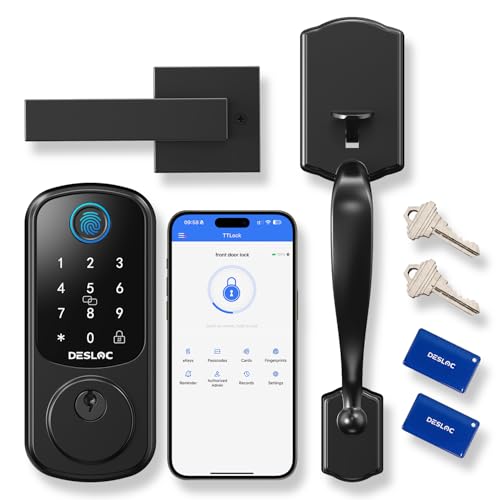
DESLOC Smart Front Door Lock Handle Set
Best for: bundled handle sets with fast fingerprint access
- Access Method
- Fingerprint, App Control (what this guide is about)
- Access Methods
- Fingerprint, PIN, keys, app, eKey, fobs
- Connectivity
- Bluetooth
- Smart Home Compatibility
- Amazon Alexa, Google Assistant
- Included Door Hardware
- Handle set
- Color
- Black
The DESLOC Smart Front Door Lock Handle Set provides keyless entry for your front door using fingerprint scanning, PIN codes, physical keys, or the TTLock app over Bluetooth. It operates in temperatures from -22°F to 158°F and features an IP54 weather rating. You can generate scheduled temporary access codes within two meters of the door. This lock suits you if you need a matching handle set with local app configuration.
Pros
- Sub-0.3-second fingerprint recognition speed
- Wide operating temperature range from -22°F to 158°F
- Includes exterior handle set and two physical backup keys
- USB Type-C emergency power port for dead batteries
Cons
- Requires separate G2 Gateway for Wi-Fi remote access and voice control
- Bluetooth app control range is limited to two meters without gateway
- Four AA batteries are not included
Good fit if
- You want an exterior handle set bundled directly with your deadbolt.
- You need rapid fingerprint access alongside local Bluetooth app management.
- You live in harsh climates with temperatures reaching -22°F or 158°F.
Skip if
- You need out-of-the-box Wi-Fi control without purchasing an add-on gateway.
- You plan to use Alexa or Google Assistant voice controls immediately.
Verdict: DESLOC Smart Front Door Lock Handle Set provides durable exterior hardware with fast fingerprint scanning and local Bluetooth control. It serves as an effective package if you do not mind adding a gateway for remote internet access.

Chamberlain myQ Secure View Smart Deadbolt
Best for: combining app-controlled locking with 2K video surveillance
- Access Method
- Fingerprint, App Control (what this guide is about)
- Access Methods
- Face, fingerprint, PIN, app, key
- Included Door Hardware
- Deadbolt
- Power Source
- Battery Powered
- Resolution
- 2K
- Night Vision
- Color Night Vision
This Chamberlain smart deadbolt integrates a 2K HDR video doorbell directly into your door lock. You control access via the myQ app, allowing remote locking, visitor monitoring, and arrival alerts. Along with app control, entry methods include facial recognition, fingerprint scanning, PIN codes, and a physical key. It suits you if you want integrated color night vision video and app control without mounting a separate doorbell camera.
Pros
- Built-in 2K HDR video doorbell camera with color night vision
- Five access methods including app control, face access, fingerprint, PIN, and key
- Comes with an extra battery and an indoor chime unit
- Remote lock management and motion alerts through the myQ app
Cons
- Face and fingerprint recognition are unavailable in Illinois, Texas, and outside the US or Canada
- Heavy exterior and interior assembly weighing 6.15 pounds
Good fit if
- You want an all-in-one deadbolt and 2K doorbell camera operated through a single app
- You need multiple backup access methods such as PIN, fingerprint, key, and face entry
- You want spare battery power and an included chime in the package
Skip if
- You live in Illinois, Texas, or outside the US and Canada where biometric access is disabled
- You prefer a lightweight lock without an integrated camera
Verdict: Chamberlain myQ Secure View 3-in-1 Smart Deadbolt gives you comprehensive front-door monitoring with 2K HDR video alongside flexible myQ app control. It delivers combined deadbolt security and doorbell surveillance in a single unit.
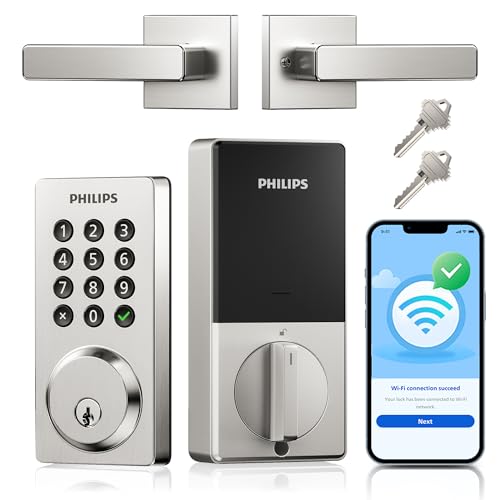
Philips Wi-Fi Keypad Deadbolt with Handle
Best for: direct Wi-Fi control with bundled handle hardware
- Access Method
- Keypad, App Control (what this guide is about)
- Access Methods
- Key, passcode, app, voice
- Connectivity
- Built-in Wi-Fi
- Smart Home Compatibility
- Alexa, Google Assistant
- Auto-Lock Delay
- 10-180 seconds
- User Code Capacity
- Up to 100
This smart deadbolt pairs built-in Wi-Fi with an included door handle, removing the need for a separate hub. You can manage access from anywhere using the Philips Home Access app, track history, or set an auto-lock timer between 10 and 180 seconds. It supports up to 100 codes alongside physical buttons and voice commands. It suits you if you want integrated Wi-Fi app management without buying an exterior handle separately.
Pros
- Built-in Wi-Fi connects directly without an external bridge
- Stores up to 100 permanent, timed, or one-time passcodes
- Configurable auto-lock delay from 10 to 180 seconds in the app
- Package includes a matching door handle
- IP54 weather resistance rated from -31°F to 150°F
Cons
- Requires eight AA batteries that are not included
- Lacks a fingerprint sensor or key card reader
Good fit if
- You want direct Wi-Fi app control without purchasing a dedicated bridge.
- You need a bundled matching handle alongside your smart deadbolt.
- You prefer physical push buttons over a smooth touchscreen.
Skip if
- You want biometric fingerprint access at the door.
- You prefer a lock that runs on four batteries rather than eight.
Verdict: Philips Wi-Fi Keypad Deadbolt with Handle delivers direct Wi-Fi control and customizable codes with an included matching handle. It provides full remote app management and physical push buttons without requiring an extra plug-in bridge.
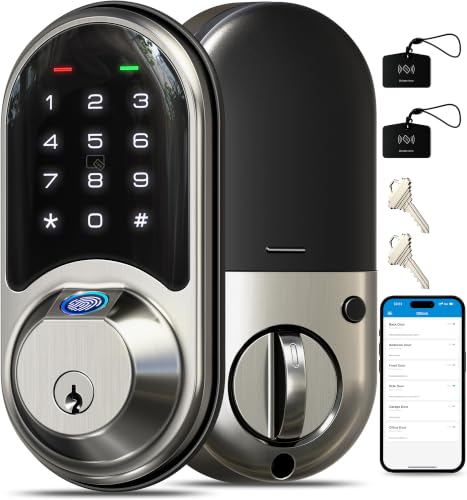
Veise Fingerprint Smart Deadbolt
Best for: rental hosts needing web management without subscriptions
- Access Method
- Fingerprint, App Control (what this guide is about)
- Access Methods
- Fingerprint, app, web, fob, code, key
- Smart Home Compatibility
- Alexa, Google Home (with G2 gateway)
- Fingerprint Capacity
- 50
- User Code Capacity
- 250+
- Color
- Satin Nickel
The Veise Fingerprint Smart Deadbolt provides keyless access via mobile app and web portal management without monthly fees. It stores up to 50 fingerprints and 250 user codes for flexible guest management. An IP55 weather resistance rating and ANSI Grade 3 certification handle exterior conditions on standard 1-3/8-inch to 2-inch doors. This deadbolt suits you if you manage entry for family, guests, or rental properties.
Pros
- Stores up to 50 fingerprints and over 250 user codes
- App and web portal access without a monthly subscription
- IP55 weather resistance and ANSI Grade 3 certified
- Supports 7 unlock methods including fobs and mechanical keys
Cons
- Requires separate G2 gateway for Wi-Fi remote access and voice control
- Carries ANSI Grade 3 certification rather than higher security grades
Good fit if
- You manage rental guests and want web portal access without subscriptions.
- You need multiple unlocking options, including fingerprints, codes, and fobs.
- You have standard doors between 1-3/8 inches and 2 inches thick.
Skip if
- You want out-of-the-box Wi-Fi without buying an add-on gateway.
- You require Grade 1 or Grade 2 security hardware ratings.
Verdict: Veise Fingerprint Smart Deadbolt combines multi-user app and web portal management with reliable daily fingerprint unlocking. It is a capable choice for homeowners and hosts who do not mind adding a gateway for remote Wi-Fi capabilities.
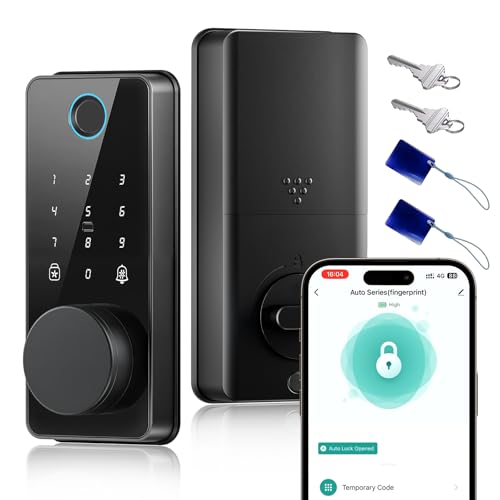
Biquole Smart Deadbolt with App Control
Best for: Bluetooth app management and multi-user access
- Access Method
- Fingerprint, App Control (what this guide is about)
- Access Methods
- Fingerprint, keypad, fob, app, key
- Connectivity
- Bluetooth
- Auto-Lock Delay
- 1-180 sec
- Fingerprint Capacity
- 100
- User Code Capacity
- 100
The Biquole Smart Deadbolt with App Control gives you keyless door management through the Smart Life app using local Bluetooth. It pairs a 0.3-second fingerprint scanner with a digital touchscreen keypad that holds up to 100 codes and 100 prints. The lock fits standard 1-3/8-inch to 2-inch doors and includes auto-locking from 1 to 180 seconds. It suits you if you need flexible local guest access without mandatory recurring subscription fees.
Pros
- Stores up to 100 unique fingerprints and 100 user passcodes
- Configurable auto-lock delay between 1 and 180 seconds
- Fast 0.3-second fingerprint sensor recognition
- Includes physical backup keys and an emergency charging port
Cons
- Out-of-home remote control requires a separate G2 Gateway
- Keypad requires a fixed 6-digit passcode length
- Keypad freezes for 1.5 minutes after 5 consecutive failed entries
Good fit if
- You want app access logs and code setup over close-range Bluetooth without a paid subscription.
- You have an exterior door between 1-3/8 inches and 2 inches thick.
- You manage rental properties or multiple guests needing temporary or single-use passcodes.
Skip if
- You need remote Wi-Fi app unlocking directly out of the box without buying an extra gateway.
- You prefer passcodes shorter or longer than 6 digits.
Verdict: Biquole Smart Deadbolt with App Control delivers broad user capacity and responsive biometric unlocking over Bluetooth for standard-thickness doors. It serves busy households well, provided you do not mind purchasing an extra gateway for remote Wi-Fi operation.

ULTRALOQ Latch 5 NFC Smart Lock
Best for: Rental hosts needing remote Wi-Fi code management
- Access Method
- Keypad, App Control (what this guide is about)
- Access Methods
- App, NFC, key fob, code, mechanical key
- Connectivity
- Built-in 2.4 GHz Wi-Fi, Bluetooth 4.0
- Color
- Black
- Included Hardware
- Handle
- Dimensions
- 6 × 7 × 3 inches
The ULTRALOQ Latch 5 Smart Lock with NFC is an integrated handle lock featuring built-in 2.4GHz Wi-Fi and Bluetooth connectivity. You manage access directly through the iOS or Android app without an external gateway, tracking activity logs and creating temporary guest codes remotely. Built with a zinc alloy chassis and weatherproof exterior, it suits rental hosts and homeowners who need app control alongside keypad, NFC fob, and physical key access options.
Pros
- Built-in 2.4GHz Wi-Fi connects without a separate bridge or gateway
- Supports app control, NFC key fobs, keypad codes, and mechanical keys
- Smartphone app tracks access logs and generates temporary guest codes remotely
- Zinc alloy construction with weatherproof exterior casing
Cons
- Wi-Fi connectivity supports only 2.4GHz networks, not 5GHz
- Does not include fingerprint scanning on this NFC configuration
Good fit if
- You want built-in Wi-Fi app management without buying an extra hub.
- You need to issue temporary access codes remotely to guests.
- You prefer using NFC fobs or keypad codes instead of physical keys.
Skip if
- You require a 5GHz Wi-Fi network connection.
- You want biometric or fingerprint unlocking on the lock.
Verdict: ULTRALOQ Latch 5 Smart Lock with NFC delivers direct Wi-Fi and Bluetooth app access without requiring a dedicated hub. It is a dependable multi-entry lock for households and rental properties managing visitors remotely.

ULTRALOQ U-Bolt Bluetooth Smart Deadbolt
Best for: Grade 1 security with local app control
- Access Method
- Keypad, App Control (what this guide is about)
- Access Methods
- Keypad, app, auto unlock, key
- Connectivity
- Bluetooth, 2.4 GHz Wi-Fi
- Smart Home Compatibility
- Alexa, Google Assistant, SmartThings
- Installation Type
- Replace current deadbolt
- Included Door Hardware
- Deadbolt
The ULTRALOQ U-Bolt Smart Deadbolt gives you keyless front door access using your smartphone, smartwatch, backlit keypad, or mechanical keys. It meets ANSI Grade 1 security standards and features an IP65 weatherproof rating. Auto-unlock triggers via smartphone proximity, and an auto-lock timer secures the deadbolt behind you. This lock suits you if you want Grade 1 deadbolt security with local Bluetooth app control and keypad entry.
Pros
- Certified ANSI Grade 1 security rating
- IP65 dust- and weather-resistant exterior housing
- Five entry methods: keypad, smartphone app, auto-unlock, smartwatch, and keys
- Preset timer auto-lock and proximity auto-unlock
Cons
- Remote Wi-Fi access requires an add-on bridge sold separately
- Alexa, Google Assistant, and SmartThings integration require the bridge
- No integrated fingerprint scanner
Good fit if
- You want ANSI Grade 1 physical deadbolt security.
- You prefer unlocking via keypad, smartphone app, or smartwatch.
- You want automatic hands-free unlocking when approaching your door with your phone.
Skip if
- You need out-of-the-box remote Wi-Fi control without purchasing an extra bridge.
- You want built-in fingerprint access.
Verdict: ULTRALOQ U-Bolt Smart Deadbolt delivers certified ANSI Grade 1 durability with versatile keypad and local Bluetooth app entry. It provides dependable local access, though off-site control requires purchasing the separate Wi-Fi bridge.

TCL Wi-Fi Touchscreen Smart Deadbolt
Best for: Fast fingerprint entry and long battery life
- Access Method
- Keypad, Fingerprint, Touchscreen, App Control (what this guide is about)
- Access Methods
- Fingerprint, PIN code, app, key
- Connectivity
- Built-in 2.4GHz Wi-Fi
- Smart Home Compatibility
- Alexa, Google Assistant
- Fingerprint Capacity
- 50
- User Code Capacity
- 100
The TCL D2 Plus is a Wi-Fi deadbolt with app control and no hub needed. It recognizes fingerprints in 0.3 seconds and stores 50 fingerprints plus 100 PIN codes. You get 8-month battery life from 8 AA cells and an emergency Type-C port. It works with Alexa and Google Assistant. This model suits you if you want fast biometric entry and long battery endurance for your front door.
Pros
- 0.3-second fingerprint recognition speed
- Built-in 2.4GHz Wi-Fi without a hub
- 8-month battery life on 8 AA batteries
- Stores 50 fingerprints and 100 PIN codes
- Emergency Type-C power port
Cons
- Requires 8 AA batteries for power
- No mention of Bluetooth or Zigbee connectivity
- Only supports 2.4GHz Wi-Fi networks
Good fit if
- You want fast biometric entry without a hub
- You need long battery life between replacements
- You use Alexa or Google Assistant for voice control
Skip if
- You only have 5GHz Wi-Fi networks available
- You prefer battery packs over AA cells
- You need multi-protocol smart home integration
Verdict: TCL D2 Plus Smart Deadbolt fits you if you prioritize quick fingerprint access and long battery life. It is a solid choice for standard doors where you want app control without extra hardware.
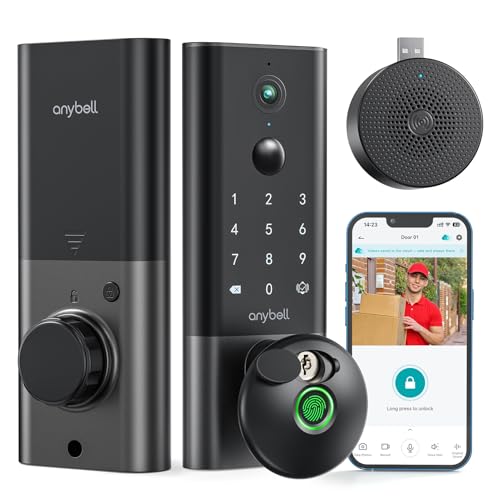
Anybell Smart Deadbolt with 2K Camera
Best for: front doors needing night video and app entry
- Access Method
- Fingerprint, App Control (what this guide is about)
- Access Methods
- Fingerprint, passcode, app, voice, key
- Connectivity
- Built-in 2.4 GHz Wi-Fi
- Smart Home Compatibility
- Alexa, Google Assistant
- Night Vision
- Night Vision
- Color
- Black
This Anybell smart deadbolt combines keyless entry with an integrated 2K video doorbell camera. You can manage access through the CloudEdge app over built-in 2.4GHz Wi-Fi without needing a separate bridge. It includes advanced night vision, a 110-degree field of view, and a 10,500mAh rechargeable battery. This setup suits you if you want app control and live doorway monitoring in a single lock without paying monthly cloud subscription fees.
Pros
- Built-in 2K camera with 110-degree field of view and advanced night vision
- Direct 2.4GHz Wi-Fi connectivity with no extra hub required
- Large 10,500mAh rechargeable battery pack
- IP65 weather-resistance rating tested from -22°F to 158°F
Cons
- Wi-Fi connectivity operates exclusively on 2.4GHz networks
- Large exterior profile measuring 12 inches in height
Good fit if
- You want an integrated deadbolt with a 2K camera and night vision.
- You prefer app control and camera access without recurring monthly subscriptions.
- You want a high-capacity rechargeable battery to reduce maintenance intervals.
Skip if
- You require a smart deadbolt compatible with 5GHz Wi-Fi bands.
- You need a compact lock profile that occupies minimal exterior door surface.
Verdict: Anybell Smart Deadbolt with 2K Camera delivers integrated video surveillance and app control directly over Wi-Fi without an external hub. Its high-capacity battery and night vision hardware make it a practical all-in-one security fixture.

TCL Palm Vein Wi-Fi Smart Deadbolt
Best for: biometric palm vein and remote Wi-Fi access
- Access Method
- Keypad, App Control (what this guide is about)
- Access Methods
- Palm vein, app, passcode, key, fob
- Smart Home Compatibility
- Amazon Alexa, Google Assistant
- Power Source
- Battery Powered
- Connectivity
- Wi-Fi
- Application
- Front Door
The TCL Palm Vein Smart Deadbolt gives you keyless front door access using Wi-Fi connectivity and the Smart Life mobile app. You can unlock your deadbolt remotely, review real-time audit logs, and schedule temporary or recurring passcodes for guests. It pairs app control with sub-dermal palm vein scanning and voice management via Alexa or Google Assistant. It suits households wanting versatile digital entry backed by a rechargeable 7800mAh battery.
Pros
- Direct Wi-Fi connectivity with Smart Life app control and audit trails
- Near-infrared palm vein sensor scans sub-dermal patterns
- Rechargeable 7800mAh battery operates up to 8 months per charge
- Compatible with Amazon Alexa and Google Assistant voice commands
Cons
- Does not include an integrated video doorbell camera
- Recharging the 7800mAh battery requires operational downtime
Good fit if
- You want app-based access logs and remote unlocking over Wi-Fi.
- You prefer biometric palm vein scanning over traditional fingerprint sensors.
- You use Amazon Alexa or Google Assistant for smart home voice control.
Skip if
- You want an integrated camera to view front door visitors.
- You prefer using standard replaceable alkaline batteries over a rechargeable pack.
Verdict: TCL Palm Vein Smart Deadbolt combines Wi-Fi app management with palm vein biometrics, giving you versatile keyless access without standard fingerprint issues. Its audit logs and voice assistant compatibility make front door tracking straightforward.
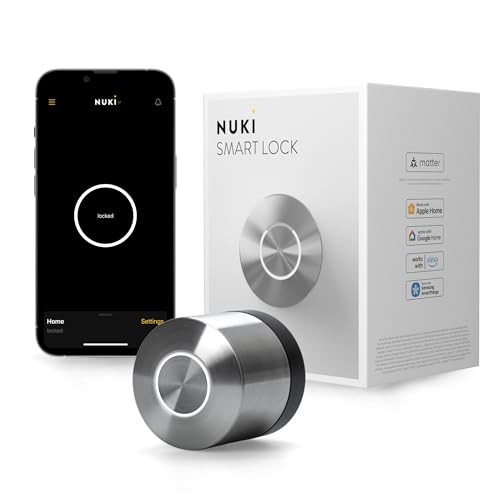
Nuki Retrofit Smart Deadbolt
Best for: interior retrofit setups needing Matter and Wi-Fi
- Access Method
- App Control (what this guide is about)
- Access Methods
- App, auto-unlock, key
- Connectivity
- Bluetooth, Wi-Fi, Matter over Thread
- Smart Home Compatibility
- Apple Home, Alexa, Google Home
- Installation Type
- Interior retrofit
- Color
- Silver
The Nuki Retrofit Smart Deadbolt is an interior add-on lock finished in silver. It mounts over your existing deadbolt inside your door without drilling, keeping your exterior hardware intact. You get app control, auto-unlock, and remote access using built-in Wi-Fi, Bluetooth, or Matter over Thread. It pairs directly with Apple Home, Alexa, Google Home, and SmartThings, making it a clean fit if you prefer invisible smart upgrades.
Pros
- Mounts inside over existing deadbolt without drilling
- Supports Wi-Fi, Bluetooth, and Matter over Thread
- Integrates with Apple Home, Alexa, Google Home, and SmartThings
- Rechargeable battery charges in two hours
Cons
- No built-in keypad or fingerprint scanner included
- Requires an existing compatible interior deadbolt to mount over
Good fit if
- You want an interior-only retrofit that leaves exterior hardware unchanged
- You use Matter over Thread, Apple Home, Alexa, or Google Home
- You need hands-free auto-unlock and remote app management
Skip if
- You want an exterior keypad or fingerprint scanner for entry
- You prefer a full lock replacement rather than an interior retrofit
Verdict: Nuki Retrofit Smart Deadbolt provides interior smart locking with Matter, Wi-Fi, and auto-unlock capabilities. It gives you comprehensive app control while preserving your door's exterior key hardware.
Specifications side by side
| Spec | Chamberlain myQ 3-in-1 Video Doorbell Smart Lock | Veise Fingerprint Smart Lock with App Control | Kwikset Halo Touchscreen Wi-Fi Deadbolt | Veise Smart Deadbolt Handle Set | DESLOC Smart Front Door Lock Handle Set | Chamberlain myQ Secure View Smart Deadbolt | Philips Wi-Fi Keypad Deadbolt with Handle | Veise Fingerprint Smart Deadbolt | Biquole Smart Deadbolt with App Control | ULTRALOQ Latch 5 NFC Smart Lock | ULTRALOQ U-Bolt Bluetooth Smart Deadbolt | TCL Wi-Fi Touchscreen Smart Deadbolt | Anybell Smart Deadbolt with 2K Camera | TCL Palm Vein Wi-Fi Smart Deadbolt | Nuki Retrofit Smart Deadbolt |
|---|---|---|---|---|---|---|---|---|---|---|---|---|---|---|---|
| Access Methods | Face access, fingerprint, PIN, app, key | Fingerprint, app, fob card, code, key | Touchscreen, app, auto-unlock | App, code, fob, key, thumb turn | Fingerprint, PIN, keys, app, eKey, fobs | Face, fingerprint, PIN, app, key | Key, passcode, app, voice | Fingerprint, app, web, fob, code, key | Fingerprint, keypad, fob, app, key | App, NFC, key fob, code, mechanical key | Keypad, app, auto unlock, key | Fingerprint, PIN code, app, key | Fingerprint, passcode, app, voice, key | Palm vein, app, passcode, key, fob | App, auto-unlock, key |
| Connectivity | not specified | not specified | not specified | not specified | Bluetooth | not specified | Built-in Wi-Fi | not specified | Bluetooth | Built-in 2.4 GHz Wi-Fi, Bluetooth 4.0 | Bluetooth, 2.4 GHz Wi-Fi | Built-in 2.4GHz Wi-Fi | Built-in 2.4 GHz Wi-Fi | not specified | Bluetooth, Wi-Fi, Matter over Thread |
| Smart Home Compatibility | not specified | Amazon Alexa, Google Assistant | Amazon Alexa, Google Home | Alexa, Google Home | Amazon Alexa, Google Assistant | not specified | Alexa, Google Assistant | Alexa, Google Home (with G2 gateway) | not specified | not specified | Alexa, Google Assistant, SmartThings | Alexa, Google Assistant | Alexa, Google Assistant | Amazon Alexa, Google Assistant | Apple Home, Alexa, Google Home |
| Installation Type | not specified | not specified | not specified | not specified | not specified | not specified | not specified | not specified | not specified | not specified | Replace current deadbolt | not specified | not specified | not specified | Interior retrofit |
| Auto-Lock Delay | not specified | 0–180 seconds | not specified | not specified | not specified | not specified | 10-180 seconds | not specified | 1-180 sec | not specified | not specified | not specified | not specified | not specified | not specified |
| Fingerprint Capacity | not specified | not specified | not specified | not specified | not specified | not specified | not specified | 50 | 100 | not specified | not specified | 50 | not specified | not specified | not specified |
| User Code Capacity | not specified | not specified | Up to 250 | 250+ | not specified | not specified | Up to 100 | 250+ | 100 | not specified | not specified | 100 | not specified | not specified | not specified |
| Included Door Hardware | not specified | not specified | Deadbolt | Handle set | Handle set | Deadbolt | not specified | not specified | Deadbolt | not specified | Deadbolt | Deadbolt | not specified | not specified | not specified |
| Power Source | not specified | not specified | not specified | not specified | not specified | Battery Powered | not specified | not specified | not specified | not specified | not specified | Battery Powered | not specified | Battery Powered | not specified |
| Resolution | 2K | not specified | not specified | not specified | not specified | 2K | not specified | not specified | not specified | not specified | not specified | not specified | not specified | not specified | not specified |
| Access Method | Fingerprint, App Control | Fingerprint, App Control | Touchscreen, App Control | App Control | Fingerprint, App Control | Fingerprint, App Control | Keypad, App Control | Fingerprint, App Control | Fingerprint, App Control | Keypad, App Control | Keypad, App Control | Keypad, Fingerprint, Touchscreen, App Control | Fingerprint, App Control | Keypad, App Control | App Control |
| Night Vision | Color Night Vision | not specified | not specified | not specified | not specified | Color Night Vision | not specified | not specified | not specified | not specified | not specified | not specified | Night Vision | not specified | not specified |
| Color | Black | Matte Black | Matte Black | Matte Black | Black | Black | Satin Nickel | Satin Nickel | Matte Black | Black | Black | Dark Grey | Black | D1Pro-Palm Vein | Silver |
| Application | not specified | not specified | Front Door | Front Door | Front Door | not specified | not specified | not specified | not specified | not specified | Front Door | Home, Front Door | Home, Front Door | Front Door | Home, Front Door |
| Included Hardware | not specified | not specified | not specified | Handle | Handle | not specified | Handle | not specified | not specified | Handle | not specified | not specified | not specified | not specified | not specified |
| Special Features | not specified | not specified | not specified | not specified | not specified | not specified | not specified | not specified | not specified | not specified | Auto Lock | not specified | Auto Lock | not specified | not specified |
| Dimensions | 2.95 × 3.84 × 6.85 inches | 2.7 × 5.8 × 3 inches | 3.99 × 4.24 × 9.74 inches | 18 × 7 × 4 inches | 7 × 10 × 5 inches | 2.95 × 3.84 × 6.85 inches | 9 × 7.5 × 4.45 inches | 6.3 × 2.96 × 1.15 inches | 8.27 × 5.71 × 3.94 inches | 6 × 7 × 3 inches | 2.95 × 2.95 × 0.98 inches | 6.2 × 2.5 × 1.3 inches | 6.5 × 3.5 × 12 inches | 5 × 3 × 1 inches | 2.24 × 2.24 × 2.28 inches |
| Weight | 4.87 pounds | 2.25 pounds | 3.6 pounds | 5.06 pounds | 4.74 pounds | 6.15 pounds | not specified | 2.67 pounds | 1.2 pounds | 5.78 pounds | 3 pounds | 2.05 pounds | 3.5 pounds | 2.05 pounds | not specified |
| Model | MYQL90AXXB | VE017 | 99390-004 | VE06-H | B200 | MYQ-ND0BXAB1 | DDL242X-15HW-L | RZ07 | QEK-S03 | Latch 5 NFC | U-Bolt-BK | D2 Plus | DK86 | D1 Pro | 221146 |
| Size | not specified | not specified | not specified | not specified | not specified | not specified | not specified | 2.96 x 6.3 x 1.15 inches | not specified | NFC | Bluetooth | D2 Plus | not specified | not specified | Round |
If you need smart cleaning solutions, see our guide on the best robot vacuums with app control.
Key Specs for Choosing Smart Deadbolts
-
Select Your Primary Access Method
Consider how you prefer to unlock the door when you do not want to use a phone. Many app-controlled deadbolts include secondary hardware options like fingerprint scanners, digital touchscreens, or physical keyways. Biometric sensors provide immediate entry without remembering passcodes, making them useful for children or frequent family entries. If multiple visitors need temporary access, keypads let you assign numerical codes directly. Models like the Veise VE017 focus on fingerprint and app control, giving you fast local access without typing PIN codes on a pad.
-
Evaluate Included Exterior Door Hardware
Check whether you need a standalone deadbolt replacement or a full matching handle set. A standalone smart deadbolt mounts above your existing passage handle or doorknob. If you want a uniform finish or your current handle is worn, choose a kit that includes matching lower hardware. Bundles like the DESLOC B200 provide both the smart deadbolt and the exterior grip handle in one package. Verify your door preparation beforehand, as integrated handle sets require specific center-to-center spacing between the deadbolt borehole and the lower handle mount.
-
Check Smart Home Ecosystem Compatibility
Verify compatibility with your existing voice platforms before selecting a deadbolt. Many connected deadbolts operate solely through their proprietary smartphone application unless they explicitly list smart platform support. If you manage routines through smart speakers or third-party automation hubs, confirm support for Amazon Alexa or Google Assistant. The TCL D1 Pro lists direct integration with Alexa and Google Assistant, enabling voice-assisted status checks and automated lock routines. Without published smart home compatibility, you must rely exclusively on the manufacturer app to trigger locking functions and check entry logs.
-
Compare Exterior Dimensions and Footprint
Check the physical exterior dimensions to make sure the unit fits your door face without blocking window trim or storm doors. Compact deadbolts measure under three inches wide and fit tight door margins. In contrast, large units or extended plate sets demand significant vertical surface area. For example, the Veise VE06-H measures 17.99 inches long because it combines the deadbolt and lower handle into one continuous assembly. Measure the clearance between your lock center and any existing architectural obstacles to confirm the chassis fits flat against the exterior.
-
Look for Auto Lock Functionality
Review the spec sheet for auto-lock capabilities if you frequently forget to secure the door when leaving. Deadbolts equipped with automatic locking engage the bolt mechanism after a preset delay once the door closes. This feature ensures your entryway stays secured even if you do not open the mobile application to trigger the lock manually. The ULTRALOQ U-Bolt includes built-in auto lock functionality among its core specifications. Confirm whether your chosen lock allows you to adjust the auto-lock delay timer within the mobile settings to match your daily habits.
-
Verify Application and Location Specs
Ensure the hardware matches the specific room or entry point where you plan to install it. Standard exterior deadbolts require sturdy deadbolt boreholes and weather-resistant housings designed for exterior front doors. For interior security, such as home offices or rental bedrooms, a locking knob or lever is often more practical than a heavy deadbolt. The VANZBON smart lock specifies bedroom application and comes in a knob configuration rather than a deadbolt format. Always match the hardware category to your door's existing cutout type to avoid drilling new holes.
Frequently asked questions
Can you operate an app-controlled deadbolt using voice commands?
Yes, several smart deadbolts integrate with voice assistants like Amazon Alexa and Google Assistant for hands-free door locking. Models like the TCL Palm Vein Wi-Fi Smart Deadbolt and TCL Wi-Fi Touchscreen Smart Deadbolt list direct compatibility with Alexa and Google Assistant. This lets you check lock status or secure entryways using voice prompts, provided your lock connects to an active network via Wi-Fi.
Do all app-controlled smart locks require buying an external Wi-Fi bridge?
No, some locks include integrated Wi-Fi hardware, while others rely on Bluetooth and require an add-on bridge for remote access. Devices such as the Philips Wi-Fi Keypad Deadbolt and ULTRALOQ Latch 5 feature built-in Wi-Fi connections that communicate over your local network out of the box. In contrast, models like the ULTRALOQ U-Bolt and Veise VE017 require separate gateway accessories to enable out-of-home app control.
Can you buy a smart deadbolt that replaces your entire door handle set?
Yes, complete smart handle packages are available if you want matching exterior hardware alongside your electronic deadbolt. Bundles like the Veise Smart Deadbolt Handle Set and DESLOC Smart Front Door Lock Handle Set include both the app-enabled locking unit and a matching passage handle. Choosing an all-in-one set ensures your door hardware finishes match, though you must confirm your door has the required bore holes for installation.
What power source do app-controlled deadbolts use?
Most smart deadbolts operate on replaceable or rechargeable internal batteries to maintain locking functions during power outages. For instance, the Chamberlain myQ Secure View and the TCL smart deadbolts specify battery-powered operation. Battery power keeps the motor, keypad, and wireless radios functioning independently of household electrical wiring. You can monitor the remaining battery percentage directly inside the lock companion app to prevent unexpected lockouts.
What is the difference between standard fingerprint locks and palm vein deadbolts?
Palm vein scanners read internal vein structures beneath your skin rather than surface dermal patterns on your fingertip. The TCL Palm Vein Wi-Fi Smart Deadbolt utilizes this biometric technology to authenticate entries without relying on traditional fingerprint contact. This provides an alternative access method for people with worn fingerprints or dirty hands, while still delivering keyless security managed through companion app settings and access activity logs.
How does auto-lock functionality work on smart deadbolts?
Auto-lock engages the deadbolt motorized bolt automatically after a preset delay once the door closes. Hardware such as the ULTRALOQ U-Bolt and the Anybell Smart Deadbolt specify auto-lock capabilities directly in their feature sets. You can typically customize the countdown timer within the smartphone app so the door locks behind you automatically, preventing accidental lapses where an entryway is left unsecured.
What backup entry options exist if your smartphone battery dies?
Smart deadbolts typically pair app control with secondary entry hardware like physical keys, PIN keypads, or biometric sensors. For example, the VANZBON Smart Door Knob combines app management with traditional physical keys and key cards, while the Kwikset Halo uses a backlit touchscreen. These alternative access methods ensure you can unlock your door immediately even if your mobile device is unavailable, uncharged, or without network service.