PHILIPS Wi-Fi Keypad Deadbolt Handle Review (2026): A Spec-Based Look
As an Amazon Associate we earn from qualifying purchases. Links on this page are affiliate links.
This philips wifi keypad door lock review covers the Philips Wi-Fi Keypad Deadbolt with Handle. It is a smart deadbolt featuring built-in Wi-Fi for direct network connection and physical keypad buttons for entry. The design prioritizes straightforward access methods over complex touchscreens. You get remote app control, voice assistant compatibility, and customizable password modes. The unit measures 7.5 inches wide and 9 inches long. It fits standard US door preparations. This spec-based look explains how these features function in your home.
What stands out
- Built-in Wi-Fi connects directly to your home network without a hub
- Physical buttons offer a simpler entry method than touchscreens
- Create up to 100 custom passwords with permanent or timed options
- Auto-lock delay ranges from 10 to 180 seconds via the app
- Operates in temperatures from -31°F to 150°F with IP54 waterproofing
Who it fits
Good fit for
This lock suits homeowners who want direct Wi-Fi connectivity without buying a separate bridge. It fits users who prefer physical buttons for reliability and ease of use. The 100-user code capacity helps families or those with frequent guests. The wide temperature range makes it viable for outdoor doors in extreme climates. If you need simple remote management and robust physical entry, this model aligns with your needs.
Who should skip it
Skip this if you require Bluetooth-only control or a lock that does not use Wi-Fi. You should also look elsewhere if you prefer a touchscreen interface over physical buttons. This model requires eight AA batteries, so you might want a rechargeable option if you dislike frequent battery changes. Additionally, if your door does not fit standard US deadbolt dimensions, this lock will not work for your installation.
Verdict: The Philips Wi-Fi Keypad Deadbolt offers direct network connectivity and reliable physical entry. It is a practical choice for users seeking simple smart lock features without extra hubs.
Key specs for this lock
Connectivity: Built-in Wi-Fi
This lock connects directly to your home network without needing a separate hub or bridge. You can control it remotely via the app from anywhere. This simplifies setup compared to locks requiring a Zigbee gateway. It ensures stable communication for real-time notifications and remote access commands without extra hardware costs or complexity.
Access Methods: Key, passcode, app, voice
You have four distinct ways to enter your home. Physical keys and a numeric keypad offer reliable manual entry. The app allows smartphone control. Voice commands work with Alexa and Google Assistant. This variety suits households with diverse preferences, ensuring you are not locked out if one method fails or is unavailable during an emergency.
User Code Capacity: Up to 100
You can store up to one hundred unique passcodes in the system. This is useful for managing access for family members, regular cleaners, or short-term tenants. You can assign specific codes to different people and track who enters. This capacity reduces the need to reprogram the lock frequently when household members change.
Auto-Lock Delay: 10-180 seconds
The lock can automatically engage the deadbolt after you close the door. You set the timer between ten and one hundred eighty seconds via the app. This feature prevents accidental forgetting to lock the door. It adds a layer of security for busy households, ensuring the entry point is secured shortly after use without manual intervention.
Smart Home Compatibility: Alexa, Google Assistant
This lock integrates with major voice platforms. You can lock or unlock the door using voice commands through Alexa or Google Assistant devices. This allows hands-free operation when your hands are full. It fits into existing smart home ecosystems, enabling routines like locking the door when you say goodnight to your assistant.
Design and Build Quality
The Philips Wi-Fi Keypad Deadbolt with Handle presents a straightforward physical design. According to the listing, the finish is Satin Nickel. This coating provides a standard metallic look that resists fingerprints better than glossy surfaces. The unit measures 7.5 inches in width, 4.45 inches in height, and 9 inches in length. These dimensions fit standard US door preparations. You can verify compatibility by checking your cross bore size of 1-1/2 inches or 2-1/8 inches. The door thickness must range from 1-3/8 to 2 inches. The hardware includes a handle, which simplifies the installation process for most homeowners.
The control interface relies on physical buttons rather than a touchscreen. This layout choice enhances reliability in various weather conditions. The lock operates within a temperature range of -31°F to 150°F. It also carries an IP54 waterproof rating, protecting internal components from dust and water splashes. The mechanism withstands 2200N of pressure, suggesting robust construction for daily use. You do not need to worry about the screen failing due to rain or extreme cold. The physical keys offer a tangible backup if electronic systems fail. The design prioritizes durability and ease of use over complex digital interfaces. This approach ensures the lock remains functional in harsh environments. The handle adds a traditional aesthetic while providing mechanical leverage for locking and unlocking. This combination of materials and layout makes it suitable for high-traffic entryways.
Setup and Everyday Use Guide
Installing this deadbolt requires matching your door’s standard US specifications. The unit fits cross bores of 1-1/2 inches or 2-1/8 inches. Your door thickness must be between 1-3/8 inches and 2 inches. The listing states you can complete the physical installation in about 15 minutes. No separate hub is needed because Wi-Fi is built directly into the lock. You connect it to your home network to enable remote functions.
Daily operation relies on four access methods. You can use a physical key, enter a passcode on the durable buttons, use the Philips Home Access App, or use voice commands via Alexa or Google Assistant. The physical buttons are noted as simpler and more reliable than touchscreens. You can create up to 100 unique passwords. These include permanent codes for family, one-time codes for guests, and timed codes for cleaners.
The app allows you to set the auto-lock delay between 10 and 180 seconds. This feature ensures the door secures itself after you enter. The lock also monitors power levels. It runs on eight AA batteries and sends low-power alerts to your app when charge drops below 10 percent. The unit withstands temperatures from -31°F to 150°F and resists water at IP54 levels. Wrong password attempts trigger an alarm prompt to deter unauthorized entry.
Before You Buy This Lock
You need to verify your door’s specifications before purchasing. The unit fits cross bores of 1-1/2 inches or 2-1/8 inches. Your door thickness must range from 1-3/8 inches to 2 inches. Ensure your home network provides stable Wi-Fi coverage at the entryway. This lock connects directly to your router, so weak signals may disrupt app control. You should check if your smart home ecosystem includes Alexa or Google Assistant for voice commands. Battery maintenance is essential. The device uses eight AA batteries. You must monitor levels via the app to prevent lockouts. Low battery alerts send notifications, but you still need to replace them promptly. This deadbolt suits users who prefer physical buttons over touchscreens. It fits well in a smart entry system alongside video doorbells. The handle is included, so you do not need to buy separate hardware. Consider how this integrates with your existing security routine.
Check before you buy
- Verify door thickness is between 1-3/8 and 2 inches.
- Confirm cross bore size matches 1-1/2 or 2-1/8 inches.
- Ensure your Wi-Fi signal is strong at the entryway.
- Check compatibility with your Alexa or Google Assistant setup.
The product at a glance
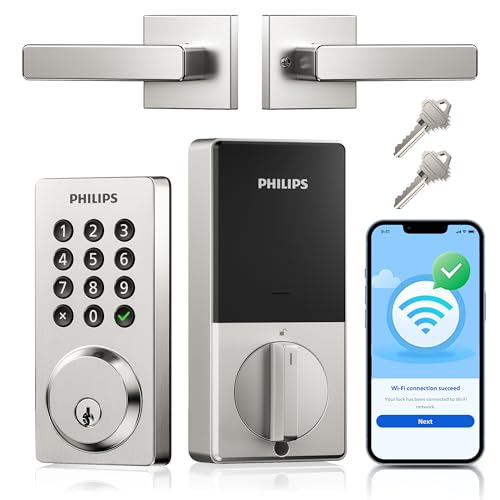
Philips Wi-Fi Keypad Deadbolt with Handle
Best for: Remote access management and temporary codes
- Access Methods
- App, keypad, key, voice
- Smart Home Compatibility
- Amazon Alexa, Google Assistant
- Auto-Lock Delay
- 10–180 seconds
- User Code Capacity
- 100
- Included Door Hardware
- Deadbolt with handle
- Connectivity
- Wi-Fi
View on Amazon: Philips Wi-Fi Keypad Deadbolt with Handle Affiliate link
This Philips smart deadbolt features built-in Wi-Fi for direct home network connection and app control. It offers four unlock methods: keys, passcode, mobile app, and voice commands via Alexa or Google Assistant. The unit supports up to 100 user codes and includes an auto-lock delay of 10 to 180 seconds. Powered by eight AA batteries, it provides up to nine months of life. It fits standard US door preparations and operates in extreme temperatures.
Pros
- Built-in Wi-Fi connects directly to your home network without a hub
- Supports up to 100 custom passwords including one-time and timed codes
- Compatible with Alexa and Google Assistant for voice control
- Auto-lock delay adjustable from 10 to 180 seconds via the app
- Operates in temperatures from -31°F to 150°F
Cons
- Requires eight AA batteries which are not included
- Physical buttons only, lacking a touchscreen interface
- IP54 waterproof rating limits outdoor durability in heavy rain
Good fit if
- You want to manage access remotely without buying a separate hub
- You need to assign temporary codes for cleaners or tenants
- You prefer physical buttons over touchscreens for reliability
Skip if
- You require a touchscreen keypad for entry
- You need a lock that includes batteries in the box
- You want a lock with a higher IP rating for wet climates
Verdict: Philips WiFi Keypad Deadbolt Handle is a solid choice for renters who need remote access management and temporary code capabilities. It suits users who value physical button reliability and direct Wi-Fi connectivity over touchscreen aesthetics.
Specifications side by side
| Spec | Philips Wi-Fi Keypad Deadbolt with Handle |
|---|---|
| Access Methods | App, keypad, key, voice |
| Smart Home Compatibility | Amazon Alexa, Google Assistant |
| Auto-Lock Delay | 10–180 seconds |
| User Code Capacity | 100 |
| Included Door Hardware | Deadbolt with handle |
| Connectivity | Wi-Fi |
| Access Method | Keypad, App Control |
| Water Resistance | Waterproof |
| Color | Satin Nickel |
| Included Hardware | Handle |
| Special Features | Auto Lock |
| Dimensions | 9 × 7.5 × 4.45 inches |
| Model | DDL242X-15HW-L |
Frequently asked questions
Does the Philips Wi-Fi Keypad Deadbolt require a hub?
No, this deadbolt does not require a separate hub or bridge. It features built-in Wi-Fi connectivity that allows it to connect directly to your home network. This direct connection simplifies the initial setup process and ensures stable communication for real-time notifications without additional hardware.
What access methods does this lock support?
You can enter using the physical keypad or via app control. The device supports both traditional code entry and remote management through a smartphone application. This dual approach offers flexibility for daily use while providing remote access capabilities for granting entry to guests or service providers.
What color finish is available for this model?
The Philips Wi-Fi Keypad Deadbolt with Handle is available in Satin Nickel. This finish provides a standard metallic look that resists fingerprints better than glossy surfaces. The satin texture helps maintain a clean appearance in high-traffic areas by minimizing the visibility of smudges and daily wear.
Is this deadbolt suitable for renters?
Yes, this lock is a solid choice for renters who need remote access management and temporary code capabilities. It suits users who value physical button reliability and direct Wi-Fi connectivity over touchscreen aesthetics. The design prioritizes straightforward access methods, making it practical for temporary living situations.
What are the dimensions of the handle assembly?
The unit measures 7.5 inches in width, 4.45 inches in height, and 9 inches in length. These dimensions define the physical footprint of the handle assembly. You should verify that your door frame and surrounding trim can accommodate these specific measurements before installation to ensure a proper fit.
Does the package include a handle?
Yes, the included hardware comes with a handle. This means you receive the complete exterior assembly necessary for standard door installation. The handle is integrated into the deadbolt mechanism, providing a unified design that combines locking functionality with ergonomic entry access without requiring separate component purchases.
What is the model number for this lock?
The model number for this specific deadbolt is DDL242X-15HW-L. You can use this identifier to verify compatibility with your existing door preparations or to locate replacement parts and accessories. It is distinct from other Philips smart lock models and helps ensure you are referencing the correct specifications.