6 Best Alternatives to the Yale Assure Lock Zigbee Touchscreen (2026)
As an Amazon Associate we earn from qualifying purchases. Links on this page are affiliate links.
The Yale Assure Lock Zigbee Touchscreen Deadbolt offers reliable code entry and auto-relocking for homes with Xfinity Home or Echo Plus hubs. If you are searching for yale assure lock zigbee alternatives, you may need a different connectivity standard or access method. This guide covers 6 options that share core specifications with the original model.
We selected these alternatives because their specs overlap with the Yale lock, such as touchscreen keypads and smart home integration. Some products add built-in Wi-Fi to remove the need for a separate hub. Others support Apple Home Keys or Matter for modern ecosystems. You might prefer a fingerprint scanner for faster entry or a lever handle for renters. Each option here meets the basic requirements of a smart deadbolt while offering distinct features for your specific setup.
Comparing alternatives to the Yale lock
Yale Assure Lock 2 Touchscreen Deadbolt
The Yale Assure Lock 2 Touchscreen Deadbolt uses Bluetooth and Wi-Fi instead of Zigbee. This gives you direct app control without needing a separate hub like Xfinity Home. It is lighter at one pound and has a more compact design. You lose the native Echo Plus compatibility found in the original model. However, you gain Apple Watch integration for convenient unlocking. This lock suits users who want remote access via Wi-Fi but prefer local Bluetooth control over Zigbee automation. It is a solid upgrade if you do not rely on a Zigbee hub for your smart home setup. The touchscreen remains intuitive, but the connectivity path is entirely different from the original.
ULTRALOQ Latch 5 Touchscreen Smart Lever Lock
The ULTRALOQ Latch 5 Touchscreen Smart Lever Lock replaces the deadbolt mechanism with a full lever handle. It includes built-in Wi-Fi, removing the need for any smart home hub or gateway. You get fingerprint scanning in addition to the touchscreen keypad, which adds a layer of biometric security. The original Yale lock requires a Zigbee hub for remote features, while this unit connects directly to your network. It is heavier and larger due to the integrated handle hardware. This option is best for renters or office users who need remote guest management without complex installation. You trade the traditional deadbolt style for a more versatile lever system with direct internet connectivity.
Yale Assure Lock 2 Keyless Touchscreen Deadbolt
The Yale Assure Lock 2 Keyless Touchscreen Deadbolt offers Bluetooth and Wi-Fi connectivity rather than Zigbee. It is significantly smaller and lighter than the original, weighing only one pound. This model supports Apple Watch unlocking for hands-free access. You give up the specific Xfinity Home integration that defines the original lock. Instead, you gain a more modern, compact form factor that fits various door styles. It is ideal for users who want app control via Bluetooth but do not have a Zigbee hub. The touchscreen keypad remains a core feature, but the underlying technology is streamlined for direct smartphone interaction. This is a lighter, more versatile alternative for those outside the Zigbee ecosystem.
Yale Assure Deadbolt Satin Nickel
The Yale Assure Deadbolt Satin Nickel is a non-connected model that lacks Wi-Fi and Zigbee entirely. It relies on the touchscreen keypad and physical keys for access. You save weight, as it weighs only three pounds compared to the five-pound original. This lock is best for users who want simple, reliable code entry without smart home complexity. You can add a separate remote kit later if needed, but it does not connect out of the box. It is a solid choice if you prioritize mechanical reliability over remote monitoring. The design mirrors the original deadbolt style, but the internal electronics are stripped back for basic functionality. Choose this if you do not need hub integration or remote locking features.
Yale Assure Lock 2 Plus Keypad Deadbolt
The Yale Assure Lock 2 Plus Keypad Deadbolt is designed for Apple Home users with Apple HomeKit compatibility. It lacks built-in Wi-Fi, requiring an Apple hub for remote access. It supports Apple Watch tap-to-unlock, which the original Yale lock does not offer. The lock is much smaller and lighter, weighing 3.69 pounds. You lose the Zigbee connectivity that allows integration with Xfinity Home or Echo Plus. This model is ideal for users already invested in the Apple ecosystem who want seamless home automation. The keypad remains a primary access method, but the focus is on Apple-specific features. It is a specialized alternative for those who prefer Apple HomeKit over Zigbee or standard Wi-Fi smart home platforms.
Kwikset Halo Select Plus Touchscreen Deadbolt
The Kwikset Halo Select Plus Touchscreen Deadbolt supports Matter and Wi-Fi connectivity. It offers Apple Home Keys support, which the original Yale lock lacks. The lock is slightly narrower and lighter than the original Yale model. It does not require a Zigbee hub, connecting directly to your network via Wi-Fi. This makes it suitable for users building a modern, app-centric smart home. You trade the Xfinity Home compatibility for broader Matter support and direct internet access. The touchscreen interface is similar, but the underlying protocols are more contemporary. This lock is best for users who want future-proof connectivity and do not rely on legacy Zigbee hubs. It provides a streamlined experience for modern smart home setups.
Quick picks
Our 7 picks
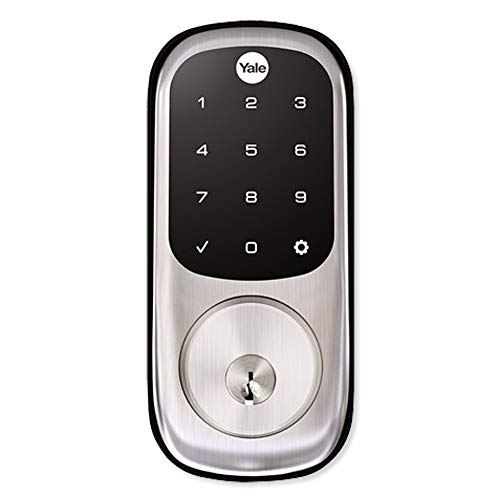
Yale Assure Lock Zigbee Touchscreen Deadbolt
Best for: Xfinity Home or Echo Plus users
- Access Methods
- Touchscreen keypad, key
- Connectivity
- Zigbee
- Smart Home Compatibility
- Xfinity Home, Echo Show, Echo Plus
- Color
- Satin Nickel
- Dimensions
- 5.5 × 5.5 × 10 inches
- Weight
- 5 pounds
View on Amazon: Yale Assure Lock Zigbee Touchscreen Deadbolt Affiliate link
This Yale deadbolt uses Zigbee connectivity to integrate with compatible smart home hubs like Xfinity Home and Echo Plus. You unlock it via a backlit touchscreen keypad or physical keys. It supports Auto Relock and unique entry codes. The unit measures 10 inches high and weighs 5 pounds. It is designed for home use and includes two physical keys for backup access.
Pros
- Zigbee connectivity for smart home integration
- Backlit touchscreen keypad for code entry
- Auto Relock feature available
- Includes two physical keys
Cons
- Requires a compatible Zigbee hub
- No native Wi-Fi connectivity
- No mention of Apple Home Keys support
Good fit if
- You use Xfinity Home or Echo Plus
- You prefer code entry over keys
- You want Auto Relock functionality
Skip if
- You need Apple Home Keys
- You want built-in Wi-Fi
- You prefer a lever handle design
Verdict: Yale Assure Lock Zigbee Satin Nickel suits users with Xfinity Home or Echo Plus hubs who need reliable code entry. It is not ideal for those requiring Apple Home Keys or standalone Wi-Fi.
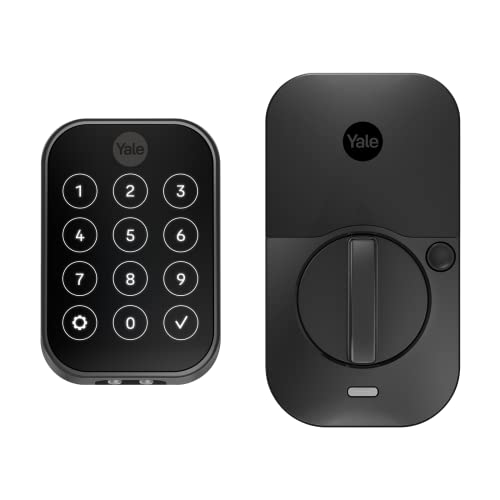
Yale Assure Lock 2 Touchscreen Deadbolt
Best for: Apple Watch users seeking Bluetooth control
- Access Methods
- Keypad, app, Apple Watch, Auto-Unlock
- Connectivity
- Bluetooth
- Color
- Black
- Application
- Home
- Dimensions
- 2.5 × 3.7 × 2.3 inches
- Weight
- 1 pounds
View on Amazon: Yale Assure Lock 2 Touchscreen Deadbolt Affiliate link
The Yale Assure Lock 2 in Black Suede offers keyless entry via a digital touchscreen keypad. It connects through Bluetooth for control via the Yale Access app or Apple Watch. The unit includes Auto-Lock and optional Auto-Unlock features. It weighs 1 pound and measures 3.7 inches wide. This model suits users who want secure, app-managed access without Wi-Fi hardware.
Pros
- Digital touchscreen keypad for key-free access
- Compatible with Yale Access app and Apple Watch
- Auto-Lock function secures the door automatically
- Optional Auto-Unlock feature for convenience
Cons
- Bluetooth connectivity only, no built-in Wi-Fi
- Requires optional hub for remote access outside local range
- No mention of Zigbee support in specifications
Good fit if
- You want to use Apple Watch for entry
- You prefer Bluetooth control over Wi-Fi
- You need Auto-Lock functionality
Skip if
- You require built-in Wi-Fi connectivity
- You need Zigbee integration for your hub
- You want a touchscreen with a display
Verdict: Yale Assure Lock 2 Black Suede fits users who prioritize Apple Watch integration and automatic locking over remote Wi-Fi access. It is a solid choice for local Bluetooth control.
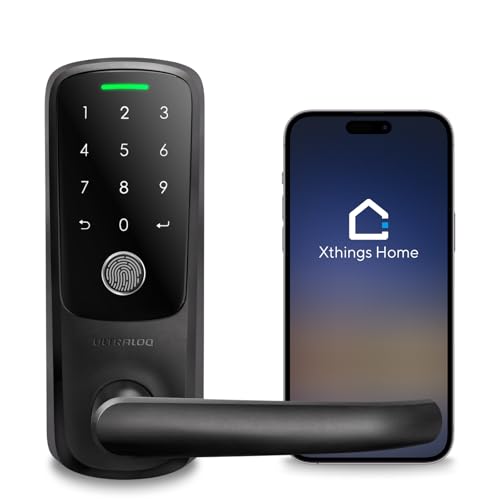
ULTRALOQ Latch 5 Touchscreen Smart Lever Lock
Best for: renters needing remote access
- Access Methods
- App, fingerprint, code, mechanical key
- Connectivity
- Built-in 2.4 GHz Wi-Fi
- Included Door Hardware
- Lever handle
- Color
- Black
- Application
- Front Door, Office, Rental Property
- Special Features
- Auto Lock
View on Amazon: ULTRALOQ Latch 5 Touchscreen Smart Lever Lock Affiliate link
The ULTRALOQ Latch 5 is a smart lever lock with built-in 2.4 GHz Wi-Fi. It uses a touchscreen keypad and fingerprint sensor for access. You can manage entry via a smartphone app without a gateway. The zinc alloy body handles busy households. It fits standard US doors. This model suits renters and homeowners needing remote guest access.
Pros
- Built-in 2.4 GHz Wi-Fi connectivity
- Fingerprint and touchscreen keypad access
- Smartphone app remote control
- Zinc alloy construction
Cons
- 2.4 GHz Wi-Fi only
- No Zigbee support
- Lever handle design only
Good fit if
- You need built-in Wi-Fi without a gateway
- You want fingerprint access
- You rent a property and need remote guest codes
Skip if
- You require Zigbee connectivity
- You prefer a traditional deadbolt style
- You need 5 GHz Wi-Fi support
Verdict: ULTRALOQ Latch 5 WiFi Lever Lock fits users who need built-in Wi-Fi and fingerprint scanning for remote guest management. It avoids the gateway requirement found in other smart locks.

Yale Assure Lock 2 Keyless Touchscreen Deadbolt
Best for: Bluetooth-only smart lock setups
- Access Methods
- Keypad, Yale Access app, Bluetooth
- Connectivity
- Bluetooth
- Included Door Hardware
- Deadbolt
- Color
- Satin Nickel
- Dimensions
- 2.5 × 3.7 × 2.3 inches
View on Amazon: Yale Assure Lock 2 Keyless Touchscreen Deadbolt Affiliate link
This Yale deadbolt uses Bluetooth for local control via the Yale Access app. It features a touchscreen keypad and supports Apple Watch access. The Satin Nickel finish matches many door styles. It includes auto-lock and auto-unlock features for convenience. You get custom entry codes for guests. This model connects directly to your phone without a separate hub.
Pros
- Bluetooth connectivity for direct app control
- Touchscreen keypad for key-free entry
- Supports Apple Watch access
- Auto-lock and auto-unlock functions
Cons
- Lacks built-in Wi-Fi for remote access outside Bluetooth range
- No Zigbee support for direct smart home hub integration
- Requires a smartphone for full feature access
Good fit if
- You want local Bluetooth control without extra hubs
- You use an Apple Watch for access
- You prefer a touchscreen keypad interface
Skip if
- You need remote access via Wi-Fi from anywhere
- You rely on a Zigbee smart home hub
- You want a lever handle style lock
Verdict: Yale Assure Lock 2 Bluetooth Deadbolt suits users who want app control via Bluetooth and Apple Watch support without needing Wi-Fi or Zigbee.
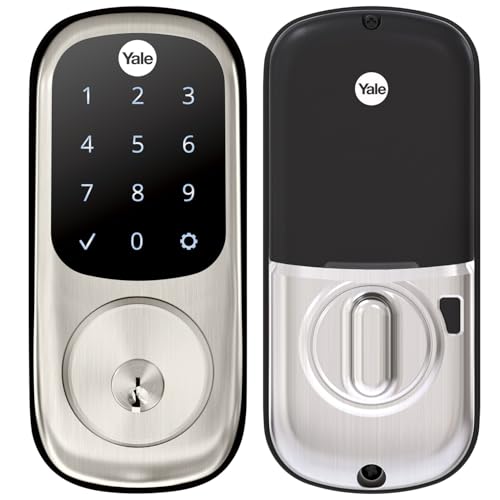
Yale Assure Deadbolt Satin Nickel
Best for: Users wanting local keypad access without Wi-Fi
- Access Methods
- Keypad, Key
- Installation Type
- Deadbolt replacement
- Auto-Lock Delay
- Auto-lock
- Included Door Hardware
- Deadbolt
- Connectivity
- Wi-Fi
- Color
- Satin Nickel
View on Amazon: Yale Assure Deadbolt Satin Nickel Affiliate link
This Yale deadbolt offers keypad entry without built-in Wi-Fi. It features a touchscreen interface for code access and includes a physical key backup. The auto-lock function engages automatically when you leave. You can share unique codes with family or guests. For smartphone control, you must purchase the Yale Access Upgrade Kit separately. It fits standard doors between 1-3/4 and 2-1/4 inches thick. The satin nickel finish matches many entryways.
Pros
- Touchscreen keypad for code entry
- Auto-lock function for security
- Physical key backup included
- Fits standard door thicknesses
Cons
- No built-in Wi-Fi connectivity
- Requires separate upgrade kit for app control
- Heavier build at 3 pounds
Good fit if
- You want reliable keypad entry without subscription fees
- You prefer local control over remote features
- You need a backup physical key option
Skip if
- You require immediate Wi-Fi connectivity out of the box
- You want app control without buying extra hardware
- You have doors thinner than 1-3/8 inches
Verdict: Yale Assure Deadbolt Non-Connected Satin Nickel suits users who value simple keypad access and auto-locking without immediate smart home integration. You should choose this model if you are willing to add a separate kit later for remote features.

Yale Assure Lock 2 Plus Keypad Deadbolt
Best for: Apple Home users wanting tap-to-unlock
- Access Methods
- Apple home keys, keypad, app
- Smart Home Compatibility
- Apple Home, Apple HomeKit
- Connectivity
- Wi-Fi
- Color
- Satin Nickel
- Dimensions
- 0.88 × 2.5 × 3.75 inches
- Weight
- 3.69 pounds
View on Amazon: Yale Assure Lock 2 Plus Keypad Deadbolt Affiliate link
This Yale deadbolt integrates Apple Home Keys for tap-to-unlock access via iPhone or Apple Watch. It supports keypad entry and app control through the Yale Access app. The unit operates without built-in Wi-Fi, requiring a separate hub for remote features. It includes auto-lock functionality triggered by door sense and offers power reserve for emergency access. The finish is satin nickel.
Pros
- Apple Home Keys support for tap-to-unlock with iPhone or Apple Watch
- Keypad entry for code-based access
- Power reserve allows home key use after battery depletion
- Auto-lock engages automatically when door sense detects closure
Cons
- No built-in Wi-Fi requires a separate hub for remote control
- Remote access limited to Apple ecosystem users
- Requires Apple TV or HomePod for away-from-home automation
Good fit if
- You use an iPhone XS or later with iOS 15 or later
- You want tap-to-unlock convenience with Apple Watch
- You already have an Apple HomeKit hub
Skip if
- You need built-in Wi-Fi without extra hardware
- You use Android or non-Apple smart home platforms
- You want remote control without a HomePod or Apple TV
Verdict: Yale Assure Lock 2 Plus Apple Home Keys is ideal for Apple ecosystem users seeking tap-to-unlock convenience and keypad access without built-in Wi-Fi. It fits those who already own an Apple hub for remote features.

Kwikset Halo Select Plus Touchscreen Deadbolt
Best for: Apple Home Keys and Matter users
- Access Methods
- Apple home keys, app, touchscreen code
- Connectivity
- Wi-Fi, Matter, NFC
- Smart Home Compatibility
- Amazon Alexa, Apple Home, Google Home
- User Code Capacity
- up to 250
- Color
- Satin Nickel
- Dimensions
- 4.19 × 5.44 × 9.88 inches
View on Amazon: Kwikset Halo Select Plus Touchscreen Deadbolt Affiliate link
This Kwikset deadbolt combines Wi-Fi and Matter connectivity for broad smart home support. You get Apple Home Keys for tap-to-unlock access via iPhone or Apple Watch. The touchscreen accepts codes, and the app handles remote control. It supports up to 250 user codes. This model suits those who want seamless integration with Apple ecosystems and Matter-enabled hubs.
Pros
- Matter and Wi-Fi connectivity
- Apple Home Keys tap-to-unlock
- Supports up to 250 user codes
- Works with Alexa and Google Home
Cons
- No Bluetooth connectivity listed
- No Zigbee connectivity listed
- No physical key override mentioned
Good fit if
- You use Apple Home Keys
- You want Matter compatibility
- You need remote app control
Skip if
- You require Zigbee connectivity
- You prefer Bluetooth-only locks
- You need a physical key override
Verdict: Kwikset Halo Select Plus Satin Nickel fits users who prioritize Apple Home Keys and Matter support. It is ideal for those building a modern, app-centric smart home.
Specifications side by side
| Spec | Yale Assure Lock Zigbee Touchscreen Deadbolt | Yale Assure Lock 2 Touchscreen Deadbolt | ULTRALOQ Latch 5 Touchscreen Smart Lever Lock | Yale Assure Lock 2 Keyless Touchscreen Deadbolt | Yale Assure Deadbolt Satin Nickel | Yale Assure Lock 2 Plus Keypad Deadbolt | Kwikset Halo Select Plus Touchscreen Deadbolt |
|---|---|---|---|---|---|---|---|
| Access Methods | Touchscreen keypad, key | Keypad, app, Apple Watch, Auto-Unlock | App, fingerprint, code, mechanical key | Keypad, Yale Access app, Bluetooth | Keypad, Key | Apple home keys, keypad, app | Apple home keys, app, touchscreen code |
| Connectivity | Zigbee | Bluetooth | Built-in 2.4 GHz Wi-Fi | Bluetooth | not stated | not stated | Wi-Fi, Matter, NFC |
| Smart Home Compatibility | Xfinity Home, Echo Show, Echo Plus | not stated | not stated | not stated | not stated | Apple Home, Apple HomeKit | Amazon Alexa, Apple Home, Google Home |
| Installation Type | not stated | not stated | not stated | not stated | Deadbolt replacement | not stated | not stated |
| Auto-Lock Delay | not stated | not stated | not stated | not stated | Auto-lock | not stated | not stated |
| User Code Capacity | not stated | not stated | not stated | not stated | not stated | not stated | up to 250 |
| Included Door Hardware | not stated | not stated | Lever handle | Deadbolt | Deadbolt | not stated | not stated |
| Access Method | Keypad, Touchscreen | Keypad, Touchscreen | Keypad, Fingerprint, Touchscreen, Remote Control | Keypad | Keypad, Touchscreen, Key | Keypad | Touchscreen |
| Color | Satin Nickel | Black | Black | Satin Nickel | Satin Nickel | Satin Nickel | Satin Nickel |
| Application | Home | Home | Front Door, Office, Rental Property | not stated | not stated | Home | Home |
| Included Hardware | not stated | not stated | Handle | not stated | not stated | not stated | not stated |
| Special Features | not stated | not stated | Auto Lock | not stated | not stated | not stated | not stated |
| Dimensions | 5.5 × 5.5 × 10 inches | 2.5 × 3.7 × 2.3 inches | 3.5 × 6.5 × 7 inches | 2.5 × 3.7 × 2.3 inches | 5.5 × 5.5 × 10 inches | 0.88 × 2.5 × 3.75 inches | 4.19 × 5.44 × 9.88 inches |
| Weight | 5 pounds | 1 pounds | not stated | not stated | 3 pounds | 3.69 pounds | not stated |
| Model | YRD226-HA2-619 | YRD450-BLE-BSP | Latch 5 | YRD430-BLE-619 | YRD226-NR-619 | YRD450-N-BLE-619 | 998010-003 |
| Size | not stated | Bluetooth | Fingerprint | Bluetooth | No Wi-Fi | No Wi-Fi | not stated |
If you prefer to stay with the brand, compare the best yale smart locks by their wireless protocols and keypad designs.
Frequently asked questions
Which smart lock offers the best fingerprint recognition for renters?
The ULTRALOQ Latch 5 is the best choice for fingerprint scanning. It features a built-in Wi-Fi connection, so you do not need a separate gateway for remote access. This lever lock includes a handle and is suitable for front doors or rental properties. It supports remote control via an app.
What is the best option for Apple Home users who want tap-to-unlock?
The Yale Assure Lock 2 Plus is ideal for Apple HomeKit users. It supports tap-to-unlock using Apple Home Keys and includes a keypad. Note that this model does not have built-in Wi-Fi, so you must already own an Apple hub to enable remote features from outside your home.
Which lock supports Matter for future-proof smart home integration?
The Kwikset Halo Select Plus is the best choice for Matter support. It connects via Wi-Fi and Matter, making it suitable for modern, app-centric smart homes. It features a touchscreen and is designed for residential use. This model is particularly good for users who want Apple Home Keys compatibility.
Is there a Yale lock that works without Wi-Fi or Zigbee?
Yes, the Yale Assure Lock 2 Bluetooth Deadbolt works without Wi-Fi or Zigbee. It relies on Bluetooth for app control and supports Apple Watch integration. This model is best for users who want local control via an app and keypad access without needing a hub or internet connection for basic operation.
Which deadbolt is best for users who already have an Echo Plus hub?
The original Yale Assure Lock Zigbee Touchscreen Deadbolt is best for Echo Plus users. It uses Zigbee connectivity, which works directly with Echo Plus hubs. It features a touchscreen keypad and auto-relocking. This satin nickel model is ideal for those who need reliable code entry without switching to a different smart home standard.
Can I use a smart lock with just Bluetooth for app control?
The Yale Assure Lock 2 Touchscreen Deadbolt supports Bluetooth for app control. It is lighter than many competitors at one pound and has a compact design. This black suede model fits users who prioritize Apple Watch integration and automatic locking over remote Wi-Fi access, making it a solid choice for local control.
Which lock is best for simple keypad access without immediate smart features?
The Yale Assure Deadbolt Satin Nickel is best for simple keypad use. It offers local access and auto-locking without requiring immediate smart home integration. You can choose this model if you are willing to add a separate kit later for remote features. It uses a key and touchscreen for entry.