Yale Assure Lock 2 Plus Alternatives: 6 Similar Picks Compared
As an Amazon Associate we earn from qualifying purchases. Links on this page are affiliate links.
The Yale Assure Lock 2 Plus Smart Deadbolt offers Apple Home Key access and automatic locking for users already in the Apple ecosystem. If you are searching for yale assure lock 2 plus alternatives, you may need different specifications or brand options. This guide compares 6 similar smart locks that share key features with your current pick. Each alternative was selected because its published specs overlap with the original model. You might want a different size, a distinct access method, or broader smart home compatibility. Some buyers prefer a hidden design, while others need Matter support or fingerprint entry. The list includes locks with Wi-Fi connectivity, various finish options, and specific hardware inclusions. We focused strictly on the data provided by each manufacturer. This approach helps you compare practical details like dimensions, connectivity types, and supported protocols. You can review each product’s attributes to find the best fit for your door and security needs. The following picks cover a range of styles and functionalities. They all aim to provide secure, app-controlled entry without requiring extra hubs in many cases. Read on to see how these options compare in size and feature set.
How These Alternatives Compare
Level Lock+ WiFi Smart Deadbolt
The Level Lock+ WiFi Smart Deadbolt hides its mechanism inside your existing deadbolt for a clean exterior look. This design choice preserves your door's aesthetic but requires a bridge for remote Wi-Fi access. It supports Apple Home Key and works with Alexa and Google Assistant. You gain a premium, low-profile appearance that the Yale Assure Lock 2 Plus does not offer. However, you lose the visible keypad for manual code entry. This model suits users who prioritize hidden hardware and seamless Apple integration over traditional keypad access. It is a strong alternative if you dislike bulky exterior panels.
Kwikset Halo Select Plus Touchscreen Deadbolt
The Kwikset Halo Select Plus Touchscreen Deadbolt adds Matter support to its Wi-Fi connectivity. This ensures broader compatibility with future smart home ecosystems beyond just Apple. It features a full touchscreen keypad for code entry, which the Yale Assure Lock 2 Plus also provides. You get robust smart home integration without needing a separate hub. The physical dimensions are larger, with a height of 9.88 inches compared to the Yale's 3.75 inches. This pick is ideal for users who want Matter readiness and a standard keypad interface. It offers similar convenience with added protocol flexibility for your home automation setup.
August Home Smart Lock Satin Nickel
The August Home Smart Lock Satin Nickel is a retrofit device that mounts inside your door. It allows you to keep your existing exterior deadbolt and keys. This is a significant difference from the Yale Assure Lock 2 Plus, which replaces the entire lock body. You gain the ability to upgrade your current hardware without new drilling or structural changes. It connects via Wi-Fi with a bridge and works with Alexa. The footprint is smaller, measuring 1.63 inches in width. This option is best for renters or those who want to retain physical key access. It offers app control without sacrificing your current key setup.
Schlage Encode Smart WiFi Deadbolt
The Schlage Encode Smart WiFi Deadbolt focuses on high-security ratings and extensive code management. It connects directly to Wi-Fi without a separate bridge. You get a traditional keypad interface similar to the Yale model. The unit is heavier at 3.31 pounds, indicating a robust metal construction. Its dimensions are slightly taller and wider than the Yale Assure Lock 2 Plus. This lock is suited for users who prioritize security certifications and the ability to manage many unique access codes. It lacks Apple Home Key support, so you rely on codes and app access. It is a solid choice for security-focused homes needing hub-free operation.
Philips 4200 Fingerprint Deadbolt with Handle
The Philips 4200 Fingerprint Deadbolt with Handle integrates a handle set directly into the lock body. This simplifies installation by combining the lock and handle in one unit. It features a fingerprint sensor for entry in 0.3 seconds, which is faster than keypad or app entry. You also get a keypad and remote control access. The Yale Assure Lock 2 Plus requires a separate handle. This Philips model offers auto-locking and Wi-Fi connectivity. It is ideal for users who want rapid biometric entry and an all-in-one hardware solution. The included handle set makes it a practical choice for new installations or full replacements.
Yale Wi-Fi Smart Deadbolt with Keypad
The Yale Wi-Fi Smart Deadbolt with Keypad offers hub-free Wi-Fi connectivity and unlimited code sharing. It uses a traditional keypad for access, similar to the Yale Assure Lock 2 Plus. However, it does not support Apple Home Key. You get robust Wi-Fi performance and durable construction suitable for high-traffic homes. The dimensions are slightly taller at 4.88 inches. This model is best for users who need extensive code management and reliable Wi-Fi without the Apple ecosystem. It provides a straightforward smart lock experience with broad access control. It is a practical alternative if you prefer keypad entry and do not require tap-to-unlock convenience.
Quick picks
Our 7 picks

Yale Assure Lock 2 Plus Smart Deadbolt
Best for: Apple Home Key users seeking auto-lock
- Access Methods
- Apple home keys, app, code
- Connectivity
- 2.4 GHz Wi-Fi
- Smart Home Compatibility
- Apple Home
- Included Door Hardware
- Deadbolt
- Color
- Satin Nickel
- Special Features
- Auto Lock
View on Amazon: Yale Assure Lock 2 Plus Smart Deadbolt Affiliate link
This Yale deadbolt integrates Apple Home Keys for tap-to-unlock access via iPhone or Apple Watch. It includes a Wi-Fi bridge for remote app control and auto-locking triggered by DoorSense. You get unique door codes for guests and secure entry without physical keys. The satin nickel finish fits standard residential doors. It supports 2.4 GHz Wi-Fi for connectivity.
Pros
- Supports Apple Home Keys for tap access
- Includes Wi-Fi bridge for remote control
- Auto-locks when door closes via DoorSense
- Generates unique temporary codes for guests
Cons
- Requires an Apple TV, HomePod, or mini for full feature sharing
- Limited to 2.4 GHz Wi-Fi networks only
- Does not include a physical keypad on the exterior
Good fit if
- You use an iPhone or Apple Watch for entry
- You want automatic locking after the door closes
- You need to share temporary codes with guests
Skip if
- You only have 5 GHz Wi-Fi networks
- You prefer a traditional keypad for code entry
- You do not own Apple ecosystem devices
Verdict: Yale Assure Lock 2 Plus Satin Nickel suits Apple users who want tap-to-unlock convenience and automatic locking. It works best for those already invested in the Apple home ecosystem.
Level Lock+ WiFi Smart Deadbolt
Best for: hidden design and Apple Home Key users
- Access Methods
- Apple Home Key, app, key fob
- Connectivity
- 2.4 GHz Wi-Fi
- Smart Home Compatibility
- Apple HomeKit, Google Home, Amazon Alexa
- Color
- Satin Nickel
- Dimensions
- 4.5 × 2.75 × 2.75 inches
View on Amazon: Level Lock+ WiFi Smart Deadbolt Affiliate link
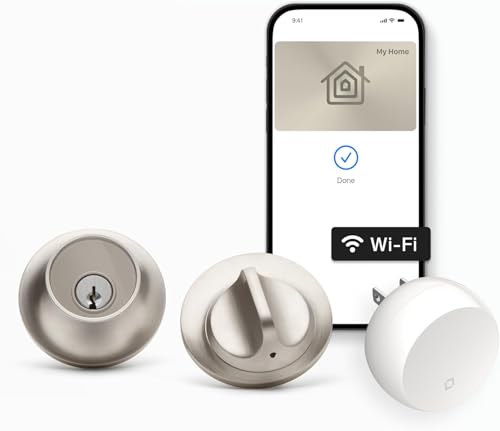
The Level Lock+ WiFi is a compact smart lock designed to hide inside your existing door hardware. It measures 2.75 inches wide and 4.5 inches long, keeping the exterior clean. You control it via the Level Home app or by tapping an iPhone or Apple Watch with Apple Home Key. It connects through 2.4 GHz Wi-Fi using the included Level Connect bridge. This model suits those who want seamless Apple integration and a discreet look.
Pros
- Supports Apple Home Key for tap-to-enter access
- Includes Level Connect Wi-Fi bridge for remote control
- Compact 2.75-inch width hides inside existing hardware
- Compatible with Apple HomeKit, Google Home, and Alexa
Cons
- Requires a separate Wi-Fi bridge for remote features
- No built-in touchscreen or physical keypad for code entry
- Lacks native Bluetooth connectivity for local access
Good fit if
- You want to hide the lock mechanism inside your door
- You primarily use Apple devices for home control
- You prefer a clean exterior without visible electronics
Skip if
- You need a built-in touchscreen keypad for entry
- You want a single-unit lock without extra bridges
- You rely on Bluetooth for local access without Wi-Fi
Verdict: Level Lock+ WiFi Smart Lock fits users who prioritize a hidden design and Apple Home Key convenience. It is ideal for those willing to use a bridge for remote management.

Kwikset Halo Select Plus Touchscreen Deadbolt
Best for: Apple users needing Matter and Wi-Fi
- Access Methods
- Apple home keys, app, touchscreen code
- Connectivity
- Wi-Fi, Matter, NFC
- Smart Home Compatibility
- Amazon Alexa, Apple Home, Google Home
- User Code Capacity
- up to 250
- Color
- Satin Nickel
- Dimensions
- 4.19 × 5.44 × 9.88 inches
View on Amazon: Kwikset Halo Select Plus Touchscreen Deadbolt Affiliate link
This Kwikset deadbolt features a touchscreen keypad and Wi-Fi connectivity with Matter support. It uses NFC for Apple Home Keys tap-to-unlock. You can manage up to 250 user codes via the app. The satin nickel finish measures 5.44 by 9.88 inches. It works with Alexa, Apple Home, and Google Home. This lock suits users who want keyless entry and broad smart home compatibility.
Pros
- Matter and Wi-Fi connectivity
- Apple Home Keys tap-to-unlock
- Supports up to 250 user codes
- Compatible with Alexa and Google Home
Cons
- No Bluetooth connectivity listed
- No physical key override mentioned
- Touchscreen only, no traditional knob
Good fit if
- You use Apple devices for tap-to-unlock
- You need Matter compatibility
- You want keyless entry via touchscreen
Skip if
- You prefer a traditional key cylinder
- You require Bluetooth-only operation
- You need a handle with a knob
Verdict: Kwikset Halo Select Plus Touchscreen is a solid choice for Apple users who value Matter support. It offers convenient keyless entry and broad smart home integration for your home.

August Home Smart Lock Satin Nickel
Best for: Existing deadbolts needing smart upgrades
- Access Methods
- App, Key
- Auto-Lock Delay
- Optional set amount of time
- Connectivity
- Wi-Fi
- Smart Home Compatibility
- Alexa
- Color
- Satin Nickel
- Application
- Home
View on Amazon: August Home Smart Lock Satin Nickel Affiliate link
This smart lock attaches to your existing deadbolt, preserving your current keys. It includes a Wi-Fi bridge for remote control via the August app. The unit measures 1.63 by 2.6 by 4.8 inches and weighs 2.8 ounces. You can grant virtual keys and receive real-time activity notifications. It integrates with Alexa and other smart home systems for voice control.
Pros
- Attaches to existing deadbolt to keep physical keys
- Includes Wi-Fi bridge for remote app access
- Supports virtual keys and real-time activity logs
- Compatible with Alexa and major smart home platforms
Cons
- Requires a separate Wi-Fi bridge for connectivity
- No built-in keypad for keyless entry
- Does not replace the entire lock mechanism
Good fit if
- You want to keep your current physical keys
- You need remote access via smartphone app
- You use Alexa or SmartThings for home automation
Skip if
- You prefer a lock with a built-in keypad
- You want a single unit without extra bridges
- You need a lock that replaces the entire deadbolt
Verdict: August Home Smart Lock + Wi-Fi Bridge is a practical retrofit for renters or homeowners who value key retention. It suits those who want app control and smart home integration without replacing their existing hardware.

Schlage Encode Smart WiFi Deadbolt
Best for: high-security homes needing many codes
- Access Methods
- Touchscreen keypad, app, key
- Connectivity
- Built-in Wi-Fi
- Smart Home Compatibility
- Alexa, Google Home, Ring, Airbnb
- User Code Capacity
- Up to 100 access codes
- Color
- Satin Nickel
- Dimensions
- 0.9 × 3 × 5 inches
View on Amazon: Schlage Encode Smart WiFi Deadbolt Affiliate link
The Schlage Encode is a built-in Wi-Fi deadbolt with a touchscreen keypad. It supports up to 100 user codes and works with Alexa and Google Home. The lock features auto-locking, a fingerprint-resistant surface, and BHMA Grade 1 certification. It runs on four AA batteries. This model suits you if you want a reliable, high-security option with straightforward app management and no hub required.
Pros
- Built-in Wi-Fi connectivity for remote access
- Supports up to 100 user access codes
- Compatible with Alexa and Google Home voice control
- BHMA Grade 1 certified for security and durability
- Fingerprint-resistant touchscreen exterior
Cons
- No Bluetooth or Zigbee support mentioned
- Uses four AA batteries instead of a rechargeable pack
- Does not include Apple Home Key support
Good fit if
- You want a high-security lock with built-in Wi-Fi
- You need to manage many user codes for family or guests
- You use Alexa or Google Home for voice control
Skip if
- You require Apple Home Key access
- You prefer a lock with a rechargeable battery
- You want a lock with Bluetooth connectivity
Verdict: Schlage Encode WiFi Deadbolt is a solid choice for users prioritizing security ratings and code management. It fits you if you need a robust, app-controlled deadbolt without extra hubs.

Philips 4200 Fingerprint Deadbolt with Handle
Best for: fast fingerprint entry and integrated handles
- Access Methods
- Fingerprint, passcode, app, voice
- Connectivity
- 2.4 GHz Wi-Fi
- Smart Home Compatibility
- Alexa, Google Assistant
- Auto-Lock Delay
- 0–180 seconds
- Included Door Hardware
- Handle set
- Color
- Satin Nickel
View on Amazon: Philips 4200 Fingerprint Deadbolt with Handle Affiliate link
This Philips deadbolt integrates a keypad and fingerprint scanner for quick entry. It connects directly to 2.4 GHz Wi-Fi without a hub. You can manage access via the app or voice commands. The unit includes a matching handle set for a complete front door upgrade. It supports auto-locking with delays up to 180 seconds. This model suits users who prioritize biometric speed and integrated hardware.
Pros
- 0.3-second fingerprint unlock speed
- Direct 2.4 GHz Wi-Fi connectivity
- Includes matching handle set
- Voice assistant compatibility
- Real-time app access history
Cons
- Requires 8 AA batteries
- No Bluetooth option listed
- 2.4 GHz Wi-Fi only
Good fit if
- You want fast biometric entry
- You prefer an all-in-one handle set
- You use Alexa or Google Assistant
Skip if
- You need 5 GHz Wi-Fi support
- You want to use included batteries
- You require Bluetooth connectivity
Verdict: Philips WiFi Door Lock with Fingerprint delivers rapid 0.3-second entry and includes a handle set for easy installation. It is a solid option for users who want integrated hardware and voice control.

Yale Wi-Fi Smart Deadbolt with Keypad
Best for: Users needing unlimited codes and hub-free Wi-Fi
- Access Methods
- Keypad, smartphone, key, auto-unlock
- Connectivity
- 2.4 or 5 GHz Wi-Fi
- User Code Capacity
- Unlimited
- Color
- Satin Nickel
- Dimensions
- 0.88 × 2.5 × 4.88 inches
- Weight
- 1 pounds
View on Amazon: Yale Wi-Fi Smart Deadbolt with Keypad Affiliate link
This Yale deadbolt connects directly to 2.4 or 5 GHz Wi-Fi without a hub. It offers keypad entry, app control, and Apple Watch access. The lock supports unlimited user codes and includes DoorSense for auto-locking. It is Grade 2 certified for durability and operates in extreme temperatures. You get real-time alerts and remote management through the Yale Access app.
Pros
- Direct 2.4 or 5 GHz Wi-Fi connectivity
- Unlimited user code capacity
- Apple Watch and smartphone control
- Grade 2 BHMA durability certification
Cons
- Requires 2.4 or 5 GHz Wi-Fi; no Bluetooth mentioned
- App access limited to US and Canada
- Heavier at 1 pound compared to some compact locks
Good fit if
- You want direct Wi-Fi without a hub
- You need unlimited access codes for guests
- You prefer Apple Watch integration
Skip if
- You live outside the US or Canada
- You require Bluetooth-only connectivity
- You need a lock smaller than 2.5 inches wide
Verdict: Yale WiFi Smart Lock Deadbolt suits users who need robust, hub-free Wi-Fi connectivity and unlimited code sharing. It is ideal for homes requiring high durability and broad access control.
Specifications side by side
| Spec | Yale Assure Lock 2 Plus Smart Deadbolt | Level Lock+ WiFi Smart Deadbolt | Kwikset Halo Select Plus Touchscreen Deadbolt | August Home Smart Lock Satin Nickel | Schlage Encode Smart WiFi Deadbolt | Philips 4200 Fingerprint Deadbolt with Handle | Yale Wi-Fi Smart Deadbolt with Keypad |
|---|---|---|---|---|---|---|---|
| Access Methods | Apple home keys, app, code | Apple Home Key, app, key fob | Apple home keys, app, touchscreen code | App, Key | Touchscreen keypad, app, key | Fingerprint, passcode, app, voice | Keypad, smartphone, key, auto-unlock |
| Connectivity | 2.4 GHz Wi-Fi | 2.4 GHz Wi-Fi | Wi-Fi, Matter, NFC | not stated | Built-in Wi-Fi | 2.4 GHz Wi-Fi | 2.4 or 5 GHz Wi-Fi |
| Smart Home Compatibility | Apple Home | Apple HomeKit, Google Home, Amazon Alexa | Amazon Alexa, Apple Home, Google Home | not stated | Alexa, Google Home, Ring, Airbnb | Alexa, Google Assistant | not stated |
| Auto-Lock Delay | not stated | not stated | not stated | Optional set amount of time | not stated | 0–180 seconds | not stated |
| User Code Capacity | not stated | not stated | up to 250 | not stated | Up to 100 access codes | not stated | Unlimited |
| Included Door Hardware | Deadbolt | not stated | not stated | not stated | not stated | Handle set | not stated |
| Access Method | Key | Key | Touchscreen | not stated | Keypad, Touchscreen, App Control | Keypad, Fingerprint, Remote Control | Keypad, Key, App Control |
| Color | Satin Nickel | Satin Nickel | Satin Nickel | Satin Nickel | Satin Nickel | Satin Nickel | Satin Nickel |
| Application | Home | Home | Home | Home | Home | Front Door | not stated |
| Included Hardware | not stated | not stated | not stated | not stated | not stated | Handle | not stated |
| Special Features | Auto Lock | not stated | not stated | not stated | not stated | Auto Lock | not stated |
| Dimensions | 0.88 × 2.5 × 3.75 inches | 4.5 × 2.75 × 2.75 inches | 4.19 × 5.44 × 9.88 inches | 2.6 × 1.63 × 4.8 inches | 0.9 × 3 × 5 inches | 2.7 × 0.73 × 5.72 inches | 0.88 × 2.5 × 4.88 inches |
| Weight | not stated | not stated | not stated | 2.8 ounces | 3.31 pounds | not stated | 1 pounds |
| Size | Wi-Fi | Lock+ WiFi | not stated | not stated | Encode | not stated | Wi-Fi |
| Model | YRD450-N-CB1-619 | C-F12U-S1 | 998010-003 | AUG-SL04-C03-N04 | BE489WBCAM619 | DDL242X-1HW | YRD410-WF1-619 |
If you are also researching countertop cooking appliances, you can compare nuwave pro plus 2 infrared alternatives.
Frequently asked questions
Which smart lock is best for Apple Home Key users?
The Yale Assure Lock 2 Plus is the top pick for Apple users. It supports Home Key for tap-to-unlock convenience and includes automatic locking. The Level Lock+ WiFi is also suitable for this group, though it requires a bridge for remote management. Both devices prioritize seamless integration with the Apple ecosystem.
Do any of these locks support Matter protocol?
Yes, the Kwikset Halo Select Plus Touchscreen Deadbolt supports Matter. It also features Wi-Fi connectivity and a touchscreen for keyless entry. This makes it a solid choice for users who value broad smart home integration alongside Apple compatibility. Other listed locks rely on Wi-Fi or specific bridge requirements instead.
Which option is best for renters who want to keep their existing keys?
The August Home Smart Lock is ideal for renters. It is a practical retrofit that does not require replacing your existing deadbolt hardware. You retain your physical keys while gaining app control and smart home integration via a Wi-Fi bridge. This makes it a flexible upgrade for rental properties.
Is there a smart lock with a built-in handle?
The Philips 4200 Fingerprint Deadbolt includes an integrated handle set. This feature simplifies installation by combining the lock and handle into one unit. It also offers rapid 0.3-second fingerprint entry and Wi-Fi connectivity. This makes it a convenient option for users seeking all-in-one hardware solutions for their front door.
Which lock allows for the most user codes?
The Yale Wi-Fi Smart Deadbolt with Keypad is designed for high code capacity. It supports unlimited code sharing, making it suitable for homes with many residents or frequent guests. It offers hub-free Wi-Fi connectivity and robust durability. This feature ensures you can manage access for a large group without restriction.
Which deadbolt has the highest security rating mentioned?
The Schlage Encode Smart WiFi Deadbolt is noted for its security ratings. It is a solid choice for users prioritizing robust protection and code management. It connects directly via Wi-Fi without extra hubs. This makes it a reliable option for high-security homes that require detailed control over user access codes.
Which lock offers the fastest fingerprint recognition?
The Philips 4200 Fingerprint Deadbolt provides rapid 0.3-second entry. This speed is achieved through its dedicated fingerprint sensor technology. It also includes a handle and Wi-Fi connectivity for remote management. This makes it a strong option for users who prioritize quick and convenient access without relying solely on keypads or apps.
Do these locks require a separate hub for Wi-Fi?
Most listed locks connect directly via Wi-Fi, eliminating the need for a separate hub. The Yale Assure Lock 2 Plus, Kwikset Halo Select Plus, and Schlage Encode all feature built-in Wi-Fi. The August Home and Level Lock+ require a Wi-Fi bridge for remote access. This distinction affects setup complexity and remote control capabilities.