Looking Beyond the Yale Assure Lock 2 Keypad? 6 Alternatives Worth a Look
As an Amazon Associate we earn from qualifying purchases. Links on this page are affiliate links.
The Yale Assure Lock 2 Keypad with Lever offers key-free entry via Bluetooth and a physical keypad. If you are looking for yale assure lock 2 keypad alternatives, this list helps you compare other options. The original model provides solid app control and includes a passage lever. It fits users who want smartphone-based access without direct Wi-Fi integration.
However, you might need different specifications. Some buyers prefer fingerprint sensors for faster entry. Others require Wi-Fi for remote management or Matter compatibility for broader smart home integration. The alternatives in this guide were chosen because their specs overlap with the original. They share core features like Bluetooth connectivity and keypad access. You can find options with biometric readers, different hardware styles, or direct network connections. This selection covers various needs while maintaining the essential functionality of the Yale Assure Lock 2.
How alternatives differ from Yale
Yale Lock 2 Touch Biometric Deadbolt
The Yale Lock 2 Touch Biometric Deadbolt replaces the standard keypad with a fingerprint sensor for faster entry. It supports both Wi-Fi and Bluetooth, whereas the original relies solely on Bluetooth for app connectivity. This model weighs 4 pounds, making it heavier than the 1-pound original. You gain biometric verification and direct internet access without a bridge. You lose the physical lever handle included with the base model. Choose this if you prioritize speed and remote monitoring over the simpler mechanical setup of the original.
Yale Assure Lock 2 Touchscreen Deadbolt
The Yale Assure Lock 2 Touchscreen Deadbolt features a touchscreen interface instead of a traditional push-button keypad. It connects via Wi-Fi and Bluetooth, offering direct internet access unlike the original’s Bluetooth-only link. The unit is wider at 3.7 inches compared to the original’s 2.5 inches. It weighs the same at 1 pound. You get broader smart home integration and remote control capabilities. You give up the tactile feedback of the original’s lever and push-button design. Pick this option if you want seamless app control and a modern interface without needing a separate hub.
Yale Bluetooth Smart Lock Black Suede
The Yale Bluetooth Smart Lock Deadbolt combines a keypad with a fingerprint reader for versatile entry methods. Like the original, it uses Bluetooth connectivity, so it does not offer direct Wi-Fi access. It is slightly taller at 4.9 inches and heavier than the original’s 1-pound weight, though exact weight is not listed. The inclusion of biometric scanning adds a layer of convenience for quick entry. You maintain the familiar lever hardware style of the original. This model suits users who want fingerprint speed but prefer to stick with Bluetooth connectivity rather than upgrading to Wi-Fi.
Nuki Keypad 2 NFC (2026)
The Nuki Keypad 2 NFC (2026) is designed specifically for existing Nuki Smart Lock owners. It adds Matter support and Bluetooth connectivity, enabling wallet-based access alongside keypad and fingerprint methods. It is significantly smaller and lighter at 3.2 ounces compared to the original’s 1-pound mass. The dimensions are compact at 1 by 1 by 5 inches. You gain compatibility with the Matter protocol and digital wallet keys. You cannot use this as a standalone lock; it requires a compatible Nuki device. Choose this if you already use Nuki hardware and want to expand your access methods with modern standards.
Yale Wi-Fi Smart Deadbolt with Keypad
The Yale Wi-Fi Smart Deadbolt with Keypad connects directly to Wi-Fi, eliminating the need for Bluetooth-only reliance found in the original. It offers direct internet access for remote management. The physical dimensions match the original at 2.5 by 4.88 by 0.88 inches, and it weighs the same at 1 pound. You get reliable Grade 2 durability and unlimited code management. You lose the specific lever hardware configuration of the original, as this is a deadbolt-focused unit. Select this model if you require direct Wi-Fi connectivity for broader remote control and do not need the specific lever design of the Assure Lock 2.
Sifely S Bluetooth Smart Lock
The Sifely S Bluetooth Smart Lock integrates with Alexa and Google Assistant for voice control, a feature not highlighted in the original. It uses Bluetooth connectivity and includes both a keypad and fingerprint sensor. It is taller at 7 inches and wider at 3 inches compared to the original’s compact form. It weighs 1 pound. You gain smart home voice command capabilities and biometric entry. You trade the specific lever hardware of the original for a handle-included design. Pick this lock if you prioritize voice assistant integration and fast fingerprint entry over the simpler Bluetooth app control of the Yale original.
Quick picks
Our 7 picks

Yale Assure Lock 2 Keypad with Lever
Best for: Smartphone-controlled entry with a lever
- Access Methods
- Keypad, Yale Access app, Auto-Unlock
- Connectivity
- Bluetooth
- Included Door Hardware
- Passage lever
- Color
- Black
- Trigger Type
- Push Button
- Dimensions
- 0.88 × 2.5 × 4.88 inches
View on Amazon: Yale Assure Lock 2 Keypad with Lever Affiliate link
This Yale deadbolt combines a keypad with Bluetooth connectivity for smartphone control. It includes a Black Suede passage lever for standard US door preparations. You get key-free entry via the Yale Access app or optional Auto-Unlock. The push-button interface keeps the design clean. It suits renters or homeowners who want app-based access without installing a separate hub.
Pros
- Bluetooth connectivity for smartphone control
- Includes Black Suede passage lever
- Supports optional Auto-Unlock feature
- Push-button keypad interface
Cons
- Requires a smartphone for smart features
- No Wi-Fi built-in for remote access
- Only supports Bluetooth range control
Good fit if
- You want app-controlled entry
- You prefer a lever handle
- You have a smartphone nearby
Skip if
- You need Wi-Fi connectivity
- You want a fingerprint scanner
- You need remote access outside Bluetooth range
Verdict: Yale Assure Lock 2 Keypad Black Suede is a solid choice for users who want app-based access via Bluetooth. It fits those who already carry their smartphones and want to skip physical keys.

Yale Lock 2 Touch Biometric Deadbolt
Best for: Fast fingerprint entry without Wi-Fi
- Access Methods
- Fingerprint, keypad, app
- Connectivity
- Bluetooth
- Color
- Black
- Dimensions
- 0.88 × 2.5 × 4.88 inches
- Weight
- 4 pounds
View on Amazon: Yale Lock 2 Touch Biometric Deadbolt Affiliate link
This Yale Lock 2 Touch deadbolt uses fingerprint, keypad, or app access. It features 99% accuracy fingerprint recognition in under 0.5 seconds. The unit measures 2.5 by 4.88 inches and weighs 4 pounds. It connects via Bluetooth. You get two-factor authentication and an activity feed. It suits users wanting fast, keyless entry with biometric security.
Pros
- Fingerprint recognition accuracy of 99%
- Recognition time under 0.5 seconds
- Two-factor authentication support
- Activity feed tracks entry logs
Cons
- Bluetooth only, no built-in Wi-Fi
- Requires app for remote features
- Heavier at 4 pounds
Good fit if
- You want the fastest unlock method
- You prefer biometric security over keys
- You use the Yale Access App
Skip if
- You need Wi-Fi connectivity
- You want a lighter lock
- You dislike app dependency
Verdict: Yale Lock 2 Touch Biometric Bluetooth offers rapid fingerprint access for security-focused users. It fits those prioritizing speed and biometric verification over direct Wi-Fi integration.
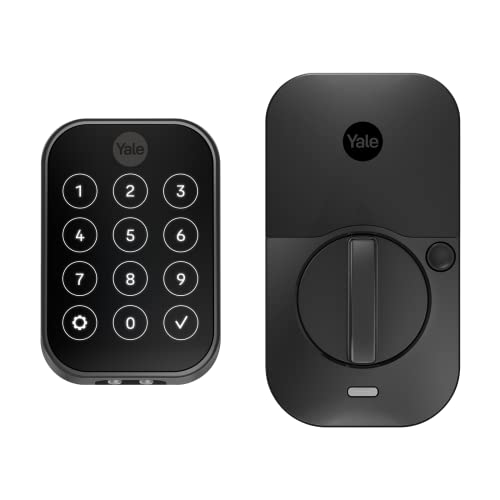
Yale Assure Lock 2 Touchscreen Deadbolt
Best for: Bluetooth app control enthusiasts
- Access Methods
- Keypad, app, Apple Watch, Auto-Unlock
- Connectivity
- Bluetooth
- Color
- Black
- Application
- Home
- Dimensions
- 2.5 × 3.7 × 2.3 inches
- Weight
- 1 pounds
View on Amazon: Yale Assure Lock 2 Touchscreen Deadbolt Affiliate link
This Yale deadbolt offers keyless entry via a digital touchscreen keypad. It connects to your smartphone using Bluetooth, allowing you to lock and unlock the door remotely through the Yale Access app. The unit weighs 1 pound and measures 3.7 inches wide. It supports Apple Watch access and optional Auto-Unlock. This model suits homeowners who want secure, app-controlled access without needing Wi-Fi infrastructure.
Pros
- Digital touchscreen keypad for keyless entry
- Bluetooth connectivity for app control
- Compatible with Apple Watch
- Optional Auto-Unlock feature
Cons
- Bluetooth only, no built-in Wi-Fi
- Requires optional hub for remote access away from home
- Heavier build at 1 pound
Good fit if
- You want app control without Wi-Fi setup
- You prefer Bluetooth connectivity
- You use an Apple Watch
Skip if
- You need built-in Wi-Fi
- You want remote access without a hub
- You prefer a lighter lock
Verdict: Yale Assure Lock 2 Bluetooth is a solid choice for users who prioritize app-based control and Apple Watch integration over direct Wi-Fi connectivity.

Yale Bluetooth Smart Lock Black Suede
Best for: Near-door control and fingerprint entry
- Access Methods
- Fingerprint, keypad, app, key
- Connectivity
- Bluetooth
- User Code Capacity
- Unlimited
- Color
- Black
- Dimensions
- 0.9 × 2.5 × 4.9 inches
View on Amazon: Yale Bluetooth Smart Lock Black Suede Affiliate link
This Yale deadbolt uses Bluetooth for near-door control via the app, keypad, or fingerprint scanner. It supports unlimited user codes for easy sharing. The unit is Grade 2 certified for durability and includes DoorSense for auto-locking. You can upgrade to Wi-Fi or Z-Wave later using separate modules. It fits homes needing reliable, keyless entry without immediate remote access.
Pros
- Fingerprint, keypad, app, and key access methods
- Unlimited user code capacity
- Grade 2 BHMA durability certification
- DoorSense auto-lock feature
- Expandable connectivity via separate modules
Cons
- No built-in Wi-Fi for remote access
- Requires separate module for Z-Wave integration
- Bluetooth range limits remote control
Good fit if
- You want fingerprint convenience without remote access
- You need unlimited entry codes for family
- You prefer local Bluetooth control
Skip if
- You need immediate remote access from anywhere
- You want built-in Wi-Fi connectivity
- You require Z-Wave integration out of the box
Verdict: Yale Bluetooth Smart Lock Deadbolt suits you if you prioritize fingerprint speed and local control over remote access. It delivers solid durability and flexible code management for near-door use.

Nuki Keypad 2 NFC (2026)
Best for: Nuki lock owners using wallet keys
- Access Methods
- NFC, Fingerprint, 6-Digit Code
- Connectivity
- Bluetooth, Matter
- Smart Home Compatibility
- Apple Home, Samsung Digital Home Key
- Installation Type
- Keypad accessory for Nuki Smart Lock
- Fingerprint Capacity
- 20
- User Code Capacity
- 200
View on Amazon: Nuki Keypad 2 NFC (2026) Affiliate link
The Nuki Keypad 2 NFC adds a second entry method to compatible Nuki Smart Locks. You can unlock the door using Apple Home Key, Samsung Digital Home Key, a fingerprint, or a 6-digit code. It supports up to 35 Tap to Unlock keys, 20 fingerprints, and 200 individual entry codes. The device connects via Bluetooth and Matter. It is IP54-rated and weighs 3.2 ounces.
Pros
- Supports Apple Home Key and Samsung Digital Home Key for wallet access
- Stores up to 200 individual entry codes
- IP54-rated weather-resistant design
- End-to-end encryption for access data
Cons
- Requires a compatible Nuki Smart Lock to function
- Needs a Matter hub for wallet key usage
- Limited to 20 fingerprint storage capacity
Good fit if
- You already own a Nuki Smart Lock
- You want to use Apple or Samsung wallet keys
- You need to manage many individual entry codes
Skip if
- You do not have a Nuki Smart Lock
- You prefer a standalone lock without a hub
- You need to store more than 20 fingerprints
Verdict: Nuki Keypad 2 NFC (2026) fits users who already have a Nuki Smart Lock and want to add wallet-based access. It is a solid upgrade for those managing many codes.

Yale Wi-Fi Smart Deadbolt with Keypad
Best for: Direct Wi-Fi access management
- Access Methods
- Keypad, smartphone, key, auto-unlock
- Connectivity
- 2.4 or 5 GHz Wi-Fi
- User Code Capacity
- Unlimited
- Color
- Black
- Dimensions
- 0.88 × 2.5 × 4.88 inches
- Weight
- 1 pounds
View on Amazon: Yale Wi-Fi Smart Deadbolt with Keypad Affiliate link
This Yale deadbolt connects directly to 2.4 or 5 GHz Wi-Fi without a hub. It supports unlimited user codes and works with the Yale Access app. You can control it via smartphone, Apple Watch, or keypad. The Grade 2 BHMA rating ensures durability. It includes DoorSense and Auto-Lock. This model suits you if you want direct Wi-Fi connectivity and extensive access management.
Pros
- Direct 2.4 or 5 GHz Wi-Fi connection
- Unlimited user code capacity
- Apple Watch and smartphone control
- Grade 2 BHMA durability rating
- DoorSense and Auto-Lock features
Cons
- Requires 2.4 or 5 GHz Wi-Fi network
- App access limited to US and Canada
- No Bluetooth connectivity listed in specs
Good fit if
- You want direct Wi-Fi without a hub
- You need unlimited access codes for guests
- You use Apple Watch for entry
Skip if
- You live outside the US or Canada
- You require Bluetooth-only connectivity
- You need international app support
Verdict: Yale WiFi Deadbolt Black Suede fits you if you need direct Wi-Fi access and unlimited codes. It offers reliable Grade 2 durability and app control for US and Canadian users.

Sifely S Bluetooth Smart Lock
Best for: Alexa users needing fast fingerprint entry
- Access Methods
- Fingerprint, passcode, app, FOB, key
- Connectivity
- Bluetooth
- Smart Home Compatibility
- Amazon Alexa, Google Assistant
- Included Door Hardware
- Handle
- Color
- Black
- Application
- Home, Front Door, Rental Property
View on Amazon: Sifely S Bluetooth Smart Lock Affiliate link
This Sifely deadbolt offers Bluetooth connectivity and a fast 0.3-second fingerprint sensor for keyless entry. You can manage access via the app, create codes, and use voice commands with Alexa or Google Assistant. It supports multiple unlock methods including a keypad, FOB, and mechanical key. The unit weighs 1 pound and measures 7 inches in height, making it a compact option for front doors.
Pros
- Fast 0.3-second fingerprint recognition
- Compatible with Alexa and Google Assistant
- Includes mechanical key backup
- Supports FOB and app control
Cons
- Bluetooth only, no WiFi
- No built-in camera
- No video doorbell integration
Good fit if
- You need Alexa voice control
- You want fast fingerprint access
- You prefer local Bluetooth management
Skip if
- You require WiFi connectivity
- You need video monitoring
- You want Google Home only
Verdict: Sifely Bluetooth Fingerprint Lock fits users who prioritize Alexa integration and rapid biometric entry over remote WiFi access.
Specifications side by side
| Spec | Yale Assure Lock 2 Keypad with Lever | Yale Lock 2 Touch Biometric Deadbolt | Yale Assure Lock 2 Touchscreen Deadbolt | Yale Bluetooth Smart Lock Black Suede | Nuki Keypad 2 NFC (2026) | Yale Wi-Fi Smart Deadbolt with Keypad | Sifely S Bluetooth Smart Lock |
|---|---|---|---|---|---|---|---|
| Access Methods | Keypad, Yale Access app, Auto-Unlock | Fingerprint, keypad, app | Keypad, app, Apple Watch, Auto-Unlock | Fingerprint, keypad, app, key | NFC, Fingerprint, 6-Digit Code | Keypad, smartphone, key, auto-unlock | Fingerprint, passcode, app, FOB, key |
| Connectivity | Bluetooth | Bluetooth | Bluetooth | Bluetooth | Bluetooth, Matter | 2.4 or 5 GHz Wi-Fi | Bluetooth |
| Smart Home Compatibility | not stated | not stated | not stated | not stated | Apple Home, Samsung Digital Home Key | not stated | Amazon Alexa, Google Assistant |
| Installation Type | not stated | not stated | not stated | not stated | Keypad accessory for Nuki Smart Lock | not stated | not stated |
| Fingerprint Capacity | not stated | not stated | not stated | not stated | 20 | not stated | not stated |
| User Code Capacity | not stated | not stated | not stated | Unlimited | 200 | Unlimited | not stated |
| Included Door Hardware | Passage lever | not stated | not stated | not stated | not stated | not stated | Handle |
| Access Method | Keypad | Keypad, Fingerprint | Keypad, Touchscreen | Keypad, Fingerprint | Keypad, Fingerprint, Key | Keypad, Key, App Control | Keypad, Fingerprint |
| Color | Black | Black | Black | Black | Black | Black | Black |
| Application | not stated | not stated | Home | not stated | Home | not stated | Home, Front Door, Rental Property |
| Included Hardware | Lever | not stated | not stated | not stated | not stated | not stated | Handle |
| Trigger Type | Push Button | not stated | not stated | not stated | not stated | not stated | not stated |
| Dimensions | 0.88 × 2.5 × 4.88 inches | 0.88 × 2.5 × 4.88 inches | 2.5 × 3.7 × 2.3 inches | 0.9 × 2.5 × 4.9 inches | 5 × 1 × 1 inches | 0.88 × 2.5 × 4.88 inches | 1.2 × 3 × 7 inches |
| Weight | 1 pounds | 4 pounds | 1 pounds | not stated | 3.2 ounces | 1 pounds | 2 pounds |
| Size | Push Button | Bluetooth | Bluetooth | Bluetooth | not stated | Wi-Fi | not stated |
| Model | B-YRD410-BLE-VL-BSP | YRD420-F-BLE-BSP | YRD450-BLE-BSP | YRD410-F-BLE-BSP | 221198 | YRD410-WF1-BSP | Sifely S |
For broader hardware comparisons, you can evaluate how alternative models rank among the best smart locks with keypad.
Frequently asked questions
Which Yale lock supports both Wi-Fi and Bluetooth?
The Yale Lock 2 Touch Biometric Deadbolt supports both Wi-Fi and Bluetooth connectivity. This allows for remote access via Wi-Fi and local control via Bluetooth. It also features a fingerprint sensor for quick entry. The model weighs 4 pounds and includes a black suede finish. This dual-connectivity setup offers more flexibility than Bluetooth-only models.
What is the best budget-friendly Yale smart lock?
The Yale Assure Lock 2 Touchscreen Deadbolt is the best budget option. It offers Bluetooth and Wi-Fi connectivity for versatile control. The lock features a touchscreen keypad for code entry. It weighs 1 pound and measures 3.7 inches in width. This model is ideal for users who want app control without a high price tag.
Can I use a fingerprint with the Yale Assure Lock 2 Keypad?
No, the Yale Assure Lock 2 Keypad with Lever does not support fingerprints. It relies on a physical keypad for entry. If you need biometric access, consider the Yale Lock 2 Touch Biometric Deadbolt. That model includes a fingerprint sensor along with keypad and connectivity options. It is designed for users who prefer fast, keyless entry.
Does the Yale Lock 2 Touch Biometric Deadbolt require Wi-Fi?
No, the Yale Lock 2 Touch Biometric Deadbolt does not strictly require Wi-Fi. It supports Bluetooth for local control and Wi-Fi for remote access. You can use it with just Bluetooth if you prefer. The lock includes a fingerprint sensor and keypad. It weighs 4 pounds and features a black suede color.
Which Yale lock is best for Alexa users?
The Sifely S Bluetooth Smart Lock is best for Alexa users. It supports both Alexa and Google Assistant for voice control. The lock features a fingerprint sensor and keypad for entry. It includes a handle and weighs 1 pound. This model is suitable for homes, front doors, and rental properties where smart home integration is a priority.
What is the difference between the Yale Assure Lock 2 and the Yale Lock 2 Touch?
The Yale Assure Lock 2 Keypad uses a push-button keypad for entry. The Yale Lock 2 Touch Biometric Deadbolt adds a fingerprint sensor. The Touch model also supports both Wi-Fi and Bluetooth, while the Assure Keypad uses only Bluetooth. The Touch model weighs 4 pounds, whereas the Assure Keypad weighs 1 pound. Both feature black finishes.
Does the Nuki Keypad 2 NFC work with Yale locks?
No, the Nuki Keypad 2 NFC is designed for Nuki Smart Locks. It supports Matter, Bluetooth, and NFC for wallet-based access. It is not compatible with Yale locks. If you have a Yale lock, you should look at the other Yale models listed. This keypad is an upgrade for Nuki users who manage many codes.
Which Yale lock offers direct Wi-Fi access without a bridge?
The Yale Wi-Fi Smart Deadbolt with Keypad offers direct Wi-Fi access. It does not require a separate bridge for remote control. The lock features a keypad for entry and weighs 1 pound. It measures 2.5 inches in width. This model is ideal for users who need reliable remote access and unlimited code management for their home.