ULTRALOQ U-Bolt Bluetooth Smart Deadbolt vs ULTRALOQ U-Bolt Wi-Fi Smart Deadbolt (2026): Key Differences
As an Amazon Associate we earn from qualifying purchases. Links on this page are affiliate links.
Comparing the ultraloq u bolt wifi smart lock vs u bolt smart lock reveals two distinct approaches to keyless entry. Both models offer five-in-one access methods, including keypad, app, and auto unlock capabilities. They share identical ANSI Grade 1 security ratings and IP65 weatherproofing. The main difference lies in connectivity and included hardware. One model relies on Bluetooth with a separate bridge for remote access, while the other features built-in Wi-Fi and a door sensor for immediate remote control without extra components.
Key differences
| Aspect | ULTRALOQ U-Bolt Bluetooth Smart Deadbolt | ULTRALOQ U-Bolt Wi-Fi Smart Deadbolt with Sensor |
|---|---|---|
| Connectivity | Bluetooth; 2.4 GHz Wi-Fi via separate bridge | Built-in 2.4 GHz Wi-Fi and Bluetooth |
| Included Hardware | Deadbolt only | Deadbolt and door sensor |
| Remote Access | Requires ULTRALOQ Bridge (sold separately) | Direct via built-in Wi-Fi |
| Battery Life | Low battery alert via app | Up to 8 months with intelligent monitoring |
| Security Features | Auto lock/unlock, random digits | Lockout Mode, door status alerts |
Which one should you choose?
Choose ULTRALOQ U-Bolt Bluetooth Smart Deadbolt if
- You already own or plan to purchase the ULTRALOQ Bridge for remote access
- You prefer a simpler hardware setup without additional sensors
- You want to use the lock with SmartThings or IFTTT routines
Choose ULTRALOQ U-Bolt Wi-Fi Smart Deadbolt with Sensor if
- You want immediate remote access without buying an extra bridge
- You need to monitor door status with an included sensor
- You value a stated battery life of up to 8 months
Verdict: Choose the Bluetooth model if you already have the bridge or prefer a basic deadbolt. The Wi-Fi model is better for users who want plug-and-play remote access and door status monitoring. Both provide robust security and versatile entry options.
U-Bolt Bluetooth vs Wi-Fi Locks
Connectivity
The ULTRALOQ U-Bolt Bluetooth Smart Deadbolt relies on Bluetooth for local control, requiring the ULTRALOQ Bridge (sold separately) for remote access and full app features when you are away from home. In contrast, the ULTRALOQ U-Bolt Wi-Fi Smart Deadbolt includes built-in 2.4 GHz Wi-Fi. This allows you to lock, unlock, and check entry logs from anywhere without buying extra hardware. Both models support 2.4 GHz Wi-Fi for smart home routines, but the Wi-Fi version offers immediate remote access out of the box, making it more convenient for renters or those who travel frequently.
Power Source
Battery performance is a key practical difference between these two locks. The ULTRALOQ U-Bolt Wi-Fi Smart Deadbolt is optimized for standard 1.5V AA alkaline batteries and offers up to 8 months of dependable performance with intelligent battery monitoring. The ULTRALOQ U-Bolt Bluetooth Smart Deadbolt also uses batteries and includes low battery alerts via the app, but the specific duration and battery type are not explicitly listed in its published specifications. If you want to know exactly how long the batteries last before needing replacement, the Wi-Fi model provides clearer data on its power endurance and monitoring features.
Access Method
Both locks provide five-in-one keyless entry options, including a keypad, smartphone app, auto unlock, and mechanical keys. The ULTRALOQ U-Bolt Bluetooth Smart Deadbolt also supports a Smart Watch App for unlocking. The ULTRALOQ U-Bolt Wi-Fi Smart Deadbolt adds a web portal for access management and includes a door sensor to check door status. While both allow you to share eKeys and manage access logs, the Wi-Fi version offers additional flexibility with a web portal and physical door status monitoring, which is useful for verifying if the door is actually closed after using the app.
Security Features
Both models meet the ANSI Grade 1 security standard, which is the highest residential rating, and feature IP65 weatherproofing to withstand rain, dust, heat, and cold. The ULTRALOQ U-Bolt Bluetooth Smart Deadbolt highlights a 7 times longer lifespan and 35 times strength compared to standard locks. The ULTRALOQ U-Bolt Wi-Fi Smart Deadbolt includes a specific Lockout Mode to temporarily disable all electronic unlocking methods while you are traveling. This feature adds an extra layer of security for absences, whereas the Bluetooth model emphasizes general durability and lifespan metrics without mentioning a dedicated travel lockout function.
Smart Home Compatibility
Both smart locks are compatible with Amazon Alexa, Google Assistant, SmartThings, and IFTTT for voice control and connected home routines. The ULTRALOQ U-Bolt Bluetooth Smart Deadbolt requires the separate ULTRALOQ Bridge to enable these smart home integrations and remote features. The ULTRALOQ U-Bolt Wi-Fi Smart Deadbolt supports these integrations natively via its built-in Wi-Fi, though it still recommends keeping the app updated and using a stable network connection. For users who already have a smart home ecosystem, the Wi-Fi model offers easier setup without the need for additional bridge hardware.
Which ULTRALOQ U-Bolt Should You Buy
Renters needing remote access without extra hardware
The Wi-Fi model includes built-in remote access, so you do not need to buy the separate ULTRALOQ Bridge. You can check entry logs and manage codes from anywhere. It also features a door sensor for open-door alerts and a lockout mode for extra security while you travel.
Users prioritizing local Bluetooth control and simplicity
This Bluetooth deadbolt offers straightforward local control without the complexity of Wi-Fi setup. It supports auto unlock and keypad entry for quick access. If you already have the bridge or prefer local connectivity, this model provides the same ANSI Grade 1 security and five-in-one entry methods as the Wi-Fi version.
Homeowners wanting door status monitoring
The Wi-Fi smart lock comes with an included door sensor. This allows you to verify if the door is closed and receive alerts if it is left open. The Bluetooth model lacks this specific sensor feature, making the Wi-Fi version better for monitoring door status remotely via the app.
The products compared

ULTRALOQ U-Bolt Bluetooth Smart Deadbolt
Best for: local Bluetooth control and high security
- Access Methods
- Keypad, app, auto unlock, key
- Connectivity
- Bluetooth, 2.4 GHz Wi-Fi
- Smart Home Compatibility
- Alexa, Google Assistant, SmartThings
- Installation Type
- Replace current deadbolt
- Included Door Hardware
- Deadbolt
- Color
- Black
View on Amazon: ULTRALOQ U-Bolt Bluetooth Smart Deadbolt Affiliate link
This is the ULTRALOQ U-Bolt Bluetooth smart lock. It uses Bluetooth for local control and requires a separate bridge for Wi-Fi remote access. You get five entry methods: keypad, app, auto unlock, smart watch, and keys. It meets ANSI Grade 1 security and has an IP65 weatherproof rating. This model suits you if you want robust local access without needing built-in Wi-Fi for every task.
Pros
- Five entry methods including keypad, app, and auto unlock
- ANSI Grade 1 security certification for durability
- IP65 weatherproof rating for outdoor use
- Works with Alexa and Google Assistant via bridge
Cons
- Requires separate ULTRALOQ bridge for remote Wi-Fi access
- Only supports 2.4 GHz Wi-Fi when using the bridge
- 18-month electronic warranty is shorter than lifetime mechanical coverage
Good fit if
- You want a secure lock with local Bluetooth control
- You prefer using a separate bridge for remote features
- You need a weatherproof deadbolt for exterior doors
Skip if
- You need built-in Wi-Fi without extra hardware
- You want a longer than 18-month electronic warranty
- You only use 5 GHz Wi-Fi networks
Verdict: ULTRALOQ U-Bolt Bluetooth Smart Lock fits you if you value strong local security and do not mind buying a bridge for remote access.
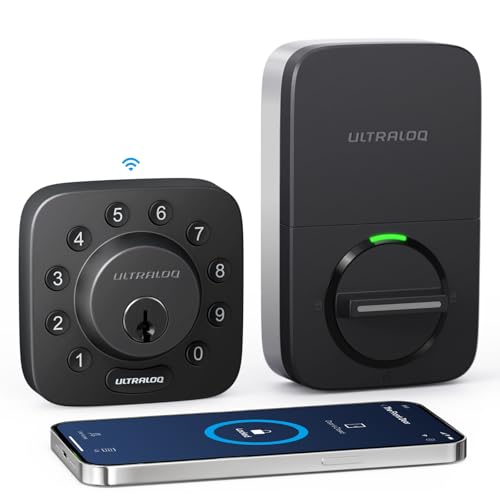
ULTRALOQ U-Bolt Wi-Fi Smart Deadbolt with Sensor
Best for: Remote access and high security
- Access Methods
- Passcode, app, eKey, key, web portal
- Connectivity
- 2.4 GHz Wi-Fi, Bluetooth
- Smart Home Compatibility
- Amazon Alexa, Google Assistant
- User Code Capacity
- 50 passcodes
- Color
- Black
- Dimensions
- 2.95 × 0.99 × 2.95 inches
View on Amazon: ULTRALOQ U-Bolt Wi-Fi Smart Deadbolt with Sensor Affiliate link
The ULTRALOQ U-Bolt WiFi Smart Lock integrates built-in 2.4 GHz Wi-Fi and Bluetooth for remote access without a bridge. It features ANSI/BHMA Grade 1 zinc alloy construction and an IP65 weather-resistant rating. You can manage up to 50 passcodes and receive door status alerts via the included sensor. This model suits renters and homeowners seeking reliable, app-controlled entry with high security standards.
Pros
- Built-in 2.4 GHz Wi-Fi enables remote lock and unlock without a hub
- ANSI/BHMA Grade 1 security rating with durable zinc alloy body
- IP65 weather-resistant design withstands rain, dust, and temperature extremes
- Supports up to 50 custom passcodes with scheduling and one-time options
Cons
- Wi-Fi connectivity is limited to 2.4 GHz networks only
- Requires router placement within 70 feet for optimal signal strength
- Relies on four AA alkaline batteries rather than a rechargeable pack
Good fit if
- You want to manage access codes and view entry logs remotely
- You need a high-security Grade 1 lock for daily use
- You prefer a weather-resistant build for exterior door installation
Skip if
- You only have a 5 GHz Wi-Fi network available
- You require a rechargeable battery system for power
- You need a lock without a mechanical key override
Verdict: The ULTRALOQ U-Bolt WiFi Smart Lock offers Grade 1 security and direct app control for users who value remote management and durable construction.
Specifications side by side
| Spec | ULTRALOQ U-Bolt Bluetooth Smart Deadbolt | ULTRALOQ U-Bolt Wi-Fi Smart Deadbolt with Sensor |
|---|---|---|
| Access Methods | Keypad, app, auto unlock, key | Passcode, app, eKey, key, web portal |
| Connectivity | Bluetooth, 2.4 GHz Wi-Fi | 2.4 GHz Wi-Fi, Bluetooth |
| Smart Home Compatibility | Alexa, Google Assistant, SmartThings | Amazon Alexa, Google Assistant |
| Installation Type | Replace current deadbolt | not stated |
| User Code Capacity | not stated | 50 passcodes |
| Included Door Hardware | Deadbolt | not stated |
| Access Method | Keypad, App Control | not stated |
| Color | Black | Black |
| Application | Front Door | not stated |
| Special Features | Auto Lock | not stated |
| Dimensions | 2.95 × 2.95 × 0.98 inches | 2.95 × 0.99 × 2.95 inches |
| Weight | 3 pounds | not stated |
| Size | Bluetooth | Bluetooth + Built-in WiFi + Door Sensor |
| Model | U-Bolt-BK | U-BOLT-WiFi |
Frequently asked questions
Does the ULTRALOQ U-Bolt Bluetooth model work without Wi-Fi?
Yes, it functions locally via Bluetooth. You control it from your phone when near the door. For remote access, you need the separate ULTRALOQ Bridge. The Wi-Fi model includes built-in connectivity, so you do not need extra hardware for remote management.
Which lock is better for renters who want remote access?
The ULTRALOQ U-Bolt Wi-Fi Smart Deadbolt is the better choice. It has built-in Wi-Fi for remote app control. You do not need to purchase a separate bridge. This makes it easier to manage entry codes and check logs from anywhere without extra gear.
What are the physical dimensions of these smart locks?
Both models share similar dimensions. The Bluetooth version measures 2.95 inches in width and length, with a height of 0.98 inches. The Wi-Fi model is slightly taller at 2.95 inches in height. Both are compact enough for standard front door installations.
Do these locks support auto-locking features?
Yes, the ULTRALOQ U-Bolt Bluetooth model lists auto-lock as a special feature. The Wi-Fi model also supports app control and auto-unlock capabilities. Both allow you to secure your door automatically or via your smartphone, depending on your preferred setup.
Is the ULTRALOQ U-Bolt Wi-Fi model compatible with door sensors?
Yes, it includes a built-in door sensor. This feature is part of its connectivity specification. The Bluetooth model does not list this sensor in its data. The sensor helps track whether the door is open or closed through the app.
How much does the Bluetooth deadbolt weigh?
The ULTRALOQ U-Bolt Bluetooth Smart Deadbolt weighs 3 pounds. The Wi-Fi model does not list a weight in the provided data. Both are constructed for durability and security, meeting Grade 1 ratings for robust performance on your front door.
Can I use the keypad on both models?
Yes, both models support keypad access. The Bluetooth model lists keypad and app control as access methods. The Wi-Fi model also offers these options. You can enter via code or use your smartphone app for keyless entry on either device.
What color options are available for these locks?
Both models are available in Black. The Bluetooth version lists Black as its color. The Wi-Fi model also specifies Black. You can choose the model that fits your connectivity needs without worrying about color mismatches for your front door.