ULTRALOQ Bolt Matter Smart Deadbolt vs ULTRALOQ U-Bolt Wi-Fi Smart Deadbolt (2026): Key Differences
As an Amazon Associate we earn from qualifying purchases. Links on this page are affiliate links.
Choosing between the ultraloq bolt se wi fi smart vs u bolt wifi smart lock depends on your smart home ecosystem and security needs. Both are ULTRALOQ deadbolts with built-in 2.4 GHz Wi-Fi, allowing remote access without a hub. They share similar dimensions and support up to 50 passcodes. The main difference lies in connectivity protocols and included hardware. The Bolt SE uses Matter over Thread for expanded compatibility, while the U-Bolt includes a door sensor and Bluetooth for local control.
Key differences
| Aspect | ULTRALOQ Bolt Matter Smart Deadbolt | ULTRALOQ U-Bolt Wi-Fi Smart Deadbolt with Sensor |
|---|---|---|
| Connectivity | Wi-Fi, Thread | Wi-Fi, Bluetooth |
| Smart Home Platforms | Apple Home, Matter, Alexa, Google | Alexa, Google, SmartThings, IFTTT |
| Included Hardware | No door sensor | Door sensor included |
| Access Methods | Fingerprint, passcode, app, key, voice | Passcode, app, eKey, key, voice |
| Battery Life | Up to 18 months | Up to 8 months |
| Security Certification | ANSI BHMA Certified | ANSI/BHMA Grade 1 |
Which one should you choose?
Choose ULTRALOQ Bolt Matter Smart Deadbolt if
- You use Apple Home or want Matter over Thread integration
- You need fingerprint access in addition to passcodes
- You want longer battery life due to Thread efficiency
Choose ULTRALOQ U-Bolt Wi-Fi Smart Deadbolt with Sensor if
- You want real-time door status alerts from the included sensor
- You use SmartThings or IFTTT for home automation
- You prefer Bluetooth local control alongside Wi-Fi
Verdict: The ULTRALOQ Bolt SE is better for users in Matter ecosystems who want fingerprint scanning and extended battery life. The U-Bolt is the practical choice if you need a door sensor for status alerts and use SmartThings or IFTTT.
Bolt SE vs U-Bolt Wi-Fi Comparison
Smart home integration
The ULTRALOQ Bolt Matter Smart Deadbolt supports Matter over Thread, allowing integration with Apple Home and other Matter-compatible apps through a Thread Border Router. It also works with Siri, Alexa, and Google Assistant. The ULTRALOQ U-Bolt Wi-Fi Smart Deadbolt connects to Alexa, Google Assistant, SmartThings, and IFTTT. It lacks Matter or Thread support. If you use Apple Home or want a self-healing mesh network, the Bolt SE is the better choice. The U-Bolt is better if you rely on SmartThings or IFTTT routines. Both support standard voice assistants, but their ecosystem compatibility differs significantly based on your existing hub setup.
Battery life
The ULTRALOQ Bolt Matter Smart Deadbolt offers up to 18 months of battery life. This efficiency comes from Thread’s low-energy mesh network, which reduces power consumption compared to standard Wi-Fi connections. The ULTRALOQ U-Bolt Wi-Fi Smart Deadbolt provides up to 8 months of performance using standard 1.5V AA alkaline batteries. The Bolt SE lasts more than twice as long between changes. This difference matters if you want to minimize maintenance. The U-Bolt still offers intelligent battery monitoring to alert you before power runs low. However, the extended duration of the Bolt SE makes it more convenient for long-term use without frequent battery swaps.
Included sensors
The ULTRALOQ U-Bolt Wi-Fi Smart Deadbolt includes a door sensor. This sensor helps you check the door status and receive alerts if the door is left open. It is essential for knowing if the door is secure without checking the app. The ULTRALOQ Bolt Matter Smart Deadbolt does not include a door sensor. The data states that the door sensor is not included. You would need to purchase one separately if you want that specific alert functionality. For users who want immediate out-of-the-box status monitoring, the U-Bolt has a clear advantage. The Bolt SE relies solely on the lock mechanism for status updates.
Access methods
The ULTRALOQ Bolt Matter Smart Deadbolt supports seven entry methods. You can use fingerprints, passcodes, the smartphone app, a web portal, eKeys, voice control, and mechanical keys. It stores up to 50 fingerprints and 50 access codes. The ULTRALOQ U-Bolt Wi-Fi Smart Deadbolt supports passcodes, app access, auto unlock, shared eKeys, voice assistants, web portals, and mechanical keys. It does not list fingerprint support. If you prefer biometric entry, the Bolt SE is the only option. Both allow up to 50 custom passcodes. The U-Bolt adds auto unlock via smartphone proximity, which the Bolt SE data does not explicitly mention.
Security features
The ULTRALOQ U-Bolt Wi-Fi Smart Deadbolt includes a Lockout Mode. This feature temporarily disables all electronic unlocking methods, including passcodes and app unlock, while you are traveling. It provides an extra layer of security for rentals or vacations. The ULTRALOQ Bolt Matter Smart Deadbolt data does not mention a Lockout Mode. Both locks are ANSI BHMA certified and built with zinc alloy for durability. The U-Bolt is rated Grade 1, the highest residential standard. The Bolt SE is certified but does not specify the grade in the provided data. The Lockout Mode gives the U-Bolt a distinct advantage for travelers.
Which ULTRALOQ Smart Lock Suits You
Apple Home or Matter ecosystem users
The Bolt Matter Smart Deadbolt integrates with Apple Home via Matter over Thread. It requires a Thread Border Router for setup. This lock supports Siri voice control and offers up to 18 months of battery life due to Thread’s low-energy mesh network. It stores 50 fingerprints and 50 passcodes. It lacks a door sensor, so you must check status via the app.
Rentals needing auto unlock and door alerts
The U-Bolt Wi-Fi Smart Deadbolt includes a built-in door sensor. It provides auto-unlock when you approach and auto-lock when the door closes. You receive alerts if the door is left open. It supports Lockout Mode for temporary security during trips. It works with Alexa, Google Assistant, and SmartThings. Battery life lasts up to eight months with AA alkaline batteries.
Users wanting highest security grade certification
The U-Bolt Wi-Fi Smart Deadbolt meets ANSI/BHMA Grade 1, the highest residential security standard. It is crafted from premium zinc alloy for enduring strength. It features Lockout Mode to disable electronic unlocking methods while you travel. It supports up to 50 custom passcodes with one-time or scheduled access options. It includes mechanical keys for manual entry backup.
Fingerprint recognition fans wanting long battery life
The Bolt Matter Smart Deadbolt stores up to 50 fingerprints. Its Thread connectivity extends battery life to 18 months. It supports 2.4 GHz Wi-Fi for app control without a hub. You can share eKeys and passcodes via the app. It requires a Thread Border Router for Matter features. It does not include a door sensor for physical status checks.
The products compared

ULTRALOQ Bolt Matter Smart Deadbolt
Best for: Users wanting dual Wi-Fi and Matter connectivity
- Access Methods
- Fingerprint, keypad, app, key
- Connectivity
- Built-in 2.4 GHz Wi-Fi, Thread
- Smart Home Compatibility
- Apple Home, Alexa, Google, Matter
- Fingerprint Capacity
- 50
- User Code Capacity
- 50
- Included Door Hardware
- Deadbolt
View on Amazon: ULTRALOQ Bolt Matter Smart Deadbolt Affiliate link
The ULTRALOQ Bolt SE combines standard 2.4 GHz Wi-Fi with Matter over Thread connectivity. It supports up to 50 fingerprints and 50 passcodes for keyless entry. The lock integrates with Apple Home, Alexa, and Google Assistant. Thread technology extends battery life to 18 months. It includes a door sensor slot but does not include the sensor. This model suits users who want flexible smart home integration without a hub.
Pros
- Supports both 2.4 GHz Wi-Fi and Matter over Thread
- Stores up to 50 fingerprints and 50 access codes
- 18-month battery life via low-energy Thread network
- ANSI BHMA certified with IP65 weather resistance
Cons
- Door sensor is not included in the package
- Wi-Fi connectivity limited to 2.4 GHz networks only
- Matter features require a separate Thread Border Router hub
Good fit if
- You want to use Apple Home or Matter ecosystems
- You need long battery life with minimal maintenance
- You prefer installing the lock without professional help
Skip if
- You already own a Wi-Fi lock with a built-in door sensor
- You rely on 5 GHz Wi-Fi networks exclusively
- You do not have a Thread Border Router for Matter features
Verdict: The ULTRALOQ Bolt SE Wi-Fi Smart Lock offers dual connectivity options for versatile smart home control. It fits users who value extended battery life and flexible app access over included accessories.
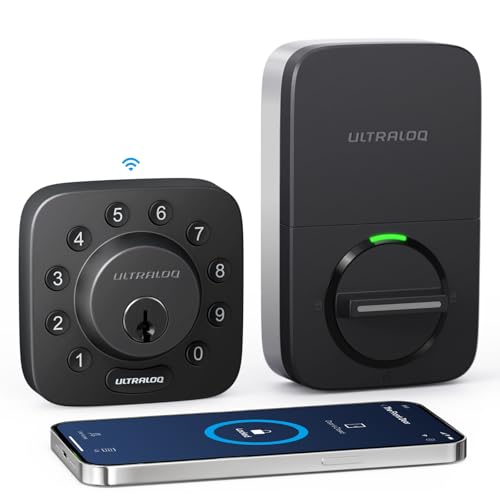
ULTRALOQ U-Bolt Wi-Fi Smart Deadbolt with Sensor
Best for: Direct Wi-Fi control and door status monitoring
- Access Methods
- Passcode, app, eKey, key, web portal
- Connectivity
- 2.4 GHz Wi-Fi, Bluetooth
- Smart Home Compatibility
- Amazon Alexa, Google Assistant
- User Code Capacity
- 50 passcodes
- Color
- Black
- Dimensions
- 2.95 × 0.99 × 2.95 inches
View on Amazon: ULTRALOQ U-Bolt Wi-Fi Smart Deadbolt with Sensor Affiliate link
This smart deadbolt combines built-in 2.4 GHz Wi-Fi with an included door sensor, giving you remote access without a separate bridge. It holds up to 50 custom passcodes, features ANSI/BHMA Grade 1 certification, and integrates with Alexa, Google Assistant, and SmartThings. Choose this model if you want direct Wi-Fi management and door open alerts without needing a Matter network.
Pros
- Built-in 2.4 GHz Wi-Fi requires no external bridge
- Includes dedicated door sensor for open-door alerts
- Certified ANSI/BHMA Grade 1 with IP65 weather rating
- Offers multiple access methods including passcodes, app, and physical keys
Cons
- Wi-Fi operates on 2.4 GHz only and requires router placement within 70 feet
- Passcode capacity tops out at 50 users
- Does not support Matter over Thread protocols
Good fit if
- You want remote access over direct Wi-Fi without buying an extra bridge.
- You need real-time door open alerts via an included sensor.
- You manage access for 50 or fewer family members, guests, or tenants.
Skip if
- You use a 5 GHz-only network or your router sits beyond 70 feet of the door.
- You want a smart lock built specifically for Matter over Thread setups.
- You require storage for more than 50 user codes.
Verdict: ULTRALOQ U-Bolt Wi-Fi Smart Deadbolt fits homes needing direct Wi-Fi control, ANSI Grade 1 deadbolt strength, and open-door monitoring without added hub hardware.
Specifications side by side
| Spec | ULTRALOQ Bolt Matter Smart Deadbolt | ULTRALOQ U-Bolt Wi-Fi Smart Deadbolt with Sensor |
|---|---|---|
| Access Methods | Fingerprint, keypad, app, key | Passcode, app, eKey, key, web portal |
| Connectivity | Built-in 2.4 GHz Wi-Fi, Thread | 2.4 GHz Wi-Fi, Bluetooth |
| Smart Home Compatibility | Apple Home, Alexa, Google, Matter | Amazon Alexa, Google Assistant |
| Fingerprint Capacity | 50 | not stated |
| User Code Capacity | 50 | 50 passcodes |
| Included Door Hardware | Deadbolt | not stated |
| Access Method | Fingerprint, Remote Control | not stated |
| Color | Black | Black |
| Application | Home, Front Door | not stated |
| Special Features | Auto Lock | not stated |
| Dimensions | 2.95 × 1 × 2.95 inches | 2.95 × 0.99 × 2.95 inches |
| Size | Deadbolt | Bluetooth + Built-in WiFi + Door Sensor |
| Model | ULTRALOQ BOLT SE | U-BOLT-WiFi |
Frequently asked questions
Does the ULTRALOQ Bolt Matter Smart Deadbolt support Matter?
Yes, it supports Matter connectivity alongside standard Wi-Fi. This allows you to integrate the lock with Apple Home and other Matter-compatible apps using a Thread Border Router. You also get Siri voice control. The U-Bolt Wi-Fi version does not list Matter support, relying instead on direct Wi-Fi and Bluetooth for app access.
Which ULTRALOQ lock includes a door sensor?
The ULTRALOQ U-Bolt Wi-Fi Smart Deadbolt includes a built-in door sensor. This feature monitors open-door status, letting you know if the door is left ajar. The Bolt Matter Smart Deadbolt data does not mention an integrated sensor, focusing instead on dual connectivity options for versatile smart home control.
Are the dimensions of the Bolt SE and U-Bolt similar?
Yes, the physical dimensions are nearly identical. Both locks measure approximately 2.95 inches in height and length. The width varies slightly, with the Bolt SE at 1 inch and the U-Bolt at 0.99 inches. Both models are available in black and share the same deadbolt size classification.
Can I control the ULTRALOQ U-Bolt without a hub?
Yes, the U-Bolt Wi-Fi model connects directly to your 2.4 GHz Wi-Fi network. You do not need an additional hub for remote access. It also supports Bluetooth for local control. The Bolt SE also offers direct Wi-Fi, but adds Matter connectivity for broader ecosystem compatibility.
Which lock is better for Apple Home users?
The Bolt Matter Smart Deadbolt is better for Apple Home users. It supports Matter over Thread, enabling seamless integration with Apple Home and Siri voice commands. The U-Bolt Wi-Fi lock lacks Matter support, so it does not offer the same direct integration path for Apple’s ecosystem without third-party workarounds.
Does the ULTRALOQ U-Bolt have Bluetooth connectivity?
Yes, the U-Bolt Wi-Fi Smart Deadbolt supports Bluetooth in addition to built-in Wi-Fi. This allows for local control when you are near the door. The Bolt Matter Smart Deadbolt data lists Wi-Fi and Matter connectivity but does not explicitly mention Bluetooth support in its specifications.
What colors are available for these ULTRALOQ locks?
Both the Bolt Matter Smart Deadbolt and the U-Bolt Wi-Fi Smart Deadbolt are available in black. The product data does not list other color options for either model. You will find the same finish across both the deadbolt size variants from ULTRALOQ.
Is the Bolt SE model compatible with Alexa and Google?
Yes, the Bolt Matter Smart Deadbolt works with Alexa and Google Assistant. It also supports Siri through Matter integration. The U-Bolt Wi-Fi lock data does not specify voice assistant compatibility, though it supports direct Wi-Fi control. You should verify assistant support for the U-Bolt through the manufacturer's app details.