Lockly Access Touch Retrofit Smart Alternatives: 6 Similar Picks Compared
As an Amazon Associate we earn from qualifying purchases. Links on this page are affiliate links.
The Lockly Access Touch Retrofit Smart Lock upgrades existing deadbolts with fingerprint and app control. If you are searching for lockly access touch alternatives, you might want a different size, feature set, or brand. This guide compares 6 similar options that share core specifications with the original model. We selected these picks because their technical data overlaps with what you need, whether that is direct Wi-Fi connectivity or a simpler keypad interface.
The original Lockly model fits left or right swing doors and stores up to 99 fingerprints. It includes a WiFi hub for remote management. However, you may prefer a lock that does not require a separate hub, or one with a different physical footprint. Some alternatives offer direct Wi-Fi connections or basic keyless entry without app complexity. Each product listed here meets specific criteria based on published specs. This allows you to compare dimensions, access methods, and connectivity types directly. You can choose the device that best matches your door frame and security requirements.
How alternatives compare to Lockly
Schlage Encode Smart WiFi Deadbolt
The Schlage Encode connects directly to Wi-Fi, removing the need for the separate hub included with the Lockly Access Touch. This simplifies your setup by eliminating an extra device. It measures 3 inches wide, which is narrower than the Lockly’s 5.2-inch width. You get robust durability and voice assistant integration. However, it lacks fingerprint scanning. You must rely on keypad codes or app control. Choose this if you want a slimmer profile and direct network connection without additional hardware.
TEEHO Keypad Keyless Entry Deadbolt
The TEEHO Keypad Deadbolt offers basic keyless entry without any smart connectivity or app control. It is significantly smaller at 2.95 inches wide and lighter at 1.76 pounds compared to the Lockly. You trade fingerprint storage and remote monitoring for simplicity and a lower price point. This lock uses only a keypad for access. It fits standard doors but does not support remote locking. Pick this option if you want reliable keyless entry without the complexity of Wi-Fi, hubs, or biometric sensors.
Philips 4200 Fingerprint Deadbolt with Handle
The Philips 4200 includes a full handle set, whereas the Lockly Access Touch is a retrofit deadbolt that fits your existing hardware. The Philips model connects directly to Wi-Fi without a hub. It supports keypad, fingerprint, and remote control access. Its dimensions are 0.73 inches wide, making it much thinner than the Lockly. It features auto-locking capabilities. Choose this if you need a complete hardware upgrade rather than a retrofit. It is ideal for homes with 2.4 GHz Wi-Fi where you want integrated handle and lock functionality.
Kwikset Powerbolt 250 Contemporary Keypad Deadbolt
The Kwikset Powerbolt 250 focuses on local keypad entry and code management without remote app connectivity. It measures 5 inches wide and 7 inches high, similar in footprint to the Lockly but lacking smart features. You get a contemporary style with auto-locking. This lock is best for users who prefer physical interaction over smartphone control. It does not support fingerprint scanning or Wi-Fi. Select this if you want straightforward code management and local security features without the need for an app or hub.
Yale Wi-Fi Smart Deadbolt with Keypad
The Yale Wi-Fi Smart Deadbolt provides direct Wi-Fi access, eliminating the need for the Secure Link hub required by the Lockly. It supports unlimited codes via keypad. The Yale unit is narrower at 2.5 inches wide and lighter at 1 pound. It lacks fingerprint scanning, relying solely on keypad and app control. This model is ideal for users who need flexible entry management without extra hardware. Choose this if you want direct network connectivity and unlimited code capacity in a compact, lightweight design.
Kwikset Single Cylinder Deadbolt Satin Nickel
The Kwikset Single Cylinder Deadbolt is a traditional lock with no smart features, app control, or fingerprint scanning. It is a simple, durable option for users who value basic security over connectivity. It lacks the Wi-Fi hub, keypad, or biometric sensors found in the Lockly. This lock is suitable for homes where physical key access is preferred. Pick this if you want a straightforward, no-frills deadbolt without the complexity of smart home integration or remote management capabilities.
Quick picks
Our 7 picks

Lockly Access Touch Retrofit Smart Lock
Best for: existing deadbolt upgrades with fingerprint access
- Access Methods
- Fingerprint, app
- Connectivity
- Wi-Fi (via hub)
- Installation Type
- Retrofit
- Fingerprint Capacity
- Up to 99
- Color
- Satin Nickel
- Dimensions
- 7.8 × 5.2 × 9 inches
View on Amazon: Lockly Access Touch Retrofit Smart Lock Affiliate link
The Lockly Access Touch transforms your existing deadbolt into a smart lock without replacing the hardware. It uses a 3D biometric fingerprint sensor to store up to 99 prints for quick entry. You control the lock remotely via the Lockly Home app and a Secure Link WiFi hub. It fits standard doors 1⅜ to 2 inches thick. This retrofit design suits those who want keyless entry without drilling new holes.
Pros
- Retrofit design fits most existing single-cylinder deadbolts
- 3D biometric fingerprint sensor stores up to 99 prints
- Remote control via Lockly Home app and WiFi hub
- No professional installation required for DIY setup
Cons
- Requires a separate WiFi hub for remote features
- No physical keypad for code entry
- Not compatible with storm doors or round latch holes
Good fit if
- You want to keep your current deadbolt hardware
- You prefer fingerprint access over traditional keys
- You need remote monitoring via an app
Skip if
- You need a built-in WiFi module without a hub
- You prefer a physical keypad for code entry
- You have a door thicker than 2 inches
Verdict: Lockly Access Touch Retrofit Smart Lock offers a practical retrofit solution for existing deadbolts. It fits homeowners who want fingerprint convenience and remote app control without replacing their entire lock mechanism.

Schlage Encode Smart WiFi Deadbolt
Best for: hub-free Wi-Fi security with high durability
- Access Methods
- Touchscreen keypad, app, key
- Connectivity
- Built-in Wi-Fi
- Smart Home Compatibility
- Alexa, Google Home, Ring, Airbnb
- User Code Capacity
- Up to 100 access codes
- Color
- Satin Nickel
- Dimensions
- 0.9 × 3 × 5 inches
View on Amazon: Schlage Encode Smart WiFi Deadbolt Affiliate link
The Schlage Encode is a built-in Wi-Fi deadbolt with Camelot trim. It connects directly to your home network without a hub. You can manage up to 100 access codes via the app or voice assistants like Alexa. The touchscreen is fingerprint-resistant and includes a customizable alarm. It fits standard doors and uses four AA batteries for up to six months of use.
Pros
- Built-in Wi-Fi for remote access without a hub
- Supports up to 100 user access codes
- Works with Alexa and Google Home for voice control
- BHMA certified highest residential security and durability ratings
Cons
- Requires four AA batteries, which may need replacement every six months
- Includes only one physical backup key
- No mention of Bluetooth or Zigbee connectivity
Good fit if
- You want direct Wi-Fi connectivity without extra hubs
- You need to manage many temporary access codes
- You prefer voice control via Alexa or Google Home
Skip if
- You need a lock that works without Wi-Fi
- You require a physical key for every user
- You prefer a battery-free hardwired power source
Verdict: Schlage Encode WiFi Deadbolt is ideal for users who want robust, hub-free Wi-Fi security with high durability ratings. It suits those who manage multiple codes and value voice assistant integration.

TEEHO Keypad Keyless Entry Deadbolt
Best for: Basic keyless entry without app control
- Access Methods
- Keypad, key
- Auto-Lock Delay
- 10-99 seconds
- User Code Capacity
- 20
- Included Door Hardware
- Deadbolt
- Power Source
- Battery Powered
- Water Resistance
- Waterproof
View on Amazon: TEEHO Keypad Keyless Entry Deadbolt Affiliate link
The TEEHO TE001 is a keyless entry deadbolt for front doors. It features a satin nickel finish and supports 20 user codes. The unit includes an auto-lock function with a 10 to 99 second delay. It runs on four AA batteries for up to 365 days. This lock is suitable for doors with a 2-1/8 inch hole. It offers a budget-friendly option for basic keyless access.
Pros
- Supports 20 user codes for family access
- Includes a one-time PIN for guests
- Auto-lock delay adjustable from 10 to 99 seconds
- Battery life lasts up to 365 days
Cons
- No app or remote control capability
- Requires manual reset to detect door direction
- Incompatible with 38mm door holes
Good fit if
- You need a simple keypad lock without Wi-Fi
- You want to issue temporary codes for guests
- Your door has a standard 2-1/8 inch hole
Skip if
- You require remote access via a smartphone app
- Your door has a 38mm bore hole
- You need voice assistant integration
Verdict: The TEEHO TE001 Satin Nickel Keypad Lock fits users who want basic keyless entry without smart features. It is a practical choice for standard doors where app control is unnecessary.

Philips 4200 Fingerprint Deadbolt with Handle
Best for: Complete hardware upgrades with fast fingerprint access
- Access Methods
- Fingerprint, passcode, app, voice
- Connectivity
- 2.4 GHz Wi-Fi
- Smart Home Compatibility
- Alexa, Google Assistant
- Auto-Lock Delay
- 0–180 seconds
- Included Door Hardware
- Handle set
- Color
- Satin Nickel
View on Amazon: Philips 4200 Fingerprint Deadbolt with Handle Affiliate link
The Philips DDL242X is a Satin Nickel deadbolt with a built-in handle set. It connects directly to 2.4 GHz Wi-Fi without a hub. You unlock the door via fingerprint, passcode, app, or voice commands. The fingerprint sensor takes 0.3 seconds. You can set auto-lock for 0 to 180 seconds. It works with Alexa and Google Assistant. This lock suits you if you want a complete hardware package with fast biometric access.
Pros
- Built-in 2.4 GHz Wi-Fi requires no hub
- Includes matching handle set for easy installation
- 0.3-second fingerprint recognition speed
- Supports Alexa and Google Assistant voice control
- Adjustable auto-lock delay from 0 to 180 seconds
Cons
- Requires 8 AA batteries, which are not included
- Only supports 2.4 GHz Wi-Fi networks
- No mention of Bluetooth connectivity for local access
Good fit if
- You want a complete lock and handle set in one package
- You prefer fingerprint unlocking for speed and convenience
- You need remote access via Wi-Fi without extra hardware
Skip if
- You only have 5 GHz Wi-Fi available
- You already own a compatible handle set and want just the lock
- You require battery-free power options
Verdict: The Philips DDL242X WiFi Smart Lock fits you if you need a fast fingerprint reader and a full handle set without a hub. It works well for homes with 2.4 GHz Wi-Fi.
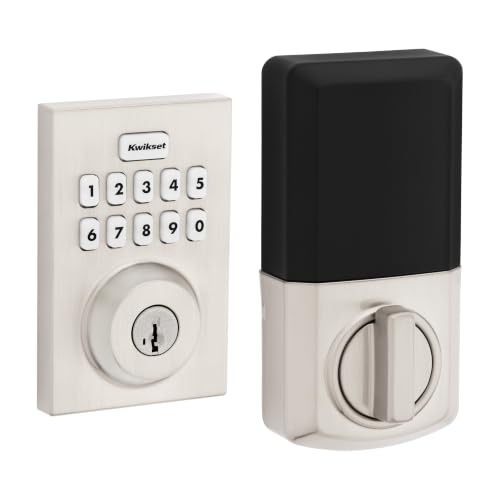
Kwikset Powerbolt 250 Contemporary Keypad Deadbolt
Best for: simple keypad entry and local code management
- Access Methods
- Keypad
- Auto-Lock Delay
- 30 sec, 1 min, 3 min, 5 min, 10 min
- User Code Capacity
- Up to 25
- Included Door Hardware
- Deadbolt
- Color
- Satin Nickel
- Style
- Contemporary
View on Amazon: Kwikset Powerbolt 250 Contemporary Keypad Deadbolt Affiliate link
This Kwikset deadbolt offers keyless entry via a 10-button keypad in a satin nickel contemporary finish. It supports up to 25 user codes and five one-time codes. The auto-lock function lets you choose delay intervals from 30 seconds to 10 minutes. An intrusion alert triggers after three incorrect entries. It includes a vacation mode to disable codes temporarily. Installation requires only a screwdriver.
Pros
- Supports up to 25 user codes plus five one-time codes
- Customizable auto-lock delays from 30 seconds to 10 minutes
- LED keypad illumination for low-light entry
- Intrusion alert disables keypad after three incorrect entries
Cons
- No built-in WiFi for remote app control
- No fingerprint sensor for biometric access
- Lacks integration with smart home voice assistants
Good fit if
- You want a simple keypad lock without app complexity
- You need to manage up to 25 distinct user codes
- You prefer a contemporary satin nickel finish
Skip if
- You require remote locking via a smartphone app
- You need biometric fingerprint recognition
- You want integration with a broader smart home ecosystem
Verdict: Kwikset Powerbolt 250 Contemporary Deadbolt fits users who prioritize straightforward code management and local security features over remote connectivity. It is ideal for homes where physical keypad entry is preferred.

Yale Wi-Fi Smart Deadbolt with Keypad
Best for: Direct Wi-Fi access with unlimited codes
- Access Methods
- Keypad, smartphone, key, auto-unlock
- Connectivity
- 2.4 or 5 GHz Wi-Fi
- User Code Capacity
- Unlimited
- Color
- Satin Nickel
- Dimensions
- 0.88 × 2.5 × 4.88 inches
- Weight
- 1 pounds
View on Amazon: Yale Wi-Fi Smart Deadbolt with Keypad Affiliate link
The Yale WiFi Smart Lock Deadbolt connects directly to 2.4 or 5 GHz Wi-Fi without a hub. It offers keypad, app, and Apple Watch entry methods. The lock supports unlimited user codes and includes DoorSense to confirm the door is closed. This Grade 2 certified deadbolt operates in extreme temperatures. It suits users who want direct Wi-Fi connectivity and flexible access control for their front door.
Pros
- Direct 2.4 or 5 GHz Wi-Fi connectivity without a hub
- Unlimited user code capacity for shared access
- DoorSense feature verifies the door is fully closed
- Compatible with Apple Watch for keyless entry
Cons
- Limited to 2.4 or 5 GHz Wi-Fi bands only
- Requires the Yale Access app which is US and Canada only
- Includes a backup key rather than being entirely keyless
Good fit if
- You want direct Wi-Fi connection without extra hardware
- You need to manage many temporary or permanent access codes
- You want automatic locking confirmation via DoorSense
Skip if
- You require Bluetooth or Zigbee connectivity instead of Wi-Fi
- You live outside the US or Canada
- You prefer a completely keyless design without a physical key backup
Verdict: Yale WiFi Smart Lock Deadbolt delivers direct Wi-Fi access and unlimited codes for users who need flexible entry management. It is ideal for those who want app control without a hub and live in supported regions.

Kwikset Single Cylinder Deadbolt Satin Nickel
Best for: Simple keyless entry without smart features
- Access Methods
- Keypad, Key
- Installation Type
- Deadbolt
- Included Door Hardware
- Deadbolt
- Color
- Satin Nickel
View on Amazon: Kwikset Single Cylinder Deadbolt Satin Nickel Affiliate link
This Kwikset deadbolt offers a single cylinder design with a touchscreen keypad for keyless entry. The satin nickel finish provides a modern look that suits contemporary decor. It uses durable nickel construction to withstand daily use. The special key lock feature adds an extra layer of security. It is a solid choice for homeowners seeking a reliable, standard entry lock without complex smart features.
Pros
- Touchscreen keypad for easy keyless operation
- Single cylinder deadbolt design for secure entry
- Durable nickel construction withstands daily use
- Special key lock feature for added security
- Satin nickel finish complements contemporary decor
Cons
- No built-in WiFi for remote app control
- No Bluetooth connectivity for proximity unlocking
- Lacks integration with smart home ecosystems
Good fit if
- You want a reliable keyless entry lock
- You prefer a standard deadbolt without smart features
- You like the satin nickel finish
Skip if
- You need remote access via smartphone app
- You require WiFi connectivity for automation
- You want to control the lock from away
Verdict: Kwikset Single Cylinder Deadbolt Satin Nickel is a straightforward, durable lock for users who value simplicity over smart connectivity. It fits those who want keyless entry without the need for app-based management.
Specifications side by side
| Spec | Lockly Access Touch Retrofit Smart Lock | Schlage Encode Smart WiFi Deadbolt | TEEHO Keypad Keyless Entry Deadbolt | Philips 4200 Fingerprint Deadbolt with Handle | Kwikset Powerbolt 250 Contemporary Keypad Deadbolt | Yale Wi-Fi Smart Deadbolt with Keypad | Kwikset Single Cylinder Deadbolt Satin Nickel |
|---|---|---|---|---|---|---|---|
| Access Methods | Fingerprint, app | Touchscreen keypad, app, key | Keypad, key | Fingerprint, passcode, app, voice | Keypad | Keypad, smartphone, key, auto-unlock | Keypad, Key |
| Connectivity | Wi-Fi (via hub) | Built-in Wi-Fi | not stated | 2.4 GHz Wi-Fi | not stated | 2.4 or 5 GHz Wi-Fi | not stated |
| Smart Home Compatibility | not stated | Alexa, Google Home, Ring, Airbnb | not stated | Alexa, Google Assistant | not stated | not stated | not stated |
| Installation Type | Retrofit | not stated | not stated | not stated | not stated | not stated | Deadbolt |
| Auto-Lock Delay | not stated | not stated | 10-99 seconds | 0–180 seconds | 30 sec, 1 min, 3 min, 5 min, 10 min | not stated | not stated |
| Fingerprint Capacity | Up to 99 | not stated | not stated | not stated | not stated | not stated | not stated |
| User Code Capacity | not stated | Up to 100 access codes | 20 | not stated | Up to 25 | Unlimited | not stated |
| Included Door Hardware | not stated | not stated | Deadbolt | Handle set | Deadbolt | not stated | Deadbolt |
| Power Source | not stated | not stated | Battery Powered | not stated | not stated | not stated | not stated |
| Access Method | Fingerprint | Keypad, Touchscreen, App Control | Keypad | Keypad, Fingerprint, Remote Control | Keypad | Keypad, Key, App Control | not stated |
| Water Resistance | not stated | not stated | Waterproof | not stated | not stated | not stated | not stated |
| Color | Satin Nickel | Satin Nickel | Satin Nickel | Satin Nickel | Satin Nickel | Satin Nickel | Satin Nickel |
| Application | not stated | Home | Front Door | Front Door | not stated | not stated | not stated |
| Included Hardware | not stated | not stated | not stated | Handle | not stated | not stated | not stated |
| Style | not stated | not stated | not stated | not stated | Contemporary | not stated | not stated |
| Trigger Type | not stated | not stated | not stated | not stated | Push Button | not stated | not stated |
| Special Features | not stated | not stated | not stated | Auto Lock | Auto Lock | not stated | not stated |
| Dimensions | 7.8 × 5.2 × 9 inches | 0.9 × 3 × 5 inches | 5.12 × 2.95 × 1.3 inches | 2.7 × 0.73 × 5.72 inches | 0.97 × 2.81 × 4.41 inches | 0.88 × 2.5 × 4.88 inches | not stated |
| Weight | not stated | 3.31 pounds | 1.76 pounds | not stated | not stated | 1 pounds | not stated |
| Model | PGD7AWSN | BE489WBCAM619 | TE001 | DDL242X-1HW | 992500-010 | YRD410-WF1-619 | not stated |
| Size | not stated | Encode | 5.125 x 3 x 4.25 inches | not stated | not stated | Wi-Fi | Round (Pack of 2) |
If you need external storage for local video files, you can review seagate one touch alternatives by their hardware specifications.
Frequently asked questions
Which lock is best for existing deadbolts with fingerprint access?
The Lockly Access Touch Retrofit Smart Lock is the top pick for this need. It fits homeowners who want fingerprint convenience and remote app control without replacing their entire lock mechanism. The unit measures 5.2 inches wide and 9 inches high, providing a substantial presence on your door.
What is the best hub-free Wi-Fi smart lock option?
The Schlage Encode Smart WiFi Deadbolt is ideal for users who want robust, hub-free Wi-Fi security. It suits those who manage multiple codes and value voice assistant integration. The lock connects directly to your network, eliminating the need for a separate hub or bridge device for operation.
Are there budget keyless entry deadbolts without app control?
Yes, the TEEHO Keypad Keyless Entry Deadbolt fits users who want basic keyless entry without smart features. It is a practical choice for standard doors where app control is unnecessary. The lock operates via a standard keypad, offering simple access without the complexity of Wi-Fi connectivity or remote management.
Which smart lock offers the fastest fingerprint reader?
The Philips 4200 Fingerprint Deadbolt with Handle is the best choice for fast fingerprint access. It fits you if you need a fast fingerprint reader and a full handle set without a hub. It works well for homes with 2.4 GHz Wi-Fi and includes auto-locking special features.
Is there a contemporary deadbolt with simple code management?
The Kwikset Powerbolt 250 Contemporary Keypad Deadbolt fits users who prioritize straightforward code management. It is ideal for homes where physical keypad entry is preferred over remote connectivity. The lock features a push button trigger type and auto-lock functionality, providing local security without requiring an app for basic operation.
Which lock allows unlimited access codes via Wi-Fi?
The Yale Wi-Fi Smart Deadbolt with Keypad delivers direct Wi-Fi access and unlimited codes. It is ideal for those who want app control without a hub. The lock is designed for flexible entry management, allowing you to generate and revoke codes remotely through the companion application without additional hardware.
What is a simple keyless entry lock without smart features?
The Kwikset Single Cylinder Deadbolt Satin Nickel is a straightforward, durable lock for users who value simplicity. It fits those who want keyless entry without the need for app-based management. This option provides reliable mechanical security for your home without the added complexity or connectivity requirements of smart devices.