Looking Beyond the LINGDU Smart Lock Apple Home? 6 Alternatives Worth a Look
As an Amazon Associate we earn from qualifying purchases. Links on this page are affiliate links.
The LINGDU HK01 Apple Home Key Deadbolt handles tap-to-unlock entry without needing a dedicated app. Its local processing and Apple HomeKit compatibility make it a strong choice for that specific ecosystem. However, you might seek lingdu smart lock apple home alternatives if you need Matter support, Wi-Fi connectivity, or a different hardware style. Some users prefer a full handle set over a standalone deadbolt. Others want broader smart home integration beyond just Apple devices. The alternatives in this list were chosen because their specs overlap with the original in key areas like access methods and auto-lock features. Each option offers a distinct approach to keyless entry. You can compare dimensions, connectivity types, and power sources to find the best fit for your door. This guide focuses strictly on published specifications to help you decide. We look at what each lock does well and where it differs from the LINGDU model. Your choice depends on your existing smart home setup and physical door requirements.
Comparing LINGDU Alternatives
ULTRALOQ Bolt Smart Deadbolt with Handle
The ULTRALOQ Bolt SE uses Matter and Wi-Fi, offering broader compatibility than the LINGDU’s Apple-only ecosystem. It includes a handle, making it a full entry solution rather than just a deadbolt. You get remote access via any Matter hub, whereas the LINGDU relies on local Apple processing. This model suits users who want cross-platform support and integrated hardware. The LINGDU remains better for those strictly within the Apple Home app who prefer tap-to-unlock convenience without managing a separate Wi-Fi network or Matter gateway.
Philips Fingerprint Wi-Fi Deadbolt with Handle
The Philips Fingerprint Wi-Fi Deadbolt provides a complete handle and lock set, unlike the LINGDU’s deadbolt-only design. It connects directly via Wi-Fi, allowing remote control without needing an Apple hub or local processing. This model fits homes that need a waterproof, full-assembly entry system with guest code management. You sacrifice Apple Home Key tap-to-unlock for universal Wi-Fi reach and included hardware. Choose this if you prioritize a complete, weather-resistant package over the seamless, app-free Apple integration found in the LINGDU.
Sifely S Model WiFi Smart Lock
The Sifely S Model WiFi offers direct Wi-Fi connectivity and key card access, features absent in the LINGDU. It supports Alexa and Google Assistant, providing wider smart home compatibility than the Apple-exclusive LINGDU. This lock includes a handle, making it a complete entry solution for renters or hosts. You gain flexible code management and remote access without needing a dedicated hub. The trade-off is the loss of Apple Home Key tap-to-unlock. Pick this if you need key card entry or broader assistant support rather than localized Apple control.
ULTRALOQ Latch 5 Touchscreen Smart Lever Lock
The ULTRALOQ Latch 5 is a touchscreen lever lock with built-in Wi-Fi, differing from the LINGDU’s deadbolt and keypad design. It includes a handle, making it suitable for renters who cannot install a new deadbolt. This model offers direct Wi-Fi control without a hub, unlike the LINGDU’s hub-dependent Apple Home integration. You get a modern lever style and touchscreen access instead of Apple Key tap-to-unlock. Choose this if you need a lever-style lock for a rental property or prefer touchscreen entry over the LINGDU’s fingerprint and Apple Key options.
Sifely S WiFi Gold Smart Lock
The Sifely S WiFi Gold connects directly via Wi-Fi and supports Alexa, offering wider compatibility than the LINGDU’s Apple-only setup. It includes a handle, providing a complete entry solution rather than just a deadbolt. This model features fast biometric entry and remote access without needing an Apple hub. You gain direct Wi-Fi control and Alexa integration, sacrificing the LINGDU’s tap-to-unlock convenience and local processing. Pick this if you are an Alexa user who needs direct Wi-Fi connectivity and a full handle set rather than Apple ecosystem integration.
LOCKSTAR Smart Deadbolt with App Control
The LOCKSTAR Smart Deadbolt offers a traditional aesthetic with app control, differing from the LINGDU’s modern Apple-focused design. It supports key card access and includes a hub for Wi-Fi connectivity, unlike the LINGDU’s local Apple processing. This model fits users who want a complete package with traditional styling and app-based remote management. You gain key card entry and broader app compatibility, losing the LINGDU’s Apple Home Key tap-to-unlock feature. Choose this if you prefer a traditional look with key card options over the LINGDU’s sleek, Apple-centric, tap-to-unlock experience.
Quick picks
Our 7 picks

LINGDU HK01 Apple Home Key Deadbolt
Best for: Apple HomeKit users seeking tap-to-unlock
- Access Methods
- Apple HomeKey, fingerprint, app, code
- Connectivity
- Bluetooth
- Smart Home Compatibility
- Apple HomeKit
- Application
- Front Door
- Special Features
- Auto Lock
- Dimensions
- 5 × 3 × 1 inches
View on Amazon: LINGDU HK01 Apple Home Key Deadbolt Affiliate link
The LINGDU HK01 is a keyless entry deadbolt designed for Apple HomeKit ecosystems. It uses Apple Home Key for tap-to-unlock access via iPhone or Apple Watch. The lock supports fingerprint, keypad, and NFC entry, plus physical keys as backup. It runs on eight AA batteries for up to 200 days and includes a USB-C emergency port. This model fits standard US doors and installs in about 10 minutes.
Pros
- Apple Home Key tap-to-unlock via iPhone or Apple Watch
- Local processing via HomeKit protocol without dedicated Wi-Fi
- Fingerprint, keypad, NFC, and physical key entry options
- Up to 200 days battery life with USB-C emergency port
Cons
- Requires Apple HomeKit hub (HomePod, Apple TV, or iPad) for remote access
- No Wi-Fi connectivity for direct internet control
- Batteries not included
Good fit if
- You use Apple devices and want seamless HomeKit integration
- You prefer local processing for enhanced privacy and speed
- You need multiple entry methods including fingerprint and keypad
Skip if
- You do not have an Apple HomeKit hub
- You need Wi-Fi remote access without a hub
- You use Android or Windows as your primary smart home platform
Verdict: LINGDU HK01 Apple Home Key Deadbolt is ideal for Apple users seeking a secure, app-free entry solution. It suits those who value local processing and tap-to-unlock convenience over universal Wi-Fi compatibility.

ULTRALOQ Bolt Smart Deadbolt with Handle
Best for: Matter ecosystem users needing handle and deadbolt
- Access Methods
- Fingerprint, keypad, app, keys, voice
- Smart Home Compatibility
- Apple Home, Alexa, Google Assistant
- Fingerprint Capacity
- 50
- User Code Capacity
- 50
- Included Door Hardware
- Deadbolt with handle
- Connectivity
- Wi-Fi, Matter
View on Amazon: ULTRALOQ Bolt Smart Deadbolt with Handle Affiliate link
The ULTRALOQ Bolt SE combines a deadbolt and handle with built-in Wi-Fi and Matter over Thread support. It stores up to 50 fingerprints and 50 passcodes, allowing remote control via app or voice assistants like Siri and Alexa. The Matter integration requires a compatible Thread border router or hub. Battery life extends up to 18 months due to low-energy mesh networking. It includes auto-lock and lockout modes for added security.
Pros
- Built-in Wi-Fi and Matter over Thread connectivity
- Stores up to 50 fingerprints and 50 passcodes
- Includes both deadbolt and handle hardware
- 18-month battery life with Thread support
- Works with Siri, Alexa, and Google Assistant
Cons
- Requires a separate Matter over Thread hub or border router
- Door sensor is not included in the package
- Wi-Fi connectivity limited to 2.4 GHz networks only
Good fit if
- You want Matter integration for smart home automation
- You need both a handle and deadbolt in one unit
- You prefer long battery life with Thread technology
Skip if
- You do not have a compatible Matter Thread hub
- You need a door sensor included with the lock
- You require 5 GHz Wi-Fi connectivity
Verdict: The ULTRALOQ Bolt SE Deadbolt with Handle offers robust Matter and Wi-Fi control for users with compatible hubs. It suits those seeking a combined handle and deadbolt solution with extended battery efficiency.

Philips Fingerprint Wi-Fi Deadbolt with Handle
Best for: homes needing a full lock and handle set
- Access Methods
- Fingerprint, app, passcode, backup keys
- Connectivity
- Built-in 2.4GHz Wi-Fi
- Smart Home Compatibility
- Alexa, Google Assistant
- Auto-Lock Delay
- 10 to 180 seconds
- User Code Capacity
- Up to 100
- Included Door Hardware
- Lock and handle set
View on Amazon: Philips Fingerprint Wi-Fi Deadbolt with Handle Affiliate link
The Philips smart lock set includes a deadbolt and handle with built-in 2.4GHz Wi-Fi. It unlocks in 0.3 seconds via fingerprint or passcode. You can manage 100 unique codes remotely. It works with Alexa and Google Assistant. This matte black lock suits families needing quick access and guest management without extra hubs.
Pros
- Built-in 2.4GHz Wi-Fi for direct app control
- 0.3-second fingerprint recognition speed
- Supports 100 unique user passcodes
- Includes matching deadbolt and handle hardware
- Compatible with Alexa and Google Assistant
Cons
- Requires four AA batteries, which are not included
- Limited to 2.4GHz Wi-Fi networks only
- No Apple Home Key support
Good fit if
- You want a complete lock and handle set
- You need fast fingerprint entry for busy mornings
- You require remote code management for guests
Skip if
- You require Apple Home Key compatibility
- You prefer a lever-style lock handle
- You need 5GHz Wi-Fi support
Verdict: The Philips Wi-Fi Smart Door Lock Set offers reliable keyless entry with a complete hardware package. It fits households that value speed and guest code management over Apple ecosystem integration.

Sifely S Model WiFi Smart Lock
Best for: renters needing remote access
- Access Methods
- Fingerprint, PIN, app, fob, key, voice
- Connectivity
- Built-in Wi-Fi
- Smart Home Compatibility
- Amazon Alexa, Google Assistant
- Fingerprint Capacity
- 100
- User Code Capacity
- 200
- Included Door Hardware
- Reversible lever handle
View on Amazon: Sifely S Model WiFi Smart Lock Affiliate link
The Sifely S Model WiFi is a silver smart lock with built-in Wi-Fi and a handle. It supports six entry methods: fingerprint, keypad, card, app, key, and voice commands. You can store 100 fingerprints and 200 codes. It works with Alexa and Google Assistant. The lock fits standard US doors. It offers remote access without a gateway. Battery life lasts up to six months.
Pros
- Built-in Wi-Fi for remote app control
- Six keyless entry methods including fingerprint
- Stores 100 fingerprints and 200 codes
- Compatible with Alexa and Google Assistant
- Type-C emergency power port
Cons
- No Apple Home Key support
- No Matter protocol compatibility
- Uses physical keys as backup
Good fit if
- You need remote access without a gateway
- You want fingerprint and keypad entry
- You use Alexa or Google Assistant
Skip if
- You require Apple Home Key integration
- You want Matter protocol support
- You prefer lever handle designs
Verdict: Sifely S Model WiFi Silver Lock offers robust keyless entry and remote access for Android and iOS users. It suits renters and hosts who need flexible code management but do not need Apple Home integration.
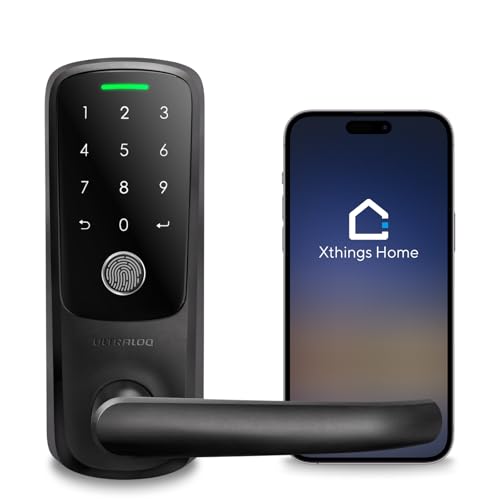
ULTRALOQ Latch 5 Touchscreen Smart Lever Lock
Best for: renters needing lever-style keyless entry
- Access Methods
- App, fingerprint, code, mechanical key
- Connectivity
- Built-in 2.4 GHz Wi-Fi
- Included Door Hardware
- Lever handle
- Color
- Black
- Application
- Front Door, Office, Rental Property
- Special Features
- Auto Lock
View on Amazon: ULTRALOQ Latch 5 Touchscreen Smart Lever Lock Affiliate link
The ULTRALOQ Latch 5 is a smart lever lock with built-in 2.4 GHz Wi-Fi. It features a touchscreen keypad, fingerprint sensor, and app control. The zinc alloy body is weatherproof and includes auto-lock. You can manage access remotely without a gateway. This model suits renters and homeowners needing keyless entry for standard doors.
Pros
- Built-in 2.4 GHz Wi-Fi connectivity
- Touchscreen digital keypad for code entry
- Fingerprint sensor for quick access
- Zinc alloy construction for durability
- Auto-lock functionality
Cons
- Only supports 2.4 GHz Wi-Fi networks
- Requires mechanical key backup
- Limited to lever door handles
Good fit if
- You need a lever-style smart lock
- You want built-in Wi-Fi without a hub
- You prefer touchscreen code entry
Skip if
- You have a standard deadbolt door
- You require 5 GHz Wi-Fi support
- You need Apple Home Key compatibility
Verdict: The ULTRALOQ Latch 5 Smart Lever Lock is ideal for renters who need a lever-style lock with built-in Wi-Fi and touchscreen access. It fits users who prioritize keyless entry without a separate gateway.

Sifely S WiFi Gold Smart Lock
Best for: Alexa users wanting direct Wi-Fi fingerprint entry
- Access Methods
- App, Fingerprint, Passcode, FOB, Key
- Connectivity
- Built-in Wi-Fi
- Smart Home Compatibility
- Alexa, Google Assistant
- Installation Type
- Full deadbolt replacement
- Included Door Hardware
- Deadbolt only
- Application
- Home, Front Door, Rental Property
View on Amazon: Sifely S WiFi Gold Smart Lock Affiliate link
The Sifely S WiFi smart lock integrates directly into your home network without a separate gateway. It uses a fingerprint sensor that unlocks in 0.3 seconds and supports passcodes, app control, and mechanical keys. The unit weighs 3.63 pounds and measures 7 inches in length. It works with Alexa for voice commands. This model suits renters and homeowners who want remote access logs and auto-locking features for their front door.
Pros
- Built-in Wi-Fi eliminates the need for a separate gateway
- Fingerprint recognition takes just 0.3 seconds
- Compatible with Amazon Alexa and Google Assistant
- Includes a handle and deadbolt for complete entry coverage
Cons
- Does not support Apple Home Key
- No Bluetooth connectivity listed for local pairing
- Only supports Alexa, excluding native HomeKit integration
Good fit if
- You need remote access without buying extra hardware
- You prefer fingerprint entry for speed
- You use Alexa for smart home control
Skip if
- You require Apple Home Key compatibility
- You want a lever-style lock handle
- You need Google Home Key support
Verdict: Sifely S WiFi Smart Lock is a solid option for Alexa users who want direct Wi-Fi connectivity and fast biometric entry. It fits well for rentals or homes where Apple Home integration is not a priority.

LOCKSTAR Smart Deadbolt with App Control
Best for: Renters needing a complete smart lock package
- Installation Type
- Deadbolt
- Connectivity
- Wi-Fi
- Access Method
- Fingerprint
- Color
- Black
- Material
- Wood
- Dimensions
- 1.18 × 2.64 × 6.46 inches
View on Amazon: LOCKSTAR Smart Deadbolt with App Control Affiliate link
The LOCKSTAR LS-SDL is a traditional-style deadbolt offering multiple entry methods. It supports keypad codes, fingerprint scans, key cards, and physical keys. The system includes a secure app for real-time notifications and event history. A key advantage is the inclusion of a Wi-Fi gateway, allowing remote control without extra purchases. It weighs 1 pound and fits standard doors with basic tools.
Pros
- Includes Wi-Fi gateway for remote app control
- Supports fingerprint, keypad, card, and key entry
- Auto-locks when door closes or via manual tap
- Real-time notifications for all access events
Cons
- No mention of Apple Home or Matter compatibility
- Requires separate Wi-Fi bridge for smart features
- No visible battery level indicator in specs
Good fit if
- You want a traditional deadbolt with smart app control
- You need multiple entry methods like keys and cards
- You prefer a package with the Wi-Fi bridge included
Skip if
- You require native Apple Home Key support
- You want a lock with built-in Wi-Fi
- You prefer a lever handle over a deadbolt
Verdict: LOCKSTAR LS-SDL Traditional Smart Lock fits renters or homeowners who value traditional aesthetics with added app convenience. It suits those who want a complete package with the necessary Wi-Fi hardware included for remote management.
Specifications side by side
| Spec | LINGDU HK01 Apple Home Key Deadbolt | ULTRALOQ Bolt Smart Deadbolt with Handle | Philips Fingerprint Wi-Fi Deadbolt with Handle | Sifely S Model WiFi Smart Lock | ULTRALOQ Latch 5 Touchscreen Smart Lever Lock | Sifely S WiFi Gold Smart Lock | LOCKSTAR Smart Deadbolt with App Control |
|---|---|---|---|---|---|---|---|
| Access Methods | Apple HomeKey, fingerprint, app, code | Fingerprint, keypad, app, keys, voice | Fingerprint, app, passcode, backup keys | Fingerprint, PIN, app, fob, key, voice | App, fingerprint, code, mechanical key | App, Fingerprint, Passcode, FOB, Key | not stated |
| Connectivity | Bluetooth | not stated | Built-in 2.4GHz Wi-Fi | Built-in Wi-Fi | Built-in 2.4 GHz Wi-Fi | Built-in Wi-Fi | not stated |
| Smart Home Compatibility | Apple HomeKit | Apple Home, Alexa, Google Assistant | Alexa, Google Assistant | Amazon Alexa, Google Assistant | not stated | Alexa, Google Assistant | not stated |
| Installation Type | not stated | not stated | not stated | not stated | not stated | Full deadbolt replacement | Deadbolt |
| Auto-Lock Delay | not stated | not stated | 10 to 180 seconds | not stated | not stated | not stated | not stated |
| Fingerprint Capacity | not stated | 50 | not stated | 100 | not stated | not stated | not stated |
| User Code Capacity | not stated | 50 | Up to 100 | 200 | not stated | not stated | not stated |
| Included Door Hardware | not stated | Deadbolt with handle | Lock and handle set | Reversible lever handle | Lever handle | Deadbolt only | not stated |
| Access Method | Fingerprint | not stated | Keypad, Fingerprint, Remote Control | Keypad, Fingerprint, Key, App Control | Keypad, Fingerprint, Touchscreen, Remote Control | Keypad, Fingerprint, Remote Control | Fingerprint |
| Water Resistance | not stated | not stated | Waterproof | not stated | not stated | not stated | not stated |
| Color | Obsidian | Black | Matte Black | Silver | Black | Gold | Black |
| Application | Front Door | Home, Front Door | Front Door | Home, Front Door, Bedroom, Rental Property | Front Door, Office, Rental Property | Home, Front Door, Rental Property | not stated |
| Included Hardware | not stated | Handle | Handle | Handle | Handle | Handle | not stated |
| Material | not stated | not stated | not stated | not stated | not stated | not stated | Wood |
| Special Features | Auto Lock | Auto Lock | Auto Lock | Auto Lock | Auto Lock | Auto Lock | not stated |
| Dimensions | 5 × 3 × 1 inches | 2.95 × 1 × 2.95 inches | 2.7 × 0.73 × 5.72 inches | 7 × 3 × 1.12 inches | 3.5 × 6.5 × 7 inches | 7 × 3 × 1.12 inches | 1.18 × 2.64 × 6.46 inches |
| Weight | 3 pounds | 2.87 pounds | not stated | 2 pounds | not stated | 3.63 pounds | 1 pounds |
| Model | HK01 | BOLT SE | DDL242X-1HW-H-NEW | Sifely S WiFi | Latch 5 | Sifely S WiFi | LS-SDL |
| Size | not stated | Deadbolt+Handle | not stated | Deadbolt, Knob, Handle, Keypad | Fingerprint | not stated | not stated |
Frequently asked questions
Which smart lock works best with Apple Home if I want tap-to-unlock?
The LINGDU HK01 is the top choice for Apple Home users seeking tap-to-unlock convenience. It features local processing and does not require a dedicated app. You can access it via keypad, fingerprint, or physical key. Its compact design fits standard front doors, making it ideal for those prioritizing ecosystem integration over universal Wi-Fi compatibility.
What is the best smart lock for Matter ecosystem users?
The ULTRALOQ Bolt SE is the best option for Matter users. It combines Wi-Fi and Matter connectivity for broad hub compatibility. This model includes both a handle and a deadbolt, offering a complete entry solution. You get remote access and auto-lock features, making it suitable for households needing robust, cross-platform smart home integration.
Is there a smart lock with a handle for premium home setups?
The Philips Fingerprint Wi-Fi Deadbolt with Handle is designed for premium homes needing a full set. It offers waterproof construction and reliable keyless entry via keypad or fingerprint. The matte black finish suits modern aesthetics. You benefit from remote control access and auto-lock functionality without needing Apple Home integration, focusing on speed and guest code management.
Which smart lock is best for renters needing remote access?
The Sifely S Model WiFi is ideal for renters requiring remote access. It supports Android and iOS users with robust keyless entry options. You can use keypad, fingerprint, key, or key card methods. The silver finish and included handle make it a practical choice. It offers flexible code management without relying on Apple Home integration.
Do any smart locks feature a touchscreen for lever-style doors?
The ULTRALOQ Latch 5 is the best touchscreen option for lever-style doors. It includes built-in Wi-Fi, eliminating the need for a separate gateway. You can access it via keypad, fingerprint, touchscreen, or remote control. This black lever lock is suitable for homes, offices, or rental properties, prioritizing keyless entry convenience for renters and homeowners alike.
What is the best budget smart lock for Alexa users?
The Sifely S WiFi Gold is a solid budget choice for Alexa users. It provides direct Wi-Fi connectivity for fast biometric entry. You can use the keypad or fingerprint scanner for access. The gold finish and included handle suit front doors or rental properties. It offers reliable performance without requiring Apple Home integration, focusing on direct smart assistant compatibility.
Which smart lock offers a traditional look with app control?
The LOCKSTAR Smart Deadbolt with App Control offers a traditional aesthetic with modern convenience. It includes a Wi-Fi hub for remote management. You can access the lock via keypad, fingerprint, key, or key card. The black finish suits standard home entrances. This package is designed for renters or homeowners who value traditional styles while needing app-based control.