Kwikset vs GHome Smart: Door Knobs Compared by Specs
As an Amazon Associate we earn from qualifying purchases. Links on this page are affiliate links.
When comparing a kwikset vs GHome Smart door knob, you are looking at two very different approaches to interior security. Both fit standard doors and use a knob design. The main difference is functionality. Kwikset offers a mechanical privacy lock for simple needs. GHome Smart provides a smart lock with multiple access methods and app control. You need to decide if you want basic privacy or advanced digital management.
Key differences
| Aspect | Kwikset Tylo Privacy Knob Satin Chrome | GHome Smart Rechargeable Keypad Door Knob |
|---|---|---|
| Access Methods | Push button lock, release tool | Fingerprint, password, app, mechanical key |
| Power Source | Not listed | 400mAh rechargeable battery |
| Smart Features | Not listed | Auto lock, app control, access logs |
| Certification | Grade 3 BHMA | Not listed |
| Warranty | Lifetime mechanical and finish | 1-year product warranty |
Which one should you choose?
Choose Kwikset Tylo Privacy Knob Satin Chrome if
- You need a simple, reliable privacy lock for a bedroom or bathroom.
- You prefer a mechanical solution with no batteries or apps to manage.
- You want a product with a lifetime mechanical warranty and BHMA certification.
Choose GHome Smart Rechargeable Keypad Door Knob if
- You want to unlock the door using fingerprints, passwords, or a smartphone app.
- You need auto-locking features and access logs for better security monitoring.
- You are comfortable charging a rechargeable battery every few months.
Verdict: Choose the Kwikset Tylo if you just need a dependable privacy knob with no tech complications. Pick the GHome Smart lock if you want the convenience of keyless entry and remote app management. Your choice depends on whether you value mechanical simplicity or digital control.
Kwikset vs GHome Smart Specs
Access methods
GHome Smart provides four distinct ways to enter: fingerprint, password, app control, and mechanical keys. It stores 20 fingerprints and 20 passwords locally. Kwikset relies on a push-button lock from the inside and a release tool from the outside. It has no digital codes or app integration. If you need multiple entry options for family or guests, GHome Smart is the clear choice. Kwikset is simpler, using only mechanical parts for privacy.
Smart connectivity
GHome Smart connects via Bluetooth to a mobile app. You can manage access codes, view logs, and switch modes like silent or passage remotely. It requires no extra gateway. Kwikset has no app, no Wi-Fi, and no Bluetooth. It is a purely mechanical device. You cannot monitor who enters or lock it from your phone. For remote management and digital logs, GHome Smart offers significant modern convenience over the analog Kwikset.
Power source
GHome Smart uses a 400mAh rechargeable battery. It charges in four to six hours and lasts for 10,000 unlocks or over 300 days. Kwikset requires no batteries at all. It is entirely mechanical. You do not need to worry about charging cables or battery depletion. If you prefer zero maintenance and no power source, Kwikset is superior. If you want smart features that require power, GHome Smart handles it with a rechargeable unit.
Security certification
Kwikset is BHMA Grade 3 certified for security, durability, and finish. This is a recognized industry standard for residential hardware. GHome Smart does not list a BHMA grade in its specifications. It emphasizes local data storage and AI recognition accuracy. For verified mechanical durability and standardized security ratings, Kwikset has the edge. GHome Smart focuses on digital access control rather than traditional hardware grading.
Warranty coverage
Kwikset includes a lifetime mechanical and finish warranty. This covers the hardware indefinitely under normal use. GHome Smart offers a one-year product warranty and lifetime after-sales support. It also has a 30-day money-back guarantee. For long-term hardware protection, Kwikset’s lifetime coverage is stronger. GHome Smart’s warranty is shorter for the device itself, reflecting the electronic components involved.
Which Door Knob Fits Your Needs
You want simple, durable privacy
The Kwikset Tylo is a Grade 3 BHMA certified mechanical lock. It uses a push-button for interior privacy and a release tool for emergencies. This model fits doors from 1-3/8 inches to 1-3/4 inches thick. It includes all hardware for DIY installation. You get a lifetime mechanical warranty, making it a reliable choice for bedrooms or bathrooms.
You need smart app control
GHome Smart offers app control via Bluetooth without a gateway. You can manage 20 fingerprints and 20 passwords remotely. The unit auto-locks in 5 seconds and features silent mode. It includes a 400mAh rechargeable battery lasting 300 days. This smart knob fits doors up to 2-1/4 inches thick and provides detailed access logs.
You prefer keyless fingerprint entry
This GHome Smart knob unlocks in 0.2 seconds with 99.9% accuracy. It stores 20 fingerprints locally with no cloud storage. You also have a keypad for 20 passwords and mechanical keys for backup. The self-learning AI adapts to your usage over time. It is ideal for apartments or offices where quick, secure access is priority.
You want a basic interior lock
The Kwikset Tylo provides straightforward privacy locking for standard doors. It adjusts to 2-3/8 or 2-3/4 inch backsets. The satin chrome finish is durable and backed by a lifetime warranty. It weighs 13.3 ounces and installs in minutes with a screwdriver. This is a no-frills option for rooms where you need simple, reliable privacy control.
The products compared
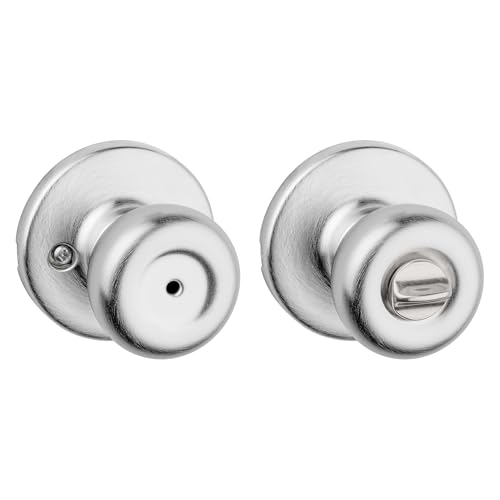
Kwikset Tylo Privacy Knob Satin Chrome
Best for: bedroom and bathroom privacy
- Access Methods
- Physical key
- Application
- Bedroom
- Included Hardware
- Handle
- Trigger Type
- Push Button
- Dimensions
- 7.39 × 3.59 × 2.89 inches
- Weight
- 13.3 ounces
View on Amazon: Kwikset Tylo Privacy Knob Satin Chrome Affiliate link
This Kwikset Tylo interior door knob is a satin chrome privacy lock for bedrooms and bathrooms. It features a push-button lock and includes a release tool for outside access. The latch backset adjusts to 2-3/8 inches or 2-3/4 inches to fit standard doors. It holds a Grade 3 BHMA certification for security and durability. Installation requires only a screwdriver and takes minutes.
Pros
- Push-button interior locking mechanism
- Adjustable latch backset for standard doors
- Grade 3 BHMA certified quality
- Lifetime mechanical and finish warranty
Cons
- No smart connectivity or app control
- Requires physical key or tool for outside access
- Limited to interior privacy use only
Good fit if
- You need a reliable interior lock for a bedroom
- You want a simple push-button privacy lock
- You prefer a traditional mechanical design
Skip if
- You require remote access or smart features
- You need a keyed entry for exterior doors
- You want a higher Grade 1 or 2 certification
Verdict: Kwikset Tylo Privacy Door Knob is a straightforward privacy lock for interior rooms. It suits homeowners who want a secure, easy-to-install door handle without electronic complexity.

GHome Smart Rechargeable Keypad Door Knob
Best for: privacy-focused renters needing app and fingerprint access
- Access Methods
- Fingerprint, password, app, key
- Recognition Speed
- 0.2s
- Fingerprint Capacity
- 20
- Passcode Capacity
- 20
- Application
- Home, Garage, Office, Apartment, Bedroom
- Included Hardware
- Knob
View on Amazon: GHome Smart Rechargeable Keypad Door Knob Affiliate link
The GHome Smart K10PRO is a four-in-one smart door knob offering fingerprint, keypad, app, and mechanical key access. It stores 20 fingerprints and 20 passwords locally without cloud dependency. The unit features a 400mAh rechargeable battery, auto-locking in five seconds, and a 0.2-second recognition speed. It fits doors from 1-3/8 to 2-1/4 inches thick. This model suits renters and homeowners seeking local data privacy and app control.
Pros
- Local storage for 20 fingerprints and 20 passwords ensures data privacy
- Fast 0.2-second biometric recognition with 99.9% accuracy
- Auto-locks in 5 seconds after entry for added security
- Rechargeable 400mAh battery provides 300+ days of use
- App control allows remote management within Bluetooth range
Cons
- Only stores 20 fingerprints, which is lower than typical competitors
- Requires a screwdriver for installation, limiting DIY ease
- App control is limited to Bluetooth range, not true remote access
Good fit if
- You prioritize local data privacy over cloud connectivity
- You need a lock with multiple access methods including app control
- You want a rechargeable battery to avoid frequent changes
Skip if
- You require remote access from outside your home network
- You need to store more than 20 user fingerprints
- You prefer a traditional key-only mechanism without electronics
Verdict: GHome Smart K10PRO Fingerprint Door Knob is a secure option for users who value local data storage and app convenience. It fits those who need reliable, fast access without cloud reliance.
Specifications side by side
| Spec | Kwikset Tylo Privacy Knob Satin Chrome | GHome Smart Rechargeable Keypad Door Knob |
|---|---|---|
| Access Methods | Physical key | Fingerprint, password, app, key |
| Recognition Speed | not stated | 0.2s |
| Fingerprint Capacity | not stated | 20 |
| Passcode Capacity | not stated | 20 |
| Access Method | not stated | Keypad, Fingerprint, App Control |
| Application | Bedroom | Home, Garage, Office, Apartment, Bedroom |
| Included Hardware | Handle | Knob |
| Trigger Type | Push Button | not stated |
| Special Features | not stated | Auto Lock |
| Dimensions | 7.39 × 3.59 × 2.89 inches | 3.93 × 9.05 × 9.05 inches |
| Weight | 13.3 ounces | 1.68 pounds |
| Size | 1 Pack | not stated |
| Color | Satin Chrome | Glossy Black |
| Model | 93001-927 | K10PRO Smart Door Knob |
Frequently asked questions
Can GHome Smart work without Wi-Fi?
Yes. The GHome Smart K10PRO stores 20 fingerprints and 20 passwords locally. You do not need cloud reliance for basic entry. The app provides convenience, but the keypad and fingerprint sensor function independently. This setup ensures reliable access even if your internet connection drops.
Does Kwikset Tylo require batteries?
No. The Kwikset Tylo Privacy Knob is a purely mechanical device. It uses a push-button trigger for locking and a release tool for emergencies. There are no electronic components or power sources involved. This makes it a straightforward option for interior rooms like bedrooms and bathrooms.
Which knob is better for renters?
The GHome Smart model suits renters who need app control and fingerprint access. It offers auto-lock features and multiple entry methods. The Kwikset Tylo is a standard privacy knob without smart features. Renters seeking digital convenience and remote management will prefer the GHome Smart option.
How many fingerprints does GHome Smart hold?
It holds 20 fingerprints. The device also stores 20 passwords locally. This capacity supports multiple household members or frequent guests. You can manage these credentials via the app or directly on the keypad. The data stays on the device, ensuring fast and secure recognition.
Is Kwikset Tylo suitable for exterior doors?
It is designed for interior privacy. The product data lists applications for bedrooms and bathrooms. It lacks the weather resistance and higher security grades typically required for exterior entry points. Use it for rooms where you need temporary privacy rather than main entry security.
What is the weight difference between the two?
The Kwikset Tylo weighs 13.3 ounces. The GHome Smart K10PRO weighs 1.68 pounds. The smart knob is significantly heavier due to its electronic components and battery. This weight difference reflects the added hardware for fingerprint scanning, keypad input, and app connectivity in the GHome model.
Does GHome Smart lock automatically?
Yes. The K10PRO features an auto-lock special function. This helps ensure the door is secured after entry. You do not need to manually turn the lock every time. This feature adds convenience for users who want to minimize the steps required to secure their home.
Can I use keys with GHome Smart?
Yes. The access methods include mechanical keys alongside fingerprint, password, and app control. This provides a backup entry method if the battery dies or the electronics fail. You retain traditional access options while enjoying the benefits of modern smart locking technology for daily use.