Kwikset or Biquole? Smart Locks Compared in 2026
As an Amazon Associate we earn from qualifying purchases. Links on this page are affiliate links.
The kwikset vs biquole smart lock debate centers on your preferred access method. Both are matte black deadbolts that use four AA batteries and offer keypad entry. The Kwikset Powerbolt 250 focuses on keyless convenience with a simple keypad and auto-lock features. The Biquole model adds fingerprint scanning, app control, and a fob. You need to decide if biometric speed or traditional keypad simplicity matters more to you.
Key differences
| Aspect | Kwikset Powerbolt 250 Keypad Deadbolt | Biquole Smart Deadbolt with App Control |
|---|---|---|
| Access Methods | Keypad, key | Fingerprint, keypad, fob, app, key |
| Connectivity | Not listed | Bluetooth |
| Auto-Lock Delay | 30 sec, 1 min, 3 min, 5 min, 10 min | 1-180 sec |
| User Code Capacity | 25 | 100 |
| Battery Life | 12 months | 10,000 openings (approx. 6 months) |
Which one should you choose?
Choose Kwikset Powerbolt 250 Keypad Deadbolt if
- You prefer a simple keypad interface without app complexity
- You want longer battery life between replacements
- You value self-rekeying capability
Choose Biquole Smart Deadbolt with App Control if
- You want to unlock the door with your fingerprint
- You need remote access via a smartphone app
- You require a larger number of user codes
Verdict: Choose the Kwikset Powerbolt 250 if you want straightforward keypad entry with longer battery life and self-rekeying. Pick the Biquole if you need fingerprint recognition, app connectivity, and more flexible auto-lock timing. Your choice depends on whether you prioritize biometric speed or traditional simplicity.
Kwikset vs Biquole: Key Differences
Access methods
The Biquole smart lock offers five distinct ways to enter your home. You can use a fingerprint, a keypad code, a physical key, a fob, or the companion app via Bluetooth. This variety suits households with diverse entry habits. The Kwikset Powerbolt 250 is more traditional. It relies on a keypad for keyless entry and a physical key for backup. It lacks biometric scanning or remote app control. If you prefer keeping your phone in your pocket, the Biquole provides more flexibility. If you want a simple, dedicated entry tool, the Kwikset is sufficient.
Code management
User code capacity differs significantly between these two models. The Biquole allows you to store up to 100 unique user codes. This is useful for large families, frequent guests, or short-term rentals like Airbnb. You can also set timed, permanent, or one-time codes through the app. The Kwikset Powerbolt 250 supports 25 user codes, along with five one-time codes and one programming code. While 25 codes cover most standard homes, it is less flexible than the Biquole. If you need to manage access for many people regularly, the Biquole offers greater capacity and remote management options.
Fingerprint speed
The Biquole includes a fingerprint sensor for rapid entry. It identifies your print in 0.3 seconds and unlocks the door in 0.5 seconds. This eliminates the need to find keys or remember a code. The Kwikset Powerbolt 250 does not have a fingerprint sensor. You must enter a code on the keypad or use a physical key. For users who value speed and convenience, the Biquole’s biometric feature is a clear advantage. It allows hands-free entry when carrying groceries or luggage. The Kwikset requires manual input, which takes slightly longer.
Auto-lock timing
Both locks feature automatic locking, but the control ranges differ. The Biquole allows you to set the auto-lock delay anywhere from 1 to 180 seconds. This precise control helps prevent the door from slamming shut while ensuring it locks quickly. The Kwikset Powerbolt 250 offers fixed intervals: 30 seconds, 1 minute, 3 minutes, 5 minutes, or 10 minutes. This is less granular than the Biquole. If you want fine-tuned control over how fast the door locks after you close it, the Biquole is more adaptable. The Kwikset options are standard and sufficient for most users.
Battery life
Power efficiency is a key spec for smart locks. The Kwikset Powerbolt 250 claims a battery life of at least 12 months using four AA alkaline batteries. This is a strong specification for low maintenance. The Biquole states its batteries deliver approximately 10,000 openings, which equates to about 6 months of use. It also includes the batteries in the box. The Kwikset does not include batteries. If you prioritize long intervals between battery replacements, the Kwikset is superior. The Biquole requires more frequent checks and replacements.
Which smart lock fits your needs
Users wanting rapid biometric entry
The Biquole lock identifies fingerprints in 0.3 seconds and unlocks in 0.5 seconds. This speed removes the need to search for keys or remember codes. You can store up to 100 unique fingerprints, making it ideal for families who want instant, hands-free access without typing anything on the keypad.
Buyers preferring simple mechanical operation
The Kwikset Powerbolt 250 uses a straightforward keypad and physical key entry. It supports 25 user codes and offers customizable auto-lock delays ranging from 30 seconds to 10 minutes. This model does not require an app or gateway, providing a traditional keyless experience with built-in SmartKey security for re-keying.
Those needing remote app control
The Biquole smart lock connects via Bluetooth to a companion app for close-range management. While remote control requires a separate G2 Gateway, the app allows you to monitor unlock records and set timed or one-time codes. This flexibility suits renters or hosts who need to manage access for guests remotely.
The products compared

Kwikset Powerbolt 250 Keypad Deadbolt
Best for: Users prioritizing local code management and re-keying
- Access Methods
- Keypad, key
- Auto-Lock Delay
- 30 s, 1 min, 3 min, 5 min, 10 min
- User Code Capacity
- 25
- Included Door Hardware
- Deadbolt
- Color
- Matte Black
- Trigger Type
- Push Button
View on Amazon: Kwikset Powerbolt 250 Keypad Deadbolt Affiliate link
The Kwikset Powerbolt 250 is a matte black transitional keypad lock. It supports 25 user codes and five one-time codes. Auto-lock delays range from 30 seconds to 10 minutes. SmartKey allows you to re-key the lock in seconds. Bright LED lights help you enter codes in low light. It uses four AA batteries for up to 12 months of power. This lock suits you if you want robust code management without app connectivity.
Pros
- Customizable auto-lock delays from 30 seconds to 10 minutes
- Store up to 25 user codes and 5 one-time codes
- SmartKey technology allows easy re-keying to any KW1 key
- Bright LED keypad lights for low-light entry
- Intrusion alert sounds after three incorrect code attempts
Cons
- No app control or remote access capabilities
- Requires four AA batteries which are not included
- Lacks integration with smart home ecosystems
Good fit if
- You prefer physical keypad entry over smartphone control
- You need to manage multiple user codes locally
- You want a lock with built-in re-keying security
Skip if
- You require remote access via a mobile app
- You want integration with smart home systems
- You need battery-free operation
Verdict: Kwikset Powerbolt 250 Transitional is a secure keypad lock for users who value local code management and re-keying ease over app connectivity. It fits households needing flexible access codes without digital distractions.
Biquole Smart Deadbolt with App Control
Best for: fast local access and guest management
- Access Methods
- Key, keypad, fingerprint, fob, app
- Connectivity
- Bluetooth
- Auto-Lock Delay
- 1-180 seconds
- Fingerprint Capacity
- 100
- User Code Capacity
- 100
- Included Door Hardware
- Deadbolt
View on Amazon: Biquole Smart Deadbolt with App Control Affiliate link
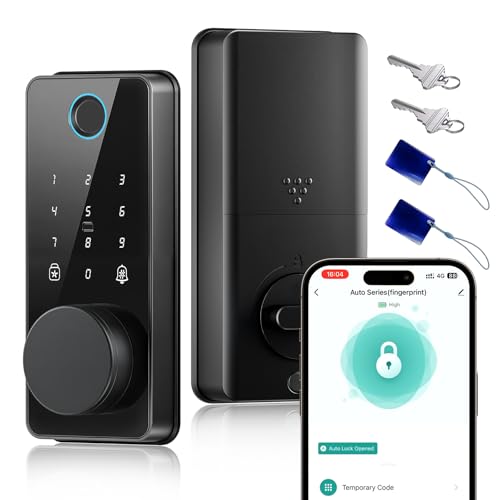
This Biquole smart lock offers five access methods: fingerprint, app, keypad, fob, and key. It stores 100 fingerprints and 100 user codes. The matte black alloy body includes a touchscreen keypad. Bluetooth connects to the Smart Life app for local management. Remote access requires a separate G2 Gateway. It fits doors 1-3/8 to 2 inches thick and uses four AA batteries.
Pros
- Recognizes fingerprints in 0.3 seconds
- Stores 100 fingerprints and 100 codes
- Supports five unlock methods including fob
- Alloy body with anti-peeping keypad
Cons
- Remote control requires a separate G2 Gateway
- No built-in Wi-Fi for direct app control
- Limited to Bluetooth connectivity only
Good fit if
- You want fast fingerprint entry
- You need multiple access options
- You manage guest codes locally
Skip if
- You need remote access without extra hardware
- You prefer Wi-Fi direct connectivity
- You want a handle set instead
Verdict: Biquole Smart Lock Matte Black suits users who prioritize speed and local code management. It fits homes needing flexible access without remote monitoring hardware.
Specifications side by side
| Spec | Kwikset Powerbolt 250 Keypad Deadbolt | Biquole Smart Deadbolt with App Control |
|---|---|---|
| Access Methods | Keypad, key | Key, keypad, fingerprint, fob, app |
| Connectivity | not stated | Bluetooth |
| Auto-Lock Delay | 30 s, 1 min, 3 min, 5 min, 10 min | 1-180 seconds |
| Fingerprint Capacity | not stated | 100 |
| User Code Capacity | 25 | 100 |
| Included Door Hardware | Deadbolt | Deadbolt |
| Access Method | Keypad | Keypad, Fingerprint, App Control |
| Water Resistance | not stated | Waterproof |
| Color | Matte Black | Matte Black |
| Trigger Type | Push Button | not stated |
| Special Features | Auto Lock | not stated |
| Dimensions | 0.97 × 2.69 × 4.59 inches | 8.27 × 5.71 × 3.94 inches |
| Weight | 2.26 pounds | 1.2 pounds |
| Size | Transitional | not stated |
| Model | 992500-008 | QEK-S03 |
Frequently asked questions
Which smart lock is better for managing guest access codes?
The Kwikset Powerbolt 250 is ideal for local code management. It allows you to create and delete codes directly at the lock. This feature suits households that need flexible access without relying on app connectivity. The Biquole model also supports guest management but adds app control for remote monitoring.
Does the Biquole lock support fingerprint entry?
Yes, the Biquole Smart Deadbolt includes fingerprint recognition. You can store up to 100 unique fingerprints for quick entry. This method offers faster access than entering a code. The Kwikset Powerbolt 250 relies solely on a keypad and does not include biometric scanning capabilities.
What are the physical dimensions of the Kwikset Powerbolt 250?
The Kwikset Powerbolt 250 measures 2.69 inches in width and 4.59 inches in height. Its depth is 0.97 inches. The unit weighs 2.26 pounds. These dimensions define its transitional size style. You should verify your door’s backset before installation to ensure a proper fit.
How does the Biquole lock connect to your phone?
The Biquole Smart Deadbolt connects via Bluetooth to its companion app. This allows you to monitor lock status and manage codes remotely. It does not require Wi-Fi. The Kwikset Powerbolt 250 lacks app connectivity and operates independently without digital distractions.
Which lock is lighter and easier to install?
The Biquole Smart Deadbolt weighs 1.2 pounds, making it lighter than the Kwikset Powerbolt 250. The Kwikset unit weighs 2.26 pounds. The Biquole’s smaller footprint may simplify handling during installation. Both locks use four AA batteries for power.
Can I re-key the Kwikset Powerbolt 250 easily?
Yes, the Kwikset Powerbolt 250 allows for easy re-keying. This feature lets you change the physical key cylinder without replacing the entire lock. It is useful if you lose keys or move into a new home. The Biquole model focuses on digital access methods instead.
What access methods does the Biquole lock offer?
The Biquole Smart Deadbolt supports five access methods. You can use a fingerprint, a keypad code, a physical key, a fob, or the app. This variety suits households with diverse entry needs. The Kwikset Powerbolt 250 offers only keypad entry for access.