Handle vs Knob Smart Locks: Which Should You Buy?
As an Amazon Associate we earn from qualifying purchases. Links on this page are affiliate links.
Choosing between a handle and knob deadbolt affects both aesthetics and installation. You are comparing the eufy Security C220 Handle Set against the Ulecoce U68 Fingerprint Deadbolt with Knob Set. Both offer keyless entry via fingerprint and app control. The primary difference lies in the included hardware: one provides a lever handle set, while the other includes a traditional knob. This handle vs knob deadbolt decision impacts how the lock fits your door style and your daily interaction with the entry point.
Key differences
| Aspect | eufy Security C220 Smart Lock Handle Set | Ulecoce Fingerprint Deadbolt with Knob |
|---|---|---|
| Included Hardware | Handle set | Knob set |
| Connectivity | Built-in Wi-Fi | Gateway required for remote features |
| Battery Life | 8 months (8 AA batteries) | Not listed |
| Fingerprint Speed | Less than 1 second | 0.3 seconds recognition |
| Warranty | Not listed | 3-year product warranty |
Which one should you choose?
Choose eufy Security C220 Smart Lock Handle Set if
- You want built-in Wi-Fi without buying a separate bridge or gateway.
- You prefer a lever handle that is easier to operate with full hands.
- You need a known battery life of approximately 8 months.
Choose Ulecoce Fingerprint Deadbolt with Knob if
- You prefer the traditional look and feel of a round knob.
- You want a longer manufacturer warranty of three years.
- You prioritize the fastest fingerprint recognition speed available.
Verdict: Choose the eufy Security C220 if you value direct Wi-Fi connectivity and a lever handle design for easier access. Select the Ulecoce U68 if you prefer a traditional knob aesthetic and want a longer warranty period. Both locks provide secure keyless entry through fingerprints and app management.
Handle Versus Knob Lock Comparison
Included Hardware
The eufy Security C220 includes a handle set, designed for standard deadbolts with a lever-style grip. It fits bores under 54mm and requires no drilling for a 15-minute install. The Ulecoce U68 provides a knob set instead. This traditional round grip suits different aesthetic preferences and door styles. Both options replace existing deadbolts, but the hardware type changes the feel and look of your entryway. Choose the handle for modern leverage or the knob for classic rotation.
Connectivity
The eufy Security C220 features built-in Wi-Fi, allowing direct connection to your network without extra hardware. You can control it from anywhere via the app. The Ulecoce U68 does not list built-in Wi-Fi in its specifications. It requires a separate gateway for remote and voice control features. If you want immediate remote access without buying additional devices, the eufy option is simpler. The Ulecoce requires that gateway for full smart home integration.
Battery Life
The eufy Security C220 runs on eight AA batteries, offering approximately eight months of use. This long duration reduces maintenance frequency. The Ulecoce U68 does not specify its battery type or expected lifespan in the provided data. Without this information, you cannot compare power efficiency directly. The eufy model provides a clear metric for planning battery replacements, ensuring you know when to expect changes.
Fingerprint Speed
The Ulecoce U68 recognizes fingerprints in as little as 0.3 seconds, unlocking within one second. It stores up to 512 fingerprints with a 99.99% recognition rate. The eufy Security C220 unlocks in less than one second using a touch sensor. While both are fast, the Ulecoce specifies the initial recognition time. The eufy model uses self-learning AI to improve precision over time. Both offer quick access for daily entry.
Smart Home Integration
The eufy Security C220 integrates directly with the eufy ecosystem, allowing routines with eufy doorbells. It supports Alexa and Google Voice Assistant natively via Wi-Fi. The Ulecoce U68 supports Alexa and Google Assistant but only when paired with a separate gateway. This adds complexity and cost for full voice and remote functionality. The eufy model offers a more seamless setup for users already in that ecosystem.
Which smart lock handle or knob fits you
Users wanting built-in Wi-Fi without extra hardware
The eufy Security C220 features built-in Wi-Fi, so you do not need a separate bridge or gateway to control the lock remotely. You can manage access via the app from anywhere. The Ulecoce U68 requires a sold separately gateway for voice and remote features, adding complexity and cost to your setup.
Buyers needing a standard lever handle for accessibility
If you prefer a lever handle over a round knob, the C220 provides that included hardware. It fits standard deadbolts with bores under 54mm and installs in 15 minutes without drilling. This design is often easier to operate with elbows or bags, offering a practical alternative to the knob set found on the Ulecoce U68.
Shoppers prioritizing a long warranty and auto-lock
The Ulecoce U68 includes a 3-year product warranty and lifetime support, which exceeds the C220 specifications. It also offers a customizable auto-lock function that engages within 5 to 60 seconds. This ensures the door secures itself after entry, a feature not explicitly detailed in the eufy C220 product data.
Quick picks
| # | Product | Best for | Price |
|---|---|---|---|
| 1 | eufy Security C220 Smart Lock Handle Set | Users replacing full door handles with smart access | Check price of eufy Security C220 Smart Lock Handle Set on Amazon |
| 2 | Ulecoce Fingerprint Deadbolt with Knob | Fingerprint-focused knob deadbolt users | Check price of Ulecoce Fingerprint Deadbolt with Knob on Amazon |
The products compared
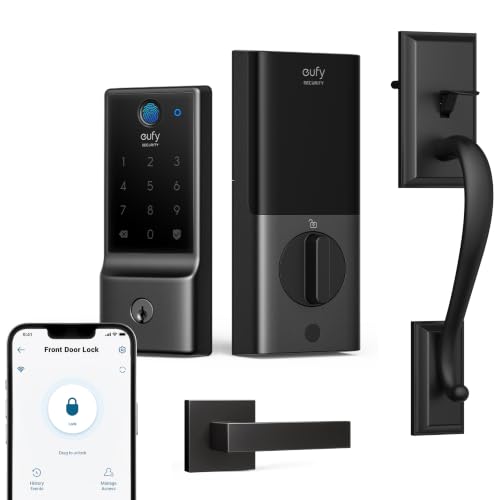
eufy Security C220 Smart Lock Handle Set
Best for: Users replacing full door handles with smart access
- Included Hardware
- Handle (what this guide is about)
- Access Methods
- Fingerprint, app, keypad, key, voice
- Connectivity
- Built-in Wi-Fi
- Smart Home Compatibility
- Alexa, Google Assistant
- Included Door Hardware
- Handle set
- Power Source
- Battery Powered
View on Amazon: eufy Security C220 Smart Lock Handle Set Affiliate link
The eufy Security C220 is a front door handle set with an integrated keyless deadbolt. It features built-in Wi-Fi for app control without a bridge. You can unlock it via fingerprint, keypad, physical key, voice assistant, or Apple Watch. The self-learning AI improves fingerprint recognition over time. It includes a traditional handle style in black. This lock suits users who want a complete handle replacement rather than just a knob upgrade.
Pros
- Built-in Wi-Fi connectivity for remote app control
- Six access methods including fingerprint and Apple Watch
- Self-learning AI for faster fingerprint recognition
- BHMA Grade 3 durability certification
Cons
- Requires 8 AA batteries for power
- Only compatible with Alexa and Google Voice Assistant
- IP53 water resistance rating is lower than higher-end models
Good fit if
- You need a full handle set instead of just a knob
- You want to control the lock via the eufy Security app
- You prefer fingerprint entry over keypad only
Skip if
- You already have a compatible handle and only need a deadbolt
- You require Apple HomeKit or Samsung SmartThings integration
- You need a battery-free or hardwired power solution
Verdict: eufy Security C220 Smart Lock Handle offers a complete handle solution with versatile access methods. It fits users replacing their entire front door hardware who value app integration and fingerprint speed.

Ulecoce Fingerprint Deadbolt with Knob
Best for: Fingerprint-focused knob deadbolt users
- Included Hardware
- Knob (what this guide is about)
- Access Methods
- Fingerprint, keypad, app, key
- Smart Home Compatibility
- Alexa, Google Assistant
- Auto-Lock Delay
- 5 to 60 seconds
- Included Door Hardware
- Deadbolt with knob set
- Color
- Black
View on Amazon: Ulecoce Fingerprint Deadbolt with Knob Affiliate link
The Ulecoce U68 is a knob-style deadbolt with fingerprint and keypad entry. It unlocks in 0.3 seconds and stores 512 fingerprints. You can manage access via a smartphone app or voice commands with Alexa and Google Assistant. The unit weighs 3.45 pounds and includes a 3-year warranty. It fits standard left or right-hand doors.
Pros
- 0.3-second fingerprint recognition speed
- Stores up to 512 fingerprints and passcodes
- App control for remote locking and logs
- Compatible with Alexa and Google Assistant
- Auto-lock delay adjustable from 5 to 60 seconds
Cons
- Requires a separate gateway for voice control
- App unlocking limited to 5-meter range
- No physical handle lever included
Good fit if
- You want a knob-style lock with high fingerprint capacity
- You need remote app management for guests
- You prefer voice control via Alexa or Google
Skip if
- You require a lever handle instead of a knob
- You need voice control without buying extra hardware
- You want remote unlocking from anywhere outside the 5-meter range
Verdict: Ulecoce U68 Knob Deadbolt suits households prioritizing quick fingerprint entry and app-based access management. It fits users comfortable with a knob design and willing to purchase a separate gateway for full voice integration.
Specifications side by side
| Spec | eufy Security C220 Smart Lock Handle Set | Ulecoce Fingerprint Deadbolt with Knob |
|---|---|---|
| Access Methods | Fingerprint, app, keypad, key, voice | Fingerprint, keypad, app, key |
| Connectivity | Built-in Wi-Fi | not stated |
| Smart Home Compatibility | Alexa, Google Assistant | Alexa, Google Assistant |
| Auto-Lock Delay | not stated | 5 to 60 seconds |
| Included Door Hardware | Handle set | Deadbolt with knob set |
| Power Source | Battery Powered | not stated |
| Access Method | Keypad, Fingerprint, App Control | Keypad, Fingerprint, App Control |
| Water Resistance | Waterproof | not stated |
| Color | Black | Black |
| Application | Front Door | Front Door |
| Included Hardware | Handle | Knob |
| Style | Traditional | not stated |
| Special Features | not stated | Auto Lock |
| Dimensions | 7.68 × 4.49 × 4.4 inches | 3.54 × 7.17 × 11 inches |
| Weight | not stated | 2 pounds |
| Model | T8506 | Ulecoce U68 |
| Size | not stated | / |
Frequently asked questions
What is the main difference between a smart lock handle and a knob?
The primary difference is the operating mechanism. The eufy Security C220 uses a handle design, which is a lever-style grip suitable for replacing full door hardware. The Ulecoce U68 uses a round knob. This choice affects both the aesthetic style of your door and how you physically turn the lock to enter or exit.
Which smart lock is better for traditional door aesthetics?
The eufy Security C220 is styled as a traditional handle. It fits users replacing their entire front door hardware with a lever grip. The Ulecoce U68 offers a knob design. If your door currently uses a round knob and you prefer that classic look, the Ulecoce option aligns better with that specific hardware style.
Do I need a separate gateway for voice control?
It depends on the model. The eufy Security C220 features built-in Wi-Fi, so you do not need a separate bridge or gateway to control the lock remotely. The Ulecoce U68 requires a separate gateway for full voice integration. You must purchase this accessory separately if you want to use voice commands with the Ulecoce lock.
How do I access the lock without a key?
Both locks offer keyless entry methods. The eufy Security C220 supports versatile access methods, including app integration and fingerprint speed. The Ulecoce U68 provides access via a keypad and fingerprint scanner. You can unlock the door quickly using your fingerprint or by entering a code on the keypad, eliminating the need for a physical key.
What are the physical dimensions of these smart locks?
The eufy Security C220 measures 4.49 inches in width, 4.4 inches in height, and 7.68 inches in length. The Ulecoce U68 is 7.17 inches wide, 11 inches high, and 3.54 inches long. These dimensions determine how the lock fits on your door. Check your existing door bore size to ensure the new hardware aligns correctly with your current installation.
Can I manage access for guests remotely?
Yes, both locks allow remote management via an app. The eufy Security C220 lets you manage access directly through the app due to its built-in Wi-Fi. The Ulecoce U68 also supports app-based access management. You can grant or revoke entry permissions for guests from your phone, regardless of whether you choose the handle or knob design.