14 Best Deadbolts Under $150, Compared
As an Amazon Associate we earn from qualifying purchases. Links on this page are affiliate links.
Finding a dependable deadbolt under 150 gives your home secure keyless access without requiring complicated wiring. The Schlage Electronic Keypad Deadbolt leads the list because of its certified Grade 2 metal construction and dependable two-year battery life.
This guide compares 14 locks strictly against the specifications published on their product listings. Reviewing these verified details helps you evaluate entry methods, physical dimensions, and smart home connectivity so you can choose the best hardware configuration for your front door.
Quick picks
The best fit for you
- You want Grade 2 security and long battery life. Schlage Electronic Keypad Deadbolt It provides certified Grade 2 metal construction with a two-year battery life for keyless keypad access.
- You want integrated video surveillance built into your deadbolt. Chamberlain myQ 3-in-1 Video Doorbell Smart Lock It integrates a 2K resolution camera and color night vision directly into a fingerprint-enabled deadbolt.
- You need Matter smart home support with bundled hardware. ULTRALOQ Bolt Smart Deadbolt with Handle It supports Matter and Wi-Fi connectivity and includes a matching exterior door handle.
- You need waterproof hardware for an exposed front door. Philips Fingerprint Wi-Fi Deadbolt with Handle It features a waterproof specification, integrated Wi-Fi, and includes a matching entry handle.
Our 14 picks

Schlage Electronic Keypad Deadbolt
Best for: long battery life and certified Grade 2 security
- Access Methods
- Keypad, app
- User Code Capacity
- 19
- Dimensions
- 4.25 × 3.25 × 5.5 inches
- Weight
- 5.1 pounds
View on Amazon: Schlage Electronic Keypad Deadbolt (paid link)
The Schlage Electronic Keypad Deadbolt gives you keyless entry via an illuminated silicone keypad without needing hardwiring. It features a Grade 2 security rating, metal construction, and storage for up to 19 distinct user codes. The unit runs on an included 9V battery rated for up to two years of typical use. It fits standard doors measuring 1-3/8 inches to 1-3/4 inches thick with adjustable 2-3/8 or 2-3/4 inch backsets.
Pros
- Grade 2/AAA security rating with metal construction
- Up to two years of operation on an included 9V battery
- Stores up to 19 access codes with two pre-programmed
- Backlit silicone keypad illuminates when pressed
Cons
- Requires manual thumbturn rotation to extend and retract the bolt
- Maximum user code capacity capped at 19 codes
- Does not fit doors thicker than 1-3/4 inches
Good fit if
- You want a keypad deadbolt with a Grade 2 security rating.
- You need up to 19 custom access codes for visitors or family.
- You prefer an included 9V battery with up to two years of life.
Skip if
- You have a door thicker than 1-3/4 inches.
- You require storage for more than 19 entry codes.
- You want a motorized deadbolt that locks without turning a physical thumbturn.
Verdict: Schlage Electronic Keypad Deadbolt delivers durable Grade 2 metal construction, a two-year battery life, and straightforward code entry for standard doors. It offers reliable keyless security without requiring wiring or complex setup.

Chamberlain myQ 3-in-1 Video Doorbell Smart Lock
Best for: all-in-one deadbolt security and video monitoring
- Access Methods
- Face access, fingerprint, PIN, app, key
- Resolution
- 2K
- Night Vision
- Color Night Vision
- Color
- Black
- Dimensions
- 2.95 × 3.84 × 6.85 inches
- Weight
- 4.87 pounds
View on Amazon: Chamberlain myQ 3-in-1 Video Doorbell Smart Lock (paid link)
The Chamberlain myQ 3-in-1 Video Doorbell Smart Lock combines an electronic deadbolt and a 2K HDR camera into a single front door unit. You get five entry methods, including facial recognition, fingerprint scanning, PIN codes, physical keys, and app controls. Built-in color night vision handles low-light monitoring, while the removable battery operates four to six months per charge. It suits you if you want integrated deadbolt security and video surveillance without mounting separate devices.
Pros
- Combines deadbolt hardware and a 2K HDR video doorbell into one unit
- Provides five entry methods including facial recognition and fingerprint access
- Features color night vision paired with a wide-angle lens
- Rechargeable battery lasts four to six months per charge
Cons
- Smart AI alerts for people, packages, and vehicles require a subscription
- Spare battery is not included and must be purchased separately
- Substantial door footprint with a total weight of 4.87 pounds
Good fit if
- You want hands-free facial recognition or fingerprint access on your door.
- You prefer an integrated 2K camera instead of installing a separate doorbell.
- You need color night vision to monitor doorstep arrivals in low light.
Skip if
- You want person, vehicle, and package detection without paying for a subscription.
- You prefer lightweight lock hardware that weighs under four pounds.
Verdict: Chamberlain myQ 3-in-1 Video Doorbell Smart Lock delivers comprehensive entry control and sharp 2K video surveillance in a single unit. It gives you flexible entry options like face recognition and fingerprints without requiring a separate doorbell camera.

eufy Security Modern Deadbolt and Lever Set
Best for: modern entryways needing matching lock and lever
- Access Methods
- Fingerprint, app, keypad, key, voice
- Connectivity
- Built-in Wi-Fi
- Smart Home Compatibility
- Amazon Alexa, Google Assistant
- Included Door Hardware
- Front door lever set
- Color
- Black
- Style
- Modern
View on Amazon: eufy Security Modern Deadbolt and Lever Set (paid link)
This smart lock set combines a modern electronic deadbolt with a matching front door lever. You get built-in Wi-Fi for direct remote app access without an external bridge, plus a fingerprint scanner with sub-0.3-second response times. It also supports keypad codes, physical keys, and voice assistants. Powered by eight AA batteries lasting up to eight months, this system fits standard doors and suits homeowners seeking a unified, keyless entryway setup.
Pros
- Built-in Wi-Fi connects directly without a separate bridge
- Five access methods: fingerprint, keypad, app, physical key, voice
- Fingerprint scanner unlocks in under 0.3 seconds
- Includes matching modern lever handle
Cons
- Requires eight AA batteries for operation
- Includes bundled door lever you must replace or store
Good fit if
- You want a matching deadbolt and lever set with modern styling.
- You prefer direct Wi-Fi control without purchasing an external bridge.
- You want quick access via an integrated fingerprint scanner.
Skip if
- You only need a standalone deadbolt without an extra door lever.
- You prefer hardware that requires fewer than eight batteries.
Verdict: eufy Security Modern Deadbolt and Lever Set delivers built-in Wi-Fi and rapid fingerprint entry in a coordinated package. It provides a cohesive modern look without requiring a separate network bridge.

Kwikset Halo Wi-Fi Keypad Deadbolt
Best for: Venetian Bronze styling with high user code capacity
- Access Methods
- Keypad, Kwikset app, geofencing
- Smart Home Compatibility
- Amazon Alexa, Google Home
- User Code Capacity
- Up to 250 access codes
- Connectivity
- Wi-Fi
- Color
- Venetian Bronze
- Dimensions
- 3.99 × 4.24 × 9.74 inches
View on Amazon: Kwikset Halo Wi-Fi Keypad Deadbolt (paid link)
The Kwikset Halo Wi-Fi Keypad Deadbolt is a connected lock finished in Venetian Bronze. It connects directly to your home Wi-Fi network without a dedicated hub. You can store up to 250 unique user codes on its backlit keypad, track activity history, and control it remotely using the Kwikset app. It suits you if you want keyless access for many visitors alongside voice control via Amazon Alexa or Google Home.
Pros
- Built-in Wi-Fi connects directly to your network without an added hub
- Backlit keypad stores up to 250 custom access codes
- Integrates with Amazon Alexa and Google Home for voice control
- Sends alerts for lock tampering and invalid code attempts
Cons
- Lacks a fingerprint scanner for biometric entry
- Electronics warranty lasts 1 year compared to lifetime mechanical coverage
- Door thickness compatibility caps at 1-3/4 inches
Good fit if
- You need to assign up to 250 unique entry codes for guests.
- You want direct Wi-Fi management without buying a separate bridge.
- You want a Venetian Bronze finish to match existing door hardware.
Skip if
- You prefer fingerprint authentication over typing access codes.
- You have an exterior door thicker than 1-3/4 inches.
Verdict: Kwikset Halo Wi-Fi Keypad Deadbolt delivers robust remote access and large 250-code capacity in a Venetian Bronze housing. It provides direct network control without requiring a dedicated third-party bridge.

Veise Fingerprint Deadbolt with Handle Set
Best for: biometric entry with a matching handle set
- Access Methods
- Fingerprint, keypad, key
- Auto-Lock Delay
- 10–99 seconds
- Fingerprint Capacity
- 20
- User Code Capacity
- 20
- Included Door Hardware
- Handle set
- Dimensions
- 18 × 7 × 4 inches
View on Amazon: Veise Fingerprint Deadbolt with Handle Set (paid link)
The Veise Fingerprint Deadbolt with Handle Set provides an exterior door latch and deadbolt combination featuring a 500 DPI biometric scanner. It stores up to 20 fingerprints and 20 user codes, unlocks in one second, and features an adjustable auto-lock timer between 10 and 99 seconds. You get an all-in-one zinc alloy handle and lock setup suited for households wanting keyless biometric entry without managing wireless network connections.
Pros
- Includes matching zinc alloy exterior handle set
- Fingerprint scanner reads in 0.3 seconds with 20-print capacity
- Auto-locks automatically within 10 to 99 seconds
- IP54 weather resistance rated from -31 °F to 158 °F
Cons
- No Wi-Fi, Bluetooth, or mobile app connectivity
- Requires four AA batteries that are not included
- Carries an ANSI Grade 3 rating rather than Grade 1 or 2
Good fit if
- You want an all-in-one package containing both a deadbolt and a matching exterior handle.
- You prefer fast fingerprint and keypad access without configuring smartphone apps.
- You need custom auto-lock timing between 10 and 99 seconds.
Skip if
- You want remote Wi-Fi control or integration with smart home platforms.
- You require an ANSI Grade 1 or Grade 2 security certification.
Verdict: Veise Fingerprint Deadbolt with Handle Set delivers quick biometric unlocking and a matching zinc alloy handle without the complexity of internet connectivity. It provides reliable offline access management for entry doors using fingerprints, PINs, or physical keys.

ULTRALOQ Bolt Smart Deadbolt with Handle
Best for: Matter-based smart homes needing bundled door handles
- Access Methods
- Fingerprint, passcode, app, voice, key
- Smart Home Compatibility
- Apple Home, Alexa, Google Assistant
- Fingerprint Capacity
- Up to 50
- User Code Capacity
- Up to 50
- Included Door Hardware
- Deadbolt and handle
- Connectivity
- Wi-Fi, Matter
View on Amazon: ULTRALOQ Bolt Smart Deadbolt with Handle (paid link)
This ULTRALOQ smart deadbolt set includes a matching handle and connects using both 2.4 GHz Wi-Fi and Matter over Thread. It gives you seven entry options, including a 50-print fingerprint scanner, a keypad storing 50 codes, and two physical keys. It suits you if you want a complete hardware bundle that works directly with Apple Home, Google Assistant, or Alexa ecosystems.
Pros
- Matter over Thread support for Apple Home, Alexa, and Google Assistant
- Includes matching door handle in the box
- Stores up to 50 fingerprints and 50 keypad codes
- Built-in 2.4 GHz Wi-Fi requires no dedicated bridge
- Up to 18-month battery life via Thread network
Cons
- Door sensor is not included for open-door detection
- Matter functionality requires a compatible Matter over Thread hub
- Wi-Fi connectivity supports only 2.4 GHz bands
Good fit if
- You use Apple Home or a Matter-enabled smart home network.
- You need both a deadbolt and a matching exterior handle.
- You want multiple entry methods including fingerprint and keypad access.
Skip if
- You want door position sensing without buying an add-on sensor.
- You lack a compatible Matter over Thread border router.
Verdict: ULTRALOQ Bolt Smart Deadbolt with Handle provides versatile Matter and Wi-Fi connectivity alongside a matching handle set. It delivers flexible smart home integration with extensive fingerprint and passcode storage.

Kwikset SmartCode 270 Touchpad Deadbolt
Best for: traditional offline keypad door security
- Access Methods
- Keypad, key
- Auto-Lock Delay
- 30 sec, 1 min, 3 min, 5 min or 10 min
- User Code Capacity
- 50
- Color
- Satin Nickel
- Style
- Traditional
- Special Features
- Auto Lock
View on Amazon: Kwikset SmartCode 270 Touchpad Deadbolt (paid link)
This deadbolt provides keyless access via an electronic touchpad without requiring network connectivity. You get BHMA Grade 2 certified construction, capacity for up to 50 user codes and 10 one-time codes, and an adjustable auto-lock timer running from 30 seconds to 10 minutes. A single set of four AA batteries powers the lock for up to 12 months. It suits you if you want dependable standalone keypad security with traditional styling.
Pros
- BHMA Grade 2 certified for security, durability, and finish
- Stores up to 50 user codes and 10 one-time codes
- Customizable auto-lock settings from 30 seconds to 10 minutes
- Built-in tamper alarm triggers after 3 incorrect entries
- Up to 12-month battery life on four AA batteries
Cons
- Requires four AA batteries that are not included
- No built-in Wi-Fi or remote app control
- Lacks fingerprint recognition hardware
Good fit if
- You want Grade 2 security hardware with a traditional exterior design.
- You need multiple temporary access codes for guests or service workers.
- You prefer a self-locking deadbolt that operates offline without Wi-Fi.
Skip if
- You want remote lock management or Wi-Fi smart home integration.
- You prefer unlocking your door with a fingerprint scanner.
Verdict: Kwikset SmartCode 270 Touchpad Deadbolt delivers certified Grade 2 physical security and flexible offline code management in a traditional design. It gives you dependable keypad operation without network complexity.

Schlage Touch Keyless Deadbolt
Best for: Bump-proof, keyless offline door security
- Access Methods
- Touchscreen
- User Code Capacity
- 19
- Color
- Matte Black
- Dimensions
- 5.2 × 3 × 5.4 inches
- Weight
- 3.4 pounds
View on Amazon: Schlage Touch Keyless Deadbolt (paid link)
This electronic deadbolt gives you keyless entry via a backlit touchscreen without a traditional physical keyway. It carries a Grade 2/AAA rating and stores up to 19 access codes. Power comes from an included 9V battery with external jumpstart contacts for emergency access. Its slim profile fits between standard doors and screen doors. It suits you if you want bump-proof security without managing keys or Wi-Fi configurations.
Pros
- Cylinder-free design eliminates lock picking and key bumping
- Certified Grade 2/AAA security and durability rating
- Stores up to 19 customizable user codes
- External 9V battery jumpstart terminal provides backup power access
Cons
- No physical key backup slot
- Lacks Wi-Fi, Bluetooth, and smart-home app connectivity
- Capacity limited to 19 access codes
Good fit if
- You want a deadbolt without a physical keyhole to bump or pick.
- You need a slim exterior profile that clears a front screen door.
- You prefer a standalone electronic deadbolt without wireless apps.
Skip if
- You require a physical metal key for manual backup entry.
- You want remote app control or Wi-Fi connectivity.
- You need to store codes for more than 19 individual users.
Verdict: Schlage Touch Keyless Deadbolt provides Grade 2 security with a bump-proof, keyless design and exterior jumpstart reliability. It is a solid standalone choice if you want illuminated touchscreen access without smart network features.

Philips Wi-Fi Fingerprint Smart Lock Set
Best for: touchscreen entry with included lever handles
- Access Methods
- Fingerprint, PIN, key, app, voice
- Connectivity
- Built-in 2.4 GHz Wi-Fi
- Smart Home Compatibility
- Amazon Alexa, Google Assistant
- User Code Capacity
- 100
- Included Door Hardware
- Lock and 2 lever handles
- Color
- Matte Black
View on Amazon: Philips Wi-Fi Fingerprint Smart Lock Set (paid link)
This Philips front door lock set combines a touchscreen deadbolt with two matching lever handles. It connects directly to your 2.4 GHz Wi-Fi network without requiring an external bridge, giving you app management and smart assistant voice controls. With support for up to 50 fingerprints, 100 user PIN codes, and unlimited single-use access codes, it fits households that need complete entryway hardware and multiple keyless access methods.
Pros
- Includes lock hardware and two matching lever handles
- Built-in 2.4 GHz Wi-Fi requires no external hub
- Stores up to 50 fingerprints and 100 user PIN codes
- Works with Amazon Alexa and Google Assistant voice commands
Cons
- Timed and recurring PIN codes require an optional gateway sold separately
- Auto-lock has no integrated door sensor to confirm the door is closed
Good fit if
- You want a matching deadbolt and lever handle bundle for your door.
- You prefer built-in Wi-Fi without having to plug in an extra bridge.
- You need multiple unlock options, including fingerprint, PIN, physical key, and app access.
Skip if
- You want an auto-lock system that detects open and closed door positions via sensor.
- You need timed or recurring PIN schedules without buying an extra Wi-Fi gateway.
Verdict: Philips Touchscreen Wi-Fi Deadbolt Set delivers complete hardware with two handles and versatile keyless entry directly out of the box. Its built-in Wi-Fi and touchscreen provide remote access management without requiring an extra bridge.

Yale August Wi-Fi Smart Lock with Keypad Touch
Best for: retaining existing deadbolts with fingerprint access
- Access Methods
- Fingerprint, keypad, app, key
- Connectivity
- Built-in Wi-Fi, Bluetooth
- Color
- Silver
- Dimensions
- 0.8 × 2.72 × 4.84 inches
- Weight
- 2.18 pounds
View on Amazon: Yale August Wi-Fi Smart Lock with Keypad Touch (paid link)
The Yale August Wi-Fi Smart Lock mounts to the inside of your door and keeps your existing exterior deadbolt and keys intact. It features built-in Wi-Fi, eliminating the need for an external bridge, and includes a wireless keypad with a fingerprint scanner. You get app control, auto-locking, and custom entry codes alongside biometric access. This suits you if you want keyless fingerprint entry without replacing your exterior hardware.
Pros
- Installs on the interior side so you keep existing deadbolt and keys
- Built-in Wi-Fi requires no extra hub or bridge
- Includes separate Keypad Touch with fingerprint scanner
- Supports Auto-Lock and Auto-Unlock via the Yale Access app
Cons
- Keypad must be mounted separately within Bluetooth range
- Interior unit adds 2.18 pounds of hardware to the door
- Only offered in a silver finish option
Good fit if
- You want to keep your existing exterior deadbolt and physical keys.
- You need fingerprint and keypad entry without replacing exterior door locks.
- You want built-in Wi-Fi connectivity without purchasing an external hub.
Skip if
- You prefer a full exterior deadbolt replacement over an interior retrofit.
- You do not want to mount a secondary keypad unit near your door.
Verdict: Yale August Wi-Fi Smart Lock with Keypad Touch gives you fingerprint and app entry while letting you retain your original exterior deadbolt hardware. Its built-in Wi-Fi and included wireless keypad deliver smart access without requiring a bridge.

Philips Fingerprint Wi-Fi Deadbolt with Handle
Best for: weather-exposed entryways needing a matching handle set
- Access Methods
- Fingerprint, app, passcode, key, voice
- Connectivity
- Built-in 2.4GHz Wi-Fi
- Smart Home Compatibility
- Alexa, Google Assistant
- Auto-Lock Delay
- 10 to 180 seconds
- User Code Capacity
- 100
- Included Door Hardware
- Deadbolt and handle
View on Amazon: Philips Fingerprint Wi-Fi Deadbolt with Handle (paid link)
This Philips front door set pairs a waterproof smart deadbolt with a matching handle. It connects directly to your home network via built-in 2.4GHz Wi-Fi without an external hub. You get five unlocking options, including a 0.3-second fingerprint scanner, a keypad supporting up to 100 custom passcodes, and voice assistant support. It suits you if you want an integrated handle and versatile keyless entry.
Pros
- Built-in 2.4GHz Wi-Fi requires no extra hub
- 0.3-second fingerprint scanner for quick unlocking
- Stores up to 100 time-sensitive guest passcodes
- Includes a matching front door handle in the box
Cons
- Does not include the four required AA batteries
- Operates only on 2.4GHz Wi-Fi networks
Good fit if
- You want a complete lock and matching exterior handle set
- You need direct remote app control without purchasing a separate bridge
- You manage multiple visitor schedules using time-sensitive passcodes
Skip if
- You only need a replacement deadbolt without a new door handle
- You operate an exclusively 5GHz Wi-Fi home network
Verdict: Philips Fingerprint Wi-Fi Deadbolt with Handle delivers multiple entry methods and direct cloud connectivity in a waterproof design. It gives you a complete hardware upgrade with no additional bridge required.

Aqara U100 Keyed Fingerprint Deadbolt
Best for: Apple Home and iPhone users
- Access Methods
- Apple Home Key, fingerprint, app, key
- Connectivity
- Zigbee 3.0
- Smart Home Compatibility
- Apple Home, Google Home, Alexa, IFTTT
- Fingerprint Capacity
- 50
- Color
- Gray
- Dimensions
- 5.27 × 3.46 × 2.91 inches
View on Amazon: Aqara U100 Keyed Fingerprint Deadbolt (paid link)
The Aqara U100 is a zinc alloy smart deadbolt built for keyless entry and smart home automation. You can unlock your door using Apple Home Key via an iPhone or Apple Watch, a built-in 50-fingerprint scanner, or a physical key. It features an IP65 weather rating, a built-in gyroscope for auto-locking, and up to 8 months of battery life. It suits you if you prioritize Apple ecosystem integration.
Pros
- Supports Apple Home Key via iPhone and Apple Watch
- Stores up to 50 fingerprints locally with AES encryption
- IP65 weather-resistant zinc alloy body rated for -31°F to 151°F
- Includes USB-C emergency power port and mechanical backup key
Cons
- Requires an Aqara Zigbee 3.0 hub for remote app control and Alexa or Google Home support
- Requires an Apple Home Hub to share Apple Home Keys with guests
- NFC cards are sold separately
Good fit if
- You want to unlock your deadbolt by tapping your iPhone or Apple Watch
- You need biometric access for up to 50 fingerprints
- You already have an Apple Home setup or Aqara Zigbee hub
Skip if
- You want built-in Wi-Fi without buying an additional hub
- You plan to use NFC cards right out of the box
Verdict: Aqara U100 Fingerprint Smart Deadbolt delivers responsive Apple Home Key support alongside versatile local fingerprint access. It provides solid hardware specifications, though full remote access and third-party platform automations depend on an external hub.
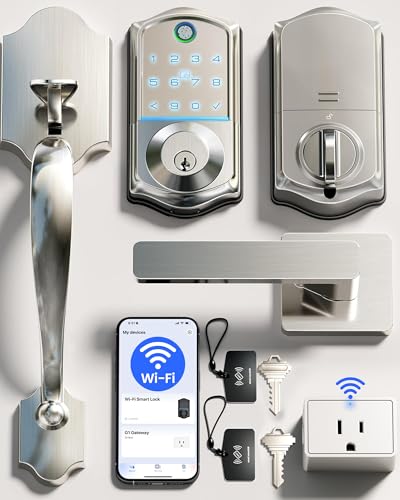
Veise Wi-Fi Fingerprint Deadbolt with Handle Set
Best for: complete entry hardware and flexible guest codes
- Access Methods
- Fingerprint, app, code, card, key, voice
- Smart Home Compatibility
- Amazon Alexa, Google
- Auto-Lock Delay
- 0-180s
- Fingerprint Capacity
- 20+
- User Code Capacity
- 100+
- Included Door Hardware
- Handle set
View on Amazon: Veise Wi-Fi Fingerprint Deadbolt with Handle Set (paid link)
This Wi-Fi smart lock includes a matching exterior handle set and pairs with the KK Home App. You get 8-in-1 entry options, including a 0.2-second fingerprint scanner with room for 20 prints and storage for over 100 access codes. It connects directly to Amazon Alexa and Google Assistant without extra hubs. It suits you if you want a complete hardware package with versatile access methods and an adjustable auto-lock timer.
Pros
- Includes both smart deadbolt and matching door handle set
- Multiple entry methods including fingerprint, app, code, card, key, and voice
- Stores over 100 access codes with anti-peeping protection
- Fast 0.2-second biometric fingerprint reader
Cons
- Requires four AA batteries that are not included in the box
- Fingerprint memory capped at 20 profiles
- Carries an ANSI Grade 3 security rating rather than Grade 1 or 2
Good fit if
- You need a complete front door setup with both handle and deadbolt.
- You want flexible guest management with up to 100 custom codes.
- You prefer biometric unlocking alongside app and voice control.
Skip if
- You require Grade 1 or Grade 2 heavy-duty security hardware.
- You need to store more than 20 unique fingerprints.
Verdict: Veise Wi-Fi Deadbolt with Handle Set provides an all-in-one hardware bundle featuring diverse keyless access methods. Its responsive fingerprint scanner and extensive code management make it practical for busy entries.

Kwikset SmartCode 260 Keypad Deadbolt
Best for: offline keypad entry with multiple user codes
- Access Methods
- Keypad, key
- Auto-Lock Delay
- 30 sec, 1 min, 3 min, 5 min, 10 min
- User Code Capacity
- 50
- Color
- Satin Nickel
- Dimensions
- 4.13 × 5.19 × 9.91 inches
- Weight
- 1 pounds
View on Amazon: Kwikset SmartCode 260 Keypad Deadbolt (paid link)
The Kwikset SmartCode 260 is an electronic deadbolt that gives you keyless access via a keypad or a traditional key. It holds up to 50 user codes alongside 10 one-time codes, with customizable auto-locking from 30 seconds to 10 minutes. Featuring BHMA Grade 2 certification, it suits you if you want standalone keypad security without smart home apps.
Pros
- BHMA Grade 2 certified for durability and security
- Stores up to 50 user codes and 10 one-time codes
- Selectable auto-lock delays from 30 seconds to 10 minutes
- Intrusion alarm and temporary keypad lockout after 3 failed attempts
Cons
- Lacks Wi-Fi and Bluetooth for app-based remote unlocking
- Requires four AA batteries that are not included
- No fingerprint reader
Good fit if
- You want a keypad deadbolt that works entirely offline without smart integrations.
- You need distinct one-time and recurring codes for guests or visitors.
- You want adjustable auto-lock timing to secure the door automatically.
Skip if
- You want to lock or monitor your door remotely using a smartphone.
- You prefer one-touch biometric fingerprint access.
Verdict: Kwikset SmartCode 260 Keypad Deadbolt delivers certified BHMA Grade 2 hardware with extensive local code storage. It provides dependable keyless entry for doors that do not need network access.
Specifications side by side
| Spec | Schlage Electronic Keypad Deadbolt | Chamberlain myQ 3-in-1 Video Doorbell Smart Lock | eufy Security Modern Deadbolt and Lever Set | Kwikset Halo Wi-Fi Keypad Deadbolt | Veise Fingerprint Deadbolt with Handle Set | ULTRALOQ Bolt Smart Deadbolt with Handle | Kwikset SmartCode 270 Touchpad Deadbolt | Schlage Touch Keyless Deadbolt | Philips Wi-Fi Fingerprint Smart Lock Set | Yale August Wi-Fi Smart Lock with Keypad Touch | Philips Fingerprint Wi-Fi Deadbolt with Handle | Aqara U100 Keyed Fingerprint Deadbolt | Veise Wi-Fi Fingerprint Deadbolt with Handle Set | Kwikset SmartCode 260 Keypad Deadbolt |
|---|---|---|---|---|---|---|---|---|---|---|---|---|---|---|
| Access Methods | Keypad, app | Face access, fingerprint, PIN, app, key | Fingerprint, app, keypad, key, voice | Keypad, Kwikset app, geofencing | Fingerprint, keypad, key | Fingerprint, passcode, app, voice, key | Keypad, key | Touchscreen | Fingerprint, PIN, key, app, voice | Fingerprint, keypad, app, key | Fingerprint, app, passcode, key, voice | Apple Home Key, fingerprint, app, key | Fingerprint, app, code, card, key, voice | Keypad, key |
| Connectivity | not specified | not specified | Built-in Wi-Fi | not specified | not specified | not specified | not specified | not specified | Built-in 2.4 GHz Wi-Fi | Built-in Wi-Fi, Bluetooth | Built-in 2.4GHz Wi-Fi | Zigbee 3.0 | not specified | not specified |
| Smart Home Compatibility | not specified | not specified | Amazon Alexa, Google Assistant | Amazon Alexa, Google Home | not specified | Apple Home, Alexa, Google Assistant | not specified | not specified | Amazon Alexa, Google Assistant | not specified | Alexa, Google Assistant | Apple Home, Google Home, Alexa, IFTTT | Amazon Alexa, Google | not specified |
| Auto-Lock Delay | not specified | not specified | not specified | not specified | 10–99 seconds | not specified | 30 sec, 1 min, 3 min, 5 min or 10 min | not specified | not specified | not specified | 10 to 180 seconds | not specified | 0-180s | 30 sec, 1 min, 3 min, 5 min, 10 min |
| Fingerprint Capacity | not specified | not specified | not specified | not specified | 20 | Up to 50 | not specified | not specified | not specified | not specified | not specified | 50 | 20+ | not specified |
| User Code Capacity | 19 | not specified | not specified | Up to 250 access codes | 20 | Up to 50 | 50 | 19 | 100 | not specified | 100 | not specified | 100+ | 50 |
| Included Door Hardware | not specified | not specified | Front door lever set | not specified | Handle set | Deadbolt and handle | not specified | not specified | Lock and 2 lever handles | not specified | Deadbolt and handle | not specified | Handle set | not specified |
| Resolution | not specified | 2K | not specified | not specified | not specified | not specified | not specified | not specified | not specified | not specified | not specified | not specified | not specified | not specified |
| Access Method | Keypad | Fingerprint, App Control | not specified | Keypad | Fingerprint | Keypad, Fingerprint, Remote Control | not specified | not specified | Fingerprint, Touchscreen | Keypad, Fingerprint | Keypad, Fingerprint, Remote Control | Fingerprint, Key | not specified | Keypad |
| Night Vision | not specified | Color Night Vision | not specified | not specified | not specified | not specified | not specified | not specified | not specified | not specified | not specified | not specified | not specified | not specified |
| Water Resistance | not specified | not specified | not specified | not specified | not specified | not specified | not specified | not specified | not specified | not specified | Waterproof | not specified | not specified | not specified |
| Color | Aged Bronze (Pack of 1) | Black | Black | Venetian Bronze | Bronze | Black | Satin Nickel | Matte Black | Matte Black | Silver | Matte Black | Gray | Satin Nickel | Satin Nickel |
| Application | not specified | not specified | Front Door | not specified | not specified | Home, Front Door | not specified | not specified | Front Door | not specified | Front Door | Home | not specified | not specified |
| Included Hardware | not specified | not specified | Lever | not specified | Handle | Handle | not specified | not specified | not specified | not specified | Handle | not specified | Handle | not specified |
| Style | not specified | not specified | Modern | not specified | not specified | not specified | Traditional | not specified | not specified | not specified | not specified | not specified | not specified | not specified |
| Special Features | not specified | not specified | not specified | not specified | not specified | Auto Lock | Auto Lock | not specified | not specified | not specified | Auto Lock | not specified | not specified | not specified |
| Dimensions | 4.25 × 3.25 × 5.5 inches | 2.95 × 3.84 × 6.85 inches | 6.08 × 2.53 × 0.99 inches | 3.99 × 4.24 × 9.74 inches | 18 × 7 × 4 inches | 2.95 × 1 × 2.95 inches | 4.13 × 5.19 × 9.91 inches | 5.2 × 3 × 5.4 inches | 6 × 2 × 1.5 inches | 0.8 × 2.72 × 4.84 inches | 2.7 × 0.73 × 5.72 inches | 5.27 × 3.46 × 2.91 inches | 12.8 × 9.29 × 3.74 inches | 4.13 × 5.19 × 9.91 inches |
| Weight | 5.1 pounds | 4.87 pounds | not specified | 1 pounds | not specified | 2.87 pounds | 2.31 pounds | 3.4 pounds | 5 pounds | 2.18 pounds | not specified | 2.59 pounds | not specified | 1 pounds |
| Size | 2.25 x 5.5 x 3.25 inch | not specified | Small Handle | not specified | not specified | Deadbolt+Handle | not specified | (Pack of 1) | not specified | not specified | not specified | not specified | not specified | Traditional |
| Model | BE365VCAM716 | MYQL90AXXB | T8506 | 99380-002 | KS02D | ULTRALOQ BOLT | 992700-008 | BE375CEN622 | DDL240X-1HW-L | AUG-SL05 | DDL242X-1HW-H-NEW | SDL-D01 | VE017G-H | 992600-007 |
If you need household cooling, published airflow specs and noise ratings for each fan under 150 help you compare motor performance.
How to Choose the Right Deadbolt
-
Bundled Handles and Levers
Check if the package includes matching door hardware or only the deadbolt mechanism. Standard deadbolts replace just the upper lock, leaving your existing handle in place. If your lower entry latch looks worn or clashes in finish, look for options that list an included lever or handle set. For example, the eufy Security Modern Deadbolt and Lever Set pairs the motorized lock with matching modern hardware. This ensures consistent color and styling across your entire door prep without needing to purchase separate exterior handles.
-
Biometric Fingerprint Scanners
Compare the primary access methods supported on the exterior housing. Push-button and touchscreen keypads require you to memorize and punch in numeric PINs, which can take extra time when your hands are full. Biometric deadbolts integrate a capacitive fingerprint scanner directly into the lock face for single-touch entry. If you prioritize quick exterior access without typing digits, examine scanner placement and verification speed. The Veise Fingerprint Deadbolt with Handle Set provides biometric recognition right on the lock exterior, giving household members rapid entry using registered fingerprints.
-
Smart Platform Integration
Review the listed smart home compatibility if you want your lock linked with voice assistants and home automation routines. While standard wireless models support proprietary mobile apps, ecosystem-ready locks list direct compatibility for platforms like Amazon Alexa, Google Assistant, or Matter. Matter support ensures local device interoperability across different smart home controllers without vendor lock-in. The ULTRALOQ Bolt Smart Deadbolt with Handle specifies both Matter and Wi-Fi, allowing you to incorporate entry status into broader routines, trigger exterior lighting, and manage entry permissions across multi-brand setups.
-
Weather Resistance Ratings
Inspect exterior durability specifications if your front entrance lacks an awning, porch, or storm door. Exterior deadbolt escutcheons face direct exposure to driving rain, snow, and humidity. Locks explicitly rated with waterproof protection feature sealed gaskets and internal moisture barriers to safeguard sensitive electronics and touch interfaces against corrosion. The Philips Fingerprint Wi-Fi Deadbolt with Handle lists waterproof construction for exterior components. Verifying weather resistance ensures the numeric keypad and fingerprint scanner maintain consistent electrical conductivity and touch sensitivity through wet outdoor conditions.
-
Existing Hardware Retention
Check whether the product replaces the entire lock assembly or mounts over your current deadbolt. Full replacement models swap out both interior thumbturns and exterior key cylinders, which changes the exterior door appearance and keyway. Retrofit conversion kits replace only the interior hardware while keeping your existing exterior deadbolt and original physical keys intact. The Yale August Wi-Fi Smart Lock with Keypad Touch uses this configuration. This setup suits users who must maintain exterior master keys or want to preserve their existing exterior aesthetic.
-
User Access Code Capacity
Evaluate the total user code capacity if you manage multiple residents, service workers, or short-term guests. Basic standalone locks often store between 10 and 30 unique entry codes, which suffices for standard single-family use. Properties requiring distinct credentials for visitors, cleaners, and family members require higher credential limits to avoid constantly deleting and reassigning codes. The Kwikset Halo Wi-Fi Keypad Deadbolt supports up to 250 individual user codes. Checking capacity limits ensures you can assign trackable, individualized access codes without running out of memory.
Frequently asked questions
Can you keep your existing exterior deadbolt hardware when upgrading to a smart lock?
Yes, you can retain your original exterior deadbolt hardware by selecting a retrofit model. The Yale August Wi-Fi Smart Lock with Keypad Touch mounts on the interior side of your door, leaving your outside lock face unchanged. This design lets you keep your existing physical house keys while gaining built-in Wi-Fi connectivity and an exterior wireless keypad for biometric fingerprint access.
How do keyless deadbolts handle lock picking or bump attacks?
You prevent standard physical lock picking and bump attacks entirely by choosing a lock without an exterior key cylinder. The Schlage Touch Keyless Deadbolt uses a completely keyless design, eliminating keyhole vulnerabilities while providing Grade 2 security. If the internal battery depletes, you can use the exterior jumpstart contacts with a standard battery to power the illuminated touchscreen and gain access.
Which deadbolts support Apple Home Key for door access?
The Aqara U100 Keyed Fingerprint Deadbolt provides native support for Apple Home Key alongside local fingerprint and physical key access. You can tap an iPhone or Apple Watch to unlock your door directly. While local unlocking works immediately, integrating the lock into third-party automations or managing access remotely requires pairing it with a compatible external hub.
Can a smart deadbolt connect directly to Matter smart home platforms?
Yes, you can connect directly to Matter setups if the lock includes native Matter support. The ULTRALOQ Bolt Smart Deadbolt provides Matter and Wi-Fi connectivity, allowing integration with platforms like Alexa and Google Assistant. This lock also features auto lock functionality, fingerprint entry, remote control, and a keypad, giving you unified management across your existing connected smart home gear.
What should you look for if your front door deadbolt is exposed to rain?
You should check for dedicated weather resistance ratings on the exterior hardware. The Philips Fingerprint Wi-Fi Deadbolt with Handle specifies a waterproof exterior build to withstand direct moisture exposure on uncovered entryways. It combines that exterior protection with built-in Wi-Fi, an automatic locking feature, and multiple access options including fingerprint recognition, a numeric keypad, and remote app control.
How many unique access codes can a smart deadbolt store?
Code storage capacity depends on the model, ranging from small local lists to hundreds of credentials. For example, the Kwikset Halo Wi-Fi Keypad Deadbolt stores up to 250 distinct user codes. Its built-in Wi-Fi lets you assign, adjust, or revoke individual PINs remotely through the mobile app without requiring a separate third-party network bridge.
Do all smart deadbolts require an internet connection to work?
No, many deadbolts operate completely without an internet connection or Wi-Fi setup. The Veise Fingerprint Deadbolt with Handle Set manages security offline using stored fingerprints, numeric keypad PINs, or physical keys. Choosing an offline deadbolt eliminates network vulnerability and Wi-Fi troubleshooting while still giving you convenient keyless entry at your front entrance.