15 Best Satin Nickel Deadbolts, Compared
As an Amazon Associate we earn from qualifying purchases. Links on this page are affiliate links.
Finding the best satin nickel deadbolts means balancing secure exterior hardware with the entry options your household needs. This guide compares 15 models strictly using the specifications published on the listings. The TEEHO Keypad Keyless Entry Deadbolt takes the top spot because it provides IP54 weather protection and automated locking for standard 2-1/8-inch door preps.
Whether you want standalone keypad credentials, biometric fingerprint access, or integrated Wi-Fi control, this guide helps you decide which locking features and physical dimensions fit your entryway requirements.
Quick picks
The best fit for you
- You need simple keypad access without smart network setup TEEHO Keypad Keyless Entry Deadbolt IP54 weather protection and standalone keypad operation fit standard 2-1/8-inch door preps without network configuration.
- You want direct Wi-Fi control without auxiliary hubs Schlage Encode Smart WiFi Deadbolt Built-in Wi-Fi connectivity enables direct app management without requiring auxiliary smart home bridges.
- You need fingerprint access with an included matching handle Philips 4200 Fingerprint Deadbolt with Handle The unit includes entry handle hardware alongside native Wi-Fi connectivity and fingerprint unlocking.
- You need a replacement deadbolt with matching door knobs Veise Keyless Deadbolt with Matching Knobs The package includes matching knob hardware to install alongside the satin nickel deadbolt.
Our 15 picks

TEEHO Keypad Keyless Entry Deadbolt
Best for: straightforward keyless entry without smart network setup
- Color
- Satin Nickel (what this guide is about)
- Access Methods
- Keypad, passcode
- Auto-Lock Delay
- 10-99 seconds
- User Code Capacity
- 20
- Application
- Front Door
- Dimensions
- 5.12 × 2.95 × 1.3 inches
The TEEHO Keyless Entry Keypad Deadbolt brings standalone digital security to your front door in a satin nickel finish. It stores up to 20 user passcodes alongside a single-use guest code. You get customizable auto-locking between 10 and 99 seconds, IP54 weather resistance, and up to a full year of battery life from four AA cells. It suits anyone seeking keypad convenience without wireless network setups.
Pros
- Stores up to 20 user access codes plus one single-use temporary code
- Configurable auto-lock delay from 10 to 99 seconds
- Rated IP54 for exterior weather resistance
- Up to 365-day battery life with low-power warning light
Cons
- No Wi-Fi, Bluetooth, or smartphone app integration
- Incompatible with 38mm door holes, requiring a 2-1/8-inch hole
- Four required AA batteries are not included
Good fit if
- You want simple PIN access for family and guests without a phone app
- You have a standard 2-1/8-inch door prep and want an IP54 weather-rated lock
- You prefer automatic locking that engages within 10 to 99 seconds
Skip if
- You want remote access, Wi-Fi management, or smartphone control
- You have a door with a 38mm borehole
- You require biometric fingerprint entry
Verdict: TEEHO Keyless Entry Keypad Deadbolt provides straightforward keypad access, reliable auto-locking, and sturdy IP54 weather protection for standard 2-1/8-inch door preps. It is an effective choice if you want keyless entry without smart network complexity.

Schlage Encode Smart WiFi Deadbolt
Best for: Direct Wi-Fi access without separate hubs
- Color
- Satin Nickel (what this guide is about)
- Access Methods
- App, touchscreen, physical key
- Connectivity
- Built-in Wi-Fi
- Smart Home Compatibility
- Alexa, Google Home
- User Code Capacity
- Up to 100 access codes
- Included Door Hardware
- Deadbolt (Single)
This satin nickel deadbolt pairs a touchscreen keypad with built-in Wi-Fi, eliminating the need for an external bridge. You can manage up to 100 access codes, control access via Alexa or Google Home, and rely on standard 1-3/8-inch to 1-3/4-inch door compatibility. Four AA batteries power the unit for up to six months. It suits you if you want direct wireless control, automated time-delay locking, and a built-in forced-entry alarm.
Pros
- Built-in Wi-Fi connects directly without extra hubs
- Stores up to 100 unique access codes
- Built-in sensor sounds alarm on forced entry attempts
- Integrates with Alexa and Google Home voice control
Cons
- Battery life rated for up to six months
- Includes only one physical backup key
- Lacks fingerprint access
Good fit if
- You want direct Wi-Fi connectivity without a separate adapter.
- You need to assign up to 100 unique entry codes.
- You want audible alerts for door movement and forced entry.
Skip if
- You prefer unlocking via fingerprint sensor.
- You have a door thicker than 1-3/4 inches.
- You require multiple physical backup keys out of the box.
Verdict: Schlage Encode Smart WiFi Deadbolt Camelot provides direct wireless connection and robust code storage in a satin nickel design. It handles everyday access control through app, keypad, and voice platforms without requiring auxiliary hubs.

Schlage Camelot Electronic Keypad Deadbolt
Best for: offline keypad entry with Grade 2 security
- Color
- Satin Nickel (what this guide is about)
- Access Methods
- Keypad
- Dimensions
- 4.25 × 3.25 × 5.5 inches
- Weight
- 5.1 pounds
This electronic deadbolt gives you keyless access finished in satin nickel with Camelot trim. It features Grade 2 and AAA security ratings, solid metal construction, and illuminated silicone buttons for nighttime code entry. You lock and unlock it by entering a PIN and turning the manual exterior thumbturn. It suits you if you want reliable keypad entry without Wi-Fi, apps, or hardwiring.
Pros
- Grade 2/AAA security and durability rating
- Illuminated silicone-coated keypad buttons
- Installs with a screwdriver and no hardwiring
- Solid metal construction weighing 5.1 pounds
Cons
- Keypad is the only access method listed
- No Wi-Fi or app connectivity included
- Requires turning the thumbturn manually to move the bolt
Good fit if
- You want a Grade 2 rated lock with a manual exterior thumbturn.
- You prefer illuminated physical pushbuttons over touchscreen panels.
- You need a satin nickel deadbolt installed using only a screwdriver.
Skip if
- You want smartphone app control, Wi-Fi pairing, or fingerprint access.
- You prefer a motorized deadbolt that throws the bolt automatically.
Verdict: Schlage Camelot Keypad Deadbolt delivers Grade 2 metal construction with illuminated buttons for straightforward PIN access. It is a dependable choice if you want keyless entry without network setup or wireless connections.

Philips 4200 Fingerprint Deadbolt with Handle
Best for: remote app control with an included handle
- Color
- Satin Nickel (what this guide is about)
- Access Methods
- Fingerprint, passcode, app, voice
- Connectivity
- 2.4 GHz Wi-Fi
- Smart Home Compatibility
- Alexa, Google Assistant
- Auto-Lock Delay
- 0–180 seconds
- Included Door Hardware
- Handle set
View on Amazon: Philips 4200 Fingerprint Deadbolt with Handle
This satin nickel deadbolt pairs built-in 2.4 GHz Wi-Fi with an included matching door handle. You manage locking, unlocking, and access schedules directly through the Philips Home Access app without needing an external bridge. It features a 0.3-second fingerprint scanner, customizable passcodes, and voice assistant support through Alexa and Google Assistant. It suits anyone wanting full remote control alongside a coordinated hardware set for standard 1-3/8-inch to 1-3/4-inch doors.
Pros
- Built-in 2.4 GHz Wi-Fi connects directly without a separate bridge
- Comes with a matching satin nickel exterior handle set
- Fast 0.3-second biometric fingerprint recognition
- Integrates with Amazon Alexa and Google Assistant for voice status and locking
Cons
- Requires 8 AA batteries, which are not included
- Restricted to standard door thicknesses between 1-3/8 and 1-3/4 inches
- Operates only on 2.4 GHz Wi-Fi bands
Good fit if
- You want remote app control and access logs without buying a dedicated smart hub.
- You need both a keypad deadbolt and a matching front door handle in one package.
- You prefer multiple access methods including fingerprint, PIN, voice, and smartphone control.
Skip if
- You have an exterior door thicker than 1-3/4 inches.
- You run a 5 GHz-only home network.
- You prefer a lock that includes batteries or uses fewer than 8 cells.
Verdict: Philips 4200 Series Wi-Fi Deadbolt with Handle delivers comprehensive remote access via native Wi-Fi alongside a coordinated entry handle. It gives you flexible entry options without requiring extra smart home hubs.
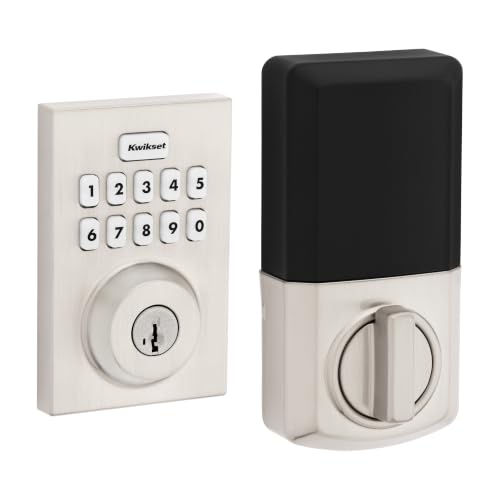
Kwikset Powerbolt 250 Contemporary Keypad Deadbolt
Best for: standalone push-button keypad access without apps
- Color
- Satin Nickel (what this guide is about)
- Access Methods
- Keypad, key
- Auto-Lock Delay
- 30 sec, 1 min, 3 min, 5 min, 10 min
- User Code Capacity
- Up to 25 user codes
- Style
- Contemporary
- Trigger Type
- Push Button
View on Amazon: Kwikset Powerbolt 250 Contemporary Keypad Deadbolt
The Kwikset Powerbolt 250 is a contemporary satin nickel deadbolt featuring a 10-button backlit keypad and physical key access. You get capacity for up to 25 user codes and five one-time codes, alongside an auto-lock function adjustable from 30 seconds to 10 minutes. It suits you if you want straightforward keyless entry with vacation mode security, without needing smart home connectivity or mobile apps.
Pros
- Stores up to 25 user codes and 5 one-time user codes
- Adjustable auto-lock timer with 5 delay settings up to 10 minutes
- Vacation mode temporarily disables all user codes
- Keypad locks for 1 minute and sounds an alarm after 3 incorrect attempts
Cons
- No Wi-Fi, Bluetooth, or mobile app connectivity
- Lacks a fingerprint scanner
Good fit if
- You want standalone keypad and physical key access without app setup.
- You want customizable auto-lock timing between 30 seconds and 10 minutes.
- You want temporary one-time codes for guests alongside a vacation mode.
Skip if
- You need remote unlocking or smartphone integration.
- You prefer biometric fingerprint authentication.
Verdict: Kwikset Powerbolt 250 Contemporary Keypad Deadbolt provides straightforward push-button access with versatile code options and customizable auto-locking. It delivers reliable keyless security without requiring an internet connection or phone application.

Veise Fingerprint Smart Deadbolt
Best for: flexible entry methods and local data storage
- Color
- Satin Nickel (what this guide is about)
- Access Methods
- Fingerprint, app, fob card, code, key
- Smart Home Compatibility
- Amazon Alexa, Google Assistant
- Auto-Lock Delay
- 0–180 seconds
- Dimensions
- 2.7 × 5.8 × 3 inches
- Weight
- 2.25 pounds
This satin nickel electronic deadbolt gives you multiple entry options, including a biometric fingerprint scanner, numeric keypad, app control, key fob, and physical key. The fingerprint sensor recognizes prints in under 0.2 seconds, and the app lets you set an auto-lock timer between zero and 180 seconds. It suits you if you want versatile entry methods and local data storage without needing a physical key every day.
Pros
- Unlocks via fingerprint, mobile app, fob card, PIN code, or physical key
- Auto-lock delay adjusts from 0 to 180 seconds
- On-device AES128 encryption stores fingerprints and credentials locally
- Includes a USB-C emergency power port if batteries run out
Cons
- Requires separate G1 Gateway for Wi-Fi remote access and voice control
- Does not include the four AA batteries required for operation
Good fit if
- You want multiple ways to enter, including fingerprint scan and fob cards.
- You prefer your access logs and biometric credentials stored locally on the lock.
- You want an adjustable auto-lock timer up to 180 seconds.
Skip if
- You need built-in Wi-Fi without buying an extra gateway.
- You prefer batteries included out of the box.
Verdict: Veise Fingerprint Smart Deadbolt delivers fast biometric entry and extensive access options backed by local data storage. It is a capable satin nickel option if you do not mind purchasing a separate gateway for remote smart home control.

Veise Keyless Deadbolt with Matching Knobs
Best for: doors needing a deadbolt and matching knobs
- Color
- Satin Nickel (what this guide is about)
- Access Methods
- User codes, master code, key
- Auto-Lock Delay
- 10–99s
- User Code Capacity
- 20
- Included Door Hardware
- 2 door knobs
- Dimensions
- 7.24 × 9.61 × 3.54 inches
This satin nickel deadbolt set includes two matching door knobs alongside an electronic keypad. You get support for up to 20 user codes, auto-locking adjustable from 10 to 99 seconds, and IP54 weather resistance rated down to -31°F. It suits you if you want a complete entryway refresh with coordinated hardware that operates locally without wireless setup or smartphone requirements.
Pros
- Includes two matching satin nickel door knobs
- Supports 20 user codes plus one-time guest passwords
- IP54 weatherproof rating with operating range of -31°F to 158°F
- Configurable auto-lock delay between 10 and 99 seconds
Cons
- Lacks Wi-Fi, Bluetooth, or mobile app connectivity
- Certified to ANSI/BHMA Grade 3 rather than higher grades
Good fit if
- You want matching satin nickel knobs included with your deadbolt.
- You prefer standalone keypad access without managing smartphone apps.
- You need an adjustable auto-lock timer to secure doors automatically.
Skip if
- You want remote access or smartphone lock notifications.
- You require an ANSI Grade 1 or Grade 2 certified lock.
Verdict: Veise Keyless Deadbolt with Door Knobs delivers an all-in-one satin nickel replacement set that secures your entry using dependable, local keypad credentials.
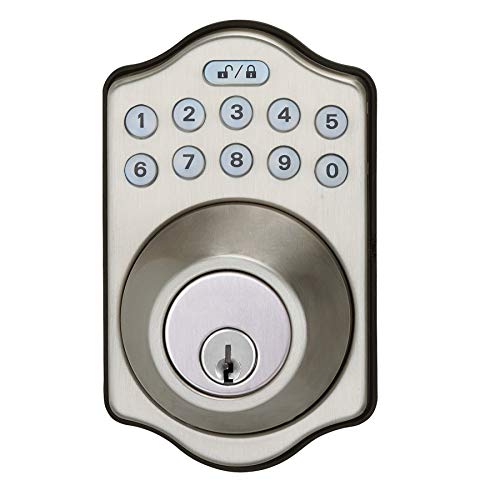
Amazon Basics Keypad Electronic Deadbolt
Best for: standalone keypad entry with temporary guest codes
- Color
- Satin Nickel (what this guide is about)
- Access Methods
- Keypad, traditional key
- Auto-Lock Delay
- 10 - 99 seconds
- User Code Capacity
- 6 user codes
- Dimensions
- 7.44 × 3.08 × 1.37 inches
- Weight
- 2.71 pounds
This Amazon Basics satin nickel electronic deadbolt gives you keyless entry via a touch keypad alongside standard physical key access. It stores up to six customizable user codes and supports single-use temporary codes for guests. The unit includes an adjustable auto-lock timer running between 10 and 99 seconds. It fits standard doors measuring 1-3/8 to 1-3/4 inches thick, making it practical if you want standalone multi-code access without Wi-Fi setups.
Pros
- Stores 6 customizable user codes plus single-use codes
- Adjustable auto-lock delay from 10 to 99 seconds
- Dual access via touch keypad or physical key
- Fits standard door thicknesses from 1-3/8 to 1-3/4 inches
Cons
- No Wi-Fi or mobile app connectivity listed
- No biometric fingerprint scanner
- User code memory limited to 6 codes
Good fit if
- You want keypad entry paired with a traditional physical key backup.
- You need single-use temporary codes for guests or service workers.
- You prefer customizable automatic locking between 10 and 99 seconds.
Skip if
- You require remote app control or smart home integrations.
- You want quick access via a fingerprint reader.
- You need more than 6 permanent user codes stored.
Verdict: Amazon Basics Touch-Control Keypad Deadbolt provides straightforward keypad and keyed entry with single-use visitor codes and automated timed locking. It delivers practical security for standard doors without network connectivity requirements.

Veise Keypad Deadbolt with Lever Handles
Best for: complete entryway upgrades with included lever handles
- Color
- Satin Nickel (what this guide is about)
- Access Methods
- Keypad, key
- Auto-Lock Delay
- 10–99 seconds
- User Code Capacity
- 20
- Included Door Hardware
- 2 lever handles set
- Dimensions
- 2.56 × 5.35 × 6.22 inches
This satin nickel entry set pairs an electronic keypad lock with two matching passage levers. You get keyless entry with up to 20 custom user codes, two backup physical keys, and customizable auto-locking between 10 and 99 seconds. It holds an ANSI Grade 3 rating and IP54 dust and water resistance. It suits you if you want an all-in-one handle and keypad package for standard residential doors without needing wireless network setups.
Pros
- Includes matching interior and exterior lever handles
- Stores up to 20 user codes plus temporary guest access
- Customizable auto-lock timer from 10 to 99 seconds
- IP54 dust and water resistance with ANSI Grade 3 testing
Cons
- No smart home integration, Wi-Fi, or app connectivity
- Requires four AA batteries that are not included
- ANSI Grade 3 is the base residential security tier
Good fit if
- You need a bundled keypad and matching lever set for a complete door update.
- You prefer an offline keypad lock without smartphone apps or Wi-Fi configurations.
- You want auto-locking and temporary guest codes for household visitors.
Skip if
- You want remote control, smartphone access, or smart home voice integration.
- You require ANSI Grade 1 or Grade 2 commercial-tier security hardware.
Verdict: Veise Keypad Door Lock with Lever Handle Set provides a self-contained keypad and matching handle hardware without the complexity of internet connectivity. It delivers practical everyday security with 20 stored codes, auto-locking, and sturdy ANSI Grade 3 construction.

Yale Wi-Fi Smart Deadbolt with Keypad
Best for: dual-band Wi-Fi setups needing unlimited codes
- Color
- Satin Nickel (what this guide is about)
- Access Methods
- Keypad, app, Apple Watch, key
- Connectivity
- 2.4 or 5 GHz Wi-Fi
- User Code Capacity
- Unlimited
- Dimensions
- 0.88 × 2.5 × 4.88 inches
- Weight
- 1 pounds
This Satin Nickel smart deadbolt integrates dual-band 2.4 and 5 GHz Wi-Fi directly, eliminating the need for an external hub. It features BHMA Grade 2 certification, an unlimited user code capacity, and multiple unlocking methods including a physical key, keypad, and mobile access. If you want direct Wi-Fi connectivity with auto-unlocking and DoorSense status monitoring, this lock fits your entryway.
Pros
- Connects to both 2.4 GHz and 5 GHz Wi-Fi networks without an external bridge
- BHMA Grade 2 certified for commercial-grade durability
- Stores an unlimited number of user access codes
- Includes DoorSense technology to verify if the door is shut
Cons
- Yale Access app functionality is restricted to the US and Canada
- Lacks a fingerprint scanner for biometric entry
Good fit if
- You need a smart lock that connects directly to a 5 GHz or 2.4 GHz Wi-Fi network.
- You manage many visitors and require unlimited custom access codes.
- You want physical door-closure detection alongside automatic locking.
Skip if
- You reside outside the United States or Canada where app support is unavailable.
- You want one-touch fingerprint authentication at the door.
Verdict: Yale Wi-Fi Smart Lock Deadbolt with Keypad provides Grade 2 security with dual-band Wi-Fi and unlimited user codes. It delivers versatile keyless operation without requiring an add-on bridge.

Kwikset Halo Wi-Fi Keypad Deadbolt
Best for: Hub-free Wi-Fi control and large code capacity
- Color
- Satin Nickel (what this guide is about)
- Access Methods
- Keypad, Kwikset app, geofencing
- Smart Home Compatibility
- Amazon Alexa, Google Home
- User Code Capacity
- Up to 250 access codes
- Connectivity
- Wi-Fi
- Dimensions
- 3.99 × 4.24 × 9.74 inches
The Kwikset Halo Wi-Fi Keypad Deadbolt is a smart lock finished in Satin Nickel that connects directly to your home network without an external hub. It gives you entry options via a backlit physical keypad, the mobile app, or automated geofencing. With capacity for up to 250 user access codes and support for Alexa and Google Home, this lock suits households needing extensive guest management and straightforward remote access.
Pros
- Direct Wi-Fi connectivity without an external hub
- Stores up to 250 unique user access codes
- Supports keypad entry, mobile app access, and geofencing unlock
- Works with Amazon Alexa and Google Home voice platforms
Cons
- Does not support fingerprint access
- Electronics warranty lasts one year
- Only fits doors between 1-3/8 and 1-3/4 inches thick
Good fit if
- You need to assign up to 250 distinct codes for family and guests.
- You prefer built-in Wi-Fi connectivity without setting up a separate hub.
- You integrate your door locks with Amazon Alexa or Google Home routines.
Skip if
- You prefer unlocking via biometric fingerprint recognition.
- You have a non-standard exterior door thicker than 1-3/4 inches.
Verdict: Kwikset Halo Wi-Fi Keypad Deadbolt delivers extensive code capacity and hub-free wireless management in a clean Satin Nickel finish. It is a practical fit if you need reliable remote access and straightforward voice assistant integration.
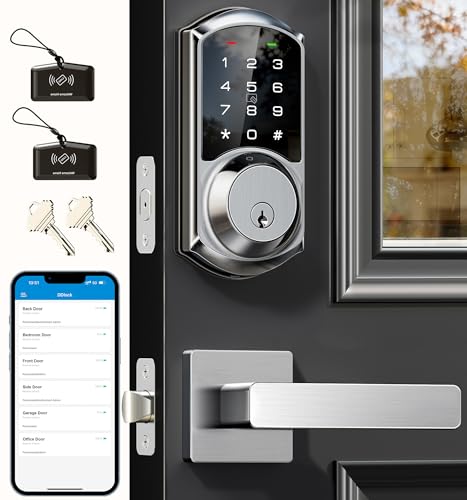
Veise Smart Deadbolt with Lever Handle Set
Best for: rental properties needing matching lever hardware
- Color
- Satin Nickel (what this guide is about)
- Access Methods
- App, code, IC card, key, Apple Watch
- Smart Home Compatibility
- Alexa, Google Assistant
- Auto-Lock Delay
- 5–900s
- User Code Capacity
- 250+
- Included Door Hardware
- Lever handle set
This satin nickel deadbolt kit comes with matching lever handles to outfit standard exterior doors. You can unlock the deadbolt using access codes, IC cards, a physical key, or the DDlock app. It stores over 250 access codes and features customizable 5- to 900-second auto-locking. Certified ANSI Grade 3 with an IP54 weather rating, this set suits property managers and homeowners needing comprehensive access management.
Pros
- Includes matching satin nickel lever handle set
- Stores over 250 passcodes and 1,000 IC cards
- Configurable auto-lock delay from 5 to 900 seconds
- ANSI Grade 3 certified zinc alloy construction with IP54 rating
Cons
- Requires separate G2 gateway for Wi-Fi remote access and voice control
- Lacks a built-in fingerprint scanner
Good fit if
- You need a complete set that includes both the deadbolt and matching door levers.
- You manage rental properties requiring web portal access and customizable passcodes.
- You want wide auto-lock timing flexibility between 5 and 900 seconds.
Skip if
- You want built-in Wi-Fi connectivity without purchasing an add-on gateway.
- You prefer biometric fingerprint entry.
Verdict: Veise Modern Deadbolt with Lever Handle Set provides versatile access management, matching door hardware, and local encryption for high-turnover properties. Remote features require purchasing a separate Wi-Fi gateway.

Veise Fingerprint and Keypad Deadbolt
Best for: offline biometric and keypad door security
- Color
- Satin Nickel (what this guide is about)
- Access Methods
- Fingerprint, keypad, key
- Auto-Lock Delay
- 10-99 seconds
- Fingerprint Capacity
- 20
- User Code Capacity
- 20
- Style
- Traditional
This satin nickel deadbolt offers keyless entry using your fingerprint, a digital keypad, or physical backup keys. It stores up to 20 fingerprints and 20 user codes, featuring an adjustable auto-lock timer between 10 and 99 seconds. With an IP54 weather rating and local data storage, it fits standard exterior doors without requiring wireless setup. It suits you if you want fast biometric access without managing network connections.
Pros
- Stores up to 20 fingerprints and 20 user passcodes
- Adjustable auto-lock delay from 10 to 99 seconds
- IP54 water resistance with operating range of -31°F to 158°F
- Local credential encryption without requiring network connectivity
Cons
- Requires four AA batteries that are not included
- Lacks Wi-Fi, Bluetooth, or mobile app integration
- Carries an ANSI Grade 3 security rating rather than Grade 1 or 2
Good fit if
- You want quick biometric fingerprint unlocking alongside a keypad.
- You prefer an offline lock that stores credentials locally without an app.
- You need customizable user and one-time codes with an auto-lock function.
Skip if
- You want remote access control or lock tracking through a smartphone app.
- You require an ANSI Grade 1 or Grade 2 security certified lock.
Verdict: Veise Fingerprint Keypad Deadbolt provides responsive biometric and PIN access with dependable offline operation. It gives you flexible local entry options without the setup demands of wireless connectivity.

TEEHO Keyless Entry Keypad Door Handle
Best for: integrated handle entry without smart apps
- Color
- Satin Nickel (what this guide is about)
- Access Methods
- PIN codes, backup keys
- Auto-Lock Delay
- 10–99 seconds
- User Code Capacity
- 20
- Included Door Hardware
- handle
- Dimensions
- 2.7 × 6.2 × 6.2 inches
This satin nickel door lock combines an electronic keypad with an integrated entry handle. It supports up to 20 user PIN codes plus temporary one-time codes, backed by two physical keys for emergencies. You can set auto-lock delays between 10 and 99 seconds or toggle passage mode for unrestricted entry. Rated ANSI Grade 3 and IP54 weather-resistant, it suits standard doors where you want straightforward keypad access without smart apps.
Pros
- Stores up to 20 user PIN codes plus temporary single-use codes
- Configurable auto-lock delay from 10 to 99 seconds with one-touch locking
- Passage mode allows temporary free entry without automatic locking
- IP54 weather resistance and solid zinc alloy construction
Cons
- Requires four AA batteries that are not included in the box
- No Wi-Fi, Bluetooth, or mobile app connectivity
- ANSI Grade 3 rating reflects standard residential security rather than commercial grade
Good fit if
- You want an all-in-one keypad and door handle set in satin nickel
- You prefer offline PIN code and physical key access without smartphone pairing
- You need passage mode to keep doors unlocked during busy hours
Skip if
- You want remote access and app monitoring over Wi-Fi
- You need a fingerprint reader for biometric entry
Verdict: TEEHO Keyless Entry Keypad Door Handle delivers practical PIN entry and handle hardware in a single unit. It gives you flexible code management and passage settings without the complexity of wireless networks.

TEEHO Fingerprint Keypad Deadbolt
Best for: standalone fingerprint and keypad door access
- Color
- Satin Nickel (what this guide is about)
- Access Methods
- Fingerprint, keypad, key
- Auto-Lock Delay
- 10–99 seconds
- Fingerprint Capacity
- 20
- User Code Capacity
- 20
- Application
- Front Door
This satin nickel deadbolt gives you keyless entry through a fingerprint scanner, keypad, and physical keys. It stores up to 20 fingerprints and 20 passcodes, alongside an auto-lock function programmable from 10 to 99 seconds. Made with an aluminum alloy housing, BHMA Grade 3 certification, and IP54 weather resistance, it suits you if you want standalone door hardware on standard doors without needing network connections.
Pros
- Stores up to 20 fingerprints and 20 passcodes
- Unlocks in 1 second with 0.3-second fingerprint recognition
- Configurable auto-lock delay from 10 to 99 seconds
- IP54 weather resistance and BHMA Grade 3 certification
Cons
- Requires four AA batteries that are not included
- No wireless network or companion app support listed
Good fit if
- You want fast fingerprint entry for up to 20 users.
- You need an automatic locking timer customizable between 10 and 99 seconds.
- You have a standard exterior door with a thickness between 1-3/8 and 2 inches.
Skip if
- You want smartphone control or Wi-Fi remote management.
- You need security certification above BHMA Grade 3.
Verdict: TEEHO Fingerprint Keypad Deadbolt provides practical standalone security with rapid biometric recognition and generous passcode storage. It serves standard exterior doors effectively without the setup complexity of smart home networks.
Specifications side by side
| Spec | TEEHO Keypad Keyless Entry Deadbolt | Schlage Encode Smart WiFi Deadbolt | Schlage Camelot Electronic Keypad Deadbolt | Philips 4200 Fingerprint Deadbolt with Handle | Kwikset Powerbolt 250 Contemporary Keypad Deadbolt | Veise Fingerprint Smart Deadbolt | Veise Keyless Deadbolt with Matching Knobs | Amazon Basics Keypad Electronic Deadbolt | Veise Keypad Deadbolt with Lever Handles | Yale Wi-Fi Smart Deadbolt with Keypad | Kwikset Halo Wi-Fi Keypad Deadbolt | Veise Smart Deadbolt with Lever Handle Set | Veise Fingerprint and Keypad Deadbolt | TEEHO Keyless Entry Keypad Door Handle | TEEHO Fingerprint Keypad Deadbolt |
|---|---|---|---|---|---|---|---|---|---|---|---|---|---|---|---|
| Access Methods | Keypad, passcode | App, touchscreen, physical key | Keypad | Fingerprint, passcode, app, voice | Keypad, key | Fingerprint, app, fob card, code, key | User codes, master code, key | Keypad, traditional key | Keypad, key | Keypad, app, Apple Watch, key | Keypad, Kwikset app, geofencing | App, code, IC card, key, Apple Watch | Fingerprint, keypad, key | PIN codes, backup keys | Fingerprint, keypad, key |
| Connectivity | not specified | Built-in Wi-Fi | not specified | 2.4 GHz Wi-Fi | not specified | not specified | not specified | not specified | not specified | 2.4 or 5 GHz Wi-Fi | not specified | not specified | not specified | not specified | not specified |
| Smart Home Compatibility | not specified | Alexa, Google Home | not specified | Alexa, Google Assistant | not specified | Amazon Alexa, Google Assistant | not specified | not specified | not specified | not specified | Amazon Alexa, Google Home | Alexa, Google Assistant | not specified | not specified | not specified |
| Auto-Lock Delay | 10-99 seconds | not specified | not specified | 0–180 seconds | 30 sec, 1 min, 3 min, 5 min, 10 min | 0–180 seconds | 10–99s | 10 - 99 seconds | 10–99 seconds | not specified | not specified | 5–900s | 10-99 seconds | 10–99 seconds | 10–99 seconds |
| Fingerprint Capacity | not specified | not specified | not specified | not specified | not specified | not specified | not specified | not specified | not specified | not specified | not specified | not specified | 20 | not specified | 20 |
| User Code Capacity | 20 | Up to 100 access codes | not specified | not specified | Up to 25 user codes | not specified | 20 | 6 user codes | 20 | Unlimited | Up to 250 access codes | 250+ | 20 | 20 | 20 |
| Included Door Hardware | not specified | Deadbolt (Single) | not specified | Handle set | not specified | not specified | 2 door knobs | not specified | 2 lever handles set | not specified | not specified | Lever handle set | not specified | handle | not specified |
| Access Method | Keypad | not specified | Keypad | Keypad, Fingerprint, Remote Control | Keypad | Fingerprint, App Control | not specified | Keypad | Keypad | Keypad | Keypad | not specified | Keypad, Fingerprint | Keypad | Keypad, Fingerprint |
| Color | Satin Nickel | Satin Nickel | Satin Nickel | Satin Nickel | Satin Nickel | Satin Nickel | Satin Nickel | Satin Nickel | Satin Nickel | Satin Nickel | Satin Nickel | Satin Nickel | Satin Nickel | Satin Nickel | Satin Nickel |
| Application | Front Door | not specified | not specified | Front Door | not specified | not specified | not specified | not specified | not specified | not specified | not specified | not specified | not specified | not specified | Front Door |
| Included Hardware | not specified | not specified | not specified | Handle | not specified | not specified | Knob | not specified | Lever | not specified | not specified | Lever | not specified | Handle | not specified |
| Style | not specified | not specified | not specified | not specified | Contemporary | not specified | not specified | Traditional | not specified | not specified | not specified | Modern | Traditional | not specified | not specified |
| Trigger Type | not specified | not specified | not specified | not specified | Push Button | not specified | not specified | not specified | not specified | not specified | not specified | not specified | not specified | not specified | not specified |
| Special Features | not specified | not specified | not specified | Auto Lock | Auto Lock | not specified | not specified | not specified | not specified | not specified | not specified | not specified | not specified | not specified | not specified |
| Dimensions | 5.12 × 2.95 × 1.3 inches | 0.9 × 3 × 5 inches | 4.25 × 3.25 × 5.5 inches | 2.7 × 0.73 × 5.72 inches | 3 × 5 × 7 inches | 2.7 × 5.8 × 3 inches | 7.24 × 9.61 × 3.54 inches | 7.44 × 3.08 × 1.37 inches | 2.56 × 5.35 × 6.22 inches | 0.88 × 2.5 × 4.88 inches | 3.99 × 4.24 × 9.74 inches | 12.6 × 7.08 × 3.93 inches | 2.71 × 1.2 × 5.47 inches | 2.7 × 6.2 × 6.2 inches | 5.12 × 2.95 × 1.3 inches |
| Weight | 1.76 pounds | 3.31 pounds | 5.1 pounds | not specified | not specified | 2.25 pounds | not specified | 2.71 pounds | 2.9 pounds | 1 pounds | 2.5 pounds | not specified | 1.9 pounds | not specified | 1 pounds |
| Size | 5.125 x 3 x 4.25 inches | Deadbolt (Single) | Pack of 1 | not specified | not specified | not specified | 1.7 x 5.5 x 2.75 inches | 6 Pack | 2.96 x 6.3 x 1.15 inches | Wi-Fi | not specified | 12.59 x 7.08 x 3.93 Inches | not specified | 5.3" x 5.4"x 3" | US Standard Door Sizes |
| Model | TE001 | BE489WBCAM619 | BE365VCAM619 | DDL242X-1HW | 992500-010 | VE017 | KS01C | PL10S10 | KS01B | YRD410-WF1-619 | 99380-001 | VE06-L | KS02A | TE004 | TE002 |
If you also need seating specifications for a home office, comparison data for the best green gaming chairs outlines armrest adjustability, frame materials, and weight capacities.
How to Choose the Right Deadbolt
-
Check Entry Access Methods
Look at how you unlock the door daily. While standard models rely strictly on keypads, hybrid designs include biometric fingerprint readers. A fingerprint scanner offers one-touch unlocking without typing a PIN or carrying physical keys, which helps when your hands are full. If you prefer quick biometric entry alongside regular passcodes, inspect the access method specs. Models like the Veise Fingerprint Smart Deadbolt list fingerprint scanning in their specifications. If you only want basic numbers, a standard keypad model keeps operation simpler.
-
Review Included Hardware Sets
Determine whether you need just a deadbolt or an entire lockset. Some units ship as standalone deadbolts, whereas others bundle matching passage levers, handles, or knobs in the same satin nickel finish. Choosing an integrated kit eliminates the hassle of finding separate hardware that matches the deadbolt styling and color. If you are updating an entire entryway or replacing worn latch hardware, consider models like the Veise Keypad Deadbolt with Lever Handles. Otherwise, a standalone deadbolt works well with your existing latch hardware.
-
Compare Lock Security Grades
Review the certified security rating on the specification sheet. Deadbolts typically feature ANSI Grade 2 or Grade 3 ratings. Grade 2 hardware provides enhanced physical strength and durability for main entry doors facing frequent residential use. Grade 3 locks offer baseline residential protection suitable for secondary exterior entrances or interior access points. If higher mechanical endurance is your priority, look for Grade 2 specifications. For example, the Schlage Camelot Electronic Keypad Deadbolt lists Grade 2 security, ensuring solid metal construction for your primary front door.
-
Evaluate Keypad Trigger Types
Consider how the numbers are activated when entering codes. Locks feature either physical push buttons or smooth touch-control panels. Push buttons give physical tactile feedback with each press, making them easy to operate in the dark or while wearing gloves during cold weather. Touch-control surfaces provide a flat, modern aesthetic with no mechanical buttons to wear down over time. If tactile feedback matters for your entryway, check the trigger type specifications on units like the Kwikset Powerbolt 250 Contemporary Keypad Deadbolt.
-
Measure Exterior Lock Dimensions
Measure the available space on your door face before selecting a deadbolt. Exterior escutcheons vary significantly in length, width, and projection thickness. If your door features decorative molding, integrated glass panels, or a tight clearance near the storm door, bulky hardware might not fit cleanly. Reviewing the published width and length prevents clearance issues during installation. Compact units like the Yale Wi-Fi Smart Deadbolt with Keypad measure just 2.5 inches wide and under one inch thick, fitting doors where clearance is limited.
-
Check Guest Code Capabilities
Review how each lock handles temporary visitors, contractors, or service personnel. Certain standalone keypads let you program single-use or temporary guest codes that expire after use, preventing visitors from retaining permanent access to your home. This feature provides security control without requiring internet connectivity or smartphone applications. If you host guests or rent out rooms, check the code management specifications. For example, the Amazon Basics Keypad Electronic Deadbolt specifically supports temporary guest passcodes alongside its permanent master codes for standard doors.
Frequently asked questions
Can you buy a satin nickel deadbolt that includes matching door handles or knobs?
Yes, several satin nickel sets include matching door hardware in the box. Models like the Veise KS01C package matching knobs, while the Veise KS01B and VE06-L come with lever handles. The Philips 4200 series also includes an entry handle. These all-in-one sets let you match your exterior trim without buying separate mechanical latch hardware for your door.
Do all smart satin nickel deadbolts connect directly to Wi-Fi?
No, not all smart deadbolts include direct Wi-Fi capability. Models like the Schlage Encode, Yale YRD410-WF1-619, and Kwikset Halo feature native Wi-Fi connections that operate without extra bridges. In contrast, options such as the Veise VE017 smart deadbolt store data locally and require a separate gateway accessory if you want remote smart home app control from outside your home network.
Which satin nickel deadbolts offer commercial ANSI or BHMA security grades?
You can find verified security grades on multiple satin nickel deadbolts on this list. The Schlage Camelot BE365VCAM619 and Yale YRD410-WF1-619 provide Grade 2 security ratings for residential entry doors. If you look at complete handle combinations, the Veise KS01B keypad deadbolt features ANSI Grade 3 construction. These standards define the deadbolt chassis strength and physical lock durability.
How do standalone keypad deadbolts operate without internet access?
Standalone keypad deadbolts store all PIN credentials and system settings locally on internal memory chips. Models like the Kwikset Powerbolt 250, Amazon Basics PL10S10, and Schlage BE365VCAM619 run entirely offline without internet, apps, or wireless connections. You program guest pins, toggle auto-lock functions, or set temporary access codes directly on the physical push-button keypad using manual programming sequences.
What satin nickel deadbolts support biometric fingerprint unlocking?
Several models combine satin nickel exterior trim with integrated biometric fingerprint sensors. The Philips 4200, Veise VE017, Veise KS02A, and TEEHO TE002 deadbolts all feature fingerprint scanners alongside numeric keypads. These biometric readers verify authorized fingerprints locally to release the deadbolt, giving you an alternative keyless entry method if you prefer not to type PIN codes on a push-button surface.
Can satin nickel deadbolts lock automatically behind you?
Yes, multiple satin nickel deadbolts include automated locking features to secure doors after entry. Models like the Kwikset Powerbolt 250, Philips 4200, Amazon Basics PL10S10, and Veise KS01B provide built-in auto-lock functionality. This mechanism automatically throws the deadbolt latch after a predetermined delay, ensuring your entryway stays locked without requiring you to manually turn the thumbturn or press a lock button.
How many user codes can you store in a satin nickel deadbolt?
Code storage capacity varies based on the deadbolt hardware and connectivity specifications. Standalone sets like the Veise KS01B store up to 20 user codes locally on the device. For larger households or rental setups, Wi-Fi models expand access management considerably. The Yale YRD410-WF1-619 supports unlimited user codes through network management, while the Kwikset Halo provides large-capacity code storage via mobile configuration.