15 Best Deadbolts with Google Assistant, Compared
As an Amazon Associate we earn from qualifying purchases. Links on this page are affiliate links.
Connecting a deadbolt with Google Assistant lets you check lock status and run voice commands directly from your smart display or phone. The ULTRALOQ Bolt Smart Deadbolt with Handle takes the top spot by combining built-in Wi-Fi and Matter connectivity with fingerprint, keypad, and remote access hardware.
We compared 15 models based on the specifications published on their listings. This guide helps you choose the right wireless protocol, entry methods, and physical hardware for your front door setup.
Quick picks
The best fit for you
- You want an all-in-one deadbolt and handle set. ULTRALOQ Bolt Smart Deadbolt with Handle It bundles an exterior handle with Wi-Fi and Matter connectivity for direct Google Assistant integration.
- You need a waterproof deadbolt with built-in Wi-Fi. Philips Built-in Wi-Fi Smart Deadbolt It provides verified waterproof protection alongside built-in Wi-Fi for Google Assistant voice commands.
- You prefer standard physical keys over keypads or biometrics. Level Lock+ WiFi Smart Deadbolt It uses standard physical key access and built-in Wi-Fi to link directly with Google Assistant.
- You want the lightest deadbolt retrofit for your door. August Smart Lock Pro with Connect Hub At 0.87 pounds, it retrofits your interior deadbolt with Wi-Fi and Google Assistant support.
Our 15 picks

ULTRALOQ Bolt Smart Deadbolt with Handle
Best for: flexible keyless entry with Google Assistant control
- Smart Home Compatibility
- Alexa, Google Assistant (what this guide is about)
- Access Methods
- Fingerprint, passcode, app, voice, key
- Fingerprint Capacity
- Up to 50
- User Code Capacity
- Up to 50
- Included Door Hardware
- Deadbolt and handle
- Connectivity
- Wi-Fi, Matter
The ULTRALOQ Bolt is a smart deadbolt and handle set equipped with built-in 2.4 GHz Wi-Fi and Matter over Thread support. You get native Google Assistant integration for voice commands alongside fingerprint recognition for up to 50 prints and keypad entry for 50 codes. It suits you if you want versatile entry options and direct smart home voice control without requiring an external Wi-Fi bridge.
Pros
- Built-in 2.4 GHz Wi-Fi and Matter over Thread for hub-free Google Assistant control
- Stores up to 50 fingerprints and 50 access codes
- Battery life rated up to 18 months via Thread network
- Includes matching door handle and two physical backup keys
Cons
- Door sensor is not included for open or closed state detection
- Matter functionality requires a separate Matter over Thread hub or border router
- Wi-Fi connectivity is limited to 2.4 GHz networks only
Good fit if
- You want Google Assistant voice control over 2.4 GHz Wi-Fi without buying an add-on bridge.
- You need multiple access options including fingerprint scanning, pin codes, and physical keys.
- You want a complete set that includes both the smart deadbolt and a matching door handle.
Skip if
- You require an integrated door sensor to confirm whether the door is physically closed.
- You only run a 5 GHz Wi-Fi network without 2.4 GHz support.
- You plan to use Matter over Thread features without an existing Thread border router.
Verdict: ULTRALOQ Bolt Smart Deadbolt with Handle delivers comprehensive entry flexibility and straightforward Google Assistant integration via 2.4 GHz Wi-Fi or Matter over Thread. It provides reliable voice control and versatile hardware access methods in a single package.

Sifely Fingerprint Smart Lock with Handle
Best for: rental hosts wanting multi-option keyless access
- Smart Home Compatibility
- Alexa, Google Assistant (what this guide is about)
- Access Methods
- Fingerprint, keypad, app, fob, key
- Connectivity
- Bluetooth
- Included Door Hardware
- Handle
- Application
- Home, Rental Property
- Dimensions
- 7 × 3 × 1.12 inches
This Sifely smart door lock gives you a reversible handle, fingerprint reader, keypad, FOB, and physical key access. You can connect it to Google Assistant and Alexa for voice control via an optional WiFi Gateway. Integrated Bluetooth provides local app controls and code generation. The 6-pound hardware fits standard doors without extra drilling. It suits you if you manage rentals or need multi-method entry with Google Assistant.
Pros
- Supports fingerprint, keypad, app, FOB, and physical key entry
- Integrates with Google Assistant and Alexa using optional WiFi Gateway
- Reversible handle fits standard doors without extra drilling
- Generates guest access codes through app or web interface
Cons
- Requires separate WiFi Gateway accessory for voice and remote access
- Limited to local Bluetooth connectivity out of the box
Good fit if
- You want multiple entry methods including fingerprint, keypad, and FOB.
- You manage rental properties needing app- or web-generated guest codes.
- You need a reversible handle setup without drilling new holes.
Skip if
- You require built-in Wi-Fi without buying an add-on gateway.
- You want a standalone deadbolt without an integrated door handle.
Verdict: Sifely Fingerprint Smart Lock with Handle provides versatile keyless entry options for standard doors, but demands an optional gateway to enable its Google Assistant capabilities.

Philips Built-in Wi-Fi Smart Deadbolt
Best for: budget-conscious Google Assistant voice and keypad access
- Smart Home Compatibility
- Alexa, Google Assistant (what this guide is about)
- Access Methods
- Passcode, key, app, voice
- Connectivity
- Built-in Wi-Fi
- Auto-Lock Delay
- 10-180 seconds
- User Code Capacity
- 100
- Water Resistance
- Waterproof
The Philips Wi-Fi Keypad Deadbolt connects directly to your home network without an external bridge. You can lock or unlock the door using Google Assistant voice commands, physical buttons, a standard key, or the companion mobile app. It supports up to 100 access codes and features automatic locking adjustable between 10 and 180 seconds. This lock suits you if you want dependable voice and keypad entry without needing extra hub hardware.
Pros
- Direct Wi-Fi connectivity without a separate bridge
- Works with Google Assistant and Alexa voice control
- Stores up to 100 custom user passcodes
- Customizable auto-lock timer from 10 to 180 seconds
- Operates from -31°F to 150°F with IP54 water resistance
Cons
- Requires eight AA batteries that are not included
- Lacks a fingerprint sensor
Good fit if
- You want Google Assistant integration through direct Wi-Fi without a separate bridge.
- You prefer physical push buttons instead of a touchscreen.
- You need multiple code schedules for guests, tenants, or cleaners.
Skip if
- You want biometric or fingerprint entry options.
- You prefer a smart lock that includes batteries in the box.
Verdict: Philips Wi-Fi Keypad Deadbolt delivers standalone Google Assistant voice control and built-in Wi-Fi using physical push buttons. It provides dependable keyless security with flexible code management and adjustable auto-locking.

Philips Wi-Fi Fingerprint Smart Deadbolt
Best for: direct Wi-Fi control and flexible guest access
- Smart Home Compatibility
- Alexa, Google Assistant (what this guide is about)
- Access Methods
- Fingerprint, PIN, app, voice, key
- Connectivity
- 2.4 GHz Wi-Fi
- Auto-Lock Delay
- 10 to 180 seconds
- Fingerprint Capacity
- 50
- User Code Capacity
- 100
This electronic deadbolt connects straight to your 2.4GHz Wi-Fi network without an external bridge, giving you Google Assistant voice control right away. It stores up to 50 fingerprints on its angled scanner and supports up to 100 custom passcodes for guests. You can set auto-locking between 10 and 180 seconds. It suits homeowners and rental hosts who want direct voice commands and multiple keyless access methods for standard entry doors.
Pros
- Built-in 2.4GHz Wi-Fi requires no extra hub or bridge
- Integrates with Google Assistant and Alexa for voice control
- Fingerprint scanner holds up to 50 unique prints
- Supports up to 100 customized or scheduled passcodes
- Adjustable auto-lock timer from 10 to 180 seconds
Cons
- Requires 8 AA batteries that are not included
- Only connects to 2.4GHz Wi-Fi networks
- Fits doors up to 2 inches thick, excluding thicker custom doors
Good fit if
- You want Google Assistant voice control without buying an external hub.
- You manage rental guests or service workers using temporary passcodes.
- You prefer unlocking via fingerprint or physical key backups.
Skip if
- You have an exterior door thicker than 2 inches.
- You want rechargeable batteries included in the box.
Verdict: Philips Wi-Fi Fingerprint Smart Deadbolt delivers built-in Google Assistant support, 50-print biometric storage, and direct Wi-Fi connectivity without requiring an extra hub. It gives you flexible keyless entry and simple passcode management for standard doors.

Sifely Keypad Fingerprint Smart Deadbolt
Best for: offices needing high-capacity user access and passage mode
- Smart Home Compatibility
- Alexa, Google Assistant (what this guide is about)
- Access Methods
- Fingerprint, keypad code, app, fob, key
- Fingerprint Capacity
- Up to 100+
- User Code Capacity
- Up to 100+
- Color
- Black
- Application
- Home, Office, Apartment, Rental Property
This smart deadbolt gives you five unlock methods: fingerprint scanning, keypad codes, key fobs, physical keys, and app control. It stores over 100 fingerprints and 100 codes, making it suitable for shared work environments and busy offices. You can switch on passage mode during business hours so doors stay unlocked. Voice integration with Google Assistant requires the separate Sifely Gateway for remote Wi-Fi connectivity and off-site web portal management.
Pros
- Passage mode keeps the deadbolt unlocked during office hours
- Stores more than 100 fingerprints and 100 user codes
- Offers five entry options including fobs, keys, and biometrics
- Includes a web portal and app for schedule management
Cons
- Requires a separately sold gateway for Google Assistant voice commands
- Lacks integrated Wi-Fi on the lock body
Good fit if
- You need passage mode to keep doors open for clients or employees.
- You manage multiple users with over 100 codes and fingerprints.
- You want web portal access to track logs and schedule entry.
Skip if
- You want Google Assistant control out of the box without buying an extra gateway.
- You prefer a smart lock with built-in Wi-Fi hardware.
Verdict: Sifely Fingerprint Keypad Smart Deadbolt provides high-capacity user tracking and flexible office passage modes. You must add an external gateway if you plan to link it to Google Assistant.

samtechT Bluetooth Smart Lock with Handle
Best for: Doors needing an integrated handle and Bluetooth access
- Smart Home Compatibility
- Alexa, Google Assistant (what this guide is about)
- Access Methods
- Fingerprint, keypad, FOB, code, app, key
- Connectivity
- Bluetooth
- Included Door Hardware
- Handle
- Color
- Silver
- Application
- Home, Rental Property
This samtechT unit combines a door handle, numeric keypad, and fingerprint scanner with Bluetooth connectivity. For Google Assistant voice control, you must connect it to a separate gateway. It supports six access methods, including physical keys and fobs, and fits standard doors between 1-3/8 inches and 2-1/4 inches thick. It suits you if you need a complete handle-and-lock set with multiple entry options and local Bluetooth management.
Pros
- Includes integrated handle and auto-lock function
- Six unlock methods: fingerprint, keypad, fob, app, code, and key
- Fits standard door thicknesses from 1-3/8 inches to 2-1/4 inches
- Supports time-limited, one-time, and permanent access codes
Cons
- Requires an external gateway for Google Assistant integration
- Relies on local Bluetooth connection without built-in Wi-Fi
Good fit if
- You want a smart lock that includes an exterior handle
- You prefer multiple entry choices like fingerprints, codes, and fobs
- You manage guest entry using temporary or scheduled codes
Skip if
- You want Google Assistant voice control directly without an extra gateway
- You only need a deadbolt replacement and want to keep your existing handle
Verdict: samtechT Bluetooth Smart Lock with Handle provides six access methods and an integrated handle, but requires a gateway for Google Assistant support.
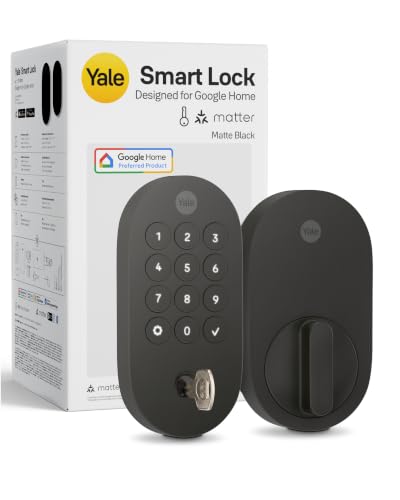
Yale Smart Deadbolt with Matter
Best for: Google Home users with a Matter hub
- Smart Home Compatibility
- Google Assistant (what this guide is about)
- Access Methods
- App, keypad, voice, key
- Connectivity
- Matter over Thread
- Color
- Matte Black
- Dimensions
- 0.88 × 2.56 × 5.38 inches
- Weight
- 3 pounds
This Yale smart deadbolt provides keyless entry using Google Assistant voice commands, a physical keypad, your phone, or a backup physical key. Built with Matter over Thread connectivity, it integrates directly with Google Home hardware like Nest Hub. It features BHMA Grade 2 certification and operates in temperatures from -22 to 140°F. This lock suits you if you already run a Google Home setup and want multi-protocol Matter support.
Pros
- Supports Google Assistant voice control and Google Home integration
- Uses Matter over Thread technology for mesh networking
- Includes a physical backup key alongside the digital keypad
- BHMA Grade 2 certified for temperatures between -22 and 140°F
Cons
- Requires a separate Matter hub for remote access
- Yale Access and Google Home app control limited to US and Canada
- Lacks a built-in fingerprint scanner
Good fit if
- You already have a Google Home system with a compatible Matter hub
- You want both digital keypad entry and a standard mechanical key backup
- You need a deadbolt rated for exterior temperatures down to -22°F
Skip if
- You want remote access without buying or setting up a Matter hub
- You live outside the United States or Canada
- You prefer biometric fingerprint access rather than pin codes
Verdict: Yale Smart Lock Deadbolt with Matter delivers versatile Google Assistant and Matter over Thread connectivity with solid Grade 2 hardware. It is an ideal pick if you already maintain a compatible smart home hub.

Yale Google Nest x Yale Keyless Deadbolt
Best for: Google Assistant users wanting pure keyless entry
- Smart Home Compatibility
- Google Assistant (what this guide is about)
- Access Methods
- Keypad, app, passcode
- Installation Type
- Deadbolt replacement
- Color
- Satin Nickel
- Application
- Front Door
- Dimensions
- 4.5 × 2.59 × 0.8 inches
The Google Nest x Yale Lock is a keyless deadbolt designed for your front door with native Google Assistant compatibility. You can manage access using the LED keypad, configure scheduled passcodes, or control locking remotely via the Nest app. It includes tamper alerts, one-touch locking, and an auto-lock function. This lock suits you if you prioritize deep integration with the Nest ecosystem and prefer passcode access.
Pros
- Tamper alerts notify you if someone attempts forced entry
- Privacy Mode disables the LED keypad to prevent passcode entry
- Supports remote access, scheduled passcodes, and status checks via the Nest app
- Keypad chimes provide audible confirmation for locking, unlocking, and mode changes
Cons
- No physical keyhole for traditional key backup
- No fingerprint or biometric entry sensor listed
Good fit if
- You want Google Assistant integration managed directly through the Nest app.
- You prefer keyless entry using an illuminated LED keypad or mobile app.
- You need scheduled access codes and privacy modes for guests.
Skip if
- You want a physical metal key backup for manual unlocking.
- You prefer biometric or fingerprint scanning to unlock your door.
Verdict: Google Nest x Yale Keypad Smart Deadbolt provides secure keyless entry with Google Assistant support and comprehensive remote management through the Nest app. It replaces standard deadbolts cleanly, offering audible keypad feedback and scheduled passcodes without physical keys.
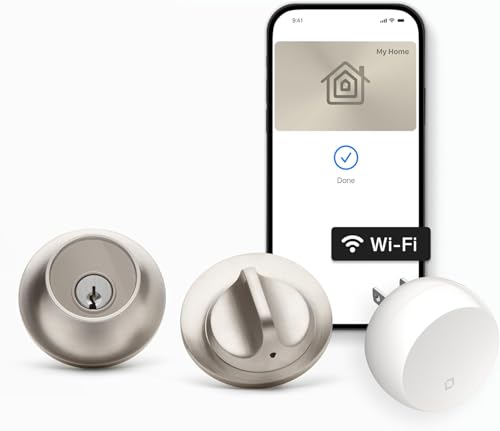
Level Lock+ WiFi Smart Deadbolt
Best for: discreet installation with flexible key access
- Smart Home Compatibility
- Alexa, Google Assistant (what this guide is about)
- Access Methods
- Apple Home Key, app, key fob
- Connectivity
- 2.4 GHz Wi-Fi
- Color
- Satin Nickel
- Dimensions
- 4.5 × 2.75 × 2.75 inches
The Level Lock+ WiFi is a compact smart deadbolt measuring 2.75 by 2.75 inches that hides its technology inside your door. You get Google Assistant, Amazon Alexa, and Apple HomeKit voice controls alongside 2.4 GHz Wi-Fi via the included Level Connect bridge. Entry options include physical keys, key fobs, the mobile app, and Apple Home Key. It suits you if you prefer standard exterior styling.
Pros
- Works with Google Assistant, Amazon Alexa, and Apple HomeKit
- Supports Apple Home Key, key fobs, mobile app, and physical keys
- Includes Level Connect bridge for 2.4 GHz Wi-Fi remote access
- Compact 2.75 by 2.75 inch footprint with hidden internal hardware
Cons
- Requires a separate keypad accessory for code-based access
- Relies on an external plug-in bridge rather than built-in Wi-Fi hardware
- Lacks a fingerprint sensor or biometric scanning hardware
Good fit if
- You want Google Assistant integration without visible electronic hardware on your door.
- You use Apple Home Key, fobs, or physical keys for daily entry.
- You need remote app control over 2.4 GHz Wi-Fi with the included bridge.
Skip if
- You want an integrated keypad out of the box without extra accessories.
- You require built-in biometric or fingerprint access at the lock.
Verdict: Level Lock+ WiFi Smart Deadbolt delivers Google Assistant voice control and flexible key-based access while maintaining the appearance of standard mechanical hardware. Its included bridge ensures remote connectivity without adding bulk to your door exterior.

SwitchBot Lock Vision Pro Smart Deadbolt
Best for: touchless biometric entry with Matter integration
- Smart Home Compatibility
- Alexa, Google Assistant (what this guide is about)
- Access Methods
- Face, palm vein, fingerprint, app, PIN
- Connectivity
- WiFi, Bluetooth
- Power Source
- Battery Powered
- Color
- Matte Black
- Application
- Home, Front Door
The SwitchBot Lock Vision Pro Smart Deadbolt is a Wi-Fi and Matter-enabled deadbolt that links directly to Google Assistant without requiring a dedicated bridge. Along with voice and app control, you get multiple biometric access methods, including infrared 3D face recognition and contactless palm vein scanning. Equipped with a 10,000mAh battery and instant sensor-based auto-locking, it suits households seeking diverse, touchless entry options for their connected door.
Pros
- Matter over Wi-Fi connects to Google Assistant without an extra hub
- Multiple biometric options including 3D face recognition, contactless palm vein, and fingerprint
- 10,000mAh main battery paired with a CR123A emergency backup
- Geomagnetic and accelerometer sensors trigger instant auto-locking upon door closure
- IP65 weather-resistance rating for exterior durability
Cons
- Requires using the included lock cylinder, making existing keys incompatible
- Seven-inch exterior length is bulkier than standard deadbolts
Good fit if
- You want hands-free 3D facial recognition or palm vein entry alongside Google Assistant.
- You want direct Wi-Fi and Matter integration without a separate bridge.
- You prefer instant sensor-driven auto-locking as soon as the door closes.
Skip if
- You want to keep your existing deadbolt cylinder and physical house keys.
- You prefer a minimalist, compact lock footprint on your door.
Verdict: SwitchBot Lock Vision Pro Smart Deadbolt combines Matter over Wi-Fi connectivity for Google Assistant with versatile 3D face and palm vein unlocking. It provides comprehensive keyless access if you are prepared to swap out your current deadbolt cylinder.

TCL Palm Vein Wi-Fi Smart Deadbolt
Best for: palm vein recognition with Google Assistant control
- Smart Home Compatibility
- Alexa, Google Assistant (what this guide is about)
- Access Methods
- Palm vein, app, passcode, key, fob
- Power Source
- Battery Powered
- Connectivity
- Wi-Fi
- Application
- Front Door
- Dimensions
- 5 × 3 × 1 inches
This Wi-Fi smart deadbolt replaces your front door lock with sub-dermal palm vein biometrics, an illuminated keypad, and a 7,800mAh rechargeable battery rated for up to eight months. It integrates directly with Google Assistant and Amazon Alexa for voice-controlled locking. With the companion Smart Life app, you can track entry logs and issue temporary passcodes, making it a solid fit if you want touchless scanning and smart home routines.
Pros
- Works directly with Google Assistant and Amazon Alexa voice commands
- Near-infrared palm vein scanner eliminates standard fingerprint reading issues
- Includes multiple unlock methods: palm vein, PIN codes, app, key fobs, and physical keys
- Rechargeable 7,800mAh battery provides up to eight months of runtime
Cons
- Lacks Apple HomeKit and Matter compatibility
- Recharging the internal battery requires temporary downtime compared to swapping AA cells
Good fit if
- You want Google Assistant voice control paired with biometric palm vein scanning.
- You need multiple unlock options for guests, including touchless vein recognition, keypads, and fobs.
- You prefer a rechargeable power pack over stocking disposable alkaline batteries.
Skip if
- You run your smart home primarily on Apple HomeKit or Matter platforms.
- You prefer standard replaceable batteries to avoid charging downtime.
Verdict: TCL Palm Vein Wi-Fi Deadbolt delivers dependable Google Assistant connectivity alongside advanced sub-dermal biometric access. It is an effective upgrade if you want versatile entry methods without the misreads common to standard fingerprint scanners.

TCL Palm Vein Wi-Fi Smart Deadbolt
Best for: Google Assistant users wanting palm vein entry
- Smart Home Compatibility
- Alexa, Google Assistant (what this guide is about)
- Access Methods
- Palm vein, passcode, app, NFC card, key
- Included Door Hardware
- Deadbolt
- Power Source
- Battery Powered
- Connectivity
- Wi-Fi
- Application
- Home, Front Door
This Wi-Fi smart deadbolt integrates with Google Assistant for voice locking, unlocking, and status checks. It replaces standard fingerprint readers with a subcutaneous palm vein scanner alongside a touchscreen keypad, NFC support, and physical keys. A rechargeable 10,000mAh battery provides up to eight months of runtime. This lock suits you if you want multiple keyless access methods and direct voice control without installing an external bridge.
Pros
- Works directly with Google Assistant and Alexa over Wi-Fi
- Subcutaneous palm vein recognition unlocks in 0.3 seconds
- 10,000mAh rechargeable battery delivers up to 8 months of use
- Six entry methods including palm vein, keypad, app, NFC, and physical key
- IP55 weather-resistant alloy construction with built-in doorbell
Cons
- Lacks Apple HomeKit or Matter compatibility
- Requires recharging a large battery pack rather than swapping standard AA cells
- Large 5 by 5-inch lock footprint takes up more door space than slim deadbolts
Good fit if
- You want to lock, unlock, and check door status using Google Assistant voice commands.
- You prefer palm vein scanning over traditional fingerprint readers for wet or worn fingers.
- You need versatile entry choices for guests, including temporary keypad codes and NFC cards.
Skip if
- You use Apple HomeKit as your primary smart home platform.
- You have a custom door thickness outside the 1-3/8-inch to 2-1/8-inch range.
- You prefer disposable alkaline batteries over recharging via USB-C.
Verdict: TCL Palm Vein Wi-Fi Smart Deadbolt pairs direct Google Assistant control with rapid biometric palm scanning. Its broad selection of six entry methods and built-in Wi-Fi make it a flexible choice for standard US doors.

August Smart Lock Pro with Connect Hub
Best for: upgrading deadbolts while keeping existing keys
- Smart Home Compatibility
- Alexa, Google Assistant (what this guide is about)
- Connectivity
- Wi-Fi
- Color
- Silver
- Application
- Home
- Dimensions
- 3.4 × 2.22 × 3.4 inches
- Weight
- 13.9 ounces
The August Home Smart Lock Pro with Connect Hub lets you add Google Assistant voice control and Wi-Fi connectivity while keeping your existing deadbolt and exterior keys. It measures 3.4 by 3.4 inches, weighs 0.87 pounds, and includes auto-lock and auto-unlock capabilities. This setup suits you if you want voice and remote door monitoring without replacing outside hardware or physical keys.
Pros
- Works with Google Assistant and Alexa for voice control
- Installs over your existing deadbolt to keep original keys
- Includes Auto-Lock and Auto-Unlock functions
- Provides remote monitoring via included Wi-Fi bridge
Cons
- Requires a separate plug-in hub for Wi-Fi operation
- No built-in keypad or biometric scanner
- Only listed in silver finish
Good fit if
- You want Google Assistant voice control without replacing your exterior lock hardware.
- You need automated locking and unlocking when arriving or leaving.
- You prefer to keep your existing physical house keys.
Skip if
- You prefer an all-in-one unit without an external plug-in Wi-Fi hub.
- You want an integrated exterior keypad or fingerprint reader.
Verdict: August Home Smart Lock Pro with Connect Hub gives you voice control through Google Assistant while keeping your existing door lock and keys intact. Its compact retrofit design and automated locking make it a practical upgrade for standard residential deadbolts.

Sifely Keypad Smart Deadbolt
Best for: rental properties needing high passcode capacity
- Smart Home Compatibility
- Alexa, Google Assistant (what this guide is about)
- Access Methods
- Keypad, app, key, fob, one-touch lock
- User Code Capacity
- 150+
- Connectivity
- Wi-Fi
- Color
- Silver
- Application
- Home, Rental Property
This Sifely smart deadbolt gives you keyless entry through a keypad, physical key, fob, or smartphone app. It integrates with Google Assistant and Alexa via a gateway, letting you check door status and lock or unlock using voice commands. With support for over 150 passcodes, auto-lock, and passage mode, this lock suits rental hosts and homeowners who need flexible guest access without managing physical keys.
Pros
- Stores over 150 permanent, temporary, recurring, or one-time codes
- Integrates with Google Assistant and Alexa via a gateway
- Includes auto-lock and passage mode settings
- Offers five access methods including keypad, fob, physical key, and app
Cons
- Requires an external gateway for Google Assistant voice integration
- Lacks a built-in fingerprint scanner
Good fit if
- You manage rental properties and need to issue up to 150 custom codes.
- You want Google Assistant voice control through a gateway connection.
- You require passage mode to keep the door unlocked during busy hours.
Skip if
- You prefer built-in Wi-Fi without needing an external gateway.
- You want biometric fingerprint access at the door.
Verdict: Sifely Smart Deadbolt with Keypad delivers high passcode capacity and Google Assistant integration through an external gateway. It provides flexible, key-free access management suited for private homes and rental properties.
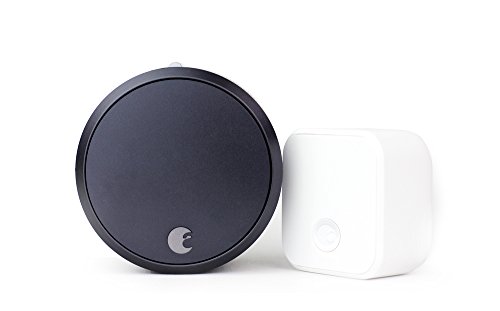
August Smart Lock Pro + Connect Hub
Best for: keeping existing keys with Google Assistant integration
- Smart Home Compatibility
- Alexa, Google Assistant (what this guide is about)
- Connectivity
- Wi-Fi
- Application
- Home
- Dimensions
- 3.4 × 2.22 × 3.4 inches
- Weight
- 13.9 ounces
The August Home Smart Lock Pro + Connect Hub installs inside your door while letting you keep your existing deadbolt and keys. It features Wi-Fi connectivity and integrates with Google Assistant alongside Alexa for home setups. You can monitor your door, know who comes and goes, and use auto-lock and auto-unlock settings. This unit measures 3.4 by 3.4 by 2.22 inches, making it a practical option if you want smart controls without replacing your exterior hardware.
Pros
- Maintains your existing deadbolt and physical keys
- Works with Google Assistant and Alexa
- Includes Wi-Fi connectivity via Connect Hub
- Supports Auto-Lock and Auto-Unlock
Cons
- No integrated keypad for PIN entry
- Only available in Dark Gray
Good fit if
- You want to keep your current deadbolt and physical keys.
- You use Google Assistant or Alexa for smart home control.
- You want automatic locking and unlocking features.
Skip if
- You want an exterior keypad for access codes.
- You prefer a smart lock with an integrated fingerprint scanner.
Verdict: August Home Smart Lock Pro + Connect Hub adds Wi-Fi connectivity and Google Assistant support while retaining your original deadbolt hardware.
Specifications side by side
| Spec | ULTRALOQ Bolt Smart Deadbolt with Handle | Sifely Fingerprint Smart Lock with Handle | Philips Built-in Wi-Fi Smart Deadbolt | Philips Wi-Fi Fingerprint Smart Deadbolt | Sifely Keypad Fingerprint Smart Deadbolt | samtechT Bluetooth Smart Lock with Handle | Yale Smart Deadbolt with Matter | Yale Google Nest x Yale Keyless Deadbolt | Level Lock+ WiFi Smart Deadbolt | SwitchBot Lock Vision Pro Smart Deadbolt | TCL Palm Vein Wi-Fi Smart Deadbolt | TCL Palm Vein Wi-Fi Smart Deadbolt | August Smart Lock Pro with Connect Hub | Sifely Keypad Smart Deadbolt | August Smart Lock Pro + Connect Hub |
|---|---|---|---|---|---|---|---|---|---|---|---|---|---|---|---|
| Access Methods | Fingerprint, passcode, app, voice, key | Fingerprint, keypad, app, fob, key | Passcode, key, app, voice | Fingerprint, PIN, app, voice, key | Fingerprint, keypad code, app, fob, key | Fingerprint, keypad, FOB, code, app, key | App, keypad, voice, key | Keypad, app, passcode | Apple Home Key, app, key fob | Face, palm vein, fingerprint, app, PIN | Palm vein, app, passcode, key, fob | Palm vein, passcode, app, NFC card, key | not specified | Keypad, app, key, fob, one-touch lock | not specified |
| Connectivity | not specified | Bluetooth | Built-in Wi-Fi | 2.4 GHz Wi-Fi | not specified | Bluetooth | Matter over Thread | not specified | 2.4 GHz Wi-Fi | WiFi, Bluetooth | not specified | not specified | not specified | not specified | not specified |
| Smart Home Compatibility | Apple Home, Alexa, Google Assistant | Alexa, Google Assistant | Amazon Alexa, Google Assistant | Alexa, Google | Amazon Alexa, Google Assistant | Alexa, Google | Google Home, Google Assistant | not specified | Apple HomeKit, Google Home, Amazon Alexa | Matter, Apple Home, Alexa, Google | Amazon Alexa, Google Assistant | Alexa, Google Assistant | Alexa, Google Assistant | Alexa, Google | Alexa, Google Assistant |
| Installation Type | not specified | not specified | not specified | not specified | not specified | not specified | not specified | Deadbolt replacement | not specified | not specified | not specified | not specified | not specified | not specified | not specified |
| Auto-Lock Delay | not specified | not specified | 10-180 seconds | 10 to 180 seconds | not specified | not specified | not specified | not specified | not specified | not specified | not specified | not specified | not specified | not specified | not specified |
| Fingerprint Capacity | Up to 50 | not specified | not specified | 50 | Up to 100+ | not specified | not specified | not specified | not specified | not specified | not specified | not specified | not specified | not specified | not specified |
| User Code Capacity | Up to 50 | not specified | 100 | 100 | Up to 100+ | not specified | not specified | not specified | not specified | not specified | not specified | not specified | not specified | 150+ | not specified |
| Included Door Hardware | Deadbolt and handle | Handle | not specified | not specified | not specified | Handle | not specified | not specified | not specified | not specified | not specified | Deadbolt | not specified | not specified | not specified |
| Power Source | not specified | not specified | not specified | not specified | not specified | not specified | not specified | not specified | not specified | Battery Powered | Battery Powered | Battery Powered | not specified | not specified | not specified |
| Access Method | Keypad, Fingerprint, Remote Control | Keypad, Fingerprint | Remote Control | Keypad, Fingerprint, Remote Control | Keypad, Fingerprint | Keypad, Fingerprint | not specified | Keypad | Key | Fingerprint | Keypad, App Control | Keypad | not specified | Keypad, Fingerprint, App Control | not specified |
| Water Resistance | not specified | not specified | Waterproof | not specified | not specified | not specified | not specified | not specified | not specified | not specified | not specified | not specified | not specified | not specified | not specified |
| Color | Black | Red | Matte Black | Matte Black | Black | Silver | Matte Black | Satin Nickel | Satin Nickel | Matte Black | D1Pro-Palm Vein | Dark Grey | Silver | Silver | Dark Gray |
| Application | Home, Front Door | Home, Rental Property | Front Door | Front Door | Home, Office, Apartment, Rental Property | Home, Rental Property | not specified | Front Door | Home | Home, Front Door | Front Door | Home, Front Door | Home | Home, Rental Property | Home |
| Included Hardware | Handle | Handle | not specified | not specified | not specified | Handle | not specified | not specified | not specified | not specified | not specified | not specified | not specified | not specified | not specified |
| Special Features | Auto Lock | not specified | Auto Lock | Auto Lock | Auto Lock | Auto Lock | not specified | not specified | not specified | Auto Lock | not specified | not specified | not specified | Auto Lock | not specified |
| Dimensions | 2.95 × 1 × 2.95 inches | 7 × 3 × 1.12 inches | 6 × 2 × 1.5 inches | 6.52 × 3.94 × 3.29 inches | 6.3 × 2.6 × 1.9 inches | 7 × 3 × 1.12 inches | 0.88 × 2.56 × 5.38 inches | 4.5 × 2.59 × 0.8 inches | 4.5 × 2.75 × 2.75 inches | 7 × 3 × 1.2 inches | 5 × 3 × 1 inches | 6 × 5 × 5 inches | 3.4 × 2.22 × 3.4 inches | 6.3 × 2.6 × 1.9 inches | 3.4 × 2.22 × 3.4 inches |
| Weight | 2.87 pounds | 6 pounds | 1.4 pounds | not specified | not specified | 1 pounds | 3 pounds | 4 pounds | not specified | 1.21 pounds | 2.05 pounds | 2.05 pounds | 13.9 ounces | 2 pounds | 13.9 ounces |
| Size | Deadbolt+Handle | Knob | not specified | not specified | not specified | Smart Lock | 5.38 x 2.56 inch (Pack of 1) | 7.03 x 2.78 Inch | Lock+ WiFi | not specified | not specified | D2 Pro | 100 | not specified | not specified |
| Model | ULTRALOQ BOLT | Sifely S | DDL242X-15HW | DDL-241-BK | Sifely Model O Deadbolt | samtechT S | YRD510-MT1-BLK | RB-YRD540-WV-619 | C-F12U-S1 | W9022000 | D1 Pro | D2 Pro | ASL-03, AC-R1 | Model Ot Deadbolt | AUG-SL03-C02-G03 |
How to Choose a Google Assistant Deadbolt
-
Choose Your Hardware Configuration
Check your current door setup before choosing a lock. Some options replace only the deadbolt mechanism, leaving your lower handle or latch set untouched. Other models include matching handles in the box to update all exterior hardware at once. If you select the ULTRALOQ Bolt Smart Deadbolt with Handle, you receive both the locking deadbolt and the exterior lever together. This complete set matches your exterior styling across the door. Standalone deadbolts work best if you want to keep your lower entry hardware.
-
Select Preferred Entry Methods
Review the access methods supported by the deadbolt exterior. Basic models rely on keypads for numeric PIN codes. More advanced units feature biometrics such as fingerprint readers or sub-dermal sensors. The TCL Palm Vein Wi-Fi Smart Deadbolt reads internal vein patterns to grant entry quickly. If you often carry groceries, touchless biometrics eliminate numeric typing. If you share access with guests, choose a model that pairs biometrics with a physical keypad for passcodes.
-
Evaluate Matter Integration
Check whether the smart deadbolt supports Matter connectivity. Standard Wi-Fi locks link to Google Assistant through cloud accounts. Matter-enabled models communicate directly with your local smart home hub over local networks. The Yale Smart Deadbolt with Matter uses this standard to handle voice commands and lock actions. Local communication reduces cloud reliance and maintains connection speed. If you run a Matter-ready hub, choosing this spec simplifies Google Assistant pairing.
-
Check Lock Replacement Style
Determine whether you want to replace your entire deadbolt or only the interior thumbturn. Full replacement locks swap your exterior key cylinder, requiring new physical keys or eliminating keyholes. In contrast, retrofit models mount directly inside the door. The August Smart Lock Pro with Connect Hub secures to existing hardware without altering exterior components. This lets you keep your original physical keys. Retrofit locks suit renters who cannot alter exterior door hardware.
-
Look for Auto-Locking Features
Look at the listed special features to see if the lock provides automated locking. Locks equipped with auto-locking secure the deadbolt behind you after a set duration or once the door closes. The SwitchBot Lock Vision Pro Smart Deadbolt includes an auto-lock function that secures your entryway automatically. This feature saves you from checking Google Assistant repeatedly to verify your security. Prioritize auto-locking models if you routinely leave without throwing the bolt.
-
Verify Exterior Weather Protection
Check the environmental specifications if you install the deadbolt on an exposed exterior door. Outdoor locks face direct contact with rain, moisture, and changing weather conditions. The Philips Built-in Wi-Fi Smart Deadbolt specifies waterproof construction to protect internal keypad circuits from moisture. Deadbolts designed for interior offices or sheltered entries lack this dedicated rating. If your front door lacks an overhang, choose a model with verified water resistance specifications.
Frequently asked questions
Can I unlock a Google Assistant deadbolt using voice commands?
Yes, but Google Assistant typically requires a voice PIN to unlock doors for security, while locking works without one. With locks like the Philips Wi-Fi Fingerprint Smart Deadbolt or Google Nest x Yale Keyless Deadbolt, voice integration allows hands-free locking and status checks. Always configure your voice match settings in the Google Home app before relying on voice commands at home.
Do all smart deadbolts work with Google Assistant right out of the box?
No, some models require additional hardware to talk to Google Assistant. Locks like the Sifely Fingerprint Smart Lock with Handle require an optional external gateway to enable smart home connectivity. Conversely, options like the Philips Built-in Wi-Fi Smart Deadbolt and Yale Smart Deadbolt with Matter connect to your assistant using integrated Wi-Fi or compatible Matter network hubs without extra vendor-specific bridges.
What happens if a smart deadbolt loses its Wi-Fi connection?
You can still unlock the door using physical access methods. Deadbolts such as the SwitchBot Lock Vision Pro Smart Deadbolt provide local access methods like biometric fingerprint scanning, while models like the Level Lock+ WiFi Smart Deadbolt retain physical key access. The ULTRALOQ Bolt Smart Deadbolt with Handle offers keypad and fingerprint options, ensuring you remain unlocked even during network drops.
How does Matter support benefit a Google Assistant deadbolt?
Matter support allows your deadbolt to connect across standard smart home ecosystems without proprietary brand bridges. Devices like the Yale Smart Deadbolt with Matter use Matter connectivity to communicate directly with Google Assistant and compatible Thread border routers. This standardized protocol simplifies setup across your smart home devices while maintaining local network communication speeds for locks and security devices on your front door.
Can I install a smart deadbolt without replacing my existing door keys?
Yes, retrofit smart locks let you keep your original keys and exterior hardware. The August Smart Lock Pro with Connect Hub replaces only the interior thumbturn on standard residential doors, leaving your exterior keyway and mechanical cylinder intact. You gain Google Assistant voice control and Wi-Fi features without needing to rekey your home or distribute new physical keys to household members.
Which entry methods are available on Google Assistant deadbolts besides voice?
Models offer access methods including physical keys, digital touchscreens, and biometric sensors. For example, the TCL Palm Vein Wi-Fi Smart Deadbolt incorporates palm vein scanning and keypad entry, whereas the Google Nest x Yale Keyless Deadbolt relies entirely on a digital keypad. Hardware like the ULTRALOQ Bolt provides fingerprint, keypad, and remote control access alongside standard Google Assistant controls.
Do Google Assistant smart deadbolts lock automatically behind you?
Many models feature an auto-lock function that secures the latch after a specified period. The Philips Built-in Wi-Fi Smart Deadbolt, samtechT Bluetooth Smart Lock with Handle, and ULTRALOQ Bolt Smart Deadbolt with Handle all list auto lock as a built-in feature. You can rely on the deadbolt to throw the bolt automatically, minimizing the need to issue a manual Google Assistant lock command.