6 Best Alternatives to the Aqara U100 Keyed Fingerprint Deadbolt (2026)
As an Amazon Associate we earn from qualifying purchases. Links on this page are affiliate links.
The Aqara U100 Keyed Fingerprint Deadbolt integrates well with Apple Home and offers local fingerprint storage. If you are looking for aqara smart lock u100 alternatives, you may need different connectivity or form factors. This lock requires a Zigbee hub for full automation and remote app control. It also lacks built-in Wi-Fi, which some users prefer for direct internet access without extra hardware.
The 6 alternatives on this list were chosen because their specs overlap with the original. You might want a model with built-in Wi-Fi for easier remote management. Some options include a handle, while others are deadbolts only. Others support Matter or offer hands-free UWB entry. Each product here shares core features like fingerprint recognition or keypad access. You can compare dimensions, battery types, and smart home compatibility to find the right fit for your door and ecosystem.
How each alternative compares
LOCKSTAR Smart Deadbolt with App Control
The LOCKSTAR Smart Deadbolt replaces the U100’s Zigbee hub requirement with direct keypad and card access. It supports four unlock methods, including fingerprint and key card, without needing a separate hub for basic operation. However, it lacks Apple Home Key support and advanced smart home automations found in the U100. This lock is heavier and taller, fitting a traditional aesthetic rather than the U100’s modern profile. You should choose this if you prioritize simple, hub-free access methods over deep ecosystem integration. It is ideal for renters who need app notifications but do not use Apple Home or require voice assistant compatibility.
LINGDU HK01 Apple Home Key Deadbolt
The LINGDU HK01 offers Apple Home Key tap-to-unlock similar to the U100 but omits the need for a dedicated Zigbee hub for core functionality. It supports fingerprint and keypad entry alongside Home Key access. The design is more compact, with a smaller width and height, making it suitable for doors with limited space. It lacks the U100’s extensive third-party smart home compatibility with Google Home and Alexa. You should pick this if you want local privacy and Apple integration without managing a hub. It is best for users already invested in the HomeKit ecosystem who prefer a minimalist setup over broad automation features.
Aqara U400 UWB Smart Deadbolt
The Aqara U400 UWB Smart Deadbolt upgrades proximity unlocking with UWB technology for hands-free entry, surpassing the U100’s tap-to-unlock method. It retains fingerprint and key access while offering a larger, silver-finished body. This model is designed for Apple users seeking advanced convenience and robust integration within the Aqara ecosystem. It lacks the U100’s specific mention of Do Not Disturb mode and gyroscope-based auto-locking in the provided data. You should choose this if you value hands-free access and are willing to invest in a premium model. It is ideal for those who want the latest in proximity technology without sacrificing biometric security.
ULTRALOQ Bolt Smart Deadbolt with Handle
The ULTRALOQ Bolt Smart Deadbolt provides built-in Wi-Fi and Matter support, eliminating the need for a separate hub required by the U100. It includes a handle, offering a complete entry solution rather than just a deadbolt. The lock supports remote access and high fingerprint capacity, making it suitable for managing multiple users. It lacks Apple Home Key support, limiting its integration with Apple devices compared to the U100. You should pick this if you need direct Wi-Fi connectivity and Matter compatibility for broader smart home control. It is ideal for users who want remote management without relying on a Zigbee hub for basic functionality.
Yale Assure Lock 2 Touch Key-Free Deadbolt
The Yale Assure Lock 2 Touch focuses on Bluetooth auto-unlock and unlimited code sharing, differing from the U100’s Zigbee hub dependency. It offers fingerprint and keypad access with a Satin Nickel finish. The lock is designed for local automatic entry, prioritizing convenience over cloud connectivity. It lacks the U100’s Apple Home Key support and extensive third-party smart home compatibility. You should choose this if you prefer Bluetooth-based convenience and do not need remote monitoring. It is ideal for homes where local automatic entry is preferred over cloud connectivity, offering a reliable alternative for users who value simplicity and direct access methods.
Sifely S Model WiFi Smart Lock
The Sifely S Model WiFi Smart Lock offers direct Wi-Fi control, removing the need for a Zigbee hub required by the U100. It supports fingerprint, keypad, and key card access, making it versatile for rental properties. The lock includes a handle and auto-lock features, providing a complete entry solution. It lacks Apple Home Key support, limiting its integration with Apple devices. You should pick this if you manage rental properties and need remote code sharing without a hub. It is ideal for hosts who require direct Wi-Fi control and broad compatibility with Alexa and Google Assistant, rather than deep Apple ecosystem integration.
Quick picks
Our 7 picks
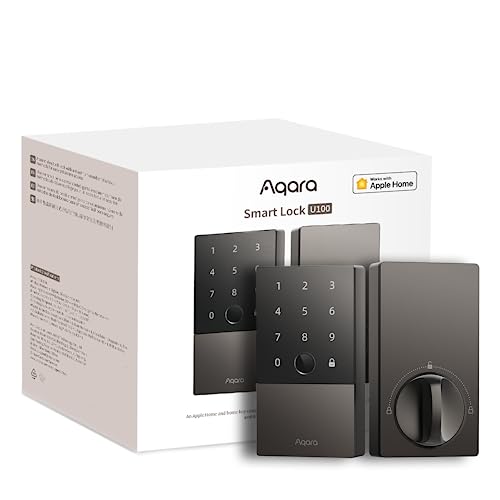
Aqara U100 Keyed Fingerprint Deadbolt
Best for: Apple Home Key users needing hub-based automation
- Access Methods
- Apple Home Key, fingerprint, app, key
- Connectivity
- Thread, Zigbee 3.0
- Smart Home Compatibility
- Apple Home, Alexa, Google, IFTTT
- Fingerprint Capacity
- 50
- Included Door Hardware
- Deadbolt
- Color
- Gray
View on Amazon: Aqara U100 Keyed Fingerprint Deadbolt Affiliate link
The Aqara U100 is a zinc alloy deadbolt designed for Apple Home Key integration. It supports up to 50 fingerprints and remote password management via the Aqara Home app. The lock uses Zigbee 3.0 connectivity and includes a gyroscope for automatic locking. It operates on four AA batteries with a USB-C emergency port. This model suits users seeking biometric access and robust smart home automation.
Pros
- Apple Home Key support for iPhone and Apple Watch unlocking
- High-precision fingerprint reader stores up to 50 users
- Zigbee 3.0 connectivity enables third-party smart home integrations
- Built-in gyroscope provides automatic locking after door closure
Cons
- Requires an Aqara Zigbee 3.0 hub for remote app control
- NFC cards are sold separately and not included
- No built-in Wi-Fi for direct internet connection
Good fit if
- You use Apple Home Key for keyless entry
- You want to integrate the lock with Google Home or Alexa
- You prefer automatic locking via a built-in gyroscope
Skip if
- You need a lock without a separate hub for remote access
- You require built-in Wi-Fi connectivity
- You want NFC cards included in the box
Verdict: Aqara U100 Apple Home Key Fingerprint Lock is ideal for Apple ecosystem users who need reliable biometric access and smart home automation. It fits homes where a Zigbee hub is already present for centralized control.

LOCKSTAR Smart Deadbolt with App Control
Best for: renters needing app notifications
- Installation Type
- Deadbolt
- Connectivity
- Wi-Fi
- Access Method
- Fingerprint
- Color
- Black
- Material
- Wood
- Dimensions
- 1.18 × 2.64 × 6.46 inches
View on Amazon: LOCKSTAR Smart Deadbolt with App Control Affiliate link
The LOCKSTAR LS-SDL is a traditional black deadbolt offering multiple entry methods. It supports keypad codes, fingerprint scans, key cards, and physical keys. The included app provides event history and real-time notifications. It also features auto-locking capabilities. This lock is designed for home use and includes a WiFi gateway for remote access. It suits users who need versatile access options without relying on smart home ecosystems.
Pros
- Supports keypad, fingerprint, card, and key entry
- Includes WiFi gateway for app control
- Auto-lock function with manual override
Cons
- No Apple Home Key or Matter support
- No fingerprint capacity limit listed
- Requires separate WiFi gateway for remote features
Good fit if
- You want multiple entry methods beyond just keys
- You need app notifications for access events
- You prefer a traditional lock style
Skip if
- You require Apple Home Key compatibility
- You want built-in WiFi without a gateway
- You need Matter protocol support
Verdict: LOCKSTAR LS-SDL Traditional Deadbolt fits renters or homeowners who value multiple access methods and app notifications over smart home integration.

LINGDU HK01 Apple Home Key Deadbolt
Best for: Apple HomeKit users wanting tap-to-unlock
- Access Methods
- Apple HomeKey, fingerprint, app, code
- Connectivity
- Bluetooth
- Smart Home Compatibility
- Apple HomeKit
- Application
- Front Door
- Special Features
- Auto Lock
- Dimensions
- 5 × 3 × 1 inches
View on Amazon: LINGDU HK01 Apple Home Key Deadbolt Affiliate link
This LINGDU deadbolt integrates Apple Home Key for tap-to-unlock access with iPhone or Apple Watch. It supports fingerprint, keypad, and NFC entry. The lock uses Apple HomeKit for local processing via a HomePod or Apple TV. It runs on 8 AA batteries for up to 200 days. It includes a USB-C emergency port and physical keys. This model suits Apple ecosystem users seeking a budget-friendly, app-free smart lock.
Pros
- Apple Home Key tap-to-unlock for iPhone and Apple Watch
- Local processing via Apple HomeKit without dedicated Wi-Fi
- Supports fingerprint, keypad, and NFC entry methods
- Up to 200 days battery life on 8 AA batteries
- Includes USB-C emergency power port and physical keys
Cons
- Requires Apple HomeKit hub for remote access
- No built-in Wi-Fi for standalone connectivity
- Battery pack not included
Good fit if
- You use Apple devices and want seamless Home Key integration
- You prefer local data processing over cloud apps
- You need a reliable backup with physical keys
Skip if
- You use Android or non-Apple smart home systems
- You want remote access without a HomeKit hub
- You prefer a lock with built-in Wi-Fi
Verdict: LINGDU HK01 Apple Home Key Deadbolt fits Apple users who want tap-to-unlock convenience and local privacy without a dedicated app. It is ideal for those already invested in the HomeKit ecosystem.

Aqara U400 UWB Smart Deadbolt
Best for: Apple users wanting hands-free UWB entry
- Access Methods
- Fingerprint, keypad, app, key, NFC, UWB
- Connectivity
- Matter over Thread, UWB
- Smart Home Compatibility
- HomeKit, Alexa, Google, Home Assistant
- Included Door Hardware
- Deadbolt
- Power Source
- Battery Powered
- Color
- Silver
View on Amazon: Aqara U400 UWB Smart Deadbolt Affiliate link
The Aqara U400 is a silver fingerprint deadbolt featuring Ultra-Wideband technology for hands-free entry. It supports Apple Home Key and connects via Matter over Thread for stable smart home integration. The lock offers multiple access methods, including a physical key and touchscreen passcode. It includes a rechargeable battery lasting up to six months and holds an IP65 rating for outdoor durability. This model suits users seeking advanced proximity unlocking within the Apple ecosystem.
Pros
- UWB technology enables true hands-free unlocking as you approach
- Matter over Thread connectivity ensures stable and fast response
- Rechargeable lithium battery lasts up to 6 months per charge
- IP65-rated exterior protects against dust and water
- Supports Apple Home Key and multiple access methods
Cons
- UWB hands-free feature requires specific Apple Watch and iPhone models
- NFC cards are sold separately
- Requires a Thread-enabled Matter controller for full smart home integration
Good fit if
- You want hands-free entry using UWB technology
- You use Apple Home and Matter-compatible devices
- You need a lock with IP65 weather resistance
Skip if
- You do not own a compatible Apple Watch or iPhone
- You prefer a lock with included NFC cards
- You need compatibility with non-Thread smart home hubs
Verdict: Aqara U400 UWB Smart Lock delivers advanced proximity unlocking for Apple users. It fits those who value hands-free convenience and robust smart home integration.

ULTRALOQ Bolt Smart Deadbolt with Handle
Best for: Remote access with high fingerprint capacity
- Access Methods
- Fingerprint, keypad, app, keys, voice
- Smart Home Compatibility
- Apple Home, Alexa, Google Assistant
- Fingerprint Capacity
- 50
- User Code Capacity
- 50
- Included Door Hardware
- Deadbolt with handle
- Connectivity
- Wi-Fi, Matter
View on Amazon: ULTRALOQ Bolt Smart Deadbolt with Handle Affiliate link
The ULTRALOQ Bolt SE combines a deadbolt and handle with built-in Wi-Fi and Matter over Thread support. It stores up to 50 fingerprints and 50 passcodes, allowing remote control via app or voice assistants like Siri, Alexa, and Google Assistant. The zinc alloy build includes auto-lock and lockout modes. It suits users seeking robust access management without a separate hub for basic connectivity.
Pros
- Built-in 2.4GHz Wi-Fi requires no hub for remote app control.
- Matter over Thread integration enables automation with compatible hubs.
- Stores up to 50 fingerprints and 50 user passcodes.
- Solid zinc alloy construction with weather-resistant design.
- Includes both deadbolt and handle in one package.
Cons
- Door sensor is not included for automatic status monitoring.
- Wi-Fi connection limited to 2.4GHz networks only.
- Matter features require a separate Thread border router or hub.
Good fit if
- You want remote access without buying a separate Wi-Fi hub.
- You need to manage up to 50 unique fingerprints or codes.
- You prefer a single unit that includes both the lock and handle.
Skip if
- You require a door sensor for automatic locking alerts.
- You only have 5GHz Wi-Fi networks available.
- You want to use Matter features without a Thread hub.
Verdict: The ULTRALOQ Bolt SE Deadbolt with Handle offers reliable remote management through built-in Wi-Fi and Matter support. It fits users who need high capacity for fingerprints and codes without extra hardware.

Yale Assure Lock 2 Touch Key-Free Deadbolt
Best for: Bluetooth auto-unlock and unlimited code sharing
- Access Methods
- Fingerprint, keypad, app
- Connectivity
- Bluetooth
- Installation Type
- Full deadbolt replacement
- User Code Capacity
- Unlimited
- Color
- Satin Nickel
- Dimensions
- 0.9 × 2.5 × 3.75 inches
View on Amazon: Yale Assure Lock 2 Touch Key-Free Deadbolt Affiliate link
The Yale Assure Lock 2 Touch offers key-free entry via fingerprint, keypad, or app. It unlocks automatically via Bluetooth as you approach. The lock replaces your existing deadbolt using a screwdriver. It supports unlimited user codes for family and guests. This model features a Satin Nickel finish and compact dimensions. It suits those wanting hands-free access without Wi-Fi hardware.
Pros
- Fingerprint recognition with 99% accuracy and under 0.5 second speed
- Auto-unlocks via Bluetooth when you approach the door
- Supports unlimited user codes shared through the app
- Replaces standard deadbolts using only a screwdriver
Cons
- Bluetooth-only connectivity requires a hub for remote Wi-Fi access
- No built-in video camera for visitor identification
- Does not support Apple Home Key like other list options
Good fit if
- You want automatic unlocking without touching the handle
- You need to share unlimited codes with guests
- You prefer a simple screwdriver installation
Skip if
- You require remote access without a separate bridge
- You need integrated video doorbell functionality
- You want Apple Home Key proximity unlocking
Verdict: Yale Assure Lock 2 Touch Bluetooth provides reliable fingerprint and Bluetooth access for users who prioritize convenience over remote monitoring. It is ideal for homes where local automatic entry is preferred over cloud connectivity.

Sifely S Model WiFi Smart Lock
Best for: rental property managers needing remote access
- Access Methods
- Fingerprint, PIN, app, fob, key, voice
- Connectivity
- Built-in Wi-Fi
- Smart Home Compatibility
- Amazon Alexa, Google Assistant
- Fingerprint Capacity
- 100
- User Code Capacity
- 200
- Included Door Hardware
- Reversible lever handle
View on Amazon: Sifely S Model WiFi Smart Lock Affiliate link
The Sifely S Model WiFi offers built-in Wi-Fi for direct app control without a separate hub. It supports six entry methods, including fingerprint, keypad, and voice commands via Alexa or Google Assistant. The unit stores up to 100 fingerprints and 200 codes. Its zinc alloy handle and deadbolt fit standard US doors. This lock is designed for rental properties and homes needing remote access management.
Pros
- Built-in Wi-Fi enables remote access without a gateway
- Stores 100 fingerprints and 200 access codes
- Compatible with Alexa and Google Assistant
- Type-C emergency power port prevents lockouts
Cons
- No mention of Apple Home Key or HomeKit support
- No Bluetooth connectivity listed for local control
- Only supports Alexa and Google, excluding other ecosystems
Good fit if
- You manage rental properties and need remote code sharing
- You want direct Wi-Fi control without extra hardware
- You need multiple entry options like fingerprint and keypad
Skip if
- You require Apple Home Key or HomeKit integration
- You prefer locks with Bluetooth for local control
- You need compatibility with proprietary smart home hubs
Verdict: The Sifely S Model WiFi Silver Lock fits hosts managing rentals who need remote code sharing and direct Wi-Fi control. It lacks Apple Home Key, making it unsuitable for Apple-centric ecosystems.
Specifications side by side
| Spec | Aqara U100 Keyed Fingerprint Deadbolt | LOCKSTAR Smart Deadbolt with App Control | LINGDU HK01 Apple Home Key Deadbolt | Aqara U400 UWB Smart Deadbolt | ULTRALOQ Bolt Smart Deadbolt with Handle | Yale Assure Lock 2 Touch Key-Free Deadbolt | Sifely S Model WiFi Smart Lock |
|---|---|---|---|---|---|---|---|
| Access Methods | Apple Home Key, fingerprint, app, key | not stated | Apple HomeKey, fingerprint, app, code | Fingerprint, keypad, app, key, NFC, UWB | Fingerprint, keypad, app, keys, voice | Fingerprint, keypad, app | Fingerprint, PIN, app, fob, key, voice |
| Connectivity | Thread, Zigbee 3.0 | not stated | Bluetooth | Matter over Thread, UWB | not stated | Bluetooth | Built-in Wi-Fi |
| Smart Home Compatibility | Apple Home, Alexa, Google, IFTTT | not stated | Apple HomeKit | HomeKit, Alexa, Google, Home Assistant | Apple Home, Alexa, Google Assistant | not stated | Amazon Alexa, Google Assistant |
| Installation Type | not stated | Deadbolt | not stated | not stated | not stated | Full deadbolt replacement | not stated |
| Fingerprint Capacity | 50 | not stated | not stated | not stated | 50 | not stated | 100 |
| User Code Capacity | not stated | not stated | not stated | not stated | 50 | Unlimited | 200 |
| Included Door Hardware | Deadbolt | not stated | not stated | Deadbolt | Deadbolt with handle | not stated | Reversible lever handle |
| Power Source | not stated | not stated | not stated | Battery Powered | not stated | not stated | not stated |
| Access Method | Keypad, Fingerprint, Touchscreen, Key | Fingerprint | Fingerprint | Fingerprint, Key | not stated | Keypad, Fingerprint, Key | Keypad, Fingerprint, Key, App Control |
| Color | Gray | Black | Obsidian | Silver | Black | Satin Nickel | Silver |
| Application | Home | not stated | Front Door | Home | Home, Front Door | not stated | Home, Front Door, Bedroom, Rental Property |
| Included Hardware | not stated | not stated | not stated | not stated | Handle | not stated | Handle |
| Material | not stated | Wood | not stated | not stated | not stated | not stated | not stated |
| Special Features | not stated | not stated | Auto Lock | not stated | Auto Lock | not stated | Auto Lock |
| Dimensions | 5.27 × 3.46 × 2.91 inches | 1.18 × 2.64 × 6.46 inches | 5 × 3 × 1 inches | 3 × 4.2 × 7 inches | 2.95 × 1 × 2.95 inches | 0.9 × 2.5 × 3.75 inches | 7 × 3 × 1.12 inches |
| Weight | 2.59 pounds | 1 pounds | 3 pounds | not stated | 2.87 pounds | not stated | 2 pounds |
| Model | SDL-D01 | LS-SDL | HK01 | DL-D16E | BOLT SE | YRD430-F-BLE-619 | Sifely S WiFi |
| Size | not stated | not stated | not stated | not stated | Deadbolt+Handle | Bluetooth | Deadbolt, Knob, Handle, Keypad |
If you want to automate your lighting next, you can compare aqara smart light switch alternatives for your home.
Frequently asked questions
Can I use Apple Home Key on these alternatives?
Yes, if you choose the Aqara U100, LINGDU HK01, or Aqara U400. The U100 and LINGDU HK01 support Apple Home Key for tap-to-unlock convenience. The Aqara U400 goes further with UWB technology for hands-free entry. Other models like the LOCKSTAR and Yale locks do not support this specific feature.
Which smart lock does not require a separate hub?
Several options work without an extra hub. The ULTRALOQ Bolt SE has built-in Wi-Fi and Matter support. The Yale Assure Lock 2 uses Bluetooth for local connectivity. The Sifely S Model connects directly via Wi-Fi. The LOCKSTAR lock offers app notifications without a hub requirement for basic operation.
Do any alternatives include a door handle?
Yes, the ULTRALOQ Bolt SE and Sifely S Model come with handles included. The ULTRALOQ model provides a complete deadbolt and handle set. The Sifely lock also includes the handle hardware. Most other listed locks, such as the Yale and Aqara U100, are standalone deadbolts without attached handles.
Which lock is best for rental property management?
The Sifely S Model is designed for rental properties. It offers direct Wi-Fi control and remote code sharing for hosts. It supports Alexa and Google Assistant. The Yale Assure Lock 2 is another option due to its unlimited code sharing capability, though it relies on Bluetooth rather than direct Wi-Fi.
How many access methods do these locks support?
Most locks support multiple methods. The LOCKSTAR Smart Deadbolt supports four methods: keypad, fingerprint, key, and key card. The LINGDU HK01 and Yale Assure Lock 2 support three methods each. The Aqara U100 and U400 rely on fingerprint and physical keys only.
Are there options with Matter support?
The ULTRALOQ Bolt SE Deadbolt with Handle includes Matter support. This allows it to work with various smart home ecosystems. The Aqara U100 uses Zigbee, which requires a hub. Other models like the Sifely and Yale rely on Wi-Fi or Bluetooth for their respective smart home integrations.
Which lock offers hands-free entry?
The Aqara U400 UWB Smart Deadbolt offers hands-free entry. It uses Ultra-Wideband technology to detect your proximity. This is ideal for Apple users who want to unlock the door without using their phone or fingerprints. Other locks require manual interaction with a keypad, fingerprint, or app.
Do these locks work with Alexa or Google?
Yes, several models support these assistants. The ULTRALOQ Bolt SE and Sifely S Model both work with Alexa and Google Assistant. The Aqara U100 works via a Zigbee hub, which can integrate with these platforms. The LINGDU HK01 is optimized for Apple HomeKit and does not list compatibility with Alexa or Google.